
MOUNT PRO 4 Monitor Mount
4.5Editor score
Supports up to 17.6 lbs per arm
Fully adjustable tilt and swivel
Easy C-clamp installation
Finding the right multi-monitor setup starts with a sturdy and flexible mount. A good 4 monitor mount with adjustable arms elevates your screens to eye level, freeing up desk space and reducing strain during long work hours.
We compared ten leading quad mounts based on arm strength, range of motion, and ease of installation. Each product was evaluated for stability, cable management, and compatibility with various screen sizes and desk types.
Each pick highlights unique strengths like pneumatic lifting or heavy-duty steel frames. Note that prices change frequently, so check the current listings before making your final decision for your office or home setup.
4.5Editor score

4.5Editor score

4.5Editor score
As an Amazon Associate we earn from qualifying purchases.
The following comparison table provides a side-by-side overview of the top ten quad monitor mounts. Use this to quickly identify which model best fits your screen sizes and desk constraints.



The WALI Stacked 4 Monitor Mount stands out as the top choice for most users seeking a reliable and affordable quad setup. With a 4.5 star rating, it consistently delivers stability and ease of use across various desk configurations.
We may earn a commission when you buy through this link, at no additional cost to you.
Its sturdy steel frame ensures that your screens remain level even after repeated adjustments. The integrated cable management keeps wires hidden, which helps maintain a clean and professional workspace appearance.
While it lacks some advanced features like pneumatic lifting, the mechanical adjustability is sufficient for standard monitors. The tilt and swivel range allows you to reduce glare and find a comfortable viewing angle quickly.
This mount is best suited for office workers and gamers who need a straightforward solution without overspending. We recommend it for anyone prioritizing durability and cost-effectiveness in their multi-monitor setup.
Hidden wires reduce clutter and prevent accidental disconnections during desk movement.
Full tilt and swivel help align screens with your eye level to reduce neck strain.
We may earn a commission when you buy through this link, at no additional cost to you.
This VIVO mount is engineered specifically for users with ultrawide screens up to 49 inches. The pneumatic arms allow you to adjust height effortlessly without struggling with heavy screens or complex screws.
We may earn a commission when you buy through this link, at no additional cost to you.
Its heavy-duty cast aluminum construction provides the necessary strength to hold larger monitors without sagging. The tilt joints are designed to maintain position even under significant weight loads over time.
The higher price is justified by the superior materials and specialized design for ultrawide panels. However, you must ensure your desk is thick enough to support the heavy-duty clamp securely.
Buyers should choose this model if they own wide screens and value smooth, tool-free adjustments. It is an excellent investment for professionals who rely on large displays for productivity.
Gas springs counterbalance monitor weight for smooth movement with a light touch.
Designed to fit 49 inch screens which standard mounts cannot support.
We may earn a commission when you buy through this link, at no additional cost to you.
The PUTORSEN Quad Monitor Mount is ideal for mixed setups featuring one large ultrawide and standard screens below. Its hybrid design supports a 49 inch monitor on top while holding smaller displays on the lower arms.
We may earn a commission when you buy through this link, at no additional cost to you.
The 3-section arm design distributes weight evenly, preventing sagging even with heavy monitors. This modular approach lets you remove segments to bring screens closer to the wall if needed.
While highly capable, the assembly requires patience due to the variety of parts and connections. Users should also ensure their desk is sturdy enough to support the combined weight of four screens.
This model is perfect for traders or creative professionals who need a large central screen with secondary tools. It offers the flexibility to customize your layout without compromising stability.
Arms can be shortened by removing segments to fit tighter spaces.
Even weight distribution keeps all screens level and prevents wobbling.
We may earn a commission when you buy through this link, at no additional cost to you.
The monTEK Quad Monitor Stand is built for stability and ease of use. It supports screens up to 32 inches with a weight capacity of 22 lbs per arm, making it versatile for various office displays.
We may earn a commission when you buy through this link, at no additional cost to you.
Its advanced joint design ensures screens stay secure and level without sagging. The quick-release VESA plates simplify installation, allowing you to attach monitors quickly without tools.
While the tilt range is standard, it covers most ergonomic needs for general office work. The included cable organizers help keep your desk tidy and protect wires from damage.
Choose this mount if you want a reliable and straightforward setup for standard monitors. It is an excellent choice for users who prioritize build quality and ease of installation.
Quick-release VESA plates reduce setup time significantly.
Heavy-duty materials ensure screens remain steady during typing or movement.
We may earn a commission when you buy through this link, at no additional cost to you.
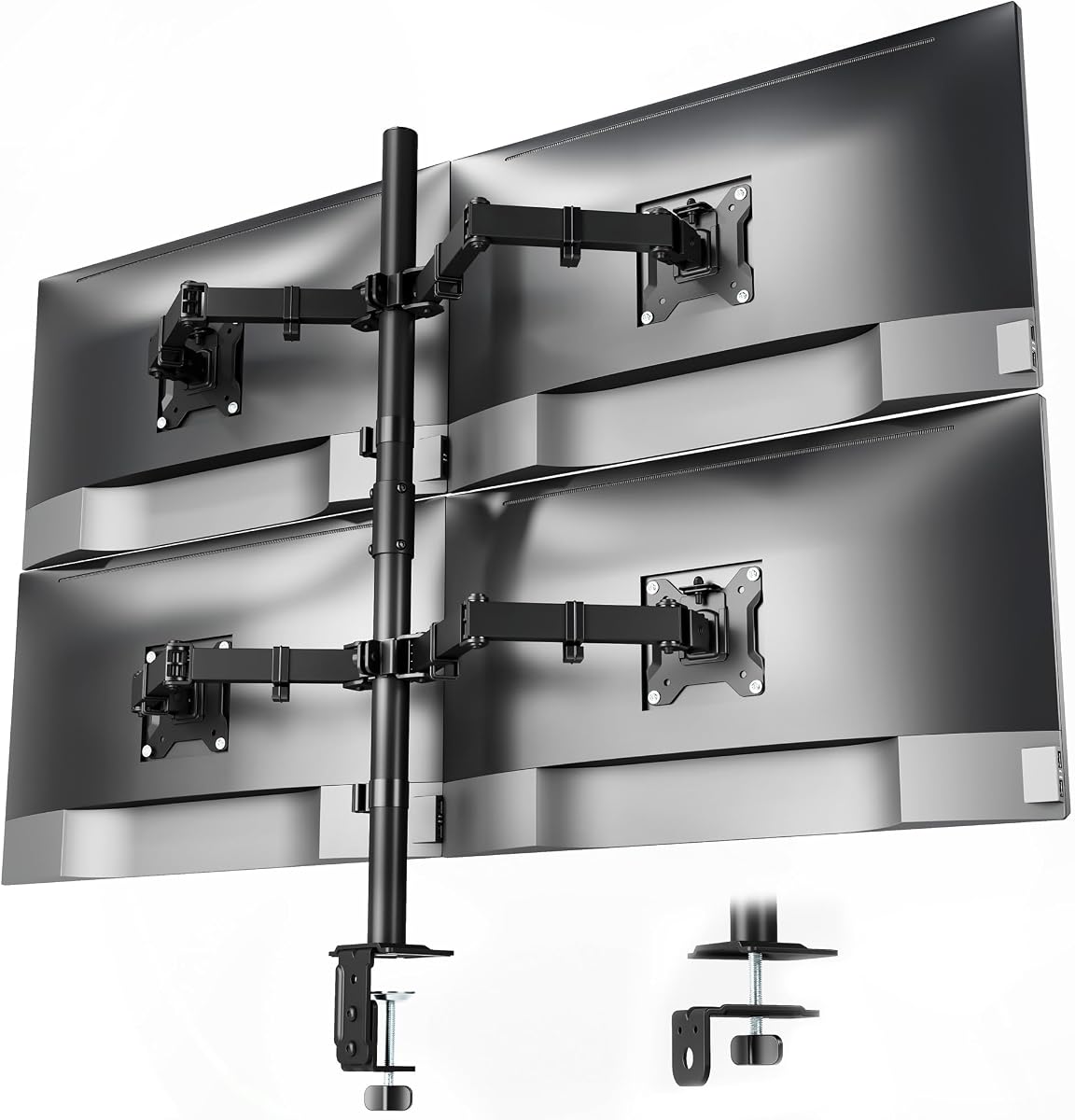
The MOUNT PRO 4 Monitor Mount offers exceptional value for users on a budget. Despite its low price, it provides full adjustability and supports screens up to 32 inches comfortably.
We may earn a commission when you buy through this link, at no additional cost to you.
Its full motion range allows you to tilt and rotate screens to find the perfect angle. The extra tall pole helps you achieve a comfortable viewing height for both sitting and standing.
While it may not handle the heaviest screens, it is ideal for standard office monitors. The cable clips included help keep your workspace neat without adding extra accessories.
We recommend this option for students or home offices looking to upgrade without overspending. It delivers the essential features needed for a clean and organized quad setup.
Get essential quad mounting features at a fraction of the cost.
Extra tall pole supports flexible viewing heights for any user.
We may earn a commission when you buy through this link, at no additional cost to you.
The MOUNTUP Quad Monitor Stand is praised for its ease of assembly and comprehensive user support. It supports screens up to 32 inches and offers a full range of motion for ergonomic positioning.
We may earn a commission when you buy through this link, at no additional cost to you.
Its quick-release VESA plates make mounting monitors simple and fast. The included instructions and hardware ensure you can set up the mount in under 20 minutes.
The 3-year support adds peace of mind for buyers concerned about long-term durability. Cable clips are included to keep your wires tidy and protected.
Choose this model if you want a hassle-free experience with reliable after-sales service. It is well-suited for home offices needing a quick and tidy setup.
3-year warranty ensures long-term reliability for your investment.
Integrated clips keep wires organized and out of sight.
We may earn a commission when you buy through this link, at no additional cost to you.
This VIVO Quad Pneumatic Monitor Mount delivers smooth height adjustments with dual springs. It is designed to support four screens up to 32 inches with reliable stability and easy movement.
We may earn a commission when you buy through this link, at no additional cost to you.
The pneumatic springs counterbalance monitor weight, allowing you to move screens effortlessly. Tension can be adjusted for heavier or lighter monitors to maintain the perfect balance.
Installation is drill-free thanks to the heavy-duty C-clamp, which secures to desks up to 3.25 inches thick. This feature saves time and avoids damage to your workspace surface.
Buyers should choose this model if they want pneumatic convenience at a reasonable price. It is excellent for office setups where screens are frequently adjusted during the day.
C-clamp allows secure mounting without drilling holes in the desk.
Adjustable tension ensures smooth motion regardless of monitor weight.
We may earn a commission when you buy through this link, at no additional cost to you.
The Pholiten Quad Monitor Arm features a clean and modern design that fits well in any office. It supports four screens up to 32 inches with smooth gas spring adjustments for easy positioning.
We may earn a commission when you buy through this link, at no additional cost to you.
Its slim profile minimizes visual clutter while keeping the workspace organized. The gas springs allow for effortless adjustments to height and tilt throughout the day.
Note that weight specs are in kilograms, which may require conversion for some users. The included instructions help clarify any setup confusion regarding compatibility.
This model is ideal for users who value aesthetics alongside functionality. Choose it if you want a professional-looking quad setup that blends into your decor.
Slim design reduces desk clutter and improves visual focus.
Smooth arms make adjustments easy and efficient.
We may earn a commission when you buy through this link, at no additional cost to you.
The WALI Quad Monitor Desk Mount is a proven solution with high customer ratings. It supports a wide range of screens from 13 to 32 inches with solid stability.
We may earn a commission when you buy through this link, at no additional cost to you.
Its two-stage locking system ensures screens stay securely in place once adjusted. The simple design makes it easy to use without complex mechanisms.
The height pole extends up to 31.5 inches, providing comfortable viewing levels. Built-in cable guides help keep wires tidy without extra accessories.
We recommend this for users seeking a no-frills and reliable quad mount. It is an excellent choice for those who want proven performance and simplicity.
Two-stage locking keeps screens securely fixed in position.
Simple guides keep wires organized and accessible.
We may earn a commission when you buy through this link, at no additional cost to you.
The VIVO Quad Monitor Mount offers a unique 3 plus 1 articulating design. This layout allows flexible positioning of a top monitor alongside three lower screens for multitasking.
We may earn a commission when you buy through this link, at no additional cost to you.
Its solid build supports screens up to 32 inches with 22 lbs capacity each. The long upper bracket helps align screens for easy vertical comparison.
While tilt range is limited, the swivel and rotation cover most ergonomic needs. The clamp ensures secure mounting without drilling, suitable for desks up to 3.94 inches thick.
Choose this model if you need specific screen layouts for data analysis or monitoring. It is best for professionals who need distinct top and bottom monitor zones.
3 plus 1 design supports specific multi-screen workflows.
Clamp allows secure mount without permanent desk changes.
We may earn a commission when you buy through this link, at no additional cost to you.
Selecting the right quad monitor mount involves evaluating several key factors to ensure compatibility with your screens and desk setup.
Ensure the mount supports the diagonal size and weight of your monitors. Most models handle screens between 13 and 32 inches, while some ultrawide options support up to 49 inches.
Always check the maximum weight capacity per arm before purchasing to avoid sagging.
Heavier monitors require mounts with stronger arms and better tension control. Models with higher lb capacities ensure stability for larger screens or ultrawides.
Match your monitor weight to the arm rating to maintain perfect balance.
Look for mounts with tilt, swivel, and rotation features to reduce glare and improve ergonomics. Some models offer full 360-degree rotation for portrait orientation.
Wide adjustment ranges help you find the ideal viewing angle for any task.
Verify your desk thickness before choosing between C-clamp or grommet options. C-clamps are non-invasive, while grommets are better for holes in the desktop.
Ensure the clamp range covers your desk thickness to secure the mount properly.
Steel and aluminum builds offer better durability and strength than plastic alternatives. Metal frames reduce vibration and ensure the mount stays level over time.
Prioritize metal construction for long-term stability and reliability.
Pneumatic mounts use gas springs for smooth height adjustments without tools. Mechanical mounts rely on friction and tension screws to hold screens in place.
Choose pneumatic if you adjust height frequently throughout the day.
Integrated cable clips and routing channels keep wires organized and protected from damage. This feature reduces clutter and makes it easier to access ports.
Good cable management saves time and improves the overall look of your setup.
Choose mounts with clear instructions and quick-release VESA plates to simplify setup. Assembly times can range from 20 minutes to over an hour depending on complexity.
Look for models with labeled parts and pre-drilled holes for faster installation.
When setting up your mount, start by attaching the VESA plates to the monitors before mounting them on the arms. This reduces the weight you need to lift during installation.
Adjust the tension of the arms according to the weight of your screens. If the screen droops, tighten the screw; if it lifts too easily, loosen it for proper balance.
Clean the mount and screens regularly with a soft dry cloth to prevent dust buildup. Periodically check all screws and clamps to ensure they remain tight over time.
Most mounts support between 17 and 22 lbs per arm. Heavy-duty models for ultrawides can hold up to 44 lbs. Always match your monitor weight to the specified capacity to ensure stability.
Yes, some models support screens up to 49 inches. Ensure the mount is specifically rated for ultrawide widths and has sufficient arm strength to handle the extra load.
C-clamps are ideal for desks without pre-drilled holes. Grommets are better for desks with a center hole. Check your desk thickness to ensure the clamp fits properly.
Yes, most include VESA plates, screws, clamps, and cable clips. Instructions are also provided to guide you through the assembly process quickly and easily.
Yes, most mounts allow height adjustments. Pneumatic models make this easier with gas springs, while mechanical models require loosening tension screws manually.
Most 4 monitor mounts support standard VESA 75x75mm and 100x100mm patterns. Always check your monitor's manual to confirm its VESA compatibility before buying.
We found the WALI Stacked Mount to be the best overall value, while the VIVO Pneumatic Arm leads for ultrawide setups. Each option offers unique features to suit different needs and budgets.
Prioritize build quality and weight capacity to ensure your screens stay stable and level. Good cable management and easy assembly also contribute to a positive user experience.
Prices and availability change often, so check current listings before buying. Investing in the right mount improves your workspace comfort and productivity immediately.