
Ubiquiti Unifi Security Appliance
4.5Editor score
VLAN support for segmentation
QoS for enterprise VoIP
VPN server for secure communication
This guide compares the best firewall appliances for secure networking, evaluating performance, features, and value to help you choose the right protection.
Securing your network is essential in today's digital landscape. A reliable firewall appliance acts as a critical barrier against unauthorized access and cyber threats. It monitors incoming and outgoing traffic to protect sensitive data and maintain system integrity.
We evaluated ten top-rated firewall appliances based on performance, security features, and ease of use. Our analysis covers diverse models suitable for small businesses, enterprises, and home labs. Each product offers unique capabilities to meet varying security and networking requirements.
Each pick highlights key strengths and potential trade-offs to guide your decision. These appliances range from compact mini PCs to enterprise-grade security gateways. Prices and availability may change, so verify current details before purchasing to ensure you get the best value.
4.5Editor score

4.6Editor score

4.4Editor score
This side-by-side comparison evaluates each appliance's core specifications and capabilities to help you identify the best fit for your specific networking and security needs.


The Protectli Vault FW4B stands out as a versatile choice for users seeking a powerful open-source firewall appliance. It features a compact fanless design with Intel Quad Core processing and ample RAM. Its compatibility with pfSense and other systems makes it highly adaptable for various networking scenarios.
We may earn a commission when you buy through this link, at no additional cost to you.
This appliance excels with its hardware encryption support via AES-NI ensuring efficient traffic handling. Four Gigabit Ethernet ports provide ample connectivity for multiple networks. The silent operation suits quiet environments like offices or home setups perfectly.
Users must install the operating system themselves which may deter less technical individuals. However, this flexibility allows for custom configurations and updates. The lack of pre-installed software means initial setup requires some effort and knowledge.
Ideal for enthusiasts and small businesses needing a reliable customizable firewall. The balance of performance and affordability makes it a top recommendation. It delivers enterprise-level features at a fraction of the cost for advanced users.
AES-NI support accelerates encryption tasks improving throughput without taxing the CPU.
Fanless design ensures quiet operation ideal for noise-sensitive environments.
We may earn a commission when you buy through this link, at no additional cost to you.
FortiGate-60F delivers top-tier security performance with advanced threat intelligence powered by AI. It offers extensive connectivity options with ten Gigabit ports supporting diverse network needs. Its high throughput ensures smooth traffic handling even under heavy loads.
We may earn a commission when you buy through this link, at no additional cost to you.
The appliance features purpose-built security processors enabling industry-leading SSL inspection. SD-WAN capabilities streamline network operations across multiple locations. A user-friendly management console simplifies deployment and ongoing visibility for administrators.
Without a subscription, key security features like threat updates remain inactive. The initial configuration can be complex for those unfamiliar with enterprise networking. However, Zero Touch Integration aids in streamlined deployment processes.
Best suited for medium to large enterprises requiring robust network security. Its performance and advanced features justify the investment for critical infrastructure. It ensures comprehensive protection against both known and unknown threats.
Specialized hardware accelerates security tasks ensuring consistent high-speed protection.
Continuous updates from FortiGuard Labs identify emerging threats in real-time.
We may earn a commission when you buy through this link, at no additional cost to you.
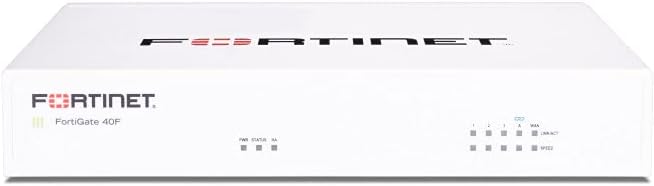
FortiGate-40F is a compact powerhouse designed for small businesses and branch offices. It delivers high-performance security within a fanless desktop form factor. The design minimizes space usage while maintaining robust protection capabilities.
We may earn a commission when you buy through this link, at no additional cost to you.
Equipped with five Gigabit ports it provides essential connectivity flexibility. Integrated threat protection leverages FortiGuard Labs to identify and mitigate advanced threats. The appliance ensures secure traffic even when encrypted.
The limited number of ports may restrict expansion needs for larger setups. Users must purchase separate subscriptions to activate full security services. Despite this, its ease of deployment and management remains a strong advantage.
Ideal for environments where space efficiency and quiet operation are priorities. It balances enterprise-grade security with manageable costs. This makes it a strategic choice for growing businesses needing reliable network defense.
Minimizes footprint and noise ensuring suitability for shared office spaces.
SSL inspection capabilities maintain visibility over encrypted network data flows.
We may earn a commission when you buy through this link, at no additional cost to you.
Ubiquiti Unifi Security Appliance offers an affordable entry point into professional firewall management. It integrates seamlessly with the Unifi Controller for simplified network oversight. The device supports VLANs and QoS making it versatile for diverse setups.
We may earn a commission when you buy through this link, at no additional cost to you.
With three Gigabit ports it covers basic connectivity needs effectively. QoS features prioritize voice traffic ensuring quality for VoIP systems. Its wall or desktop mounting options allow flexible placement in any environment.
Throughput is limited compared to higher-end models restricting use in high-traffic areas. Advanced security features may require additional ecosystem components. For small networks however, it provides excellent value and ease of use.
Best for small offices or home labs already using Unifi products. It simplifies security management without significant complexity. Its integration and cost make it a standout choice for budget-conscious users.
Unified management through a single interface reduces administrative overhead significantly.
Prioritizes voice traffic ensuring clear call quality even during network congestion.
We may earn a commission when you buy through this link, at no additional cost to you.
SonicWall TZ280 delivers impressive performance with 2.5 Gbps firewall inspection speeds. It features a desktop form factor with multiple Ethernet and SFP ports for flexibility. Reassembly-Free Deep Packet Inspection enhances threat detection efficiency.
We may earn a commission when you buy through this link, at no additional cost to you.
SonicOS 8 provides comprehensive security including intrusion prevention and anti-malware. Zero-Trust Network Access ensures secure remote worker connections. Cloud management options simplify oversight for distributed teams and branch offices.
Without a service subscription hardware security features remain inactive. Advanced configuration options may overwhelm casual users. However, the scalability and performance make it suitable for growing business needs.
Ideal for small businesses needing robust security without enterprise complexity. Its high throughput ensures minimal latency during heavy usage. This appliance offers a balanced mix of power and manageability.
Accelerates packet analysis improving throughput without compromising security depth.
Centralized cloud control simplifies network oversight across multiple locations.
We may earn a commission when you buy through this link, at no additional cost to you.
Netgate 1100 pfSense+ comes pre-loaded with pfSense+ software for immediate setup. It offers a compact and silent design ideal for desktop or wall mounting. Users receive lifetime software updates and technical support for added peace of mind.
We may earn a commission when you buy through this link, at no additional cost to you.
Three Gigabit ports provide essential connectivity for standard networks. The dual-core ARM processor delivers near gigabit routing performance efficiently. Open-source compatibility allows extensive customization for unique requirements.
Performance may fall short for high-bandwidth enterprise environments. Limited port count requires additional switches for expanded networks. However, for home labs or small offices it remains highly effective.
Best for users valuing open-source software and community support. Its included support and updates simplify long-term maintenance. This appliance balances cost with professional-grade security features.
Ensures continuous security patches and feature improvements without extra fees.
24/7 assistance helps resolve setup issues and configuration challenges quickly.
We may earn a commission when you buy through this link, at no additional cost to you.
The FORTINET FG-100E specializes in deep application visibility and threat detection. It identifies thousands of applications enabling precise traffic management. The appliance protects against known exploits and malicious websites effectively.
We may earn a commission when you buy through this link, at no additional cost to you.
Its advanced capabilities include detecting unknown attacks to prevent emerging threats. This level of security ensures data integrity and network health. Designed as a dedicated network security appliance it focuses on defense.
Limited public specifications may require direct contact for detailed technical info. Configuration demands expertise to maximize security features. However, its detection capabilities make it valuable for critical infrastructure.
Best for organizations prioritizing advanced threat prevention and visibility. It complements existing security infrastructure with deep analysis. This appliance ensures comprehensive protection against sophisticated cyberattacks.
Granular insights into app traffic allow for precise policy enforcement.
Real-time blocking of harmful sites prevents malware and phishing attacks.
We may earn a commission when you buy through this link, at no additional cost to you.
Palo Alto PAN-PA-220 delivers next-generation security features for modern threats. It provides eight ports supporting expanded network connectivity needs. As part of the Palo Alto ecosystem it integrates with broader security strategies.
We may earn a commission when you buy through this link, at no additional cost to you.
Advanced threat protection leverages Palo Alto's research and intelligence. The appliance ensures robust defense against sophisticated attacks and vulnerabilities. It suits environments requiring deep packet inspection and application control.
Limited user feedback makes performance verification challenging. Initial setup can be complex without prior networking knowledge. Despite this, its reputation for security excellence remains strong.
Best for enterprises valuing next-gen firewall capabilities. It supports scalable security needs across diverse networks. This appliance offers advanced protection for evolving cyber threats.
Advanced inspection and control ensure modern threat mitigation.
Seamless operation with other Palo Alto products enhances overall security posture.
We may earn a commission when you buy through this link, at no additional cost to you.
Protectli Vault FW4C offers a compact solution with four 2.5G ports for faster connectivity. It uses an Intel J3710 Quad Core processor with AES-NI support for efficiency. The silent fanless design suits quiet environments like home offices.
We may earn a commission when you buy through this link, at no additional cost to you.
Compatibility with pfSense and other open-source systems ensures flexibility. Users gain high-speed networking without bulky hardware. The small footprint allows placement in tight spaces.
Four GB of RAM may limit advanced virtualization scenarios compared to higher models. Without a pre-installed OS initial setup requires technical effort. However, this allows full customization for specific needs.
Best for users seeking fast connectivity in a small form factor. It balances speed and silence effectively. This appliance delivers excellent performance for home labs and small business networks.
2.5G ports support faster data transfers and modern network demands.
Fanless design ensures zero noise even during intensive tasks.
We may earn a commission when you buy through this link, at no additional cost to you.
FortiGate-60F Bundle provides hardware plus one year of essential security services. It includes FortiCare Premium support and Unified Threat Protection for immediate defense. The package targets medium-sized businesses needing comprehensive protection.
We may earn a commission when you buy through this link, at no additional cost to you.
Unified Threat Protection secures against advanced threats with filtering and anti-botnet tech. Premium support ensures high-quality assistance and continuity during critical issues. It removes the need for separate service purchases.
The higher initial investment reflects the included services and support. Renewal after one year requires additional purchases. However, this simplifies budgeting and deployment for growing companies.
Best for businesses prioritizing full-service security out of the box. The bundle streamlines setup and maintenance significantly. This package offers reliable protection with professional support included.
Comprehensive filtering ensures protection against diverse online threats.
Direct expert access ensures rapid resolution of security or network issues.
We may earn a commission when you buy through this link, at no additional cost to you.
Selecting the right firewall appliance requires understanding key factors that impact performance and security. This guide outlines essential elements to consider for your specific needs.
Throughput determines how much traffic your appliance can handle without slowing down your network. Look for IPS and threat protection throughput that matches your expected data volume. Higher throughput ensures smoother performance during peak hours or under attack.
Choose an appliance with sufficient processing power and hardware acceleration to sustain your required speeds.
Check the number and type of network ports such as Ethernet and SFP to ensure they meet your topology needs. Multiple ports allow for direct connections to routers switches and servers without extra hardware. This flexibility supports complex network designs.
Prioritize appliances with enough ports to avoid bottlenecks or additional switch requirements.
Evaluate the depth of security features including intrusion prevention deep packet inspection and SSL inspection. Advanced threat intelligence helps block emerging risks proactively. Ensure the appliance supports necessary security protocols for your organization.
Select a model that offers comprehensive protection against both known and unknown threats.
Some appliances allow custom OS installations like pfSense while others come with proprietary firmware. Open-source options provide flexibility for customization and cost savings. Proprietary systems often offer streamlined support and pre-integrated features.
Choose an OS that aligns with your technical expertise and long-term management plans.
Many appliances require annual subscriptions for threat updates and advanced services like web filtering. Factor in these recurring costs when calculating total ownership expenses. A bundle with included services might offer better value than buying hardware alone.
Ensure you understand subscription terms to avoid gaps in security coverage after initial periods.
A user-friendly interface simplifies configuration and ongoing monitoring for IT teams. Cloud management options provide centralized control for remote or distributed sites. Look for features like Zero Touch Integration that reduce deployment time.
Prioritize appliances with intuitive dashboards and support resources to minimize administrative effort.
Consider the form factor whether desktop rack-mountable or compact for space efficiency. Fanless designs ensure quiet operation essential for offices or shared spaces. Verify mounting options and dimensions fit your intended environment.
Select a physical design that accommodates your location requirements without noise or space issues.
Anticipate future growth to ensure the appliance can handle increased traffic or expanded networks. Some models offer upgradeable components or modular ports for flexibility. Investing in scalable hardware protects your investment long-term.
Choose a solution that supports evolving network demands without requiring immediate replacement.
Start by reviewing the manual to understand port assignments and basic setup procedures. Connect the WAN port to your modem and LAN ports to your internal network devices. Power on the appliance and access the management interface via the default IP address.
Regularly update firmware to patch vulnerabilities and maintain peak security performance. Monitor logs for unusual traffic patterns or attempted breaches. Adjust policies based on actual usage to balance security with usability.
Keep the appliance in a cool well-ventilated area to prevent overheating. Dust filters or compressed air can help maintain airflow for fanless models. Schedule periodic audits of your security rules to remove obsolete entries.
A hardware firewall is a dedicated physical device that protects an entire network from outside threats. A software firewall runs on individual computers to manage local traffic. Hardware appliances generally offer stronger protection for multiple devices.
Basic packet filtering works without a subscription but advanced threat protection requires updates. Services like anti-malware and web filtering rely on subscription databases. Check model specifics to determine minimum necessary subscriptions for your needs.
Yes many appliances like the Protectli Vault or Netgate support home labs effectively. They provide robust security features suitable for personal or small office use. Open-source options offer flexibility for tech-savvy home users.
Connect the hardware to your network and access the management interface via a web browser. Log in with default credentials and follow setup wizards to configure ports. Set up policies based on your security requirements and internal structure.
IPS throughput measures how much traffic the appliance can inspect for threats without delay. Higher throughput ensures consistent performance even during high-volume periods. This prevents slowdowns or dropped packets while maintaining security.
Installation difficulty varies by model with some requiring technical knowledge of networks. Many modern units offer guided setup or cloud management to simplify the process. User-friendly interfaces help non-experts manage basic configurations effectively.
This guide highlights top firewall appliances ranging from compact mini PCs to enterprise security gateways. The Protectli Vault FW4B leads for open-source flexibility while the FortiGate models excel in enterprise protection. Each option serves distinct needs based on budget and performance.
Prioritize throughput and security features that align with your network's scale and complexity. Ensure your choice supports necessary ports and subscription options for long-term viability. Balancing cost with essential capabilities ensures sustainable network protection.
Prices and availability may fluctuate so verify current details before making your purchase. Compare multiple models against your specific requirements to find the optimal fit. Regularly reassess your needs as your network grows over time.