
PROZOR 192KHz Digital to Analog Audio Converter DAC
4.4Editor score
Supports up to 192KHz/24bit audio
Aluminum alloy housing for durability
Includes optical and coaxial inputs
This guide compares the top audio converters for Mac, analyzing DACs, interfaces, and adapters to help you choose the right device for high-resolution audio.
Finding the right audio converter for your Mac can transform your listening experience significantly. Whether you are connecting external speakers, headphones, or recording equipment, a high-quality digital-to-analog converter ensures your music sounds as intended. The Mac ecosystem offers various options, from budget-friendly adapters to professional-grade interfaces.
We have evaluated ten top-rated products based on compatibility, sound quality, and features. Our comparison includes DACs, USB audio interfaces, and optical converters specifically suited for macOS users. Each product was selected for its ability to deliver clear, distortion-free audio while maintaining ease of use with Apple devices.
Each pick highlights specific strengths like high-resolution support or versatile connectivity. Note that availability and pricing may fluctuate over time, so check current listings before purchasing. This guide aims to simplify your decision-making process with detailed insights and reliable product information for Mac users.
4.4Editor score

4.6Editor score

4.5Editor score
The following table provides a side-by-side comparison of all ten selected audio converters, detailing their key specifications, inputs, and output capabilities to help you find the ideal match for your Mac setup.
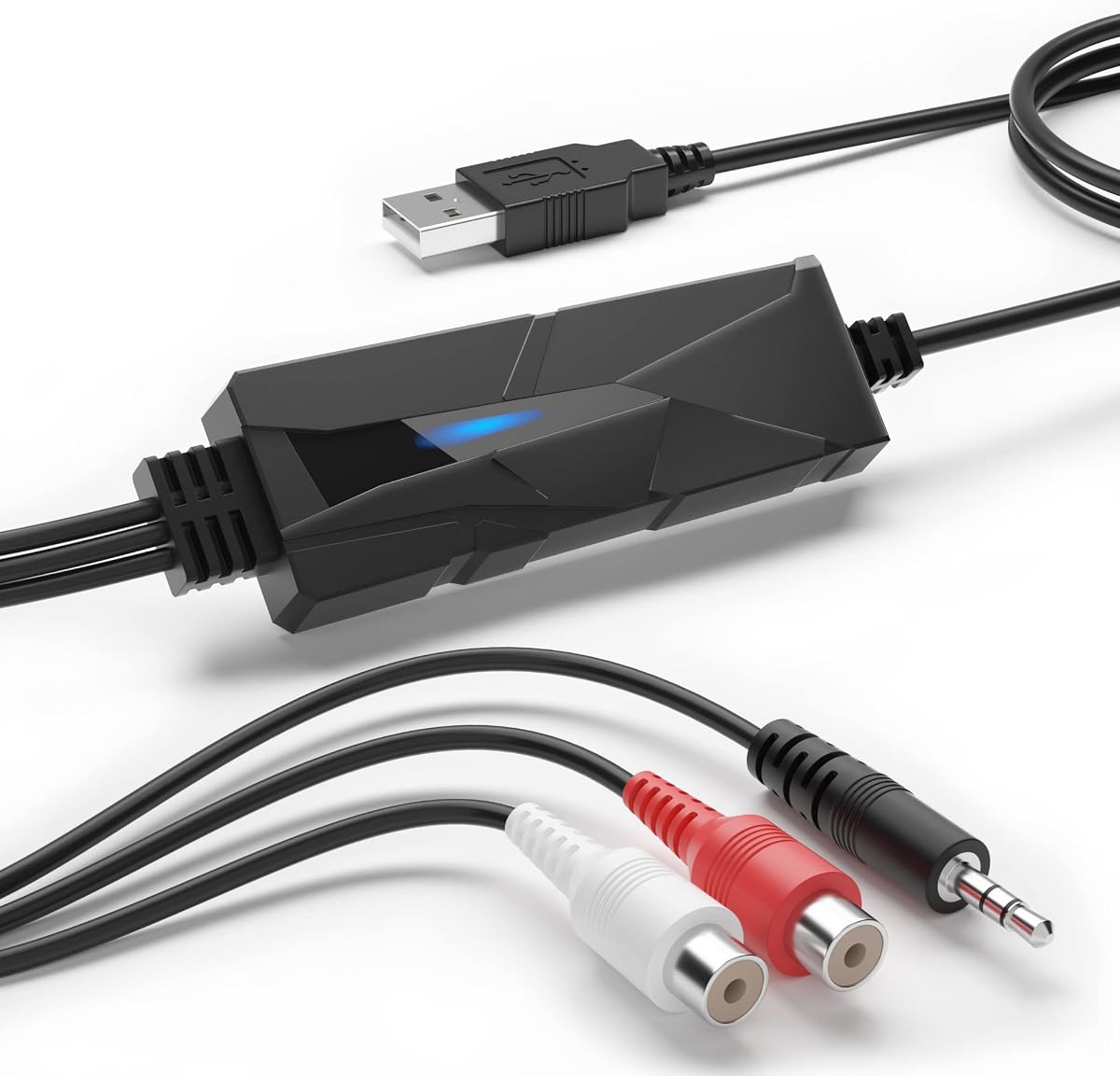


The DriverGenius AudioXfer USB Audio Capture Card is designed primarily for those looking to digitize analog recordings such as cassette tapes. It captures live audio and converts it into digital formats like MP3 or WAV. With a rating of 4.2, it is a solid entry-level choice for archiving old music. Its simple design makes it accessible for non-technical users seeking to preserve memories.
We may earn a commission when you buy through this link, at no additional cost to you.
Key strengths include its straightforward connection process using USB. The included Audacity software helps manage recordings, although users must ensure they have the correct version for 64-bit Mac systems. The LED indicator confirms when recording is active. It handles basic recording tasks well without requiring external drivers for basic operation. The device supports standard 3.5mm inputs allowing flexible connectivity for various analog sources.
A notable trade-off is the software compatibility with modern macOS versions. Users may need to update Audacity manually to ensure smooth operation on newer Mac computers. The sample rate is limited to 44.1 and 48kHz which is standard but not high-resolution. Despite these limitations, it remains a cost-effective tool for specific analog-to-digital conversion needs without demanding technical expertise.
This device is best suited for hobbyists wanting to archive old tapes or vinyl records. If you prioritize ease of use over high-fidelity specs, this capture card offers good value. It is important to verify your Mac OS version before purchasing. For those seeking a simple bridge between analog and digital audio on a Mac, the DriverGenius AudioXfer remains a practical solution worth considering.
This device allows you to easily convert cassette tapes into digital files for easy access.
No external power or complex drivers are needed for basic operation with USB connection.
We may earn a commission when you buy through this link, at no additional cost to you.
The Fosi Audio K5 Pro is a versatile DAC that combines audio conversion with amplification for headphones. It offers high-resolution audio support and connects via USB Type C, optical, or coaxial inputs. With a 4.3 rating, it appeals to gamers and music lovers alike. Its design focuses on clean sound delivery with low distortion ensuring your Mac audio sounds crisp during gaming or media consumption.
We may earn a commission when you buy through this link, at no additional cost to you.
Performance highlights include the Texas Instruments NE5532 op-amp chip which provides a clean low-noise sound. It supports sample rates up to 24 bit/192 kHz delivering detailed audio quality. The combination of volume and power control simplifies setup. The RCA outputs allow connection to powered speakers while the 3.5mm jack suits headphones directly. It is fully compatible with Mac systems offering a flexible audio solution.
While excellent for many, the device requires specific cables which may not be included depending on the kit. The microphone interface is somewhat limited compared to dedicated recording interfaces. Additionally users need to ensure their audio source connects correctly to the USB port. Despite these minor constraints, the sound quality and feature set remain strong for a compact unit designed for desktop or console use.
Gamers and Mac users seeking a compact audio upgrade will find this K5 Pro valuable. It replaces built-in sound cards with better dynamics and clarity. The balance of features and performance makes it a top contender for high-fidelity playback. Ensure you have the right cabling before setup to maximize its potential. This unit is highly recommended for immersive listening experiences on a Mac or gaming setup.
Supports 24-bit/192kHz PCM and DSD512 for audiophile-grade playback.
The built-in amp drives headphones from 16 Ohm to 300 Ohm effectively.
We may earn a commission when you buy through this link, at no additional cost to you.
The PROZOR 192KHz Digital to Analog Converter is a reliable and affordable way to convert optical audio to analog. It supports high-resolution audio up to 192KHz/24bit ensuring quality playback on external speakers or headphones. Rated 4.4, it is popular among home theater users. The aluminum housing provides durability and better heat dissipation than plastic alternatives making it a robust choice for daily use.
We may earn a commission when you buy through this link, at no additional cost to you.
It features both optical and coaxial inputs allowing it to accept digital signals from various sources like TVs or consoles. Outputs include standard RCA and a 3.5mm jack for headphone use. The included optical cable simplifies initial setup. It converts digital signals effectively with low distortion maintaining clarity. This model is widely compatible with Apple TV and other digital audio sources.
A limitation is the lack of a volume knob requiring users to adjust volume on the source device. Also the power adapter is not included in the box so you need a separate 5V adapter. These constraints are minor considering the price point and performance quality. Users should ensure they have a proper power supply to avoid electrical noise. For simple digital to analog tasks it performs admirably.
This DAC is ideal for budget-conscious users needing a simple converter for home audio systems. It handles PCM audio well and delivers clean analog signals. The build quality ensures longevity in typical home environments. If you want to connect a Mac or Apple TV to analog speakers without breaking the bank this PROZOR unit is a solid and efficient choice to consider.
Accepts both Toslink Optical and Coaxial digital audio signals.
RCA connectors are gold-plated to ensure reliable long-term signal transmission.
We may earn a commission when you buy through this link, at no additional cost to you.
The Douk Audio U2PRO USB to Optical Adapter serves as a digital interface that reclocks signals to improve audio quality. It uses the XMOS XU316 chip to provide stable transmission up to 768kHz. With a 4.1 rating it is favored by audiophiles seeking cleaner sound. The UAC mode switch allows easy compatibility with gaming consoles and computers including Mac devices offering flexibility in setup.
We may earn a commission when you buy through this link, at no additional cost to you.
Key strengths include its ability to feed jitter-free digital signals to external DACs. It supports both PCM and DSD formats ensuring high-end music streaming works well. The compact size makes it easy to carry and hide in desktop setups. Real-time indicators help monitor signal formats quickly. It is USB powered which removes the need for extra power cables and simplifies connections.
However it acts primarily as a transport and requires a compatible DAC for analog output. Users must ensure their DAC supports the specific output modes selected on the U2PRO. There are no physical volume controls here as it handles digital transmission only. While the driver issue has been resolved some users might still find the configuration slightly technical. It remains a strong upgrade for digital audio paths.
If you have a high-end DAC and want better digital signal transport from your Mac this adapter is excellent. It enhances sound quality by reducing jitter and stabilizing clocks. The support for high sample rates ensures future-proofing for modern digital files. For enthusiasts aiming to refine their digital audio chain this U2PRO offers precise performance and reliable operation.
Equipped with the latest XMOS XU316 chip for ultra-high resolution support.
UAC mode switch offers plug-and-play or high-resolution audio support modes.
We may earn a commission when you buy through this link, at no additional cost to you.
The SMSL SU-1 is a high-performance DAC focused on MQA and high-resolution audio decoding. It features the AK4493S chip which delivers extremely low distortion for accurate sound reproduction. Rated 4.2 it caters to audiophiles who listen to MQA encoded tracks. The device supports sample rates up to 768kHz and DSD512 ensuring detailed playback for those with Mac systems looking for clarity.
We may earn a commission when you buy through this link, at no additional cost to you.
A key strength is its ability to decode MQA CD signals when connected to an MQA enabled CD player. The USB input connects easily to Mac computers. It provides clean digital conversion with excellent separation between channels. The design prioritizes sound quality over physical bulk keeping it small and efficient. It works well with standard USB connections on modern Mac devices.
Users need to be aware that a driver is required for Windows but Mac OS X 10.6+ is supported natively. The compact size limits additional output options like optical or coaxial inputs which might be a constraint for some setups. However the focus on high-fidelity decoding makes it valuable for critical listening. Ensure your Mac OS is updated before connecting for best results.
For serious music lovers who want to experience MQA content fully this SU-1 is a compelling option. It brings studio-quality sound to digital streams effectively. The low noise floor ensures background silence during quiet tracks. If you prioritize audio purity and format compatibility this SMSL unit is an excellent addition to any Mac-based digital audio system.
Restores the original high-resolution signal heard in the studio.
Distortion lower than 0.00013% ensures accurate signal reproduction.
We may earn a commission when you buy through this link, at no additional cost to you.
The SMSL PO100 PRO MQA DDC is a compact digital interface designed for portability and high-resolution playback. It supports PCM up to 768kHz and native DSD64 providing versatile audio options. With a 4.6 rating it stands out for its quality. The Type-C USB input allows direct connection to modern devices including Macs. The output options include I2S optical and coaxial for wide compatibility.
We may earn a commission when you buy through this link, at no additional cost to you.
Performance highlights include the asynchronous transmission using XMOS technology. This ensures clean signal transfer with minimal latency. The device can decode MQA files without extra software which simplifies setup. Volume control on the computer is recommended for best audio output. It is small enough to fit in a backpack making it ideal for mobile audio setups or travel use.
One trade-off is the small size which might make switch handling slightly tricky. Users must adjust UAC mode correctly to avoid signal issues. While versatile it focuses more on digital transport than amplification. This makes it a specialized tool for digital-to-digital conversion. Overall it delivers reliable performance and strong fidelity for a portable unit.
If you need a portable DAC interface for your Mac or phone this PO100 PRO is highly effective. It balances size with robust feature support including MQA and DSD. The build quality ensures durability despite its small footprint. For travelers or commuters wanting high-quality digital audio on the go this unit offers excellent performance in a compact form.
PO100 PRO handles MQA playback without needing additional software installation.
Mini portable design can be easily stowed in bags and backpacks for travel.
We may earn a commission when you buy through this link, at no additional cost to you.
The Sound Blaster Play! 3 is a simple USB audio adapter designed to add audio functionality to computers. It supports 24-bit 96kHz audio for better quality than standard analog outputs. With a 4.5 rating it is praised for ease of use. No drivers are needed for Mac systems making it ideal for users who want a quick plug-and-play solution. It enhances audio clarity for general tasks.
We may earn a commission when you buy through this link, at no additional cost to you.
Key strengths include its universal compatibility with analog headsets. You can connect both gaming and studio-grade headphones easily. The downloadable software allows basic sound enhancements. It works straight out of the box ensuring immediate use. The small design keeps your desk tidy. It is a practical option for basic sound output upgrades on a Mac or laptop.
A limitation is the lack of advanced controls or high-resolution features found in more expensive DACs. It serves primarily as a functional adapter rather than an audiophile tool. The audio quality is decent but not exceptional for critical listening. However for general use like calls or casual music it performs well. Check software profiles for your earphone brand for best results.
For users needing a quick reliable audio fix on a Mac this adapter is a great choice. It eliminates the need for complex setups and drivers. The value proposition is strong for its price. If you just want better sound from your USB port without fuss the Sound Blaster Play! 3 is a practical and efficient tool to consider.
Works straight out of the box without needing extra driver installations on Mac.
Compatible with all analog headsets from earbuds to studio headphones.
We may earn a commission when you buy through this link, at no additional cost to you.
The iFi Audio Go Link Max is a portable headphone amp and dongle DAC that connects via USB-C. It supports high-resolution audio including 32-bit/384kHz PCM and DSD256. With a 4.5 rating it offers powerful performance in a small size. The Dual ESS Sabre DAC chips provide a balanced circuit for high power output to headphones. It is designed for Macs and phones needing better audio.
We may earn a commission when you buy through this link, at no additional cost to you.
Performance highlights include Dynamic Range Enhancement which improves audio detail. The balanced 4.4mm output allows connection to compatible high-end headphones. The gold-plated connectors ensure good contact and reduced corrosion. A flexible cable reduces stress on USB ports making it durable. It works seamlessly with Mac USB-C ports without needing drivers for basic operation.
A limitation is that it only accepts USB-C input limiting its use with older devices. It is also compact which means less space for controls or displays. While it offers high power it is primarily a dongle not a desktop unit. Users should check their headphone impedance to ensure it drives them well. For portable listening it remains a high-performance option.
If you use USB-C headphones and need high-fidelity sound on the go this Go Link Max is ideal. It delivers significant power and clarity in a portable form. The balanced output enhances detail in complex tracks. For Mac users with mobile setups who want audiophile quality this iFi unit is a top portable choice to consider for your needs.
Dual ESS Sabre DAC chips form a balanced circuit for high quality audio.
Supports PCM 384kHz and DSD256 for detailed and accurate playback.
We may earn a commission when you buy through this link, at no additional cost to you.
The Fosi Audio Q6 Mini Desktop DAC is a compact unit designed for high-fidelity audio conversion. It uses the AKM AK4493S DAC and XMOS XU316 processor for excellent sound quality. With a 4.6 rating it stands out for performance and build. The device supports 32bit/768kHz PCM and DSD512. It connects via USB-C, Optical, or Coaxial inputs making it versatile for many Mac setups.
We may earn a commission when you buy through this link, at no additional cost to you.
Performance highlights include its low-noise and high-fidelity design. It delivers clean accurate signal conversion with a SNR over 121dB. The aluminum alloy body ensures durability and good heat dissipation. It supports RCA and Sub-Out outputs for connecting to amplifiers. While not a headphone amp itself it pairs well with existing gear. This makes it a strong desktop audio centerpiece.
One trade-off is that it cannot drive headphones directly requiring an external amp for personal listening. The Sub-out cable is not included in the package so check connectivity needs. Despite this its signal quality is top notch for the price. Users should ensure their Mac output settings match the DAC inputs. It remains a highly capable unit for serious audio lovers.
For Mac users wanting a clean digital-to-analog upgrade for home stereo this Q6 is excellent. It brings studio-level resolution to everyday listening. The build quality and sound performance justify the cost. If you want to connect your Mac to a quality system without bulk this Fosi unit is a great choice to consider for your audio setup.
Supports PCM 32bit/768kHz and DSD512 for immersive listening.
Crafted from high-quality aluminum alloy for durability and style.
We may earn a commission when you buy through this link, at no additional cost to you.
The Shure MVX2U Gen 2 is a professional XLR-to-USB-C audio interface designed for creators. It converts any XLR microphone directly to USB for recording. With a 4.5 rating it is a favorite for podcasters. It features onboard Shure Digital Audio Processing including Auto Level Mode and a Real-Time Denoiser. This ensures clean consistent audio across devices including Macs without complex setups.
We may earn a commission when you buy through this link, at no additional cost to you.
Performance highlights include 60 dB clean gain and 48V phantom power. It works seamlessly with dynamic or condenser mics. The MOTIV app lets you adjust settings on desktop or tablet. It offers zero-latency audio for comfortable monitoring. The design focuses on streamlined recording and streaming setups. This makes it versatile for both audio and video creation workflows.
A limitation is the higher price point compared to basic adapters. It is specialized for mic input rather than general music playback. However the processing features save time during post-production. Ensure your Mac OS is compatible with the MOTIV app for best results. For recording vocals this unit delivers professional results straight out of the box.
If you need to record high-quality audio from an XLR mic this interface is ideal. It removes the need for external mixers or complex drivers. The Auto Level Mode ensures consistent levels automatically. For podcasters and streamers using a Mac this Shure unit is a premium and reliable choice to consider for professional audio needs.
Includes Real-Time Denoiser and Auto Level Mode for consistent output.
Provides up to +60 dB clean gain and 48V phantom power for mics.
We may earn a commission when you buy through this link, at no additional cost to you.
Choosing the right audio converter involves understanding your connection types and quality needs. This guide outlines key factors to consider for optimal performance.
Ensure the device supports macOS drivers or is plug-and-play. Many modern DACs work without drivers but check system requirements. USB-C models are preferable for newer Macs. Older Macs may need USB-A adapters.
Verify Mac OS compatibility before purchasing to avoid installation issues.
Look for high-resolution support like 24-bit/96kHz or higher. This ensures better detail and dynamic range. Professional gear often offers 192kHz or DSD support for audiophiles.
Higher sample rates improve fidelity for critical listening and music production.
Check if you need optical coaxial or USB inputs. RCA outputs are common for speakers. 3.5mm jacks are useful for headphones. Ensure you have the right ports on your Mac.
Match the converter's ports to your existing audio equipment for easy connection.
The DAC chip determines sound quality. Brands like ESS Sabre or AKM offer high fidelity. Professional interfaces include advanced DSP for processing. Choose based on your quality needs.
Select a DAC chip known for low distortion and high SNR ratings.
Decide between desktop units and portable dongles. Desktop units are larger but stable. Dongles are compact and great for travel. Consider where you will use the device.
Choose a size that fits your workspace and portability requirements.
Aluminum alloy housing provides better shielding and heat dissipation than plastic. Gold-plated connectors ensure longevity. Sturdy devices handle daily use better.
Invest in durable materials to ensure the device lasts over time.
Some devices need external adapters. USB-powered units are more convenient. Check if the package includes necessary cables. Ensure your USB port can supply enough power.
Confirm if the converter needs a separate power adapter to avoid interruptions.
Budget options are available for basic needs. Premium models offer advanced features for professionals. Balance cost with required features like high-res audio.
Select a model that offers value for your specific usage needs.
Connect the converter to your Mac using the appropriate USB or optical cable. Ensure the power source is stable before turning it on. Check device settings in System Preferences to select the audio output.
Keep cables organized and avoid sharp bends to prevent signal loss. Clean dust from ports regularly using compressed air. Ensure the unit has ventilation to prevent overheating during use.
Use high-quality cables for best signal transmission. Store the device in a dry place when not in use. Follow manufacturer instructions for firmware updates to maintain performance.
Most modern converters are plug-and-play and work with macOS without drivers. However always check specific system requirements. USB-C models suit newer Macs while older models may need adapters.
A DAC improves sound quality by reducing distortion and noise. It allows connection to better speakers or headphones. It enhances audio fidelity for music and video playback.
Yes optical converters work with Macs that have an optical port or via USB adapters. Ensure your audio output settings are configured for optical in System Preferences.
Most converters are plug-and-play on macOS. Some high-end models may require drivers. Check the manufacturer support page for compatibility details before purchase.
Typically USB or optical cables are included. RCA cables may need to be bought separately for analog speakers. Verify the package contents before starting setup.
Use high-quality cables and a good DAC. Set your Mac audio output to high-resolution settings. Keep the converter powered properly to avoid noise.
We reviewed ten top converters ranging from budget-friendly adapters to professional interfaces. Each offers unique benefits for Mac audio setups. Your choice depends on your specific needs.
Prioritize compatibility and audio quality when selecting. Ensure it has the right inputs for your gear. Consider portable options for travel and desktop models for fixed setups.
Prices and availability may change over time. Check current listings for the latest deals. We hope this guide helps you find the perfect audio converter.