
4K AI-Powered Conference Webcam with Microphones Speakers
4.1Editor score
120 wide angle view
AI auto framing
Physical lens cover
This guide compares the top auto tracking conference camera systems for business and worship, evaluating AI features video quality audio performance and ease
Finding the right video solution for meetings requires more than a basic webcam. Auto tracking conference cameras use AI to follow speakers, ensuring everyone stays framed without manual adjustments. These systems streamline communication for remote teams and hybrid events.
We analyzed ten top-rated models based on video resolution, zoom capabilities, and tracking accuracy. Our comparison covers all-in-one kits and standalone PTZ cameras suitable for various room sizes and professional needs across different industries.
Each pick highlights unique strengths like optical zoom, audio clarity, and platform compatibility. While features vary widely, all options deliver professional quality for conferencing. Note that availability and pricing change frequently, so verify details before purchasing.
4.1Editor score

4.8Editor score

4.6Editor score
The following table compares key specifications across all ten models. Use this overview to quickly identify which camera meets your specific requirements for video resolution, zoom power, connectivity options, and tracking features.




This all-in-one system combines a 4K PTZ camera with a wireless speakerphone for complete video conferencing. Rated highly for its AI tracking and audio clarity, it delivers professional quality for various settings.
We may earn a commission when you buy through this link, at no additional cost to you.
The camera features a 4K sensor with 3X optical zoom and a 93-degree field of view. It supports HDMI and USB 3.0 outputs, ensuring flexibility for different setups. The smart AI algorithm tracks faces and bodies accurately, keeping speakers centered during movement.
The Bluetooth speakerphone includes four omnidirectional microphones with a 5-meter pickup range. It runs on a built-in battery for 6-8 hours of continuous use. While powerful, battery life depends on usage patterns and connectivity choices.
This kit is ideal for small to medium conference rooms needing reliable video and audio. Its plug-and-play nature and broad platform support make it accessible for users without technical expertise. It stands out as a top choice for efficient collaboration.
The 4K resolution ensures detailed visuals, while the 3X optical zoom allows close-ups without quality loss.
The speakerphone provides clear audio pickup and playback, reducing the need for separate microphones or speakers.
We may earn a commission when you buy through this link, at no additional cost to you.
Designed for small meeting spaces, this webcam offers 4K resolution and AI auto framing at an accessible price point. It ensures participants remain visible without manual camera adjustments during calls.
We may earn a commission when you buy through this link, at no additional cost to you.
The 120-degree wide angle covers the entire room, capturing every attendee comfortably. Dual AI noise-canceling microphones reduce background sounds for clearer communication. A physical lens cover adds a layer of privacy for office environments.
While it lacks optical zoom, the digital zoom capabilities are sufficient for close-up views. The camera connects via USB for instant setup on Zoom or Teams. However, some users report occasional tracking inconsistencies.
This model suits teams needing a simple, effective camera for daily hybrid work. Its privacy features and wide view make it practical for shared offices. It balances cost and functionality well for basic conferencing needs.
The physical lens cover ensures the camera is off when not in use, providing peace of mind in shared spaces.
The wide-angle lens captures everyone in the room, making it ideal for group meetings in small conference areas.
We may earn a commission when you buy through this link, at no additional cost to you.
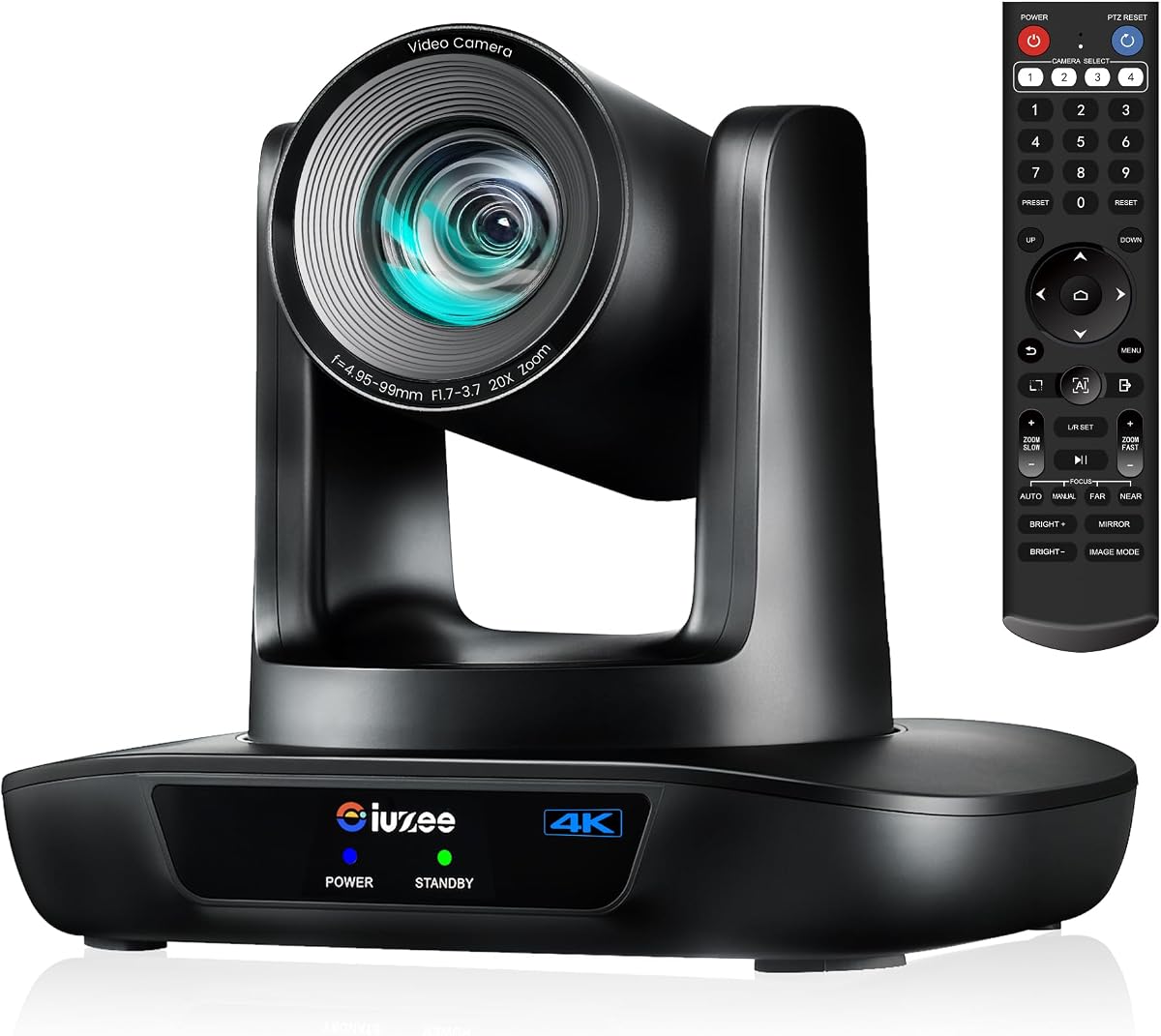
This camera is designed for professional production environments requiring high fidelity and advanced connectivity. It combines NDI integration with 4K resolution and a powerful 20X optical zoom for broadcast-quality streaming.
We may earn a commission when you buy through this link, at no additional cost to you.
The NDI license included simplifies workflows with popular software like vMix and OBS. AI tracking uses both facial and body recognition, resuming tracking even if the subject is temporarily obscured. The SDI output allows for long cable runs without signal loss.
While it lacks a built-in microphone, this design caters to users who utilize external audio systems. The camera supports PoE for simplified cabling and offers multiple control options via browser or software. Setup may require some technical knowledge.
Ideal for churches, studios, and large events, this model offers unmatched versatility. Its premium features justify the cost for users needing reliable, high-end streaming. It is a top choice for professional video production needs.
NDI and SDI outputs enable seamless integration into professional broadcast setups for advanced users and live events.
The 20X optical zoom allows for detailed close-ups from a distance, essential for large rooms or stages.
We may earn a commission when you buy through this link, at no additional cost to you.
This system offers smooth Full HD video at 60fps, making motion appear natural during meetings. It pairs a PTZ camera with a wireless Bluetooth speakerphone for a complete conferencing kit suitable for medium-sized rooms.
We may earn a commission when you buy through this link, at no additional cost to you.
The camera provides a 114-degree field of view and 3X optical zoom. It outputs high-definition video via both USB 3.0 and HDMI, ensuring compatibility with various devices. AI auto-tracking maintains focus on the speaker seamlessly.
The speakerphone features a full-duplex microphone array with echo cancellation and a 16.4-foot pickup range. It supports multiple connection methods and runs on battery power. Users should note the camera is wired, requiring cable management.
This kit is a solid choice for users prioritizing smooth video performance and audio clarity. The included speaker simplifies setup while delivering professional results. It remains a strong contender for general business conferencing.
The 60fps frame rate ensures smooth video even during active presentations or movement within the room.
Full-duplex audio allows for natural conversation without interruptions, enhancing meeting quality significantly.
We may earn a commission when you buy through this link, at no additional cost to you.
Unique gesture controls allow users to adjust tracking and zoom without touching devices, ideal for hands-free operation. This 4K system includes a speakerphone set, making it comprehensive for meetings in medium to large spaces.
We may earn a commission when you buy through this link, at no additional cost to you.
The camera offers 120-degree coverage and 5X digital zoom for flexible framing. A remote control enables preset position settings and menu adjustments. The speakerphone supports USB and dongle connections with noise reduction capabilities.
While digital zoom is less powerful than optical, the 4K resolution provides sharp details. The gesture functions require practice but offer intuitive control once mastered. The system supports major platforms like Zoom and Teams.
This model is perfect for users valuing convenience and interactive features. Its combination of video quality and unique controls sets it apart. It delivers a professional experience suitable for modern collaborative environments.
Gesture controls enable effortless operation, allowing presenters to maintain focus without interrupting their flow.
Multiple connection options for the speakerphone ensure compatibility with various network setups and devices.
We may earn a commission when you buy through this link, at no additional cost to you.
This system features a powerful 20X optical zoom, capturing clear close-ups from the back of large rooms or churches. It includes a wireless speakerphone, offering an all-in-one solution for worship services and conferences.
We may earn a commission when you buy through this link, at no additional cost to you.
The camera supports LAN and PoE for simplified networking and power delivery. AI tracking follows presenters automatically, keeping the focus on the content. It works with major streaming platforms and supports high-quality video output.
While the zoom is a standout feature, the camera requires careful setup to maximize its potential. The speakerphone provides flexible connectivity and clear audio. Users should ensure their network supports PoE standards for optimal performance.
Designed for large spaces, this camera excels at covering expansive areas with clarity. Its complete kit approach saves the hassle of sourcing separate components. It is an excellent choice for production-focused environments.
The 20X optical zoom ensures subjects remain sharp even at significant distances from the camera.
PoE support allows for clean cabling, reducing clutter in professional setups where cables are difficult to hide.
We may earn a commission when you buy through this link, at no additional cost to you.
Built for professional broadcast applications, this camera delivers 4K video with 20X optical zoom and advanced AI tracking. It is ideal for users needing high-quality video for streaming or conferencing without an integrated microphone.
We may earn a commission when you buy through this link, at no additional cost to you.
The camera supports simultaneous outputs via USB 3.0, HDMI, and LAN. Advanced noise reduction enhances image clarity in various lighting conditions. Web browser control allows for easy setup and remote management of presets.
Users must provide their own audio system as the camera lacks a built-in microphone. However, the versatility in connection options makes it adaptable for different production needs. Setup instructions are clear for non-technical users.
This model is perfect for educational institutions and churches requiring reliable video quality. Its robust feature set justifies the standalone design. It remains a strong choice for those prioritizing video fidelity over all-in-one convenience.
Support for RTSP and SRT protocols makes it ideal for advanced streaming workflows and live event production.
Web browser control enables easy remote adjustments and preset management without additional hardware controllers.
We may earn a commission when you buy through this link, at no additional cost to you.
This camera delivers sharp 4K video with a powerful 20X optical zoom for detailed shots. It features advanced AI tracking that uses both face and body recognition for smooth, continuous focus on presenters.
We may earn a commission when you buy through this link, at no additional cost to you.
Multiple installation options and preset settings offer flexibility for fixed setups. Controls are available via remote, software, or optional joystick for precise adjustments. The camera connects via HDMI, USB, LAN, or PoE.
Users may need to adjust default settings for compatibility with lower-resolution monitors. While durable and reliable, the array of features may require time to learn fully. It ensures stable operation for demanding environments.
Ideal for classrooms and conference rooms, this camera balances power and usability. Its optical zoom ensures distant details are captured clearly. It stands out as a dependable choice for professional streaming needs.
The combination of face and body recognition minimizes tracking interruptions, maintaining a smooth viewer experience.
Multiple mounting options and presets allow for seamless integration into various physical room layouts.
We may earn a commission when you buy through this link, at no additional cost to you.
This integrated system combines camera, microphones, and speakers into a single device for simplified setup. It is designed for medium and large conference rooms, ensuring every participant is clearly visible and heard.
We may earn a commission when you buy through this link, at no additional cost to you.
AI auto-framing adjusts in real time to keep groups centered during meetings. A 4-mic array with noise reduction ensures clear audio pickup across the room. Built-in speakers eliminate the need for external audio hardware.
While it lacks optical zoom, the 120-degree wide angle covers the entire meeting space effectively. The system works seamlessly with major platforms like Teams and Zoom. It is a strong choice for hybrid work environments.
Users prioritizing ease of setup will appreciate the all-in-one approach. Its audio capabilities are robust for a single unit. It delivers a complete solution for teams needing reliable conference technology.
Combining audio and video into one device reduces cable clutter and streamlines installation significantly.
The wide-angle lens and auto-framing ensure everyone is included in the frame, fostering better collaboration.
We may earn a commission when you buy through this link, at no additional cost to you.
This compact webcam integrates a 4K camera, microphones, and speaker into one device. It features adjustable field of view modes and AI auto-tracking, making it suitable for individual desks or small meeting areas.
We may earn a commission when you buy through this link, at no additional cost to you.
The included remote allows for easy control of zoom and volume. Noise-canceling microphones provide clear audio pickup for calls. A privacy cover adds security and protects the lens when not in use.
While it uses digital zoom, the 4K sensor maintains image quality for standard use. The adjustable FOV helps frame the room effectively for different meeting sizes. Setup is straightforward with no drivers needed.
This webcam is ideal for professionals working from home or small offices. Its compact design and integrated features save desk space. It offers a practical solution for users needing basic conferencing capabilities.
Integrating camera and audio into one unit reduces clutter on crowded desks, keeping workspaces organized.
Adjustable field of view modes allow users to tailor the camera angle to specific meeting requirements.
We may earn a commission when you buy through this link, at no additional cost to you.
Choosing the right camera depends on your room size, audio needs, and technical requirements. These factors help narrow down options to ensure smooth and professional conferencing.
Higher resolutions like 4K provide sharper images, making text and facial expressions clearer. A frame rate of 60fps ensures smoother motion during active discussions, which is vital for natural interaction.
Look for cameras that support high resolutions to maintain a professional appearance across all meeting environments.
Optical zoom maintains image quality when zooming in, while digital zoom can reduce clarity. For large rooms or distant speakers, a high optical zoom factor is essential for capturing details without loss.
Prioritize models with optical zoom if you need to focus on individuals from a distance.
Effective tracking keeps speakers centered without manual adjustment. Advanced AI systems recognize faces and bodies, ensuring smooth transitions even if a person is temporarily obscured by movement.
Check reviews or specs for tracking responsiveness to avoid jitter or delays during meetings.
Integrated microphones and speakers simplify setups and reduce cable clutter. Full-duplex audio allows for natural conversation without interruptions, while noise-canceling features filter out background sounds.
Select kits that include audio components if you need a complete solution in a single purchase.
Multiple outputs like HDMI, USB, and LAN offer flexibility for different setups. PoE support simplifies installation by providing power and data through a single cable, reducing the need for power outlets.
Ensure the camera supports your existing network and device connections to avoid compatibility issues.
Remote controls, web browsers, or software interfaces allow users to adjust settings easily. Some models offer unique features like gesture control for hands-free operation, which is useful during presentations.
Consider how you prefer to adjust the camera to find a user interface that matches your workflow.
Wide-angle lenses are essential for covering large meeting spaces or groups effectively. Smaller units are better for individual desks or home offices where a compact footprint is necessary.
Match the camera's field of view to your room dimensions to ensure all participants are captured.
Verify that the camera works seamlessly with your preferred conferencing software like Zoom or Teams. Certifications often guarantee stability and feature support, which is crucial for business environments.
Choose models that explicitly state compatibility with your primary communication platforms to avoid setup hurdles.
Start by connecting the camera to your device using the appropriate cable like USB or HDMI. Ensure the power supply is stable to avoid unexpected interruptions during meetings.
Adjust the camera angle to cover the entire room or the main meeting area. Use the remote or software to set presets for common scenarios like group discussions or individual presentations.
Keep the lens clean with a soft cloth to prevent smudges from affecting video quality. Regularly update firmware to access new features and maintain optimal performance over time.
Auto tracking automatically follows speakers without manual adjustments, ensuring they remain centered and visible throughout the meeting. This keeps the focus on the content and reduces distractions for remote participants.
Most models are plug-and-play and do not require additional software. However, some advanced features like remote control or preset management may benefit from using proprietary software provided by the manufacturer.
Yes, the listed cameras are designed to work seamlessly with major platforms including Zoom and Microsoft Teams. Many even hold official certifications to ensure stable integration and feature support.
Optical zoom uses physical lens movement to magnify the image without losing quality. Digital zoom crops the image digitally, which can reduce clarity when zoomed in significantly.
PoE stands for Power over Ethernet, allowing both power and data to be transmitted through a single network cable. This simplifies installation by reducing the need for power outlets near the camera.
Many of these models are ideal for church services due to their wide-angle lenses and long-range zoom. They can capture both the congregation and speakers clearly, making them suitable for live streaming.
Clean the lens regularly with a soft, lint-free cloth to remove dust and smudges. Avoid using harsh chemicals that could damage the coating or affect the image quality.
Check the lighting conditions as poor lighting can affect AI tracking accuracy. Also ensure the software is updated and that the tracking feature is enabled in the settings.
The TONGVEO 4K system stands out as the top choice for its balance of video quality and comprehensive audio features. Other models like the iuZee 4K offer exceptional zoom capabilities for specialized needs.
Prioritize optical zoom and tracking accuracy based on your room size and meeting dynamics. Ensure compatibility with your existing platforms to avoid technical issues during critical sessions.
Verify current availability and specifications before purchasing as models change frequently. The right camera investment can significantly improve collaboration and communication efficiency.