
AULA F75 Pro Wireless Mechanical Keyboard
4.6Editor score
Tri-Mode Connection Support
Pre-lubed Reaper Switches
Multi-Function Control Knob
Find the perfect keyboard for developers with our expert guide comparing top mechanical and wireless models for coding productivity and comfort.
Developers spend countless hours typing code daily, making the choice of keyboard crucial for productivity and comfort. A good keyboard offers tactile feedback, reliable connectivity, and customizable features that streamline workflow without distraction or fatigue during long sessions.
We compared ten top-rated keyboards based on build quality, switch type, connectivity options, and programmability. Our selection includes wireless mechanical models, low-profile options, and full-size layouts tailored for diverse operating systems and developer needs across various budgets.
Each pick highlights specific strengths like hot-swappable switches, QMK support, or multi-device pairing. Prices and availability may vary over time, so always verify current details before purchasing to ensure you get the best value for your specific development setup.
4.6Editor score

4.6Editor score

4.2Editor score
Explore the detailed specifications of our top ten developer keyboards to find the perfect match for your coding workflow and desk setup needs.





The Keychron V5 Max stands out as a top contender for developers needing a versatile mechanical keyboard. With a 4.6 rating, it offers a perfect blend of wireless convenience and customizable features tailored for coding workflows.
We may earn a commission when you buy through this link, at no additional cost to you.
Its QMK support allows deep key remapping via the Keychron Launcher, making complex macros easy to manage. The gasket-mounted design ensures a plush typing experience while maintaining durability for heavy daily use.
While the price is slightly higher, the hot-swappable feature lets you upgrade switches without soldering. The lack of backlight on some versions may be a downside for dim environments.
Developers who value typing feel and customization will find this keyboard ideal. It bridges the gap between productivity tools and custom mechanical builds.
The gasket mount design reduces harsh impacts during typing, significantly reducing fatigue during marathon coding sessions.
QMK support enables tailored shortcuts for IDEs, streamlining your development tasks efficiently.
We may earn a commission when you buy through this link, at no additional cost to you.
The Logitech MX Keys S delivers a fluid typing experience with its low-profile design and spherically-dished keys. Its 4.4 rating reflects comfort and reliability for developers prioritizing ergonomics over tactile switches.
We may earn a commission when you buy through this link, at no additional cost to you.
Smart illumination adjusts lighting based on hand proximity, conserving battery. The Logi Options+ app enables powerful automation, helping developers reduce repetitive keystrokes.
Scissor switches provide quieter typing but lack mechanical feedback. This may not satisfy users seeking distinct actuation points for coding precision.
Ideal for office environments where quiet typing and multi-device control are essential. It excels as a secondary typing solution for versatile setups.
The low-profile structure promotes better wrist posture, minimizing strain during extended use.
Logi Options+ allows creation of Smart Actions to automate repetitive sequences.
We may earn a commission when you buy through this link, at no additional cost to you.
The Keychron V6 offers endless customization through QMK and VIA firmware. Rated 4.6, it combines a full-size layout with tactile brown switches for a balanced typing experience.
We may earn a commission when you buy through this link, at no additional cost to you.
The inclusion of a rotary knob adds convenient media and volume control. Hot-swappable sockets mean easy upgrades without tools, ideal for enthusiasts.
Its wired design limits mobility, which may hinder users needing wireless flexibility. The size also demands significant desk space.
Perfect for stationary workstations where tactile feedback and layout flexibility matter. It supports diverse OS platforms seamlessly.
VIA support allows real-time layer and macro changes directly through the browser interface.
Double-shot PBT keycaps resist wear and oil buildup for long-term durability.
We may earn a commission when you buy through this link, at no additional cost to you.
The Logitech MX Mechanical provides premium tactile feedback with low-profile switches. Its 4.2 rating highlights the comfort and reliability expected from Logitech's business line.
We may earn a commission when you buy through this link, at no additional cost to you.
Smart illumination adjusts to environmental light conditions seamlessly. The ergonomic design reduces hand strain during long coding sessions.
At a higher price point, it may be less accessible for budget-conscious users. Limited firmware customization compared to open-source options restricts flexibility.
Ideal for professionals valuing comfort and aesthetics. It bridges the gap between office usability and mechanical keyboard feel.
Mechanical tactile switches offer clear feedback for accurate typing without loud clicks.
Connect to up to three devices for effortless switching between workstations.
We may earn a commission when you buy through this link, at no additional cost to you.
The RK Royal Kludge S98 introduces a unique smart display for status info and GIFs. Rated 4.4, it appeals to developers wanting visual feedback alongside mechanical typing.
We may earn a commission when you buy through this link, at no additional cost to you.
Sound-absorbing foams provide a creamy typing experience with reduced noise. Tri-mode connectivity ensures compatibility across wired and wireless setups.
The display might be distracting during intense coding. Software features may not match fully customizable open-source alternatives.
Great for users seeking a fun, feature-rich keyboard. It balances utility with visual engagement.
The display shows battery and connection modes without needing software checks.
IXPE pads reduce hallow sounds for a smoother acoustic experience.
We may earn a commission when you buy through this link, at no additional cost to you.
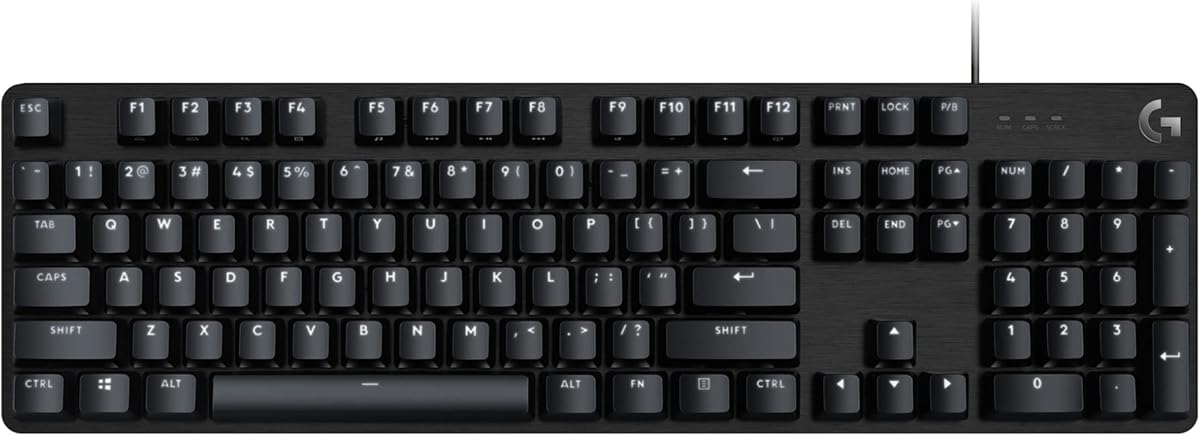
The Logitech G413 SE offers robust mechanical switches at a budget-friendly price. Its 4.5 rating reflects durability and reliability for daily coding tasks.
We may earn a commission when you buy through this link, at no additional cost to you.
PBT keycaps resist wear and shine over time. The aluminum case adds stability and reduces flex during typing.
Lack of wireless support limits portability. Limited software integration may disappoint users needing macros.
Ideal for fixed workstations needing a sturdy keyboard. It delivers value without sacrificing build quality.
PBT keycaps and brushed aluminum ensure the keyboard withstands heavy daily use.
Dedicated function keys streamline audio and system control during coding.
We may earn a commission when you buy through this link, at no additional cost to you.
The AULA F75 Pro delivers premium mechanical feel at an entry-level price. Its 4.6 rating highlights exceptional value for budget-conscious developers.
We may earn a commission when you buy through this link, at no additional cost to you.
Tri-mode connectivity allows flexibility across multiple devices. Hot-swappable sockets enable customization without soldering.
Proprietary software may require learning. Build details are less transparent than branded competitors.
Perfect for users seeking affordability without compromising typing quality. It rivals higher-priced keyboards in performance.
Features typically found in expensive custom boards are available at a fraction of the cost.
The 75% layout saves desk space while keeping essential arrow keys.
We may earn a commission when you buy through this link, at no additional cost to you.
The Keychron K10 HE introduces Hall Effect magnetic switches for rapid trigger capabilities. Rated 4.3, it appeals to tech enthusiasts seeking innovative input methods.
We may earn a commission when you buy through this link, at no additional cost to you.
Adjustable actuation points tailor sensitivity to typing style. Wireless modes ensure compatibility across diverse setups.
High cost limits accessibility for casual users. Technology is specialized, potentially unnecessary for standard coding tasks.
Ideal for users wanting cutting-edge tech. It offers responsiveness unmatched by traditional mechanical switches.
Magnetic sensors detect presses faster, improving reaction times and typing flow.
Fine-tune actuation depth to match personal typing preferences.
We may earn a commission when you buy through this link, at no additional cost to you.
The AULA F99 balances compact design with essential features. Its 4.5 rating highlights a reliable typing experience with substantial battery life.
We may earn a commission when you buy through this link, at no additional cost to you.
Gasket structure provides soft typing feedback. The large capacity battery reduces charging frequency significantly.
Software tools lack advanced features found in custom brands. Brand recognition may affect long-term support confidence.
Ideal for developers seeking portability without losing numeric pad functionality. It delivers consistent performance across devices.
An 8000 mAh battery ensures weeks of continuous typing without interruption.
Silencer layers eliminate cavity noise for a solid, pleasant sound.
We may earn a commission when you buy through this link, at no additional cost to you.
The Keychron K3 V2 offers a portable mechanical option for on-the-go developers. Its 4.3 rating reflects a balance between slim design and mechanical switches.
We may earn a commission when you buy through this link, at no additional cost to you.
QMK firmware enables deep customization. Mac layout support improves usability for Apple users.
Low-profile keys provide less tactile feedback. Battery life is modest compared to larger models.
Best for portable setups needing mechanical reliability. It fits well in travel-friendly configurations.
Despite slimness, mechanical switches retain responsive typing characteristics.
Dedicated Mac keys simplify workflows on macOS systems.
We may earn a commission when you buy through this link, at no additional cost to you.
Selecting the right keyboard involves balancing tactile feedback, connectivity, and customization to match your coding environment.
Mechanical switches offer tactile feedback and durability. Tactile switches confirm actuation physically; linear switches provide smooth motion; clicky switches add auditory feedback.
Choose tactile or linear switches for quieter environments to avoid distracting colleagues during work hours.
Full-size layouts include a number pad essential for data entry. Compact layouts like 75% save space but retain arrow keys.
Prioritize layouts that fit your desk space without sacrificing essential navigation keys.
Wireless models use Bluetooth or 2.4 GHz for flexibility. Wired models provide latency-free connection for consistent input.
Use wireless for multi-device setups; wired for stationary high-performance environments.
QMK or VIA support enables deep key remapping and macro creation. Proprietary apps may limit flexibility.
Opt for open-source firmware to tailor shortcuts and layers to your specific IDE needs.
Low-profile keyboards reduce wrist strain; gasket mounts cushion impacts. Ensure proper height for neutral wrist posture.
Invest in ergonomic features to prevent repetitive strain injuries during long coding sessions.
Wireless keyboards vary significantly in battery capacity. Large batteries reduce charging interruptions.
Check battery ratings to ensure the keyboard lasts through long workdays without recharging.
Ensure keycaps and function keys match your operating system. Some keyboards provide dual sets for Windows and Mac.
Confirm compatibility to avoid needing to relearn shortcuts or purchase additional keycaps.
Prices vary based on materials and features. Higher price often means better build quality and customization.
Balance your budget with features that directly impact your workflow efficiency.
To start using your new keyboard, connect via Bluetooth or cable and install the accompanying app if needed. Configure keys and macros to match your IDE shortcuts.
Regularly clean the keycaps with compressed air to prevent dust accumulation. Wipe surfaces with a dry cloth to avoid moisture damage.
Store the keyboard in a dry place and avoid direct sunlight to preserve key legends and prevent plastic degradation over time.
Mechanical keyboards provide consistent tactile feedback that reduces typing errors. They offer durability and customizable options beneficial for developers who type extensively.
A 75% or 96% layout balances space-saving with essential navigation keys. Full-size layouts are preferred if numeric input is a frequent requirement.
Most keyboards listed support Linux via standard protocols. QMK firmware allows extensive customization for Linux systems, though specific app support may vary.
Yes, modern wireless keyboards offer low-latency connections sufficient for typing. They provide flexibility for multi-device workstations.
QMK enables deep customization of macros and layers. While not essential, it improves workflow efficiency for power users.
Clean keycaps regularly with compressed air and dry cloth. Replace switches if needed using hot-swap features to extend lifespan.
Our top picks highlight versatile mechanical options tailored for productivity. The Keychron V5 Max offers customization while AULA models deliver budget-friendly value.
Prioritize comfort and customization features that align with your workflow. A well-chosen keyboard can significantly reduce fatigue and improve typing accuracy.
Always verify current prices and availability as market conditions change. Investing in quality equipment ensures long-term reliability for your development career.