
MSR90 USB Swipe
4.2Editor score
Plug and play USB
Reads 3 tracks
Durable design
This guide compares the top credit card swipers for businesses. We review USB and mobile readers, their features, and performance to help you choose the right
Credit card swipers are essential tools for modern businesses that need to accept payments quickly and securely. Whether you run a retail store, a mobile service, or an online business with a physical component, having a reliable device to read card data is crucial. These devices connect to computers or smartphones to process transactions efficiently.
To help you find the right solution, we have analyzed ten different credit card swipers available on the market. Our comparison looks at connectivity options, compatibility with systems, and overall build quality. We considered devices ranging from simple USB magnetic readers to advanced terminals that handle chip and contactless payments.
Each pick in this guide highlights specific strengths that suit different business needs and budgets. You will see details about installation, software requirements, and supported card types. Please note that prices and availability can change frequently, so verify current details before making your final purchase decision.
4.2Editor score

4.5Editor score

3.9Editor score
This side-by-side comparison highlights the key specifications and capabilities of the ten top credit card swipers. We focus on interface types, compatibility, and special features to help you distinguish between basic readers and full payment terminals.



The Square Terminal stands out as a comprehensive solution for businesses needing an all-in-one payment device. It combines a credit card swiper with a full point of sale system in a single unit. With a strong rating, it proves reliable for daily transactions across various industries.
We may earn a commission when you buy through this link, at no additional cost to you.
Its standout quality is the ability to accept all major credit and debit cards along with contactless payments. You can process chip cards in seconds and print receipts without extra hardware. The built-in battery ensures you can ring up customers anywhere in your store without cables.
While it comes with a higher upfront cost compared to simple swipers, the value lies in its versatility and speed. You avoid long-term contracts and hidden fees, paying a low rate per transaction instead. This makes it a practical long-term investment for growing businesses.
This device is ideal for retail stores, cafes, and mobile vendors who need a complete payment solution. If you want a device that handles sales, payments, and receipts effortlessly, this is the top recommendation. Check current availability to ensure you get the latest model.
Use the free Square Point of Sale app to track sales, manage inventory, and send digital receipts all in one place.
Get your money as soon as the next business day after processing transactions, improving your cash flow management.
We may earn a commission when you buy through this link, at no additional cost to you.
The MSR90 USB Swipe reader is an excellent budget option for businesses that rely on magnetic stripe cards. It connects via USB and works as a keyboard interface, meaning no drivers are needed to start using it immediately. Its solid rating reflects its reliability for simple transaction needs.
We may earn a commission when you buy through this link, at no additional cost to you.
This device reads up to three tracks of information from various card formats including ISO7811 and AAMVA. The bi-directional swipe feature ensures it can read high jitter or scratched cards effectively. It is built to last with over one million card swipes before failure.
The main trade-off is that it only reads magnetic stripes and does not support chip cards or contactless payments. This is acceptable for businesses in controlled environments or those on a tight budget. The configuration software allows easy changes to settings for Windows or Mac OS.
This reader is perfect for small offices, libraries, or membership systems where simple card reading is required. If you need a basic, reliable, and affordable magnetic swiper without extra bells and whistles, this is the best choice. Verify compatibility with your specific POS software before buying.
Plug and play functionality means you can start using the device immediately without installing any additional software or drivers.
Superior reading capabilities handle worn cards, ensuring reliable transactions even with less-than-perfect magnetic stripes.
We may earn a commission when you buy through this link, at no additional cost to you.
The PAX S300 v2 is a premium payment terminal designed for multilane merchants who need high transactional security. It combines magnetic stripe, chip, and contactless reading in one sleek device. While the rating is moderate, the features justify its position as a high-end choice.
We may earn a commission when you buy through this link, at no additional cost to you.
It supports PCI PTS 3.x and SRED standards to encrypt all transaction information securely. The large color touch screen provides a better user experience compared to simple screens. Connectivity options include Ethernet, RS232, and dual communication ports for flexible integration.
The trade-offs include a higher cost and potentially more complex setup compared to basic readers. However, for businesses processing high volumes or needing advanced security, this device is worth the investment. It offers everything merchants could want in a stylish payment device.
This terminal is ideal for retail stores and businesses that require robust security and a touch interface. If you need a device that handles all payment types securely and looks professional, this is a strong option. Ensure your payment processor supports PAX terminals before purchasing.
Protect customer data with state of the art security design that encrypts all transaction information reliably.
Use USB and LAN connectivity options to integrate seamlessly with your existing retail management systems.
We may earn a commission when you buy through this link, at no additional cost to you.
This USB Magnetic Stripe reader is a versatile tool for reading data from various card formats. It works with Windows, Mac, and other USB capable systems without installing software. It is a solid choice for POS, banking, and ID verification applications.
We may earn a commission when you buy through this link, at no additional cost to you.
It reads data from all three tracks on high and low coercivity cards. The LED indicator helps you confirm connections and successful swipes easily. Configuration software is available if you need to change settings later.
Like other magnetic readers, it does not support chip cards. This limitation makes it suitable for specific use cases like loyalty programs or older systems. The ability to work with TXT, Word, and Excel files makes it flexible for data entry.
This reader is perfect for businesses needing a simple, reliable device for card verification. If you need to read data into spreadsheets or POS systems without complex setup, this is a good pick. Confirm your system requirements regarding encryption before buying.
Work with TXT, Notepad, Word, Excel, and POS systems to adapt to your specific data entry needs.
The LED indicator light blinks when cards are swiped, giving you immediate visual feedback on transactions.
We may earn a commission when you buy through this link, at no additional cost to you.
The ETEKJOY USB 3-Track Magnetic Stripe Card Reader is designed for compact installations. It offers the same functionality as standard readers but in a smaller form factor. This makes it ideal for counters where space is limited.
We may earn a commission when you buy through this link, at no additional cost to you.
It connects via USB and acts as a keyboard emulation device. You can read high and low coercivity cards easily. The package includes two screw holes at the bottom for fixing it securely to a surface.
The USB cord is about 1.45 meters long, offering decent flexibility for placement. It works with most POS systems and card formats. Configuration software is available for advanced customization needs.
This reader is great for small businesses or kiosks needing a fixed payment point. If you need a compact, mountable reader for data entry, this is a strong option. Verify your POS compatibility before finalizing your purchase.
Compact size allows for installation in tight spaces where larger terminals cannot fit comfortably.
Screw holes at the bottom let you fix the reader to your counter to prevent movement or theft.
We may earn a commission when you buy through this link, at no additional cost to you.
The Square Reader for magstripe offers a quick way to start taking payments anywhere. It works with the free Square Point of Sale app on Apple devices. You can get set up quickly with no long-term commitments.
We may earn a commission when you buy through this link, at no additional cost to you.
It accepts swiped cards and allows you to track sales and manage inventory through the app. The system sends receipts digitally and accepts tips easily. You get your money as soon as the next business day.
The main limitation is that it only reads magnetic stripes and uses a specific connector. However, for those already in the Square ecosystem, the simplicity and cost make it attractive. It is designed for basic transactions without complex hardware.
This reader is perfect for market vendors, pop-up shops, or small businesses starting out. If you want a simple, quick solution to accept payments without contracts, this is an excellent pick. Ensure your device has the correct connector for compatibility.
Run your business in one place with the free app that tracks sales and manages inventory seamlessly.
Send receipts digitally to customers easily, reducing paper usage and improving customer convenience.
We may earn a commission when you buy through this link, at no additional cost to you.
This set includes two POSMATE readers, offering value for businesses needing multiple payment points. They are mini credit card swipers compatible with ISO and ANSI standards. You can use them for credit cards, gift cards, and driver licenses.
We may earn a commission when you buy through this link, at no additional cost to you.
Each unit has a 5ft cable length for flexibility in placement. They work with various card formats and are suitable for POS systems. However, please check if your system requires encryption as these are not suitable for that.
The low price point makes these attractive for multi-lane setups. Since you get two units, you can cover different counters easily. They are reliable for standard magnetic stripe data entry tasks.
This 2-pack is ideal for stores needing backup readers or dual lane service. If you need affordable, non-encrypted readers for simple verification, these are a good choice. Ensure you understand your encryption requirements before purchasing.
Get two readers in one package, saving money when you need multiple payment points.
A 5ft cable gives you enough reach to position the reader conveniently at your checkout counter.
We may earn a commission when you buy through this link, at no additional cost to you.
The SumUp Plus Card Reader connects via Bluetooth and NFC to accept payments on your smartphone. It accepts all major credit and debit cards with no long-term contracts. The free SumUp App makes it simple to start accepting transactions anywhere.
We may earn a commission when you buy through this link, at no additional cost to you.
It allows you to pay a low rate per in-person transaction. The mobile design ensures you can take payments anytime and anywhere. It is a practical solution for businesses without a fixed location.
The rating suggests some users may face connectivity or speed issues. However, the flexibility it offers is a strong benefit for mobile sellers. The lack of contracts makes it easy to try without risk.
This reader is perfect for mobile vendors, service providers, and pop-up shops. If you want to accept payments on your phone without a fixed terminal, this is a good option. Download the app and check compatibility with your device first.
Accept payments anywhere and anytime using a mobile card reader that works with your smartphone.
Pay a single low rate per in-person transaction with no hidden fees or contract obligations.
We may earn a commission when you buy through this link, at no additional cost to you.
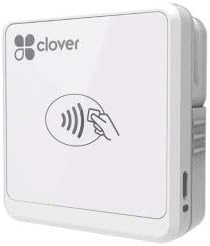
The Clover Go Contactless Reader is EMV and chip ready for secure transactions. It works with iOS and Android devices without requiring a merchant account. This makes it accessible for many small businesses looking for modern payment tools.
We may earn a commission when you buy through this link, at no additional cost to you.
It supports contactless payments which speeds up transactions. The compatibility with mobile devices allows you to process payments anywhere. However, be aware that quantities of this version are limited.
Since orders may be fulfilled with a current version, there is some uncertainty about which model you get. The core function remains to accept payments securely. It is a good choice if you find one available.
This reader is ideal for businesses needing chip and contactless support. If you want a versatile device without opening a merchant account first, this is a strong candidate. Check current availability before placing your order.
Accept EMV chip and contactless payments to ensure secure and fast transaction processing.
Works seamlessly with iOS and Android devices to integrate with your existing mobile setup.
We may earn a commission when you buy through this link, at no additional cost to you.
The Dejavoo QD2 Mobile Wireless Terminal offers secure payment processing anywhere and anytime. It features a color LCD with backlight and supports chip card EMV transactions. However, it requires a new merchant account with SwyftPAY before shipping.
We may earn a commission when you buy through this link, at no additional cost to you.
It includes the terminal and power supply to get you started. The wireless nature allows flexibility in mobile settings. This device is designed for businesses that need a robust payment solution with modern features.
The requirement for a specific merchant account is a significant factor to consider. If you need a wireless terminal with a color screen, this meets those specs. The availability of the account setup might affect your decision.
This terminal is perfect for mobile merchants needing a wireless EMV device. If you are ready to open a merchant account and want a reliable terminal, this is a solid pick. Confirm account requirements with the provider before purchasing.
Process payments anywhere with a mobile wireless terminal that does not need a fixed connection.
Accept chip cards with secure processing to protect customer data and comply with standards.
We may earn a commission when you buy through this link, at no additional cost to you.
Choosing the right credit card swipers involves understanding your business needs and technical requirements. We have outlined key factors to help you make an informed decision.
Determine whether you need a device that reads only magnetic stripes or one that supports chip and contactless payments. Many businesses are moving to chip and contactless for better security and speed. Basic readers are cheaper but may limit future growth.
Prioritize a device that supports current payment trends to avoid replacing hardware soon.
Check how the swipers connect to your systems. Common options include USB, Bluetooth, and wireless networks. USB is reliable for fixed setups while Bluetooth is great for mobile use. Ensure your computer or phone supports the required connection.
Choose a connectivity method that fits your workflow and device capabilities.
Verify that the swipers work with your existing software and hardware. Some readers are compatible with specific POS systems or operating systems. Mismatched software can lead to integration issues and extra costs.
Confirm software and OS compatibility before buying to ensure seamless operation.
Look for devices that meet current security standards like PCI PTS and encryption requirements. Secure devices protect customer data and reduce liability. Non-encrypted readers may be cheaper but pose higher risks for transactions.
Select a reader with strong encryption to protect sensitive card data effectively.
Consider whether you need to take payments on the go. Mobile devices with batteries or Bluetooth connectivity offer more flexibility than wired readers. Businesses like food trucks or repair services benefit from portable options.
Opt for a portable solution if you operate outside of a fixed location.
Evaluate how easy it is to install and use the device. Plug and play readers save time compared to those needing drivers. Also check if you need an app or account to process transactions with the device.
Choose a device with simple setup to get started quickly and easily.
Compare the upfront cost of the hardware against any fees. Some providers charge for the reader but have low transaction fees. Others might offer free hardware with higher monthly fees. Calculate the total cost of ownership for your budget.
Balance the initial investment with long-term costs to find the best value.
Review the warranty and customer support options provided with the device. Reliability is key for payment processing and technical support can save time. A good warranty covers defects and ensures you are not left without a solution.
Look for devices with good warranty and support to ensure reliability over time.
Start by connecting the card swiper to your computer or mobile device using the appropriate cable or pairing method. If it uses USB, plug it in and wait for your system to recognize it as a keyboard input. For Bluetooth devices, pair it via your settings menu before opening your payment app.
Once connected, open the software or app that will receive the card data. Swipe the card through the reader slot with the magnetic stripe facing the correct direction. A good swipe should be smooth and fast to ensure all data tracks are read without errors.
To maintain the device, keep the magnetic slot clean from dust and debris. Use a soft dry cloth to wipe the exterior regularly. Avoid exposing the reader to extreme temperatures or moisture. These steps will extend the lifespan of your card swiper and ensure reliable performance.
A magnetic swiper reads data from the striped magnetic band on the back of a card. A chip reader accepts the embedded microchip found on newer cards. Chip readers provide better security against fraud and are becoming the standard for most businesses.
Most USB card swipers use keyboard emulation, meaning no special software is needed to read data. They simply type the card data into any text field. However, you will need a POS app or website to process actual payments and track transactions.
Yes, many modern credit card swipers work with mobile phones via Bluetooth or direct connection. You need a compatible app installed on your phone to receive the data. These devices are perfect for businesses that need to take payments on the go.
The card swiper itself is often a one-time purchase without monthly fees. However, processing payments usually involves transaction fees charged by payment processors. Some providers bundle hardware costs into monthly service plans.
First check the connection between the device and your computer to ensure it is secure. Clean the magnetic slot of any dust or debris using a soft cloth. If the issue persists, restart your device and software or contact the manufacturer support.
Most swipers support standard card formats used globally including those from other countries. Compatibility depends on the magnetic track standards and your payment processor. Verify with your provider that they accept international transactions before relying on the device.
Magnetic swipers are still used but less secure than chip readers. They are acceptable for low risk or internal use where fraud risk is low. For public transactions, chip or contactless devices are recommended to protect customer data better.
Most basic magnetic swipers do not require firmware updates. For advanced terminals, check the manufacturer website for download links. Install updates using the provided software to ensure the device runs the latest security and features.
We have reviewed ten different credit card swipers to help you find the right payment tool for your needs. The Square Terminal offers a complete solution while basic USB readers like the MSR90 provide budget-friendly options. Your choice depends on whether you need mobility or just a simple reader.
Consider your processing volume and the types of cards your customers use. Businesses processing high volumes should look for chip and contactless support. Smaller operations might find simple magnetic readers sufficient for their current needs.
Prices and availability change frequently so always verify current details before purchasing. Check that the device is compatible with your software and meets your security requirements. With the right card swiper, you can streamline payments and focus on growing your business.