
MAYFLASH F300 Arcade Fight Stick
4.5Editor score
Wide platform compatibility
Sanwa parts compatible
Affordable price point
This guide compares the top 10 arcade fight sticks for Switch 2, evaluating compatibility, build quality, and features to help you find the perfect controller.
Finding the right arcade fight stick for Switch 2 can transform your gaming experience significantly. A quality controller offers precision, durability, and comfort during intense fighting sessions that standard controllers cannot match. You need a device that responds instantly to your inputs while remaining sturdy enough for competitive play.
We have carefully evaluated ten top-rated arcade sticks based on compatibility, build quality, and user feedback. Each product was analyzed for its connection methods, button quality, and ease of customization. This list covers a wide range of options from budget-friendly picks to premium models designed for serious enthusiasts.
Each pick below highlights key features, pros, and cons to help you make an informed decision. Remember that availability and pricing can change frequently so always check the latest details before purchasing. Our goal is to guide you toward the best controller for your specific gaming needs and setup.
4.5Editor score
4.7Editor score

4.6Editor score
The following comparison table provides a side-by-side overview of all ten products featured in this guide. We have extracted key specifications to help you quickly identify which model fits your requirements best without reading through every full review.




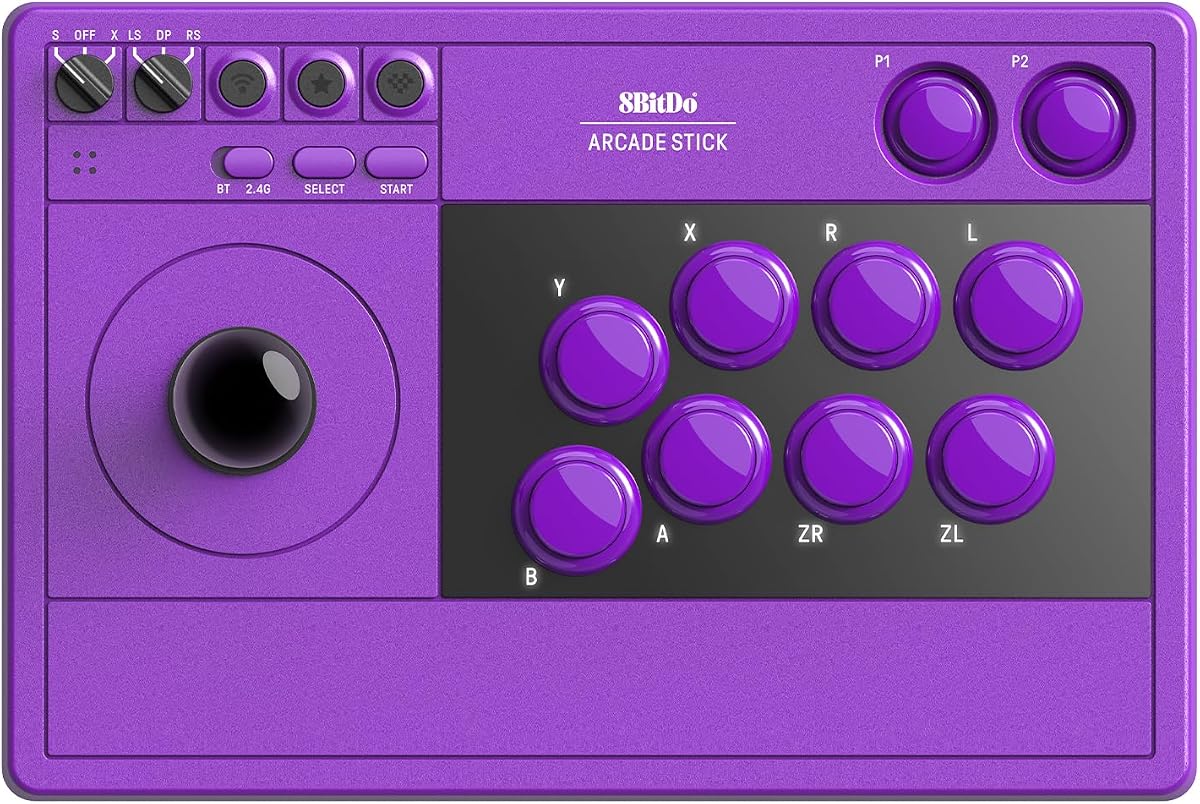
This arcade stick stands out as the top choice for Switch 2 users seeking a premium experience. With a 4.7 rating it delivers responsive controls and a sleek design that looks great on any desk. The tempered glass faceplate adds a touch of elegance while providing durability.
We may earn a commission when you buy through this link, at no additional cost to you.
Key strengths include the dynamic button layout that changes visually based on your mode switching between PC and Switch. The Ultimate Software allows deep customization including macros and profiles which is vital for competitive play. The hidden compartment for the 2.4G receiver keeps your setup neat.
While the price is higher than entry-level sticks the build quality justifies the investment. Some users may find the software a learning curve but once set up it offers significant control advantages. The dedicated macro buttons streamline complex inputs during intense matches.
Gamers looking for a reliable high-performance stick should consider this model. It balances style and function effectively making it suitable for both casual and competitive players. The Switch 2 compatibility ensures you are ready for the latest gaming titles.
The visual layout changes automatically so you never miss a button function when switching modes.
This material provides a smooth tactile feel and resists scratches better than plastic alternatives.
We may earn a commission when you buy through this link, at no additional cost to you.
The MAYFLASH F300 offers exceptional value for those on a budget without sacrificing essential features. It maintains a strong 4.5 rating thanks to its reliable performance and broad compatibility. The ability to use Sanwa components makes it a favorite for enthusiasts who want to upgrade parts.
We may earn a commission when you buy through this link, at no additional cost to you.
Its compatibility spans almost every major console and PC which is rare at this price point. The support for Turbo functions helps with rapid inputs in various game genres. You can switch between XINPUT and DINPUT seamlessly when using it on a computer.
The build is sturdy though the faceplate is plastic which feels less premium than glass options. Cable management is functional but not as sleek as higher-end models. However for a budget stick it delivers consistent performance that holds up over time.
Anyone wanting a versatile and affordable stick should look at this model first. It is ideal for beginners or those who want to customize their setup later. The value proposition here is hard to beat in the current market.
Users can swap out buttons and joysticks to match personal preferences without buying a new unit.
One stick works across multiple consoles reducing the need for separate controllers for each device.
We may earn a commission when you buy through this link, at no additional cost to you.
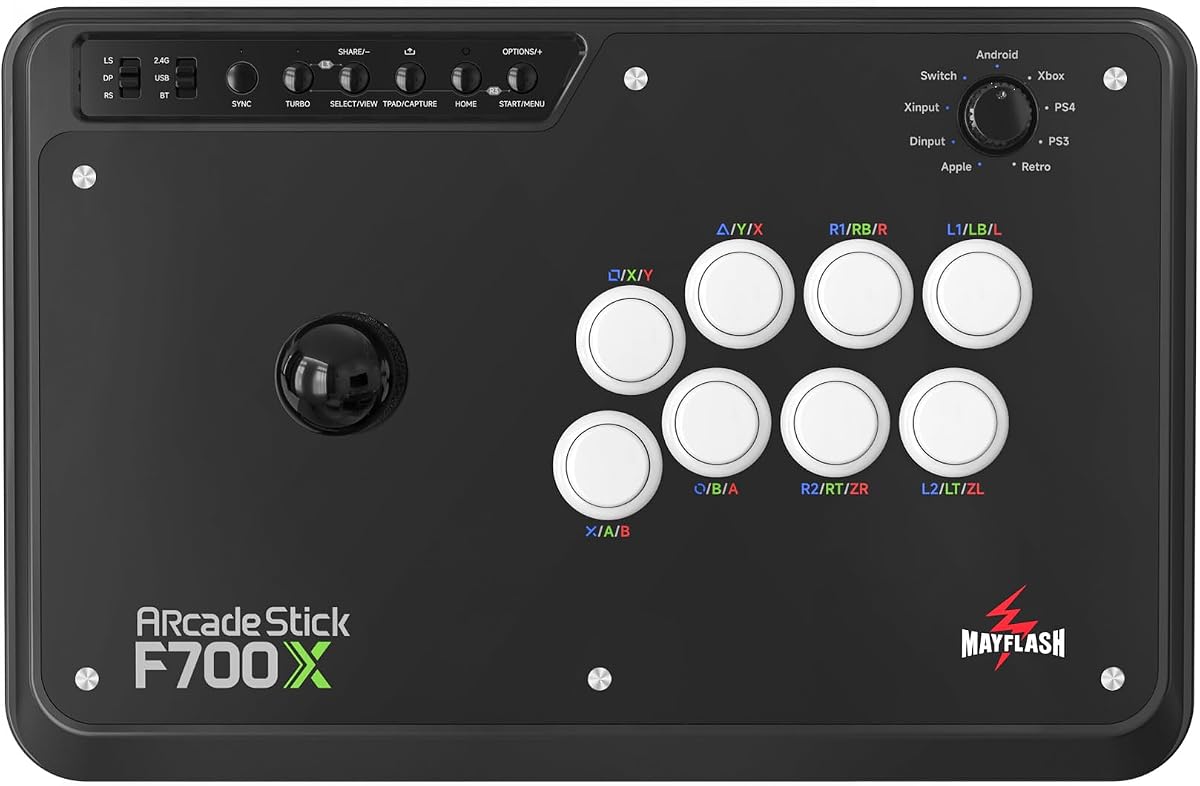
This elite version of the F700 series focuses on delivering top-tier components for serious fighting game players. It boasts a 4.6 rating due to its precise controls and robust build. The inclusion of premium Sanwa buttons and joystick ensures every press feels exact.
We may earn a commission when you buy through this link, at no additional cost to you.
The 4-way joystick design provides better accuracy for directional inputs which is crucial in competitive matches. The full-size anti-slip rubber mat keeps the stick firmly in place during vigorous play sessions. Wired headset support allows for clear communication during online tournaments.
The price reflects the high quality components but it may be too specialized for casual gamers. It only supports fighting games so you cannot use it for other genres. The Turbo functions offer adjustable speeds to suit different player styles and game mechanics.
Competitive players who demand precision should consider this premium model. It provides a reliable foundation for high-level play with components that are trusted by pros. The investment pays off in reduced input lag and better tactile feedback.
Sanwa parts are industry standard for tournament quality ensuring longevity and consistent performance.
The heavy rubber mat prevents sliding so your focus stays on the screen instead of the controller.
We may earn a commission when you buy through this link, at no additional cost to you.
This model is known for its moddable design and flexible connectivity options for Switch and Windows users. With a 4.6 rating it offers a strong balance of features and performance. The universal mounting plate supports Sanwa arcade sticks which is great for future customization.
We may earn a commission when you buy through this link, at no additional cost to you.
The Ultimate Software allows you to map buttons and create macros easily. Dynamic button layout changes visually when you switch modes so you always know which buttons are active. The hidden compartment for the receiver helps keep your desk tidy when storing the unit.
While the casing is plastic it is sturdy enough for regular use. The three connection methods give you flexibility depending on your latency needs. However the reliance on software for advanced features might be a hurdle for some users.
Gamers who enjoy tweaking their hardware will appreciate the moddability. It is a solid choice for those who want room to grow and customize later. The Switch compatibility is excellent for both current and upcoming titles.
Swap out internal parts easily to upgrade performance without replacing the entire unit.
Button labels update to match the mode preventing confusion during gameplay transitions.
We may earn a commission when you buy through this link, at no additional cost to you.
This retro-style stick offers impressive battery life and customization options for Switch 2 users. A 4.5 rating reflects its reliability and user-friendly features. The dedicated macro buttons allow quick access to complex combos which is very useful in fighting games.
We may earn a commission when you buy through this link, at no additional cost to you.
You can swap out 30mm buttons to match your touch preference easily. The Ultimate Software lets you create profiles and switch between them instantly. With 40 hours of play time on 2.4g you can game for days without recharging.
The charging time is around 4 hours which is reasonable but requires planning if you forget to charge. The retro look appeals to nostalgic gamers but functionality remains modern. Firmware updates keep the device compatible with new system updates.
Wireless gamers will love the extended battery life and lack of cables. It is a great option for those who want a clean setup without sacrificing performance. The moddable design ensures longevity as the tech evolves.
40 hours ensures uninterrupted sessions without needing frequent charges.
Save specific layouts for different games and switch instantly to optimize controls.
We may earn a commission when you buy through this link, at no additional cost to you.
This stick stands out with a display screen and audio jack that add unique utility. A 4.6 rating suggests it performs well across many platforms including Switch and PC. The macro recording feature lets you save up to 18 keystrokes for complex moves.
We may earn a commission when you buy through this link, at no additional cost to you.
The built-in display allows volume adjustments and lighting effects which enhances user control. The 3.5mm headphone jack is a convenient addition for those who want direct audio without extra adapters. Turbo modes provide burst capabilities for rapid inputs.
Some users might find the display settings a bit complex to navigate initially. The build quality is decent but may not match premium models. However for the price it offers features rarely found in other sticks at this tier.
Tech-savvy gamers who want extra controls and audio options will enjoy this model. It is suitable for those who want a stick that does more than just input commands. The wide compatibility ensures it works across your entire ecosystem.
Direct headphone jack eliminates the need for separate adapters for audio output.
Capture key press sequences to automate repetitive actions quickly during play.
We may earn a commission when you buy through this link, at no additional cost to you.
This stick is explicitly designed for fighting games which makes it highly efficient for that genre. A 4.5 rating comes from players who value its specialized functionality and connection stability. Wired headset support ensures you can hear game audio while chatting online.
We may earn a commission when you buy through this link, at no additional cost to you.
The Bluetooth connection updates via firmware to work with Switch 2 ensuring future compatibility. Sanwa Denshi parts are supported if you want to upgrade buttons later. It is versatile across PC consoles but specifically optimized for titles like Street Fighter.
Since it does not support Xbox it limits platform versatility for some users. Also it is not meant for non-fighting games which reduces its general-purpose utility. However if fighting games are your focus this model is tailored to meet those needs perfectly.
Specialists in fighting genres will find this stick reliable and responsive. The clear focus on performance in specific titles makes it a strong candidate. Just ensure your primary games match its design capabilities before purchasing.
Controls are tuned for fighting inputs ensuring precision where it matters most.
Regular updates keep the stick compatible with new console generations and games.
We may earn a commission when you buy through this link, at no additional cost to you.
This model brings wireless fighting stick support specifically to Xbox Series consoles. A 4.2 rating indicates decent performance though slightly lower than the F700. Sanwa buttons ensure responsive inputs for those who prefer this standard for their gameplay style.
We may earn a commission when you buy through this link, at no additional cost to you.
It supports wired headsets on Xbox which is useful for communication during matches. The firmware updates allow it to work with Switch 2 via Bluetooth keeping it versatile. However it does not support PS5 wirelessly which limits cross-platform use.
The build quality is solid but some users report connection quirks compared to other models. Ensure your primary console is Xbox before buying since PS5 support is missing. The 2.4g receiver offers stable connection when wired options are not practical.
Xbox owners looking for a dedicated fight stick will find this useful. It bridges the gap between official controllers and arcade peripherals. Just be aware of the platform limitations when considering your purchase.
Provides a wireless option that official controllers often lack for fighting games.
Wired audio support lets you stay connected without sacrificing sound quality.
We may earn a commission when you buy through this link, at no additional cost to you.
As an officially licensed product this stick offers reliable compatibility with the Switch. A 4.1 rating suggests it is functional but lacks advanced features found in third-party models. The metal base ensures the unit stays in place during intense play sessions.
We may earn a commission when you buy through this link, at no additional cost to you.
You can customize face-cards using downloadable templates which adds a personal touch. Bluetooth 5.0 provides a stable wireless connection with decent latency. It is designed for casual players who prefer official branding over advanced customization options.
The features are more basic compared to sticks with Turbo or macro support. Some users may find the lack of software tools limiting. However for a plug-and-play solution it is dependable and safe for all Switch titles.
Casual gamers who want official branding and simplicity should consider this option. It is great for those who do not need extensive customization. The sturdy design ensures it lasts through regular home use.
Guarantees compatibility with Switch games without needing firmware adjustments.
Personalize the look with templates to match your favorite game aesthetics.
We may earn a commission when you buy through this link, at no additional cost to you.
This V3 edition offers a modern design with tempered glass and robust battery capacity. As a newer release specific user rating data may be limited but features align with high standards. It supports Switch 2 natively ensuring readiness for upcoming titles.
We may earn a commission when you buy through this link, at no additional cost to you.
The 1000mAh battery supports long wireless sessions without frequent charging. Macro and profile management lets you organize controls for different games efficiently. The dynamic button layout refreshes visually to keep your inputs clear during mode switches.
While it is a strong competitor the lack of historical ratings means you may rely on brand trust. The design and features suggest quality but long-term durability is still being assessed. Firmware updates are expected to keep it current.
Gamers seeking a modern reliable stick with good battery life will appreciate this model. It balances aesthetics with function effectively. Check recent reviews to confirm performance before finalizing your purchase.
The tempered glass faceplate provides a sleek look that complements any setup.
1000mAh ensures extended play time between charges for uninterrupted gaming.
We may earn a commission when you buy through this link, at no additional cost to you.
Choosing the right arcade fight stick involves considering compatibility features and build quality. This guide outlines key factors to help you find a controller that suits your play style.
Ensure the stick explicitly supports Switch 2 or Switch before purchasing. Some models work across multiple consoles but may require firmware updates for new systems. Check if it works on PC if you plan to use it for other games.
Verify that your target system is listed in the product description to avoid connection issues.
Most sticks offer Bluetooth wireless 2.4G and wired connections. Wireless is convenient but wired provides the lowest latency for competitive play. Choose a model with options that fit your preference.
Select a connection type that balances your need for mobility and performance.
Look for sturdy bases and quality materials like metal or tempered glass. A solid base prevents sliding during intense gaming sessions. Durability ensures the stick lasts longer with regular use.
Prioritize models with high-density bases and premium faceplate materials.
Software support allows mapping buttons and creating macros for complex combos. Some sticks allow physical swapping of parts like buttons and joysticks. This flexibility extends the life and utility of the controller.
Check for software features or modular designs that let you tweak controls.
Sanwa parts are a standard for high responsiveness and are often preferred by pros. Ensure the stick uses quality components or supports upgrades if you have specific touch preferences. The joystick shape affects comfort and accuracy during play.
Opt for sticks with reliable internal components or upgrade paths.
Wireless sticks rely on rechargeable batteries so check the expected play time. A longer battery life reduces interruptions during long sessions. Charging time is also a factor to consider for usability.
Choose a model with sufficient battery capacity for your typical gaming sessions.
Features like Turbo functions audio jacks or display screens add utility. Turbo helps with rapid inputs in specific genres. Audio jacks allow direct headphone connection for private audio.
Identify features that match your specific gaming needs beyond basic inputs.
Budget models offer great value but may lack advanced features. Premium models provide better materials and customization but cost more. Evaluate what features are essential for your play style.
Balance your budget with the necessary features to get the best value.
Connect your stick via Bluetooth wired USB or 2.4G adapter depending on your preference. For wireless use ensure the device is in pairing mode before starting the process. Once connected test inputs in a menu to confirm all buttons respond correctly.
Use the accompanying software to customize button mappings and set up macros. Save profiles for different games to switch layouts quickly. Firmware updates can be applied through the software to keep the stick compatible with new games.
Store the stick in a cool dry place to avoid damage to the electronics. Keep the faceplate clean with a soft cloth to prevent dust from affecting buttons. Proper care extends the lifespan of the components and maintains performance.
Most sticks work universally for fighting and platformer games. However some models like MAYFLASH F700 are optimized for fighting games only. Check compatibility details for specific titles to ensure full support.
Basic functions work out of the box but macros and customization require software. 8Bitdo Ultimate Software is used for advanced features. Wired connections often work without extra software for standard use.
Wired connections typically offer lower latency and no battery drain. Wireless provides mobility and a cleaner setup. Choose based on whether you prioritize performance or convenience for your setup.
Many models support Sanwa button swaps or come with moddable parts. Check if the unit has a removable faceplate or internal mounting plate for upgrades. Some models are designed specifically for customization.
Use the manufacturer's software tool to check for updates. Connect the stick via USB and follow the prompts to install. Updating ensures compatibility with the latest system versions.
Premium models with reliable components are tournament ready. Ensure the stick meets event rules for allowed peripherals. Wired connections are often preferred for stability in competitive settings.
Our top picks include the 8Bitdo Arcade Stick for Switch 2 as the Editor's Choice due to its premium glass and customization. The MAYFLASH F300 remains the Best Budget option with reliable compatibility. For enthusiasts the MAYFLASH F700 Elite offers top-tier components.
Prioritize build quality and platform compatibility to ensure long-term satisfaction. Customization features like software support can enhance your experience significantly. Choose a connection type that fits your latency needs and setup.
Always check current prices and availability as details may change. Ensure the stick supports your specific games before purchasing. This guide aims to simplify your decision so you can focus on playing.