
5-in-1 External CD/DVD Drive
4.2Editor score
Includes SD/TF card reader
Extra USB hub ports
Affordable price point
Discover the top external DVD drives for Windows 11 laptops and desktops. We compare speed, compatibility, portability, and reliability to help you choose the
Modern laptops often lack built-in optical drives, making external USB DVD drives essential for media playback and software installation. Finding a reliable unit for Windows 11 requires checking compatibility, connection types, and data transfer speeds to ensure seamless operation without driver issues.
We evaluated ten top-rated external DVD drives based on performance, build quality, and user feedback. Our analysis covers USB 3.0 and Type-C connectivity, read/write speeds, portability features, and support for various disc formats to help you make an informed decision for your setup.
Each selection highlights key strengths like slim design, plug-and-play functionality, and broad OS support. While prices fluctuate based on demand and availability, this guide ensures you find a durable drive that meets your specific needs for data backup or movie watching today.
4.2Editor score

4.4Editor score

4.3Editor score
This side-by-side comparison highlights key specifications for all ten selected external DVD drives. Review connection types, read/write speeds, portability features, and warranty terms to find the perfect match for your Windows 11 laptop or desktop computer needs.


The ROOFULL External CD DVD Drive stands out as a top pick for Windows 11 users seeking reliability and ease of use. With a rating of 4.4 stars, it delivers consistent performance for reading and burning discs. Its dual USB connectors ensure compatibility with older USB 3.0 ports and modern Type-C ports on newer laptops.
We may earn a commission when you buy through this link, at no additional cost to you.
Key strengths include its high-speed USB 3.0 data transfer rates and strong error correction capabilities. The integrated cable design prevents losing connectors while the included carrying case protects the drive during travel. Many users appreciate the smooth operation for installing software or watching movies without complex driver setups.
Honest trade-offs involve limitations with non-computer devices like TVs or gaming consoles. Additionally, Mac users need specific software settings to eject discs properly due to OS restrictions. These limitations are acceptable given the drive's primary design for laptop and desktop use cases.
Buy this drive if you need a dependable optical solution for data backup or media playback on Windows 11. The two-year warranty provides peace of mind for long-term use. It is an excellent choice for students and professionals who travel frequently and need portable media access.
USB 3.0 and Type-C cables allow seamless connection to any computer regardless of port availability.
The included protective sleeve keeps the drive safe from scratches and dust in your laptop bag.
We may earn a commission when you buy through this link, at no additional cost to you.
This multifunctional drive offers exceptional value for budget-conscious users needing more than just optical disc access. With a 4.2 star rating, it combines DVD burning capabilities with extra USB ports and card readers. It is ideal for transferring photos from cameras or connecting peripherals without cluttering your laptop.
We may earn a commission when you buy through this link, at no additional cost to you.
Key strengths include the integrated USB hub allowing multiple peripherals like mice and keyboards. The card reader supports SD and TF cards for quick data transfers. Users find it reliable for basic data backups and software installations on Windows 11 systems without needing external power sources.
Trade-offs include standard build quality that might not withstand rough travel conditions. While functional, it lacks the premium materials found in higher-priced models. These limitations are acceptable for users seeking a cost-effective solution for home or office environments.
Choose this drive if you want additional USB ports and card reading functions in one compact device. It suits users who need occasional optical drive access along with data transfer needs. The 24-month warranty adds confidence to this budget-friendly purchase for everyday use.
Two USB 2.0 ports let you connect a mouse or keyboard while using the optical drive.
Transfer photos directly from camera memory cards without needing separate external card readers.
We may earn a commission when you buy through this link, at no additional cost to you.
The ASUS ZenDrive Black is a premium option designed for users needing long-term data storage and reliability. With M-Disc support, it allows burning archival-quality discs that last for decades. Its 13mm slim profile fits easily into tight spaces while maintaining the quality expected from the ASUS brand.
We may earn a commission when you buy through this link, at no additional cost to you.
Key strengths include the bundled Nero BackItUp software for Android devices and data management. The dual USB-C and USB 2.0 cables ensure compatibility with older systems and modern laptops. Users appreciate the password control and hidden file functionality for secure disc burning tasks.
Trade-offs include a higher price compared to basic models and USB 2.0 speeds that are slower than USB 3.0 options. These are acceptable for users prioritizing long-term archival needs over raw transfer speed. The slim design also requires careful handling to avoid physical damage during travel.
Buy this drive if you need reliable archival storage for important documents or photos. It is perfect for professionals and archivists who value data longevity. The combination of M-Disc support and trusted branding makes it a premium choice for critical data backup.
M-Disc technology ensures your burned data remains readable for decades without degradation.
Included Nero software helps manage backups and sync data to Android devices efficiently.
We may earn a commission when you buy through this link, at no additional cost to you.
The Amicool External DVD Drive delivers solid performance with USB 3.0 connectivity for faster data transfers. Users value its slim matte finish and integrated cable design that simplifies setup. It supports a wide range of operating systems making it versatile for mixed computing environments.
We may earn a commission when you buy through this link, at no additional cost to you.
Key strengths include the ability to read and write multiple disc formats reliably. Anti-shock technology ensures smoother playback even when moving the device slightly. The USB 3.0 speeds provide quick access to large files without the latency of older USB 2.0 models.
Trade-offs include a lack of Blu-ray support which limits high-definition media playback. Additionally, Mac users might face power issues without a powered hub due to power delivery limits. These are minor issues for standard CD/DVD tasks but worth noting for specific media needs.
Choose this drive if you need fast transfer speeds in a compact package for daily use. It suits users with mixed laptop types needing consistent performance. The reliable build and broad compatibility make it a practical choice for home or office setups.
Up to 5Gbps transfer speeds ensure quick data reads and writes for efficient workflows.
Built-in stabilization helps prevent errors during disc playback or burning while moving the drive.
We may earn a commission when you buy through this link, at no additional cost to you.
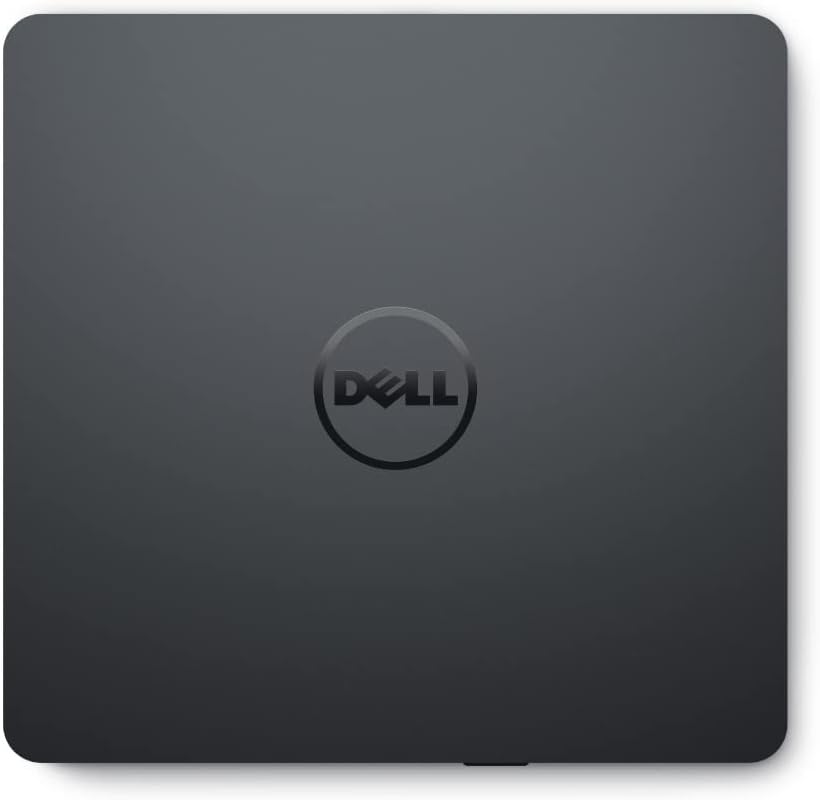
Dell offers a reliable external optical drive with a high user rating of 4.5 stars. Its lightweight design makes it easy to carry for mobile users needing on-the-go media access. The pre-loaded CyberLink Media Suite adds value for burning and playing discs immediately after setup.
We may earn a commission when you buy through this link, at no additional cost to you.
Key strengths include the low profile design that fits well with modern laptops. It is highly portable and requires no external power source thanks to USB bus power. The 1-Year Limited Hardware Warranty provides additional confidence in the product's durability.
Trade-offs involve older USB 2.0 technology which might limit transfer speeds compared to newer models. While functional, it lacks advanced features like M-Disc support or USB 3.0 speeds. These limitations are acceptable for users prioritizing brand reliability and simplicity over raw speed.
Buy this drive if you trust the Dell brand and need a simple plug-and-play solution. It is ideal for corporate environments or home users who want minimal setup steps. The included software saves time on initial configuration for everyday tasks.
CyberLink Media Suite comes pre-installed for immediate disc playback and burning tasks.
At 14mm thickness, it slides into laptop bags easily without adding significant bulk.
We may earn a commission when you buy through this link, at no additional cost to you.
HP's external DVD drive is a classic option known for straightforward functionality and reliability. It offers consistent performance for reading and burning discs without requiring complex drivers. Users appreciate the brand's reputation for quality hardware even in external peripherals.
We may earn a commission when you buy through this link, at no additional cost to you.
Key strengths include the simple plug-and-play interface that works across various systems. It is reliable for everyday tasks like installing software from discs or backing up files. The USB connectivity ensures broad compatibility with most modern laptops and desktops.
Trade-offs include a basic design that lacks advanced features found in newer models. While effective, it does not offer the fastest transfer speeds or extensive media suites. These limitations are acceptable for users prioritizing reliability over feature sets.
Choose this drive if you want a trusted brand for basic optical disc needs. It suits users who need a no-fuss solution for occasional use. The consistent performance ensures you can rely on it when internal drives fail or are absent.
HP's reputation for durable hardware extends to this reliable external drive unit.
Plug into USB and start using immediately without installing additional software drivers.
We may earn a commission when you buy through this link, at no additional cost to you.
The Rioddas drive stands out with a physical eject button for safe disc removal during system failures. It utilizes copper mesh technology to minimize electromagnetic interference for stable data transmission. Users value its high-speed USB 3.0 connection for quick access to large files.
We may earn a commission when you buy through this link, at no additional cost to you.
Key strengths include the physical button which eliminates the frustration of stuck discs. The copper mesh ensures consistent performance even in environments with other electronic devices. It is highly portable and fits well in laptop bags for on-the-go use.
Trade-offs include a basic casing material that might not offer as much protection as premium brands. While the warranty is standard, the build quality is sufficient for typical daily usage. These factors are acceptable given the performance and feature balance.
Buy this drive if you need reliable data transfer with a safety eject option. It is suitable for users who frequently burn data discs and need stability. The copper mesh tech ensures your files transfer correctly without corruption.
Use the physical button to eject discs if the software fails to recognize the drive.
Enhanced shielding reduces interference for consistent read and write performance.
We may earn a commission when you buy through this link, at no additional cost to you.
ORIGBELIE offers an ultra-slim 13mm design that is perfect for travel and tight workspaces. It includes a charging cable to provide extra power if USB ports deliver insufficient energy. The anti-skid bottom ensures stability during use on various desk surfaces.
We may earn a commission when you buy through this link, at no additional cost to you.
Key strengths include low power consumption which is ideal for battery-powered laptops. Its lightweight build makes it easy to carry without adding bulk to your bag. Users appreciate the reliable error correction that maintains performance even with lower power input.
Trade-offs include a 90-day warranty which is shorter than the two-year coverage of some competitors. The accessory kit is basic compared to those including cases or software suites. These are acceptable trade-offs for the significant savings and portability benefits.
Choose this drive if you want the thinnest possible option for maximum portability. It suits frequent travelers or users with minimal desk space. The included power cable ensures it works even with less powerful USB ports.
Use the included cable to connect to a charger if USB power is insufficient.
Rubberized bottom keeps the drive firmly in place during reading or writing.
We may earn a commission when you buy through this link, at no additional cost to you.
This portable drive uses intelligent burning technology to optimize data transfer speeds for both CDs and DVDs. Its pure-copper knitted-net tech ensures strong shielding for stable connections. Users find it versatile for working with various laptop brands without needing specialized drivers.
We may earn a commission when you buy through this link, at no additional cost to you.
Key strengths include the embedded cable design that keeps your workspace organized. It supports a wide range of brands including Dell HP and ASUS making it a universal choice. The high-speed read and write capabilities ensure efficient backups and media playback.
Trade-offs include a generic design that lacks unique premium features like carrying cases. The USB 2.0 speed might not match USB 3.0 alternatives in raw transfer rates. These limitations are acceptable for users seeking broad compatibility over cutting-edge specs.
Buy this drive if you need a universal solution for mixed laptop brands. It suits users who require reliable data transfer without brand-specific constraints. The intelligent technology ensures consistent performance across different operating systems.
Optimized algorithms adjust writing speeds to maximize reliability and reduce errors.
Pure copper networking improves stability for faster and safer data transfers.
We may earn a commission when you buy through this link, at no additional cost to you.
Dell's Slim DW316 drive is designed as a reliable OEM replacement for specific laptop models. It boasts the highest rating of 4.7 stars indicating exceptional user satisfaction and consistency. Support for DVD-RAM offers more versatile archival options compared to standard drives.
We may earn a commission when you buy through this link, at no additional cost to you.
Key strengths include its proven reliability and seamless integration with compatible Dell laptops. The drive operates quietly and efficiently without requiring external power. Users appreciate the OEM quality which matches the durability of internal components.
Trade-offs include USB 2.0 limitations and design focus on specific Dell models. While versatile for other PCs, it is optimized for the listed Inspiron and OptiPlex series. These constraints are acceptable for users needing an exact replacement for their system.
Choose this drive if you own a compatible Dell laptop needing a replacement. It suits users prioritizing OEM quality over universal features. The high reliability ensures you won't face frequent hardware failures during critical data tasks.
Designed as a factory replacement for seamless integration with Dell hardware.
Read and write DVD-RAM discs for flexible reusability and long-term storage.
We may earn a commission when you buy through this link, at no additional cost to you.
Choosing the right external DVD drive involves considering connectivity speed and compatibility. Here are the key factors to evaluate before making your purchase.
Modern laptops often have USB Type-C ports while older ones have USB 3.0 ports. Check your computer's available ports before buying to ensure you get the right adapter or cable. Dual connector drives offer the best flexibility for mixed device environments.
Always confirm the cable type matches your laptop's port to avoid buying separate adapters.
USB 3.0 drives offer faster data transfer speeds up to 5Gbps compared to USB 2.0 models. This is crucial if you frequently burn large data discs or play high bitrate videos. USB 3.0 ensures smoother performance without lag during operation.
Prioritize USB 3.0 models for faster and more efficient file transfers.
If you travel often look for drives under 15mm thick and under 200g. Slim designs fit easily into laptop bags without adding bulk. Portability is key for users who need optical access in different locations daily.
Choose a compact lightweight model for frequent travel needs.
Ensure the drive supports Windows 11 specifically for plug-and-play functionality without driver issues. Some drives also support macOS or Linux which is useful for mixed office environments. Check the product specifications for your exact OS version compatibility.
Verify Windows 11 compatibility in the product details before purchasing.
Look for drives with at least 8x DVD read and write speeds for smooth playback and burning. CD speeds often reach 24x which is adequate for audio files. Higher speeds reduce wait times when burning large backups.
Select models with 8x or higher DVD speeds for better performance.
Most drives are bus powered but some may need extra power from a wall adapter or charging cable. If you use a Mac or low-power laptop ensure the drive supports USB power delivery. Using a powered USB hub can help prevent recognition issues.
Check if the drive requires an external power source for your setup.
A longer warranty period like 1 or 2 years indicates the manufacturer's confidence in durability. Check if customer support is accessible for troubleshooting connection issues. Reliable support ensures you can resolve hardware problems quickly if they arise.
Prioritize drives with at least a one-year warranty for better protection.
Some drives come with carrying cases software suites or multiple cables which adds value. Bundled software like Nero can save you from buying separate burning tools. Accessories reduce the need to purchase extra gear separately.
Look for bundles that include cases and software for added convenience.
To use your external DVD drive connect it directly to a USB port on your computer avoiding unpowered hubs for stability. Ensure the drive is recognized in File Explorer before inserting a disc. If using a Mac insert the disc first then connect the cable to avoid power issues.
Keep the drive in its protective case when not in use to prevent scratches and dust accumulation. Avoid bending the cable excessively as this can damage the internal wiring over time. Store the drive in a cool dry place away from direct sunlight to protect internal components.
Use trusted software like VLC Player or Windows Media Player for disc playback to ensure compatibility. Regularly check for software updates on your computer to maintain optimal device recognition. If the drive stops being recognized try restarting your computer or cleaning the USB port.
Yes most modern external DVD drives are plug-and-play compatible with Windows 11. Drivers are usually installed automatically when you connect the device via USB. However check the product details to confirm explicit Windows 11 support for the best experience.
Most drives draw power from the USB port but some models may need an extra power cable. If your computer's USB port does not supply enough power use the included charging cable or a powered hub. This ensures the drive operates smoothly without errors.
Many drives support macOS but you may need to install specific software to read or burn discs. Ensure the drive is explicitly listed as Mac compatible in its specifications. Some drives require inserting the disc first before connecting the USB cable on Mac systems.
USB 3.0 drives offer faster data transfer speeds up to 5Gbps while USB 2.0 is limited to 480Mbps. This affects how quickly you can burn or read large files. USB 3.0 is recommended for better performance with modern computers and large media files.
Yes you can watch DVDs by connecting the drive and using media player software like VLC. Windows 11 does not come with DVD playback software by default so you may need to install a third-party player. This allows you to view physical DVD media easily.
Most standard external DVD drives do not support Blu-ray discs unless specified as a Blu-ray drive. Check the product specifications for mentions of BD or Blu-ray support. Standard drives usually handle CDs and DVDs but not high-definition Blu-ray media.
Try connecting the drive to a different USB port or restarting your computer to refresh connections. Avoid using unpowered USB hubs which can cause power issues. Check Device Manager to see if the drive appears or needs a driver update.
It is safer to disconnect the drive while moving your laptop to avoid damaging the USB port. External drives are not designed to be used during travel due to shock and movement risks. Store them in a protective case inside your laptop bag when not in use.
We have reviewed ten top-rated external DVD drives that offer reliable performance for Windows 11 users. From the versatile ROOFULL model to the budget-friendly 5-in-1 option there is a choice for every need and budget. Consider your specific connectivity and speed requirements before making a decision.
When choosing prioritize connectivity type compatibility and build quality to ensure smooth operation with your system. USB 3.0 models offer better speed but ensure your laptop supports them. For travelers slim designs are crucial while office users might prefer drives with better software bundles.
Prices and availability for these drives change frequently so check the latest offers before buying. Ensure you select a drive that matches your laptop's ports for optimal performance. Investing in a quality drive now will save time and hassle during future media or backup tasks.