
Aula F98Pro V3
3.5Editor score
Integrated LCD screen display
10000mAh battery capacity
Hot-swappable switch support
Explore the top 10 keyboards with acrylic chassis for stunning visuals and performance. Compare features, switch types, and wireless connectivity options for
Acrylic chassis keyboards have revolutionized the mechanical keyboard market by combining durability with stunning aesthetics. These boards offer a unique translucent look that enhances RGB lighting effects while providing a sturdy foundation for your typing experience.
We analyzed ten top-rated models based on build quality, connectivity options, switch compatibility, and overall user satisfaction. Our comparison focuses on how well each acrylic design balances visual appeal with functional performance for gaming and productivity.
Each pick highlights specific strengths like battery life, customizability, or acoustic tuning. Please note that product availability and pricing can change rapidly, so verify details on the retailer page before making your final purchase decision.
3.5Editor score

4.7Editor score
5.0Editor score
This side-by-side comparison helps you quickly identify which acrylic keyboard fits your specific needs regarding layout, battery life, and switch customization options.


The KiiBoom Phantom81 V4 stands out as a top budget option for those seeking an acrylic chassis without breaking the bank. With a rating reflecting mixed but generally positive feedback, it delivers a compelling mix of aesthetic appeal and functional features like hot-swap capability.
We may earn a commission when you buy through this link, at no additional cost to you.
Its frosted acrylic construction provides an ethereal look that diffuses RGB lighting beautifully while resisting fingerprints. The 8000mAh battery is a standout feature, offering extended wireless use that dwarfs many competitors. The rotary knob adds practical control for volume and brightness adjustments.
While the frosted finish maintains elegance, it may show dust more easily than glossy alternatives. The driver software is currently limited to Windows, which might inconvenience Mac users seeking deep customization. However, core features like hot-swapping work regardless of software.
This keyboard is ideal for budget-conscious gamers or typists who prioritize battery life and visual style. Its sturdy build and creamy typing experience make it a reliable choice for daily use. Consider it if you need long wireless endurance and don't require Mac driver support.
The frosted acrylic body conceals internal components while creating a sophisticated semi-transparent glow that enhances any desk setup.
With an 8000mAh battery, users can enjoy weeks of usage even with RGB lighting active, reducing the need for frequent charging.
We may earn a commission when you buy through this link, at no additional cost to you.
This transparent mechanical keyboard offers a sleek, clear acrylic design that reveals intricate internal mechanics for a modern look. It positions itself as an accessible entry point for users interested in custom aesthetics without complex assembly requirements.
We may earn a commission when you buy through this link, at no additional cost to you.
The silent linear switches make it suitable for shared office environments or quiet rooms where noise reduction is a priority. The rotary knob provides essential control over brightness and volume, adding convenience to a compact layout that saves significant desk space.
Users have noted inconsistent feedback regarding build quality and RGB software functionality. While the hardware supports multiple connection modes, the software interface may lack the depth found in premium models. This affects the overall customization experience.
Best suited for casual users or those starting their mechanical keyboard journey. Its clean white finish and transparency fit well in minimalist setups. If you need a silent, wireless keyboard with clear visuals and basic customization, this model delivers value.
Designed with ultra-quiet linear switches, this keyboard minimizes noise during typing, making it perfect for offices or streaming.
Supports Bluetooth 5.0, 2.4GHz wireless, and USB-C wired modes, allowing seamless switching between up to five different devices.
We may earn a commission when you buy through this link, at no additional cost to you.
The GravaStar Mercury K1 Lite earns its Editor's Choice title through a perfect blend of aesthetic beauty and solid performance. Its Crystal Aurora colorway with lavender and mint accents creates a mesmerizing gradient that stands out in any workspace environment.
We may earn a commission when you buy through this link, at no additional cost to you.
The open-frame PC chassis enhances lighting effects while maintaining durability. The five-layer gasket mount system ensures a creamy, thocky typing experience right out of the box. Users appreciate the sound profile which requires no additional modifications to enjoy premium acoustics.
While the design is visually captivating, it relies heavily on the included keycaps and chassis color, offering limited options for changing the overall look. The lack of a dedicated software driver means customization relies on hardware key combinations rather than deep software mapping.
Ideal for users who prioritize visual uniqueness and sound quality over extensive programmability. It fits perfectly in cozy or creator-inspired setups. If you want a wireless keyboard that looks like art and feels great to type on, this is a top recommendation.
Inspired by the Aurora Borealis, the gradient keycaps and translucent materials create a dreamy, ethereal glow under RGB lighting.
The gasket mount and five-layer dampening reduce resonance, providing soft, elastic keystrokes that feel luxurious and consistent.
We may earn a commission when you buy through this link, at no additional cost to you.
The YUNZII X98 Crystal offers a rare combination of full functionality and acrylic aesthetics. Its 96% layout includes a numpad for productivity tasks while maintaining a compact footprint. The jelly keycaps add a unique texture that enhances RGB light transmission effectively.
We may earn a commission when you buy through this link, at no additional cost to you.
QMK/VIA support allows deep customization without needing vendor-specific software. Users can remap keys, create macros, and adjust lighting directly through open-source firmware. This appeals to power users who want complete control over their input device configuration.
The pre-lubed switches provide a creamy feel immediately, but enthusiasts might want to replace them for further refinement. The full-size layout makes it heavier and less portable than smaller boards. The glossy bezel and clear casing require regular cleaning to avoid visible smudges.
Perfect for professionals who need a numpad and gamers who want customization. The white finish and crystal design make it a statement piece on any desk. If you value open-source support and a creamy typing experience with a full layout, this is an excellent choice.
The 96% layout retains essential navigation keys and a numeric pad, streamlining data entry and gaming shortcuts efficiently.
Full QMK/VIA support enables complex macro recording and key remapping, offering unparalleled flexibility for advanced users.
We may earn a commission when you buy through this link, at no additional cost to you.
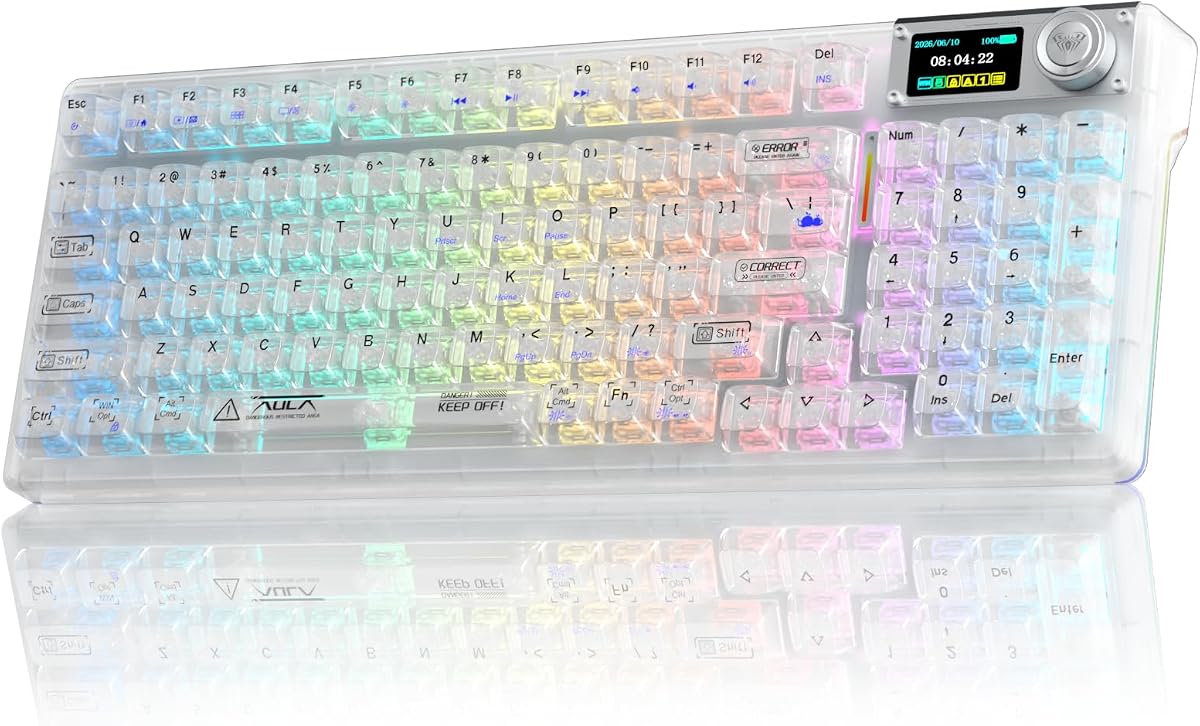
The Aula F98Pro V3 brings a unique feature to the table with its integrated TFT screen displaying real-time system info and battery levels. This adds a tech-forward appeal to the standard acrylic chassis design and provides practical utility for users tracking device status.
We may earn a commission when you buy through this link, at no additional cost to you.
Its 10000mAh battery is one of the largest in its class, ensuring minimal interruptions during extended sessions. The hot-swap PCB allows easy switch changes without soldering, encouraging experimentation with different typing feels. The clear keycaps enhance RGB brightness significantly.
Setting up the screen images and custom macros requires downloading specific drivers which are currently Windows-only. The learning curve for full functionality might be steeper for non-technical users. Some users report issues with the driver stability on older Windows versions.
Best for tech enthusiasts who want a screen and long battery life at a budget price. If you need a numpad and don't mind configuring software settings, this keyboard offers immense value. Consider it for its massive battery and unique display features.
The smart TFT screen shows connection status and battery levels, offering real-time insights without checking other devices.
With a 10000mAh battery, this keyboard supports weeks of heavy use, making it ideal for travel and extended work sessions.
We may earn a commission when you buy through this link, at no additional cost to you.
This YUNZII X98 variant focuses on seamless multi-device usage with support for up to five connections. The Crystal Switch version emphasizes a clear aesthetic with double-layer keycaps that maintain purity while resisting fading over time.
We may earn a commission when you buy through this link, at no additional cost to you.
The gasket mount design with five layers of dampening provides a satisfying thocky sound profile that appeals to enthusiasts. Pre-lubed Snow switches ensure a smooth typing experience immediately. The high transparency of the casing ensures RGB light passes through cleanly without obstruction.
While users praise the acoustics, some note that the switches might not satisfy everyone compared to premium alternatives. The build relies on high-transparency PC material which can feel less premium than metal options. Regular cleaning is needed to keep the clear casing looking new.
Ideal for users who switch between multiple devices frequently. Its creamy sound and clear visuals make it a strong contender for hybrid work and gaming setups. If you need reliable connectivity and a thocky feel without breaking the bank, this model is recommended.
Five layers of dampening materials including Poron foam create a deep, rich sound that reduces resonance effectively.
Supports connection to five devices simultaneously, allowing easy toggling between work laptops and personal PCs wirelessly.
We may earn a commission when you buy through this link, at no additional cost to you.
The GravaStar Mercury V60 brings competitive gaming performance to the acrylic category with its true 8KHz polling rate. The Crystal Rose design combines a transparent chassis with soft pink accents, appealing to streamers and gamers who want a visually striking setup.
We may earn a commission when you buy through this link, at no additional cost to you.
Hall Effect magnetic switches allow for Rapid Trigger technology, dynamically resetting keys upon release for faster directional control. This feature is crucial for high-level FPS gameplay where split-second reactions matter. The customizable actuation points let users tailor sensitivity precisely.
The compact 60% layout removes function keys and a numpad which might inconvenience non-gamers. The price reflects the advanced technology but may be steep for casual users. The acrylic casing is visually appealing but requires careful handling to avoid scratches.
Best for competitive gamers who value speed and aesthetics equally. The customizable magnetic switches offer a unique advantage over mechanical counterparts. If you need ultra-low latency and a standout design for streaming, this keyboard is a strong choice.
Rapid Trigger technology enables instant key resets, improving response times for fast-paced FPS games like Valorant or CS2.
Hall switches allow precise adjustment of actuation points, letting users fine-tune sensitivity for different game types.
We may earn a commission when you buy through this link, at no additional cost to you.
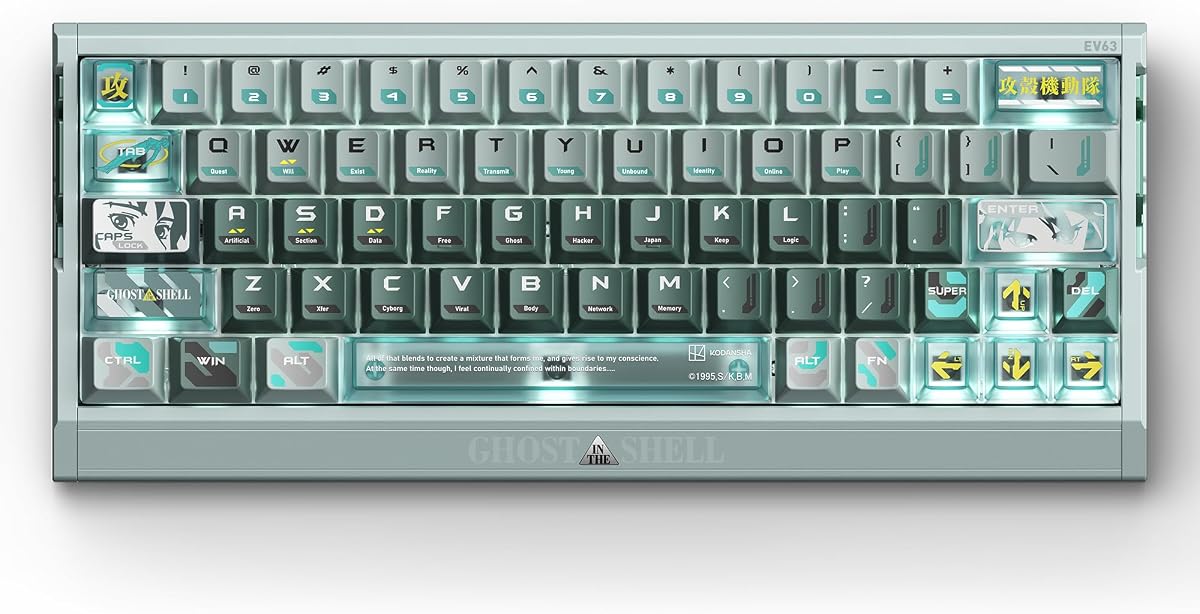
The IQUNIX EV63 stands as a premium collector's item with official Ghost in the Shell licensing. Its Shell Core version combines a transparent chassis with cyberpunk aesthetics and high-end Hall Effect switches. The aluminum case adds weight and stability unmatched by acrylic-only boards.
We may earn a commission when you buy through this link, at no additional cost to you.
HyperCore V3 technology ensures cleaner magnetic signals and consistent actuation. The Linear Nova switches provide a smooth, linear feel ideal for precise WASD movement. Every detail from lexicon sublegends to Motoko-inspired artwork caters to dedicated fans and enthusiasts.
The price is significantly higher than standard keyboards, reflecting the licensed branding and premium materials. The compact 60% layout limits functionality for productivity tasks. Maintenance of the custom artwork might require careful handling to preserve its visual integrity.
Perfect for collectors and competitive gamers who want a high-performance terminal. The CNC aluminum build and magnetic switches justify the cost for those seeking the best. If you love the anime theme and need top-tier performance, this is the ultimate choice.
The CNC aluminum case provides a solid, heavy feel that ensures stability during intense gaming sessions without slipping.
Smart Hall calibration and adaptive switch detection ensure precise magnetic sensing without manual configuration or calibration.
We may earn a commission when you buy through this link, at no additional cost to you.
The KiiBoom Phantom81 Lite focuses on programmability with full QMK/VIA compatibility allowing deep customization. The frosted ABS finish provides durability and resistance to discoloration while maintaining a refined aesthetic look. It balances functionality with a minimalist design.
We may earn a commission when you buy through this link, at no additional cost to you.
A gasket-mounted structure with multiple damping materials ensures a creamy typing foundation that appeals to enthusiasts. Pre-lubricated stabilizers eliminate rattling for a refined sound quality. The south-facing RGB backlighting enhances the visual appeal and offers dynamic lighting modes.
The battery capacity is lower than some competitors which may require more frequent charging. Users should ensure their system supports Linux if they need broad OS compatibility as firmware support can vary. The frosted finish may show wear differently than glossy options.
Ideal for tech enthusiasts and DIY aficionados who prioritize customization. Its compact layout and solid typing feel make it versatile for office or home use. If you need open-source programmability and a creamy feel without complex assembly, this is a reliable pick.
QMK and VIA support provide unlimited customization options for remapping keys and creating macros without proprietary software.
Multiple damping materials and gasket mounting reduce noise and improve feedback for a softer, more elastic typing experience.
We may earn a commission when you buy through this link, at no additional cost to you.
This variant of the Aula F98Pro V3 shows improved ratings by maintaining core strengths like battery life and aesthetics. The integrated screen continues to offer utility while the Ice Crystal switches provide a smooth and creamy typing feel. High-light-transmission keycaps maximize RGB brightness.
We may earn a commission when you buy through this link, at no additional cost to you.
The five-layer noise-dampening filling effectively eliminates cavity noise ensuring a soft, smooth experience. Hot-swap support encourages users to customize the board with their preferred switches. The clear casing creates a futuristic look ideal for gaming setups.
Users must use the original cable for charging to avoid fast charging issues. The driver software is Windows-only which may limit cross-platform customization. The setup requires some technical knowledge to unlock full features like screen images and macros.
Best for gamers and enthusiasts who value visual impact and battery life. Its solid performance and clear design make it a strong choice for daily use. If you want a versatile keyboard with a screen and long wireless use, this is worth considering.
Transparent keycaps paired with crystal switches deliver layered light transmission visuals for a captivating RGB display.
Five layers of dampening and gasket mounting ensure a soft, resilient typing feel that reduces hand fatigue over time.
We may earn a commission when you buy through this link, at no additional cost to you.
Selecting the perfect acrylic keyboard requires balancing visual appeal with functional needs. This guide helps you understand the key factors to consider before making your decision.
Acrylic chassis offer stunning transparency but vary in quality. Look for reinforced designs that resist cracking or scratching over time. Premium models often combine acrylic with stainless steel or aluminum weights to ensure stability.
Prioritize boards with scratch-resistant coatings or matte finishes to reduce visible wear and dust accumulation during daily use.
Translucent keycaps are essential for maximizing RGB effects in acrylic keyboards. Ensure the board supports south-facing LEDs for better visibility and light diffusion through the chassis.
Choose keycaps made from high-quality materials like PBT or high-transparency PC to maintain clarity and resist fading under constant LED exposure.
Most acrylic keyboards offer tri-mode connectivity including Bluetooth, 2.4GHz wireless, and USB-C. Verify polling rates like 1000Hz or higher for responsive gaming performance without cables.
Check device pairing limits to ensure the keyboard can handle all your devices like PC, laptop, and tablet simultaneously.
Hot-swap PCBs are highly recommended for acrylic keyboards allowing you to change switches without soldering. This extends the lifespan of your keyboard and enables experimentation with different feel profiles.
Select between magnetic Hall switches for gaming speed or traditional mechanical switches for tactile feedback based on your usage needs.
Wireless acrylic boards consume significant power due to RGB lighting. Look for capacities above 4000mAh to ensure reasonable usage time. Some models reach 10000mAh for extended sessions.
Check if the keyboard supports power-saving modes or allows turning off RGB to maximize battery life during work sessions.
Acrylic boards come in various sizes from 60% to full size. Consider if you need a numpad or arrow keys. Compact layouts save desk space while full layouts aid productivity.
Ensure the dimensions fit your desk area and consider portability if you plan to move the keyboard frequently between locations.
Customizable keyboards rely on software for macros and lighting. Prefer boards with open-source firmware like QMK or VIA for platform independence.
Verify driver compatibility with your operating system since some proprietary drivers only support Windows which limits customization for Mac users.
Acrylic keyboards range from budget-friendly to premium prices. Higher cost usually reflects better build quality and features like Hall Effect switches.
Determine your budget based on whether you prioritize aesthetics or performance. Mid-range options often offer the best balance of features and cost.
Always keep the keyboard clean by using a soft brush to remove dust from the transparent chassis. Avoid harsh chemicals that might cloud the acrylic surface or leave streaks on the finish.
Charge the battery using the original cable provided to ensure safe power delivery. Do not use fast chargers as they may damage the battery cells or reduce overall lifespan.
Store the keyboard in a dry environment to prevent moisture buildup. If using wireless, pair devices via the Bluetooth app for seamless switching without physical toggles.
High-quality acrylic chassis are generally durable and scratch-resistant when reinforced with metal bases. They provide better rigidity than standard plastic but should be handled carefully to prevent cracking.
Most wireless connectivity supports Mac via Bluetooth but software drivers often support Windows only. Check product details for Mac-specific compatibility before purchasing for deep customization.
Glossy acrylic models show fingerprints and dust more than frosted or matte finishes. Regular cleaning with a microfiber cloth helps maintain a clear and pristine appearance.
Battery life varies from 4000mAh to 10000mAh. With RGB off, most models last weeks, but with RGB on, expect fewer hours depending on brightness and usage intensity.
Most recommended models feature hot-swappable PCBs allowing you to change switches without soldering. This lets you customize the typing feel and upgrade components easily.
Magnetic Hall Effect switches offer faster actuation and adjustable sensitivity. They reduce mechanical wear and support features like Rapid Trigger for competitive gaming scenarios.
Our top picks include the GravaStar Mercury K1 Lite for aesthetics, the Aula F98Pro V3 for budget utility, and the IQUNIX EV63 for premium performance.
Prioritize battery life and switch customization if you need long wireless usage and tactile control. For gamers, polling rates and magnetic switches are essential for competitive play.
Always verify current pricing and availability as they change frequently. Check retailer pages for the latest offers and warranty details before finalizing your purchase.