
2026 WiFi Extender Signal Booster for Home
5.0Editor score
15000 Sq Ft Coverage
1-Tap WPS Setup
4 Modes Support
This guide compares the top ten distance WiFi extender options available in October 2026 to help you choose the best model for your home.
Finding a reliable distance WiFi extender is crucial for modern homes where signal range often falls short. Whether you work from home or stream in the backyard, consistent connectivity matters more than ever.
We analyzed ten leading models based on range capability, speed performance, ease of setup, and security features. Each product was evaluated against real world usage scenarios to ensure practical value.
Every pick highlights key strengths and ideal use cases so you can make an informed decision. Keep in mind that product availability and pricing may shift slightly over time.
5.0Editor score

4.1Editor score
4.5Editor score
This table provides a side-by-side overview of all ten top rated models. Use it to quickly compare coverage, speed specs, and key capabilities before making your final selection.


The TP-Link AX3000 stands out as a top choice for those needing reliable long distance WiFi coverage. With a solid 4.1 rating it delivers consistent performance across large homes. Its WiFi 6 technology ensures efficient data handling for multiple devices simultaneously.
We may earn a commission when you buy through this link, at no additional cost to you.
Coverage extends up to 2400 square feet thanks to high gain directional antennas and beamforming. This means dead zones are minimized even in larger floor plans. The gigabit ethernet port allows wired connections for devices that need stable speeds.
While it does not increase your original ISP speeds it improves signal reliability significantly. This is a standard limitation for all wireless extenders but the AX3000 handles it well. The EasyMesh support adds flexibility if you plan to expand your network later.
This model is ideal for families with many smart home gadgets or remote workers needing stable connections. Its security features and user friendly app setup make it accessible for non technical users. We recommend it as the best overall choice for most households.
TP-Link adheres to the Secure-by-Design pledge ensuring advanced security is built into the device. This protects your network from common threats without requiring extra configuration from you.
Move freely around your home as the extender automatically connects your devices to the strongest signal. This ensures uninterrupted coverage and optimal performance without manual switching.
We may earn a commission when you buy through this link, at no additional cost to you.
This 2026 model offers an impressive coverage range that suits very large properties or rural homes. It holds a perfect 5.0 rating from users who appreciate its straightforward design. The 1-tap WPS setup makes it accessible for anyone.
We may earn a commission when you buy through this link, at no additional cost to you.
Four adjustable external antennas allow you to optimize signal direction for better penetration. You can connect over seventy devices including laptops cameras and streaming sticks without lag. The repeater bridge and access point modes offer flexibility for different network needs.
Security is handled through standard WPA and WPA2 protocols which protect personal data effectively. While it may not have the latest WiFi 6 features it delivers stable performance for everyday tasks. The price point makes it an attractive option for budget conscious buyers.
Ideal for large homes where budget is a primary concern this extender eliminates dead zones efficiently. It is a practical choice if you need quick setup and wide coverage without extra features. We recommend it as the best budget solution on the market.
The device supports four distinct modes including repeater bridge access point and router. This versatility allows you to adapt the extender to various network configurations easily.
Equipped with a 2.4GHz processor and high gain antennas this extender maintains stable broadband. This ensures smooth video calls streaming and file transfers throughout your property.
We may earn a commission when you buy through this link, at no additional cost to you.
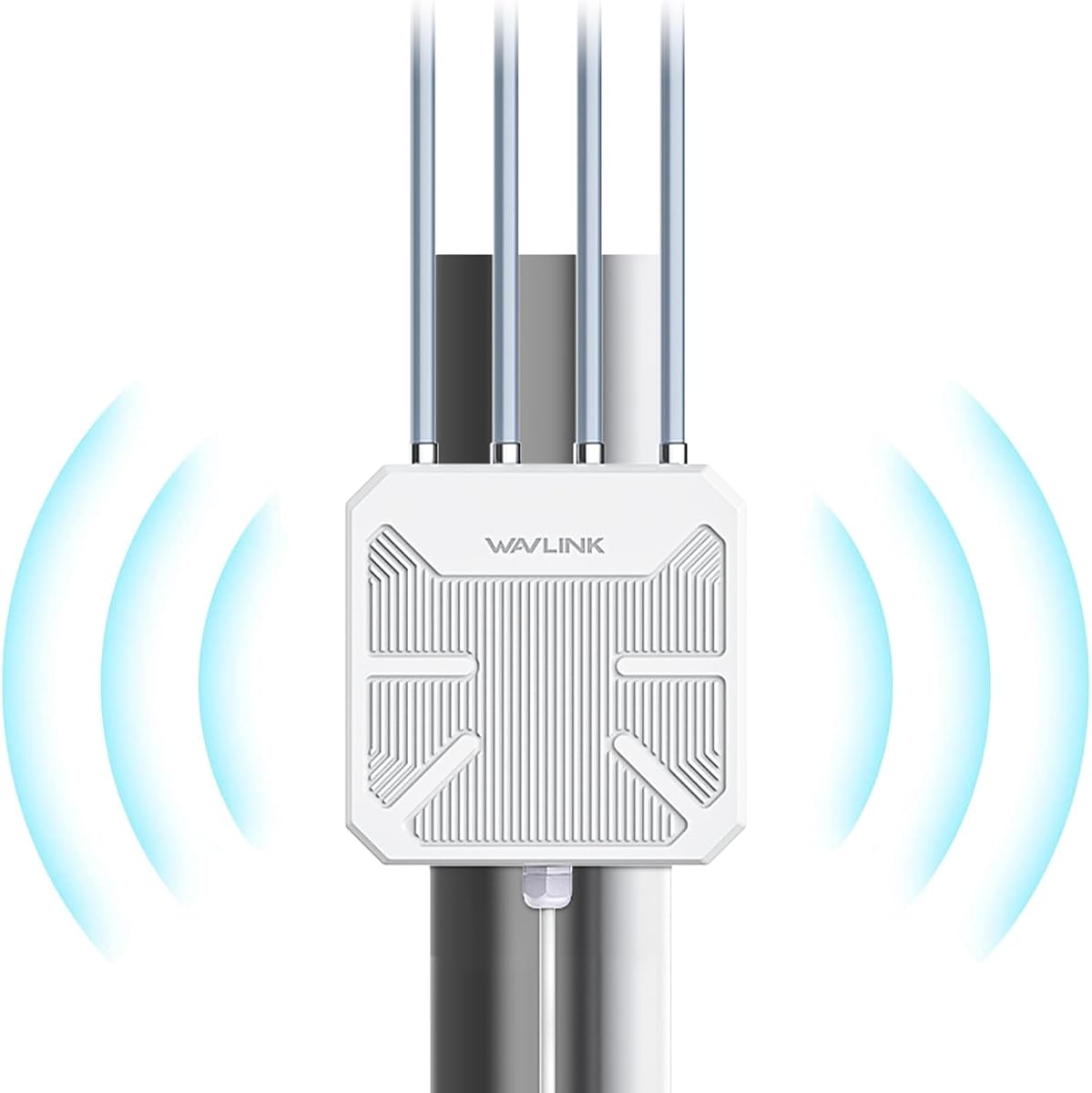
The WAVLINK Outdoor AX1800 is designed for those who need internet coverage beyond indoor walls. With an IP67 rating it withstands rain dust and temperature extremes effortlessly. Its 300 meter range makes it perfect for large yards and rural estates.
We may earn a commission when you buy through this link, at no additional cost to you.
It connects seamlessly with Starlink systems which is rare and highly useful for remote homes. Four 8dBi antennas deliver strong signal in line-of-sight environments. Mesh mode allows you to create a unified network name for smooth roaming indoors and outdoors.
Installation is simplified via PoE support letting you power the device through the ethernet cable. This reduces the need for electrical outlets in remote locations. The included adapter is not waterproof so install it indoors to protect it.
This premium unit is best for farms warehouses or estates needing robust outdoor connectivity. Its durability and specialized features justify the higher cost for specific use cases. We recommend it as the top choice for outdoor distance coverage.
The IP67 casing and heat resistant design ensure reliability in harsh conditions. It operates safely from -20C to 50C with resistance to moisture and static shock.
Support for active and passive PoE allows flexible power options. You can use a switch or the included adapter to power the unit remotely.
We may earn a commission when you buy through this link, at no additional cost to you.
The AC1900 RE550 is a trusted model offering reliable performance for most homes. Its AC speed class supports 1300 Mbps on the 5GHz band for high bandwidth tasks. Three adjustable antennas let you tailor signal direction to your home layout.
We may earn a commission when you buy through this link, at no additional cost to you.
With a 2100 square foot range it covers medium to large spaces effectively. It is compatible with EasyMesh routers to expand networks without replacing existing equipment. The gigabit port allows you to wire devices for consistent speeds.
While WiFi 6 is newer this model still delivers strong throughput for streaming and gaming. The Tether app makes setup and firmware updates simple for all users. It balances cost and performance well for those not needing the latest tech.
This extender is great for users upgrading from older systems without changing their router. It provides solid reliability and decent coverage at a competitive price. We recommend it for those seeking a proven AC standard device.
Automatic connections to the strongest signal ensure uninterrupted coverage as you move. This maintains optimal performance without manual intervention.
Turn any wired connection into a wireless hotspot using AP mode. This is useful for extending WiFi from wired locations in your home.
We may earn a commission when you buy through this link, at no additional cost to you.
The BE3200 brings WiFi 7 capabilities to extenders offering next-gen performance. Paired with a WiFi 7 router it uses MLO to combine bands for better throughput. This results in lower latency and higher reliability for demanding applications.
We may earn a commission when you buy through this link, at no additional cost to you.
It supports 4K-QAM and 160 MHz bandwidth for faster speeds up to 32 Gbps total. Four optimally positioned antennas with beamforming enhance signal strength and range significantly. The 2400 square foot coverage handles most residential layouts well.
While it does not support the 6GHz band it maximizes the 2.4 and 5GHz bands. This ensures compatibility with a wide range of devices while delivering high speeds. Setup via the Tether app is quick and intuitive for all users.
Ideal for tech enthusiasts with WiFi 7 routers this model prepares your network for the future. It handles AR VR gaming and 8K streaming with ease. We recommend it for those wanting cutting edge performance now.
Multi-Link Operation combines frequency bands for enhanced throughput and reliability. This delivers faster stable connections across all your applications.
Seamlessly move throughout your home with automatic connections to the strongest signal. This ensures uninterrupted coverage and optimal performance.
We may earn a commission when you buy through this link, at no additional cost to you.
This 2026 Internet Booster excels at supporting numerous connected devices simultaneously. It holds a perfect 5.0 rating and uses a powerful CPU for high speed processing. With 30000 square feet coverage it suits large homes effectively.
We may earn a commission when you buy through this link, at no additional cost to you.
It connects up to sixty five devices ensuring smooth performance during peak usage. The smart IC chip avoids delays and buffering even when the whole family is online. Five smart modes include AP and bridge for flexible network configurations.
Security is maintained through WPA and WPA2 protocols protecting personal data from risks. The 1-tap WPS setup means you do not need technical skills to install. It is compatible with 99 percent of routers for broad usability.
Best for large households with many smart gadgets this extender ensures stable connectivity. It offers reliable performance without needing expensive upgrades. We recommend it for families seeking capacity and ease of use.
Four external antennas provide 360 degree full signal coverage. This eliminates dead zones and ensures consistent WiFi throughout your home.
Advanced encryption and real time risk detection keep your network safe. This protects personal data from unauthorized access effectively.
We may earn a commission when you buy through this link, at no additional cost to you.
Hyzom offers a robust extender known for covering vast areas without signal loss. Rated at 4.8 it delivers stable performance for streaming video and calls. The Bionic chip and four high gain antennas ensure consistent signal penetration.
We may earn a commission when you buy through this link, at no additional cost to you.
It handles sixty five devices easily making it suitable for smart homes with many gadgets. An ethernet port provides fast wired connections for PCs consoles or TVs. Setup is simple with a WPS press or guided browser installation.
WPA2 encryption keeps your browsing and personal data secure from threats. The device works with all standard routers so you can upgrade without replacing equipment. Trusted by over five hundred thousand families it is a reliable option.
Ideal for those who want proven reliability and massive coverage this booster is a strong choice. It eliminates dead zones effectively and reduces buffering. We recommend it for home users needing consistent performance.
Trusted by over 500000 families this model transforms WiFi frustrations into smooth connectivity. It ensures dependable performance when you need it most.
The built-in ethernet port offers fast wired connections for specific devices. This is useful for stationary equipment needing stable speeds.
We may earn a commission when you buy through this link, at no additional cost to you.
This model claims the longest range among budget extenders reaching 15000 square feet. It is rated at 5.0 for its ability to penetrate walls and floors well. The FEM omnidirectional antennas ensure reliable signal in every room.
We may earn a commission when you buy through this link, at no additional cost to you.
It delivers six times faster speeds than average to prevent lag during gaming or streaming. You can connect over sixty five devices including smart speakers and security cameras. Five operating modes give you flexibility for home or office setups.
Security is bank-grade using WEP WPA and WPA2 encryption to protect data. The simple WPS setup means anyone can install it in minutes. It fits with most routers for broad compatibility across different brands.
Perfect for sprawling homes this extender ensures no area is left without coverage. Its performance and security features make it a strong contender for budget buyers. We recommend it for large homes needing maximum range.
Powered by a Bionic Chip this booster ensures faster internet speeds and smoother connections. It prevents buffering and lagging during high demand tasks.
Advanced encryption protects IoT devices from cyber threats effectively. This keeps your network safe and private at all times.
We may earn a commission when you buy through this link, at no additional cost to you.
The RE615X provides solid WiFi 6 performance for a reliable network boost. It supports 1201 Mbps on the 5GHz band ensuring smooth streaming and downloads. Two high gain directional antennas with beamforming improve signal strength effectively.
We may earn a commission when you buy through this link, at no additional cost to you.
Coverage extends to 2100 square feet eliminating dead zones for up to sixty four devices. EasyMesh compatibility lets you expand networks seamlessly with compatible routers. The gigabit port enables wired speed for key devices anywhere.
It does not support the 6GHz band but offers reliable dual band performance. Setup and management via the Tether app are quick and user friendly. Security follows the Secure-by-Design pledge for advanced protection.
Best for those wanting WiFi 6 without the highest cost this extender offers value. It is suitable for most homes needing better speed and coverage. We recommend it as a reliable middle ground option.
Beamforming enhances signal strength reliability and range significantly. This provides whole home Wi-Fi coverage and eliminates dead zones.
Check the Tether App for the latest firmware to ensure peak performance. Keeping updates current helps maintain security and speed.
We may earn a commission when you buy through this link, at no additional cost to you.
The AdaLov CPE660 is designed for connecting buildings across vast distances wirelessly. It supports up to 3KM range with clear line of sight ensuring network access between sites. This is ideal for farms barns and warehouses needing reliable links.
We may earn a commission when you buy through this link, at no additional cost to you.
It operates on 5.8GHz providing up to 300Mbps speeds for video surveillance or traffic. The 14dBi directional antenna focuses energy for stable transmission. Dual ethernet ports allow flexible wired connections for devices at each end.
WDS plug-and-play setup simplifies installation though alignment is crucial for success. The IP65 housing protects against rain and dust for outdoor durability. PoE options help simplify remote installation without nearby power sources.
Best for industrial or rural setups this bridge avoids expensive cabling costs. It delivers reliable long distance connectivity for remote security or internet access. We recommend it for those needing building-to-building network extension.
Creates a point-to-point WiFi bridge between buildings without costly Ethernet. It extends networks across open areas up to 3KM with clear line of sight.
IP65 rated housing helps protect the bridge from rain dust and weather. It is suited for exterior walls poles and exposed locations.
We may earn a commission when you buy through this link, at no additional cost to you.
Selecting the right distance WiFi extender involves understanding several key factors that affect performance and usability.
Coverage range determines how far your WiFi signal can reach beyond the router. Look for models that match your property size whether it is 2000 square feet or more. Larger homes need extenders with high gain antennas and larger coverage claims.
Always check the square footage rating to ensure it fits your layout. Dead zones will persist if the range is insufficient for your walls and floors.
WiFi standards like WiFi 5 6 and 7 define speed and efficiency capabilities. Newer standards offer better handling of multiple devices and faster throughput. If you have modern devices consider a WiFi 6 or 7 extender for future proofing.
Older standards may still work but will limit performance. Match the extender to your router to avoid bottlenecks in network speed.
Setup ease varies from simple WPS buttons to complex app based configurations. Look for 1-tap WPS or guided setups if you are not technical. This saves time and ensures you install the device correctly the first time.
App managed setups provide more features but may require downloads. Choose a method that fits your comfort level with technology.
An ethernet port allows you to connect devices that need stable wired speeds. This is useful for PCs consoles or smart TVs that can be stationary. Check if the port is gigabit for fast data transfer speeds.
Wired connections are often more reliable than wireless. Ensure the extender includes ports if you plan to connect stationary devices.
Multiple modes like Repeater Bridge Access Point and Router increase flexibility. These allow the device to adapt to different network topologies. Choose a model with modes that fit your existing network architecture.
Bridge mode connects two networks while AP creates new hotspots. Having options ensures you can use the device in various scenarios.
Device capacity indicates how many gadgets can connect without performance drops. Larger households with many smart devices need high capacity extenders. Look for models supporting 50 or more devices for optimal performance.
Exceeding capacity causes lag and dropped connections. Ensure the extender supports your current and planned number of devices.
Durability ratings like IP67 ensure resistance to weather and dust for outdoor units. Indoor models need less protection but should be sturdy. Consider where you will place the device and choose weatherproofing accordingly.
Outdoor units must withstand rain and extreme temperatures. Always check IP ratings for external installation.
Security protocols like WPA2 protect your data from unauthorized access. Modern units include built-in cybersecurity to prevent threats. Check for advanced security pledges to ensure data safety.
Secure devices keep your network private and safe. Avoid models without standard encryption to protect your information.
Place the extender halfway between your router and the dead zone. This ensures it picks up a strong signal to amplify effectively. Avoid placing it behind metal or thick concrete which can block signals.
Use the WPS button for the quickest setup by pressing both router and extender. For advanced settings download the manufacturer app to optimize channels and passwords. Regular updates keep performance and security at peak levels.
Clean the vents occasionally to prevent dust buildup which can cause overheating. Avoid placing the device near heat sources or direct sunlight. Proper ventilation ensures long lifespan and stable performance.
No it improves coverage not speed. Actual speeds may drop by half due to halving bandwidth but reliability improves. It extends reach not raw ISP capacity.
Not necessarily but performance is best with matching router standards. They work with older routers but may limit speed benefits. Match standards for optimal efficiency.
Place it within router range but closer to dead zones. Use signal indicators on the device or app to find the best spot. Avoid corners where signals weaken.
Only if the extender is rated weatherproof like IP67. Standard indoor units will fail outdoors. Check ratings before outdoor placement.
Bridge connects two networks while repeater extends one. Use bridge for separate buildings and repeater for same home. Choose based on your network layout needs.
Most support 30 to 70 devices depending on model. Check device capacity specs to avoid lag. Large homes need high capacity models.
They require connection to a router not direct internet. The router provides internet access to the extender. Both need power to function.
Use the manufacturer app to check for firmware updates. Update regularly for security patches and performance boosts. Auto update features help stay current.
The ten models reviewed offer strong solutions for extending distance WiFi coverage. Whether you need indoor range or outdoor durability there is a fit for every home.
Prioritize range capacity and security when choosing to ensure long term satisfaction. Match the tech to your needs for smooth performance.
Always check current availability and prices before buying to get the best deal. This guide helps you make a confident choice for your network.