
VTech Play Smart Preschool Laptop
4.6Editor score
30 leveled learning activities
Personalize with child name
Compact lightweight design
This guide compares the best laptop for 5 year old to find top educational toys with safe screens and learning activities for young children.
Finding the right laptop for a five year old can seem tricky with so many options available today. Parents need devices that are safe engaging and educational to support early learning goals effectively.
We compared ten top rated models based on educational content build quality and age appropriate features. Each product was evaluated for screen safety battery life and overall learning value for young kids.
Each pick shows key specs pros and cons to help you choose quickly. Keep in mind that prices and availability can change so always check current listings before buying your child a new toy laptop.
4.6Editor score

4.7Editor score

4.2Editor score
Here is a side by side comparison of all ten laptops to help you see key differences at a glance.





The LeapFrog 2-in-1 LeapTop Touch stands out as the top choice for young learners. It holds a strong 4.7 rating and transforms easily into a tablet for versatile play.
We may earn a commission when you buy through this link, at no additional cost to you.
Its key strength lies in the flip mechanism that turns the screen into a touch tablet. Kids can pretend to e-mail Scout and parents can customize spelling activities to teach their child's name.
While it requires batteries which can add ongoing cost the simplicity is worth it for this age group. The transition between modes keeps interest high without complex setup or internet needs.
This laptop is ideal for parents seeking a trusted brand with proven educational value. It bridges the gap between early toddler play and school readiness perfectly.
The five learning modes cover ABCs numbers games music and messages to ensure a broad educational experience.
Personalizing spelling and name activities helps children connect learning to their own identity early on.
We may earn a commission when you buy through this link, at no additional cost to you.
For families wanting a true laptop experience this LEXiBOOK model offers real power. It features a large 10.1 inch HD screen and powerful processor for smooth performance.
We may earn a commission when you buy through this link, at no additional cost to you.
It includes the Power Academy app and access to thousands of games via Google Play. Robust parental controls allow parents to manage time and apps safely while children explore.
The higher price reflects its advanced tech but it grows with the child. You get real laptop skills like video conferencing and app browsing within a safe family-friendly environment.
This is best for tech-savvy parents ready to introduce real computing skills early. It bridges the gap between toy and tool effectively for older preschoolers.
Access to Google Suite and YouTube helps children learn digital literacy in a controlled setting.
Customizable profiles and Qwant Junior browser ensure safe browsing and app management.
We may earn a commission when you buy through this link, at no additional cost to you.
The VTech Play Smart Preschool Laptop delivers solid value for the price. It features 30 leveled activities that adapt to the child's progress and keeps them engaged.
We may earn a commission when you buy through this link, at no additional cost to you.
Children can personalize their avatar name and age making the toy feel truly theirs. Activities cover letters numbers and beginning Spanish to build foundational skills effectively.
While it lacks advanced tech the focused learning is perfect for this age. The lightweight design makes it easy to carry around for travel or playdates anywhere.
This is the smart choice for budget-conscious parents needing a reliable learning tool. It introduces computer concepts safely without breaking the bank.
Creating a unique avatar helps children feel ownership and boosts engagement during play.
Early exposure to Spanish words builds a strong foundation for bilingual learning later.
We may earn a commission when you buy through this link, at no additional cost to you.
The VTech Genio offers a realistic computer experience with a full QWERTY keyboard. It helps build basic computer skills early with over 80 activities included offline.
We may earn a commission when you buy through this link, at no additional cost to you.
Every activity can be played in English or Spanish offering a bilingual immersion for kids. Apps like a weekly calendar and music player mimic real adult computer tasks.
While it uses more batteries the offline capability means no internet setup needed. It prepares kids for future school computers while keeping learning safe and contained.
Ideal for families wanting early typing skills and language exposure. This model bridges play and practical computer literacy better than most.
A full QWERTY keyboard helps develop finger dexterity needed for future school typing tasks.
Pre-loaded activities ensure play is available anywhere without needing internet connections.
We may earn a commission when you buy through this link, at no additional cost to you.
This Kids Laptop stands out with a built-in camera and 64 learning modes. It combines creativity with education letting kids capture memories and learn simultaneously.
We may earn a commission when you buy through this link, at no additional cost to you.
The camera includes cute photo frames and filters for fun photography. After learning math or alphabet kids can test memory logic with games and keep smiling.
While storage is limited the creative outlet is huge for development. It balances screen time with active creative expression and logical reasoning skills effectively.
Best for artistic kids who want to take pictures while learning. It makes education feel like a fun creative project rather than work.
Photo filters and frames encourage kids to experiment with visual creativity safely.
The blend of 64 modes ensures kids stay engaged with both lessons and games.
We may earn a commission when you buy through this link, at no additional cost to you.
This Kids Laptop offers a bright TFT color screen with 48 learning modes. It covers basics like alphabet math and animals with a realistic mouse and keyboard.
We may earn a commission when you buy through this link, at no additional cost to you.
The protective film ensures screen safety while the slim design fits small hands comfortably. Calendar and clock reading apps teach time management skills early on.
It trades high-end features for solid educational value. Parents looking for simple screen-based learning without cost get a reliable tool here.
Ideal for daily routine learning on the go. It is simple durable and effective for building early academic confidence.
A protective film on the screen prevents scratches and ensures a longer device life.
Calendar and clock apps help kids understand daily routines and time concepts early.
We may earn a commission when you buy through this link, at no additional cost to you.
The Lexibook Unicorn Laptop combines a favorite theme with educational content. It offers English and Spanish activities including math logic and music melodies.
We may earn a commission when you buy through this link, at no additional cost to you.
The realistic mouse and keyboard help develop typing and mouse skills early. Different levels of activities allow kids to test and improve knowledge as they grow.
While it relies on batteries the slim design makes it easy to carry. The theme helps motivate kids who love unicorns to spend more time learning.
Great for children needing motivation through theme-based learning. It turns study time into a fun engaging session effortlessly.
Dactylography activities teach basic typing and key recognition in a fun way.
Memory and logic games challenge kids to think critically after lesson completion.
We may earn a commission when you buy through this link, at no additional cost to you.
This Lexibook Barbie laptop offers a massive 124 activities to keep kids busy. It covers math logic music and language skills with an elegant design.
We may earn a commission when you buy through this link, at no additional cost to you.
Multiple activity levels allow kids to learn at their own pace comfortably. Games like Snake and Puzzle provide entertainment after mastering educational tasks.
While the screen is smaller the portability is excellent. It fits easily in bags for trips or playdates without taking up much space.
Best for kids who prefer portable learning tools. It balances fun and education perfectly with a beloved theme.
Compact dimensions make this laptop perfect for travel and on-the-go learning sessions.
Activities in English and Spanish reinforce language skills simultaneously for bilingual growth.
We may earn a commission when you buy through this link, at no additional cost to you.
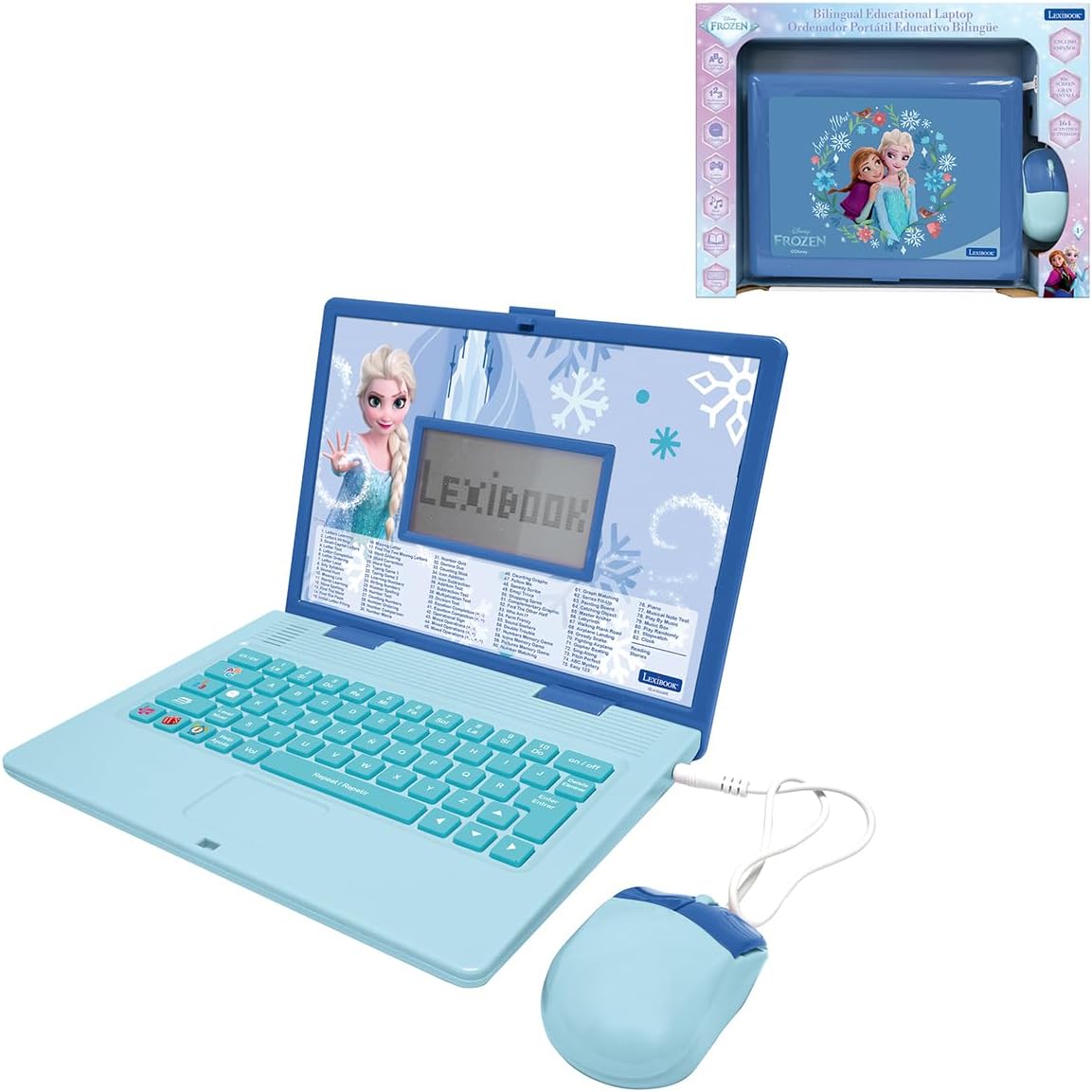
This LEXiBOOK Frozen laptop brings a favorite theme to learning with 164 activities. It covers vocabulary spelling maths and music with helpful voice guidance.
We may earn a commission when you buy through this link, at no additional cost to you.
Kids can switch between English and Spanish to build language skills easily. The lightweight design makes it ideal for learning at home or on the go.
While reviews may vary the brand quality is trusted by parents. It offers a robust set of activities for kids needing extra practice in core skills.
Ideal for fans of the movie who want to learn more. It transforms favorite characters into educational tools for growth.
Helpful voice prompts guide kids through activities without needing constant parental help.
Switching languages during play helps build strong vocabulary in both English and Spanish.
We may earn a commission when you buy through this link, at no additional cost to you.
The LeapPad Academy offers a tablet experience with 20 educator-approved apps that grow with the child. It includes a stylus and tough bumper for safety.
We may earn a commission when you buy through this link, at no additional cost to you.
Parents can set time limits and manage apps easily via controls. The rechargeable battery ensures longer playtime without frequent battery changes.
While it lacks a physical keyboard the stylus encourages creative drawing. This makes it a strong alternative for kids who prefer touch over typing.
Best for families wanting a more advanced tablet for learning. It balances screen time with educational apps safely.
Apps are vetted by educators to ensure they support real early learning goals effectively.
The included stylus helps develop fine motor skills while allowing for creative expression.
We may earn a commission when you buy through this link, at no additional cost to you.
Choosing the right laptop requires checking features that match learning needs and safety standards.
Look for laptops with over 50 activities covering math reading and logic. Quality content keeps kids engaged and helps build foundational skills effectively.
Prioritize models with leveled learning to grow with your child's abilities over time.
Ensure the screen has a protective film or shatter-safe material to prevent damage. A clear display with good contrast helps reduce eye strain during play.
Check for screen size recommendations suitable for small hands to avoid discomfort.
Most toy laptops run on AA batteries. Consider rechargeable options to save money and reduce waste over time.
Verify battery life estimates to ensure the device lasts long enough for play sessions.
A lightweight design with realistic keyboard and mouse helps develop motor skills. The size should fit comfortably in a child's grip.
Check dimensions and weight to ensure portability for travel or school use.
If you speak multiple languages look for bilingual modes that switch between English and Spanish. This supports language development early.
Verify that both languages are included in all activities for consistent learning.
For devices with internet access ensure robust parental controls exist. These help manage screen time and app access safely.
Check if you can set limits or block inappropriate content easily.
Kids often prefer themes like unicorns or dinosaurs. A favorite theme increases interest and time spent on educational activities.
Ensure the design is not just pretty but also durable for rough play.
Offline activities mean no internet is required. This ensures play is available anywhere without needing WIFI setup.
Check if all learning modes work without a connection for peace of mind.
Always start by installing fresh batteries to ensure the laptop turns on smoothly. If using AA batteries keep spares nearby for uninterrupted play.
Teach your child to gently press keys and use the mouse. Encouraging careful use extends the life of the device significantly.
Store the laptop in a cool dry place away from direct sunlight. This prevents screen fading and battery damage over time.
Most laptop toys are designed for ages 3 to 6 years. A five year old will find the activities engaging and developmentally appropriate for early learning.
Most toy laptops do not require internet and work offline. Some advanced models may have WIFI but always check the specs for connectivity needs.
Battery life varies but generally lasts for several hours of play. Using rechargeable AA batteries is cost-effective and eco-friendly for regular use.
Most toy laptops come with pre-loaded content that cannot be updated. Advanced tablets may allow app downloads to expand learning options later.
They are designed for small hands with rounded edges and shatter-safe screens. Always supervise young children during use to ensure safe play practices.
Laptops teach typing skills while tablets focus on touch. For a five year old learning computer basics a laptop toy may offer more specific skills.
The LeapFrog 2-in-1 LeapTop Touch offers the best balance of versatility and learning. It transforms into a tablet making it ideal for active and creative kids.
If you need a budget-friendly option the VTech Play Smart Preschool Laptop delivers solid value. It covers key early learning skills without a high price tag.
Remember to check current prices and availability before buying as these often change. Pick the one that best fits your child's learning goals and interests.