
ASRock 970A-G/3.1
4.2Editor score
Supports AM3+ processors
Includes M.2 slot
USB 3.1 Type-C
This guide compares ten top Asrock AM3 Motherboard models for performance and compatibility with Phenom II and Athlon CPUs in desktop builds.
Finding the right foundation for your legacy AMD build requires careful consideration of chipset capabilities and expansion options. The Asrock AM3 Motherboard lineup offers a range of solutions for users seeking reliable connectivity and efficient power delivery for their systems.
We have evaluated ten distinct models based on their chipset architecture, memory support, and expansion slot configurations. This analysis helps you identify which board aligns best with your specific processor choice and future upgrade needs.
Each selection highlights unique strengths such as SATA speeds, USB port availability, or overclocking features. Keep in mind that availability and pricing may fluctuate so checking current listings ensures you get the best deal today.
4.2Editor score

4.0Editor score

3.8Editor score
The following table provides a side-by-side comparison of key specifications across all ten reviewed models to help you make an informed decision quickly.




The ASRock 760GM-HDV stands out as an entry-level option for builders using older AMD Phenom II processors. It delivers solid performance for basic computing tasks and light gaming with a reliable chipset that supports up to eight cores.
We may earn a commission when you buy through this link, at no additional cost to you.
This board includes essential connectivity like SATA2 and USB2.0 ports which are sufficient for older storage devices. The integrated video and audio codecs simplify setup for budget builds where discrete expansion cards are not needed.
Users may find the lack of modern USB 3.0 speeds a drawback for transferring large files. However for the Advanced Clock Calibration feature allows for useful tuning without requiring a more expensive platform.
Ideal for hobbyists restoring legacy systems, this model offers excellent value. It ensures your old high-clock CPUs can still run efficiently within a stable thermal envelope.
Solid capacitor design ensures stable voltage to the CPU during extended workloads.
The MicroATX size fits well in smaller cases while still providing necessary slots.
We may earn a commission when you buy through this link, at no additional cost to you.
The ASRock 970A-G/3.1 brings modern conveniences to the AM3+ platform that are rare in this generation. It supports SATA3 and offers a surprising M.2 slot which allows for faster boot drives compared to traditional HDDs.
We may earn a commission when you buy through this link, at no additional cost to you.
With four DDR3 slots supporting up to 64GB of memory this board handles multitasking well. The USB 3.1 ports provide high-speed data transfer for external drives and peripherals requiring more bandwidth.
The primary limitation is the PCIe configuration for the M.2 slot which runs at x4 speeds rather than full x16. This is acceptable for storage but limits potential future expansion for high-speed NVMe devices.
This model is perfect for users wanting to upgrade an existing AM3+ CPU with a faster SSD. It bridges the gap between legacy hardware and modern storage performance effectively.
M.2 support allows significantly faster boot times than standard SATA SSDs.
Support for 64GB dual channel memory suits virtualization and heavy workloads.
We may earn a commission when you buy through this link, at no additional cost to you.
For those needing a smaller footprint without sacrificing performance the ASRock 970M PRO3 is an excellent choice. It packs the powerful AMD 970 chipset into a MicroATX board making it ideal for compact gaming rigs.
We may earn a commission when you buy through this link, at no additional cost to you.
It supports Quad CrossFireX allowing multiple graphics cards to work together for increased rendering power. The SATA3 ports ensure your storage remains fast enough for modern operating systems and applications.
The compact size means fewer PCI slots compared to full ATX boards. This limits extreme expansion but remains sufficient for most users who prioritize GPU performance over additional internal cards.
Buy this board if you want a balanced mix of size and speed for a legacy system. It ensures your AMD CPU can push multiple GPUs effectively without overheating.
Quad CrossFireX support allows for scalable graphics performance in gaming.
Component placement prevents interference with standard CPU coolers in tight cases.
We may earn a commission when you buy through this link, at no additional cost to you.
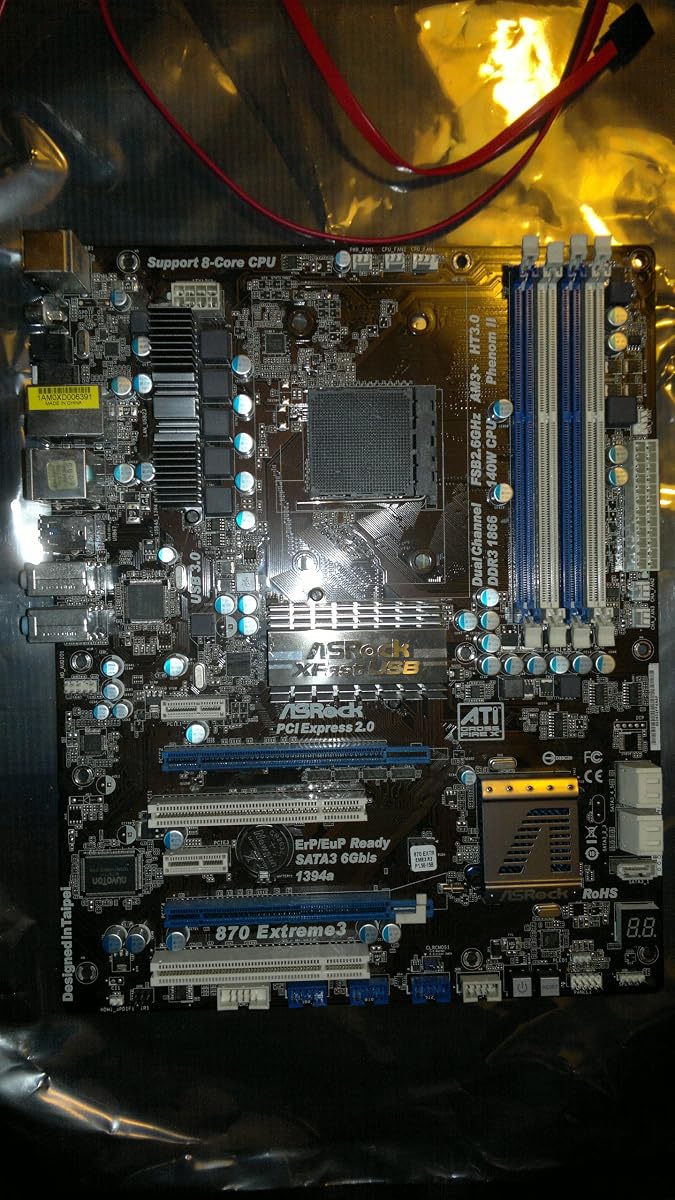
The ASRock 970 EXTREME3 focuses on storage and power reliability for demanding legacy workloads. Its SB950 southbridge provides excellent SATA control ensuring your drives run at peak speeds consistently.
We may earn a commission when you buy through this link, at no additional cost to you.
With five internal SATA3 ports plus one external eSATA3 port this board is a storage powerhouse. You can connect multiple hard drives without needing an extra expansion card for SATA connectivity.
The abundance of USB 2.0 ports is useful for legacy peripherals but lacks the speed of USB 3.0 found on newer boards. This makes it more suitable for specialized industrial or data storage setups.
Choose this if you need maximum storage connectivity for a workstation. The build quality ensures long-term stability for systems that run 24/7 in demanding environments.
Five internal SATA3 slots allow for extensive RAID arrays or large data hoards.
eSATA3 port provides fast external drive access without taking up USB ports.
We may earn a commission when you buy through this link, at no additional cost to you.
The ASRock 960GM-VGS3 FX is tailored for users who rely on integrated graphics for daily tasks. It supports AM3+ processors and provides sufficient onboard video capabilities for office work and media consumption.
We may earn a commission when you buy through this link, at no additional cost to you.
With 5.1 CH HD Audio via the Realtek ALC662 codec you get decent sound quality without needing a separate sound card. The solid capacitors ensure power stability even when running higher wattage CPUs.
The lack of robust PCIe lanes limits serious gaming upgrades but works well for budget builds. XFast features enhance system responsiveness making older hardware feel snappier during routine use.
This board is ideal for office PCs or media centers where discrete GPUs are unnecessary. It offers a reliable foundation for basic computing without the expense of a dedicated video card.
Solid capacitors protect the board from power spikes during extended use.
Onboard audio and video support make this a good fit for media PC builds.
We may earn a commission when you buy through this link, at no additional cost to you.
The ASRock 880GXH/USB3 offers an interesting hybrid approach combining integrated Radeon HD graphics with a discrete card. This allows users to boost graphics performance using two GPUs together for compatible games.
We may earn a commission when you buy through this link, at no additional cost to you.
It includes HDMI and DVI ports which are essential for connecting modern monitors to legacy systems. The USB 3.0 support ensures faster data transfer rates for external hard drives and flash storage.
However the PCIe bandwidth is shared which might limit peak performance for demanding applications. The older southbridge means SATA speeds are generally slower than the 970 chipset boards.
Buy this if you want to upgrade graphics performance gradually with a hybrid setup. It is a versatile choice for users balancing cost and performance in a mixed graphics environment.
Allows pairing integrated GPU with a discrete card for enhanced performance.
HDMI and DVI ports support higher resolutions for legacy systems.
We may earn a commission when you buy through this link, at no additional cost to you.
The ASRock 870 EXTREME3 R2.0 targets users who prioritize audio quality alongside performance. Its Realtek ALC892 codec delivers premium sound suitable for music production and immersive gaming experiences.
We may earn a commission when you buy through this link, at no additional cost to you.
With Quad CrossFireX support you can link multiple GPUs for significant graphical power gains. The SATA3 ports ensure your storage drives operate at maximum speed reducing load times for games.
While the USB 3.0 support is welcome the total number of ports is lower than other models. You may need a USB hub for devices that require numerous high-speed connections simultaneously.
This board is great for creative professionals working on legacy hardware. It offers high fidelity audio and strong multi-GPU capabilities in a single package.
Premium HD Audio CODEC supports Blu-ray audio for high fidelity sound.
Quad CrossFireX support allows for substantial graphics rendering power.
We may earn a commission when you buy through this link, at no additional cost to you.
The ASRock 990FX EXTREME3 represents the pinnacle of AM3+ board design with support for extreme hardware configurations. It is one of the few boards that allows Quad SLI for NVIDIA GPUs to run together.
We may earn a commission when you buy through this link, at no additional cost to you.
With a robust power delivery system it supports CPUs up to 140W ensuring stable performance during overclocking. The memory controller supports high speeds which helps reduce latency in memory-intensive tasks.
Power consumption can be higher compared to other chipsets which might impact energy efficiency. The premium features come at a cost that may not be justified for every legacy upgrade path.
Choose this if you want to squeeze every drop of performance from a legacy AMD CPU. It is the ultimate enthusiast choice for pushing multi-GPU systems to their limits.
Quad SLI support enables massive GPU power for specialized rendering tasks.
Designed to handle high wattage processors without thermal throttling.
We may earn a commission when you buy through this link, at no additional cost to you.
The ASRock 970DE3/U3S3 simplifies the AM3+ experience with essential modern ports. It offers a PCIe 3.0 x16 slot which allows for slightly higher bandwidth on compatible graphics cards.
We may earn a commission when you buy through this link, at no additional cost to you.
While it only has two SATA3 ports this is enough for most users who use one SSD for OS and a secondary HDD for storage. The USB 3.0 support ensures peripheral speeds are adequate for daily tasks.
This board lacks some of the advanced features of the 970 chipset models making it a budget alternative. It focuses on compatibility and basic stability rather than advanced gaming or expansion capabilities.
Ideal for simple desktop replacements or light office use. It ensures your older CPU gets a reliable socket with just enough speed to run modern applications smoothly.
Support for PCIe 3.0 provides slightly better bandwidth for newer GPUs.
Fewer features mean lower complexity and easier troubleshooting for users.
We may earn a commission when you buy through this link, at no additional cost to you.
The ASRock 890FX Deluxe4 offers a high-performance AM3 alternative for those with older Phenom II X6 processors. It is known for its robust build quality and reliable chipset stability across various loads.
We may earn a commission when you buy through this link, at no additional cost to you.
With six SATA3 ports and Marvell controllers you get excellent storage performance and flexibility. The USB 3.0 support ensures your peripheral connections are fast enough for everyday data transfer needs.
This board is compatible with older AM3 CPUs which might be cheaper to find than AM3+ models. It is a solid choice for building a workstation that needs multiple drives and consistent performance.
Perfect for users sticking with AM3 CPUs who still want high-speed storage. It provides an excellent foundation for a multi-drive setup without breaking the bank on modern hardware.
Six SATA3 ports allow for extensive storage expansion without adding cards.
AMD 890FX provides reliable performance for older AM3 processor generations.
We may earn a commission when you buy through this link, at no additional cost to you.
Selecting the right motherboard for your AMD system requires understanding chipset capabilities and physical constraints to ensure compatibility and future proofing.
The chipset dictates features like SATA speeds USB ports and graphics support. AMD 970 and 990FX chipsets offer better performance than older 760G models.
Always match the chipset to your specific CPU model to avoid bottlenecks during heavy workloads.
Verify whether your processor is AM3 or AM3+ before buying. Most newer boards support both but older ones might only support AM3.
Check the CPU socket pin layout and power delivery requirements to ensure physical fit and stability.
DDR3 memory is standard for these boards but speed and capacity vary. Look for boards supporting at least 16GB to handle modern OS requirements.
Higher supported speeds like 2100MHz can improve overall system responsiveness in memory-bound applications.
MicroATX boards save space but offer fewer expansion slots than ATX models. Choose ATX if you plan to use multiple GPUs or add numerous expansion cards.
Measure your case interior to ensure the board fits correctly without obstructing airflow or other components.
SATA3 ports provide faster data transfer for SSDs compared to SATA2. Ensure you have enough ports for all your drives without needing adapters.
M.2 slots on newer boards can offer significant speed advantages for boot drives and OS installations.
Modern peripherals often require USB 3.0 or newer. Check the rear panel for sufficient high-speed ports to avoid using hubs constantly.
Internal headers are also important for connecting front panel USB ports on your PC case.
High-end CPUs like the Phenom II X6 require robust voltage regulation. Look for solid capacitors and adequate phases to prevent throttling.
Check the total wattage support to ensure the board can handle your specific processor under load.
PCIe lanes determine how many graphics cards you can use. Quad CrossFireX requires specific lane splits that not all boards support.
Verify the slot configuration matches your GPU needs whether you are using single or multiple graphics cards.
Proper handling is crucial during installation. Always ground yourself to avoid static discharge which can damage sensitive electronic components on the board.
Ensure all fans and heatsinks are securely mounted to maintain proper airflow. Overheating can cause system instability and shorten the lifespan of your processor and motherboard.
Regularly clean dust from the heatsinks and filters using compressed air. Accumulated dust restricts airflow and leads to higher internal operating temperatures over time.
Most ASRock AM3+ boards like the 970A-G/3.1 and 990FX EXTREME3 support the Phenom II X6. However always check the CPU support list on ASRock's site to confirm compatibility with your specific revision.
Yes most AM3+ boards are backward compatible with AM3 CPUs. This allows you to use older processors on newer boards though power requirements may vary slightly depending on the model.
Only select models like the 970A-G/3.1 offer M.2 slots. Most older AM3 boards rely on SATA connections for storage which are slower but still reliable for general use.
Many models support up to 32GB or 64GB of DDR3 RAM. The 970A-G/3.1 supports up to 64GB which is ideal for heavy multitasking or virtual machines.
Several models such as the 970 EXTREME3 and 890FX Deluxe4 include USB 3.0 ports. Older models like the 760GM-HDV typically only offer USB 2.0 speeds.
High-end boards like the 990FX EXTREME3 and 970A-G/3.1 support Quad CrossFireX. Check PCIe lane configurations to ensure your specific GPU setup is compatible.
Most later AM3+ boards support UEFI but older models may use legacy BIOS. This can impact compatibility with newer operating systems like Windows 10 or 11.
The ASRock 760GM-HDV and 970A-G/3.1 are often recommended for budget builds. They offer good value with solid features for everyday computing tasks.
We have reviewed ten distinct models ranging from budget-friendly options to high-performance variants. Each board offers unique strengths tailored to different legacy system requirements and user preferences.
Prioritize features like USB 3.0 and SATA3 connectivity if you plan to use modern peripherals. The chipset choice should align with your CPU model to ensure full performance potential.
Always verify current availability and pricing before purchasing as stock for older models fluctuates frequently. Ensure you select the best board for your specific needs to maximize system longevity.