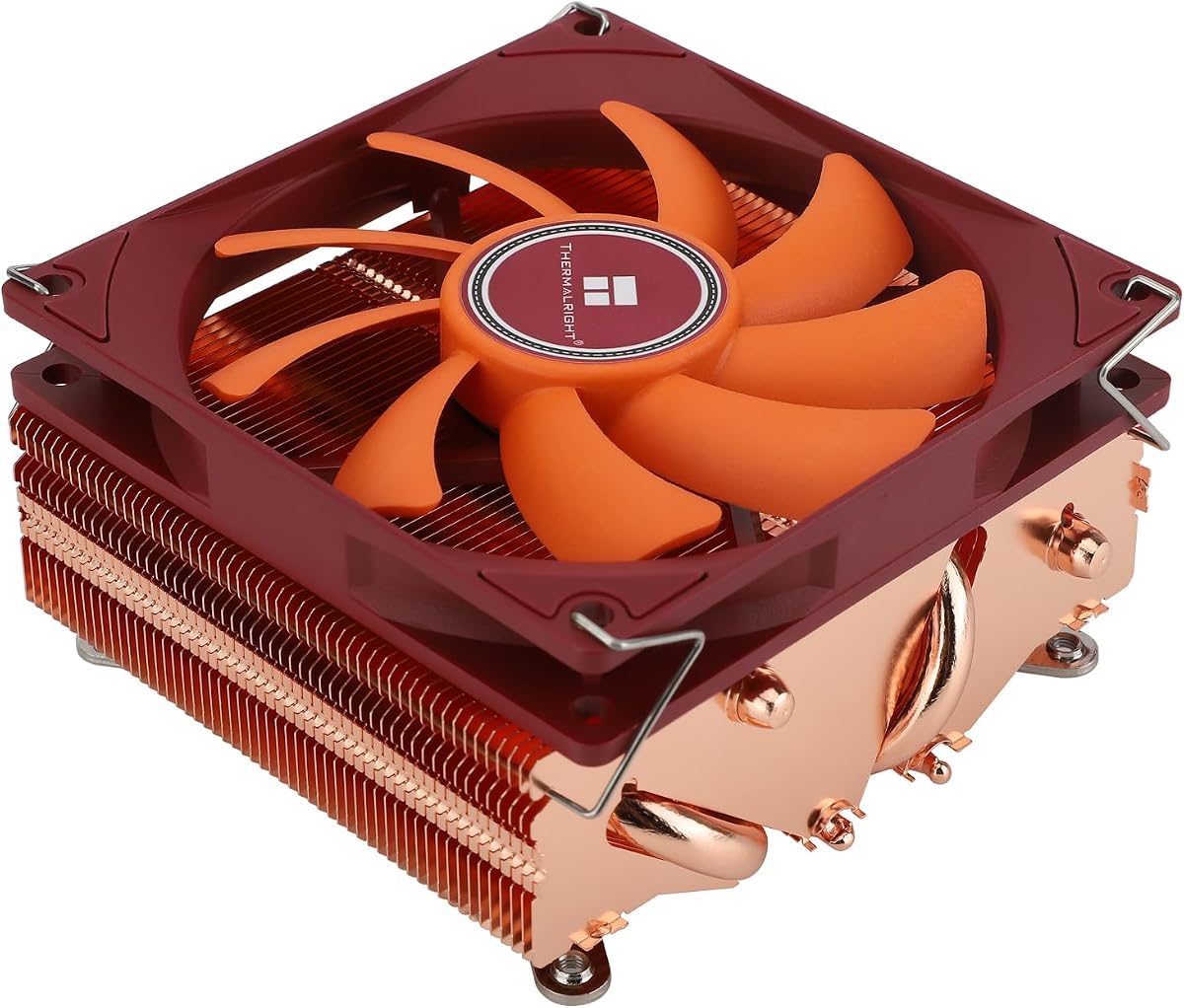
Thermalright AXP90-X53
4.5Editor score
Pure copper construction
53mm total height
AGHP technology support
This guide compares the top Htpc CPU Cooler options for quiet performance and low profile design to help you choose the right cooling solution for your build.
Building a home theater PC requires careful component selection to ensure silence and efficiency. The processor cooling solution plays a critical role in maintaining system stability without disturbing your media experience. Selecting the right cooler ensures your HTPC remains cool and quiet during long viewing sessions.
We evaluated ten leading low profile coolers based on thermal performance, noise levels, and build quality. Our analysis focuses on models that fit compact cases while delivering reliable heat dissipation for modern processors. Each entry represents a proven option for small form factor and media center systems.
Each pick highlights specific strengths like height constraints, fan noise, and socket compatibility. We include detailed specs and real world performance notes to guide your decision. Please note that product availability and pricing fluctuate regularly so verify current details before purchasing.
4.5Editor score

4.7Editor score

4.7Editor score
This table provides a side by side overview of key specifications for all ten selected coolers. Use it to quickly compare height, fan size, and material differences across the lineup.


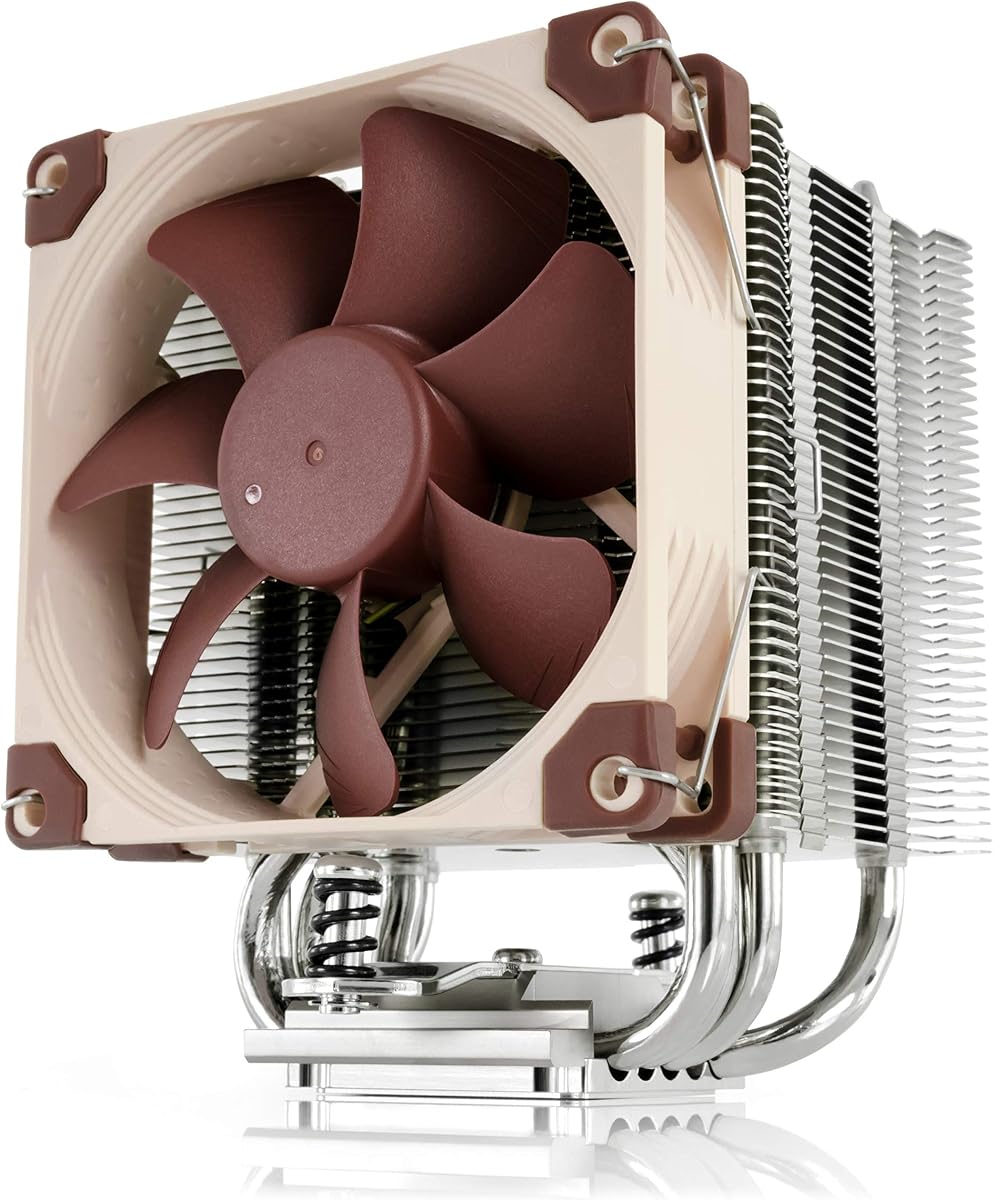


The Noctua NH-L9x65 stands out as a top contender for HTPC builds needing silent cooling. It holds a strong rating and is praised for its ability to cool efficiently without noise. This low profile cooler fits perfectly in tight cases while maintaining high performance standards.
We may earn a commission when you buy through this link, at no additional cost to you.
Its optimized NF-A9x14 fan provides exceptional airflow with minimal acoustic disturbance. The copper base and aluminum fins ensure effective heat transfer from modern CPUs. Noctua includes their premium thermal paste and a robust mounting system for secure installation across various sockets.
While it costs more than budget options, the build quality and quietness justify the investment for media centers. The height constraint limits it to moderate heat dissipation CPUs but it handles them well. It does not interfere with RAM or PCIe slots on most motherboards.
Buy this if silence and reliability are your top priorities for a small form factor system. It is an ideal match for living room PCs where noise is unacceptable. The included mounting hardware makes setup straightforward for most users.
The fan design ensures low noise even under load making it perfect for quiet environments.
At 65mm high it clears most RAM modules and fits in slim ITX chassis easily.
We may earn a commission when you buy through this link, at no additional cost to you.
The Thermalright AXP90-X53 offers impressive value for budget conscious HTPC builders. It ranks well for cooling performance given its low price point and compact size. The full copper design helps dissipate heat effectively in tight spaces without adding bulk.
We may earn a commission when you buy through this link, at no additional cost to you.
Its AGHP technology ensures heat pipes work regardless of orientation which is vital for non standard case layouts. The 53mm height clears most memory modules allowing flexible installation on ITX boards. It supports both Intel and AMD sockets with included mounting kits.
Some users note the fan can be louder at full speed but PWM control mitigates this. The pure copper fins are heavier than aluminum but offer better thermal conductivity. Installation may require care with backplates on certain motherboards to avoid conflicts.
Choose this if you need a reliable low profile cooler without spending much. It suits casual users and basic home theater PCs well. The performance per dollar is excellent compared to pricier alternatives.
Pure copper fins and base improve heat transfer for better cooling in a small unit.
Gravity independent heat pipes mean orientation does not affect cooling performance in cases.
We may earn a commission when you buy through this link, at no additional cost to you.
The Noctua NH-L12S delivers premium cooling for those needing extra headroom. Its 120mm fan moves significant air while remaining whisper quiet during normal use. This model is a successor to an award winning design and improves on its predecessor.
We may earn a commission when you buy through this link, at no additional cost to you.
Offset mounting options allow better clearance for high RAM modules which is crucial on ITX boards. The NF-A12x15 fan provides superior airflow control and low noise compared to smaller alternatives. It includes high end thermal paste and robust mounting hardware.
While it is taller than some competitors the 70mm height still fits many slim cases. The build quality justifies the price for users seeking top tier reliability and silence. It handles higher TDP CPUs better than typical low profile units.
Opt for this if you want the best balance of performance and silence for an HTPC. It is ideal for powerful living room PCs needing more cooling capacity. The investment pays off in long term stability and noise reduction.
The 120mm fan provides more cooling potential than smaller fans while staying quiet.
Offset mounts prevent RAM clearance issues making it versatile for different boards.
We may earn a commission when you buy through this link, at no additional cost to you.
The ID-COOLING IS-67-XT offers robust cooling with six heat pipes in a low profile form. It targets users who need more capacity than typical budget units allow. The 120mm fan ensures effective airflow for the size of the heatsink.
We may earn a commission when you buy through this link, at no additional cost to you.
Its 67mm height balances performance and fit making it suitable for many SFF cases. The all black aesthetic matches modern builds well. It supports current Intel and AMD sockets for broad compatibility with recent platforms.
The extra heat pipes help dissipate heat faster than four pipe designs. However the size may not fit the tightest HTPC cases compared to 47mm models. The fan speed can be adjusted via PWM for quieter operation when needed.
Consider this for HTPC builds needing stronger cooling without a full tower. It provides a good middle ground between budget and high end options. The design supports memory modules without interference in most scenarios.
Six heat pipes increase surface area for better heat transfer and stability.
A 15mm thick fan keeps total height low while maintaining high airflow.
We may earn a commission when you buy through this link, at no additional cost to you.
The ID-COOLING IS-40-XT is an ultra compact solution for very slim cases. At 47mm it is among the lowest profile coolers available. This makes it ideal for cases with strict height constraints like media boxes.
We may earn a commission when you buy through this link, at no additional cost to you.
It uses four heat pipes to manage heat efficiently despite the small size. The 92mm fan is optimized for low noise which fits HTPC needs well. Installation is straightforward with upgraded mounting kits and a back plate.
Performance is limited to moderate heat dissipation processors. High end CPUs may need more cooling capacity. However for basic home theater systems it works well. The black design looks sleek and matches most builds.
Pick this for the tightest SFF builds where space is scarce. It offers solid cooling for the size without compromising on noise. Great for users who prioritize case fit above all else.
The 47mm height fits in cases that block standard low profile coolers.
Optimized fan ensures low noise levels suitable for living room environments.
We may earn a commission when you buy through this link, at no additional cost to you.
The Thermalright AXP90 X36 is the thinnest option on this list at 36mm. It allows use in extreme slim cases where even 40mm coolers fail. Despite the thinness it maintains decent cooling with AGHP heat pipes.
We may earn a commission when you buy through this link, at no additional cost to you.
Its aluminum fins keep weight low and fit perfectly in tight spaces. The fan provides enough airflow for modest heat loads. It supports both Intel and AMD platforms with necessary mounting hardware included.
Thermal capacity is limited to moderate TDP due to reduced surface area. This cooler excels in passive style enclosures needing minimal active cooling. The AGHP technology ensures the pipes work regardless of case orientation.
Use this for the absolute tightest HTPC cases available. It is perfect for passive cooled systems needing slight air movement. The low price makes it a great entry point for SFF builds.
36mm total height clears the most restrictive chassis limits for HTPCs.
Gravity independent heat pipes maintain efficiency in varied mounting orientations.
We may earn a commission when you buy through this link, at no additional cost to you.
The Thermalright Peerless Assassin 120 SE is a powerhouse for performance focused builds. It offers dual 120mm fans and six heat pipes for maximum cooling potential. While not low profile it fits larger SFF cases with high thermal needs.
We may earn a commission when you buy through this link, at no additional cost to you.
AGHP technology ensures consistent performance regardless of orientation. The build quality is solid and mounting is straightforward with included brackets. It supports modern Intel and AMD sockets including the latest generations.
This cooler demands significant space so it is not for tiny cases. For larger HTPC enclosures it provides near liquid cooling performance. The price is competitive given the twin tower design and fan quality.
Choose this for high performance HTPC systems needing strong cooling in silence. It is ideal for gaming or rendering PCs inside living room enclosures. The dual fans ensure stable temps even under heavy loads.
Two 120mm fans move massive air for high efficiency cooling performance.
Advanced heat pipes ensure cooling works well regardless of stand orientation.
We may earn a commission when you buy through this link, at no additional cost to you.
The Noctua NH-U9S combines single tower design with high performance cooling. It fits many ITX builds that need more clearance than low profile units. The 125mm height is manageable in standard HTPC cases with enough space.
We may earn a commission when you buy through this link, at no additional cost to you.
Its 92mm NF-A9 fan is highly optimized for silence and efficiency. Noctua includes premium thermal paste and the SecuFirm2 mounting system for ease. It handles moderate to high TDP CPUs without excessive noise.
This model may be too tall for very slim cases but works in mid SFF. The single tower avoids the bulk of twin tower designs while cooling well. It is a trusted option for users prioritizing noise control.
Buy this for balanced cooling in larger HTPC enclosures. It offers premium reliability and quietness at a fair price. A strong choice for those needing more than basic cooling without full bulk.
The NF-A9 fan delivers high performance with minimal audible disturbance.
Single tower fits better in cases that block dual tower solutions.
We may earn a commission when you buy through this link, at no additional cost to you.
The Noctua NH-L9a-AM4 is designed specifically for AMD AM4 socket users. Its 37mm height fits extreme slim cases requiring the lowest profile cooling. It is ideal for Ryzen builds needing quiet operation in tight enclosures.
We may earn a commission when you buy through this link, at no additional cost to you.
Noctua includes their premium fan and thermal paste for top performance. The low footprint ensures 100 percent RAM and PCIe compatibility. Mounting is easy with the SecuFirm2 system adapted for AMD sockets.
This cooler is not for Intel platforms or newer AMD sockets so check compatibility. For AM4 users it remains a top choice for silent and compact cooling. The build quality matches Noctua standards for long term use.
Select this if you have an AMD AM4 system in a slim HTPC case. It offers exceptional silence and reliability for that platform. The height clearance makes it unmatched for extremely tight setups.
Optimized for AM4 socket ensuring perfect fit and thermal transfer.
37mm height clears tightest cases and low profile chassis limits.
We may earn a commission when you buy through this link, at no additional cost to you.
The Thermalright Assassin X120 R SE delivers high value for standard HTPC builds. It uses AGHP technology and a quiet 120mm fan for efficient cooling. This model fits larger enclosures needing robust heat management.
We may earn a commission when you buy through this link, at no additional cost to you.
Four heat pipes ensure reliable thermal performance without excessive noise. The mounting hardware supports both Intel and AMD platforms. Installation is straightforward with included manual guides and hardware.
While not low profile it is compact enough for many SFF cases. The price is very competitive for the performance provided. It is a strong choice for general purpose builds needing reliable cooling.
Pick this for cost effective cooling in standard or medium sized cases. It balances performance and price better than many competitors. An excellent choice for users wanting reliability without premium costs.
Advanced heat pipes provide consistent cooling independent of case orientation.
Optimized fan ensures low noise levels suitable for living room PCs.
We may earn a commission when you buy through this link, at no additional cost to you.
Selecting the right cooler involves balancing size, noise, and thermal needs. This guide explains key factors to consider for your HTPC build.
Most HTPC cases have strict height limits often under 70mm. Check your case specs before buying to ensure clearance. Low profile coolers like 47mm or 65mm units fit best.
Prioritize coolers under 70mm if you have a slim chassis to avoid clearance issues.
Silence is crucial for HTPCs. Look for PWM fans with low dB ratings and noise adaptors. Models with larger fans often spin slower and quieter for the same airflow.
Choose coolers with PWM fans and low noise ratings to maintain a quiet living room.
Ensure the cooler supports your CPU socket like LGA1700 or AM5. Most modern coolers support both Intel and AMD but check specifics for latest CPUs. Include mounting kits in your budget.
Verify socket support for your specific CPU model to ensure proper fit and cooling.
Pure copper fins conduct heat better than aluminum but cost more. Aluminum fins are lighter and cheaper. For HTPCs a mix with copper base is a sweet spot.
Opt for pure copper or copper base designs for better heat transfer efficiency.
Match the cooler to your CPU TDP. High TDP chips need larger coolers. Low profile units typically handle up to 100W efficiently.
Select a cooler rated for your CPU TDP to avoid thermal throttling under load.
Ensure the cooler does not block RAM slots. Many low profile models offer offset mounting or slim fins to clear memory. This is vital for ITX boards.
Check RAM clearance to avoid installing high speed memory with limited height.
AGHP ensures heat pipes work even when mounted vertically. This prevents orientation issues in non standard cases. It improves thermal consistency in all setups.
Look for AGHP heat pipes to ensure consistent cooling regardless of case orientation.
Budget varies widely from 20 to 80 dollars. Premium brands offer better warranty and build. Decide on your budget and check warranty length.
Consider warranty length to protect your investment in long term system reliability.
Install the cooler according to the manual ensuring even pressure on the CPU. Apply a small bead of thermal paste if not included. Tighten screws in a crisscross pattern for even contact.
Clean dust from fins monthly using compressed air to maintain airflow. Dust buildup reduces efficiency and increases noise over time. Keep the area around the case clear for airflow.
Monitor CPU temperatures after installation to ensure the cooler is working. Use BIOS or software tools to check heat under load. Adjust fan curves if needed for optimal silence.
Most HTPC cases have clearance below 70mm. Models under 65mm like the Noctua NH-L9x65 fit well in slim systems. Check your case manual for exact specs before purchasing.
Most support AM5 but verify before buying. Modern coolers often include AM5 mounting kits. Some older models may need adapters or lack support entirely.
AGHP ensures heat transfer works in any orientation. This is vital for vertical or tilted cases common in HTPCs. It prevents performance drops when orientation changes.
Copper conducts heat better but is heavier. Aluminum is lighter and cheaper. For HTPCs copper base with aluminum fins is a common balance.
Use PWM control and high quality fans. Choose larger fans that spin slower. Lower RPM reduces noise while maintaining airflow effectively.
Most include paste but verify on the box. If not apply a small dot on the CPU center. Proper application ensures better thermal transfer performance.
Standard towers may be too tall. Low profile models are designed for HTPC cases. Verify height limits to avoid fitting issues.
Most HTPCs need up to 100W cooling capacity. High TDP CPUs need larger coolers. Check your CPU TDP and match the cooler accordingly.
The Noctua NH-L9x65 leads the list for overall performance and silence. Budget builders may prefer the Thermalright AXP90-X53 for value. Each option delivers specific strengths for unique HTPC needs.
Prioritize case height and noise levels when making your choice. Verify socket support and RAM clearance before ordering. These factors ensure smooth installation and reliable performance.
Prices and availability change so check current listings before buying. Use this guide to narrow your selection based on your build requirements. Choosing the right cooler ensures a quiet and stable home theater PC.