
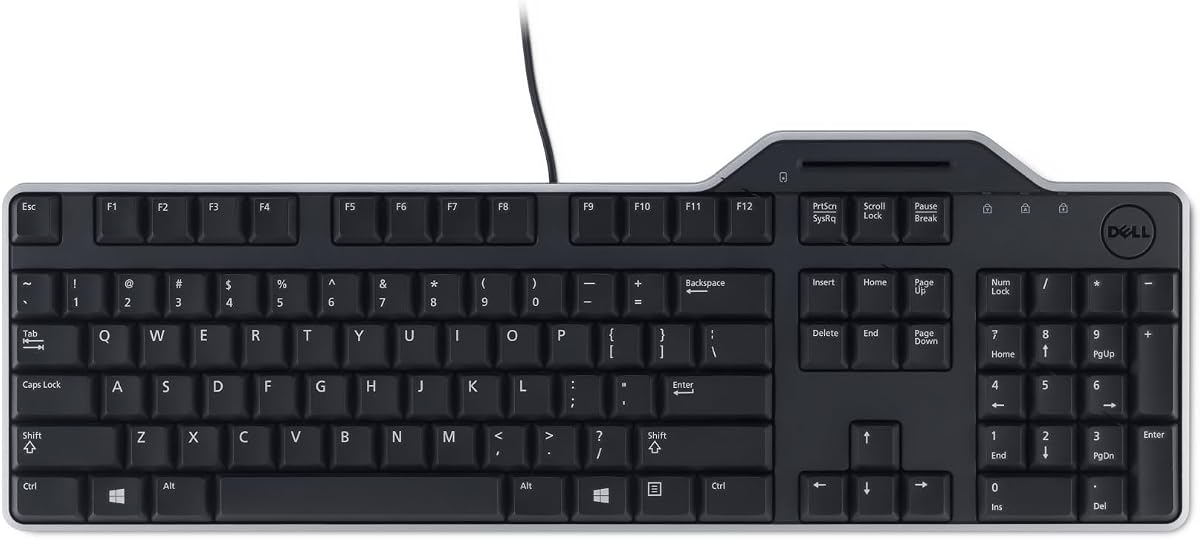
Cherry KC 1000 Smartcard Keyboard
4.6Editor score
FIPS 201 Approved
Secure PIN Entry
Thin Design
Discover the top 10 keyboards with smart card readers for secure access. We compare security features, ergonomics, and durability to help you choose the right
In today’s secure digital environment, integrating smart card readers directly into keyboards streamlines access control. This guide explores models designed for enterprise security and personal privacy needs.
We evaluated ten top-rated options based on build quality, reader compatibility, and user comfort. Our analysis includes wired connections, ergonomic designs, and compliance standards for various industries.
Each selection highlights key strengths and potential trade-offs to inform your decision. Prices and availability change frequently, so verify current details before purchasing to ensure you get the best value.
4.6Editor score
4.6Editor score

4.1Editor score
The following table provides a side-by-side comparison of all ten reviewed models. It highlights their core specifications and certifications to help you quickly identify the best fit for your security requirements.


The Dell KB813 stands out as a top choice for secure environments needing a streamlined input solution. Its integrated smart card reader ensures seamless authentication while maintaining high user comfort standards.
We may earn a commission when you buy through this link, at no additional cost to you.
Users appreciate the ergonomic design and detachable palm rest which reduce strain during long shifts. The spill-resistant construction provides extra durability against accidental liquid exposure in office settings.
While it relies on a wired connection for stability, this limits flexibility in layout. However, the reliable data transfer speed outweighs the need for wireless options in secure contexts.
This keyboard is ideal for enterprise users prioritizing security and reliability. It delivers a solid balance of functionality and comfort for daily tasks.
The built-in smart card reader enhances system access protocols without needing external devices.
Low-profile keys and a spill-resistant design ensure long-term reliability in workspaces.
We may earn a commission when you buy through this link, at no additional cost to you.
The Adesso TruForm AKB-150SB-TAA is designed for government and enterprise users requiring strict compliance. Its TAA compliance and integrated smart card reader make it a secure choice for authorized procurement.
We may earn a commission when you buy through this link, at no additional cost to you.
Its split ergonomic design promotes natural hand positioning which reduces joint strain during extended use. The dedicated hotkeys offer convenient access to internet and multimedia tools directly from the keyboard.
The main drawback is the premium pricing and lack of mechanical switch feedback. These trade-offs are often acceptable given the specific regulatory needs it addresses for large organizations.
Choose this keyboard if you need certified hardware for secure government or healthcare applications. It combines compliance with ergonomic features effectively.
TAA compliant status ensures suitability for government contracts and federal procurement needs.
The split layout encourages proper wrist alignment to prevent repetitive strain injuries.
We may earn a commission when you buy through this link, at no additional cost to you.
The Cherry KC 1000 offers a cost-effective solution for organizations needing basic smart card security. It supports essential security protocols and fits budget-conscious procurement plans without sacrificing core safety features.
We may earn a commission when you buy through this link, at no additional cost to you.
Its FIPS 201 approval ensures reliability for secure environments. The thin design saves desk space while still offering dedicated PIN entry for added protection during login sessions.
Users may find the build feels less premium than high-end models. This is a common trade-off for budget-friendly devices which focus on functionality over extra ergonomics.
This keyboard is perfect for businesses needing secure login without high costs. It delivers dependable performance for routine authentication tasks efficiently.
FIPS 201 approval provides robust protection at a fraction of the cost of enterprise models.
A slim profile keeps workspaces tidy while integrating necessary card reader functionality.
We may earn a commission when you buy through this link, at no additional cost to you.
The Adesso EasyTouch 130SB combines mechanical reliability with secure smart card integration. Its red switches offer tactile feedback suited for users needing fast and durable typing responses.
We may earn a commission when you buy through this link, at no additional cost to you.
Features like the Copilot AI hotkey and large print keycaps enhance productivity and accessibility. These elements make it versatile for both office tasks and creative workflows.
The mechanical build adds weight and cost compared to standard membranes. This might be unnecessary for simple administrative tasks but justifies for power users.
Ideal for technical teams wanting tactile feedback alongside secure login. It bridges modern AI tools with classic enterprise security standards.
Dedicated Copilot AI hotkey simplifies access to AI tools without menu navigation.
Large print keycaps ensure symbols remain visible in low-light or shared workspaces.
We may earn a commission when you buy through this link, at no additional cost to you.
This Dell Keyboard Smartcard USB delivers solid performance for standard office environments. Its quiet keys and spill-resistant features ensure uninterrupted work even during minor accidents.
We may earn a commission when you buy through this link, at no additional cost to you.
The low-profile keys offer a smooth typing experience while the detachable palm rest aids comfort. Users benefit from reliable secure data transfers without extra battery dependencies.
While functional, it lacks advanced ergonomic customization or smart keys. This simplicity may suit basic administrative roles where specialized features are unnecessary.
Choose this keyboard for dependable daily use in secure offices. It balances comfort with essential security effectively.
Spill-resistant construction and quiet keys ensure consistent performance during busy workdays.
Low-profile keys and detachable palm rest support comfortable extended typing sessions.
We may earn a commission when you buy through this link, at no additional cost to you.
The Kensington KB201C targets federal institutions needing TAA compliance and CAC support. Its full-size layout includes a numeric keypad which aids data entry for professionals.
We may earn a commission when you buy through this link, at no additional cost to you.
Quiet-click keys provide a focused environment while secure authentication ensures regulatory compliance. The plug-and-play design simplifies setup without complex software installation.
Lower ratings suggest potential build or comfort issues compared to competitors. Users may prefer models with better ergonomics if daily usage is intensive.
This keyboard is suited for government procurement requiring strict regulatory adherence. It delivers essential security features for authorized users.
CAC and TAA compliance ensure it meets strict government procurement requirements.
A full-size layout with numeric keypad supports efficient data entry for analysts.
We may earn a commission when you buy through this link, at no additional cost to you.
Lenovo’s Smartcard Wired Keyboard II offers a straightforward solution for secure office use. Its compact design and US English layout fit well into standard workspaces without clutter.
We may earn a commission when you buy through this link, at no additional cost to you.
The lightweight construction allows easy repositioning during setup or maintenance. Users appreciate its simplicity and quick integration with Lenovo systems.
Basic ergonomics may not support long sessions compared to premium models. This makes it better for shared desks or light daily usage.
Pick this model for basic secure login tasks in enterprise environments. It provides essential functionality without unnecessary complications.
Quick plug-and-play setup reduces IT overhead during bulk hardware deployment.
US English layout ensures compatibility with standard operating system defaults.
We may earn a commission when you buy through this link, at no additional cost to you.
The HP USB Business Slim Smartcard Keyboard focuses on practical utility for shared office spaces. Its slim design and built-in spill drain make it resilient against common desk accidents.
We may earn a commission when you buy through this link, at no additional cost to you.
Membrane switches offer a quiet typing experience while LED indicators provide clear status feedback. This ensures users stay informed about caps lock or secure card status.
Lack of ergonomic tilt limits comfort during prolonged typing. Users requiring extensive hand support may need an external rest for comfort.
This keyboard suits environments needing reliable spill protection and basic security. It delivers steady performance for routine administrative workflows.
Built-in spill drain channels liquid away to protect internal components and reduce downtime.
LED key indicators ensure users stay aware of status changes and input modes.
We may earn a commission when you buy through this link, at no additional cost to you.
The Cherry Secure Board 1.0 brings advanced security with RF/NFC interface support for modern access control. It is designed for secure environments requiring encrypted authentication protocols.
We may earn a commission when you buy through this link, at no additional cost to you.
Secure mode ensures data encryption especially useful with thin clients. Its compliance with ISO standards offers broad compatibility across diverse enterprise systems.
The specialized features come at a higher cost and may require specific IT support. This restricts adoption to organizations with advanced security infrastructure.
This keyboard fits high-security facilities needing encrypted NFC access. It delivers robust protection for sensitive network environments.
RF/NFC support enables contactless authentication for streamlined and secure access.
Secure mode adds encryption to protect sensitive input during thin client operations.
We may earn a commission when you buy through this link, at no additional cost to you.
The NEW OEM Dell KB813t offers a cost-effective option for organizations needing multiple units. Sealed OEM packaging ensures quality control during shipping and storage processes.
We may earn a commission when you buy through this link, at no additional cost to you.
This keyboard provides standard Dell reliability with a built-in smart card reader for authentication. It fits well into existing Dell system environments without extra drivers.
OEM packages often exclude retail accessories or extended warranties. Buyers should ensure compatibility with their IT systems before bulk ordering.
Ideal for IT departments refreshing hardware inventories economically. It delivers reliable security at a competitive bulk rate.
Sealed OEM packaging simplifies logistics for large-scale IT deployments.
Designed for Dell systems to ensure seamless compatibility and driver integration.
We may earn a commission when you buy through this link, at no additional cost to you.
Selecting the right keyboard with smart card reader requires evaluating security compliance, ergonomics, and connectivity. This section outlines the key factors to help you make an informed purchase.
Verify that the device meets necessary security protocols like FIPS 201 or CAC support. These standards ensure compatibility with government or enterprise authentication systems.
Choose models with clear compliance labels to avoid integration issues with your security infrastructure.
Look for ergonomic designs that support natural hand positioning to prevent strain. Split layouts or palm rests improve comfort for users typing all day.
Prioritize keyboards with adjustable tilts or cushioned supports for extended work sessions.
Ensure the layout matches your language needs such as QWERTY or Dvorak. A full-size layout may be useful if you need frequent numeric data entry.
Select the key type that suits your preference between quiet membrane or tactile mechanical switches.
Built-in spill resistance helps protect the keyboard from accidental liquid damage. This feature extends the lifespan of the device in busy office environments.
Check for reinforced casing or high-durability switch ratings if longevity is critical.
Most smart card keyboards use wired USB for stable secure connections. Wireless models may add flexibility but introduce battery management needs.
Ensure the interface matches your ports such as USB-A or USB-C.
Additional hotkeys for multimedia or system shortcuts can boost productivity significantly. Copilot AI integration or dedicated app keys provide extra utility.
Weigh the usefulness of these features against cost if basic typing is your priority.
Check driver support for Windows macOS or Linux systems used in your organization. Some models require specific software for smart card functionality.
Universal driver support reduces IT overhead during setup and maintenance.
Balance your budget with the required security features to find a value model. Longer warranties provide peace of mind for critical hardware purchases.
Consider total cost of ownership including potential replacement or support expenses.
Start by connecting the keyboard to your USB port and installing any necessary drivers. Ensure the smart card reader is properly recognized by your operating system before using it.
Insert your smart card into the reader slot to authenticate securely. Follow system prompts to enter your PIN if required to access protected applications or networks.
Clean the keyboard regularly with a soft cloth to remove dust and spills. Keep liquids away from the input area to maintain device longevity.
A keyboard with a smart card reader includes an integrated slot for inserting smart cards. This allows users to authenticate securely directly from the input device.
Many models support macOS but driver availability varies by manufacturer. Check the product specs to confirm operating system compatibility before buying.
Most modern systems use standard drivers but some enterprise setups may need middleware. Verify requirements with your IT department for seamless integration.
Typically the reader is built-in and not user-replaceable. You may need to purchase a new keyboard unit if the reader malfunctions.
Wired connections reduce risks associated with wireless interference or signal interception. Most security-focused models use wired USB for this reason.
FIPS 201 is a US standard for secure identity verification of federal employees. Keyboards with this approval meet strict government security requirements.
The Dell KB813 and Cherry KC 1000 offer excellent value for secure daily use. Their combination of reliability and features makes them top contenders for most users.
Prioritize compliance and ergonomics based on your specific industry needs. Government or healthcare sectors should look for TAA or CAC certified options.
Always check current pricing and availability before ordering to get the best deal. Security technology evolves quickly so verify that the model meets your latest needs.