
Samsung Odyssey G8 G80HS
3.7Editor score
Dual Mode Refresh Rates
Fast IPS Panel
G-Sync Compatible
This expert guide compares the top 6K monitors for professionals and gamers focusing on resolution color accuracy connectivity and performance across ten real
Finding the right display is crucial for modern workflows. A 6K monitor offers exceptional clarity and detail that standard screens cannot match for creative and technical tasks.
We evaluated ten leading models based on panel quality color accuracy connectivity options and overall build. Each product brings unique strengths to different professional and entertainment needs.
Each pick highlights specific advantages and potential trade-offs to help you decide. Prices and availability change frequently so verify current details before making your final purchase decision.
3.7Editor score

3.9Editor score

4.5Editor score
This side-by-side comparison highlights key specifications across all ten models including panel type resolution and connectivity options to help you find the perfect match.




The ASUS ProArt PA32QCV is a professional 6K monitor designed for Mac users and creatives requiring precise color reproduction. It holds a 3.9 rating from users who appreciate its factory calibration and wide color gamut coverage.
We may earn a commission when you buy through this link, at no additional cost to you.
This display features a 31.5-inch IPS panel with 98% DCI-P3 coverage ensuring accurate colors for design work. The Thunderbolt 4 connectivity supports daisy-chaining and delivers up to 96W power for efficient laptop charging.
While the rating is moderate the dedicated features like Light Sync technology and Auto KVM make it valuable for multi-device setups. The 5-year warranty and free Adobe Creative Cloud subscription add significant value over the long term.
Creative professionals who need reliable color accuracy and seamless Mac integration should consider this monitor. It balances high resolution with practical connectivity features essential for modern workflows.
The M3-P3 Color Preset Mode matches MacBook displays for consistent visuals across devices during collaborative editing sessions.
Dual Thunderbolt 4 ports allow high-speed data transfer and video output while powering your laptop with a single cable.
We may earn a commission when you buy through this link, at no additional cost to you.
The Dell 52-Inch 6K monitor offers an immersive cinematic experience with its curved 21:9 aspect ratio. Users rate it at 4.1 due to its exceptional detail and smooth motion handling for productivity and content creation.
We may earn a commission when you buy through this link, at no additional cost to you.
Its IPS Black panel provides a 2000:1 contrast ratio with deep blacks and accurate colors. The 120Hz refresh rate ensures smooth scrolling and minimal flicker which reduces eye strain during long work sessions.
The Thunderbolt hub supports up to 140W power delivery making it suitable for high-performance laptops. Picture-by-Picture and KVM support allow efficient switching between multiple PCs without cluttered desks.
Professionals needing a massive workspace for video editing or data visualization will benefit most from this model. Its eye comfort certifications and robust connectivity make it a strong contender for studios.
The curved 52-inch display wraps around your field of view creating a more engaging environment for immersive creative work.
TUV 5-star certification and hardware low blue light technology adjust brightness automatically to reduce strain during extended use.
We may earn a commission when you buy through this link, at no additional cost to you.
The G32P delivers exceptional clarity with its glossy IPS panel and 223 pixels per inch. Rated 4.6 by users it excels in HDR content and professional editing tasks due to its vibrant color performance.
We may earn a commission when you buy through this link, at no additional cost to you.
With 500-nit brightness and 99% sRGB coverage this monitor renders detailed visuals suitable for gaming and film production. The 10-bit color support ensures smooth gradients and lifelike details without banding.
Connectivity is flexible with a 100W port that charges devices while streaming video. The honeycomb cooling design maintains durability and aesthetics while the stand offers full ergonomic adjustments.
Users seeking a balance of entertainment and professional utility will find this model appealing. The high pixel density and color accuracy make it ideal for detailed creative workflows requiring precise visuals.
The advanced IPS panel enhances dark scenes while maintaining accurate color reproduction across the entire screen for immersive viewing.
High-speed video interfaces and multi-purpose ports allow seamless multitasking with gaming consoles and PC setups effortlessly.
We may earn a commission when you buy through this link, at no additional cost to you.
The Samsung Odyssey G8 is the industry's first 6K gaming monitor tailored for next-level gameplay. Its 3.7 rating reflects its unique dual-mode capabilities that balance high resolution with fast refresh rates.
We may earn a commission when you buy through this link, at no additional cost to you.
It offers 6K at 165Hz for visual detail or switches to 3K at 330Hz for lightning-fast action. The Fast IPS panel ensures vivid colors across the screen while reducing motion blur during intense gaming.
NVIDIA G-SYNC compatibility and AMD FreeSync Premium sync the GPU and panel to eliminate screen tearing. Multiple inputs like DP 2.1 and HDMI 2.1 provide versatile connectivity options for various setups.
Gamers wanting 6K visuals without sacrificing speed will appreciate this specialized display. The ergonomic stand and HDR optimization make it a compelling choice for immersive gaming environments.
Switch between 6K visuals and 330Hz speed depending on whether you prioritize detail or responsive action in your games.
Syncing technology reduces choppiness and image tearing ensuring fluid gameplay across supported GPUs and displays.
We may earn a commission when you buy through this link, at no additional cost to you.
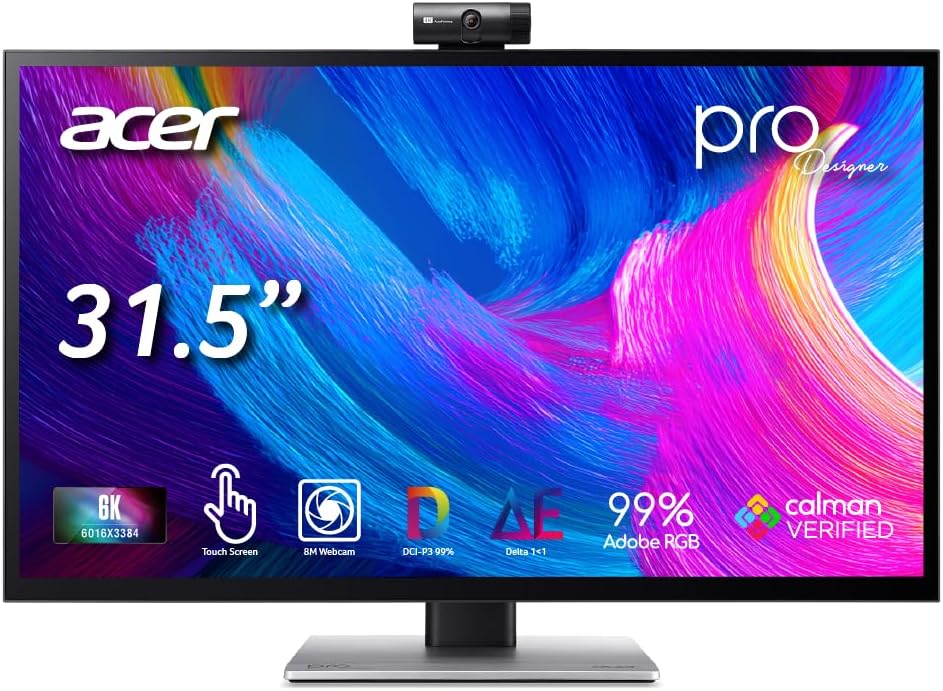
The Acer ProDesigner PE320QXT allows direct interaction with your creative work through its 10-point touch support. Rated 4.0 it stands out as a hybrid solution replacing secondary surfaces like drawing tablets.
We may earn a commission when you buy through this link, at no additional cost to you.
Factory calibrated to Delta E <1 it ensures that what you see on screen matches print or delivery outputs. The built-in 8MP webcam and 4-mic array simplify client calls without extra hardware.
DisplayHDR 600 certification allows accurate preview of HDR content before delivery. A single USB-C cable handles both video signal and up to 90W charging streamlining desk setups significantly.
Designers and annotators will benefit from the tactile interaction and color accuracy. Its ability to function as both a touch input surface and a high-quality display makes it uniquely versatile.
Retouch photos and sketch ideas directly on the screen creating a natural workflow without needing separate drawing tools.
The built-in 8MP webcam and microphone array enable seamless client calls from the desk without extra hardware clutter.
We may earn a commission when you buy through this link, at no additional cost to you.
The G32X boasts a perfect 5.0 rating highlighting exceptional user satisfaction with its minimalist design. It features a 32-inch 6K screen that provides stunning clarity for work and entertainment equally.
We may earn a commission when you buy through this link, at no additional cost to you.
Anti-glare and multi-layer anti-reflective coatings minimize eye fatigue during long sessions. The CNC-machined aluminum body ensures premium durability and a sleek appearance on any desk surface.
Connectivity includes a 100W high-speed port for single-cable charging and streaming. Its universal mount compatibility supports flexible setups including third-party monitor arms for customized ergonomic positions.
Professionals prioritizing eye comfort and build quality will find this model highly rewarding. Its perfect rating suggests reliable performance and user-friendly features that exceed expectations for daily use.
Flicker-free backlighting and low blue light modes reduce strain allowing comfortable viewing during extended work hours.
The CNC-machined aluminum body ensures durability and a sleek aesthetic that complements modern office environments.
We may earn a commission when you buy through this link, at no additional cost to you.
The Dell U5226KW delivers ultra-HD 6K resolution on a massive 52-inch screen tailored for enterprise environments. Its 3.0 rating indicates mixed feedback likely related to setup complexity or specific use cases.
We may earn a commission when you buy through this link, at no additional cost to you.
It features an Advanced IPS Black panel for deep contrast and supports dual HDMI 2.2 and DisplayPort 1.4 ports. Power delivery reaches up to 140W ensuring powerful laptops can run efficiently without extra bricks.
Integrated KVM functionality and Dell Color Management software streamline multi-computer workflows. Remote control options allow quick adjustments without accessing physical buttons directly on the unit.
Businesses requiring extensive workspace and robust connectivity will find this monitor valuable. Its ability to drive high-power devices and manage multiple PCs efficiently suits complex office environments.
Dual Thunderbolt 4 ports and HDMI 2.2 inputs support diverse device connections for streamlined office workflows.
Dell Color Management software ensures consistent color profiles across displays for standardized corporate visual output.
We may earn a commission when you buy through this link, at no additional cost to you.
The LG UltraFine evo 32U990A-S offers studio-grade accuracy with its Nano IPS Black panel and Thunderbolt 5 connectivity. Its 4.5 rating confirms strong approval from professionals needing precise color and high data throughput.
We may earn a commission when you buy through this link, at no additional cost to you.
It delivers 150 percent more usable screen space than 4K displays reducing zooming during creative workflows. DisplayHDR 600 certification ensures realistic visuals with brighter highlights and deeper blacks for critical editing tasks.
Thunderbolt 5 supports up to 80 gigabits per second transfer speed and daisy chaining for multi-display setups. Built-in KVM functionality allows control of two computers with one keyboard and mouse efficiently.
Creative professionals aiming for top-tier color accuracy and speed should prioritize this model. Its high-density pixels and advanced connectivity make it a future-proof investment for demanding studios.
Thunderbolt 5 connectivity offers data transfer speeds up to 80 gigabits per second for rapid workflow and high-speed storage.
True 10 bit color support and 99.5% Adobe RGB coverage ensure accurate color rendering for professional delivery.
We may earn a commission when you buy through this link, at no additional cost to you.
The Dell UltraSharp U3224KB focuses on dependability with a bundle that includes enhanced protection coverage. Users rate it at 3.3 indicating decent performance for general productivity tasks and viewing pleasure.
We may earn a commission when you buy through this link, at no additional cost to you.
It features a 6144 x 3456 resolution for striking clarity on its 31.5-inch viewable screen. LED backlight technology ensures visual brilliance while maintaining efficiency for daily use over long periods.
USB Type-C allows quick data transmission and simplified setup for modern laptops. The included protection pack adds peace of mind for businesses needing reliable hardware support for their monitors.
Organizations looking for cost-effective solutions with warranty coverage will appreciate this option. While not the fastest or most colorful it provides consistent performance and essential connectivity for general office use.
The included 2-year premium extended service protection plan ensures support if hardware issues arise unexpectedly.
LED backlight technology offers maximum efficiency making it suitable for continuous use in office environments.
We may earn a commission when you buy through this link, at no additional cost to you.
The Dell UltraSharp 52 WOST provides a renewed option for users needing a large curved display without the stand. It is designed for VESA mounting setups offering flexibility for specialized workstation configurations.
We may earn a commission when you buy through this link, at no additional cost to you.
Despite the rating showing N/A the specs confirm a 52-inch curved 6K display with 120Hz refresh rate. This model maintains core features like Thunderbolt 4 connectivity while removing the included stand to lower costs.
This choice suits technical users who already possess compatible VESA mounts or arms. The renewed status allows access to high-end specs at a reduced entry point compared to new full-pack units.
IT managers or tinkerers seeking to save on accessories will find this unit suitable. It provides essential connectivity and screen real estate for specialized setups without the overhead of standard packaging.
Without a stand you can integrate this display into custom VESA setups tailored for specific ergonomic needs.
A renewed option provides access to high-end specs at a lower entry point compared to purchasing a brand-new unit.
We may earn a commission when you buy through this link, at no additional cost to you.
Selecting the right 6K monitor involves balancing resolution color accuracy connectivity and ergonomics to match your specific professional or entertainment needs effectively.
Panel types like IPS and OLED determine contrast and viewing angles. For professional work ensure the panel covers at least 98 percent of DCI-P3 or Adobe RGB for color-critical tasks.
Always verify factory calibration data like Delta E values to ensure colors appear accurate out of the box without needing extra calibrators.
6K resolution offers roughly 20 million pixels allowing sharp text and detailed visuals. High pixel density prevents jagged edges and improves readability for long sessions.
Look for 218 or 224 PPI on 32 inch screens to ensure images and text remain crisp and legible at standard viewing distances.
Modern workflows require Thunderbolt 4 or 5 for high-speed data and video transfer. Check for sufficient USB-C ports that support power delivery to charge laptops efficiently.
Daisy chaining and hubs reduce cable clutter allowing multiple devices to connect through a single display interface effectively.
While many 6K monitors target 60Hz for static work gamers benefit from 120Hz or higher rates. Faster response times reduce motion blur during dynamic content viewing.
For gaming choose a model with dual-mode support allowing switches between high resolution and high speed depending on the application.
Adjustable stands allowing tilt pivot and height adjustments are vital for comfort during long workdays. A solid aluminum body ensures durability and sleek aesthetics.
Verify VESA mounting compatibility if you prefer third-party arms for more flexible and customized viewing setups.
Look for certifications like TÜV Rheinland or hardware low blue light technology to protect eyes from strain. Flicker-free backlighting prevents headaches caused by rapid light intensity changes.
Automated brightness sensors adjust screen output to ambient lighting ensuring comfortable viewing in various room conditions.
KVM switches allow controlling multiple computers with one keyboard and mouse simplifying multi-device environments. Picture-by-Picture modes help compare content simultaneously without window switching.
Integrated webcams and microphones reduce peripheral clutter and streamline video calls directly from your workspace.
Professional monitors often include extended warranties like 5-year coverage providing peace of mind for heavy usage. Check for bundled software subscriptions or accessories that add value.
Reliable customer support ensures quick resolutions for hardware issues maintaining your workflow without long interruptions.
Connect your device using the recommended high-bandwidth cable to ensure full resolution and refresh rates function correctly. Verify that your operating system is set to display the native resolution for sharp text clarity.
Calibrate your monitor colors using built-in software or a colorimeter to maintain accuracy over time. This step ensures prints and digital outputs match what you see during editing sessions consistently.
Clean the screen with a soft microfiber cloth and distilled water to avoid scratching the delicate surface. Avoid using chemical cleaners that may degrade the anti-glare coating or panel finish.
Yes running a 6K display requires significant graphics power and bandwidth. Ensure your GPU supports 6K output via DisplayPort or Thunderbolt to avoid performance bottlenecks during usage.
6K offers approximately 150 percent more screen space than 4K reducing zooming and scrolling. It displays more windows and details clearly which benefits multitasking and complex design work.
Most consoles output 4K so a 6K monitor will downscale the image slightly. Some models include dual modes to adapt refresh rates effectively for console gaming experiences.
Thunderbolt 5 provides faster data transfer up to 80 gigabits per second along with display support. It future-proofs your setup for high-speed storage and demanding workflows.
Yes standard HDMI or DisplayPort cables may not support 6K at full rates. Use certified high-speed DisplayPort or Thunderbolt cables to ensure stable signal transmission.
Many 6K monitors include eye care features like low blue light and flicker-free technology. However take regular breaks and adjust brightness to prevent strain regardless of resolution.
This guide explored ten exceptional 6K monitors ranging from large curved displays to touch-enabled creative screens. Each model offers distinct advantages depending on whether you prioritize speed color accuracy or workspace size.
Prioritize your specific workflow needs such as color-critical work or fast-paced gaming when making your decision. Connectivity options like Thunderbolt 5 or KVM switches can streamline daily tasks significantly.
Always check current availability and verify specs before purchase to ensure the monitor matches your requirements. Investing in the right display improves productivity and visual quality for years to come.