
Refurbished Tablet – Artisul D16 15.6 Inch
5.0Editor score
15.6 Inch Screen Area
Full Laminated Display
8192 Level Pressure
Finding a budget-friendly drawing tablet with a screen can transform your digital art workflow without breaking the bank. These devices allow you to draw directly on the display, offering a natural experience similar to traditional media. Many artists struggle to find affordable options that do not compromise on pressure sensitivity or color accuracy.
We have evaluated ten top models to help you choose the right tool for your creative needs. Our comparison focuses on display quality, pen performance, connectivity options, and overall value for money. Each product offers unique features that cater to different skill levels and software requirements.
Each pick below highlights specific strengths and potential drawbacks to guide your decision-making process. We have organized the list to show the best options across various categories like budget, performance, and portability. Keep in mind that prices and availability can change frequently, so check current listings before purchasing.
5.0Editor score

4.4Editor score

4.5Editor score
As an Amazon Associate we earn from qualifying purchases.
This table provides a side-by-side comparison of all ten selected drawing tablets with screens. You can quickly identify key specifications like screen size, pressure levels, and unique features to find the best fit for your artistic goals.




The XP-PEN Artist12 stands out as a highly reliable entry point into pen displays. With a solid rating and versatile features, it appeals to students and hobbyists alike. The 11.6-inch screen offers ample space for detailed work without taking up too much desk room.
We may earn a commission when you buy through this link, at no additional cost to you.
Its 72% NTSC color gamut ensures your artwork looks vibrant and true to life. The battery-free stylus provides a natural drawing feel with 8192 pressure levels. You can program six shortcut keys to streamline your workflow in applications like Photoshop or Clip Studio.
While the connection setup requires HDMI and USB ports, which might need adapters on modern laptops, the included driver software makes customization easy. The anti-reflective screen protector reduces glare effectively. Some users may find the cable management slightly cumbersome during travel.
This tablet is ideal for anyone starting digital art who needs a balance of performance and affordability. It works well for online teaching and note-taking as well. We recommend it for those who value color fidelity and a comfortable pen experience on a budget.
The 72% NTSC coverage provides vibrant colors that are accurate enough for most creative tasks.
The battery-free pen eliminates the need for charging and offers a traditional pencil feel.
We may earn a commission when you buy through this link, at no additional cost to you.
The VEIKK VK1200 V2 offers impressive value for its price point. Its full-laminated screen reduces parallax, making drawing feel more direct and precise. Artists appreciate the inclusion of two battery-free pens and replacement nibs for long-term use.
We may earn a commission when you buy through this link, at no additional cost to you.
The USB-C single cable connection simplifies setup significantly compared to models needing multiple cables. It supports tilt recognition up to 60 degrees for dynamic shading. The anti-glare glass protects the screen from scratches and provides a paper-like texture.
However, the driver installation may require patience to configure correctly on different operating systems. The screen might still show some glare depending on your lighting environment. These minor issues do not detract from its overall performance as a budget option.
We recommend this tablet for beginners who want modern features like full lamination without a high cost. It is portable enough for students and capable enough for casual professional work. Consider it if you want a straightforward connection experience.
The single USB-C cable transmits data, power, and display signals simultaneously for easier setup.
Includes two pens so you always have a backup while one charges or is being used.
We may earn a commission when you buy through this link, at no additional cost to you.
The GAOMON PD1161 is designed for artists who need quick access to commands while drawing. Its eight physical shortcut keys are customizable and speed up repetitive tasks. The matte film on the display reduces glare and gives a tactile feel.
We may earn a commission when you buy through this link, at no additional cost to you.
With 72% NTSC color gamut, it renders lifelike colors suitable for design and illustration work. The battery-free stylus includes tilt function for expressive strokes. It works across Windows, Mac, and Linux platforms with broad software compatibility.
Setup requires both HDMI and USB connections, which might necessitate adapters for newer laptops. The device includes a power adapter to ensure stable operation. Users should expect a solid build quality that feels durable on a desk.
This model is great for those who prioritize workflow efficiency through hardware shortcuts. It is a reliable choice for students and professionals working on a budget. Consider it if you need extensive keyboard customization options.
Eight programmable keys allow you to map actions like zoom or undo directly to the device.
The matte film helps reduce reflections and provides a comfortable drawing surface.
We may earn a commission when you buy through this link, at no additional cost to you.
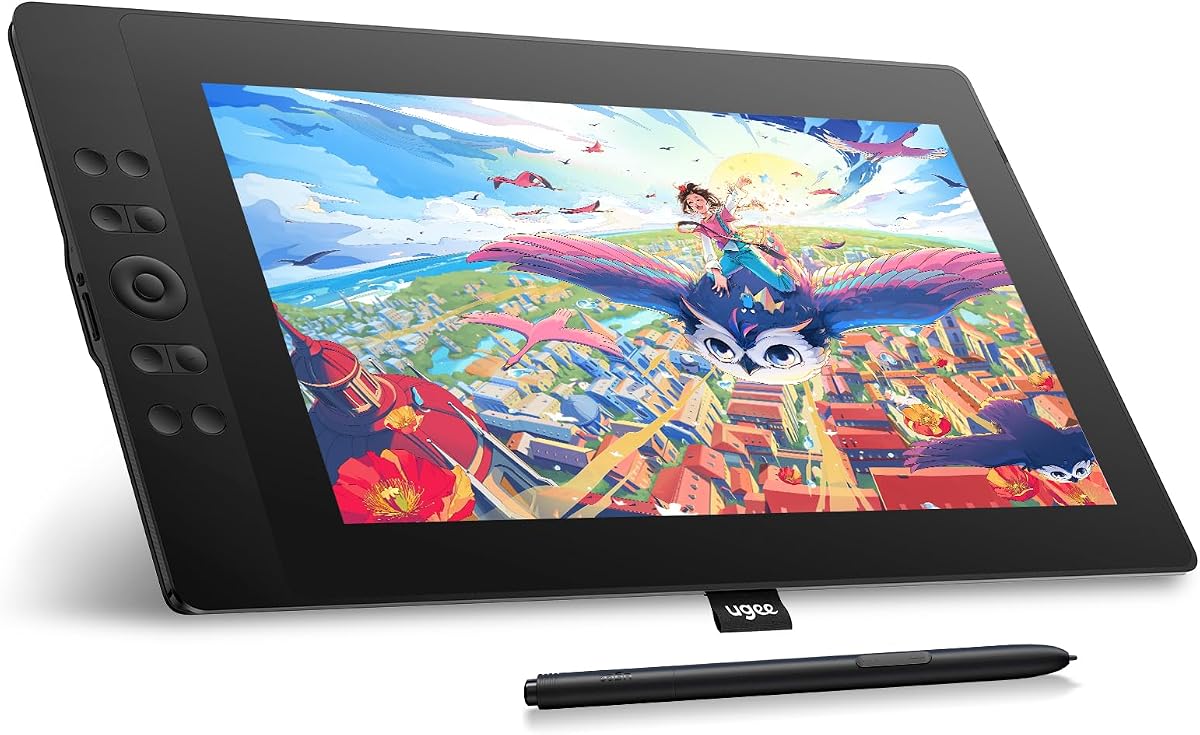
The Artisul D16 provides a generous 15.6-inch workspace which is rare at this price level. Its full-laminated screen ensures accurate cursor placement and reduces parallax. The adjustable stand allows for ergonomic positioning which helps during long sessions.
We may earn a commission when you buy through this link, at no additional cost to you.
With 76% Adobe RGB color gamut, it offers vivid and accurate color representation. The dial and seven hotkeys provide quick control over brush sizes and scrolling. This setup is ideal for animation and graphic design tasks requiring space.
As a refurbished item, condition may vary but it maintains a high rating. You might need to check return policies before purchasing. It still offers excellent value for those needing more screen real estate than 11.6 inches.
We recommend this for artists who find smaller screens limiting. It pairs well with standard PCs and laptops with HDMI ports. Choose this if screen size is a priority for your creative workflow.
The adjustable stand supports multiple angles to help you maintain a comfortable posture.
The 15.6 inch display allows you to see more of your canvas without zooming in.
We may earn a commission when you buy through this link, at no additional cost to you.
The HUION Kamvas 13 Gen 3 brings high-end features to a more accessible range. Its 16384 pressure levels offer subtle control over line weight and opacity. The dual dial buttons enhance workflow efficiency by allowing quick adjustments without menu diving.
We may earn a commission when you buy through this link, at no additional cost to you.
Color accuracy is impressive with factory calibration ensuring consistency across displays. The Canvas Glass 2.0 reduces glare and improves tracking precision. It connects via a single USB-C cable which simplifies setup significantly.
This device is suitable for professional illustrators who demand precision and color fidelity. It works with Android devices supporting USB 3.1 which adds versatility. The price is higher than basic models but justified by its superior specs.
We recommend this for those upgrading to a professional tool. It is an excellent choice for detailed artwork and professional projects. Consider it if you need precise color management and advanced pen control.
Advanced PenTech 4.0 ensures fluid drawing with low latency and high sensitivity.
Factory calibration report assures your colors will match industry standards closely.
We may earn a commission when you buy through this link, at no additional cost to you.
The UGEE UE16 stands out with its exceptionally wide color gamut of 143% sRGB. This makes it ideal for creators who need rich and vivid color reproduction. The 15.4-inch screen offers a spacious workspace for detailed design tasks.
We may earn a commission when you buy through this link, at no additional cost to you.
It features 16K pressure sensitivity and a scroll wheel for intuitive navigation. The eight physical keys provide tactile feedback for essential commands. Full-lamination reduces parallax and enhances the drawing feel significantly.
Users should ensure their computer has the necessary ports for connectivity. The cable setup might require some effort to keep tidy. Despite this, the visual quality and responsiveness are top-notch for the price range.
We recommend this for illustrators who prioritize color accuracy and screen size. It is a strong contender for digital painting and photo editing. Choose this if you want vibrant colors and a large active area.
The 143% sRGB gamut allows for a broader range of colors than standard displays.
16K pressure levels provide nuanced control for detailed artistic strokes.
We may earn a commission when you buy through this link, at no additional cost to you.
The VEIKK VK1200 is built to support students and beginners with essential tools. It includes two pens and an artist glove to keep hands clean while drawing. The six shortcut keys are easily accessible for common tasks like zooming.
We may earn a commission when you buy through this link, at no additional cost to you.
The screen resolution supports clear visuals for educational and casual art use. It connects via standard ports making it compatible with most computers. The package includes plenty of replacement nibs for extended use.
Color gamut is standard compared to higher-end models but sufficient for most tasks. The build quality is decent for the price point. Users may want to check driver settings for optimal performance.
We recommend this for students starting digital art classes. It offers everything needed to begin without unnecessary complexity. Choose this if you want a complete starter kit with accessories.
Includes two pens and a glove to ensure you can start drawing right away.
Six shortcut keys are easy to set up and help streamline basic workflows.
We may earn a commission when you buy through this link, at no additional cost to you.
The RubensTab T11 Pro offers unique freedom by functioning without a computer. Its built-in battery allows for hours of drawing on the go. This makes it ideal for students or travelers who need mobility.
We may earn a commission when you buy through this link, at no additional cost to you.
It comes with pre-installed drawing apps making setup simple for new users. The 10.1-inch screen is compact yet vivid for a portable device. You can connect to Wi-Fi to access tutorials or save work directly.
Since it runs independently it may not support heavy software like Photoshop. The screen is smaller than traditional pen displays but convenient for sketches. It is a solid choice for casual artists and note-taking.
We recommend this for those who want a tablet without cable dependencies. It works well for quick sketches and idea generation. Choose this if portability and standalone functionality are your priorities.
The internal battery supports several hours of continuous drawing without needing a power source.
Pre-installed apps help you start creating immediately without complex setup.
We may earn a commission when you buy through this link, at no additional cost to you.
The VEIKK VK1200V2 upgrades the pressure sensitivity to 16384 levels for better control. Its 120% sRGB color range delivers vibrant visuals for digital art. The full-laminated design ensures precision and reduces parallax effectively.
We may earn a commission when you buy through this link, at no additional cost to you.
It is lightweight which makes it easy to carry around for students. The six customizable hotkeys help optimize workflow. It supports multiple operating systems including Windows Mac and Linux.
Performance depends on having updated drivers installed correctly. Some users might need to download the latest version for best results. This tablet is a strong value proposition with high-end specs.
We recommend this for artists who want pressure sensitivity without paying premium prices. It suits illustration and graphic design well. Choose this if you need precise control and color accuracy.
16384 pressure levels allow for very subtle line weight adjustments.
Weighing only 1.78 lbs it is easy to transport to different locations.
We may earn a commission when you buy through this link, at no additional cost to you.
The XPPen Artist 12 Pro Lite features a unique Red Dial for quick control. This dial adds a layer of customization beyond standard shortcut keys. The full-laminated screen offers a clean and precise drawing surface.
We may earn a commission when you buy through this link, at no additional cost to you.
It includes a 3-in-1 cable that simplifies connection to various devices. The tilt support allows for natural shading techniques without adjusting software settings. It works well with Windows Mac and Linux operating systems.
The color performance is solid though not as wide as some competitors. It is ideal for sketching and design tasks that require precision. The compact size fits well on most desks and workspaces.
We recommend this for users who value dial controls and clean connectivity. It offers a refined experience for digital creators. Choose this if you prefer a compact setup with advanced input features.
The programmable Red Dial offers a unique way to control brush sizes efficiently.
A 3-in-1 cable connects data power and video signals through one single line.
We may earn a commission when you buy through this link, at no additional cost to you.
Choosing the right drawing tablet depends on your specific needs and workflow preferences. Consider these factors to find a model that matches your creative requirements.
Screen size affects how much space you have for drawing without zooming. A 11.6 inch screen is portable while 15.6 inches offers more workspace. Ensure the resolution is at least 1920×1080 for clear visuals.
Look for HD or Full HD resolution to see fine details in your artwork clearly.
Pressure sensitivity determines how the pen responds to your touch. Higher levels like 8192 or 16384 allow for more nuanced strokes. This is essential for shading and detailed illustrations.
Choose a model with at least 8192 levels for a natural drawing experience.
Color gamut defines the range of colors the display can reproduce. Higher percentages like 72% NTSC or 120% sRGB mean more vibrant and accurate colors. This matters for graphic design and illustration work.
Prioritize models with high color gamut if color accuracy is important to you.
Connectivity affects how you connect the tablet to your computer. HDMI and USB-A are common but modern laptops may need adapters. USB-C single cable options simplify setup and reduce clutter.
Check your computer ports before buying to ensure easy connection without extra hardware.
Look for battery-free pens to avoid frequent charging interruptions. Tilt support allows you to shade by changing the pen angle. Extra nibs and a pen holder add convenience and comfort.
Select a pen with ergonomic design and tilt function for better control.
Shortcut keys on the tablet allow quick access to commands like undo or zoom. Having customizable keys improves workflow efficiency significantly. More keys offer more flexibility for complex software.
Choose a model with enough shortcuts to match your software habits.
Ensure the tablet supports your operating system such as Windows Mac or Linux. Some models also support Android devices for more flexibility. Compatibility with your drawing software is also key.
Verify system requirements before purchase to avoid driver issues.
A sturdy build ensures durability especially if you plan to travel with the device. Check for anti-glare coatings and scratch resistance. A good warranty provides peace of mind for long-term use.
Look for devices with solid construction and at least a one-year warranty.
Install the latest drivers from the manufacturer's website to ensure all features work correctly. Proper driver installation helps avoid lag and connectivity issues.
Keep the screen clean with a soft cloth to prevent scratches and smudges. Avoid using harsh chemicals that could damage the display coating.
Store the pen in its holder when not in use to protect the nibs. Adjust the pressure settings in your software to match your drawing style.
Most pen displays require a computer connection to function. However some standalone models exist that work independently with built-in software and battery power.
Yes most models support macOS versions typically from 10.12 or later. Check specific driver requirements before purchasing to ensure compatibility.
Higher pressure levels offer more sensitive response to your pen strokes. This allows for finer control over line weight and opacity in your artwork.
Absolutely these devices are excellent for handwriting and annotations. Many come with software that supports document editing and presentation.
Most modern pens are battery-free meaning they do not require charging. They draw power from the screen so you can use them continuously.
Full lamination reduces the gap between glass and screen which minimizes parallax. This makes drawing more accurate and intuitive compared to non-laminated displays.
Popular programs like Photoshop Illustrator Krita and Clip Studio Paint are fully supported. Drivers optimize these apps for the tablet's features.
Many newer models support USB-C single cable connections for simplicity. Older models may need HDMI and USB-A ports for video and data transmission.
We explored ten excellent options ranging from budget to premium features. Each tablet offers unique benefits for different creative needs and skill levels.
Prioritize factors like pressure sensitivity and screen size based on your workflow. A larger screen might help detailed work while portability aids travel.
Prices and availability change often so verify current listings before purchasing. Choose the model that best aligns with your artistic goals and budget.