
Hamile for iPad 9/8/7th Generation Case with Keyboard 10.2 Inch – Wireless
4.5Editor score
180 hour battery life
Magnetic detachable design
Premium PU leather material
Finding the right keyboard case for your 8th generation iPad can transform your device into a powerful productivity machine. With so many options available, selecting the perfect match requires careful consideration of compatibility and features.
We have thoroughly evaluated ten leading keyboard cases designed specifically for the 8th generation iPad. Our analysis focuses on build quality, typing experience, battery life, and additional features like trackpads or pencil holders to ensure you get the best value.
Each product in this list highlights unique strengths tailored to different user needs, from budget-friendly options to premium models with advanced functionality. Please note that product availability and pricing may change over time, so check current details before purchasing.
4.5Editor score

4.4Editor score

4.4Editor score
As an Amazon Associate we earn from qualifying purchases.
This side-by-side comparison highlights the key specifications and unique features of each keyboard case to help you make an informed decision based on your specific needs and preferences.


This keyboard case stands out as a top choice for users seeking a complete laptop-like experience. With a rating of 4.4 stars, it delivers solid performance across multiple iPad generations including the 8th generation model.
We may earn a commission when you buy through this link, at no additional cost to you.
The inclusion of a rechargeable Bluetooth mouse is a significant advantage for multitasking and navigation. The keyboard itself features an adjustable 7-color backlight, ensuring visibility in low-light environments while adding a touch of style.
While the magnetic design is convenient, some users may find the keyboard detaches more easily than expected during transport. However, the honeycomb pattern inside the case provides excellent heat dissipation, extending the device's lifespan.
This case is ideal for students and professionals who need versatile functionality. It transforms your iPad into a productive workstation with added features that enhance typing and navigation efficiency.
The included mouse allows for precise cursor control, making document editing and web browsing significantly easier compared to touch-only inputs.
The honeycomb grid pattern on the inner layer helps dissipate heat effectively, preventing overheating during extended usage sessions.
We may earn a commission when you buy through this link, at no additional cost to you.
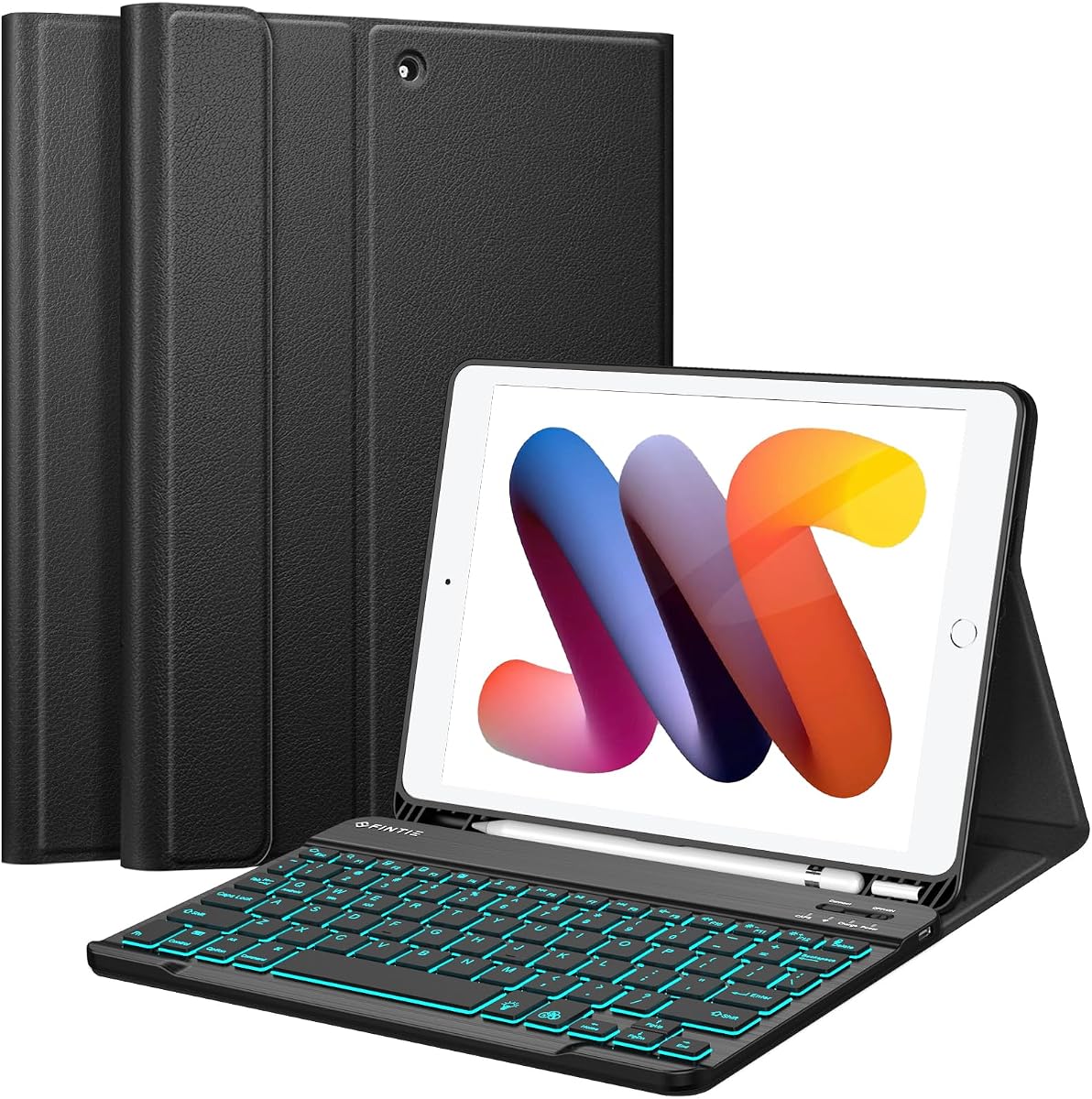
FINTIE offers a robust keyboard case designed for long-lasting performance. With an impressive 4.5-star rating, users appreciate the extensive battery life that supports weeks of typing without needing a recharge.
We may earn a commission when you buy through this link, at no additional cost to you.
The built-in 420mAh battery delivers up to 230 hours of continuous use, which is outstanding for this category. The keyboard also features ergonomic mechanical scissor keys that reduce noise and provide a comfortable typing experience.
While the battery life is a major strength, the added bulk from the battery compartment might be noticeable for users seeking a ultra-slim profile. Additionally, it lacks a trackpad, requiring touch inputs for navigation.
This case is perfect for writers and students who prioritize battery endurance. The reliable connectivity and comfortable keys make it a practical choice for daily tasks.
The energy-efficient design and large battery capacity ensure you can work for days on a single charge without interruption.
Mechanical scissor keys offer tactile feedback that reduces fatigue during long typing sessions, enhancing overall productivity.
We may earn a commission when you buy through this link, at no additional cost to you.
The typecase Touch Keyboard Case elevates the standard experience with premium features like a precision trackpad and a unique rotating hinge. It holds a 4.4-star rating reflecting its high build quality and functional design.
We may earn a commission when you buy through this link, at no additional cost to you.
Navigating your iPad becomes seamless with the multi-gesture trackpad controls. The 360-degree hinge allows you to use the device in various modes, from typing to watching videos, while the 10-color RGB backlight adds visual appeal.
The main downside is the higher price compared to basic cases. However, the inclusion of a trackpad and specialized shortcuts justifies the cost for power users who need advanced functionality.
This is an excellent choice for professionals and creatives who need a versatile and premium accessory. The robust construction and innovative design make it stand out in the market.
Multi-gesture support on the trackpad enables intuitive navigation, mimicking the experience of using a traditional laptop.
The 360-degree rotating hinge offers multiple viewing angles, enhancing flexibility for different work and entertainment scenarios.
We may earn a commission when you buy through this link, at no additional cost to you.
Hamile provides a high-quality option that balances performance and affordability. With a 4.5-star rating, this case is praised for its responsive keyboard and solid battery life.
We may earn a commission when you buy through this link, at no additional cost to you.
The 400mAh battery supports up to 180 hours of usage, ensuring you stay productive without frequent charging. The magnetic keyboard is responsive and locks securely into place, offering a satisfying typing experience.
While it lacks some premium features like a mouse or trackpad, it covers all the basics effectively. The honeycomb heat dissipation design adds to the durability and safety of your device.
This case is ideal for budget-conscious users who still want reliable features. It is a practical choice for daily use and casual productivity tasks.
Made from premium PU leather, the case feels luxurious and provides robust protection against scratches and daily wear.
The magnetic design ensures the keyboard stays firmly attached to the case while allowing easy detachment for flexibility.
We may earn a commission when you buy through this link, at no additional cost to you.
This keyboard case is tailored for users who prioritize typing efficiency and shortcut access. With a 4.4-star rating, it offers a streamlined experience designed to speed up your workflow.
We may earn a commission when you buy through this link, at no additional cost to you.
The keyboard comes with full shortcut keys customized for iPads, allowing you to control media and system functions easily. The honeycomb grid design helps prevent overheating, ensuring your device stays cool during use.
Although the battery life is lower than some competitors, it remains sufficient for most daily tasks. The case also features a pencil holder, making it convenient to store your stylus securely.
It is a great option for writers and students who need quick access to functions. The solid build and helpful shortcuts make it a reliable companion for your iPad.
Customized shortcut keys provide instant access to essential functions, streamlining your workflow and reducing time spent navigating menus.
Non-slip rubber lining keeps the tablet stable on desks, preventing unwanted movement during typing sessions.
We may earn a commission when you buy through this link, at no additional cost to you.
Logitech brings its reputation for quality to this slim folio case. With a 4.4-star rating, it is known for its long battery life and comfortable typing experience.
We may earn a commission when you buy through this link, at no additional cost to you.
The keyboard uses two replaceable coin cell batteries that can last up to four years, eliminating the need for frequent charging. The slim profile ensures it adds minimal bulk while providing full protection.
One trade-off is the lack of backlighting, which might be limiting for low-light environments. However, the reliable brand and durable construction make it a strong choice for those who prefer simplicity.
This case is perfect for users who value brand trust and minimal maintenance. It offers a no-fuss solution that gets the job done efficiently.
Replaceable coin cell batteries ensure you never face sudden power loss, offering years of uninterrupted use without recharge cycles.
Large well-spaced keys reduce hand fatigue, allowing for extended typing sessions without discomfort.
We may earn a commission when you buy through this link, at no additional cost to you.
KBCASE offers a lightweight and colorful option that appeals to users looking for portability. With a 4.5-star rating, it is praised for its slim design and responsive typing experience.
We may earn a commission when you buy through this link, at no additional cost to you.
The keyboard is ultra-thin and easily fits into bags without adding much weight. The detachable design allows you to remove the keyboard when you want to use the iPad in its native form.
While it is lightweight, it still provides solid protection with its shock absorption design. The honeycomb pattern helps with heat dissipation, keeping your device safe during extended use.
This case is ideal for travelers and students who prioritize portability. It balances protection and comfort without weighing down your device.
The slim profile ensures the case is easy to carry in any bag, making it perfect for on-the-go productivity.
A dedicated pencil holder keeps your stylus accessible and prevents it from getting lost during travel.
We may earn a commission when you buy through this link, at no additional cost to you.
Dexnor provides a premium floating case with a robust aluminum hinge. With a 4.3-star rating, it offers excellent build quality and a versatile viewing experience.
We may earn a commission when you buy through this link, at no additional cost to you.
The magnetic stand allows you to adjust the angles easily, while the included trackpad enhances navigation. The battery life is impressive, supporting up to 200 hours of usage on a single charge.
The aluminum build adds weight, which might be a consideration for users who prefer light accessories. However, the durability and premium feel justify this trade-off for many.
This case is suitable for users who value premium materials and advanced features. It offers a solid solution for both work and entertainment.
The durable hinge ensures stability and longevity, providing a reliable stand for any viewing angle.
The precision trackpad allows for smooth cursor control, improving your efficiency with multi-tasking tasks.
We may earn a commission when you buy through this link, at no additional cost to you.
INFILAND focuses on delivering a zero-lag typing experience with precision features. With a 4.5-star rating, this case is highly regarded for its responsiveness and build quality.
We may earn a commission when you buy through this link, at no additional cost to you.
The magnetic keyboard locks firmly into place, ensuring stability while typing. The built-in trackpad provides smooth cursor control, making it easy to navigate without touching the screen.
While the black color is versatile, there are limited options available. However, the performance and protection it offers make it a top contender in this category.
This case is ideal for professionals who need a reliable typing experience. The precision features ensure you can work efficiently without distractions.
The mechanical structure ensures instant response, reducing typing errors and improving workflow speed.
Form-fitting case design shields the iPad from scratches and bumps while maintaining access to all ports.
We may earn a commission when you buy through this link, at no additional cost to you.
KBCASE offers a stylish option with a 360-degree swivel design that appeals to creative users. With a 4.4-star rating, it combines functionality with a unique look.
We may earn a commission when you buy through this link, at no additional cost to you.
The included precision trackpad makes navigation effortless, while the hardshell ensures your device is well-protected. The swivel design allows you to adjust the angle for different tasks easily.
The added features might increase the weight compared to simpler cases. However, the versatility and style make it a great choice for those who want a distinctive accessory.
This case is perfect for creatives who need flexible viewing angles. It provides a practical and stylish solution for your iPad.
The swivel hinge offers maximum flexibility, allowing you to view the screen from any angle comfortably.
The included trackpad and pencil holder cater to creative workflows, ensuring all tools are accessible at all times.
We may earn a commission when you buy through this link, at no additional cost to you.
Choosing the right keyboard case involves considering several factors to ensure it meets your specific needs and preferences.
Ensure the keyboard case is designed specifically for the 8th generation iPad to guarantee a perfect fit. Check the model numbers listed by the manufacturer to avoid purchasing an incompatible case that may not align with buttons or ports.
Always verify the model number starting with 'A' on the back of your iPad before buying to confirm it matches the supported devices.
Look for cases with long battery life if you plan to use the keyboard extensively throughout the day. Some models offer up to 200 hours of use, while others may require more frequent charging cycles.
Choose a keyboard with fast charging capabilities via USB-C to minimize downtime when the battery runs low during busy work periods.
If you often work in low-light environments, a keyboard with backlight is essential. Models with multiple color options and adjustable brightness levels provide flexibility for different settings.
Prioritize keyboards with bright, uniform lighting to ensure you can see keys clearly without straining your eyes during night work sessions.
Consider whether the case includes a trackpad or comes with a separate mouse for easier navigation. This feature transforms your iPad into a more traditional laptop-like experience.
Cases with precision trackpads offer advanced gestures that improve multitasking efficiency, making them ideal for productivity-focused users.
Check the materials used in the case to ensure it offers robust protection against drops and scratches. Durable PU leather and soft TPU linings provide excellent shock absorption.
Look for features like honeycomb heat dissipation patterns inside the case to keep your device cool during extended usage sessions.
If you use an Apple Pencil, ensure the case has a dedicated pencil holder to keep it secure and easily accessible. This prevents losing your stylus when transporting your iPad.
A built-in holder adds convenience for artists and note-takers who need quick access to their stylus for drawing or writing tasks.
Select a case with multiple viewing angles to find the most comfortable position for typing or media consumption. Adjustable stands allow you to switch between portrait and landscape modes easily.
Sturdy magnetic hinges or grooved stands offer stability at various angles, reducing the risk of the case tipping over during use.
Bluetooth connectivity is standard for keyboard cases, but check for wireless range and pairing speed. A strong, lag-free connection ensures smooth typing without interruptions.
Magentic detachable keyboards add flexibility, allowing you to remove the keyboard when you prefer to use the iPad as a standard tablet.
To start using your keyboard case, first pair the Bluetooth keyboard with your iPad by enabling Bluetooth settings on both devices. Follow the pairing instructions provided in the user manual to establish a connection.
Clean the keyboard and case regularly using a soft, dry cloth to remove dust and debris. Avoid using liquid cleaners directly on the keys to prevent damage to the internal components.
Store your iPad in a cool, dry place when not in use to preserve battery life and prevent overheating. Ensure the case is closed properly to protect the screen from scratches.
Yes, many cases are designed to support multiple generations including the 7th and 9th. Always verify the model numbers on the case description to ensure it fits your specific device.
Yes, most keyboard cases include a pencil holder or a slot that allows you to access the pencil without removing it from the case.
Most modern cases use USB-C cables for charging. Simply connect the provided cable to a power source and the keyboard port to charge it up.
Many models feature a magnetic detachable design that allows you to remove the keyboard easily when you do not need it.
If the battery dies, the keyboard will stop working until you recharge it. Most models enter sleep mode automatically to conserve power when not in use.
Some cases offer multi-model compatibility, but most are specific to the 10.2 inch models. Check the product details to confirm support for your specific iPad model.
The top picks in this guide offer a range of options to suit different needs, from budget-friendly choices to premium models with trackpads and long battery life.
Prioritize features that matter most to you, such as backlighting, compatibility, or extra storage, to find the best match for your workflow.
Remember that product details may change, so review the latest specifications and availability before making your final purchase decision.