
HP 14 inch Laptop
4.5Editor score
Intel N150 Processor
1TB Cloud Storage included
Lightweight portable design
Finding the right laptop for Zoom Calls ensures your virtual meetings run smoothly without technical glitches. A capable machine handles video streams, background apps, and clear audio essential for professional communication.
We compared ten top-rated devices based on camera quality, microphone performance, display clarity, and battery life. Our analysis focuses on models that support seamless video conferencing experiences for remote workers and students.
Each pick highlights key strengths tailored to different needs and budgets. Prices and availability change frequently so verify current details before purchasing to ensure you get the best value for your setup needs.
4.5Editor score

5.0Editor score

5.0Editor score
As an Amazon Associate we earn from qualifying purchases.
This side-by-side comparison evaluates every product based on specs, performance, and user ratings to help you choose the ideal device for your video conferencing needs.





This HP Everyday Slim Laptop stands out as a top choice for Zoom Calls with its True Vision 720p HD camera featuring temporal noise reduction. Its 5.0 rating reflects strong user satisfaction for video meeting performance and reliability in daily tasks.
We may earn a commission when you buy through this link, at no additional cost to you.
The dual array microphones ensure your voice is heard clearly even in moderately noisy environments. Integrated Microsoft Copilot key enhances productivity during work hours while the multi-touch Imagepad offers effortless navigation through apps.
While the 128GB SSD limits local file storage the cloud options help mitigate this. The lightweight design makes it easy to carry to different rooms for flexible meeting setups without adding strain to your backpack.
Ideal for students and remote professionals needing a slim device for frequent video meetings. Prioritize this model if you value audio clarity and portability over massive local storage or heavy multitasking capabilities.
The True Vision camera and dual microphones reduce background noise ensuring you look and sound professional during every Zoom session.
A thin chassis and lightweight build make this laptop easy to move between home offices or study spaces for seamless meetings.
We may earn a commission when you buy through this link, at no additional cost to you.
The Cyezcor Video Conference Lighting Kit improves Zoom Call quality without needing a new laptop. With a 4.3 rating it offers essential lighting control for video clarity using 48 LED beads that reduce shadows effectively.
We may earn a commission when you buy through this link, at no additional cost to you.
Three color temperatures let you match your room light to avoid harsh contrasts. The clip-on design stays stable on monitors and USB power means no extra adapters are required for setup or daily use.
While it lacks advanced features like app control the simplicity suits users wanting quick installation. The soft ring design prevents glare on your screen which is common with traditional desk lamps during long calls.
Buy this if you need affordable lighting upgrades for existing laptops. It is perfect for budget-conscious professionals seeking better visual presence without investing in high-end camera systems or hardware upgrades.
The circular layout distributes light evenly across your face minimizing shadows and glare that often distract during video meetings.
Plug directly into your laptop or charger for immediate power without cables or extra outlets cluttering your workspace setup.
We may earn a commission when you buy through this link, at no additional cost to you.
This NIMO laptop delivers top-tier performance for demanding Zoom Calls with 16GB RAM and a 512GB NVMe SSD. Its 5.0 rating confirms smooth handling of multiple browser tabs and HD video streaming without lag or slowdowns.
We may earn a commission when you buy through this link, at no additional cost to you.
The 15.6 inch Full HD screen provides clear visuals during presentations or screen sharing sessions. An 8- second fast boot means you can join meetings instantly without waiting for the system to load after waking.
While it costs more than budget models the included 2-year warranty and US-based support add long-term value. The metal A-cover design reduces shoulder strain making it a practical choice for commuters who carry it daily.
Choose this model for intensive multitasking and long meeting schedules. It balances screen size and processing power effectively for professionals who need reliability and speed during critical video conference hours every day.
16GB RAM allows simultaneous running of Zoom Teams and multiple browser tabs with zero lag during complex conference calls.
Up to 8.5 hours of Zoom calls ensures you stay powered through a full workday without needing constant charging breaks.
We may earn a commission when you buy through this link, at no additional cost to you.
The HP 14 inch Laptop balances portability with essential features for video meetings. With 1TB Cloud Storage it solves local storage limits while maintaining a slim 0.71-inch profile ideal for travelers attending remote meetings.
We may earn a commission when you buy through this link, at no additional cost to you.
Anti-glare coating on the display reduces eye strain during long calls in bright environments. Multiple ports like USB-C and HDMI allow connecting external webcams or monitors for improved setup flexibility during work sessions.
While the screen brightness is moderate the anti-glare helps maintain clarity in varied lighting conditions. The lightweight chassis at 3.24 lbs makes it easy to reposition throughout the day for better camera angles.
Perfect for users needing cloud access without bulky hardware. This model works well for students or professionals who prioritize carrying weight and cloud file access over high-end local processing power.
1TB of cloud storage ensures files are always accessible for presentations without consuming limited local SSD space.
The anti-glare coating reduces reflections making it easier to view shared screens clearly during virtual meetings.
We may earn a commission when you buy through this link, at no additional cost to you.
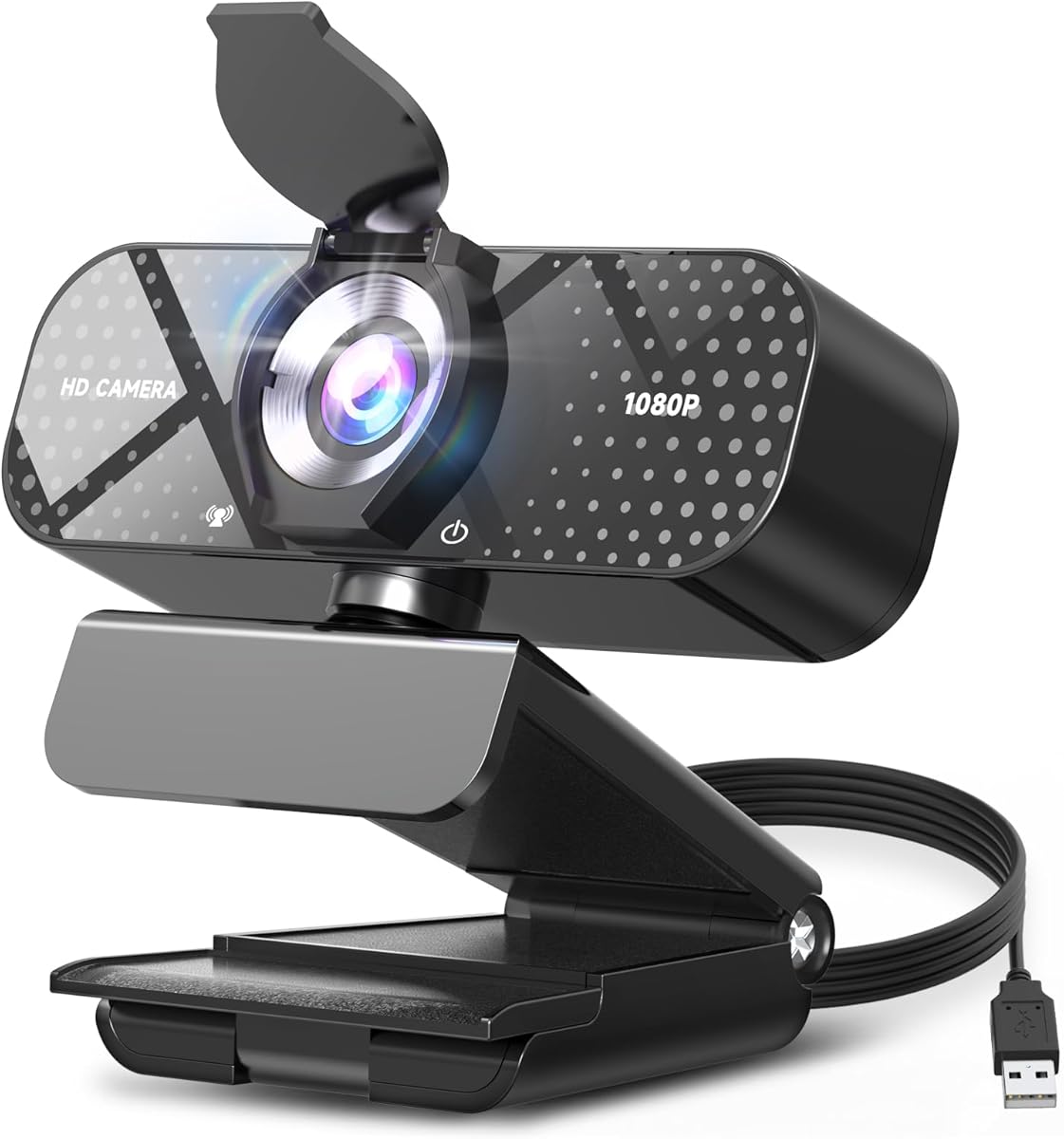
This TRAUSI webcam upgrades video quality for any laptop used in Zoom Calls. A 4.6 rating highlights its 1080P HD clarity and auto light correction ensuring you look sharp even in dimly lit rooms or spaces.
We may earn a commission when you buy through this link, at no additional cost to you.
The noise-canceling microphone ensures your voice remains clear despite background distractions. Auto light correction dynamically adjusts video brightness so color and detail stay consistent regardless of your current lighting environment conditions.
Plug-and-play compatibility means no driver installations are required for quick setup. The included privacy cover provides peace of mind by physically blocking the lens when you are not on active meetings.
Ideal for upgrading older laptops with poor built-in cameras. This device offers high-end video features at a budget-friendly price point perfect for remote workers wanting professional quality without new hardware purchases.
Smart sensors adjust brightness and color dynamically ensuring consistent visual quality across various room lighting conditions.
Built-in noise-canceling mic filters out ambient sounds so your voice stays clear during important conference calls.
We may earn a commission when you buy through this link, at no additional cost to you.
This Zoom Lighting desk lamp uses advanced edge-lit technology for even soft illumination. A 4.4 rating shows it reduces glare effectively making it ideal for long Zoom Calls where eye comfort is essential.
We may earn a commission when you buy through this link, at no additional cost to you.
High CRI of 97.8 ensures accurate color reproduction for natural skin tones on camera. The ergonomic design allows height adjustment from 22 to 32.5 inches to fit various monitor heights comfortably.
With 360-degree rotation you can direct light exactly where needed. The sturdy metal base with non-slip pad ensures stability during active use without scratching your desk surface or moving unexpectedly.
Buy this for a premium lighting setup that doubles as a reading lamp. It suits users wanting adjustable height and true-to-life colors without the bulk of traditional ring lights on their workspace.
Edge-lit tech delivers uniform light that eliminates harsh glare reducing eye strain during extended video sessions.
A CRI of 97.8 ensures skin tones and details appear natural and vibrant on every call.
We may earn a commission when you buy through this link, at no additional cost to you.
This ring light features a 6-inch circular design that minimizes glare compared to flat lampshades. A 4.4 rating confirms reliable performance for Zoom Calls with a CRI over 95 for accurate color reproduction on video.
We may earn a commission when you buy through this link, at no additional cost to you.
Multiple lighting modes include warm mixed and cold options to suit any environment. The 10 dimming levels allow precise brightness adjustments ensuring your face is well-lit without causing screen reflections.
The curved lampshade with upgraded coatings prevents eye strain while illuminating your workspace. It is compact enough to stay attached to monitors without obstructing view during meetings or remote work sessions.
Choose this for an affordable way to improve video quality on existing laptops. It is especially useful for beginners or creators needing consistent lighting for calls without investing in complex studio equipment.
The curved design reduces glare and provides even coverage for a more flattering look during Zoom meetings.
Cycle through warm mixed and cold modes to match your room lighting and appear more natural on camera.
We may earn a commission when you buy through this link, at no additional cost to you.
This HP 14 Business Laptop includes a 1-Year Office 365 subscription for integrated meeting tools. A 4.1 rating reflects its suitability for general video conferences with Intel Quad-Core N150 processing power.
We may earn a commission when you buy through this link, at no additional cost to you.
The 1366×768 LED screen provides enough clarity for basic video needs while keeping the device lightweight. USB-C 3.1 and HDMI ports allow easy connection to external monitors or projectors during remote work.
While RAM is limited the UFS storage ensures decent responsiveness for single-tasking sessions. The bundled earphones provide immediate audio readiness for calls without needing to buy additional peripherals separately.
Best for professionals needing basic Office integration and connectivity. It serves well for short meetings where portability and software inclusion outweigh high-resolution display or heavy multitasking requirements.
One year of Office 365 ensures full access to productivity tools essential for remote work and meetings.
USB-C 3.1 ports support fast data transfer and external monitor connections for flexible meeting setups.
We may earn a commission when you buy through this link, at no additional cost to you.
The HP New Everyday Slim Laptop offers Copilot AI for enhanced productivity during meetings. With a 3.3 rating it includes True Vision 720p HD camera and dual array microphones for clear video and audio capture.
We may earn a commission when you buy through this link, at no additional cost to you.
Wireless streaming supports up to 7.5 hours which may require mid-day charging for full meetings. The lightweight Natural Silver chassis at 3.24 lbs ensures easy transport between different workspaces.
While local SSD is 128GB the 1TB Cloud Storage helps manage file storage effectively. The multi-touch Imagepad simplifies navigation without needing external mice for basic Zoom Calls.
Consider this for AI features and cloud integration but verify battery needs. It suits users needing portability and Copilot AI tools over long independent runtime or high-resolution local storage.
Dedicated Copilot key speeds up access to AI tools during work sessions.
Dual array mics capture clear voice audio reducing background noise during meetings.
We may earn a commission when you buy through this link, at no additional cost to you.
This dual-lamp system provides brighter even lighting than single-bar options for Zoom Calls. A 4.2 rating highlights the remote and touch control for quick adjustments during meetings without touching your laptop directly.
We may earn a commission when you buy through this link, at no additional cost to you.
Three color modes and 10 brightness levels let you adapt to any environment. The dual bars create a wider lighting area reducing shadows and enhancing professionalism during remote presentations or meetings.
Installation takes under a minute with adjustable height ranges to fit most screens. The sponge pads on clips prevent scratching your monitor while ensuring secure attachment for active work sessions.
Choose this for a versatile lighting setup with remote control convenience. It suits users needing higher brightness and flexible mounting options for professional-looking video calls from home or office.
Two light bars provide wider and brighter coverage ensuring even illumination across your face and workspace.
Control lighting via touch or remote to adjust settings without interrupting your video meeting workflow.
We may earn a commission when you buy through this link, at no additional cost to you.
Selecting the right laptop for Zoom Calls requires balancing performance camera quality and connectivity features. This guide breaks down key factors to consider for optimal video meeting experiences.
Look for at least 720p HD resolution with noise reduction to ensure clear video during meetings. Temporal noise reduction helps maintain image quality in low-light environments where built-in webcams struggle.
Prioritize models with dual array microphones for better audio capture without external devices.
Choose laptops with Intel N150 or better processors to handle video streams and multiple browser tabs smoothly. Low latency prevents freezes during screen sharing or group calls.
Aim for processors rated for 15W+ thermal design power for consistent performance over long meetings.
8GB RAM or higher ensures seamless multitasking between Zoom Teams and other work tools. Insufficient RAM can lead to slowdowns during shared screen sessions.
If possible select models with expandable RAM slots for future upgrades.
A Full HD display with anti-glare coating reduces eye strain during long calls. High color accuracy helps viewers see details in shared documents or presentations clearly.
Brightness levels above 250 nits are ideal for rooms with ambient light.
All-day battery support allows uninterrupted meetings without needing constant power access. Look for models supporting 6+ hours of continuous video playback.
Fast charging options are beneficial if you frequently travel between locations.
Ensure the laptop includes USB-C and HDMI ports to connect external monitors or peripherals. This flexibility helps optimize your workspace for video meetings.
Built-in card readers add convenience for transferring files quickly during work.
Wi-Fi and Bluetooth support ensures stable connections for wireless headsets or mouse. Dual-band Wi-Fi reduces interference during video calls in busy networks.
Check for Bluetooth 5.0+ compatibility for better audio device performance.
Cloud storage options supplement local SSDs for recording meetings and saving large files. Sufficient local space is needed for software updates and temporary cache.
Prioritize models offering 512GB SSD or expandable storage for future needs.
Position your laptop at eye level to reduce awkward neck angles during meetings. Use books or stands to adjust the height so the camera captures you from the best angle.
Keep the cooling vents clear to prevent overheating during extended Zoom sessions. Use cooling pads if working in warm environments to maintain performance.
Clean the screen and webcam regularly with microfiber cloths to ensure image clarity. Dust and fingerprints can degrade video quality over time.
Focus on at least 720p HD webcam quality 8GB RAM and a processor capable of video streaming. Good audio microphones and stable connectivity are equally important.
Built-in webcams are often sufficient but external ones offer 1080p clarity and better light control. This is useful if your laptop camera is low resolution.
Aim for at least 6 to 8 hours of active video call time. This prevents mid-meeting shutdowns and allows flexibility during travel.
Yes RAM ensures smooth switching between Zoom other apps and browser tabs. 8GB is recommended to avoid freezes during screen sharing.
Yes laptops with Ethernet ports can connect via cable for stable internet. Some models also support mobile hotspot tethering for backup.
14 to 15.6 inches balances portability with viewing space. Larger screens help with presentations but reduce mobility for remote workers.
Copilot AI features enhance productivity during meetings but require sufficient processing power. They are beneficial for automating tasks during long sessions.
Use dual microphones or external headsets to reduce background noise. Avoid placing laptops near noisy fans or windows.
The top picks highlight devices balancing performance camera quality and portability. Each model offers distinct strengths for different budgets and workspace needs.
Prioritize features like battery life and audio clarity if you attend frequent meetings. Performance and connectivity are critical for reliable remote work experiences.
Prices and availability change frequently so verify current details before purchasing. Check reviews to ensure the chosen device matches your specific meeting workflow.