
Thermalright Assassin X120 Refined SE
4.7Editor score
Four heat pipes with AGHP technology
Silent TL-C12C PWM fan included
Compatible with Intel and AMD sockets
This guide compares the top 10 CPU Air Cooler Fan Heatsink models for performance, compatibility, and value to help you choose the right cooling solution.
Choosing the right CPU Air Cooler Fan Heatsink is crucial for maintaining optimal system performance. A good model ensures your processor runs cool under load while keeping noise levels low for a comfortable workspace.
We evaluated ten leading products based on thermal performance, build quality, and socket compatibility. Each selection offers unique features ranging from budget-friendly options to high-end dual tower designs.
Every pick includes detailed specs and pros to help you decide. Note that prices and availability can change frequently so check current listings before making your final purchase decision today.
4.7Editor score

4.8Editor score
4.7Editor score
This side-by-side comparison highlights key specifications and features across all ten selected CPU Air Cooler Fan Heatsink models to help you find the best fit for your build.


The Thermalright Assassin X120 Refined SE is a standout budget option for users seeking reliable cooling without breaking the bank. It holds a strong 4.7 rating from thousands of users who appreciate its balance of performance and cost.
We may earn a commission when you buy through this link, at no additional cost to you.
Its four heat pipes utilize AGHP technology to ensure consistent cooling regardless of orientation. The TL-C12C fan delivers efficient airflow while keeping noise levels low for peaceful computing environments.
While it lacks the premium build of higher-end models, the aluminum heatsink cover provides adequate protection. The only notable trade-off is its single tower design which limits maximum thermal capacity compared to dual towers.
This cooler is ideal for budget builds or office PCs where silence and efficiency matter. If you need a dependable solution for an i5 or Ryzen 5 processor, this model delivers excellent value.
AGHP ensures optimal heat pipe performance even when the cooler is installed horizontally or vertically.
Supports Intel LGA 1700 and AMD AM5 ensuring longevity for future CPU upgrades.
We may earn a commission when you buy through this link, at no additional cost to you.
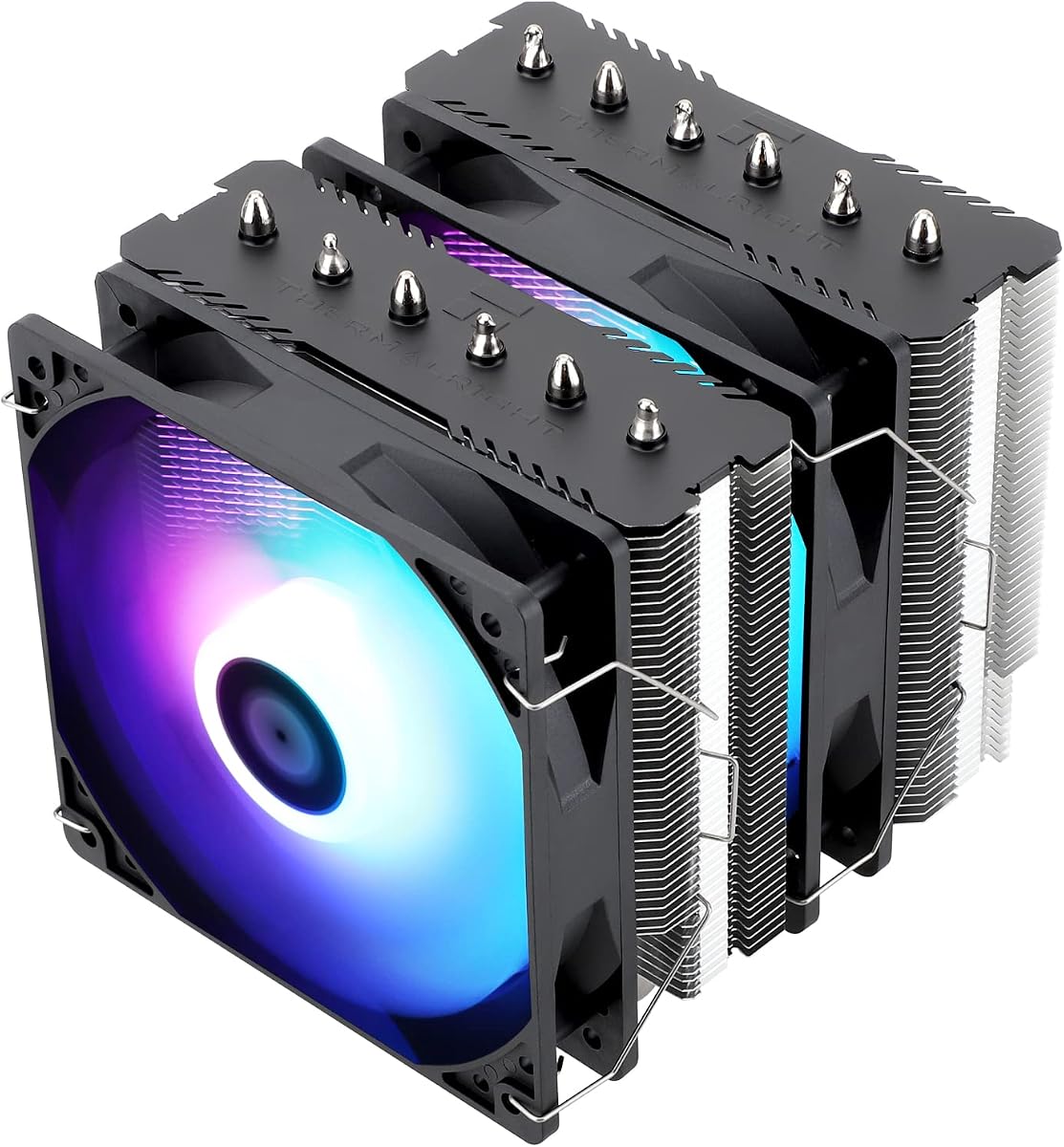
The Thermalright Peerless Assassin 120 SE ARGB bridges the gap between budget and premium performance. It boasts a 4.7 rating and is praised for its massive cooling capacity in a dual tower form factor.
We may earn a commission when you buy through this link, at no additional cost to you.
With six heat pipes and two high-performance fans, it handles high heat loads effortlessly. The ARGB fans add a touch of style to your build while maintaining low noise levels under load.
Installation can be tricky due to its size but the included accessories make mounting secure. The main trade-off is its bulk which might interfere with RAM slots on smaller motherboards.
This cooler is perfect for enthusiasts who want high performance without paying flagship prices. If you are running a high-end CPU like a Core i7 or Ryzen 9 this unit keeps it cool.
The dual tower configuration provides significantly more surface area for heat dissipation.
Fans support 5V 3pin synchronization for seamless lighting control via motherboard software.
We may earn a commission when you buy through this link, at no additional cost to you.
The Noctua NH-D15 chromax.Black is widely regarded as the gold standard for air cooling. Its 4.8 rating reflects years of trust among builders who need reliable performance and silence.
We may earn a commission when you buy through this link, at no additional cost to you.
Dual NF-A15 fans push massive airflow while remaining nearly silent. The all-black design fits perfectly into modern setups while delivering cooling power that rivals many liquid coolers.
The price is higher than competitors but the build quality and six year warranty justify the cost. It is very large so ensure your case has enough space before purchase.
Buy this if you want the best possible air cooling and value long-term reliability. It is ideal for quiet workstations or gaming rigs where thermals and noise are top priorities.
These fans use advanced aerodynamic design to maximize efficiency while minimizing noise.
The mounting system ensures perfect contact with the CPU for optimal heat transfer.
We may earn a commission when you buy through this link, at no additional cost to you.
The Noctua NH-U12A chromax.Black offers premium cooling in a compact single tower design. It carries a 4.8 rating for its ability to cool efficiently without hogging RAM space.
We may earn a commission when you buy through this link, at no additional cost to you.
Dual NF-A12x25 fans provide exceptional performance for a 120mm cooler. The chromax.Black aesthetic matches high-end black builds while maintaining the quiet operation Noctua is known for.
While it costs more than many dual tower units, its compact size is its selling point. It trades some max cooling potential for better compatibility with tight motherboard layouts.
Choose this for small ATX cases where RAM clearance is a priority. It is perfect for systems that need powerful cooling but cannot accommodate a wide dual tower unit.
Two high pressure fans work together to pull heat through the dense fin stack.
The narrow design leaves ample room for tall RAM modules on most boards.
We may earn a commission when you buy through this link, at no additional cost to you.
The Thermalright Assassin X 120R Digital ARGB stands out with a digital screen on top. It holds a 4.7 rating from users who love seeing real-time CPU stats right on their cooler.
We may earn a commission when you buy through this link, at no additional cost to you.
Using TRCC software it displays temperatures and usage clearly. The single tower design with four heat pipes provides solid cooling while the fan adds vibrant ARGB lighting effects.
While the screen is a neat party trick the cooling performance is comparable to other budget towers. You do need to install software to use the display which adds a step to setup.
This cooler is great for builders who want a unique look without spending a fortune. If you like having visual system data accessible immediately this unit delivers a distinctive experience.
View CPU temperature and usage instantly without opening system monitoring software.
Connect via USB to customize the display content and control ARGB lighting.
We may earn a commission when you buy through this link, at no additional cost to you.
The Noctua NH-D15 is the classic version of the award-winning cooler. It has a 4.8 rating and remains a top choice for those who prefer Noctua's signature color scheme.
We may earn a commission when you buy through this link, at no additional cost to you.
Its dual tower design provides massive heat dissipation capacity. The two NF-A15 fans ensure the system stays cool even under heavy loads while maintaining an almost silent environment.
The beige and brown color scheme may not appeal to all builders but performance is unmatched. It is large and requires a case that can accommodate its width and height comfortably.
Buy this if you want proven reliability and top-tier cooling in a traditional design. It is an excellent choice for silent PCs or systems where thermals are the primary concern.
The original color scheme is instantly recognizable and iconic in the PC community.
This cooler can handle high overclocked settings without thermal throttling the CPU.
We may earn a commission when you buy through this link, at no additional cost to you.
The Noctua NH-D15S chromax.Black offers the cooling power of a dual tower with better compatibility. It holds a 4.8 rating for its ability to fit into tighter spaces without sacrificing performance.
We may earn a commission when you buy through this link, at no additional cost to you.
Its asymmetrical single fan design clears most RAM slots which is a huge advantage. The black aesthetic makes it suitable for modern builds while retaining the quality you expect from Noctua.
Running only one fan it might be slightly louder than the dual fan version under load. However it still manages to stay quiet enough for most quiet computing scenarios.
This cooler is best for users who need high performance but have RAM compatibility concerns. It strikes an ideal balance between size and cooling capability for versatile builds.
The asymmetrical layout avoids blocking tall memory modules on modern motherboards.
Optimized airflow ensures cooling stays effective with just one high performance fan.
We may earn a commission when you buy through this link, at no additional cost to you.
The Noctua NH-D9L is designed for those who need dual-tower power in a small footprint. With a 4.7 rating it proves that small cases can still run cool and quiet.
We may earn a commission when you buy through this link, at no additional cost to you.
Its 110mm height makes it perfect for HTPC or SFF builds where space is critical. The dual-tower design maximizes cooling efficiency while keeping the overall height very low.
The smaller 92mm fan may produce a higher pitch than larger fans but remains quiet. It is a specialized product that comes with a price tag reflecting its unique design.
Choose this for small form factor cases where standard coolers will not fit. It ensures your mini-ITX system can handle high performance components without overheating or noise.
Specifically engineered to fit into 3U and mini cases without clearance issues.
Retains the thermal benefits of a dual tower even in a reduced height form.
We may earn a commission when you buy through this link, at no additional cost to you.
The Noctua NH-U12S is a classic slim tower cooler that focuses on compatibility and reliability. It has a 4.8 rating from users who appreciate its unobtrusive design and solid performance.
We may earn a commission when you buy through this link, at no additional cost to you.
Its slim profile ensures it does not block RAM or PCIe slots on most motherboards. The NF-F12 fan is a high quality unit that moves air efficiently while staying whisper quiet.
While it is not meant for extreme overclocking it handles standard workloads effortlessly. The price is higher than budget options but the build quality justifies the expense over time.
This cooler is ideal for mainstream builds that need a balance of performance and size. If you want a quiet system that looks clean and does not interfere with other components.
The narrow profile ensures compatibility with almost all modern ATX motherboards.
The NF-F12 fan optimizes airflow direction to maximize cooling efficiency.
We may earn a commission when you buy through this link, at no additional cost to you.
The Thermalright Peerless Assassin 120 SE offers exceptional performance for the price. With a 4.8 rating it is a top contender for builders seeking high-end cooling on a budget.
We may earn a commission when you buy through this link, at no additional cost to you.
Its six heat pipes and dual fans create a powerful cooling engine. The nickel-plated base ensures long-term corrosion resistance while the SS2 install system simplifies mounting.
It requires checking case compatibility due to its large dimensions. However the performance it delivers rivals units that cost twice as much in many real-world tests.
Choose this if you want flagship performance without paying flagship prices. It is perfect for gaming rigs and workstations that need to run cool under heavy loads.
Provides better corrosion resistance and improves thermal contact with the CPU.
Ensures secure installation across a wide range of Intel and AMD sockets.
We may earn a commission when you buy through this link, at no additional cost to you.
Selecting the right CPU Air Cooler Fan Heatsink involves balancing thermal needs with physical constraints and budget.
Thermal performance is the primary factor when selecting a CPU Air Cooler Fan Heatsink. Look for models with high TDP ratings that match your processor's heat output. Dual tower coolers generally provide better heat dissipation than single tower options.
Prioritize models with sufficient TDP ratings to ensure your CPU stays cool under heavy workloads.
Ensure the cooler supports your current and future CPU sockets. Most modern coolers support LGA1700, AM4, and AM5 but always check the specifications list. Compatibility with LGA1851 and 1200 is also common in recent models.
Confirm that the mounting kit includes all necessary hardware for your specific motherboard type.
Check the height of the cooler against your case limits. A typical tower might be 160mm tall which fits most mid-towers but not all. Ensure there is enough clearance for your RAM and PCIe slots.
Measure your case and motherboard to avoid purchasing a cooler that is too large for your build.
Noise levels are crucial for quiet work environments. Look for fans with low dB ratings often found in PWM models. High-quality bearings like S-FDB or Fluid Dynamic Bearing help reduce operational noise.
Choose fans with low noise ratings if you plan to use the PC for work or media.
Quality materials affect longevity and thermal efficiency. Copper heat pipes and aluminum fins are standard in reliable models. Nickel-plated bases offer better corrosion resistance over time.
Invest in models with durable materials to ensure your cooler lasts for years without issues.
Some coolers have wide heatsinks that block RAM slots. Asymmetrical designs or slim towers often avoid this issue. Check the clearance height provided by the manufacturer before buying.
Ensure your chosen cooler leaves enough space for your RAM modules without obstructing them.
Installation complexity varies by model. Look for tools-free systems that use standard brackets. Most modern coolers come with detailed manuals to guide you through the process.
Select a model with a well-designed mounting system to avoid installation headaches.
Balance the cost against the features you need. Budget options often provide excellent performance for mid-range CPUs. Premium models add noise reduction and build quality for a higher price.
Choose a model that meets your thermal needs without overspending on unnecessary features.
Begin by cleaning the CPU surface to remove any old paste before installing the new heatsink. Apply a small pea-sized amount of thermal paste directly to the center of the CPU for even coverage. Proper application ensures heat moves efficiently from the processor to the cooler.
Secure the mounting brackets according to your motherboard manual to avoid uneven pressure. Make sure the base sits flat on the CPU for optimal contact. Incorrect mounting can cause high temperatures even with a great heatsink.
Dust and debris can accumulate on the fins over time so clean them regularly. Use compressed air to blow out dust from the heatsink and fan every few months. Regular maintenance keeps airflow unobstructed and temperatures low.
Air coolers are generally more reliable and require less maintenance than liquid coolers. They eliminate the risk of leaks and are often quieter at idle. While high-end liquid coolers might have a slight edge in extreme overclocking air coolers offer better value for most users.
Most coolers come with thermal paste pre-applied but checking it before installation is wise. If the paste is missing or dried out you will need to apply a new layer. Using high quality paste ensures better heat transfer between the CPU and heatsink.
Check your PC case specifications for the maximum CPU cooler height supported. Most mid-tower cases support up to 160mm but compact cases have stricter limits. Compare the cooler's height against this limit to ensure a physical fit.
Dual fans push more air through the heatsink fins which improves cooling efficiency. This setup helps maintain lower temperatures under heavy loads without increasing noise too much. Two fans provide better airflow for dense heat sinks.
AGHP technology ensures heat pipes work correctly regardless of installation orientation. It prevents gravity from affecting the internal coolant flow in the pipes. This allows the cooler to perform well even in non-standard mounting positions.
Most models in this guide support LGA1700 which is used by Intel 14th generation processors. Always verify the specific socket support in the product description before purchasing. Some models may require an adapter or specific mounting bracket for newer chips.
Quality air coolers often operate below 30 decibels at idle which is very quiet. Under load noise levels might increase slightly but usually remain acceptable for most users. Look for models with fluid dynamic bearings for the quietest experience.
A well-maintained air cooler can last 10 years or more without issues. The fans may need replacement after several years if noise increases. The heatsink itself rarely fails and typically outlasts the CPU itself.
The Thermalright Assassin X120 Refined SE and Noctua NH-D15 chromax.Black stand out as top picks for budget and premium builds respectively. Each offers distinct advantages whether you seek low cost or top performance.
Prioritize socket compatibility and physical dimensions before considering brand or price. A cooler that fits your case and motherboard perfectly will always be the better choice regardless of other specs.
Prices and stock change rapidly so always verify current availability and prices on retailer sites. Take the time to read user reviews for specific installation tips before finalizing your purchase.