
Noctua NA-FC1
4.8Editor score
Compact PWM manual control
No stop mode prevents errors
Three year manufacturer warranty
This guide compares the top ten front panel fan controller models available in October 2026, helping you choose the right cooling solution for your PC build.
Keeping your computer cool is essential for performance and longevity. A front panel fan controller lets you manage fan speeds and temperatures directly from your chassis without opening the case or relying on complex software tools.
We evaluated ten different models based on their display quality, control precision, build materials, and safety features. Each option offers unique capabilities ranging from simple manual knobs to advanced LCD screens with temperature monitoring.
Our list highlights top choices for various needs including budget builds, quiet operations, and high-performance rigs. Remember that product availability and pricing can change frequently so verify details before making your final purchase decision today.
4.8Editor score

5.0Editor score

4.2Editor score
The following table provides a side-by-side overview of key specifications and features across all ten models to help you quickly identify the best fit for your specific cooling requirements.
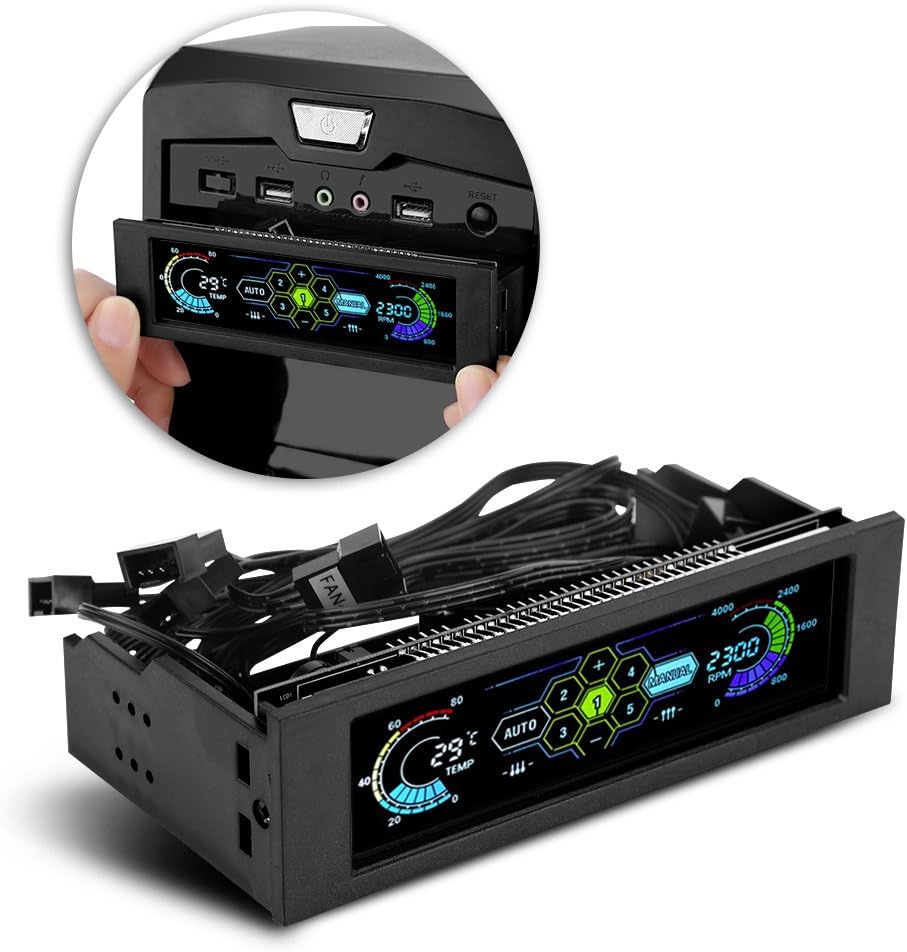


The STW‑6041 stands out as a top contender with its comprehensive LCD interface and robust safety systems. It earns a perfect rating due to its ability to monitor temperatures and fan speeds simultaneously without software.
We may earn a commission when you buy through this link, at no additional cost to you.
Its wide LCD screen displays four sets of fan speeds and temperatures ensuring you always know the status of your cooling. The high temperature alarm activates at 60 degrees providing immediate alerts to prevent hardware damage.
Users might find the physical size requires a dedicated 5.25 inch slot which could be a limitation in modern compact cases. However the build quality and noise reduction features justify the space for many enthusiasts.
This model is ideal for users who want immediate visual feedback and strong safety features without relying on software. We recommend it for standard tower builds needing reliable manual control.
The display shows four fan speeds and temperatures simultaneously giving a complete overview of system thermal health.
PWM circuitry reduces high frequency noise while temperature alarms prevent overheating risks for critical components.
We may earn a commission when you buy through this link, at no additional cost to you.
This controller offers significant flexibility with automatic and manual mode switching allowing users to adapt cooling strategies on the fly. It is highly rated for its ability to monitor disk state alongside fan speeds.
We may earn a commission when you buy through this link, at no additional cost to you.
The large LCD screen provides constant visibility into working conditions including alarm temperature settings which can be adjusted from 40 to 90 degrees. This customization helps protect hardware from unexpected thermal spikes.
While powerful the interface can be slightly complex for beginners who prefer simple knob controls. However advanced users will appreciate the detailed monitoring capabilities available in this drive bay unit.
It is a strong choice for systems with multiple drives and fans needing coordinated management. We suggest it for users who value detailed status reporting.
Switch between automatic temperature based cooling and manual override for precise control over fan speeds.
Display hard disk state and temperatures to keep a complete watch on system health and stability.
We may earn a commission when you buy through this link, at no additional cost to you.
The SaiDian controller distinguishes itself by adding date and time display to standard temperature and speed metrics. It is designed to prevent hardware damage through effective alarm settings and manual adjustments.
We may earn a commission when you buy through this link, at no additional cost to you.
Its large screen keeps you abreast of working status showing fan speeds and temperatures continuously. The alarm temperature range can be set from 50 to 90 degrees to prevent overheating effectively.
Lower ratings suggest potential variability in build quality or ease of use compared to premium models. However the feature set remains competitive for those seeking a clock display with basic cooling control.
This unit is suitable for budget builds wanting extra display utility without spending much. We recommend it for casual users needing simple monitoring.
The LCD panel includes a clock function adding utility beyond just thermal monitoring for your case.
Immediate alarms sound if fans fail to dissipate heat keeping components safe from thermal runaway.
We may earn a commission when you buy through this link, at no additional cost to you.
Thermaltake delivers a premium experience with its Commander F6 RGB model featuring a customizable screen and extensive channel support. It is rated highly for its ability to manage complex cooling setups and lighting.
We may earn a commission when you buy through this link, at no additional cost to you.
The six temperature sensors and voltage control knobs offer precise tuning for every fan in your system. Additionally it supports two LED strips merging thermal management with visual aesthetics in a single panel.
The cost is higher than basic units which may not suit all budgets. However the short circuit protection and one-year warranty provide peace of mind for high-end investments.
We recommend this for enthusiasts building custom rigs with extensive lighting and cooling needs. It is ideal for users prioritizing aesthetics and control depth.
Personalize your build with RGB lighting integrated into the controller display for a unique look.
Short circuit protection safeguards your expensive components from electrical issues during operation.
We may earn a commission when you buy through this link, at no additional cost to you.
Ejoyous provides a balanced solution with four independent controllers and a clear LCD overview for managing fan speeds. Its double safety function ensures reliability by monitoring both temperature and fan standstill.
We may earn a commission when you buy through this link, at no additional cost to you.
The PWM circuitry allows for precise control reducing high frequency noises that can be distracting during quiet tasks. High-temperature capacitors support a long lifespan ensuring the unit functions reliably over time.
The lack of a confirmed rating in data suggests it may be a newer product. However the robust execution and safety features align with industry standards for quality controllers.
It is a good choice for users wanting a quiet efficient solution without extra frills. We suggest it for standard case cooling needs.
Manage each fan separately allowing for tailored airflow based on specific component temperatures.
Matte aluminum panels and high-quality capacitors ensure the unit looks good and lasts long.
We may earn a commission when you buy through this link, at no additional cost to you.
ARCTIC offers a hub style controller that focuses on centralized management with driver support for Windows and Linux. It is highly rated for its ability to eliminate cable chaos with precise PWM control.
We may earn a commission when you buy through this link, at no additional cost to you.
With up to 10 ports this unit simplifies complex multi-fan setups by providing independent control for every fan. This approach moves beyond limited motherboard signals offering better customization options for large builds.
It lacks a physical front panel display which means you must rely on software to monitor status. For users who prefer a clean build and digital monitoring this trade-off is worth it.
We recommend this for advanced users managing server cases or dense workstations. It is ideal for those who prefer software over physical dials.
Native drivers enable seamless integration with popular monitoring tools for real-time adjustments.
Centralized connections reduce clutter and eliminate the need for multiple Y-splitters inside your case.
We may earn a commission when you buy through this link, at no additional cost to you.
Noctua brings its reputation for quality with this compact manual controller designed to work alongside automatic motherboard controls. It is highly rated for its simplicity and reliability in quiet operation scenarios.
We may earn a commission when you buy through this link, at no additional cost to you.
The No stop mode ensures fans stay above 300 RPM to avoid BIOS errors which is a thoughtful feature for system stability. It works with standard 4-pin PWM fans allowing for quiet operation with industrial fans.
Being manual it lacks the automation of LCD units but offers straightforward speed reduction without extra wires. This trade-off is acceptable for users who prioritize minimalism and noise reduction over monitoring.
We recommend this for quiet home theaters or office PCs needing simple speed tweaks. It is ideal for users who trust motherboard sensors.
Pair with high-quality fans for a silent build that remains stable without complex electronics.
Easy installation with included splitter allows control of multiple fans with a single unit.
We may earn a commission when you buy through this link, at no additional cost to you.
Delinx offers a versatile solution that supports a wide voltage range making it suitable for various electronic projects beyond standard PCs. It is highly rated for its robust protection and dual control modes.
We may earn a commission when you buy through this link, at no additional cost to you.
The digital display shows real-time temperature and fan speed ensuring precise thermal management. Auto manual modes switch automatically when the probe is disconnected offering flexibility in different scenarios.
It requires a dedicated power source like a USB-C charger which adds a step to setup. However the wide voltage support and memory features make it great for specialized cooling needs.
This unit is ideal for server cabinets and custom projects needing reliable regulation. We suggest it for builders wanting a standalone versatile controller.
Support from 5V to 30V allows use in diverse environments beyond typical computer cases.
Over current and reverse polarity protection ensures stable and safe long term operation.
We may earn a commission when you buy through this link, at no additional cost to you.
This model shares many features with top tier controllers including LCD displays and safety alarms. It is designed to reduce noise and protect components with PWM circuits and capacitors.
We may earn a commission when you buy through this link, at no additional cost to you.
The safety system includes high temperature alarms and anti-seize warnings to keep the system running safely. Despite similar features user ratings are lower suggesting potential consistency issues or quality differences.
The alloy panel offers a durable finish but the performance may vary compared to established brands. It is a potential option for those seeking similar functionality at a competitive price.
We recommend caution and checking recent reviews before purchasing. It is ideal for standard PC cooling if budget is a priority.
Built-in warnings alert you to thermal issues before they cause permanent damage to hardware.
PWM technology ensures fans run smoothly with minimal high frequency noise during operation.
We may earn a commission when you buy through this link, at no additional cost to you.
The 5-Fans controller offers extensive fan control with the ability to manage five groups of fans from a single panel. It is rated for its inclusion of hard disk state monitoring alongside fan speeds.
We may earn a commission when you buy through this link, at no additional cost to you.
The big LCD screen keeps you constantly aware of working conditions including temperature and alarm settings. Users can manually set the alarm range from 40 to 90 degrees for customized protection.
Customer feedback is mixed which may indicate variability in unit quality or ease of installation. Despite this the feature set remains robust for those needing multiple fan controls in one place.
This unit is suitable for large cases needing extensive airflow management. We suggest verifying installation details before purchase for a smooth setup.
Manage up to five fan groups independently to tailor airflow to specific case zones.
Display hard disk status on the LCD to track drive health alongside thermal data.
We may earn a commission when you buy through this link, at no additional cost to you.
Selecting the right controller involves weighing features like display type, control method, and safety against your specific system needs.
Front panel controllers often feature LCD or LED screens that show real-time data. A wide LCD screen is preferable if you want to see multiple temperatures and RPMs simultaneously without opening software.
Look for displays that show at least two variables to keep your setup informed effectively.
Controllers usually offer manual knobs or auto modes. Manual knobs provide immediate physical control while auto modes adjust based on temperature probes automatically.
Choose manual for quick tweaks and auto for set-and-forget operation.
Ensure the controller has enough ports for your fans. Options range from 3 to 10 ports so match this to your current fan setup to avoid using splitters.
More channels mean better independent control over airflow zones.
Critical safety features include high temperature alarms and fan anti-seize warnings. These alerts ensure you are notified of overheating immediately to prevent hardware damage.
Always pick a model with clear audible and visual alarm indicators.
Aluminum alloy panels and high-spec capacitors contribute to longevity. Matte finishes often look better in a case and resist fingerprints over time.
Verify the material composition to ensure durability during long-term use.
Check that the controller supports your fan types such as 3-pin or 4-pin PWM. Some models also offer voltage adjustments which are vital for specialized fans.
Confirm compatibility with your motherboard and fan connectors.
Simple plug-and-play setups save time and reduce cable clutter. Look for models with included adapters and clear instructions for bay installation.
Prioritize designs that support magnetic or adhesive mounting if your case limits space.
Prices vary significantly based on features like RGB lighting and software support. Decide if you need premium extras or basic control to stay within your budget.
Balance cost against the features you actually need.
Install the controller into a free 5.25 inch drive bay in your case using the provided screws or brackets. Connect the power cable to your PSU and the fan connectors to the appropriate ports.
Configure the alarm temperature and fan profiles through the LCD screen or knobs. Ensure the temperature probe is placed near hot components for accurate readings.
Regularly dust the panel and check connections to maintain performance. If the display becomes unreadable replace the capacitors or unit to ensure reliable safety.
A front panel fan controller is a device installed in your computer case that allows you to manually or automatically manage fan speeds. It typically features a display to show temperatures and RPMs without needing software.
No you do not need a separate controller for every fan. Most controllers have multiple channels allowing you to manage several fans from one unit to reduce clutter.
Using a controller generally does not void fan warranties as long as you stay within the voltage and power limits. Always check your fan manufacturer's guidelines.
Yes many controllers support both 3-pin and 4-pin fans. However for automatic speed control 4-pin PWM fans are recommended for best results.
No they draw minimal power from your PSU. They mainly act as control interfaces so the impact on your system's total power draw is negligible.
Access the settings menu on the LCD or use the adjustment knobs to set your desired temperature limit. Once set the controller will alert you if that limit is exceeded.
Our top picks highlight the STW‑6041 for overall performance and the Noctua NA-FC1 for budget-conscious manual control. Each model brings unique strengths to different user needs and setups.
Prioritize safety features and build quality when selecting a unit to ensure long-term reliability. A good controller protects your hardware while keeping your system running efficiently.
Remember to check current availability and verify compatibility with your case before buying. These tools provide essential visibility and control for any serious PC enthusiast.