
Redragon K686 HE Wired Hall-Effect Rapid Trigger Magnetic Gaming Keyboard
4.4Editor score
UltraMag POM Magnetic Switches
Dual-Module Floating Structure
Software-Powered Precision Tuning
This guide compares the top ten keyboards for Valorant featuring rapid trigger, hall effect switches, and low latency for competitive FPS performance and
Finding the right keyboard for Valorant is crucial for competitive players who need instant responses and precise control during intense matches. The best keyboards offer rapid trigger technology and hall effect switches that allow you to stop and shoot with accuracy.
We compared ten top models based on polling rates, switch types, build quality, and customization options to help you choose the best fit for your setup. Each product was evaluated for its performance in fast-paced tactical shooters like Valorant.
Each pick shows key strengths and trade-offs so you can decide what matters most for your playstyle and budget. Please note that prices and availability change frequently, so check current listings before making your final purchase decision.
4.4Editor score

4.1Editor score

4.4Editor score
This side-by-side comparison highlights the key specifications and features of each keyboard to help you find the ideal match for your Valorant gameplay needs.
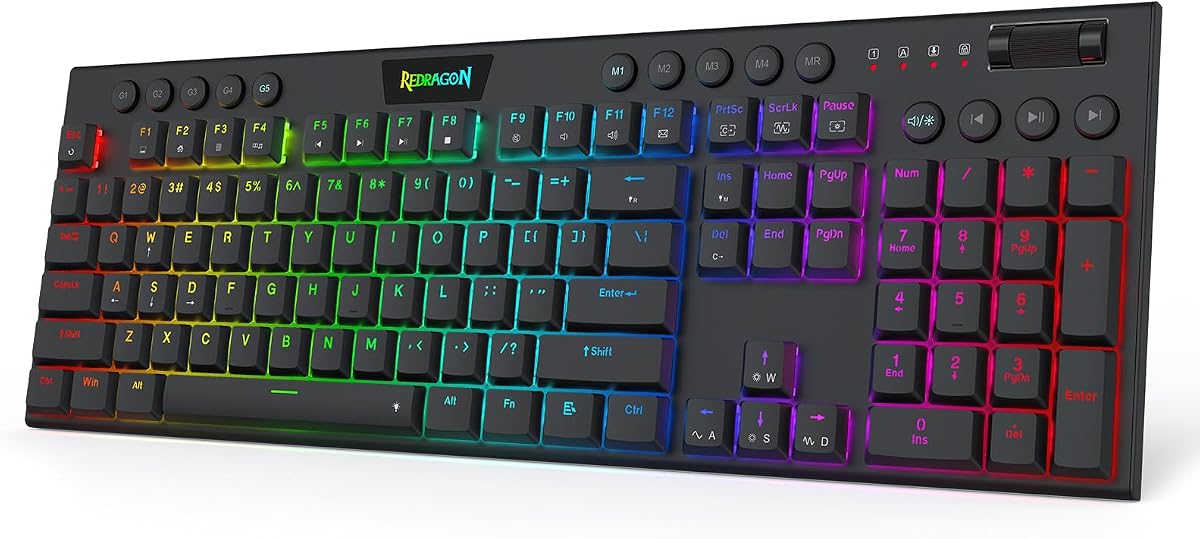





The Redragon K673 HE stands out as a top choice for Valorant players seeking high performance without breaking the bank. With an impressive 8000Hz polling rate and rapid trigger capabilities, it ensures your movements are registered instantly during critical moments. Its magnetic switches provide a smooth and consistent typing experience that reduces fatigue over long gaming sessions.
We may earn a commission when you buy through this link, at no additional cost to you.
Key strengths include the ultra-fast input transmission which is up to eight times faster than standard keyboards. The dynamic key activation feature helps cut redundant keystrokes when changing directions quickly, essential for counter-strafing in tactical shooters. The software-powered precision tuning allows you to save multiple actuation profiles between 0.1mm and 3.4mm for tailored performance.
While the keyboard offers exceptional speed and customization, it does require installing desktop or web-based drivers to unlock full potential. The lack of wireless connectivity means you are tethered to your PC, which may not suit setups preferring clutter-free desks. However, these trade-offs are minimal compared to the performance benefits it delivers.
This keyboard is ideal for competitive gamers who prioritize speed and precision over wireless convenience. Whether you are a seasoned pro or climbing ranks, the K673 HE provides the tools needed to execute precise shots and movements consistently. We recommend it for anyone looking to upgrade their input device for Valorant.
Rapid trigger technology allows keys to reset instantly when released, enabling faster key re-presses for rapid tapping and movement.
Customizable actuation profiles let you adjust key sensitivity to match your personal playstyle and reaction habits perfectly.
We may earn a commission when you buy through this link, at no additional cost to you.
The Redragon K686 HE delivers premium magnetic switch performance at a budget-friendly price making it accessible for more gamers. It shares the same rapid trigger hall effect technology as higher-end models ensuring you get competitive speed without extra cost. The build quality is solid with a floating structure that minimizes wobble during intense gameplay.
We may earn a commission when you buy through this link, at no additional cost to you.
Performance highlights include the ultra-fast 8000Hz polling rate which reduces latency significantly for responsive inputs. The dynamic key activation system cuts redundant keystrokes helping you move and aim more cleanly during rapid direction changes. Software tools allow you to calibrate switches and save profiles for consistent performance across different titles.
On the downside, you must rely on software drivers to access advanced features which can be an extra step for some users. The keyboard is wired only so wireless enthusiasts may look elsewhere. Despite these limitations the value proposition is strong given the advanced tech packed into this affordable unit.
Buy this keyboard if you want top-tier rapid trigger functionality without spending a premium. It suits players who need reliable fast inputs and do not mind a wired setup. For the price, the K686 HE offers an excellent entry into magnetic switch gaming keyboards.
The dual-module floating design reduces wobble and noise providing a stable typing experience even during aggressive key presses.
Advanced hall effect and rapid trigger tech at a low price point makes high-end performance accessible to budget gamers.
We may earn a commission when you buy through this link, at no additional cost to you.
Corsair Clipper PRO MINI 60 is built for competitive FPS gamers who demand durability and precision. Its IP57 rating ensures it can withstand spills and dust while the MGX Hyperdrive switches offer zero drift and massive endurance. The 60% layout maximizes mouse space for better aiming control.
We may earn a commission when you buy through this link, at no additional cost to you.
Key strengths include the FlashTap SOCD which delivers cleaner directional inputs essential for sharp counter-strafing in Valorant. The 8000Hz polling rate provides near-instant input registration so your movements land exactly when you need them. Double-shot PBT keycaps resist wear maintaining a fresh feel over time.
The main trade-offs are the higher price and the compact layout which may take adjustment if you are used to full-size keyboards. Some users miss dedicated arrow keys but the FN combinations make them accessible. These compromises are acceptable for those prioritizing pure gaming ergonomics and build quality.
This keyboard is perfect for serious competitors wanting the best build and switch performance. It combines premium features with a compact form factor ideal for tournament setups. If you value durability and speed the Clipper PRO MINI 60 is a top contender.
Water and dust resistance protect the keyboard from accidental spills allowing long sessions without worry of damage.
FlashTap SOCD ensures consistent directional inputs improving movement accuracy during high-pressure fights.
We may earn a commission when you buy through this link, at no additional cost to you.
The Redragon K618 HE is designed for players who want ultra-low travel for faster actuation. Its low-profile magnetic switches are shorter than standard models enabling quicker keystrokes and lighter wrist effort. The 30% slimmer design enhances ergonomics during extended gaming sessions.
We may earn a commission when you buy through this link, at no additional cost to you.
Strengths include the built-in macro system which lets you record combos without installing software. This is rare in magnetic keyboards and adds convenience for complex key binds. The actuation tuning allows precise calibration between 0.1mm and 2.8mm to suit your touch sensitivity.
The main downside is the low profile might feel too shallow for typists preferring tactile feedback. Also learning the macro recording without software takes some trial and error. Still these minor issues do not outweigh the speed and ergonomic benefits for FPS play.
Choose this keyboard if you value fast actuation and minimal desk footprint. It suits gamers who prefer lightweight low-profile peripherals. The K618 HE offers a unique blend of speed and convenience tailored for tactical shooters.
Reduced key travel distance allows faster keystrokes and less finger movement for improved reaction times.
On-the-fly macro recording provides quick binding of complex combos without needing driver installation.
We may earn a commission when you buy through this link, at no additional cost to you.
Razer Huntsman Mini uses optical switches that register keystrokes at the speed of light offering incredible speed. The 60% layout saves desk space while retaining full functionality via key combinations. Razer Snap Tap feature enhances directional inputs making movement smoother in competitive games.
We may earn a commission when you buy through this link, at no additional cost to you.
Performance strengths include 1.0mm actuation which is 15-30% shorter than typical linear switches. This reduces finger travel for faster key presses. The Synapse software allows deep customization including macro mapping and RGB lighting sync with other gear.
A drawback is the dependency on Synapse software to unlock most features which may not appeal to privacy focused users. Also the fixed actuation distance lacks the tuning flexibility of magnetic switches. Still the optical tech delivers reliable speed and durability.
This keyboard is ideal for Razer fans wanting a compact fast keyboard. The optical switches ensure consistent actuation ideal for high intensity matches. For those invested in the Razer ecosystem this is a strong choice.
Optical beams detect key presses faster than mechanical contacts eliminating debounce delay entirely.
Snap Tap prioritizes the latest input between paired keys for cleaner counter strafe execution.
We may earn a commission when you buy through this link, at no additional cost to you.
Aula WIN60 HE features advanced magnetic switches with an industry leading 0.02mm rapid trigger step. Its compact 60% layout is perfect for gamers needing desk space. The hot swappable base allows easy switch replacement without soldering offering great customization.
We may earn a commission when you buy through this link, at no additional cost to you.
Key strengths include the ultra low latency and high polling rate enabling lightning fast responses for rapid shooting combos. The web-based driver avoids system compatibility issues letting you customize via browser. RGB lighting adds style with millions of colors.
One downside is that the web driver requires internet access which might be inconvenient offline. Also hot swap support adds slight weight. These are small compromises for the versatility and speed it provides.
Buy this keyboard if you want hot swap flexibility and rapid trigger performance. It suits gamers who like tinkering with their setup. The WIN60 HE balances features and affordability well.
The 0.02mm rapid trigger step enables near instant key resets for faster tapping and movement.
Hot swap support allows replacing switches easily for customized feel and sound.
We may earn a commission when you buy through this link, at no additional cost to you.
AULA WIN68 HE provides magnetic switches with adjustable actuation and fast trigger mode optimized for FPS. The 68 key layout keeps arrow keys useful for gameplay and desktop tasks. Polling rates up to 8000Hz ensure instant input registration.
We may earn a commission when you buy through this link, at no additional cost to you.
Performance strengths include per key sensitivity adjustment allowing you to tailor each key based on habits. The web driver supports RT and SOCD functions for advanced control. South facing LEDs improve visual experience with vibrant lighting effects.
Limitations include no macOS support restricting use to Windows systems. The detachable cable is standard but could be more durable. These are minor concerns compared to the customization depth offered.
Choose this if you want precise control and arrow keys in compact form. It suits gamers needing versatile layout. The WIN68 HE delivers excellent performance and customization.
Adjustable actuation points per key allow precise tailoring to individual typing and gaming habits.
Fast trigger modes support SOCD for cleaner directional inputs during competitive play.
We may earn a commission when you buy through this link, at no additional cost to you.
AULA F75 Pro is a wireless keyboard offering tri-mode connectivity including Bluetooth 5.0 and 2.4GHz. The 75% layout keeps essential keys while saving space. A multi-function knob provides quick access to media and lighting controls.
We may earn a commission when you buy through this link, at no additional cost to you.
Key strengths include 4000mAh battery delivering long battery life between charges. The hot swap base supports 3 or 5 pin switches enabling custom switch choices. Side printed PBT keycaps enhance durability and aesthetics.
Wireless latency may be slightly higher than wired options but still low enough for most play. Weight is higher than typical wireless models but stable. These trade-offs are acceptable for convenience.
Buy this if you want wireless freedom and customization. It suits multitaskers using multiple devices. The F75 Pro balances performance and convenience well.
Connect via Bluetooth 2.4GHz or USB for seamless switching between devices and setups.
Hot swappable base allows easy switch changes for different tactile or linear experiences.
We may earn a commission when you buy through this link, at no additional cost to you.
ATTACK SHARK X68 HE offers adjustable hall effect switches with true 8000Hz polling and 0.01mm RT accuracy. It binds four functions per key by pressing degrees enabling versatile control. The top mount structure provides stable smooth typing.
We may earn a commission when you buy through this link, at no additional cost to you.
Strengths include the web driver for remapping keys and adjusting light modes without installation. RGB LEDs illuminate keys clearly and south facing orientation improves visual quality. Non-slip mat keeps keyboard secure during intense play.
Drawbacks include lack of built-in macro features requiring web driver setup for extra functionality. Wrist rest is not included. Still performance is strong for the price point.
Choose this if you want precise RT control and stable typing. It suits gamers who prioritize accuracy. The X68 HE delivers excellent responsiveness.
0.01mm RT accuracy ensures near instant key resets for rapid movement and reaction sequences.
Top mounted structure offers stable typing experience and better noise control.
We may earn a commission when you buy through this link, at no additional cost to you.
ASUS ROG Strix Scope II 96 offers full size keys in compact layout saving space. It features tri-mode connectivity supporting Bluetooth 2.4GHz wireless or wired. Pre-lubed ROG NX Snow switches provide smooth thocky keystrokes.
We may earn a commission when you buy through this link, at no additional cost to you.
Key strengths include exceptional battery life up to 1500 hours in wireless mode reducing charging frequency. Sound dampening foam improves acoustics minimizing noise. Wrist rest included enhances comfort during long sessions.
Main limitation is the higher price compared to budget options and less focus on rapid trigger technology. These are acceptable for those seeking full size convenience and build quality.
Buy this if you want wireless full size versatility. It suits gamers and professionals needing number pad. The ROG Strix Scope II 96 delivers premium comfort and style.
Extended battery life reduces charging interruptions ensuring consistent performance during long gaming sessions.
Integrated foam absorbs noise providing quieter typing experience ideal for shared spaces.
We may earn a commission when you buy through this link, at no additional cost to you.
Selecting the ideal keyboard for Valorant requires understanding key features that directly impact your in-game performance and comfort.
Magnetic hall effect switches offer superior precision with rapid trigger capabilities. These switches detect keystrokes without physical contact ensuring faster response times and reduced wear. Optical and traditional mechanical switches are alternatives but magnetic technology leads in speed and adjustability.
For Valorant prioritize keyboards with hall effect magnetic switches to gain the competitive edge in movement and shooting.
A high polling rate like 8000Hz means your keyboard reports inputs eight thousand times per second reducing latency significantly. Low latency ensures commands execute instantly improving your reaction time during firefights.
Look for keyboards with 4000Hz or higher polling rates for optimal performance in fast-paced tactical shooters.
Adjustable actuation points allow you to set how far a key must press before registering. Shorter distances like 0.1mm enable faster key presses while longer settings reduce accidental presses. Software tools help save profiles for different scenarios.
Choose a keyboard with customizable actuation to match your personal sensitivity and playstyle.
Compact layouts like 60% or 68% free up desk space for larger mouse movement improving aiming. Full size or TKL offer more keys but take more room. Consider if you need number pad or function keys regularly.
Opt for compact layouts if you play with low sensitivity aiming to maximize mouse area.
Sturdy construction with aluminum frames and PBT keycaps resists wear and tear during intense sessions. IP ratings for water resistance protect against spills. Check for anti-ghosting and N-key rollover to ensure all inputs register simultaneously.
Prioritize durable materials and keycap quality to ensure your keyboard lasts through long-term use.
Wired keyboards offer the lowest latency ideal for competitive play. Wireless models provide flexibility with Bluetooth or 2.4GHz connections but can introduce minor delays. Some models support tri-mode for switching between devices easily.
Choose wired for pure performance or wireless if convenience and multi-device use are priorities.
Software suites enable macro programming RGB lighting control and switch calibration. Web-based drivers offer convenience without installation. Ensure the software is intuitive and supports your OS for easy setup.
Select a keyboard with accessible customization tools to tailor your gaming experience precisely.
Prices vary widely from affordable magnetic keyboards to premium wireless models. Determine which features matter most to you. Often budget models offer competitive performance but may lack extra amenities like RGB or wireless.
Balance cost with essential features to get the best value for your gaming setup.
Begin by installing any required drivers or web software to unlock advanced features like rapid trigger and macros. This ensures your keyboard performs at its full potential from day one.
Clean your keyboard regularly using compressed air and soft brushes to remove dust and debris from switches. Avoid liquids near the unit to prevent damage especially if not water resistant.
Store your keyboard in a dry cool place when not in use to extend its lifespan. Using a keyboard cover can protect against spills and dirt accumulation during storage.
Hall effect switches detect keystrokes magnetically without physical contact providing faster response times and no wear. They support rapid trigger allowing keys to reset instantly for smoother movement and faster shooting in Valorant.
Yes higher polling rates reduce latency so your inputs register faster. This leads to quicker reactions and more precise movements crucial for competitive FPS games like Valorant.
Rapid trigger resets the key immediately when lifted enabling instant re-pressing. This is essential for rapid tapping and counter-strafing improving agility during gameplay.
Modern wireless keyboards with 2.4GHz have low latency but wired are still faster. If wireless convenience is key choose top models but prioritize performance for competitive play.
Only keyboards with hall effect or advanced magnetic switches offer adjustable actuation. Traditional mechanical switches lack this feature so check specs before buying.
Use compressed air to blow out dust and a soft brush gently. Avoid liquids and harsh chemicals to prevent damage to switches and electronics.
Compact 60% or 65% layouts save space for mouse movement which improves aiming. Choose layouts that fit your desk and mouse style comfortably.
This guide highlighted ten top keyboards offering rapid trigger hall effect switches and high polling rates ideal for Valorant. From budget-friendly Redragon models to premium ASUS wireless options there is a pick for every need.
Prioritize speed and customization over extra features when choosing. Look for hall effect switches rapid trigger adjustable actuation and reliable build quality to enhance your gameplay significantly.
Remember prices and availability change so verify current listings before buying. Investing in the right keyboard now can elevate your performance and enjoyment in Valorant.