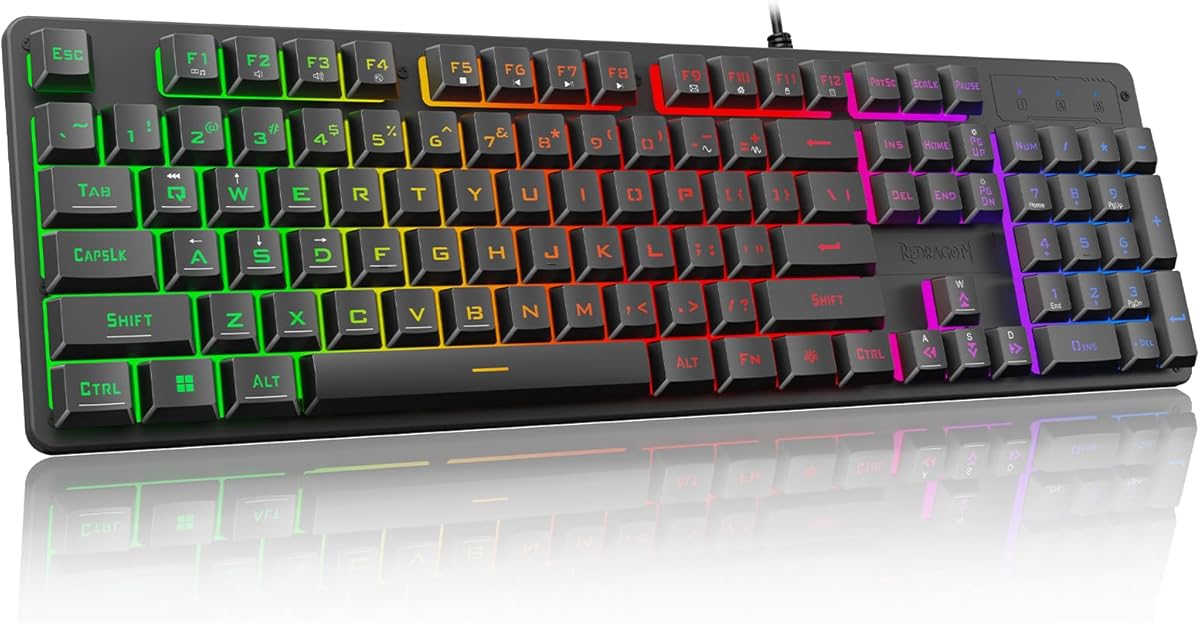
Redragon K521 Upgrade Rainbow LED Gaming Keyboard
4.4Editor score
Mechanical feeling keys
Anti-ghosting support
Rainbow LED backlight
Multimedia function keys
This guide compares the top ten keyboards for Rainbow Six Siege, evaluating switch types, actuation speed, and durability to help you find the perfect gear.
Finding the right keyboard for Rainbow Six Siege means prioritizing speed, reliability, and comfort. Competitive players need responsive switches and anti-ghosting to execute complex operator combos without delay or input lag during critical moments.
We evaluated ten real products based on switch performance, build quality, and customization options. Each entry offers unique strengths, from budget-friendly membrane boards to premium magnetic switch models designed specifically for tactical FPS precision and accuracy.
Each pick details real-world features, pros, and cons to help you decide quickly. Prices and availability change frequently, so verify current listings before purchasing. Use this guide to upgrade your setup and dominate every round in your favorite tactical shooter.
4.4Editor score

4.6Editor score

4.6Editor score
This side-by-side comparison highlights key specifications across ten top-rated keyboards for Rainbow Six Siege. Use it to quickly identify which model fits your budget, layout preference, and performance needs.



The AULA F75 Pro stands out as the best overall choice for players who want premium features without a flagship price. It earns a 4.6 rating thanks to its hot-swappable design and tri-mode connectivity options that suit every setup.
We may earn a commission when you buy through this link, at no additional cost to you.
Its LEOBOG reaper switches are pre-lubed for smooth, consistent actuation, essential for rapid peeking in Siege. The side-printed PBT keycaps and 75% layout save space while keeping arrow keys accessible for navigation.
Some users find the driver software less intuitive than major brands, and side-print legends may be harder to read in low light. These minor issues do not outweigh the performance gains and build quality at this price point.
Choose this keyboard if you value tactile comfort, customizable lighting, and wireless flexibility. It delivers reliable performance for ranked matches and daily use alike, making it the top recommendation for most users.
Tri-mode connection ensures stable 2.4GHz wireless or reliable USB-C, so you never face lag during intense operations or tactical reloads.
Hot-swappable PCB lets you tailor switch feel for precise operator actions without soldering, enhancing your competitive edge over time.
We may earn a commission when you buy through this link, at no additional cost to you.
The Redragon K521 proves you don't need to spend much to get solid Siege performance. Rated 4.4, it offers mechanical-like feedback and anti-ghosting for reliable skill execution during clutch moments in tactical matches.
We may earn a commission when you buy through this link, at no additional cost to you.
Its mechanical-feeling keys allow fast tapping and accurate binding activation without fatigue. The rainbow LED backlight is adjustable with a one-touch button, adding visual flair without distracting from critical gameplay elements.
It lacks true mechanical durability and has limited lighting customization compared to higher-end boards. However, for budget-conscious players or secondary setups, it provides impressive responsiveness and multimedia convenience that few rivals at this price.
Pick this keyboard if you need a cost-effective, plug-and-play solution with solid performance. It's ideal for casual ranked play or testing the waters before investing in premium hardware.
With anti-ghosting for multiple key combos, you can execute complex operator movements without missing inputs, even on a tight budget.
Twelve combo media keys let you manage audio and system controls quickly, keeping your focus on the tactical situation at hand.
We may earn a commission when you buy through this link, at no additional cost to you.
The ROG Strix Scope II 96 delivers flagship performance for serious players who demand precision and versatility. It earns a 4.6 rating with its tri-mode wireless, hot-swappable ROG switches, and durable PBT keycaps built for long-term use.
We may earn a commission when you buy through this link, at no additional cost to you.
Its 96% layout keeps arrow keys and essential modifiers while saving desk space for mouse movement. Pre-lubed linear switches ensure consistent actuation with minimal noise, perfect for communication-heavy team play without distracting clicks.
The price is higher than average, and some may miss a full numeric pad. However, the battery life and sound-dampening features justify the cost for those seeking a premium, long-lasting gaming keyboard experience.
Choose this if you want the best blend of comfort, customization, and wireless performance. It suits both competitive Siege players and professionals who need reliable input for daily tasks.
ROG SpeedNova 2.4GHz wireless delivers near-wired latency, ensuring your operator commands execute instantly during high-stakes engagements.
Sound-dampening foam reduces keystroke noise, keeping your setup quiet for team comms without sacrificing tactile clarity or speed.
We may earn a commission when you buy through this link, at no additional cost to you.
The Corsair K55 RGB PRO excels as the top membrane option, offering macro customization and durability for budget players. It holds a 4.4 rating and includes six macro keys for operator abilities, plus spill-resistant design for peace of mind.
We may earn a commission when you buy through this link, at no additional cost to you.
Its RGB zones are customizable via iCUE, and the detachable palm rest ensures comfort during extended sessions. The membrane switches provide a softer feel that reduces finger fatigue compared to stiff mechanical alternatives.
It lacks true mechanical actuation and dedicated lighting for every key, which some competitive players prefer. However, the macro functionality and sturdy build make it a strong pick for casual users and office-to-gaming setups.
Opt for this if you prioritize macro customization, comfort, and reliability over switch precision. It's perfect for players who want functional aesthetics without breaking the bank.
Six dedicated macro keys streamline operator skill execution, letting you trigger abilities quickly without complex key combinations mid-match.
IP42 spill and dust resistance protect your keyboard from accidents, ensuring consistent performance even during intense gaming marathons.
We may earn a commission when you buy through this link, at no additional cost to you.
The SteelSeries Apex 3 is the top pick for quiet gaming environments. Rated 4.6, it features whisper-quiet switches that minimize noise during stealth operations or late-night ranked play while maintaining responsive performance.
We may earn a commission when you buy through this link, at no additional cost to you.
Its IP32 water resistance protects against spills, and the magnetic wrist rest provides full support for long sessions. The dedicated volume controls allow instant audio adjustments without leaving your tactical HUD or voice chat.
It lacks mechanical feedback and deep customization options found in higher-end models. However, its quiet operation and sturdy protection make it ideal for shared spaces or users who prefer soft, low-profile typing.
Choose this if noise reduction and spill protection are your top priorities. It suits players who value comfort and reliability over tactile switch feedback or advanced macro programming.
Whisper quiet switches ensure your keystrokes stay silent during stealth gameplay, keeping teammates focused on comms instead of keyboard noise.
IP32 water resistance guards against accidental spills, extending your keyboard's lifespan even during intense gaming sessions with drinks nearby.
We may earn a commission when you buy through this link, at no additional cost to you.
The Razer Ornata V3 stands out with its low-profile design that reduces hand strain during long tactical sessions. Rated 4.5, it combines mecha-membrane switches for mechanical feel with durable UV-coated keycaps that resist fading and wear over time.
We may earn a commission when you buy through this link, at no additional cost to you.
Its short key travel ensures quick actuation for fast operator movements, while the magnetic wrist rest offers comfortable support for extended play. Media keys allow easy control of game audio and system settings during matches.
It lacks dedicated macro keys and has fewer RGB zones than higher-end models, limiting complex customization. However, its ergonomic design and responsive feedback make it a strong choice for players prioritizing comfort and speed.
Opt for this if you want a slim, low-profile keyboard that balances comfort with performance. It suits players who prefer compact layouts and soft, consistent keypress feedback.
Low-profile keys reduce wrist strain and promote natural hand positioning, allowing longer comfort during extended competitive gaming sessions.
UV-coated keycaps resist fading and scratches, ensuring clean legends and consistent performance even with intense daily use over months.
We may earn a commission when you buy through this link, at no additional cost to you.
The Logitech G413 TKL SE offers excellent tactile feedback in a compact tenkeyless design. Rated 4.6, it features durable PBT keycaps and a solid aluminum top case that ensures stability during intense tactical maneuvering and rapid key presses.
We may earn a commission when you buy through this link, at no additional cost to you.
Its tactile switches provide clear actuation for precise operator inputs without excessive noise. The tenkeyless layout frees up desk space for broader mouse movements, critical for flick shots and positioning adjustments in Siege.
It lacks RGB lighting and advanced macro features, focusing instead on core performance and build quality. However, its reliability and durability make it ideal for players who prefer functional, no-frills mechanical keyboards.
Choose this if you want a sturdy, space-saving mechanical keyboard with clear feedback. It suits players prioritizing performance and longevity over customization or visual flair.
Tactile mechanical switches offer clear feedback for precise operator ability timing, reducing missed inputs during critical moments in ranked matches.
Tenkeyless layout provides extra space for mouse movement, improving aiming precision without sacrificing essential keys for tactical gameplay.
We may earn a commission when you buy through this link, at no additional cost to you.
The ROG Strix Scope II X delivers full-size functionality with hot-swappable ROG NX V2 linear switches. Rated 4.5, it provides smooth, consistent actuation and vibrant per-key RGB lighting that enhances your gaming setup's aesthetic and visibility.
We may earn a commission when you buy through this link, at no additional cost to you.
Its hot-swap design lets you easily customize switches without soldering, while the multi-function wheel offers intuitive control for volume and brightness. The aluminum plate and PBT keycaps ensure long-lasting durability and premium tactile feel.
It lacks wireless connectivity and has a larger footprint than compact models, which may limit desk space. However, the performance and customization options make it a top choice for players wanting full layout utility and visual customization.
Pick this if you want full-size layout and premium customization features. It suits players who value tactile smoothness, RGB expression, and reliable wired performance for competitive gameplay.
Hot-swappable switches allow easy replacement to suit your preferred tactile feel, optimizing performance for specific operator roles or playstyles.
Multi-function wheel provides quick access to volume and lighting adjustments, keeping essential controls at your fingertips without pausing gameplay.
We may earn a commission when you buy through this link, at no additional cost to you.
The Razer BlackWidow V4 X is a standout linear switch keyboard designed for rapid-fire inputs. Rated 4.5, its Yellow switches deliver quiet, consistent actuation ideal for fast operator reloads and precise tactical movements in competitive play.
We may earn a commission when you buy through this link, at no additional cost to you.
Six dedicated macro keys expand your command arsenal, allowing quick execution of complex operator skills. The Chroma RGB integration syncs with hundreds of games, enhancing immersion and visual feedback without distracting from core gameplay.
Its ABS keycaps may wear faster than PBT alternatives, and switch customization options are limited compared to hot-swappable models. However, its speed and macro convenience make it excellent for players prioritizing smooth, reliable performance.
Opt for this if you want smooth linear switches and deep RGB integration. It suits players who value quiet, rapid inputs and rich visual customization for an immersive tactical gaming experience.
Yellow linear switches ensure quick actuation with minimal resistance, enabling faster response times for operator skills and movement commands.
Six macro keys let you bind complex operator abilities for one-touch activation, simplifying control schemes during high-pressure tactical situations.
We may earn a commission when you buy through this link, at no additional cost to you.
The Aula WIN60 HE delivers competitive FPS performance with magnetic switches and rapid trigger mode. Rated 4.5, it offers ultra-fast response times up to 8000 Hz and adjustable actuation points tailored for precise peeking and fast-stop movement.
We may earn a commission when you buy through this link, at no additional cost to you.
Its compact 60% layout frees maximum desk space for wide mouse movement, ideal for flicking and positioning. The web-based driver simplifies customization without bulky software, allowing quick remapping and RGB tweaks for tactical efficiency.
It lacks dedicated arrow keys, requiring function-layer navigation for some inputs. However, the magnetic switch precision and responsiveness give serious players a clear edge in high-stakes scenarios where milliseconds matter.
Choose this if you want maximum speed and customization for competitive FPS. It suits advanced players ready to optimize their setup for rapid reaction and precise movement control.
Rapid trigger mode enables instant key reset for faster peeking and movement, giving you a split-second advantage over opponents in ranked matches.
8000 Hz polling rate ensures minimal input latency, translating your commands into game actions faster than standard mechanical keyboards.
We may earn a commission when you buy through this link, at no additional cost to you.
Selecting the right keyboard for Rainbow Six Siege involves balancing speed, durability, and ergonomics. Consider these factors to match your playstyle, budget, and desk setup.
Switches define tactile feedback and speed. Linear switches offer smooth, rapid actuation ideal for fast inputs. Tactile switches provide a bump for confirmation without noise. Clicky switches are loud but offer distinct feedback. For Siege, linear or tactile switches reduce accidental presses.
Choose linear or tactile switches for rapid, consistent operator inputs. Avoid overly loud clicky switches if you value quiet stealth and clear comms.
Actuation distance and reset speed impact reaction times. Rapid trigger or adjustable actuation allows resetting keys mid-press for faster peeking. Standard mechanical switches have fixed reset points that may slow down movement.
Prioritize keyboards with adjustable or rapid trigger features to reduce reset delay and improve movement precision in ranked matches.
Higher polling rates reduce input latency by sending keystrokes more frequently to your PC. Standard boards run at 1000Hz, while advanced magnetic keyboards reach 4000Hz or 8000Hz. Lower latency is critical for competitive accuracy.
Look for keyboards with at least 1000Hz polling. High-end magnetic switch models offer faster rates for edge performance in tactical shooter games.
Full-size keyboards include a number pad, which some operators or macros use. Compact 75% or 60% layouts save desk space for mouse movement. Consider if you need arrow keys and number pads for utility or navigation.
Choose 75% or 60% layouts for maximum mouse space, or full-size if you need extra keys for custom operator binds or daily tasks.
Wired connections offer zero latency and consistent performance. Wireless options provide flexibility and cleaner setups but depend on battery and signal stability. Bluetooth has higher latency than dedicated 2.4GHz dongles.
Prefer wired or 2.4GHz wireless for competitive reliability. Bluetooth suits casual play but may introduce lag during critical tactical moments.
PBT keycaps resist shine and wear better than ABS. Aluminum cases prevent flex during intense use. Spill resistance and dust protection extend keyboard lifespan. Durability matters for daily use over multiple years.
Opt for PBT keycaps and solid frame materials to ensure your keyboard withstands long sessions and frequent keypresses without degradation.
Macro keys, RGB lighting, and driver software enable personalized controls and visual flair. Hot-swappable switches let you change key feel without soldering. Robust software simplifies binding complex abilities for operators.
Choose keyboards with macro support and hot-swap options to adapt your setup for different operators and gameplay scenarios over time.
Wrist rests, adjustable tilt, and low-profile designs reduce strain during long gaming sessions. Comfortable typing prevents fatigue and keeps your aim steady. Ergonomics are especially important for daily practice and ranked queues.
Look for detachable wrist rests and adjustable angles to maintain proper hand posture during extended Siege sessions and training.
Position your keyboard comfortably with arms resting naturally. Use a wrist rest if provided to reduce strain during long ranked sessions. Adjust tilt angles to suit your hand posture for consistent, accurate inputs.
Clean your keyboard weekly with compressed air to remove dust and debris from switches. Use soft cloths for keycap surfaces to maintain visibility of legends and reduce grime buildup that impacts tactile feel over time.
Regularly update firmware and drivers for optimal performance. Re-map unused keys to suit your operator abilities, ensuring your most-used skills are on comfortable, accessible keys. Protect against spills with covers or careful desk management.
Linear or tactile switches are generally preferred. Linear switches offer smooth, consistent actuation for rapid operator inputs. Tactile switches provide clear feedback without excessive noise, ideal for communication-heavy matches.
Yes, higher polling rates reduce input latency. Standard 1000Hz boards work well, but 4000Hz or 8000Hz magnetic switches offer faster responsiveness for precise movement and quick peeking.
Modern 2.4GHz wireless keyboards are highly reliable for competitive play. Bluetooth options may introduce latency, so prefer dedicated wireless dongles or wired connections for serious ranked matches.
Macro keys streamline complex operator abilities or utility combinations. They allow quick execution without pressing multiple keys simultaneously, reducing errors and saving critical seconds during intense tactical situations.
PBT keycaps are more durable and resistant to shine and wear than ABS. They maintain texture and legend clarity over time, making them ideal for heavy daily use and long gaming sessions.
A wrist rest helps reduce strain during extended sessions. It isn't mandatory but improves ergonomic comfort and consistency, especially during long ranked queues or training periods.
Yes, RGB customization does not affect performance. Many keyboards offer game-specific lighting profiles or dimming modes to reduce distractions while maintaining visual feedback and immersion.
Clean your keyboard weekly with compressed air and a soft cloth. Regular maintenance prevents dust buildup and ensures consistent key feel, extending your hardware's lifespan during heavy use.
The AULA F75 Pro, Redragon K521, and ASUS ROG Strix Scope II 96 represent top choices across customization, budget, and premium categories. Each offers unique strengths tailored to different player needs, layouts, and performance priorities.
Prioritize switch responsiveness and comfort to maximize your tactical precision. Choose layouts that suit your mouse space and operator needs, and consider durability factors for long-term use and competitive consistency.
Prices fluctuate frequently, so verify current listings before purchasing. Check for promotions and bundle deals to get the best value on the keyboard that fits your setup and ranked goals.