
WAVLINK USB 3.0/USB C to HDMI Universal Video Adapter
4.4Editor score
Supports up to 6 monitors
Universal USB 3.0 compatibility
Built-in USB 3.0 GPU
Explore the top Displaylink Adapter options for Mac and Windows users. Compare features, compatibility, and performance to find the right dual monitor solution
Finding the right Displaylink Adapter can transform your workspace by enabling multiple external displays on laptops that normally support only one. These devices use advanced technology to bypass hardware limitations, offering seamless connectivity for professionals who need extra screen real estate for productivity.
We evaluated ten top-rated adapters based on compatibility, video output quality, build design, and user feedback. Our list covers options for Mac M1 through M5 chips, Windows PCs, and ChromeOS devices, ensuring you find a solution that fits your specific operating system and connectivity needs.
Each pick highlights key strengths like dual 4K support, charging ports, or portable designs. Keep in mind that prices and availability can change frequently, so verify current details before purchasing to ensure you get the best value for your specific workflow requirements.
4.4Editor score

4.6Editor score

4.3Editor score
This side-by-side comparison highlights the key specifications and unique selling points of each adapter to help you make an informed decision based on your specific hardware and display requirements.



The WAVLINK Universal Video Adapter stands out as an excellent entry point for users needing extra screens without breaking the bank. With a solid 4.4 rating, it offers reliable performance for general productivity tasks and supports up to six monitors on PCs.
We may earn a commission when you buy through this link, at no additional cost to you.
Its universal compatibility is a major strength, working seamlessly with Windows 11, MacOS M1 to M5, and ChromeOS systems. The built-in USB 3.0 GPU ensures stable video transmission, while the compact design makes it easy to carry for remote work.
While driver installation is required, the process is straightforward and ensures the adapter functions correctly across different platforms. The lack of audio output is a minor trade-off given the focus on visual expandability and affordability for most users.
This adapter is ideal for students, freelancers, and office workers who need a cost-effective solution to extend their workspace. Its versatility and solid build quality make it a strong recommendation for those starting to explore multi-monitor setups.
Works with Windows, MacOS, and ChromeOS for broad accessibility across different hardware environments.
Capable of supporting up to six monitors on compatible PCs for maximum screen real estate utilization.
We may earn a commission when you buy through this link, at no additional cost to you.
This WAVLINK adapter earns its Editor's Choice badge with a impressive 4.6 rating and robust feature set tailored for modern workflows. It delivers dual 4K@60Hz output, making it perfect for high-definition content and professional multitasking environments.
We may earn a commission when you buy through this link, at no additional cost to you.
Security is a standout feature here, as the DL-Chip encryption technology protects data during transmission, which is crucial for corporate or sensitive personal use. The compatibility with Mac M1 to M5 and Windows systems ensures it adapts to various user needs seamlessly.
While it requires driver installation, this step ensures optimal performance and stability across supported operating systems. The exclusion of Linux support is a limitation for open-source users but does not impact the vast majority of business and personal Windows or Mac users.
We recommend this adapter for professionals who prioritize resolution quality and security in their external display setups. Its balance of performance, features, and support makes it a top contender in the crowded Displaylink Adapter market.
Delivers dual 4K@60Hz resolution for sharp visuals and smooth motion in productivity and content tasks.
Includes DL-Chip encryption to safeguard sensitive information during video transmission sessions.
We may earn a commission when you buy through this link, at no additional cost to you.
Plugable's adapter is a premium choice recognized by MacWorld for its ability to extend MacBook screens beyond native limits. It adds two 4K 60Hz displays from a single USB-C port, enabling a three-screen setup that boosts productivity for remote and hybrid workers.
We may earn a commission when you buy through this link, at no additional cost to you.
The lifetime North American support is a significant perk, offering peace of mind and expert assistance whenever issues arise. The design focuses on reliability and ease of deployment, making it suitable for IT departments and individual users alike.
While the price is higher than budget options, the investment pays off in stability, support, and the unique ability to unlock full display potential on Macs. Driver installation is required for macOS, but the process is well-documented and straightforward for most users.
This adapter is best suited for professionals who demand reliability and need to maximize screen real estate on MacBooks. Its combination of performance, support, and premium design makes it a top choice for serious users.
Overcomes native single-display limits on M1 to M5 Macs for enhanced multitasking capabilities.
Includes lifelong access to expert North American support for troubleshooting and setup help.
We may earn a commission when you buy through this link, at no additional cost to you.
ACASIS offers a sleek aluminum hub that transforms laptops into productivity powerhouses with dual 4K@60Hz displays. It is designed for office work and coding, providing seamless compatibility with Mac M1 to M4 and Windows PCs for versatile usage.
We may earn a commission when you buy through this link, at no additional cost to you.
The 100W PD fast charging feature keeps your laptop powered during long sessions, while the three USB-A ports allow easy connection of peripherals like mice and keyboards. This combination of video and connectivity ports reduces cable clutter effectively.
It is important to note that this adapter is not suitable for gaming or HDCP content due to DisplayLink limitations. However, for professional tasks, it delivers stable, flicker-free extended desktops that enhance workflow efficiency significantly.
Ideal for remote workers and office professionals, this adapter combines portability with robust functionality. Its premium build and comprehensive port selection make it a strong option for those needing a complete workspace solution.
Features 100W PD port to charge your laptop while driving external displays simultaneously.
Compact and lightweight design with efficient heat dissipation for reliable long-term use.
We may earn a commission when you buy through this link, at no additional cost to you.
Plugable's adapter offers unique flexibility with both USB-C and USB-A connectivity options, making it adaptable to various laptop generations. It uses the DL-6950 chipset to drive two 4K 60Hz monitors, ensuring smooth performance for standard office applications.
We may earn a commission when you buy through this link, at no additional cost to you.
ChromeOS users benefit from plug-and-play convenience without needing driver installation, which simplifies setup significantly. The integrated USB-A adapter ensures you can connect to older Windows laptops even if USB-C ports are occupied or unavailable.
While MacOS is not recommended due to compatibility constraints, the adapter excels in Windows and ChromeOS environments for home offices and hot-desk spaces. Its design prioritizes everyday productivity and IT deployment needs effectively.
This is a smart choice for organizations or individuals with mixed hardware needs. The lifetime support and reliable chipset performance make it a dependable tool for extending workspace capabilities across different systems.
Supports both USB-C and USB-A ports for wide compatibility with different laptop models.
Requires no driver installation on ChromeOS systems for immediate ease of use.
We may earn a commission when you buy through this link, at no additional cost to you.
StarTech's mini dock is designed for portability and efficiency, offering dual DisplayPort 4K outputs along with a Gigabit Ethernet port. Its compact form factor makes it ideal for small in-office workspaces or travelers who need reliable connectivity.
We may earn a commission when you buy through this link, at no additional cost to you.
The 1ft attached USB cable helps reduce port strain on devices like Surface Pros, and the auto driver setup simplifies deployment for users. It supports both Windows and Chrome OS platforms, ensuring broad compatibility for different business environments.
While the cable length is limited, this is a conscious design choice to keep the device small and manageable. The inclusion of GbE ensures stable network connections when Wi-Fi is weak, which is valuable for remote work settings.
Perfect for professionals who need a lightweight solution for dual monitors and networking, this dock balances features with size. Its ease of setup and reliable performance make it a strong option for mobile workers.
Combines dual video outputs with Ethernet to provide a complete portable connectivity hub.
Includes a short 1ft cable to prevent port damage on ultralight laptops and tablets.
We may earn a commission when you buy through this link, at no additional cost to you.
ACASIS delivers a high-performance docking solution specifically tailored for MacBook Air and Pro users. With a 4.8 rating, it bypasses macOS restrictions to support dual extended displays, providing ultra-stable video signals for editing and multitasking.
We may earn a commission when you buy through this link, at no additional cost to you.
The 100W PD charging port keeps your notebook powered, while the three USB-A ports allow immediate connection of legacy peripherals. Its aluminum alloy build ensures effective heat dissipation and scratch resistance for lasting durability in daily use.
Users should note that the video output is DisplayPort, so HDMI-only monitors will need conversion cables. Despite this minor setup step, the adapter delivers a reliable and efficient workspace expansion for designers and power users.
This adapter is highly recommended for Mac owners seeking a complete all-in-one solution. Its combination of charging, data, and video capabilities makes it a versatile tool for both home and business environments.
Engineered to overcome native single-screen limits on M1 to M4 MacBook models effectively.
Integrates charging, video, and data ports into a single compact aluminum unit.
We may earn a commission when you buy through this link, at no additional cost to you.
WAVLINK's adapter stands out for enterprise-level security, equipped with DL-Chip encryption to protect sensitive data during daily operations. It delivers crystal-clear 4K@60Hz visuals, making it ideal for financial analysis and professional presentations.
We may earn a commission when you buy through this link, at no additional cost to you.
Its compatibility extends across Windows, MacOS, and ChromeOS systems, supporting Thunderbolt 3/4 for versatile connectivity. The dedicated life-long technical support ensures users can resolve issues quickly and maintain productivity without long downtimes.
While Linux and iPad are not supported, the focus on secure and stable performance makes this adapter perfect for corporate environments. The driver setup is straightforward, ensuring consistent performance across all supported platforms.
We recommend this adapter for businesses prioritizing data security and reliable dual-monitor setups. Its robust features and responsive support make it a trustworthy choice for professionals handling confidential information.
DL-Chip encryption ensures trusted data protection for sensitive corporate operations.
Supports Windows, MacOS, and ChromeOS for flexible deployment across varied devices.
We may earn a commission when you buy through this link, at no additional cost to you.
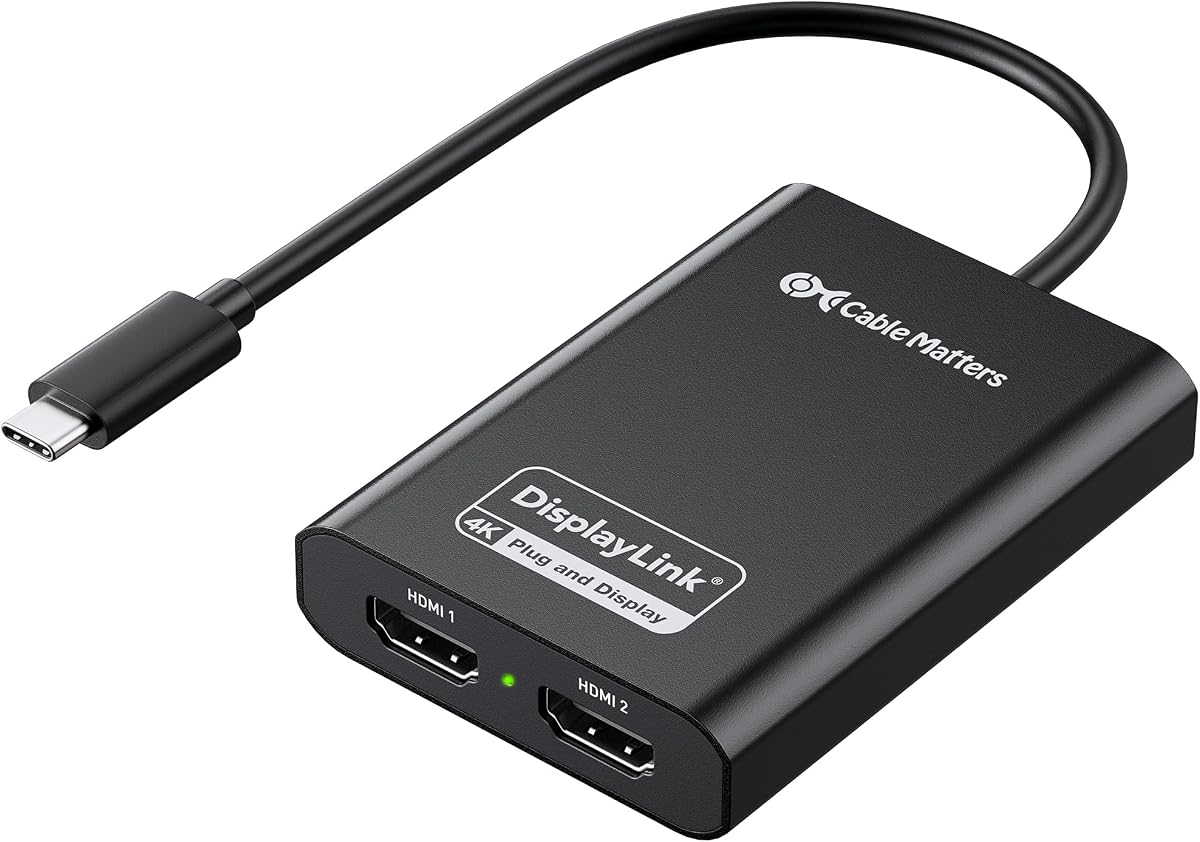
Cable Matters offers a reliable solution for breaking the single-display limit on Macs, providing true dual extended displays for creative workflows. Its HDMI 2.0 performance delivers smooth visuals that eliminate 30Hz flicker issues for content creation tasks.
We may earn a commission when you buy through this link, at no additional cost to you.
The durable aluminum housing helps dissipate heat efficiently, though users should expect some warmth during operation as is normal for metal cases. Setup requires macOS Screen Recording permission, which ensures proper functionality for extended multi-screen arrangements.
Performance may vary depending on CPU and USB bandwidth, so newer systems are recommended for best dual 4K results. Despite this requirement, it remains a solid choice for those needing to expand workspace on modern laptops effectively.
Ideal for developers and designers, this adapter transforms one USB-C port into a comprehensive dual-monitor setup. Its focus on stability and compatibility makes it a practical tool for everyday productivity and creative work.
Eliminates common flicker issues to ensure smooth visuals for extended work sessions.
Features aluminum housing to maintain stable performance through efficient heat management.
We may earn a commission when you buy through this link, at no additional cost to you.
Sonnet delivers a powerful adapter capable of connecting two 4K displays or supporting higher refresh rates like 144Hz for smoother motion. This flexibility makes it versatile for both work and play, expanding your onscreen area significantly.
We may earn a commission when you buy through this link, at no additional cost to you.
It works well with M1 Pro, Max, and Ultra chips, providing robust compatibility with newer MacBooks. The included USB-A female adapter ensures you can connect to various Thunderbolt or USB ports without worrying about adapters separately.
While it focuses on visual performance, the support for audio output adds convenience for multimedia tasks. Its ability to handle 1080p and higher resolutions at 60Hz ensures broad compatibility with existing monitors and displays.
For users who need a mix of high refresh rates and standard 4K setups, this adapter offers a balanced solution. Its design supports a wide range of applications from browsing to video consumption on modern systems.
Supports up to 144Hz on select resolutions for smoother motion in various applications.
Provides audio output through HDMI, reducing the need for separate speaker connections.
We may earn a commission when you buy through this link, at no additional cost to you.
Selecting the right Displaylink Adapter involves considering compatibility, performance needs, and build quality to ensure it meets your specific workspace requirements effectively.
Ensure the adapter supports your specific operating system such as Windows, MacOS, or ChromeOS, and check for driver requirements to avoid setup issues.
Always verify that the adapter works with your laptop's processor generation like Mac M1 to M5 or Windows 10/11 for stable performance.
Look for adapters that support dual 4K@60Hz output to ensure sharp visuals and smooth motion for professional tasks.
Higher refresh rates can reduce flicker and improve visual comfort during long work sessions.
Check if you need USB-C, USB-A, or Thunderbolt connectivity based on the available ports on your laptop or desktop.
Adapters with hybrid cables offer more flexibility for different device generations.
Adapters with aluminum housings dissipate heat better and resist physical damage for long-term reliability.
Look for sturdy cables and reliable connectors to prevent wear and tear from frequent travel.
Consider extra ports like USB-A for peripherals or power delivery to keep your laptop charged during use.
Some adapters include encryption or specialized chips for enhanced security in business environments.
Some adapters require driver installation to function correctly, which may affect setup time and compatibility.
Ensure the driver is available for your OS and easy to install before purchase to avoid interruptions.
Check for lifetime or long-term technical support options that can help resolve issues quickly.
A solid warranty period protects your investment against defects or performance issues.
Compare features relative to price to find a balance between cost and performance for your needs.
Higher priced models often include better build quality and extended support options.
Begin by downloading and installing the required DisplayLink driver from the official website before connecting the adapter to your computer for optimal functionality.
Connect the adapter to a USB 3.0 or Thunderbolt port and then plug in your HDMI or DisplayPort monitors to establish the extended display setup.
Keep the adapter in a cool, dry place when not in use and avoid bending the cables excessively to maintain their structural integrity over time.
Yes, most DisplayLink adapters work with Mac M1 through M5 chips but require installing the DisplayLink Manager driver and granting Screen Recording permissions to function properly.
DisplayLink adapters are not recommended for gaming or streaming protected content because they do not support HDCP and may introduce input lag.
Windows systems typically require the DisplayLink driver to be installed before the adapter functions correctly with external displays.
Many DisplayLink adapters are compatible with ChromeOS 100+ and often work plug-and-play without needing additional driver installation.
Some DisplayLink adapters support up to six monitors on PCs depending on the model, operating system, and available USB bandwidth.
Without the driver, the adapter may not display images or function properly since the software manages the video signal processing.
Audio support depends on the specific model and monitor capabilities, but most modern adapters support audio transmission through HDMI.
Some warmth is normal during operation, but ensure the adapter has proper airflow and is not covered to prevent excessive overheating issues.
We recommend the WAVLINK Universal adapter for budget buyers, the WAVLINK Dual HDMI for value, and the Plugable adapter for premium Mac users seeking lifetime support.
Prioritize compatibility with your operating system and the specific resolution needs of your monitors to ensure a smooth and reliable multi-screen experience.
Always verify the latest pricing and availability on Amazon before purchasing as product details and costs may change over time.