
Thermaltake 200mm Pure 20 Series
4.5Editor score
High airflow 200x30mm design
Long life sleeve bearing
Anti-vibration mounting system
Choosing the right cooling solution is critical for maintaining optimal system performance and longevity. A 200mm case fan offers a unique balance of high airflow and low noise, making it ideal for mid-tower and full-tower chassis designs.
We evaluated ten top-rated models based on airflow capacity, acoustic performance, bearing technology, and build quality. Our analysis focuses on real-world specifications and user feedback to ensure you get reliable cooling for your hardware.
Each pick below highlights specific strengths like PWM control, RGB lighting, or silent operation. Note that prices and availability change frequently, so verify current details before purchasing to ensure you get the best deal available today.
4.5Editor score
4.8Editor score

4.6Editor score
As an Amazon Associate we earn from qualifying purchases.
This side-by-side comparison highlights the key specifications and unique features of each top-rated 200mm case fan to help you make an informed decision based on your specific cooling and aesthetic needs.


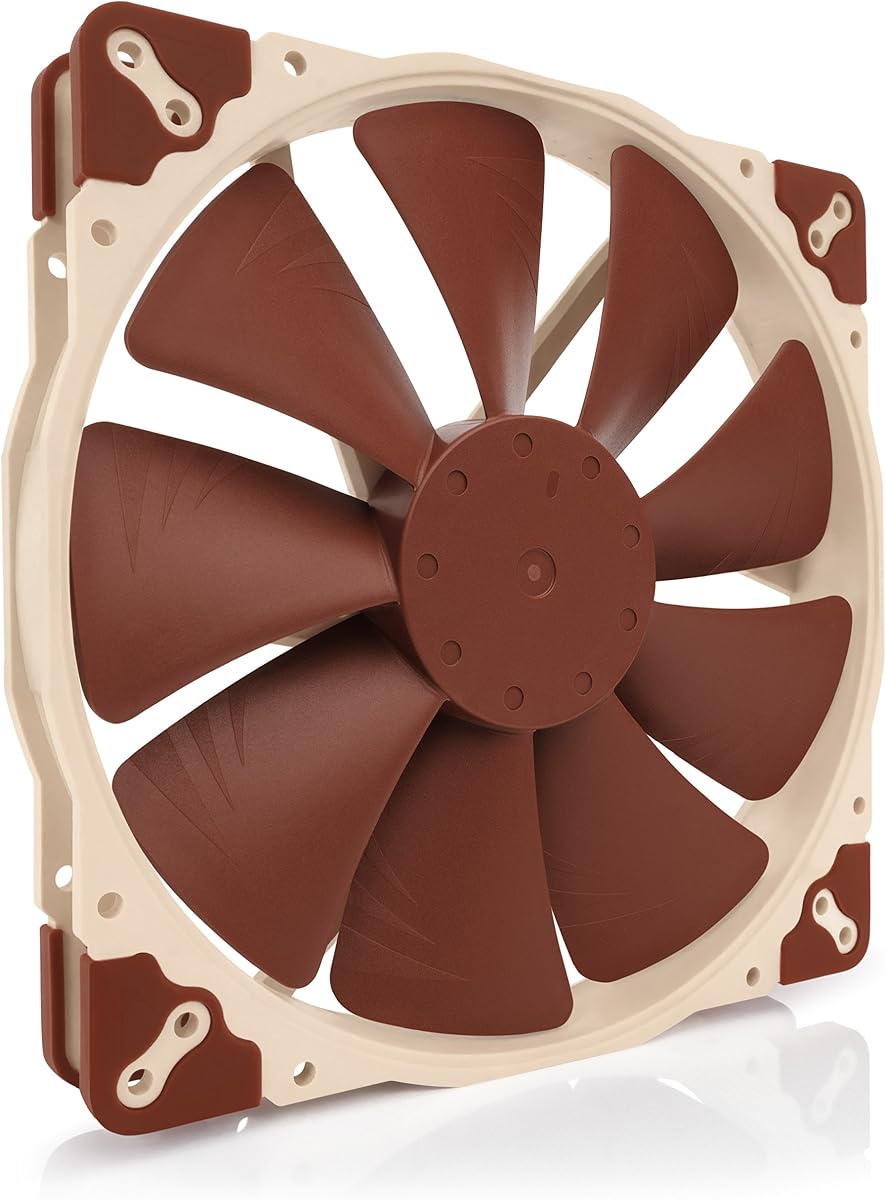
The Noctua NF-A20 PWM stands out as the top choice for users seeking reliable cooling without compromising on noise levels. It holds a solid 4.8 rating from verified buyers who praise its engineering and build quality.
We may earn a commission when you buy through this link, at no additional cost to you.
Its award-winning A-series design includes Flow Acceleration Channels and an Advanced Acoustic Optimisation frame that delivers superior quiet cooling performance. The large 200mm diameter ensures high airflow at extremely low noise levels.
Trade-offs include the premium price and a limited color palette, but the included Low-Noise Adaptor and extension cables make it versatile for different setups. The anti-vibration mounts ensure the fan stays stable even under load.
This fan is ideal for builders who prioritize silence and longevity over budget or flashy lighting. If you want a set-and-forget cooling solution that performs consistently, the NF-A20 PWM is the best investment you can make.
The frame and blade design work together to minimize turbulence and resonance, ensuring that the fan runs smoothly without generating annoying buzzing sounds.
Beyond the fan itself, you get anti-vibration mounts, fan screws, and extension cables which simplifies installation in tight or complex cases.
We may earn a commission when you buy through this link, at no additional cost to you.
The Thermaltake Pure 20 Series offers a compelling balance of performance and value for budget-conscious builders. Users appreciate its thick 200x30mm design which pushes air efficiently without generating excess noise.
We may earn a commission when you buy through this link, at no additional cost to you.
Its fan blades are designed to focus airflow while the long life sleeve bearing extends the overall lifespan of the unit. The shaved frame allows for more installation flexibility especially within Thermaltake chassis.
While it does not offer the same acoustic refinement as premium models it delivers a perfect balance of silence style and efficiency for most users. It is a solid choice for cases needing robust intake or exhaust.
Buyers looking for reliable cooling without breaking the bank should consider this fan. It meets essential cooling needs effectively and is easy to integrate into existing PC builds with minimal effort required.
The 30mm thickness allows for more blade surface area and motor displacement translating to better static pressure and airflow for the size.
Shaved frames make it easier to mount in tight spaces without compromising the structural integrity of the fan housing or blades.
We may earn a commission when you buy through this link, at no additional cost to you.
The chromax.Black.swap edition brings a sleek all-black aesthetic to the proven NF-A20 PWM platform. It retains the same high performance and quiet operation while allowing users to customize the look of their build.
We may earn a commission when you buy through this link, at no additional cost to you.
Its flow acceleration channels and advanced acoustic optimization frame ensure superior quiet cooling performance. The chromax.black.swap edition includes swappable anti-vibration pads in multiple colors for personalization.
Trade-offs include the higher price compared to standard models but the aesthetic appeal and customization options often justify the extra cost for enthusiasts. It fits perfectly into dark-themed systems.
This fan is perfect for builders who want the best cooling performance without the traditional Noctua brown accents. If you value a clean unified look and silence this is the ideal choice for your case.
Four pads of each color allow you to match the fan mounts to your case or other components for a cohesive visual appearance.
Despite the stylish look it does not sacrifice cooling power making it as effective as the standard version in thermal management.
We may earn a commission when you buy through this link, at no additional cost to you.
The Thermaltake CT200 PWM is designed for users who need high airflow and a streamlined cable management solution. Its optimized 9-blade design pushes up to 131.6 CFM of airflow while maintaining quiet operation.
We may earn a commission when you buy through this link, at no additional cost to you.
Hydraulic bearings provide reliable performance and reduce noise which is essential for continuous operation. Each fan features daisy chainable 4-Pin PWM connectors making installation easier without multiple cables.
Trade-offs include mid-range noise levels and limited color options compared to RGB fans. However the high CFM and static pressure make it effective for cases with restrictive filters or tight spaces.
Buyers looking for high performance and simple cabling should choose this fan. It is ideal for cases needing strong intake or exhaust capabilities without sacrificing too much on noise or installation simplicity.
Nine blades are engineered to balance speed and pressure resulting in a powerful torrent of air that cools components efficiently.
Multiple fans can be connected in series reducing cable clutter and allowing easier management within the case environment.
We may earn a commission when you buy through this link, at no additional cost to you.
The SickleFlow 200 combines efficient cooling with aRGB Gen2 lighting to enhance build aesthetics. It features a hybrid PBT frame for stability and frosted blades that diffuse light for a vibrant customizable luminous effect.
We may earn a commission when you buy through this link, at no additional cost to you.
Dynamic PWM allows adjustable speeds from zero to 800 RPM to balance noise and airflow. The blade design optimizes airflow and stability while the sealant prevents dust and oil leakage extending fan lifespan.
Trade-offs include the requirement for an RGB header and mid-range pricing. However the visual appeal and solid cooling performance make it a favorite for gamers and enthusiasts building custom rigs.
If you want to light up your system without sacrificing cooling power this fan is an excellent choice. It suits modern cases where aesthetics are just as important as thermal performance for your components.
The frosted material helps spread the light evenly across the fan surface creating a soft glow rather than harsh distinct LED points.
The anti-resonance mounting minimizes noise ensuring quiet performance even when the fan is spinning at higher speeds under load.
We may earn a commission when you buy through this link, at no additional cost to you.
The NF-A20 FLX provides the same premium quality as the PWM version but uses a 3-pin Molex connector. It is rated 4.7 stars for its durability and consistent performance over many years of use.
We may earn a commission when you buy through this link, at no additional cost to you.
It offers 800 or 550 RPM speed settings via Low-Noise Adaptor to fine-tune airflow or near-silent operation. The award-winning A-series design ensures superior quiet cooling performance and longevity.
Trade-offs include the lack of automatic PWM speed control and an older connector type. However for users with limited motherboard headers or specific power requirements this version offers maximum versatility.
Buyers needing a reliable fan without complex controls should choose the FLX version. It is a great fit for systems prioritizing quiet operation and longevity over dynamic software-based speed adjustments.
The included adaptor allows you to swap between high speed and low speed modes manually depending on your current thermal requirements.
The 3-pin connector ensures compatibility with older systems and allows for powering the fan directly from the power supply if needed.
We may earn a commission when you buy through this link, at no additional cost to you.
The 5V PWM version of the NF-A20 allows the fan to run on devices with USB host ports or power banks. This makes it uniquely versatile for custom projects outside standard PC cases.
We may earn a commission when you buy through this link, at no additional cost to you.
It features polarity protection for 5V applications with PWM speed control. The OmniJoin adaptor set enables connection to proprietary fan headers found in specialized enclosures.
Trade-offs include the need for a USB host port and specialized adapter. However for builders using mini-PCs or portable systems this version offers the same silent performance in a different form factor.
Choose this fan if you need cooling for non-standard setups or USB-powered devices. It delivers proven Noctua quality with the added flexibility of USB power compatibility.
This unique feature allows the fan to power from smartphones or power banks making it ideal for portable cooling projects.
Provides compatibility with proprietary fan headers often found in custom-built or specialized computer chassis designs.
We may earn a commission when you buy through this link, at no additional cost to you.
The MF200R RGB brings certified RGB support with Asus Aura and MSI RGB. Its hybrid design applies static air pressure without sacrificing airflow making it effective for standard case setups.
We may earn a commission when you buy through this link, at no additional cost to you.
Silent cooling technology includes sound absorbing rubber pads. The smart fan sensor automatically stops the motor if jammed ensuring safety and longevity for your components.
Trade-offs include the requirement for an external controller and lower CFM compared to larger fans. However for cases supporting 200mm RGB fans it offers a good blend of visual appeal and cooling.
This fan suits builders looking for certified RGB and safety features. It is a solid mid-range choice for users wanting colorful lighting without compromising on basic cooling performance.
The helicopter blade design optimizes airflow to push air efficiently while maintaining low noise levels during operation.
If an object blocks the fan the sensor stops the motor automatically preventing damage to the hardware or the fan itself.
We may earn a commission when you buy through this link, at no additional cost to you.
The CHICIRIS 200mm ARGB offers a budget-friendly option for builders wanting visual flair and cooling. It delivers 95CFM of airflow with a translucent blade design that diffuses light evenly.
We may earn a commission when you buy through this link, at no additional cost to you.
Its hydraulic bearing reduces friction ensuring stable performance. The fan supports 5V 3pin ARGB motherboard synchronization for lighting control. It is compatible with major brands for easy customization.
Trade-offs include a limited brand reputation and basic software features. However for users seeking high volume airflow and ARGB at a lower cost this fan provides strong value for money.
Buyers prioritizing value and lighting should consider this model. It offers a practical upgrade for cases needing better airflow and visual appeal without a significant investment.
With 34 LEDS and a translucent blade design the fan creates a uniform soft glow that enhances the overall look of the build.
The optimized blade design ensures efficient heat dissipation keeping components cool during intense workloads or gaming sessions.
We may earn a commission when you buy through this link, at no additional cost to you.
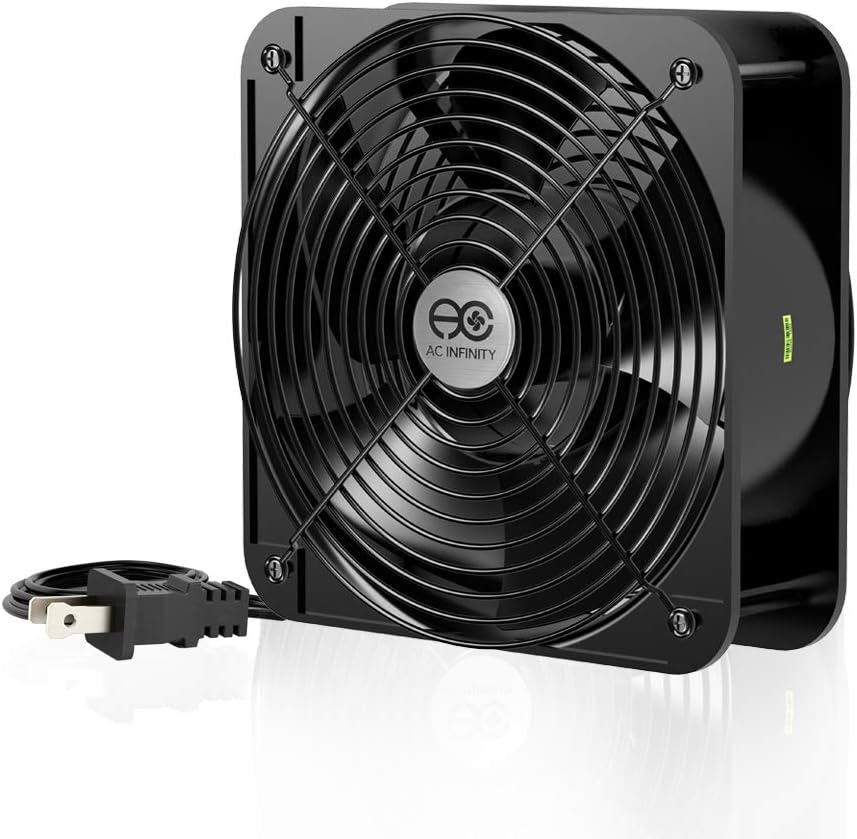
The AC IN AXIAL 2060 is designed for industrial or heavy-duty cooling needs. It uses 120V AC power and delivers a massive 425 CFM of airflow for extreme heat dissipation.
We may earn a commission when you buy through this link, at no additional cost to you.
Dual-ball bearings have a lifespan of 67000 hours allowing the fan to be laid flat or stand upright. It includes a heavy-duty aluminum fan with power plug cord and mounting hardware.
Trade-offs include high noise levels and AC power requirements. However for applications requiring massive air exchange this model maximizes airflow where standard DC fans fall short.
Choose this fan for projects needing robust ventilation. It is best suited for server rooms or industrial enclosures where noise and power type are less critical than cooling capacity.
Designed to maximize airflow for projects requiring intense cooling or ventilation without standard DC constraints.
The aluminum build and dual-ball bearings ensure the fan survives long-term operation in demanding environments.
We may earn a commission when you buy through this link, at no additional cost to you.
Selecting the right 200mm case fan requires balancing airflow, noise, and features. This guide breaks down the essential factors to help you find a fan that fits your case and cooling needs.
Airflow (CFM) measures how much air the fan moves while static pressure measures how well it pushes air through restrictive areas like filters. For open intake or exhaust slots prioritize high CFM.
Choose high airflow for unrestricted vents and high static pressure for filtered or dense areas.
Noise levels are measured in decibels. Lower dBA values mean quieter operation. Look for fans under 25dB for silence or under 30dB for general use.
Prioritize low decibel ratings if you value a quiet workspace or bedroom setup.
Bearings determine the lifespan and noise of the fan. Sleeve bearings are budget-friendly but wear faster. Fluid and ball bearings offer longer life and smoother performance.
Invest in hydraulic or fluid dynamic bearings for longevity and quiet operation.
PWM (4-pin) allows automatic speed control based on temperature while DC (3-pin) runs at fixed speeds. PWM offers better efficiency and silence during low load.
Choose PWM for automatic speed adjustments and better energy efficiency.
RGB fans add color but require specific headers and software. Check if your motherboard supports 5V 3-pin or 12V 4-pin lighting before purchasing.
Verify RGB header support on your motherboard to ensure lighting functionality.
Standard fans are 25mm thick but some are 30mm or 60mm. Measure your case clearance to ensure the fan fits without hitting drives or cables.
Check case dimensions and fan thickness to ensure proper physical fit.
200mm fans may have different hole patterns. Check if the fan supports standard 200mm mounts or requires specific brackets.
Confirm mounting hole patterns match your case design.
Daisy chain connectors allow multiple fans to plug into one header reducing clutter. This feature is common on newer models and simplifies installation.
Look for daisy chain options to reduce cable clutter inside your case.
Install fans to create a logical airflow pattern typically pushing cool air in from the front and pulling hot air out from the rear or top.
Keep your computer in a dust-free environment and clean the fan blades regularly with a soft brush or compressed air to maintain optimal airflow.
Check cables and mounts occasionally to ensure no wires are vibrating against the blades which can cause noise or mechanical failure over time.
Yes, 200mm case fans are worth buying because they move more air at lower speeds than 120mm fans resulting in quieter operation and better cooling efficiency for large cases.
RGB fans that support motherboard sync do not need a separate controller. Just plug them into a 5V 3-pin ARGB header and use your BIOS or software to control the colors.
PWM fans allow precise speed control via the motherboard while DC fans run at a fixed speed. PWM is better for balancing performance and noise.
No, you cannot directly fit a 200mm fan into a 120mm hole. You need a case that specifically supports 200mm mounting points.
A typical 200mm fan operates between 18 and 30 decibels which is usually quieter than smaller fans because they do not need to spin as fast.
Fluid Dynamic and Ball bearings generally last the longest offering tens of thousands of hours of operation compared to standard sleeve bearings.
The Noctua NF-A20 PWM and Thermaltake Pure 20 Series lead our list by offering unmatched reliability and value respectively. Whether you need silence or airflow these picks cover all essential needs.
Prioritize PWM control and bearing quality to ensure your system stays cool and quiet. Also confirm your case supports 200mm mounting before purchasing any model.
Remember that prices fluctuate frequently so check current deals and availability before making your final purchase decision today.