
xTool F2 Ultra 60W MOPA & 40W Diode Dual Laser Engraver
4.2Editor score
MOPA fiber laser for color on metal
Dual 48MP AI camera precision
Industrial-grade speed up to 15000mm/s
Finding the right 60W laser engraver can transform your creative workflow. These machines offer powerful cutting and precise engraving for diverse materials. Whether you run a small business or craft at home, the right tool makes a difference.
We evaluated ten leading 60W laser engraver models based on safety, speed, software compatibility, and build quality. Our comparison highlights key features like enclosed designs, camera systems, and dual laser capabilities to help you choose wisely.
Each selection includes detailed pros and cons alongside real-world performance insights. Note that prices and availability may change over time. Check current listings before purchasing to ensure you get the best value for your specific project needs.
4.2Editor score

4.5Editor score

5.0Editor score
As an Amazon Associate we earn from qualifying purchases.
The following table provides a side-by-side overview of the top 60W laser engraver options available today. Each entry highlights essential specifications to help you compare capabilities quickly.




The Creality Falcon2 Pro is a top-tier 60W laser engraver designed for serious makers. It features a fully enclosed Class 1 design that prioritizes user safety. With adjustable power and a dual laser system, it handles diverse materials effortlessly.
We may earn a commission when you buy through this link, at no additional cost to you.
Its standout quality lies in the intelligent two laser output levels. You can switch between 60W, 40W, and 22W to suit different tasks. The integrated HD camera streamlines alignment, reducing setup time significantly for batch projects.
Trade-offs include the initial investment and the need for a stable environment. The enclosure adds weight and footprint. However, the safety and precision gains justify the cost for professional use.
Buyers seeking a professional workflow will appreciate this machine. It balances power with safety features effectively. We recommend it for businesses needing reliable daily performance.
The fully enclosed Class 1 design minimizes laser exposure risks. This makes it safer for home studios and shared spaces.
Combining a 60W laser with a 1.6W positioning laser enhances versatility. You get precision engraving alongside heavy-duty cutting in one unit.
We may earn a commission when you buy through this link, at no additional cost to you.
This desktop diode model focuses on speed and batch processing. It delivers high output power suitable for cutting through various materials quickly. The integrated enclosure adds a layer of safety for desktop use.
We may earn a commission when you buy through this link, at no additional cost to you.
Key strengths include the intelligent two camera and the quick installation time. Users can set up in minutes and start engraving. The high speed helps reduce processing time significantly.
However, lower ratings indicate potential quality variance. Some users report issues with consistency. Careful inspection upon arrival is recommended to ensure proper function.
Ideal for sole traders needing fast throughput. If speed is your priority, this unit offers compelling advantages despite minor drawbacks.
High speed allows for efficient mass production of items. This reduces overall turnaround time for orders.
Most assembly is pre-done. You only need ten minutes to get started, minimizing downtime.
We may earn a commission when you buy through this link, at no additional cost to you.
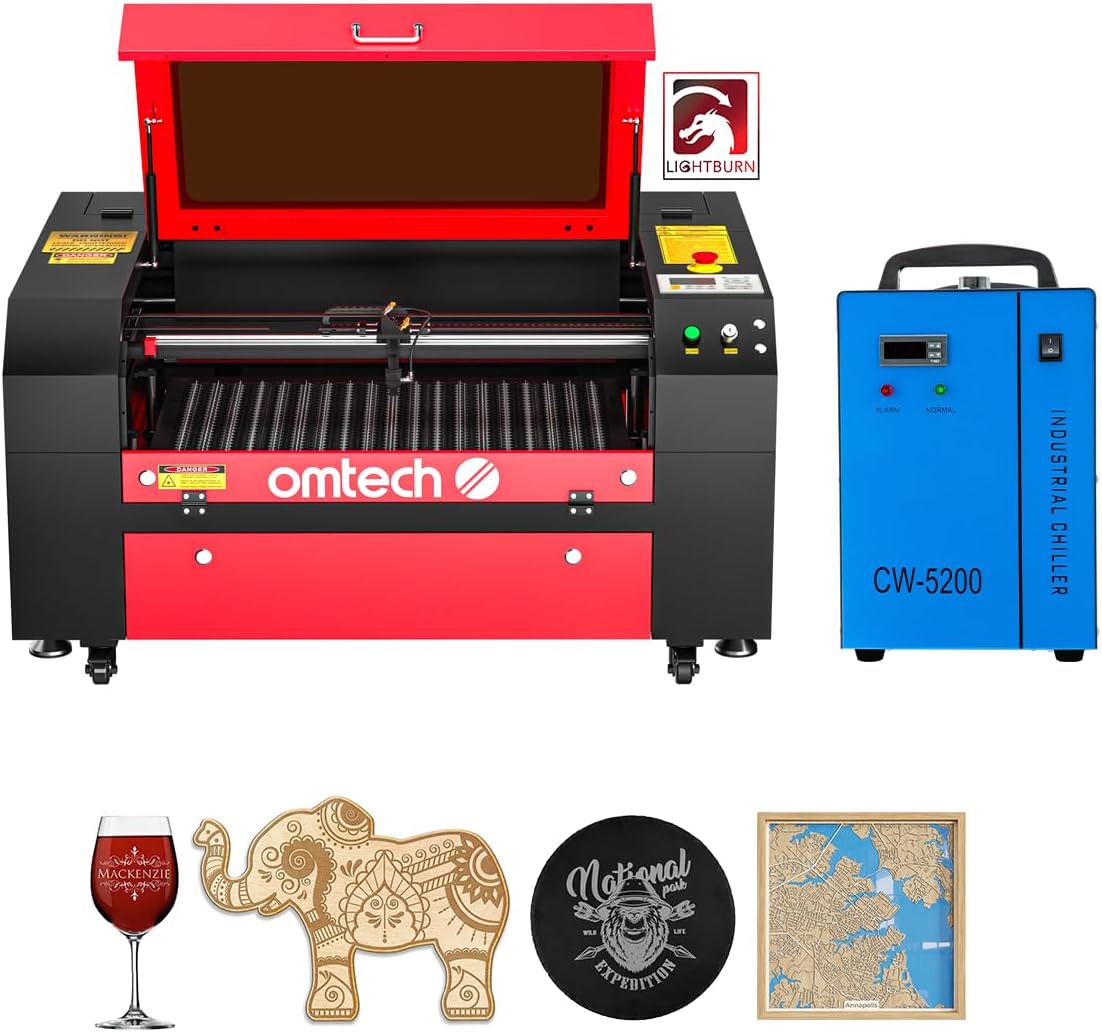
The OMTech Maker 60W CO2 laser engraver offers a spacious workspace. It is ideal for engraving large items like signs. The autofocus feature eliminates manual guesswork during setup.
We may earn a commission when you buy through this link, at no additional cost to you.
Strengths include the comprehensive bundle with LightBurn software. You get everything needed to start. The high rating reflects reliable performance and build quality.
CO2 lasers require periodic tube replacement and alignment. The water chiller is essential but adds complexity. These maintenance tasks are standard for this technology.
Perfect for businesses needing large format capabilities. The ease of use makes it accessible even for less experienced operators.
The 20×28 inch bed accommodates full sheets of material. This reduces the need for cutting material to fit.
Workbeds adjust automatically with a button press. This ensures optimal focus for every cut.
We may earn a commission when you buy through this link, at no additional cost to you.
This version emphasizes safety and visual workflow tools. The Class 1 rating is crucial for home environments. The smart camera helps automate positioning, reducing manual errors.
We may earn a commission when you buy through this link, at no additional cost to you.
Key strengths are the bundled software and dual laser capabilities. It cuts deep materials efficiently. The enclosure minimizes smoke and noise during operation.
The camera needs a stable connection to work fully. Some users find the manual video helpful but initial setup takes care. These are minor hurdles for a robust machine.
Recommended for small businesses starting out. It offers a safe and efficient entry point into professional laser engraving.
The high-resolution camera projects designs onto the work area. This visual alignment speeds up preparation.
Compatible with Creality Design Space and third-party tools. This flexibility allows for various design styles.
We may earn a commission when you buy through this link, at no additional cost to you.
The xTool F2 Ultra combines MOPA fiber and diode technologies. It masters metals and organic materials effortlessly. The industrial-grade productivity makes it a top choice for serious professionals.
We may earn a commission when you buy through this link, at no additional cost to you.
Its MOPA system delivers vibrant colors on metals without ink. The dual camera system ensures precise positioning. Speed is unmatched, reducing job times significantly.
The price is steep for casual users. It requires a technical understanding to leverage fully. However, for metal customization, no other desktop unit matches this.
Buyers seeking ultimate metal finishing capabilities should choose this. It is an investment that pays off in specialized applications.
MOPA technology allows for 100+ consistent color options. This creates unique aesthetic effects on steel.
AI auto-detects materials to suggest settings. This reduces trial and error in production.
We may earn a commission when you buy through this link, at no additional cost to you.
This fiber laser is built specifically for metal marking. It is compact and lightweight for portability. The long lifespan ensures reliability for high-volume industrial tasks.
We may earn a commission when you buy through this link, at no additional cost to you.
Strengths include the precision of 0.01mm. This accuracy is vital for fine text on jewelry. LightBurn compatibility allows for professional software integration.
The work area is limited to small items. If you need larger surfaces, this machine won't fit. It is best for specific jewelry or tool marking.
Ideal for jewelers or tool manufacturers needing precision. It is a niche but highly effective solution for metal engraving.
Designed for rings and small metal parts. It delivers deep and clear marks consistently.
Compatible with LightBurn for advanced file handling. This supports complex vector designs easily.
We may earn a commission when you buy through this link, at no additional cost to you.
The VEVOR offers a large working area for a reasonable price. It handles wood and acrylic with ease. The air assist system ensures clean and burr-free edges on cuts.
We may earn a commission when you buy through this link, at no additional cost to you.
Strengths include the perfect rating from users. It supports a wide range of design software. The pass-through doors make handling long materials simple.
Manual focusing can be time-consuming. The lack of enclosure means safety glasses are necessary. These are typical trade-offs for open-frame systems.
Perfect for those needing large format without high cost. It is an excellent choice for signage and wood crafts.
The 24×16 inch bed fits large sheets. This is great for full sign cutting without seams.
Removes smoke and debris from the cut line. This maintains lens clarity and cut quality.
We may earn a commission when you buy through this link, at no additional cost to you.
This commercial laser features motorized autolift beds. It handles large projects efficiently. The tube is rated for high usage hours, making it reliable for daily operations.
We may earn a commission when you buy through this link, at no additional cost to you.
Strengths include the spacious work area. It accommodates large items without extra cutting. The bundled software provides a complete package for businesses.
Maintenance of the water chiller is key. It takes up significant space in a studio. Proper planning for ventilation is also required.
Ideal for businesses needing consistent high-volume output. It is a robust machine for professional environments.
Touch button adjustment simplifies setup. This saves time when switching material thicknesses.
Built for long operational hours daily. It supports sustained business workflows.
We may earn a commission when you buy through this link, at no additional cost to you.
The Aliencell X1 Lite delivers industrial-level speed and precision. It is designed for high-quality photo engraving. The massive bed size supports large batch production.
We may earn a commission when you buy through this link, at no additional cost to you.
Strengths include the high frequency for clean gradients. It reduces waste by simulating cuts before processing. The Class 1 safety standard provides peace of mind.
Setup requires familiarity with design software. The price is above entry-level models. However, the quality justifies the investment for detailed work.
Recommended for those prioritizing output quality over cost. It is excellent for custom gifts and detailed patterns.
The software simulates engraving to reduce waste. This ensures accuracy before cutting begins.
Produces smoother gradients on photos. This avoids pixelation in detailed images.
We may earn a commission when you buy through this link, at no additional cost to you.
This fiber laser is specialized for metal engraving. It uses JPT technology for high precision and longevity. The MOPA function allows for deep and colored marks on metals.
We may earn a commission when you buy through this link, at no additional cost to you.
Strengths include the two interchangeable lenses. You can switch between small and large areas easily. It is portable and lightweight for transport.
The work area is limited compared to CO2. It requires careful handling of the lenses. Setup involves assembly which may take time.
Ideal for metal shops needing reliable marking. It offers a high return on investment for metal-specific tasks.
Two lenses allow for flexibility in scale. This supports both rings and rods.
Reaches deep engraving capabilities for durability. The mark resists wear and heat.
We may earn a commission when you buy through this link, at no additional cost to you.
Choosing the right 60W laser engraver involves understanding your specific needs. Here are the key factors to consider before making a purchase.
Laser sources vary from diode to CO2 and fiber. Diodes are versatile for wood and acrylic. CO2 handles larger sheets. Fiber excels on metals.
Choose the source that matches your primary material.
Class 1 enclosures are essential for safe operation. They prevent laser exposure during use. Look for certified flame and safety detectors.
Prioritize safety features to protect your workspace.
The bed size determines what you can engrave. Larger beds are better for signs. Smaller ones save space for jewelry.
Measure your typical projects to find the right fit.
Most units support LightBurn. Check for free alternatives if you prefer open-source. Compatibility ensures smooth workflow.
Verify software support before buying the machine.
60W is a powerful output for desktop machines. Speed varies by technology. Fiber is faster than diode for marking.
Balance speed with precision for your projects.
CO2 lasers need water chillers. Diodes often use air. Proper cooling extends laser life.
Ensure you have space for cooling systems.
Cameras allow for visual alignment. This is crucial for engraving existing objects. It saves time on setup.
Consider units with cameras for batch work.
Prices vary widely based on features. Check warranty terms for peace of mind. A good warranty protects your investment.
Look for units that offer long-term support.
Start by reading the manual and setting up safety gear. Always wear appropriate protection depending on the laser class. Ensure the area is well ventilated.
Regularly clean the lenses to maintain power. Check the mirrors for dust and debris. Replace water if the unit uses a chiller.
Adjust focus based on the material thickness. Use test grids to find the right settings. Store designs on USB drives for safety.
Most 60W laser engravers cannot cut bare metal. Fiber lasers can mark metals deeply but cutting is limited to thin sheets. You typically need fiber for metal work.
For enclosed Class 1 units, standard glasses may not be needed. For open units, always wear laser safety eyewear. Check the specific wavelength for your glasses.
LightBurn is the industry standard for most models. It supports many controllers and file types. Some units include their own design software.
CO2 tubes usually last around 4000 hours. Fiber lasers can last over 100000 hours. Diode modules vary based on usage hours.
Yes, 60W is excellent for cutting acrylic. It produces clean edges. Cast acrylic is preferred for engraving over extruded.
Yes, ventilation is critical to remove smoke. Some units have built-in filters. External extraction is better for larger projects.
We reviewed the top 60W laser engraver models for November 2026. The Creality Falcon2 Pro leads in safety and versatility. The xTool F2 Ultra stands out for metal work.
Prioritize safety and software compatibility when choosing. Your workspace size matters for larger units. Always test materials before full production.
Prices may vary by retailer and time. Check current listings for the best value. These machines are powerful tools for creative professionals.
