
Eaton Tripp Lite BC350R Small UPS
4.5Editor score
Compact wall mount design
Easy battery replacement
Surge protection included
This guide compares the top 10 battery backup systems for small offices to help you find reliable power protection and surge prevention for your critical
Maintaining continuous power is vital for small office operations. A quality battery backup ensures your devices stay online during outages. It also protects sensitive electronics from damaging voltage spikes that occur frequently.
We evaluated ten leading uninterruptible power supply models available on the market. Our analysis focuses on output capacity, runtime performance, outlet configuration, and surge protection levels to identify the most reliable solutions for daily business needs.
Each selection below highlights specific strengths and ideal use cases. You will find options for desktop PCs, routers, and network gear. Note that pricing and availability may fluctuate based on current market conditions and retailer stock levels.
4.5Editor score

4.5Editor score
4.9Editor score
This side-by-side comparison examines key specifications across all ten models to help you quickly identify the right capacity and feature set for your office environment.


This CyberPower unit delivers reliable pure sine wave power ideal for sensitive office equipment. With a 1500VA rating it supports workstations and network devices easily. The color LCD provides clear real time status updates on battery health and load levels.
We may earn a commission when you buy through this link, at no additional cost to you.
Its advanced Active PFC compatibility ensures safe operation with modern power supplies found in high end PCs. Automatic Voltage Regulation stabilizes incoming power without draining the battery unnecessarily. This extends battery life significantly during frequent minor power dips.
While it carries a higher price tag than standard models the protection offered justifies the investment for critical setups. The weight makes it less portable but ensures stability on a desk or floor. Noise is minimal during normal operation modes.
Buy this if you need guaranteed clean power for servers or advanced workstations in a small office. It balances performance and monitoring features exceptionally well. The included software enables remote management and shutdowns if you require added control.
This output type prevents overheating in active power factor corrected supplies found in modern computers.
AVR adjusts voltage levels internally to avoid switching to battery mode during minor brownouts.
We may earn a commission when you buy through this link, at no additional cost to you.
This model offers a high 1500VA capacity suitable for multiple devices in an office setting. The intelligent LCD panel gives users detailed visibility into power conditions and battery status at a glance. It handles typical office loads effectively.
We may earn a commission when you buy through this link, at no additional cost to you.
The simulated sine wave design works well for standard computers and peripherals but might not suit all advanced hardware. Its AVR feature corrects minor surges efficiently. The twelve outlets provide ample connectivity for routers and monitors plus desktops.
Users should verify device compatibility with simulated wave outputs before purchasing for critical gear. The build quality is solid and the weight indicates robust internal components. Setup requires minimal effort thanks to standard plugs.
Choose this for general office use where budget and capacity matter more than pure sine requirements. It protects essential tools well. The included software allows for automated shutdowns to prevent data loss during extended outages.
Twelve outlets allow you to connect multiple monitors peripherals and network gear simultaneously.
The intelligent LCD simplifies troubleshooting by showing voltage and load details clearly.
We may earn a commission when you buy through this link, at no additional cost to you.
This unit focuses on efficiency by automatically shutting off peripherals when connected computers sleep. The LCD panel keeps you informed on battery levels and system health. It is a practical choice for energy conscious small offices.
We may earn a commission when you buy through this link, at no additional cost to you.
The ECO controlled outlets reduce wasted energy by cutting power to devices like speakers or monitors when the main PC is idle. While the waveform is simulated it covers most desktop needs. The surge protection shields against common spikes.
One tradeoff is that ECO mode outlets must be planned carefully for specific equipment. Non essential items go there to maximize savings. The unit stays quiet during operation which helps maintain a focused work environment.
Select this if lowering energy costs is a priority alongside basic backup needs. It offers smart functionality at a reasonable level. The included software helps track usage trends over time for better resource management.
ECO mode cuts power to peripherals when the main PC is off or sleeping to save energy.
Built in surge suppression safeguards connected devices from sudden voltage spikes during storms.
We may earn a commission when you buy through this link, at no additional cost to you.
This slim UPS fits easily under desks or on shelves thanks to its compact profile. It delivers reliable standby power with a 900VA capacity that covers basic office workloads. GreenPower technology improves overall energy efficiency significantly.
We may earn a commission when you buy through this link, at no additional cost to you.
The twelve widely spaced outlets accommodate bulky plugs like power bricks without blocking adjacent slots. This is crucial for tight spaces where multiple devices connect. The standby design ensures quick switchover during an outage.
While it lacks advanced features like network protection it remains a robust tool for general protection. The efficiency features help keep running costs low. It is well suited for standard desktop environments without heavy server loads.
Pick this if you have limited desk space and need broad outlet coverage. Its design prioritizes utility and efficiency. The warranty provides peace of mind for daily use in a small office setting.
High efficiency design reduces power consumption and lowers your overall energy footprint.
Widely spaced outlets prevent bulky adapters from blocking other sockets in a row.
We may earn a commission when you buy through this link, at no additional cost to you.
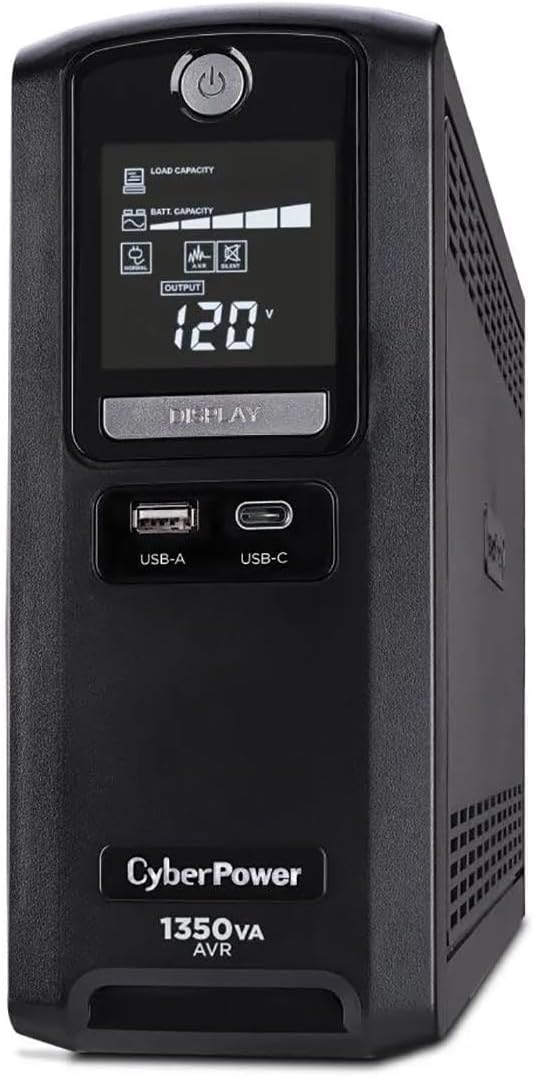
This premium unit stands out with dedicated network and coaxial line protection to keep internet and TV signals safe. A 1350VA rating offers solid power for a small office mix of devices. Its high joule rating provides superior defense against surges.
We may earn a commission when you buy through this link, at no additional cost to you.
The inclusion of both Type A and Type C USB ports facilitates modern device charging without needing separate blocks. Energy Star certification ensures it meets strict efficiency guidelines. The LCD interface provides clear status updates at all times.
While it uses simulated sine wave it remains a top pick for network heavy offices. The data line protection is a rare feature in this class. The software included allows for automated safe shutdowns which is essential for servers.
Buy this if you need comprehensive protection for routers and modems alongside your computers. It bridges the gap between basic power and data safety. The robust build ensures long term reliability in daily professional use.
Coaxial and network ports protect modems and routers from surges entering via cables.
Dual USB Type A and C ports allow charging of phones and tablets during outages.
We may earn a commission when you buy through this link, at no additional cost to you.
This model provides vital data line protection to shield electronics from surges traveling via telephone or network lines. The intelligent LCD displays real time voltage and battery details for easy monitoring. AVR handles minor fluctuations without battery use.
We may earn a commission when you buy through this link, at no additional cost to you.
Its design caters to offices where modems or older telephone systems share power lines. The surge protection covers both power and data lines effectively. The twelve outlets ensure you can connect all essential office devices securely.
While the waveform is simulated it suits most standard business equipment. The build quality is dependable and the warranty adds confidence. It strikes a good balance between feature set and cost for a mid range office.
Choose this if you have older network gear that requires line protection. It is a practical solution for preventing data loss from external surges. The software tools help manage power events efficiently.
Protection prevents surges on phone lines from damaging connected modems or fax machines.
AVR maintains consistent voltage levels to protect sensitive components from brownouts.
We may earn a commission when you buy through this link, at no additional cost to you.
This compact UPS fits tight spaces with its small footprint and silent operation. The wall mount tabs allow it to be installed securely on a wall to save desk space. It offers essential protection for basic routers and PCs.
We may earn a commission when you buy through this link, at no additional cost to you.
Its replaceable battery cartridge makes maintenance straightforward and extends the unit life. The eight outlets provide enough connections for a simple home office setup. The LED indicators keep you informed of system status clearly.
While the capacity is lower it serves well for single devices or small networks. It is designed for ease of use and basic reliability. The warranty and support add value for small business users.
Select this if you need a small reliable backup for a router or single PC. It is cost effective and simple to maintain. The silent design makes it ideal for quiet work environments.
Wall mount tabs allow you to free up valuable desk space for other equipment.
Internal battery is easily replaceable with standard cartridges for extended usability.
We may earn a commission when you buy through this link, at no additional cost to you.
This model offers a budget friendly entry point for essential power protection in small setups. Its compact design and wall mount slots make it easy to hide away in a corner. It is perfect for routers and small electronics.
We may earn a commission when you buy through this link, at no additional cost to you.
The setup is simple plug it in and connect devices to gain immediate protection. A resettable circuit breaker prevents damage from overloads. The LED lights provide clear status updates without noise or confusion.
It lacks advanced features but covers the basics of surge protection and runtime. The replaceable battery adds long term value for a low cost. It is a practical choice for light duty office needs.
Choose this if you need basic protection on a tight budget. It provides peace of mind without extra features. The VESA mounting pattern ensures it stays secure during use.
This unit provides reliable protection at an entry level price point for small offices.
Standard keyhole slots allow for easy wall installation to save floor space.
We may earn a commission when you buy through this link, at no additional cost to you.
APC delivers a straightforward backup solution designed to keep your computer and router running during short outages. The battery swap feature simplifies maintenance. It offers a USB port for charging phones and clear indicators for status.
We may earn a commission when you buy through this link, at no additional cost to you.
It focuses on essential functionality with well spaced outlets for your desk needs. The runtime is sufficient to save work and shut down safely. The design is clean and fits most office desks easily.
While basic it is reliable for daily small office tasks. The included features cover common needs like phone charging. It is a solid choice for those who prefer simple brands.
Buy this for a no fuss backup for your workstation. It keeps critical devices online and prevents data loss. The warranty supports long term use for your small office.
Swapping the internal battery is quick and does not require professional help.
The built in USB port works during power outages to charge mobile devices.
We may earn a commission when you buy through this link, at no additional cost to you.
This entry level standby UPS provides essential protection for low load devices like routers and small PCs. The wiring fault LED helps you spot electrical issues quickly. It is small enough to sit under a desk without crowding.
We may earn a commission when you buy through this link, at no additional cost to you.
Eight outlets give you ample room for your main devices and some peripherals. The GreenPower technology ensures it does not waste electricity when not under full load. It is a practical solution for very small offices.
It handles basic surges and short outages well. The warranty covers the battery and ensures peace of mind. It is ideal for single user workstations that need simple backup.
Choose this for basic protection without extra cost. It covers the essentials for keeping online during short power drops. The design focuses on simplicity and ease of use for daily tasks.
The wiring fault LED alerts you to potential electrical issues before damage occurs.
GreenPower technology reduces energy consumption when the unit is not actively backing up.
We may earn a commission when you buy through this link, at no additional cost to you.
Selecting the right battery backup involves analyzing output capacity runtime and specific protection features needed for your office devices.
VA and wattage ratings determine how much load a UPS can support. Calculate total device wattage to choose a unit with adequate capacity. Ensure the unit supports your computer and monitor needs simultaneously.
Choose a unit that exceeds your total wattage needs by at least 20 percent for safety.
Runtime depends on load level and battery health. Higher loads drain the battery faster during an outage. Review estimated runtimes for typical office loads to ensure enough time to save work.
Look for models that provide at least 5 to 10 minutes for critical shutdowns.
Pure sine wave output is required for active power factor corrected power supplies found in modern servers and computers. Simulated sine wave works for basic desktops but may cause issues with advanced electronics.
Pick pure sine wave for servers or high end workstations to ensure safe operation.
Adequate outlet spacing prevents bulky adapters from blocking adjacent sockets. Ensure the model offers enough battery backed outlets for critical gear and surge only outlets for non essential items.
Prioritize units with well spaced outlets to avoid power strip dependency on your desk.
Joule ratings indicate how much energy the unit can absorb from a surge. Higher joule values offer better protection for expensive electronics and network gear against lightning or grid spikes.
Choose a model with a high joule rating to protect sensitive office hardware effectively.
Some units include coaxial or network ports to protect modems and routers from surges traveling via cables. This is essential for offices that rely on internet connectivity during storms.
Select a UPS with data line protection if your office uses external modems or TV signals.
Replaceable batteries extend the lifespan of the unit. A warranty covering the battery ensures you get a replacement without extra cost. Check the warranty terms for battery inclusion and length.
Choose a model with a replaceable battery and a warranty that covers battery failure for three years.
LCD panels and monitoring software help track battery health and manage shutdowns. Intelligent displays show voltage levels and load percentages to keep you informed. Software can automate shutdowns for connected servers.
Look for units with LCD screens and free software for remote management and status tracking.
Install the UPS on a stable surface away from moisture and direct sunlight to ensure longevity. Plug it into a grounded wall outlet and avoid using extension cords. Connect your critical devices to the battery backed outlets rather than the surge only ones.
Allow the unit to charge fully before first use by leaving it plugged in for at least 24 hours. Periodically test the backup function by simulating an outage to verify all devices switch over correctly. Record these tests in a log.
Replace the battery every two to three years or when the unit indicates a low battery warning. Proper disposal of old batteries follows local hazardous waste regulations. Keeping the unit clean and free of dust helps maintain efficient airflow and operation.
A surge protector only guards against voltage spikes while a UPS battery backup provides continuous power during an outage. The UPS uses internal batteries to keep devices running for a period of time. This allows you to save work and shut down safely.
Most lead acid batteries inside a UPS need replacement every two to three years depending on usage. Frequent outages may shorten this lifespan. Many units include indicator lights or alarms to alert you when a battery swap is required.
It is generally not recommended to connect laser printers to a UPS due to their high startup power draw. This can drain the battery quickly or cause the unit to shut down. Connect printers to a standard surge strip instead.
Yes if your computer has an active power factor corrected power supply. These modern units require pure sine wave output to operate efficiently without noise or overheating. Basic desktops often work with simulated wave but critical gear needs pure wave.
Check the LED lights on the front of the unit to confirm it is receiving power. Most models have a test button to simulate an outage and verify the battery kicks in. Ensure your critical devices are plugged into the correct outlets.
AVR adjusts incoming voltage levels to keep them stable without switching to battery power. This protects your devices from brownouts or surges. It also extends battery life by only using stored power during full outages.
The top picks like the CyberPower CP1500PFCLCD and CST135UC offer robust protection for diverse office needs. They balance capacity and features to ensure your critical gear stays safe. Smaller units like the Eaton Tripp Lite models serve compact setups well.
Prioritize the right VA rating and waveform type for your specific hardware to avoid compatibility issues. Consider network protection if you rely on internet connections daily. Investing in quality safeguards data and prevents expensive hardware damage.
Always check current product availability and warranty details before purchasing to ensure you get the best value. Your power needs may change so plan for scalability when possible. A reliable backup is essential for uninterrupted office productivity.