
GOLDENMATE 2000VA/1600W
4.4Editor score
LiFePO4 Long Life Battery
2000VA 1600W Output
Pure Sine Wave Technology
This comprehensive guide compares the top 10 battery backup units for workstation PCs, evaluating power capacity, waveform type, outlet count, and reliability
Selecting the right battery backup for workstation PC setups is essential for maintaining productivity during power outages. A high-quality uninterruptible power supply protects sensitive electronics from surges, sags, and sudden blackouts. It ensures you can save your work gracefully rather than suffering data loss or hardware damage.
We evaluated ten leading models based on voltage capacity, waveform technology, outlet configurations, and software features. Our analysis focuses on units suitable for workstations, including those with active power factor correction. We considered build quality, warranty terms, and real-world performance ratings from verified users.
Each product listing below provides key specifications, pros and cons, and detailed usage scenarios. Note that pricing and availability fluctuate frequently on Amazon. Always verify the current cost before purchasing. We aim to highlight the most reliable options for protecting your valuable workstation investments effectively.
4.4Editor score

4.5Editor score

4.7Editor score
The following table offers a side-by-side comparison of all ten selected units. It highlights critical specifications including VA rating, wattage, outlet count, and warranty length. This overview helps you quickly identify which model matches your specific power requirements and budget constraints for your workstation setup.


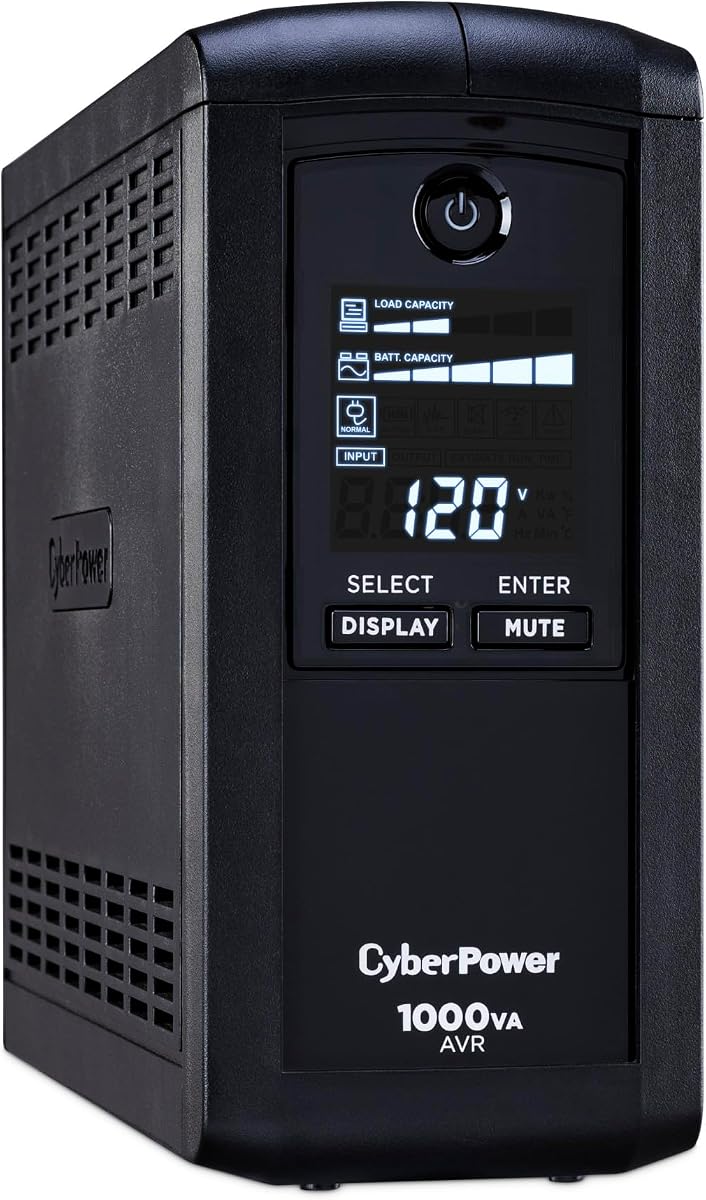


The CyberPower CP1500PFCLCD stands out as a top tier solution for workstation protection. It boasts a high 1500VA capacity and pure sine wave output which is critical for modern power supplies with active power factor correction. User ratings remain consistently high due to its reliable performance during outages.
We may earn a commission when you buy through this link, at no additional cost to you.
Its key strengths include the extensive outlet configuration offering twelve NEMA 5-15R sockets split between backup and surge protection. The color LCD panel gives detailed real-time data on load and battery health. Additionally the included PowerPanel software allows for safe automated shutdowns to prevent data loss.
While highly effective the unit does occupy a significant amount of desk space due to its robust build. The battery is not user replaceable by everyone though standard UPS maintenance procedures apply. These trade-offs are acceptable given the high level of equipment protection offered.
This UPS is ideal for users running powerful workstations or servers where power quality is paramount. If you need guaranteed compatibility with active PFC supplies and plenty of outlets this model should be your primary consideration for critical workstation backup needs.
Pure sine wave output ensures that sensitive electronics and active PFC power supplies operate correctly without overheating or shutting down unexpectedly during power transfer.
With twelve outlets available you can connect the computer monitor router and other peripherals directly to the UPS without needing additional power strips.
We may earn a commission when you buy through this link, at no additional cost to you.
The GOLDENMATE 2000VA/1600W distinguishes itself by utilizing Lithium Iron Phosphate battery technology. This innovation provides a lifespan exceeding ten years which drastically reduces long term ownership costs. It delivers a massive 1600W output capable of supporting high performance workstation configurations easily.
We may earn a commission when you buy through this link, at no additional cost to you.
Key advantages include the elimination of frequent battery replacements typical of lead acid models. The pure sine wave output ensures compatibility with sensitive workstation components. The LCD display offers clear status updates and the built-in Battery Management System enhances safety during operation.
However the internal transformer required for the lithium system makes the unit slightly larger and heavier than some peers. It also has specific voltage input requirements that may not suit generator connections. These constraints are minor given the superior battery performance.
If you want a set it and forget it solution for your workstation this is an excellent choice. The longevity of the battery means you invest once and enjoy reliable protection for a decade without worrying about maintenance schedules.
LiFePO4 batteries offer over 3000 charge cycles and require no periodic maintenance unlike traditional lead acid batteries which degrade faster.
Automatic shutdown capabilities can be configured via communication ports to safely turn off your PC during extended power outages.
We may earn a commission when you buy through this link, at no additional cost to you.
The CyberPower BRG1500AVRLCD2 offers a premium experience with a five year warranty covering the battery. This extended coverage reflects confidence in its build quality and performance. The color LCD panel provides intuitive monitoring of power conditions and alerts for potential issues before they cause downtime.
We may earn a commission when you buy through this link, at no additional cost to you.
A standout feature is the support for remote management cards allowing administrators to monitor multiple units from a central location. It provides twelve outlets for connecting various workstation peripherals. The AVR function corrects minor voltage fluctuations automatically to preserve battery life.
The unit uses simulated sine wave output which works well for most workstations but may not suit sensitive medical or audio equipment. The remote card is an additional purchase. Despite this it remains a top choice for offices requiring centralized oversight of power protection.
Invest in this model if you need professional grade reliability and the option to manage UPS health remotely. The five year warranty provides significant peace of mind for critical business equipment compared to standard three year offerings.
Optional management cards allow IT teams to track status and receive alerts across multiple locations without physical inspection of each device.
A five year warranty including the battery offers better long term value than the typical three year coverage found on many competitors.
We may earn a commission when you buy through this link, at no additional cost to you.
The CyberPower CP1500AVRLCD3 delivers solid power protection with a 1500VA capacity. It uses simulated sine wave technology which suits most conventional power supplies found in workstations. The color LCD panel offers immediate feedback on battery status and load capacity for the user.
We may earn a commission when you buy through this link, at no additional cost to you.
Its generous outlet count ensures you can connect all necessary devices without extra adapters. USB ports are included for keeping mobile devices charged during an outage. The unit is UL safety certified ensuring it meets rigorous testing standards for home and office use.
However the simulated sine wave might not be ideal for systems specifically requiring pure sine wave input. The price point is slightly higher than some similar capacity units. These factors are worth considering if pure wave output is a strict requirement for your hardware.
Choose this model if you need high capacity backup for standard workstations and value a clear color display. It provides reliable protection for networking gear and computers where simulated sine wave is sufficient for safe operation.
The intelligent LCD panel alerts users to potential issues before they affect critical equipment allowing for proactive maintenance decisions.
UL certification guarantees that the product has been tested in a certified lab for safety and performance reliability.
We may earn a commission when you buy through this link, at no additional cost to you.
The CyberPower EC850LCD is designed with energy efficiency in mind. It features ECO outlets that automatically cut power to peripherals when the connected PC is off. This reduces standby power consumption and helps lower overall energy costs for daily use.
We may earn a commission when you buy through this link, at no additional cost to you.
With eight backup outlets and additional surge protected sockets it accommodates a typical workstation setup well. The LCD panel provides essential status updates without needing software. The unit is lightweight and fits easily into office environments without taking up much space.
The ECO mode requires specific outlets which might limit flexibility if you have multiple active peripherals. The lower wattage means it may not support high load workstations as well as larger models. Still it is excellent for standard desktop protection.
This UPS is perfect for users prioritizing energy savings and basic surge protection. If your workstation does not require massive power and you want to reduce electricity waste this model offers a smart eco-friendly solution.
When the UPS detects a computer is off or in sleep mode it turns off power to connected peripherals reducing unnecessary energy usage.
The smaller form factor makes it easy to place under desks or on shelves without cluttering the workspace.
We may earn a commission when you buy through this link, at no additional cost to you.
The CyberPower CP1000PFCLCD offers pure sine wave output in a compact package. It is designed specifically to support active PFC power supplies ensuring compatibility with modern computers. The ten outlets provide enough flexibility for a standard workstation setup.
We may earn a commission when you buy through this link, at no additional cost to you.
Its color LCD panel tilts for better visibility and displays detailed information about battery and power conditions. The unit includes USB ports for convenient charging of mobile devices during a power event. It meets UL safety standards for reliable operation.
Compared to the 1500VA models it has a smaller capacity and thus less runtime under heavy loads. The number of backup outlets is moderate which may restrict adding extra peripherals later. These are acceptable limitations for a smaller office setup.
Choose this unit if you need sine wave protection without taking up too much room. It balances portability and functionality well for individual workstations that do not require maximum power capacity or extended backup times.
The pure sine wave output ensures compatibility with active power factor correction supplies found in many modern desktops.
The LCD screen can tilt up to 22 degrees for better viewing angles when installed on a desk.
We may earn a commission when you buy through this link, at no additional cost to you.
The CyberPower AVRG900LCD delivers reliable protection with a line-interactive design. It features data line protection to guard modems against surges that travel through telephone lines. The twelve outlets allow for connecting multiple devices including network routers.
We may earn a commission when you buy through this link, at no additional cost to you.
Its AVR system corrects voltage fluctuations without using battery power to extend battery life. Users appreciate the high reliability and compact design which fits easily in office spaces. The LCD panel provides immediate status updates for peace of mind.
The lower wattage means it is best for lighter workloads rather than power hungry workstations. Simulated sine wave limits compatibility with very sensitive equipment. Still for standard office PC setups it is a robust and well rated choice.
Use this model to protect workstations and networking gear in standard environments. The included data line protection makes it especially useful if your internet modem connects via phone lines.
Prevents power surges traveling through telephone lines from causing damage to connected electronics modems.
Automatic voltage regulation corrects minor fluctuations without battery use prolonging overall battery lifespan.
We may earn a commission when you buy through this link, at no additional cost to you.
The CyberPower CP1000AVRLCD provides solid mid-range performance for typical office workstations. It uses simulated sine wave which works for most standard power supplies. The intelligent LCD panel displays runtime estimates and load capacity helping users plan shutdowns.
We may earn a commission when you buy through this link, at no additional cost to you.
Nine outlets include five backup protected sockets. The spacing is adequate for larger plugs. Its AVR technology stabilizes voltage fluctuations automatically. The unit comes with management software for safe PC shutdowns during extended outages.
It lacks the pure sine wave needed for high-end equipment. Five backup outlets might not suffice for heavily wired setups. These limits are acceptable for general use where cost efficiency is a priority.
Select this unit if you need reliable protection for a standard workstation. The intelligent display offers good visibility of status without needing a full premium model.
Displays runtime and load capacity to help users manage battery usage efficiently during outages.
AVR corrects minor fluctuations without switching to battery preserving battery life for major events.
We may earn a commission when you buy through this link, at no additional cost to you.
The CyberPower ST900U features a slim profile ideal for tight desk spaces. It uses high efficiency design to reduce power consumption while running. The twelve outlets offer ample connectivity for computer and peripherals without taking up much floor space.
We may earn a commission when you buy through this link, at no additional cost to you.
It provides standby protection suitable for home offices and standard workstations. The unit meets UL standards for safety. It is designed for energy efficiency using compact chargers to keep electricity usage low during normal operation.
The slim design may limit physical strength compared to larger bulkier units. Simulated sine wave restricts use with active PFC only systems. Still it is a great fit for space constrained offices.
This model is perfect for small offices or home setups where space is at a premium. The efficiency benefits help keep energy bills lower while maintaining adequate surge protection.
Compact chassis fits easily on desks or shelves without obstructing workspace.
High efficiency design reduces power consumption during regular operation to save energy.
We may earn a commission when you buy through this link, at no additional cost to you.
The CyberPower CP850AVRLCD is an entry level option providing solid protection for basic workstations. It includes an intelligent LCD panel showing runtime and load information. Nine outlets offer sufficient connectivity for standard desktop and monitor setups.
We may earn a commission when you buy through this link, at no additional cost to you.
It is UL safety certified and comes with management software. AVR functionality helps maintain stable voltage to extend battery life. This model is ideal for lighter loads and home office environments.
The lower capacity limits runtime for heavy tasks. Fewer backup outlets might require additional strips. However for basic computing needs it delivers reliable performance at an accessible price point.
Use this if you need simple protection for a light workstation. It provides essential safety and monitoring features without the premium cost.
Smaller footprint makes it easy to install under desks.
Shows detailed info on battery capacity to manage usage effectively.
We may earn a commission when you buy through this link, at no additional cost to you.
Choosing the right battery backup requires understanding your power needs and equipment compatibility. This section outlines the essential factors to consider when evaluating UPS models.
VA and wattage determine how much load a UPS can support. For workstations choose a model with capacity exceeding your total system draw by at least 20 percent to ensure stable operation during outages.
Always calculate your total wattage needs and select a UPS that provides a comfortable margin above that number.
Pure sine wave output is recommended for computers with active power factor correction power supplies as it ensures compatibility and prevents overheating. Simulated sine wave is cheaper but may cause issues with sensitive electronics.
Prioritize pure sine wave models if your workstation uses modern high efficiency power supplies.
Count the number of outlets you need for your computer monitor and peripherals. Look for models that provide enough backup protected sockets to cover your critical devices plus extra surge protected outlets.
Ensure the spacing between outlets accommodates large adapters without blocking adjacent sockets.
Traditional lead acid batteries require replacement every few years while lithium options last longer. Consider the total cost of ownership over time including replacement costs and expected cycle life.
Lithium units offer higher performance and longer life but come with a higher initial price.
AVR adjusts input voltage to safe levels without switching to battery power. This feature extends battery life and provides protection against brownouts and surges that occur frequently in many areas.
Ensure the UPS has AVR to maintain stable power quality between battery backups.
Management software allows the UPS to communicate with your PC to perform safe shutdowns during outages. Check for compatibility with your operating system and features like remote monitoring.
Look for included software that supports automated shutdown protocols for your specific workstation OS.
A longer warranty period often indicates better build quality and manufacturer confidence. Most units offer three years but some premium models extend this to five years covering the battery and connected equipment.
Compare warranty terms to ensure comprehensive protection for both the UPS and your connected devices.
The physical footprint should fit your available space without causing obstruction. Consider noise levels during operation if the unit will be located near your desk or workspace.
Measure your available space and check the weight before purchasing to ensure easy placement.
Connect your critical workstation components to the battery backed up outlets and leave nonessential devices for surge only outlets. Plug the UPS into a dedicated wall outlet to ensure proper grounding and safety.
Allow the battery to charge fully for at least eight hours before first use. Regularly test the unit by simulating an outage to verify functionality and battery health.
Replace the battery every three to five years for lead acid models or follow manufacturer guidelines for lithium units. Keep the vents clean and the area around the UPS free of dust.
Yes but only if the UPS provides pure sine wave output. Active PFC supplies require clean sine wave electricity to function correctly and will shut down if exposed to simulated sine wave. Always check the waveform specification before purchasing.
Run time depends on the total wattage draw of your system. A standard workstation might run for 10 to 20 minutes on a 1500VA unit while a high performance rig may last less. Use the included software to estimate actual runtime.
Most standard UPS models allow user replacement of the battery cartridge. However some compact units may require professional service. Always consult the specific product manual to determine if the battery is serviceable by the end user.
Yes the UPS must be turned on to protect connected devices. It should remain powered on continuously and connected to a wall outlet. Ensure it is plugged into a grounded outlet for proper surge protection to function.
A surge protector only guards against voltage spikes whereas a UPS also provides backup power during outages. A UPS is necessary for workstations to prevent data loss and allow safe shutdowns during power failures.
The beep indicates the UPS is running on battery power. This alarm is designed to alert you to the loss of utility power. You can typically mute the alarm using the front panel controls while keeping the unit operational.
Only if it includes data line protection ports for phone or coaxial lines. Most models protect connected AC devices but you must verify if network ports are included to protect your modem from line surges.
Yes and that is the recommended way to use a UPS. Leave connected devices plugged in continuously so the UPS can filter power and switch to backup instantly when utility power fails.
Selecting the ideal battery backup for workstation PC depends on balancing capacity waveform type and outlet needs. Our top picks include the CyberPower CP1500PFCLCD for pure sine wave reliability and the GOLDENMATE 2000VA for long life battery technology.
Prioritize units with AVR and software support to protect your equipment from voltage issues and data loss. Ensure the warranty covers both the unit and battery to maximize investment protection over several years.
Prices and availability change frequently so verify the current listings before making a final decision. A reliable UPS is an investment in productivity that safeguards your critical hardware from unexpected power interruptions.