
Switch Cooling Fan with Bottom Cooling
4.0Editor score
Vertical stand design
Adjustable speed settings
Compatible with Switch OLED
This guide compares the top Cooling Fan Nintendo Switch Dock options to help you choose the right cooler for your setup based on performance and features.
Maintaining optimal thermal performance is crucial for extending the lifespan of your gaming console during extended play sessions. A dedicated cooling fan accessory ensures your hardware stays within safe operating limits even under heavy load conditions.
We evaluated ten leading models based on airflow efficiency noise levels build quality and ease of installation. Our analysis covers original dock replacements and universal stands designed to enhance ventilation without compromising your entertainment setup.
Each pick highlights key specifications pros and cons to help you find the ideal match for your needs. Please note that product availability and pricing may fluctuate over time so check current listings before purchasing.
4.0Editor score

4.6Editor score

4.4Editor score
This side by side comparison breaks down the critical specifications of each model to highlight differences in fan count power source and compatibility options for your specific console version.



This replacement kit stands out as the top choice for its comprehensive monitoring capabilities and robust cooling power. It delivers excellent thermal management for both original and OLED models with precise control options.
We may earn a commission when you buy through this link, at no additional cost to you.
The LED display provides real time feedback on fan RPM and exhaust temperature which is rare in this price segment. Users can adjust speed from nearly silent to maximum output ensuring flexibility across different gaming environments.
While the fan is quiet at lower speeds it does produce some noise at maximum RPM which may be noticeable in very quiet rooms. The micro USB power requirement adds a cable to your setup but ensures stable power delivery.
It is ideal for gamers who prioritize temperature visibility and customizable airflow to prevent interruptions. The included accessories like the fixed pad and joystick caps add value and ensure a secure installation without scratches.
The digital LED display keeps you informed about both fan speed and exact temperature to help prevent overheating before it impacts your gameplay.
A dedicated fixed pad and anti slip sponges keep the fan stable and protect your console from scratches during extended use.
We may earn a commission when you buy through this link, at no additional cost to you.
This model offers an affordable entry point for those seeking effective cooling without breaking the bank. It matches the performance of more expensive units with a versatile design that supports multiple devices.
We may earn a commission when you buy through this link, at no additional cost to you.
The adjustable speed settings allow you to balance noise and cooling power effectively for long gaming sessions. Its vertical stand design ensures stability while the included accessories provide extra value for the price.
Build quality is functional but not premium and the micro USB cable adds clutter to your entertainment center. These trade offs are acceptable given the low cost and strong cooling capabilities it provides.
It is perfect for budget conscious buyers who need reliable heat dissipation for their Switch or Steam Deck. The inclusion of joystick caps and a stabilizer pad makes it a complete solution out of the box.
Unlike many single use fans this model works with both Switch and Steam Deck making it a versatile investment for multi device gamers.
Packaged with essential tools like caps and pads this unit saves you from buying separate accessories to protect your console.
We may earn a commission when you buy through this link, at no additional cost to you.
This unit is designed specifically for the 2021 OLED dock and integrates seamlessly with its form factor and power input. The unique storage feature makes it stand out for collectors who need organized card management.
We may earn a commission when you buy through this link, at no additional cost to you.
Its high efficiency fan ensures the console stays cool during intense play without adding bulk to your setup. The blue light accent adds a modern tech inspired look that matches the OLED aesthetic beautifully.
The lack of speed control means it runs at a constant pace which may be louder than preferred for some users. Also it is incompatible with the original dock limiting its appeal to OLED owners only.
It is the ideal choice for OLED users who value organization and style alongside performance. The large number of slots ensures your favorite games are always within reach without cluttering your entertainment shelf.
Fourteen slots on top allow you to store and access your physical game collection quickly without needing external storage solutions.
Designed to match the exact dimensions of the OLED dock this replacement looks like an original part while improving thermal efficiency.
We may earn a commission when you buy through this link, at no additional cost to you.
This unit is built for the next generation Switch 2 dock offering advanced features like dual fans and USB expansion. It addresses heat issues while expanding connectivity options for modern gaming accessories.
We may earn a commission when you buy through this link, at no additional cost to you.
The three stage cooling levels let you balance performance and noise depending on your current gaming session. RGB lighting adds a personalized touch to your setup and the card slots keep your games organized.
Installation may require some care to align with the Switch 2 dock properly. The reliance on specific hardware means it is not compatible with older console models which limits versatility for some users.
It is a great choice for those looking ahead to the next console generation with a focus on connectivity. The extra USB ports allow you to charge controllers and headsets without using up dock ports.
Specifically designed for the Switch 2 dock this model ensures you are prepared for future thermal management needs with optimized airflow.
Multiple USB ports let you connect and charge additional peripherals making your dock a more versatile hub for your gaming setup.
We may earn a commission when you buy through this link, at no additional cost to you.
This fan focuses on delivering a quiet experience without compromising on cooling efficiency for your OLED console. The white finish ensures it blends into your entertainment center while maintaining a sleek look.
We may earn a commission when you buy through this link, at no additional cost to you.
It operates silently even during extended gaming sessions which is perfect for those who prefer a distraction free environment. The Type-C power connection is straightforward and matches the modern aesthetic of the OLED base.
The single fan design may not offer the same raw power as triple fan units but it is sufficient for most casual and moderate gaming needs. There is also little customization beyond basic on and off control.
It is best suited for users who prioritize silence and visual harmony over maximum airflow. This makes it a solid companion for late night gaming when noise levels matter most to those around you.
Engineered to minimize noise this fan ensures you can focus on your game without hearing distracting whirring sounds in the background.
The white color and simple design ensure the unit looks like a natural extension of your console rather than an aftermarket accessory.
We may earn a commission when you buy through this link, at no additional cost to you.
This unit delivers efficient cooling in a compact form factor that does not add bulk to your console setup. It is designed to keep the system running smoothly during intense gameplay without taking up extra space.
We may earn a commission when you buy through this link, at no additional cost to you.
The turbo fan accelerates airflow instantly to cool the dock and ensure optimal performance. Its compact size keeps your gaming area tidy and the simple plug design makes setup extremely easy for any user.
Lack of speed adjustments means it runs at a fixed pace which may not suit all preferences. The basic feature set is acceptable for those who want straightforward cooling without complex controls.
It is ideal for users with limited space who need effective thermal management quickly. The combination of performance and small footprint makes it a practical choice for any entertainment cabinet.
The compact design ensures this cooler fits easily on crowded shelves without cluttering your entertainment center or desk.
Despite its small size this fan delivers strong airflow that effectively lowers temperatures during demanding gaming sessions.
We may earn a commission when you buy through this link, at no additional cost to you.
Constructed from superior materials this fan stands up to daily use while delivering consistent cooling performance. The triple fan setup ensures heat is dissipated quickly which is vital for long gaming marathons.
We may earn a commission when you buy through this link, at no additional cost to you.
Users can adjust cooling speed with a switch on the side allowing them to choose between turbo or normal modes. This flexibility ensures you have the right balance of performance and noise for any situation.
The design is somewhat basic and may protrude from the dock slightly compared to flush fit models. However this adds to its durability and ease of use without requiring tools for installation.
It is a strong choice for users who want a robust and adjustable cooling solution. The combination of multiple fans and sturdy build makes it a reliable option for heavy gaming use.
Made from durable materials this fan is built to withstand regular handling and provide lasting performance over time.
The speed toggle allows you to customize cooling power based on whether you are playing casual or intense games.
We may earn a commission when you buy through this link, at no additional cost to you.
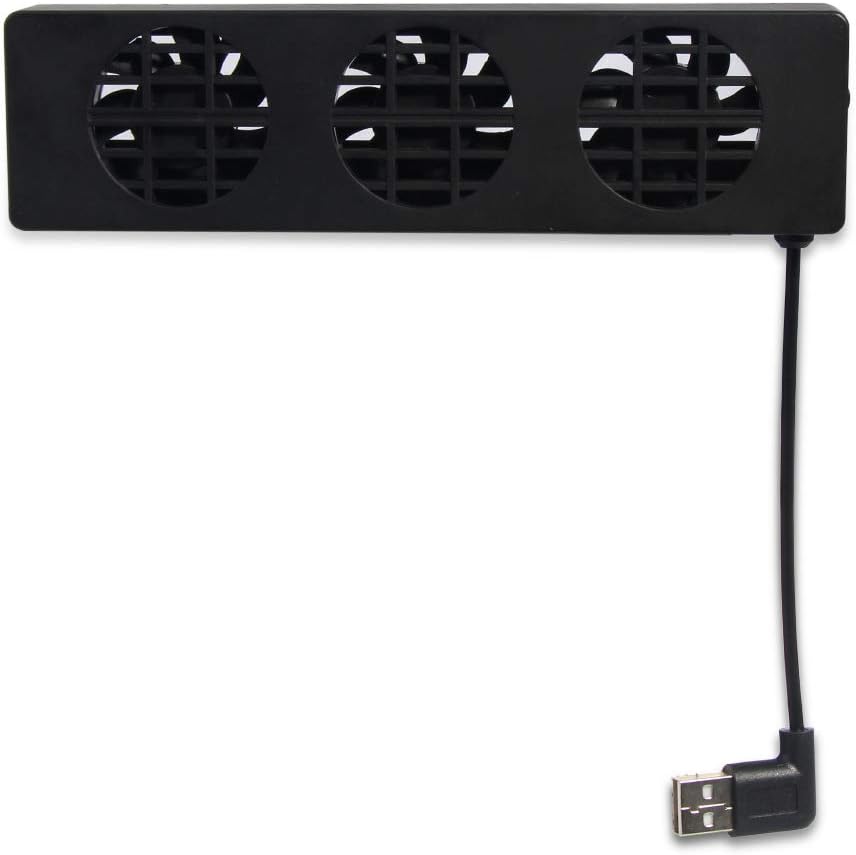
This model offers a straightforward solution for cooling with three fans working together to lower temperatures effectively. It is designed for both casual and hardcore gamers with two distinct speed modes for different needs.
We may earn a commission when you buy through this link, at no additional cost to you.
The USB port power source means no additional cables are required for operation. Its portable size makes it easy to take with you when traveling to friends or LAN events without adding bulk.
Lower user ratings suggest mixed experiences perhaps due to noise levels or build consistency. While it performs well for the price it may not match the refinement of higher end models.
It is a solid value pick for those who need a quick upgrade to their cooling setup. The inclusion of turbo mode ensures that even intense games run without thermal throttling or interruptions.
A dedicated turbo mode provides maximum airflow for intense sessions ensuring your console stays cool even during heavy workloads.
Its small size makes it easy to pack and carry so you can maintain cooling performance wherever you game.
We may earn a commission when you buy through this link, at no additional cost to you.
This unit features a vertical stand design that allows for bottom cooling which is often more effective than rear fans. The LED display offers valuable insight into operating temps and RPM at a glance.
We may earn a commission when you buy through this link, at no additional cost to you.
Speed control is precise allowing you to keep noise low during quiet hours and crank it up when performance is critical. The package includes essential accessories like joystick caps and a stabilizer for added value.
The micro USB power requirement adds another cable to manage which might be a drawback for clean setups. Quality is functional but not premium so it serves well as a practical tool rather than a luxury item.
It is great for users who want to see exactly how their console is performing while playing. The ability to fine tune speed makes it a versatile choice for different environments and play styles.
A vertical stand design targets bottom vents which often provide the most effective path for heat dissipation in docked mode.
Seeing real time RPM and temperature data helps you make informed decisions about cooling power and noise trade-offs instantly.
We may earn a commission when you buy through this link, at no additional cost to you.
This unit is specifically crafted to match the OLED console and dock aesthetics with a sleek black finish. It provides dedicated cooling for the dock ensuring that heat is managed effectively without altering the visual appeal.
We may earn a commission when you buy through this link, at no additional cost to you.
The compact design ensures it integrates smoothly into your entertainment center. It is easy to install and maintains a clean look that appeals to users who prioritize a tidy setup.
It offers fewer customization options than other models which limits its appeal to power users. The price point is also higher than some competitors but you are paying for a refined look.
It is ideal for gamers who want a cooling solution that looks like part of the original product. This makes it a top choice for those who value aesthetics as much as performance.
Designed to match the OLED dock exactly this cooler maintains the clean lines and color scheme of your console setup.
Focused cooling for the dock ensures heat is removed efficiently from the area where it most often builds up during gameplay.
We may earn a commission when you buy through this link, at no additional cost to you.
Selecting the right cooling fan requires understanding how fan count power sources and compatibility affect your specific setup needs.
Most models use one to three fans to create airflow that pushes heat away from the console. A higher count typically means more power but also more noise so find a balance that suits your environment.
Look for units with higher RPM ranges if you plan on gaming for long periods without interruptions.
Fans typically draw power from the docks USB port or via a micro USB cable. USB powered units are cleaner but micro USB cables add flexibility if your dock ports are limited.
Choose a power method that does not create cable clutter in your entertainment center or desk setup.
Some units are made for the original dock while others fit the OLED model or even next gen hardware. Always verify your console model before buying to ensure a physical fit and proper ventilation.
OEM specific fans often offer a more seamless look and integration with your existing hardware.
Adjustable fans let you lower noise during casual play and boost cooling when needed. Models with LED displays add visibility into real time performance which helps prevent overheating.
Prioritize models with multiple speed modes to give you flexibility across different gaming sessions.
A good cooler should be quiet at low speeds so it does not distract from your game. Check reviews for notes on fan noise especially at maximum speed to ensure it matches your tolerance.
If you game in a quiet room a model with a silent mode is essential for a pleasant experience.
Durable materials like ABS plastic ensure the unit withstands regular use without cracking or overheating. A stable base prevents wobbling which can be annoying during gameplay.
Opt for models with anti slip pads to protect your console from scratches during installation.
Some models include game card slots RGB lighting or joystick caps to add value to your purchase. These features can help organize your collection or enhance the look of your setup.
Consider which extras matter to you rather than paying for features you will not use.
Prices vary widely based on features and brand. Higher cost does not always guarantee better cooling but it often correlates with better build and more control options.
Set a budget that allows you to get essential features without overpaying for unnecessary bells and whistles.
Begin by checking compatibility with your specific dock model to ensure a proper fit. Remove any dust from the dock vents before attaching the fan so airflow is not restricted.
Connect the power cable to the dock or USB port and secure the fan using any included pads. Turn on the unit and adjust the speed based on how noisy you prefer it to be.
Clean the fan blades regularly with a soft brush to prevent dust buildup that can reduce efficiency. Periodically check the cables and connections to ensure there is no wear or damage from use.
Yes keeping the console cool prevents thermal throttling that can cause lag or crashes. With effective cooling your game maintains consistent frame rates and avoids unexpected pauses during intense play.
Most fans operate quietly at low speeds but may produce noise at maximum RPM. Look for models with adjustable speeds to balance cooling power with a noise level that suits your room.
Not all models fit both dock versions. Some are made specifically for the OLED dock while others support the original model. Check the product compatibility list to ensure a match.
Most draw power directly from the docks USB port or use a micro USB cable. You typically do not need a separate adapter but a free USB port on your dock or TV is necessary.
Use a soft dry brush or compressed air to remove dust buildup from the blades and housing. Regular cleaning ensures the fan maintains peak performance without overheating itself.
Using third party cooling accessories generally does not void the warranty unless they cause physical damage. However always check with the manufacturer for official policies before installing external hardware.
We highlighted ten top performers including our top picks like the LED equipped 122 replacement and the OLED specific GLDRAM unit. These models excel in visibility style and overall thermal performance.
Prioritize speed control compatibility and noise levels when making your decision to ensure the fan fits your routine. Features like displays and storage slots can add convenience depending on your setup.
Remember to check current product availability and listings before finalizing your purchase to get the best value. A good cooler is a small investment that extends the life of your console significantly.