
TECKNET Compact Ambidextrous Wireless Mouse
4.6Editor score
Compact travel friendly size
Soft quiet click buttons
Long battery life span
This guide compares the top cute laptop mouse options for style and performance. Find the perfect wireless or Bluetooth mouse to match your setup today.
Finding a cute laptop mouse can transform your workspace into a personalized haven. You want a device that looks great while delivering reliable performance for daily tasks.
We compared ten top-rated models based on connectivity, design, and user feedback. Our list covers various styles from playful themes to sleek minimalist options.
Each pick highlights key features and potential trade-offs to help you decide. Remember that prices and availability can change frequently on retailer sites.
4.6Editor score

4.4Editor score

4.6Editor score
Explore our detailed side-by-side comparison of the ten best cute laptop mouse models available today. This table highlights key specifications to help you choose quickly.




The TECKNET Compact Wireless Mouse stands out as an excellent budget-friendly option for those seeking a cute laptop mouse. With a high user rating, it delivers reliable performance without breaking the bank. Its compact design and special pink color make it a charming addition to any desk.
We may earn a commission when you buy through this link, at no additional cost to you.
Users appreciate the soft click buttons that reduce noise significantly, making it perfect for shared workspaces. The mouse supports 2.4GHz wireless connectivity with a range up to 49 feet ensuring you can work comfortably from a distance. Adjustable DPI levels allow you to customize cursor speed to your preference.
While it lacks Bluetooth connectivity, the nano receiver provides a stable connection for most devices. The only downside is the lack of varied color options beyond pink which might limit personalization. However, the smart sleep modes extend battery life significantly reducing maintenance needs.
If you need a functional and cute mouse at an affordable price this model is highly recommended. It is particularly suitable for students or professionals with smaller hands who value portability. The long warranty support also adds peace of mind for your purchase.
Its small footprint ensures it fits easily into laptop bags for travel.
Soft buttons minimize noise making it ideal for libraries or offices.
We may earn a commission when you buy through this link, at no additional cost to you.
The Unipows Wireless Mouse offers a sleek slim profile combined with a unique gradient pink to purple finish. This design choice makes it a standout choice for users wanting a cute laptop mouse with a modern aesthetic. It is rated highly for its reliable wireless connection and ergonomic shape.
We may earn a commission when you buy through this link, at no additional cost to you.
The mouse features responsive buttons that provide a soft click experience reducing noise during use. Its high DPI movement resolution ensures smooth tracking on various surfaces without needing a mousepad. The nano receiver is stored inside the mouse preventing it from getting lost when traveling.
One limitation is that it relies on a single AA battery which is not included in the package. While the battery life is decent users might need to stock up on replacements. Also it does not support switching between multiple devices seamlessly like some premium models.
For those who prioritize style and portability this mouse is a great value pick. It fits well in slim laptop bags and offers a comfortable grip for extended use. The gradient finish adds a touch of personality to your tech setup.
The pink to purple gradient makes it a visually appealing accessory.
Silent buttons ensure you do not disturb others while working.
We may earn a commission when you buy through this link, at no additional cost to you.
The Akko Cat Theme Wireless Gaming Mouse is our top pick for its perfect blend of function and fun. It features an adorable cat-shaped design that adds a playful touch to your workspace while delivering high performance. With a strong user rating it is clear that this model delivers on both style and substance.
We may earn a commission when you buy through this link, at no additional cost to you.
This mouse stands out with its tri-mode connectivity supporting 2.4GHz wireless and Bluetooth versions 3.0 and 5.0. This flexibility allows you to connect to multiple devices without cluttering your desk with receivers. The ergonomic design ensures a comfortable fit for the palm reducing strain during long sessions.
While it is labeled as a gaming mouse its utility extends to everyday tasks like browsing and document work. The only drawback is the price point which is slightly higher than basic budget options. However the added versatility and unique design justify the extra cost for most users.
If you want a cute laptop mouse that can handle both work and play this is the ideal choice. It works seamlessly with Mac and Windows systems making it a versatile option for any setup. The anti-slip bottom and agile scroll wheel further enhance the user experience.
Switch between Bluetooth and wireless effortlessly for multiple device setups.
Designed to fit the palm comfortably reducing hand fatigue.
We may earn a commission when you buy through this link, at no additional cost to you.
The FMOUSE Cute Cartoon Silent Wireless Mouse features a popular meme design that resonates with office workers. Its ergonomic shape fits small to medium hands comfortably making it suitable for daily use. This model is highly rated for its silent click technology which is perfect for quiet environments.
We may earn a commission when you buy through this link, at no additional cost to you.
It offers dual mode connectivity supporting both Bluetooth and 2.4GHz wireless connections. This flexibility means you can use it with laptops that have USB ports and those that rely solely on Bluetooth. The stable 33ft range ensures reliable performance across your workspace without interruptions.
While it is not rechargeable the battery life is impressive lasting months on a single AA battery. The auto-sleep feature helps conserve power when not in use ensuring you do not run out of power unexpectedly. The only limitation is the specific design theme which may not appeal to everyone.
This mouse is an excellent gift for coworkers or anyone who loves cat-themed accessories. It balances practical features like silent clicks with a fun aesthetic. The wide compatibility with various operating systems makes it a versatile choice for any user.
Up to 90% quieter than standard mice for distraction free work.
Connect via Bluetooth or USB receiver for maximum device compatibility.
We may earn a commission when you buy through this link, at no additional cost to you.
The Bluetooth Mouse for Laptop Donut Pink is a standout choice for its unique rechargeable design. With a high user rating it is clear that users love its cute donut shape and functionality. It is designed to be a reliable travel mouse for everyday use on various devices.
We may earn a commission when you buy through this link, at no additional cost to you.
It supports both Bluetooth and 2.4G wireless connections allowing you to switch between two devices easily. The silent click feature ensures a quiet environment perfect for libraries or offices. The 1200 DPI sensor provides smooth tracking on most surfaces without needing a mousepad.
While the donut shape is charming some users might find it takes time to get used to. The lack of a traditional USB receiver might be a drawback for devices without Bluetooth. However the rechargeable battery eliminates the need for constant battery replacements.
If you want a cute laptop mouse that is eco-friendly and easy to use this model is ideal. The long battery life and dual device connection make it highly efficient for multitaskers. Its compact design ensures it fits easily into bags for travel.
Built-in battery allows for weeks of use without buying new batteries.
Seamlessly switch between your laptop and tablet with one button.
We may earn a commission when you buy through this link, at no additional cost to you.
The wegear USB Wireless Mouse is designed with productivity in mind offering robust features for work. It features a contoured ergonomic design that reduces hand strain during extended use. The pink color adds a cute touch making it a stylish addition to your desk setup.
We may earn a commission when you buy through this link, at no additional cost to you.
It includes six buttons including forward and backward side buttons that streamline navigation tasks. The adjustable DPI levels allow you to switch between cursor speeds for precision or speed as needed. The 2.4GHz wireless technology ensures a stable connection within a 33ft range.
One limitation is that the side buttons are not recognized on Mac systems which limits utility for Apple users. Additionally it lacks Bluetooth connectivity requiring a USB port for operation. However the long battery life and durable construction make it a reliable workhorse.
For users who need extra buttons for workflow efficiency this mouse is a great choice. It works well with most operating systems and offers consistent performance. The durable design ensures it can withstand heavy daily use over time.
Forward and backward buttons save time when navigating files or pages.
Switch DPI levels to match your specific task speed requirements.
We may earn a commission when you buy through this link, at no additional cost to you.
The JUHOO Wireless Mouse is a solid choice for those seeking a reliable and silent cute laptop mouse. It is designed to be portable and mobile making it ideal for commuters. The silent click technology ensures a quiet experience for both the user and those around them.
We may earn a commission when you buy through this link, at no additional cost to you.
It features a simple plug-and-play setup with a nano receiver hidden in the battery compartment. The wireless range extends up to 10 meters allowing you to move freely without losing connection. The durable construction ensures it can withstand regular use over time.
The design is functional but lacks unique aesthetic features found in other models. Also it does not support switching between multiple devices seamlessly. However for the price it offers excellent performance and reliability for everyday tasks.
If you prioritize silence and portability this mouse is a worthy option. It is compatible with a wide range of devices including laptops and desktops. The simple design makes it easy to use without any complex setup.
Enjoy a quiet clicking experience perfect for shared workspaces.
Lightweight and compact for easy transport in laptop bags.
We may earn a commission when you buy through this link, at no additional cost to you.
The TENMOS M101 Wireless Mouse features a charming flower theme that adds a touch of elegance. It is highly rated for its silent click operation making it suitable for quiet environments. The accurate tracking ensures smooth cursor control on various surfaces.
We may earn a commission when you buy through this link, at no additional cost to you.
It uses 2.4GHz wireless technology for a stable connection up to 10 meters away. The mouse is designed to be simple and user-friendly requiring no software installation. The low power consumption ensures extended battery life on a single AA battery.
The only drawback is the lack of advanced features like Bluetooth or multi-device switching. It is a basic mouse designed for fundamental tasks. However the aesthetic design and silent buttons make it a charming choice for many.
This mouse is perfect for users who want a cute and functional device without high costs. It works well with most operating systems and offers reliable performance. The silent click feature ensures you can work without disturbing others.
The floral aesthetic adds a soft and cute touch to your desk.
Soundless buttons provide a quiet experience for focus.
We may earn a commission when you buy through this link, at no additional cost to you.
The HuGuWdy Pink Wireless Car Mouse is a playful choice for those who want something unique. Its sports car shape and LED lights make it a fun accessory for any desk. It is highly rated for its stable wireless performance and affordable price.
We may earn a commission when you buy through this link, at no additional cost to you.
It uses 2.4GHz wireless technology to ensure a lag-free browsing experience. The receiver is conveniently stored inside the mouse making it portable. The mouse is designed to be a fun gift for women and children.
The car shape might not offer the same ergonomic support as traditional mice. It is best suited for casual use rather than heavy professional work. However its unique design makes it a great conversation starter.
If you are looking for a cute laptop mouse that stands out this is the perfect option. It adds a fashionable twist to your workspace with its LED lights. The stable connection ensures it works reliably for everyday tasks.
The sports car shape offers a fun and distinctive look.
Bright LED lights add a playful touch to your setup.
We may earn a commission when you buy through this link, at no additional cost to you.
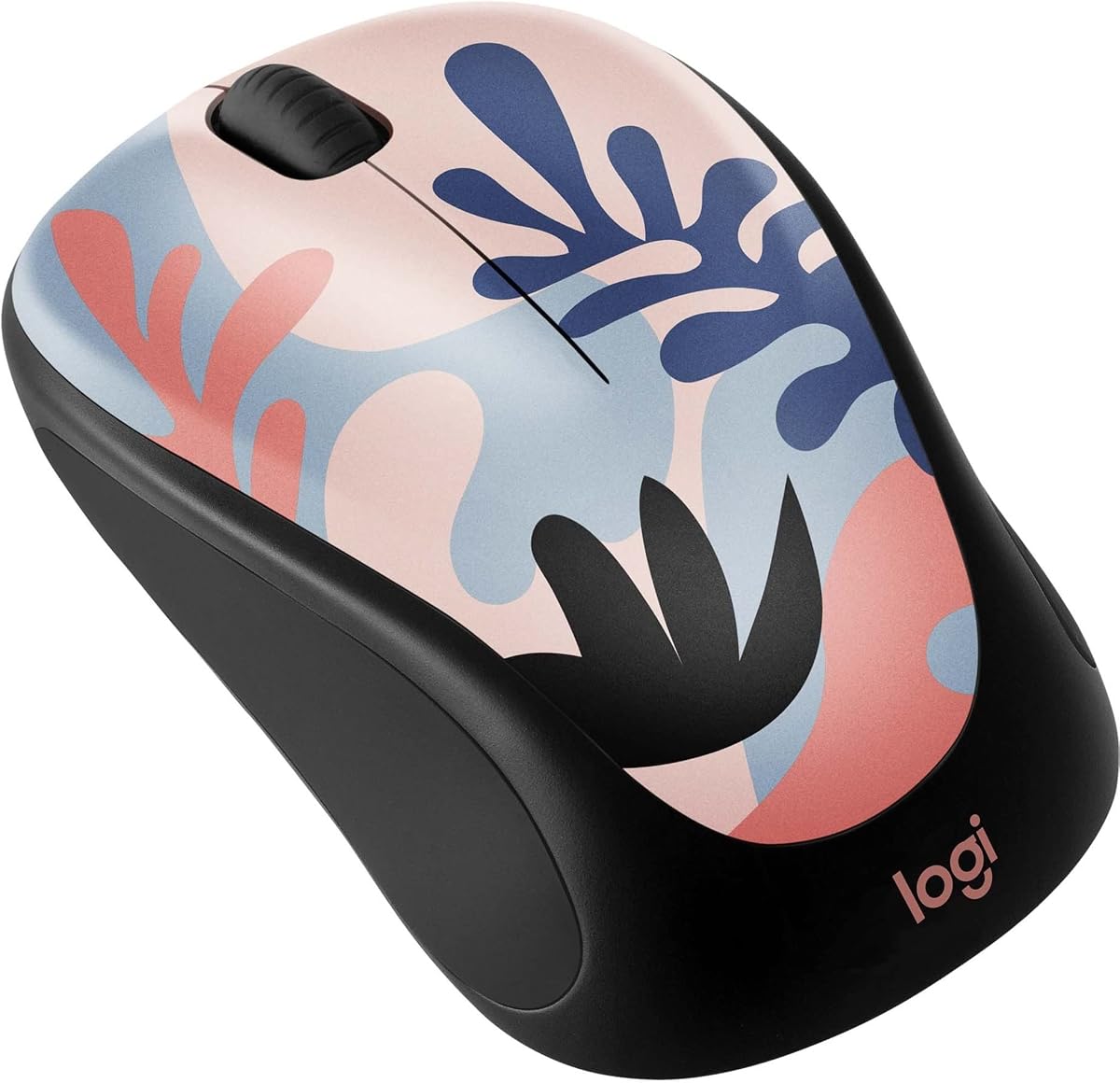
The Logitech Design Collection Limited Edition Wireless Mouse combines style with premium features. It offers a portable design with soft rubber grips for enhanced comfort. With a strong user rating it is clear that users appreciate its reliable performance and eco-friendly materials.
We may earn a commission when you buy through this link, at no additional cost to you.
It uses Logitech Unifying technology to connect up to six compatible devices with a single receiver. The battery life lasts up to 12 months on a single AA battery reducing maintenance. The soft rubber side grips ensure a comfortable grip during long sessions.
While it is a premium option the price is higher than basic budget models. Also the color selection is limited to specific designs in the collection. However the build quality and connectivity options make it a top choice.
For those who want a high-quality cute laptop mouse this is the best investment. The eco-friendly plastic components align with sustainable values. It works with most major operating systems ensuring broad compatibility.
Connect multiple devices to one receiver for a tidy desk.
Side grips provide added comfort during extended use.
We may earn a commission when you buy through this link, at no additional cost to you.
Choosing the right cute laptop mouse involves considering connectivity design and features. Here are key factors to help you make an informed decision.
Wireless connectivity is essential for a clean desk setup. Options include 2.4GHz wireless using a USB receiver and Bluetooth for devices without USB ports. Bluetooth offers more flexibility while wireless often provides lower latency.
Choose Bluetooth if you have newer laptops without USB ports otherwise wireless is sufficient for most.
A cute laptop mouse should match your personal style. Look for colors patterns or themes like cats or cars that appeal to you. Some models feature gradient finishes or unique shapes like donuts.
Select a design that makes you happy to work every day.
Comfort is key for long working hours. Look for mice with contoured shapes or soft grips that fit your hand well. If you have smaller hands compact models are ideal to reduce strain.
Prioritize a comfortable fit to prevent hand fatigue.
Battery life affects how often you need to replace batteries or charge the device. Models with sleep modes save power effectively. Rechargeable mice are eco-friendly and convenient.
Look for long battery life or rechargeable options for less maintenance.
Silent click buttons are beneficial for shared environments. They reduce noise significantly making them ideal for libraries or open offices. This feature allows you to work without disturbing others.
Opt for silent clicks if you work in quiet settings.
Adjustable DPI levels allow you to customize cursor speed. This is useful for switching between precision work and general browsing. Higher DPI settings make the cursor move faster across the screen.
Choose a model with adjustable DPI for better control.
Ensure the mouse works with your operating system like Windows or macOS. Some features like side buttons may not work on all systems. Checking compatibility ensures all functions work as expected.
Verify system compatibility before purchasing to avoid issues.
Budget mice offer basic functions while premium models add extra features. Consider what features you truly need versus what is nice to have. A higher price often means better build quality and longer warranty.
Balance your budget with the features that matter most to you.
To set up your new cute laptop mouse plug the USB receiver into a free port or pair via Bluetooth. Follow the on screen prompts to complete the connection process quickly.
Keep the surface clean to ensure smooth tracking. Wipe the bottom sensor with a soft cloth occasionally to remove dust or debris that may affect performance.
If your mouse is battery powered check the battery level regularly. Replace or recharge as needed to avoid sudden power loss during important tasks.
Yes many cute laptop mouse models offer features like adjustable DPI and fast response times. Some gaming-focused models even have extra buttons for macros. However check specific specs to ensure they meet your gaming needs.
Most models support macOS but check if specific features like side buttons work. Some Bluetooth models work better with Macs that lack USB ports. Always verify system compatibility before purchasing.
Battery life varies by model and usage ranging from months to weeks. Sleep modes help extend battery life significantly. Rechargeable models can last weeks on a single charge.
Silent click mice are designed to reduce noise significantly often by up to 90 percent. They are ideal for shared workspaces or quiet environments. The buttons use a cushioned mechanism to dampen sound.
Most optical mice work well on various surfaces without a mousepad. However smooth glass or very textured surfaces might affect tracking. A mousepad ensures consistent performance across all environments.
If the receiver is lost Bluetooth models offer an alternative. For 2.4GHz models you can often buy a replacement receiver. Store the receiver in the mouse when not in use to prevent loss.
Many models undergo durability testing rated for millions of clicks. Quality construction ensures they withstand daily use over time. Check warranty details for added protection against defects.
Some models support connecting to multiple devices via Bluetooth or a receiver. This allows seamless switching between laptops and tablets. Check if multi-device support is listed in the specs.
Our top picks highlight a range of options from the Akko Cat Theme for versatility to the TECKNET for budget value. Each model offers unique features to suit different preferences.
Prioritize features like silent clicks or rechargeable batteries based on your daily needs. Comfort and connectivity are also vital for a satisfying user experience.
Remember that prices and availability change frequently so check current offers before buying. This guide aims to help you find a device that looks great and works well.