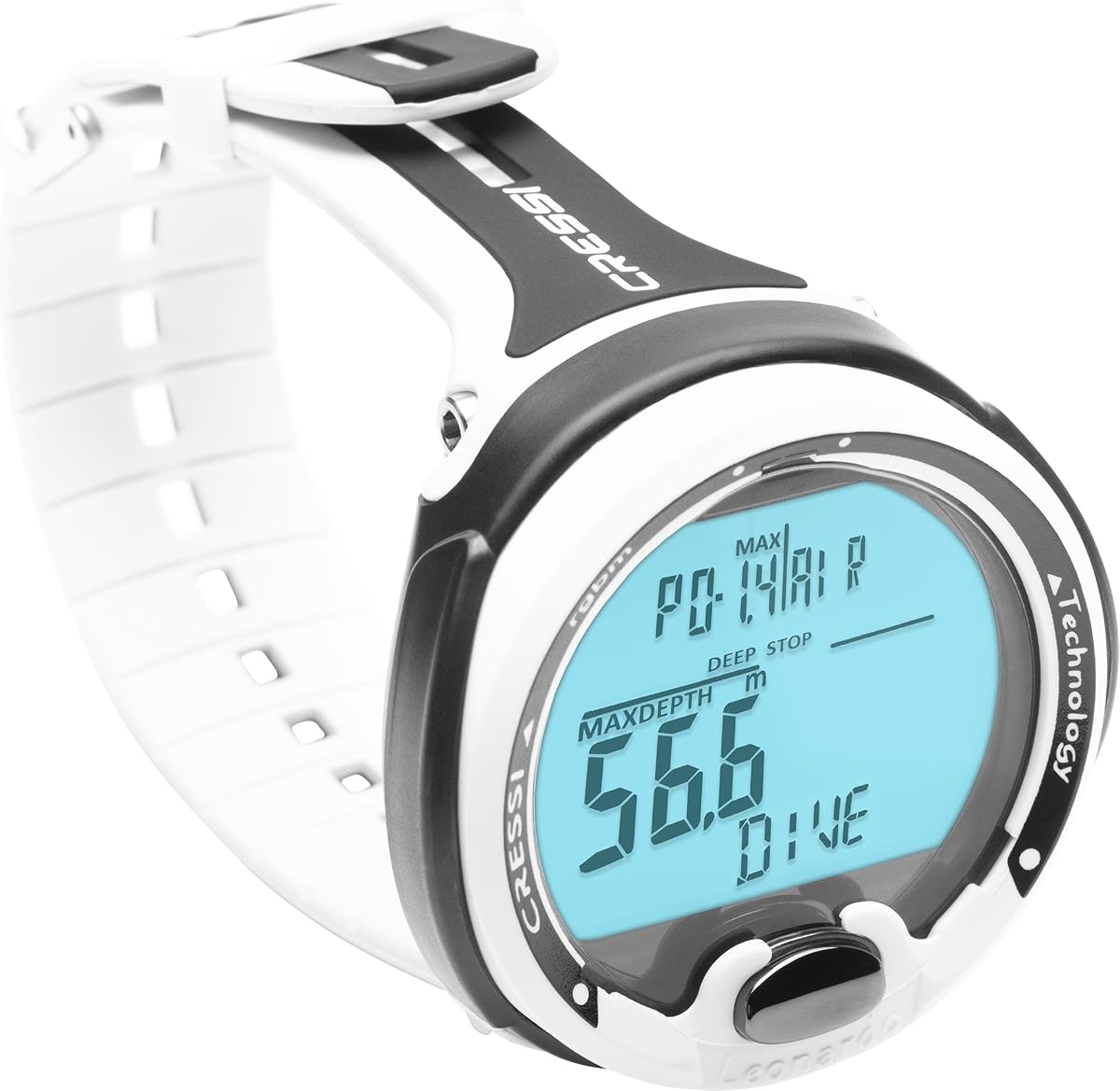
CRESSI Leonardo 2.0 G2
4.2Editor score
One-button interface
Air and Nitrox modes
Device integration
This guide compares the top 10 dive computer for beginners options to help new divers choose the right tool for safety and tracking.
Starting your scuba diving journey requires reliable gear to monitor depth and time safely. A good dive computer tracks your limits and ensures you return to the surface without issues.
We evaluated ten top-rated models based on ease of use, battery life, and critical safety features. Each product was selected for its suitability for new divers entering the underwater world.
Each pick highlights key strengths and potential trade-offs to help you make an informed choice. Prices and availability can change quickly so always verify current details before purchasing your gear.
4.2Editor score

4.8Editor score

4.7Editor score
The following table provides a side-by-side overview of key specifications for all ten selected dive computers to assist in your selection process.


The Mares Puck Pro EZ Wrist stands out as a top choice for new divers seeking reliability and clarity. It holds a strong rating and delivers critical dive data with precision during every underwater excursion.
We may earn a commission when you buy through this link, at no additional cost to you.
Its high-contrast screen ensures data like depth and no-deco limits are readable even in murky conditions. The single-button interface simplifies menu navigation, reducing cognitive load while submerged.
While it lacks wireless charging capabilities found in premium models, the replaceable power source supports up to 100 dives ensuring long-term utility without frequent maintenance requirements.
This computer is ideal for recreational divers who prioritize ease of use and clear data presentation. It balances essential features with user-friendly design for a safe and confident diving experience.
The clear high-contrast screen ensures you can read critical data instantly without straining your eyes underwater.
Navigating settings is effortless with a single button which reduces the risk of accidental inputs during your dive.
We may earn a commission when you buy through this link, at no additional cost to you.
The CRESSI Leonardo 2.0 G2 offers exceptional value for beginners on a budget without compromising essential safety features. It brings Italian craftsmanship to underwater adventures with a versatile design suitable for various setups.
We may earn a commission when you buy through this link, at no additional cost to you.
Navigation is straightforward thanks to the single-button interface which makes menu access easy even with gloves on. Critical alerts are visual and audible ensuring you stay informed about your dive status at all times.
Data management relies on USB and infrared transfer which may be less convenient than modern wireless options but remains effective for detailed dive log analysis post-trip.
This device is perfect for entry-level divers wanting a reliable computer that supports both Air and Nitrox modes. It integrates well with mobile devices for tracking and analysis over time.
Support for Air and Nitrox modes allows you to grow into enriched air diving without needing a new device immediately.
Pairing with iOS and Android devices provides comprehensive dive tracking ideal for tech-savvy divers monitoring their progress.
We may earn a commission when you buy through this link, at no additional cost to you.
The Garmin Descent™ X30 delivers a premium experience with a vibrant 2.4 color display and rugged build made from recycled ocean-bound plastics. It is designed to withstand depths while offering advanced features for future growth.
We may earn a commission when you buy through this link, at no additional cost to you.
Features like surface GPS help you navigate to dive sites and mark entry points accurately. The large screen allows for multiple data fields making it easy to monitor NDL limits in real time.
While the advanced features might seem complex for absolute beginners the flip-screen mode and intuitive layout simplify usage. It supports trimix and multi-gas dives for those looking to advance their certification.
This computer is ideal for beginners who plan to pursue technical diving or desire top-tier navigation tools. The ability to customize screens ensures you see exactly what matters most during your dive.
Use the surface GPS to navigate to dive sites and mark entry and exit points for safer and more organized expeditions.
See how specific depth changes impact your no-decompression limit in real time to optimize your bottom time safely.
We may earn a commission when you buy through this link, at no additional cost to you.
The Shearwater Research Peregrine is known for its state-aware menu structure which simplifies navigation during dives. It offers a robust build and a simple two-button interface that is easy to learn for beginners.
We may earn a commission when you buy through this link, at no additional cost to you.
Battery life is impressive with up to 30 hours of use on medium brightness. The included USB wireless charging station adds convenience by eliminating the need to open compartments for battery swaps.
While the screen is smaller than some competitors the clarity remains excellent for reading vital stats. The buttons are made of 316 stainless steel ensuring durability against corrosion in saltwater environments.
This model is well-suited for divers who value reliability and straightforward operation over flashy features. It provides a stable platform for learning dive computer basics without unnecessary complexity.
The menu structure adapts based on your current dive mode so you only see options relevant to your situation.
USB wireless charging keeps your device ready without the hassle of opening seals or replacing traditional batteries.
We may earn a commission when you buy through this link, at no additional cost to you.
The SUUNTO D5 features a color display and wireless tank pressure monitoring which enhances situational awareness. It is waterproof to 100 meters and includes vibration alarms for subtle yet effective notifications underwater.
We may earn a commission when you buy through this link, at no additional cost to you.
A digital compass is built into the unit removing the need for separate compass gear. The wireless mobile connection allows for easy synchronization of dive data with compatible smartphones for quick review.
Battery performance may vary depending on usage of wireless features but the convenience of automatic tank readings is significant. The interface is intuitive though touchscreen responsiveness can be affected by water pressure.
This computer is a great choice for divers who want a sleek look with essential technical features like tank pressure. It balances modern connectivity with core functionality for recreational safety.
Monitor tank pressure wirelessly to stay aware of your air supply without needing to check a separate gauge.
Vibration alarms provide discrete notifications ensuring you stay informed without relying solely on visual or audible signals.
We may earn a commission when you buy through this link, at no additional cost to you.
The Cressi Donatello is a versatile tool for divers interested in both scuba and freediving activities. Its single-button interface streamlines navigation while offering comprehensive freediving gauge mode for breath-hold sessions.
We may earn a commission when you buy through this link, at no additional cost to you.
Customizable ascent planning allows you to select deep stops for personalized safety management. Transitioning between air and nitrox modes is effortless making it flexible for various dive profiles and environments.
Data transfer is handled via an optional IR interface which is functional but slower than Bluetooth. The design remains lightweight and comfortable on the wrist for extended underwater excursions.
This model is suitable for beginners who want one device for multiple disciplines without complexity. It provides reliable tracking for recreational scuba and surface-level freediving needs.
Dive into adventure with a comprehensive freediving gauge mode perfect for breath-hold sessions alongside traditional scuba.
Tailor your dive experience with user-selectable deep stops for personalized ascent management and enhanced safety.
We may earn a commission when you buy through this link, at no additional cost to you.
The Cressi Raffaello integrates a digital compass directly into the unit enhancing underwater navigation precision. It uses an RGBM-based mixed-gas planning system for meticulous preparation across multiple gas mixes.
We may earn a commission when you buy through this link, at no additional cost to you.
Data can be transferred via Bluetooth or USB offering flexibility in how you review your dive history on smartphones or PCs. It supports four operating modes including apnea and gauge for broad versatility.
Battery life is user-replaceable with an expected duration of four years reducing frequent maintenance downtime. The build is robust though some might prefer metal buttons for premium feel over standard plastic.
This computer is ideal for divers who want reliable navigation tools without carrying extra accessories. The long battery life ensures it remains ready for every underwater journey for years.
Navigate underwater effortlessly with a built-in digital compass eliminating the need for separate compass gear.
Plan your dives with confidence using the RGBM-based mixed-gas planning system for multiple gas mixtures.
We may earn a commission when you buy through this link, at no additional cost to you.
The Garmin Descent™ Mk3i combines high-end watch aesthetics with serious dive computer functionality. It features a stunning AMOLED display and SubWave sonar technology for exchanging messages underwater or monitoring tank pressure.
We may earn a commission when you buy through this link, at no additional cost to you.
Multi-band GPS provides superior accuracy while on the surface and diveView maps help you find over 4000 dive sites easily. Health monitoring features like heart rate and sleep tracking support overall wellness and dive readiness.
While the size is large at 51mm the durability and scratch-resistant sapphire lens make it resilient against impacts. The dive readiness tool offers guidance on lifestyle factors affecting your body's preparation for diving.
This device is best for tech-savvy divers wanting a full smartwatch experience that is also fully dive-ready. It bridges the gap between daily wear and specialized underwater navigation tools effectively.
Exchange preset diver-to-diver messages up to 30 meters using SubWave sonar technology available with latest software.
Use the dive readiness tool to see how sleep and stress affect your body's preparedness for your next dive.
We may earn a commission when you buy through this link, at no additional cost to you.
The Garmin Descent™ G2 offers a slightly more compact 46mm design while maintaining rugged performance and a vibrant AMOLED display. It supports all diving types including recreational and technical making it a versatile choice.
We may earn a commission when you buy through this link, at no additional cost to you.
Multi-GNSS support helps you mark entry and exit points accurately on the surface. The housing uses 100% recycled ocean-bound plastics aligning with environmental values without sacrificing durability or performance standards.
Battery life is efficient offering up to 27 hours in dive mode and 10 days in smartwatch mode. Smartwatch capabilities like smart notifications and payments make it practical for everyday wear beyond diving.
This watch is ideal for divers who want a balanced mix of daily utility and underwater capability. It is particularly suitable for those who prefer a smaller form factor on the wrist.
100% of the plastic used to make the watch housing bezel and buttons comes from recycled ocean-bound plastics.
Support for all types of diving including recreational advanced technical freediving and pool apnea.
We may earn a commission when you buy through this link, at no additional cost to you.
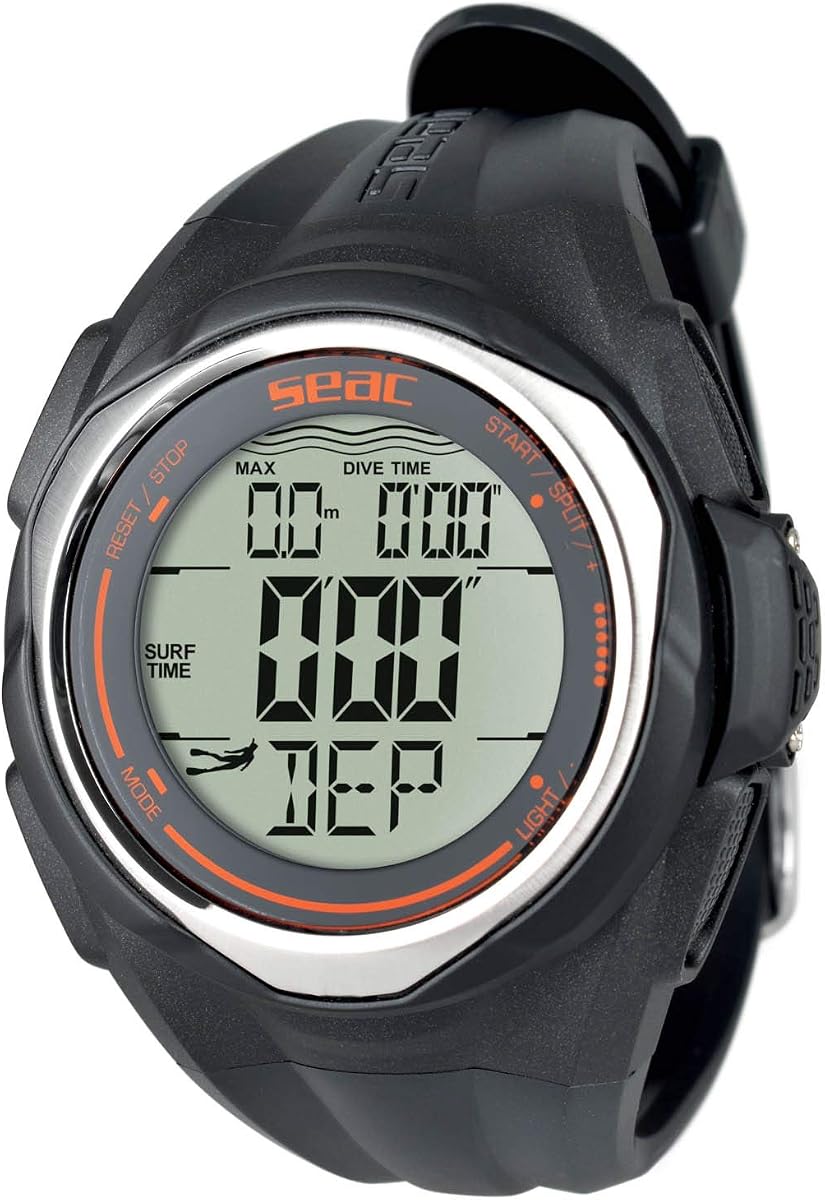
The SEAC Partner is designed specifically for freediving sessions focusing on simplicity and essential tracking. It functions as a stopwatch and countdown timer recording sessions up to 99 dives for later review.
We may earn a commission when you buy through this link, at no additional cost to you.
Powered by a standard CR2032 battery it is easy to replace and keeps maintenance costs low. The backlit display ensures you can see the time during dives even in low light conditions underwater.
While it lacks advanced decompression calculations this unit is perfect for breath-hold divers who do not need gas mixing. It is water resistant to 100 meters providing sufficient depth protection for most surface activities.
This computer is best for beginners focusing solely on freediving who want a no-frills device. Its lightweight design and simple interface make it easy to use without distraction.
Records your freediving session up to 99 dives using basic stopwatch and countdown functions.
It works with a standard CR2032 battery ensuring easy availability and replacement when needed.
We may earn a commission when you buy through this link, at no additional cost to you.
Selecting the right dive computer involves considering factors like interface simplicity, battery life, and data tracking capabilities.
Beginners should look for devices with intuitive menus and minimal buttons to reduce cognitive load during dives. Complex controls can distract from enjoying the underwater experience and increase the risk of navigation errors.
Focus on models with clear displays and straightforward settings navigation to ensure safety and ease of use.
Battery capacity directly affects how many dives you can complete without charging or swapping batteries. Wireless charging adds convenience but traditional replaceable batteries offer independence during long trips.
Choose a power solution that aligns with your diving frequency and travel habits to avoid downtime.
A high-contrast screen ensures data is readable in dark water or sunlight glare without straining your eyes. Color displays can offer better visual cues than black and white screens.
Prioritize screens that remain legible at a glance so you can focus on your environment.
Consider whether you need support for Air, Nitrox, or freediving modes depending on your training level. Some computers switch between modes automatically while others require manual adjustment.
Ensure the device supports the types of diving you plan to do as you grow in skills.
Bluetooth or USB connectivity allows you to upload dive logs to a computer or phone for review. Tracking your progress helps you understand your diving habits and improve safety over time.
Select models that offer seamless data transfer to maintain a consistent log of your adventures.
Durability is crucial as saltwater and pressure can degrade inferior materials over time. Look for devices with robust housings and ratings appropriate for recreational depths.
Investing in quality construction ensures your computer lasts through years of exploration.
Visual, audible, and vibration alarms alert you to critical thresholds like depth or time limits. Having multiple alert types ensures you notice warnings even if one sense is compromised.
Safety alarms are essential for beginners to maintain situational awareness underwater.
A built-in digital compass helps with orientation and navigation during longer dives or low visibility. Separate compasses add bulk and cost whereas integrated tools streamline your gear setup.
Integrated navigation features simplify preparation and improve orientation underwater.
Before your first dive fully charge the battery and verify all settings are configured correctly. Familiarize yourself with the menu structure on the surface so you do not waste time adjusting controls underwater.
After every dive rinse the device with fresh water to remove salt and sand which can cause corrosion. Dry it thoroughly with a soft cloth before storing to prevent moisture buildup in ports.
Regularly check the battery level and replace or recharge as needed to avoid power loss during a dive. Periodically review your dive logs to identify trends and ensure the device remains calibrated correctly.
Yes having your own computer ensures you track your own limits and data accurately. Guides provide oversight but your device gives you precise visibility into safety margins.
Absolutely most beginner-friendly computers allow switching to Nitrox mode easily. This lets you progress in training without needing a brand new device later.
Check the manufacturer website annually for updates that may improve safety calculations. Keeping firmware current ensures you have the latest features and bug fixes.
Wireless charging is convenient for home use but replaceable batteries offer reliability during remote trips. Choose based on how often you travel far from power sources.
With proper care a dive computer can last 5 to 10 years or more. Maintenance like rinsing and battery changes plays a big role in longevity.
Touchscreens are becoming more common but buttons are generally more reliable with gloves or in cold water. Look for hybrid models that offer both options for flexibility.
Choosing from these top 10 models ensures you find a computer that meets your specific training and budget needs. Whether you prioritize simplicity or advanced features there is an option for every style of diver.
Focus on interface clarity and safety features as these are most critical when you are learning underwater skills. A well-chosen computer becomes an essential partner for safe and confident exploration.
Always check current prices and availability before purchasing since deals and stock can fluctuate frequently online. Take the time to research which model best fits your long-term diving goals.