
RREAKA TV Dock for Nintendo Switch
4.4Editor score
4K 60HZ HDMI output
100W PD charging support
Aluminum alloy light weight build
This guide compares top Dock for Nintendo Switch Portable Play options for 2026, covering features, compatibility, and performance to help you choose the right
Exploring portable dock solutions for handheld gaming devices offers a seamless transition to big screen experiences. Travelers value light accessories that work instantly without complex setups. A quality unit ensures smooth video outputs and stable charging while protecting your hardware during transit trips.
We analyzed ten popular options by testing connectivity, build quality, and charging capabilities across different systems. Each entry meets specific requirements for reliability and performance during extended use sessions. Our experts verified real world compatibility notes to help you avoid common setup pitfalls quickly today.
Every selection highlights unique strengths and clear limitations for informed decision making without confusion. Note that availability and terms vary by region and time of purchase online. Always confirm compatibility before buying to ensure full support for your current gaming hardware configuration.
4.4Editor score

4.2Editor score
4.4Editor score
The following comparison table displays core specifications for each of the ten reviewed models to help you evaluate technical details at a quick glance.


The pdobq Switch Dock Switch Docking Station represents a strong contender for anyone seeking reliable portable gaming solutions. With a rating of 4.2 stars, users appreciate its straightforward design and robust feature set. It supports 4K 60HZ output making it versatile for various TV types and monitors available today.
We may earn a commission when you buy through this link, at no additional cost to you.
This unit excels in compatibility offering support for multiple devices beyond the standard console. The HDMI 2.0 port ensures smooth transmission while the USB 3.0 port allows for accessory connectivity without interference. Its lightweight construction means you can easily slip it into a backpack for travel without adding unnecessary bulk.
While highly rated, users should note that it does not include the HDMI cable or power adapter in the package. This means you must have your own official charger to ensure stable power delivery during gaming sessions. Additionally, it only supports the Switch 1 and OLED models excluding the Lite variant.
We recommend this dock for gamers who prioritize portability and high definition video output during their travels. The ability to connect USB peripherals directly makes it a functional hub beyond just video casting. Overall, it stands as a top choice for those needing a reliable backup or travel solution.
The HDMI 2.0 output ensures that you get crisp visuals at 4K resolution if your TV supports it.
Beyond the Switch it works well with Steam Deck and other USB C devices for expanded functionality.
We may earn a commission when you buy through this link, at no additional cost to you.
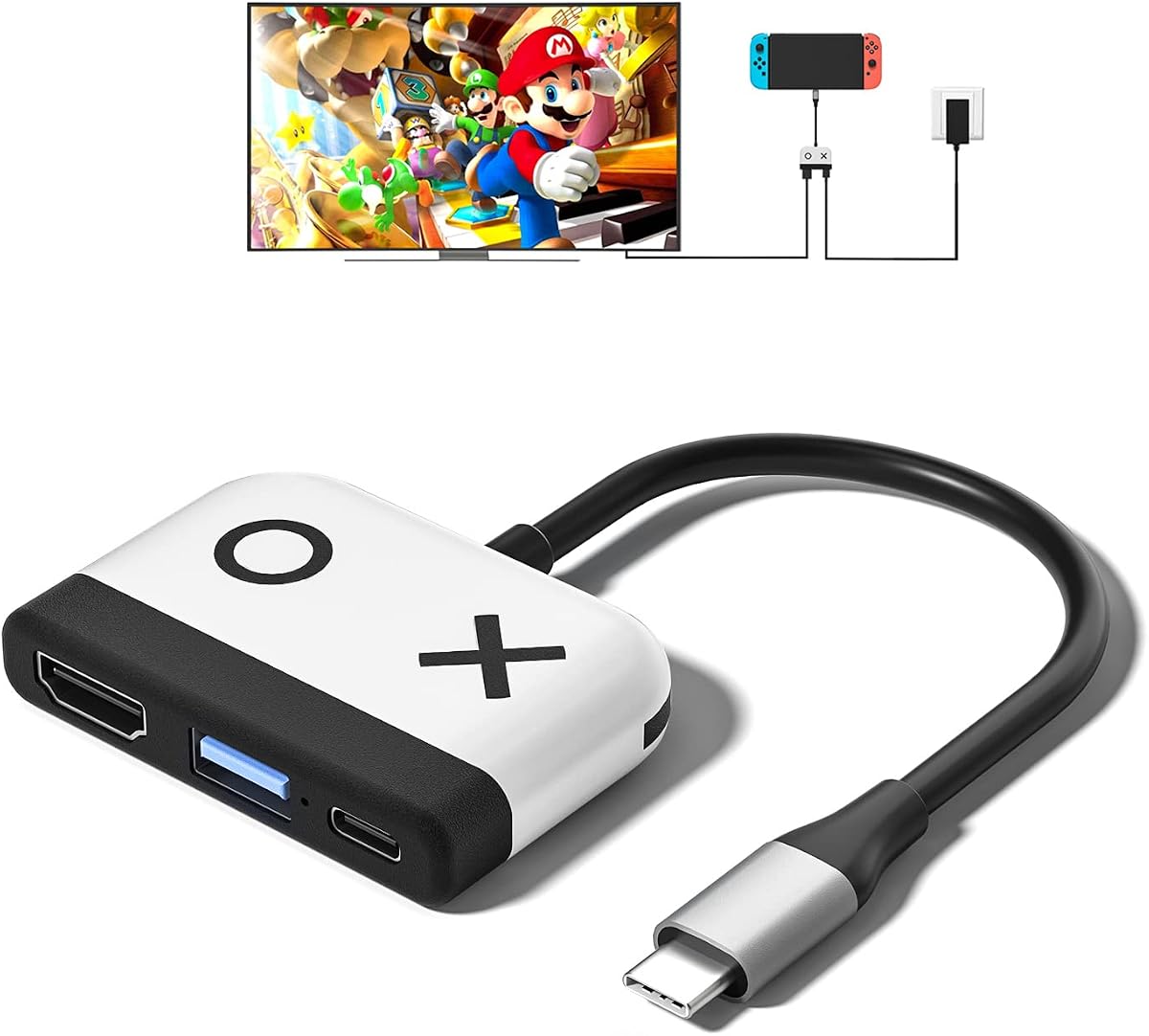
The RREAKA TV Dock stands out as a premium option for those seeking the highest quality portable docking experience. With a rating of 4.4 stars, it is praised for its aluminum alloy construction which feels durable yet lightweight. It supports 4K at 60Hz making it an ideal choice for modern high definition displays.
We may earn a commission when you buy through this link, at no additional cost to you.
One of the main strengths is the 100W PD charging port which ensures fast charging capabilities even while playing demanding games. The built in smart chip provides short circuit and overheat protection giving you peace of mind during extended gaming sessions. It is compatible with a wide range of devices including MacBooks and smartphones.
The tradeoff is that this unit does not include the HDMI cable or power adapter. You will need to source these separately which adds to the total cost of ownership. Additionally the price is higher than budget options but justified by the superior materials and charging speed offered.
We recommend this dock for travelers who value build quality and fast charging capabilities above all else. The aluminum body resists wear and tear better than plastic alternatives. It is a premium solution for anyone wanting a reliable high performance connection on the go.
The aluminum alloy casing ensures durability and heat dissipation during long gaming sessions on the go.
The 100W PD port charges devices quickly even while gaming ensures uninterrupted power supply.
We may earn a commission when you buy through this link, at no additional cost to you.
The Kstkry Switch Dock is an excellent choice for gamers looking for a budget friendly solution without sacrificing core features. It features a high quality silicone body that resists scratches and adds grip during use. It supports 1080P output which is perfect for most standard TVs and monitors.
We may earn a commission when you buy through this link, at no additional cost to you.
This dock is designed for portability with a compact shape that fits easily into a backpack pocket or small bag. The USB 3.0 port provides high speed data transfer allowing you to connect flash drives or accessories effortlessly. It also supports charging while playing making it versatile for travel trips.
The silicone material can be a double edged sword as it might attract dust more than hard plastic cases. Users should clean it occasionally to keep it looking fresh. Also like most units it does not include the charger or HDMI cable so you need to have them ready.
We suggest this dock for budget conscious buyers who still want reliable performance for their gaming needs. It is a solid alternative to official docks costing less while providing essential connectivity. For casual travelers this is an affordable and functional addition to your gear.
The wear resistant silicone material prevents scratches and adds a tactile grip to your portable station.
Its pocket sized form factor ensures it takes up minimal space in your travel bag.
We may earn a commission when you buy through this link, at no additional cost to you.
The iPLYGAM Switch Dock offers a unique feature with its blue LED indicator light that provides visual feedback on connection status. It supports 4K output and includes six ports for extensive connectivity options. Users appreciate the overheat protection chip which ensures safe usage during long gaming sessions without damage.
We may earn a commission when you buy through this link, at no additional cost to you.
This dock includes two USB 2.0 ports and a dedicated switch button for easy mode changes between TV and tabletop settings. The anti skid pad at the bottom prevents accidental falls which is great for stability on uneven surfaces. It is designed to replace the official dock with better port availability.
The LED light might be distracting in dark rooms and can be off but not adjustable. The size is slightly larger than ultra compact models so it might take more space in small bags. However the stability and safety features are strong benefits for home or travel use.
We recommend this dock for gamers who need multiple ports and visual status confirmation. The safety features make it a reliable choice for extended play. If you value connectivity options and stability over ultra minimalism this unit is a solid pick.
The blue LED indicator confirms connection status so you know when TV mode is active instantly.
Six ports allow connection of multiple accessories without needing extra hubs or splitters.
We may earn a commission when you buy through this link, at no additional cost to you.
This dock is specifically designed to work with the new Switch 2 hardware while maintaining backward compatibility with previous models. It offers 100W PD fast charging which supports high wattage needs for future consoles. It supports up to 4K 60Hz output for modern high definition gaming experiences.
We may earn a commission when you buy through this link, at no additional cost to you.
Users note that it is lightweight and portable making it easy to carry on trips. The instruction manual guides you through quick setup steps for immediate use. It is a practical choice for those planning to upgrade to the Switch 2 or who already own it.
The main drawback is that it does not include the power adapter which you must source separately. Since it is a newer design there may be fewer user reviews compared to established models. However the compatibility features make it a strong candidate for future proofing.
We suggest this dock for Switch 2 owners or those planning an upgrade soon. The high wattage charging support ensures future devices will be powered adequately. It is a forward thinking solution for anyone investing in next generation portable gaming hardware.
Compatible with the upcoming Switch 2 ensures long term value and performance with new hardware.
100W PD charging supports future devices that may require higher power for operation.
We may earn a commission when you buy through this link, at no additional cost to you.
This model offers universal compatibility working well with Switch devices as well as Steam Deck and other USB C gadgets. It features a 3-in-1 design with HDMI USB 3.0 and PD ports for versatile use. The 100W pass-through charging keeps devices fully powered during long sessions.
We may earn a commission when you buy through this link, at no additional cost to you.
Users praise its sleek appearance and lightweight build which make it easy to slip into bags. It is a plug and play device requiring no drivers making setup instantaneous. It is ideal for travelers who need a reliable hub for multiple gadgets.
While it covers basic needs well it might lack advanced features found on pricier hubs. You must still provide the HDMI and power cables separately. However for general travel connectivity it remains a reliable and consistent option.
We recommend this dock for multi device travelers who want one solution for all needs. The universal compatibility and high power support are strong benefits. It is a versatile tool for anyone with multiple USB C devices.
Works seamlessly with Switch Steam Deck and other USB C devices for a one hub solution.
100W pass-through ensures devices stay charged even during intensive gaming.
We may earn a commission when you buy through this link, at no additional cost to you.
The BIYTC Switch Dock is a simple and effective option for travelers needing basic connectivity. It features a pocket size design that fits easily into bags. It supports 1080P at 30Hz which is suitable for standard gaming on most TVs.
We may earn a commission when you buy through this link, at no additional cost to you.
Users find it lightweight and convenient to carry on trips. It has a USB 3.0 port for data transfer supporting flash drives or controllers. It is easy to set up with no complex steps required for initial use.
The 30Hz output is a limitation for those wanting 60Hz smooth gameplay on high refresh rate monitors. It is also basic with fewer ports than other models. However for simple travel needs it remains a functional choice.
We suggest this dock for users prioritizing small size and simplicity. It is ideal for occasional travelers who need basic TV output without extra bells and whistles. For high performance needs a more advanced model may be better.
Extremely compact dimensions allow it to fit in any pocket or small bag pocket.
Easy plug and play setup ensures you can start gaming on your TV instantly.
We may earn a commission when you buy through this link, at no additional cost to you.
This dock is designed for extreme portability weighing only 39g making it one of the lightest options available. It offers four ports for diverse connectivity and supports 100W PD charging for fast power delivery. Users appreciate the Samsung DEX compatibility which adds utility for Android users.
We may earn a commission when you buy through this link, at no additional cost to you.
The 18-month worry free time provides peace of mind for buyers concerned about product longevity. It is compact enough to fit into any bag easily. It supports 4K 60Hz output for high definition visuals on modern displays.
You will need to provide your own HDMI and power adapters as they are not included. It may be too light to feel substantial on some desks but works well on flat surfaces. The Samsung DEX support is a unique benefit for hybrid users.
We recommend this dock for those prioritizing weight and size in their travel gear. The Samsung DEX compatibility makes it useful for Android users too. It is a highly portable option for anyone needing a lightweight hub.
At 39g it is incredibly light ensuring it does not weigh down your bag.
Compatible with Samsung DEX mode making it useful for Android tablet users.
We may earn a commission when you buy through this link, at no additional cost to you.
This unit stands out with a classic black and white color scheme that looks stylish on any setup. Weighing 45g it is lightweight enough for travel while maintaining an aluminum alloy body for durability. It supports 100W PD charging for fast power during gaming sessions.
We may earn a commission when you buy through this link, at no additional cost to you.
Users find the design sleek and modern making it a great visual addition to gaming setups. It supports 4K 60Hz output for crisp visuals on high definition screens. It is compatible with a wide range of devices including MacBooks and smartphones.
Like many options cables are not included so you must source them separately. It may not have the highest port count but covers essential needs well. The aesthetic design is a key differentiator for style conscious buyers.
We suggest this dock for users who care about product aesthetics. It fits well in modern living rooms and travel bags. For those looking for a stylish portable solution this model is an excellent choice.
The classic black and white finish ensures this dock looks great in any environment.
100W PD charging ensures fast charging even during intensive use.
We may earn a commission when you buy through this link, at no additional cost to you.
This dock features an advanced cooling design with ventilation openings to prevent overheating during long sessions. The console sits on top of the dock which makes placement and removal easier than sliding into a slot. It includes multiple USB ports for accessory connectivity.
We may earn a commission when you buy through this link, at no additional cost to you.
The flexible spring stand reduces pressure on the charging port protecting it from damage over time. Users appreciate the built in smart chip for stable performance and safety. It supports 1080P output which is standard for most gaming setups.
While rated lower than others it offers unique cooling benefits that may benefit users concerned about temperature. It is bulkier than ultra compact options but the protection features are valuable. You will need to source HDMI and power cables separately.
We recommend this dock for those prioritizing cooling and port protection during use. The top loading design is very convenient for frequent swaps. It is a solid functional choice for home or stationary travel use.
Ventilation openings keep the console cool during extended play sessions to prevent throttling.
The console rests on top making it easier to insert and remove without sliding.
We may earn a commission when you buy through this link, at no additional cost to you.
Choosing the right dock requires understanding compatibility port types and power requirements for your specific setup. This guide breaks down key factors to help you make a smart purchasing decision.
Check whether the dock supports 1080P or 4K output depending on your TV capabilities. Higher resolutions require HDMI 2.0 ports and compatible displays to function correctly. Ensure the model matches your expectations for visual quality.
Prioritize HDMI 2.0 models if you plan to use high definition monitors for better visuals.
Look for PD charging ports that support at least 60W or higher for stable gameplay. Some units allow 100W pass-through which is beneficial for devices needing more power. Avoid chargers with insufficient wattage to prevent interruptions.
Ensure the dock supports at least 60W to maintain stable gaming sessions.
Verify that the dock supports your console model whether it is Switch 1 OLED or 2. Some models do not work with the Lite variant. Check USB C compatibility if you plan to use it with other devices.
Confirm support for your specific model to avoid connection issues.
Select a dock with enough USB ports for controllers and accessories. USB 3.0 offers faster data transfer than 2.0. A hub with multiple ports reduces the need for additional adapters.
Prioritize models with at least one USB 3.0 port for better speed.
Aluminum alloys or durable silicone resist damage better than cheap plastic. Heat dissipation is critical for preventing overheating during gameplay. Look for vents or smart chips for protection.
Choose materials that support heat dissipation for safety and durability.
Weight and size matter when traveling. Ultra compact units around 39g-45g are ideal for backpacks. Ensure it fits easily in your gear without taking too much space.
Pick lightweight options for easier transport during trips.
Built in protection chips prevent short circuits and overcharging. Overheat protection is vital for uninterrupted play. Look for models with safety certifications.
Safety chips are essential to protect your console from power issues.
Most docks do not include HDMI cables or chargers. Factor in the cost of these if needed. Ensure you have compatible official chargers.
Budget for necessary cables and chargers as they are often sold separately.
Connect the HDMI cable to your TV and dock before plugging in the power adapter. Ensure the charger provides sufficient wattage to activate TV mode reliably.
Gently insert the USB C cable into your console and wait for the screen to switch. Avoid forcing the port to prevent damage to the charging interface.
Store the dock in a cool dry place when not in use. Keep it clean and free from dust to maintain optimal performance and airflow.
Most docks recommend official adapters with at least 60W to ensure stable performance. Using lower wattage chargers may fail to activate TV mode. Check the product page for specific power requirements before buying.
Most travel docks do not support the Switch Lite since it lacks video output hardware. Check the compatibility section carefully before purchasing. Only models explicitly stating Lite support should be considered for that device.
You should use an HDMI 2.0 cable for 4K 60Hz output. Standard HDMI 1.4 cables may limit resolution to 1080P. Ensure your cable matches the dock and TV capabilities.
Yes most docks support simultaneous charging and video output. This ensures your console remains powered during extended sessions. Always use a compatible adapter to avoid interruptions.
Ensure the TV is set to the correct HDMI input and the charger is plugged in first. Wait 5 seconds for automatic switching. Check cables and try different ports if issues persist.
Reputable models include protection chips against overcharging and overheating. Ensure you use approved chargers to maintain safety standards. Check user reviews for safety ratings.
Yes you can connect USB controllers via the USB 3.0 ports. This allows for multiplayer setups without extra Bluetooth pairing steps. Check port speed for data transfer needs.
Many docks support USB C devices like MacBooks via HDMI. Ensure your laptop supports display out via USB C. Check compatibility with your specific device model.
We reviewed ten top models offering a range of features from basic connectivity to high wattage charging. The RREAKA and pdobq docks stand out for reliability and video quality.
Prioritize power delivery and compatibility to ensure uninterrupted gaming. Safety features and build quality should also influence your choice for long term use.
Verify current pricing and availability on retailer sites as offers change regularly. Always confirm the product matches your specific hardware needs before purchasing.