
TP-Link ER605
4.4Editor score
Five Gigabit Ports
Mobile Broadband Support
Advanced Firewall Policies
Find the top Dual Wan Router options for reliable connectivity. This guide compares ten models with failover, load balancing, and enterprise security features.
Choosing a reliable Dual Wan Router ensures your business stays online even if one internet connection fails. These devices manage multiple WAN links to balance load or provide automatic failover for critical operations. Selecting the right model depends on your bandwidth needs and security requirements.
We evaluated ten leading Dual Wan Router models based on performance, port configuration, and security features. Our comparison includes options ranging from affordable home office units to high-end enterprise-grade routers. Each product was analyzed for its ability to handle multiple ISPs and maintain stable connections.
This guide details the strengths and weaknesses of each router to help you make an informed decision. You will find expert insights on setup, management, and real-world reliability for every pick. Please note that prices and availability may change, so check current listings before purchasing.
4.4Editor score

4.4Editor score

4.2Editor score
This side-by-side comparison highlights key specifications and features across all ten Dual Wan Router models. Use this table to quickly identify port counts, VPN capabilities, and unique selling points for your specific network requirements.



The TP-Link ER605 offers exceptional value for users seeking a reliable Dual Wan Router without breaking the bank. With a 4.4-star rating, it is known for its robust port configuration and comprehensive security suite. This wired router focuses on stability and efficient bandwidth usage.
We may earn a commission when you buy through this link, at no additional cost to you.
Its five Gigabit ports allow you to connect multiple devices and ISPs simultaneously. You can set up failover or load balancing to ensure uptime. The USB WAN port adds flexibility by supporting mobile broadband modems for backup connectivity when needed.
Security is a strong point with advanced firewall policies and DoS defense mechanisms. You can configure IP/MAC filtering and VPN tunnels to protect data. While it lacks Wi-Fi, it integrates well with existing wireless access points for full coverage.
Small businesses or home labs should consider this router for its affordability and performance. It handles basic to moderate traffic loads effectively. We recommend it for those prioritizing wired reliability over all-in-one convenience.
Five Gigabit ports provide flexible configurations for WAN and LAN connections.
USB WAN port supports mobile broadband modems for instant internet backup.
We may earn a commission when you buy through this link, at no additional cost to you.
The Peplink B-One stands out as the Editor's Choice for its resilient dual-WAN architecture and enterprise-grade features. With a 4.4-star rating, it excels in maintaining connectivity through SpeedFusion technology. This router ensures smooth video calls and uninterrupted work even during outages.
We may earn a commission when you buy through this link, at no additional cost to you.
Its seamless integration with Starlink is a unique advantage for remote or hybrid locations. You can load balance cable or fiber with satellite connections easily. The dual-band Wi-Fi 6 offers fast speeds for wireless devices alongside wired ports.
Reliability is key here, as the B-One reduces the need for frequent resets. Automatic firmware updates keep your network secure without manual intervention. This stability is crucial for branch offices requiring consistent uptime.
Ideal for small businesses with multiple ISPs, this router balances performance and connectivity. We recommend it for those needing robust failover and modern Wi-Fi capabilities.
SpeedFusion technology creates a robust network ensuring uninterrupted connectivity.
Seamlessly integrates with Starlink for backup or load balancing options.
We may earn a commission when you buy through this link, at no additional cost to you.
The NETGEAR PR60X represents the pinnacle of cloud-managed dual WAN routing for SMEs. Its 10G Multi-Gigabit ports future-proof your network for high-bandwidth demands. With a 4.2-star rating, it offers secure remote access and robust failover capabilities.
We may earn a commission when you buy through this link, at no additional cost to you.
Integration with NETGEAR Pro WiFi Access Points simplifies managing your entire enterprise network. You can monitor and control your setup remotely using Insight. This ensures seamless connectivity and security across multiple locations.
Advanced features like up to 32 VLANs allow for efficient traffic segmentation. Secure remote access is supported via IPSec, OpenVPN, and WireGuard. The device handles up to 30 VPN tunnels for secure collaboration.
Businesses needing high performance and centralized management should choose this router. It is best suited for environments requiring reliable multi-gigabit connectivity and detailed cloud oversight.
High-performance hardware supports up to 10G and Multi-Gigabit ports.
NETGEAR Insight allows you to manage your network remotely from anywhere.
We may earn a commission when you buy through this link, at no additional cost to you.
The Cudy R700 appeals to tech-savvy users who demand enterprise control on a budget. A 4.4-star rating reflects its strong support for OpenWRT and comprehensive VPN capabilities. You can connect up to five ISPs with automatic failover and load balancing.
We may earn a commission when you buy through this link, at no additional cost to you.
Full OpenWRT support unlocks VLAN segmentation and custom QoS policies. This allows you to tailor the router to specific professional-grade network management needs. The built-in VPN suite supports WireGuard, OpenVPN, and IPsec for secure tunnels.
Deployment is flexible via web GUI or Cudy App cloud management. TR-069 support enables remote monitoring for IT teams. Built-in diagnostic tools help troubleshoot connectivity issues rapidly without external software.
Home labs or remote offices needing customizable controls will find this router useful. It balances affordability with advanced networking features that typical consumer routers lack.
Full OpenWRT support unlocks VLAN segmentation and custom firewall rules.
Complete VPN Gateway Suite with WireGuard, OpenVPN, and IPsec support.
We may earn a commission when you buy through this link, at no additional cost to you.
The Omada ER707-M2 integrates seamlessly into Omada SDN environments for centralized control. With 2.5Gigabit ports, it supports high-bandwidth aggregation for modern networks. A 4.4-star rating highlights its capacity for over 1000 concurrent clients.
We may earn a commission when you buy through this link, at no additional cost to you.
Cloud access via the Omada app allows you to manage your network from anywhere. You can set up secure VPN tunnels for remote site-to-site connections. USB storage support adds file sharing capabilities directly from the router.
Reliability is backed by a 5-year warranty and free technical support. This makes it a robust choice for businesses prioritizing long-term stability and support. The device handles significant session loads efficiently.
Organizations invested in the Omada ecosystem should consider this router. It offers enterprise performance and management features suitable for growing business networks.
Remote Cloud access and Omada app bring centralized network management.
Maximum number of clients supports over 1000 simultaneous connections.
We may earn a commission when you buy through this link, at no additional cost to you.
The ASUS RT-BE88U brings next-generation WiFi 7 technology to dual WAN routing. With a 4.3-star rating, it offers blazing-fast throughput and versatile WAN configurations. AI WAN detection ensures always-on internet through smart configuration options.
We may earn a commission when you buy through this link, at no additional cost to you.
Its 10G SFP+ and WAN/LAN ports bolster wired network capacity up to 34G. This makes it ideal for demanding applications and high-speed file transfers. The quad-core 2.6GHz CPU ensures powerful performance under load.
Security is managed by commercial-grade AiProtection Pro powered by Trend Micro. You can set up guest networks and instant VPN connections easily. AiMesh compatibility extends coverage across your whole home or office.
Tech enthusiasts and power users will appreciate the advanced features and speed. We recommend this router for those seeking the latest connectivity standards and wired performance.
Blazing-fast WiFi 7 tech boosts throughput up to 7200Mbps.
AI WAN detection establishes always-on internet through versatile configurations.
We may earn a commission when you buy through this link, at no additional cost to you.
The ASUS ExpertWiFi EBG15 offers commercial-grade security and setup ease for small businesses. With a 3.8-star rating, it provides up to three WAN ethernet ports for load balancing. Layer 7 firewall features protect your network from malicious traffic.
We may earn a commission when you buy through this link, at no additional cost to you.
Each Ethernet port can be assigned to specific VLAN IDs for added security. This allows precise traffic management and segmentation within your network. Mobile hotspot backup via USB maintains reliable connectivity when needed.
Remote management is handled through the ASUS ExpertWiFi mobile app or web browser. You can configure settings and monitor status easily. This simplifies IT administration for distributed teams.
Businesses needing commercial security features in a manageable package should consider this model. It offers robust protection for public WiFi and client connections.
Each Ethernet port can be assigned to VLAN IDs for additional security.
Layer 7 Firewall features include intrusion prevention and deep packet inspection.
We may earn a commission when you buy through this link, at no additional cost to you.
The D-Link DSR-250V2 is designed for agencies and businesses under strict regulations. With a 2.9-star rating, it follows TAA/NDAA standards for enhanced trust. Enterprise-grade encryption protects sensitive data across remote networks.
We may earn a commission when you buy through this link, at no additional cost to you.
Dual WAN failover ensures continuous connectivity for remote workers. If the primary link fails, it switches automatically to backup sources. Load balancing optimizes bandwidth for smoother performance during calls.
SNMP tools offer clear visibility and control for IT administrators. This reduces troubleshooting complexity and deployment time. The router supports both hardware and client-based VPN options.
Organizations requiring compliance and lifetime protection should review this model carefully. It provides essential security features but may lack modern usability improvements.
Follows NDAA and TAA for enhanced trust and government industry standards.
Enterprise-grade encryption helps protect sensitive data from external threats.
We may earn a commission when you buy through this link, at no additional cost to you.
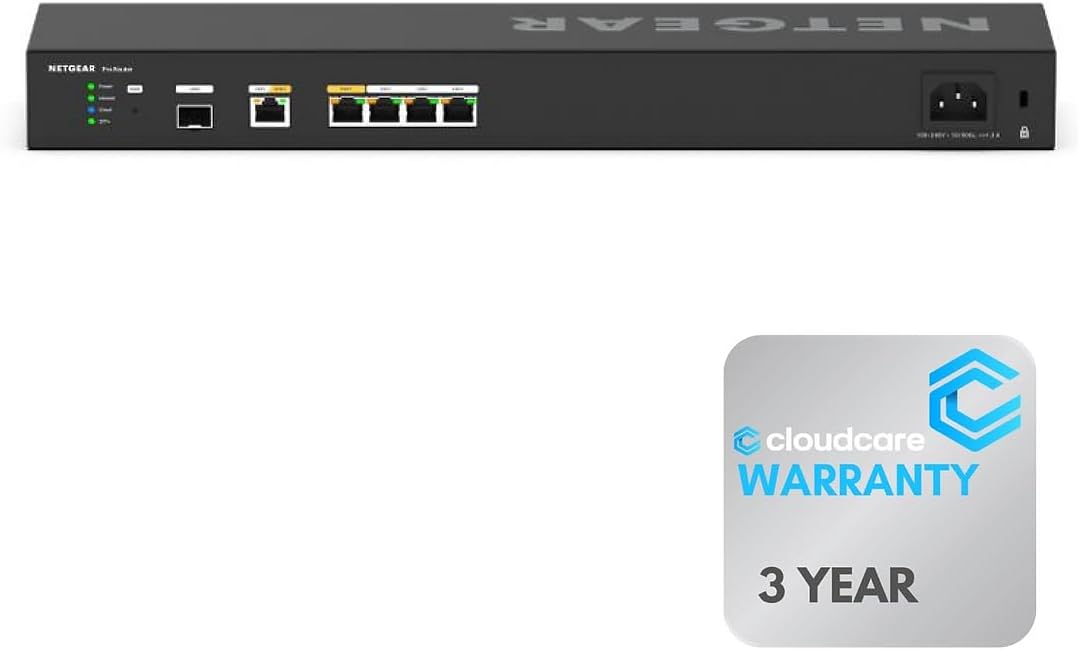
The Cloud Care NETGEAR PR60X offers professional-grade rack-mountable design for enterprise environments. With a 4.6-star rating, it supports six 10G ports for maximum speed. You can organize equipment efficiently in server racks.
We may earn a commission when you buy through this link, at no additional cost to you.
Cloud Management via NETGEAR Insight allows remote setup and maintenance. This ensures you can manage your network anytime from anywhere. Cloud Care warranty support adds peace of mind for claims and claims.
Dual WAN ports support load balancing and failover for continuous internet access. This design saves space while organizing your equipment efficiently for high-speed tasks. It is ideal for professional setups needing reliability.
Businesses needing rack-mount options and advanced cloud oversight should choose this unit. It combines high-speed hardware with convenient warranty support features.
Rack-mountable design saves space and organizes equipment efficiently.
Cloud Care Warranty SupportPlus offers simple warranty claims for products.
We may earn a commission when you buy through this link, at no additional cost to you.
The Linksys LRT224 provides a straightforward solution for small businesses needing dual WAN. With a 4.0-star rating, it supports up to 50 IPsec tunnels for secure site connections. Load balancing ensures reliable internet connectivity for your team.
We may earn a commission when you buy through this link, at no additional cost to you.
Its firewall throughput reaches 900 Mbps with 110 Mbps IPsec throughput. This performance suits moderate business traffic without expensive costs. The router supports load balancing and failover for redundancy.
User manuals are available for troubleshooting if issues arise. The device meets a wide range of business network requirements effectively. It focuses on core functionality rather than flashy features.
Budget-conscious businesses needing essential VPN and failover capabilities will find this useful. We recommend it for simple setups requiring reliable performance.
Up to 50 IPsec tunnels for site-to-site and client-to-site VPN connections.
900 Mbps firewall and 110 Mbps IPsec throughputs for business traffic.
We may earn a commission when you buy through this link, at no additional cost to you.
Selecting the right Dual Wan Router requires understanding your specific network needs and performance goals. This section covers essential factors to consider before making a purchase.
Ensure the router has enough ports for your WAN and LAN requirements. Some models offer 2.5G or 10G ports for higher speeds.
Look for flexible port options like WAN/LAN switches to maximize hardware utility.
Decide if you need automatic failover for uptime or load balancing for speed distribution. Some devices support both modes simultaneously.
Failover is critical for critical operations while load balancing helps manage bandwidth efficiency.
Check how many VPN tunnels the router supports for remote access. Different protocols like WireGuard, OpenVPN, and IPsec should be available.
Choose a model that matches your team's remote connection security needs.
Look for advanced firewalls, intrusion prevention, and content filtering to protect data. Commercial-grade routers often include deeper packet inspection.
Security should align with industry compliance requirements if you handle sensitive information.
Consider whether you prefer web-based setup or cloud management tools. Some brands offer mobile apps for easier control.
Cloud management allows you to monitor multiple locations from a single dashboard.
If the router includes Wi-Fi, ensure it supports modern standards like Wi-Fi 6 or 7 for speed. Many business routers are wired only.
Decide if you need an integrated router or prefer separate access points for flexibility.
Choose a device that can grow with your business. Consider the maximum number of concurrent sessions and devices.
Future-proofing prevents the need for early hardware replacements as demands increase.
Review the warranty duration and technical support availability. Enterprise models often come with multi-year warranties.
Reliable support ensures you can resolve issues quickly to minimize downtime.
Begin by connecting your primary internet modem to a WAN port on the router. Use the web interface or mobile app to configure the secondary internet source for failover.
Regularly update the firmware to maintain security and performance stability. Most routers offer automatic updates, but manual checks are recommended annually.
Monitor your network traffic through the dashboard to detect anomalies or slow connections. This helps identify issues before they disrupt operations significantly.
A Dual Wan Router connects to two internet sources to provide backup or increased speed. It ensures your network stays online if one connection fails, which is vital for businesses. You need one if reliability and continuous access are priorities.
Yes, most Dual Wan Routers support connections from different providers. This allows you to mix cable, fiber, and even mobile data sources. It gives you flexibility to switch providers without changing hardware.
Load balancing distributes incoming traffic across both internet connections evenly. This maximizes your total available bandwidth for all connected devices. It works best when you have multiple heavy users or high-speed streams.
Most routers have preset failover modes that you enable during setup. You may need to set health checks to detect connection drops. Testing the failover ensures the backup kicks in automatically when needed.
Many wired Dual Wan Routers work well with external Wi-Fi access points. Models with built-in Wi-Fi can replace your current home router. Check port types to ensure they match your existing devices.
Common features include firewalls, DoS protection, and content filtering. Advanced models offer intrusion prevention and site-specific security policies. These tools protect your devices from external threats effectively.
Yes, reputable brands offer phone and email support for setup issues. Some provide community forums for troubleshooting with other users. Extended warranties often include dedicated support channels for businesses.
Cloud-managed models let you control networks from different sites via one dashboard. You can push settings and update firmware centrally without being on-site. This is ideal for chains or remote offices.
We reviewed ten top Dual Wan Routers ranging from budget to premium enterprise models. Each option offers unique benefits for connectivity and security needs.
Prioritize uptime, VPN needs, and management style when selecting a model. Consider future growth to ensure your network remains reliable.
Check current prices and availability before buying to get the best deal. Network requirements change so choose a router that fits your long-term strategy.