
HP LaserJet M207dw
4.0Editor score
Fast two-sided printing class
Built-in Ethernet port
Strong security features included
This guide compares the top Ethernet laser printers for office reliability, print speed, and network connectivity to help you choose the right model for your
Ethernet laser printers offer reliable network connectivity for consistent printing across multiple devices. They are ideal for small offices that need secure, fast, and always available document output without relying on wireless signals.
We compared ten top models based on print speed, connectivity options, security features, and paper handling. Each unit supports Ethernet networking to ensure stable connections for shared office environments and business workflows.
Every selection highlights key strengths like duplex printing, mobile support, and security tools. Note that availability and pricing may change frequently so check current listings before making your final purchasing decision today.
4.0Editor score

4.0Editor score

4.2Editor score
The following table compares key specifications across all ten selected Ethernet laser printers to help you evaluate speed, connectivity, and capacity at a glance.



The Brother HL-L2460DW stands out as the top choice for small teams needing consistent Ethernet connectivity. With a 4.0 rating and robust network features it delivers reliable black and white output for daily office use.
We may earn a commission when you buy through this link, at no additional cost to you.
Its 36 pages per minute speed ensures quick turnaround for reports and documents. The dual-band wireless and Ethernet ports allow flexible setup while the Brother Mobile Connect app enables remote management and toner tracking.
While it lacks color output and has a standard 250-sheet tray the trade-offs are acceptable for monochrome-focused offices. The Refresh subscription trial helps manage costs effectively and the compact size fits well on shared desks.
This model is ideal for home offices and small businesses that prioritize speed and connectivity over color capabilities. Its reliable performance and strong security make it a solid long-term investment for document workflows.
Ethernet and dual-band Wi-Fi ensure stable connections across multiple devices for seamless office printing.
The Refresh EZ Print Subscription offers up to 50 percent savings on genuine toner and prevents unexpected supply shortages.
We may earn a commission when you buy through this link, at no additional cost to you.
The HP LaserJet M207dw offers an affordable entry point for Ethernet-enabled laser printing without sacrificing essential features. Rated 4.0 it balances cost and performance well for small offices and home users.
We may earn a commission when you buy through this link, at no additional cost to you.
Its standout feature is the fastest two-sided printing in its class which reduces paper waste and improves workflow efficiency. The built-in Ethernet port and self-reset Wi-Fi provide stable connectivity options for shared networks.
Security features help protect sensitive data and the device supports printing from mobile devices and tablets easily. While it lacks a touchscreen and has a lower duty cycle it handles typical office volumes competently.
Buyers seeking a budget-friendly yet secure printer should consider this model for daily monochrome needs. It delivers consistent quality and reliability for basic document workflows without demanding advanced capabilities.
Finish multi-page projects quickly with industry-leading duplex speeds that save time and reduce paper consumption.
Automatic detection and resolution of connectivity issues keep the printer online and ready to serve users.
We may earn a commission when you buy through this link, at no additional cost to you.
The Brother HL-6210DW delivers premium performance with a 50 pages per minute speed and robust capacity for high-volume offices. With a 4.2 rating it excels in efficiency and network integration for demanding environments.
We may earn a commission when you buy through this link, at no additional cost to you.
Its 520-sheet main tray and optional expansion reduce refill frequency while Gigabit Ethernet ensures fast data transmission. Triple layer security safeguards documents and network access making it suitable for sensitive business workflows.
While the unit costs more upfront and occupies more space the operational savings and speed justify the investment. High-yield toner cartridges further lower cost per page and support uninterrupted professional-grade printing tasks.
Large teams or departments with heavy print loads will benefit most from this premium model. It balances speed capacity and security to maintain productivity across busy workgroups effectively.
Complete 50 pages per minute to reduce wait times and keep workflows moving smoothly during peak hours.
Triple layer security protects your network devices and documents during transmission and printing processes.
We may earn a commission when you buy through this link, at no additional cost to you.
The HP LaserJet Pro 4001dn is built for small teams needing fast secure Ethernet printing. Its 4.4 rating reflects reliable performance and strong network protection features for business document workflows.
We may earn a commission when you buy through this link, at no additional cost to you.
With 42 pages per minute it handles large print jobs efficiently while HP Wolf Pro Security protects data. The Ethernet and USB ports provide stable connections and mobile printing support works across most platforms easily.
Lacking wireless options limits flexibility for mobile users who rely on Wi-Fi only. However wired users gain consistent speeds and security benefits that suit shared office environments requiring stable network access.
This model suits offices prioritizing speed and security over wireless convenience. It delivers professional quality output and reliable connectivity for teams with fixed workstation setups.
Combine blazing fast print speeds with customizable security settings to protect data and productivity.
Ethernet and USB ports ensure reliable wired connections for stable office networking and printing.
We may earn a commission when you buy through this link, at no additional cost to you.
The Brother DCP-L2640DW combines printing scanning and copying in one compact device for small businesses. Rated 4.1 it offers essential multifunction features alongside reliable Ethernet networking for shared office use.
We may earn a commission when you buy through this link, at no additional cost to you.
Its 50-page auto document feeder speeds up multi-page scanning while the Brother Mobile Connect app supports remote management. Dual-band wireless and Ethernet provide flexible connectivity and toner tracking ensures supply visibility.
While it lacks fax functions and a touchscreen the essential features cover most daily needs. The compact design saves desk space and the print and scan speeds support efficient document workflows easily.
Office environments needing an all-in-one solution without color will find this model suitable. It balances functionality and connectivity to streamline document processing and sharing across teams.
Combine laser printing copying and scanning with fast speeds to handle daily document tasks in one footprint.
A 50-page auto document feeder allows convenient time saving multi-page scanning and copying operations.
We may earn a commission when you buy through this link, at no additional cost to you.
The HP LaserJet Pro 3001dw provides fast secure printing for small teams with robust connectivity options. Rated 4.1 it delivers reliable output with Ethernet and Bluetooth support for diverse device compatibility.
We may earn a commission when you buy through this link, at no additional cost to you.
HP Wolf Pro Security protects data and intelligent Wi-Fi maintains stable connections. With 35 pages per minute it handles moderate print volumes while Bluetooth enables direct printing without network setup complexity.
While it lacks color printing and has a smaller paper capacity it meets common office needs efficiently. The balance of speed connectivity and security supports teams needing versatile yet compact document solutions.
This printer is ideal for offices requiring strong security and flexible connection choices. It offers consistent performance for professional document production without demanding extra space.
Ethernet and Bluetooth ensure flexible integration with mobile devices and office networks seamlessly.
Customizable security settings safeguard data and printer access against unauthorized use and cyberattacks.
We may earn a commission when you buy through this link, at no additional cost to you.
The Brother HL-L2405W fits compact home offices needing reliable Ethernet connectivity and affordable performance. Rated 4.1 it delivers consistent monochrome prints with secure multi-device connectivity and simple setup.
We may earn a commission when you buy through this link, at no additional cost to you.
Dual-band wireless and Ethernet allow flexible connections while the Brother Mobile Connect app manages supplies and print jobs. A 250-sheet tray and manual slot support everyday printing tasks without complex paper handling.
Lacking automatic duplex printing means more manual steps for double-sided documents but the price remains competitive. The design focuses on simplicity and reliability for users who prioritize basic productivity over advanced automation.
Individual professionals and home workers seeking a dependable printer will appreciate this model. It balances cost and functionality for straightforward document production needs.
Flexible connection options make this an ideal printer for home use and at-home offices.
Order genuine supplies track toner usage and complete more work on-the-go via the mobile app.
We may earn a commission when you buy through this link, at no additional cost to you.
The HP LaserJet Pro M404dn is designed for shared office spaces needing fast and secure Ethernet printing. With a 4.4 rating it offers consistent quality and strong network integration for daily document workflows.
We may earn a commission when you buy through this link, at no additional cost to you.
Built-in Ethernet enables easy network sharing and automatic duplex printing saves paper. HP Wolf Pro Security protects data while the compact footprint fits well into shared work areas without sacrificing speed.
Without wireless options mobile users must rely on network printing via Ethernet or wired connections. Still the speed and reliability serve teams focused on productivity and document security in stable office environments.
Businesses prioritizing consistent output and secure sharing will find this printer dependable. It balances performance with space efficiency to support growing business needs.
Built-in Ethernet lets you access print and share resources with colleagues easily across your network.
Energy efficient design saves up to 18 percent energy and includes technologies to reduce paper waste.
We may earn a commission when you buy through this link, at no additional cost to you.
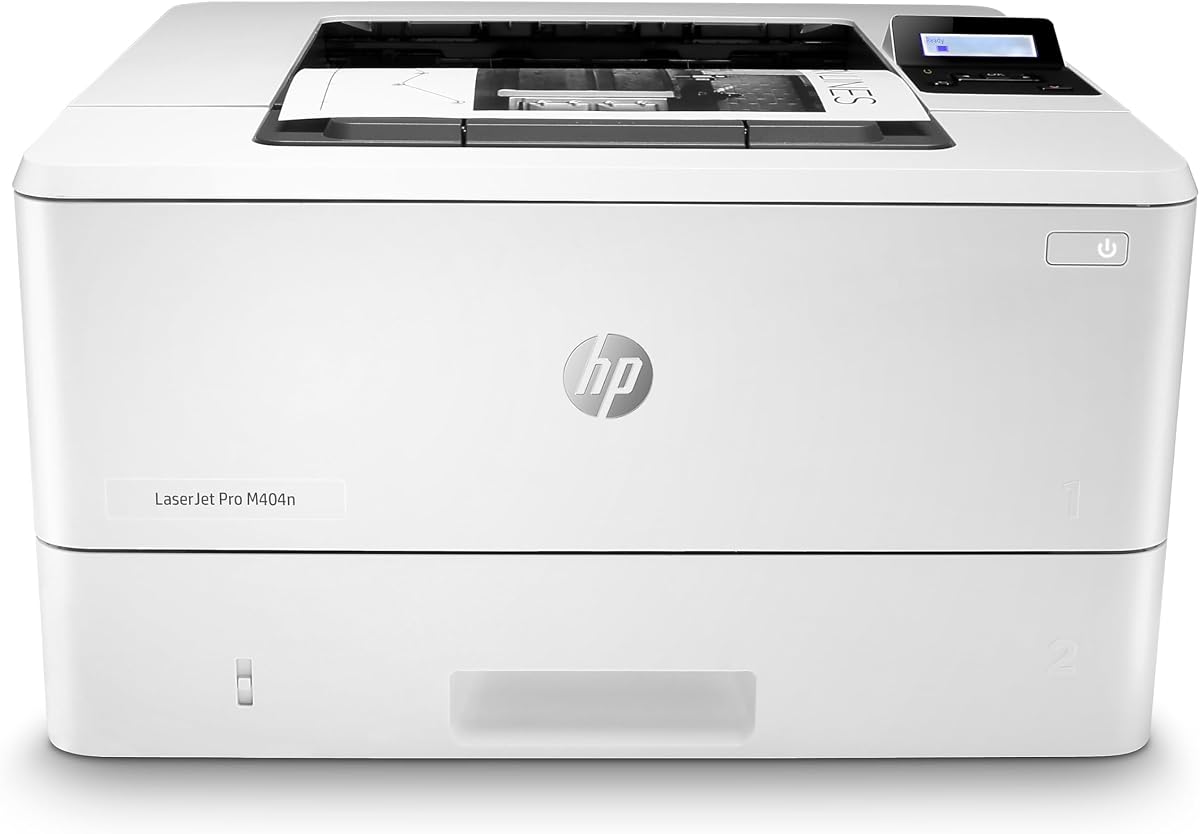
The HP LaserJet Pro M404n focuses on stable wired Ethernet connectivity for secure office environments. Rated 4.3 it offers reliable performance with built-in security and consistent document output for shared networks.
We may earn a commission when you buy through this link, at no additional cost to you.
Its Ethernet port ensures stable connections and HP Wolf Pro Security protects against attacks. With 40 pages per minute it handles moderate print volumes efficiently while the compact design fits well into workspaces.
Lacking wireless support limits flexibility for mobile users but wired users gain dependable speed and security. The energy efficient design reduces power usage without compromising performance or reliability for daily tasks.
Offices prioritizing secure and stable network printing will find this model suitable. It delivers professional output with minimal setup and consistent connectivity over time.
Built-in security helps protect company data and safeguard against cyberattacks with hardware firmware and OS protection.
Built to keep your business moving forward with fast print speeds and reliable document output.
We may earn a commission when you buy through this link, at no additional cost to you.
The Brother HL-L5100DN supports higher print volumes with fast speeds and expandable capacity for busy offices. Rated 4.4 it balances performance and security features while delivering reliable network printing over time.
We may earn a commission when you buy through this link, at no additional cost to you.
Its 42 pages per minute speed and two-sided printing improve efficiency while optional trays expand capacity significantly. Secure function lock and secure print protect documents and Ethernet networking supports reliable shared access.
Without wireless options the unit relies on wired connections but offers dependable performance for heavy print needs. The larger size accommodates extra trays and remains compact enough for shared work areas with proper planning.
Departments needing consistent high-volume output and strong security will benefit most from this model. It supports uninterrupted professional workflows with robust hardware and connectivity options.
Total capacity expands to 1340 sheets with optional add-on trays for high-volume uninterrupted printing.
Advanced security features help protect sensitive documents and restrict unauthorized printing activities effectively.
We may earn a commission when you buy through this link, at no additional cost to you.
Choosing the right Ethernet laser printer depends on your office size, workflow needs, and security requirements. These factors help you match hardware features to your daily printing demands.
Print speeds range from 28 to 50 pages per minute across these models. For shared teams or high-volume offices higher speeds reduce wait times and improve productivity during peak work hours.
Match the printer's monthly duty cycle to your expected workload to ensure reliability and avoid overworking the unit.
Ethernet connectivity provides stable wired connections for office networks without relying on wireless signals. Look for Gigabit Ethernet on high-volume models to ensure fast data transfer and reduce network bottlenecks.
Verify compatibility with your existing router and network protocols to prevent installation issues.
Standard trays hold 250 to 520 sheets while some models support optional trays for expanded capacity. Larger capacities reduce refill frequency and keep printers running during busy periods without manual intervention.
Choose models with manual feed slots if you regularly print on envelopes or specialty media.
Automatic duplex printing saves paper and cost by printing on both sides of the page. This feature is essential for offices seeking eco-friendly practices and reducing operational supply expenses.
Prioritize printers with hardware duplex to avoid manual flipping and maintain consistent print quality.
Advanced security features protect sensitive documents and prevent unauthorized access to your printer. Look for options like Wolf Pro Security secure function lock and secure print for added protection.
Ensure the model supports firmware updates to maintain protection against evolving network threats.
Mobile printing support allows staff to send jobs from smartphones or tablets via network or app. Dual-band wireless alongside Ethernet provides flexibility for hybrid work environments and mobile workers.
Check compatibility with AirPrint Mopria and vendor apps to ensure seamless printing from various devices.
Consider toner yield and subscription options to manage long-term supply costs effectively. High-yield cartridges reduce cost per page and frequent replacements improve productivity for high-volume printing.
Review available subscription services or auto-replenishment tools to prevent unexpected downtime due to empty toner.
Compact models fit smaller desks while larger units offer more capacity and connectivity options. Measure your available workspace and ensure proper ventilation to maintain printer performance over time.
Balance size needs with feature requirements to choose a unit that fits your office layout.
Connect the printer to your network using an Ethernet cable and power it on. Install drivers from the manufacturer website and add the device via your operating system network settings.
Use the printer driver or mobile app to send documents and monitor supplies. Keep firmware updated to maintain security and performance across all connected devices.
Clean exterior surfaces with a soft cloth and replace toner cartridges when notifications appear. Avoid placing the printer near direct sunlight or heat sources to preserve internal components.
Yes all selected models support Ethernet networking which operates independently of Wi-Fi. You can connect via cable to your router for stable wired printing without wireless setup.
Ethernet offers a more stable connection less prone to interference or signal drops. This makes it ideal for shared office environments where consistent printing access is essential.
Yes mobile printing apps and protocols work through the network regardless of connection type. Your phone sends print jobs over the network to the printer via its IP address.
Look for firmware encryption secure print secure function lock and regular updates. These protect data and prevent unauthorized access or cyberattacks on your printer.
Plug an Ethernet cable between the printer and your router then install drivers. Add the printer via network settings and assign a static IP for consistent access.
The Brother HL-6210DW and HL-L5100DN offer high speeds and expandable capacity for demanding workflows. Their Ethernet support ensures stable sharing across busy teams and departments.
These ten models offer reliable Ethernet networking for offices needing secure stable and fast document output. Whether you prioritize speed capacity or budget there is a suitable option in this roundup.
Consider your team size print volume and security needs to select the right unit. Models like the Brother HL-L2460DW and HP LaserJet Pro 4001dn balance speed and connectivity for most small teams.
Prices and availability may change so verify current listings before purchasing. Check warranty terms and supply options to ensure long-term reliability for your office workflow.