
Cooling Fan for Nintendo Switch 1/2
4.6Editor score
Adjustable fan speed control
LED temperature display
Micro USB powered design
This guide compares the top external cooling fan Nintendo Switch dock accessories to help gamers prevent overheating and extend console life with reliable
Gaming on a Nintendo Switch often leads to overheating issues during long sessions. External cooling fans help maintain optimal temperatures ensuring smooth performance without unexpected pauses due to thermal throttling or system malfunctions.
We compared ten top-rated cooling accessories based on fan speed adjustability noise levels compatibility with original and OLED docks and additional features like game card storage or RGB lighting effects.
Each pick shows key specs pros and cons to help you choose the right cooler for your setup. Prices and availability change frequently so check current listings before making your final purchase decision.
4.6Editor score

3.9Editor score
4.4Editor score
The following table provides a side-by-side comparison of all ten products analyzed in this guide highlighting their core specifications and unique features to help you make an informed decision quickly.


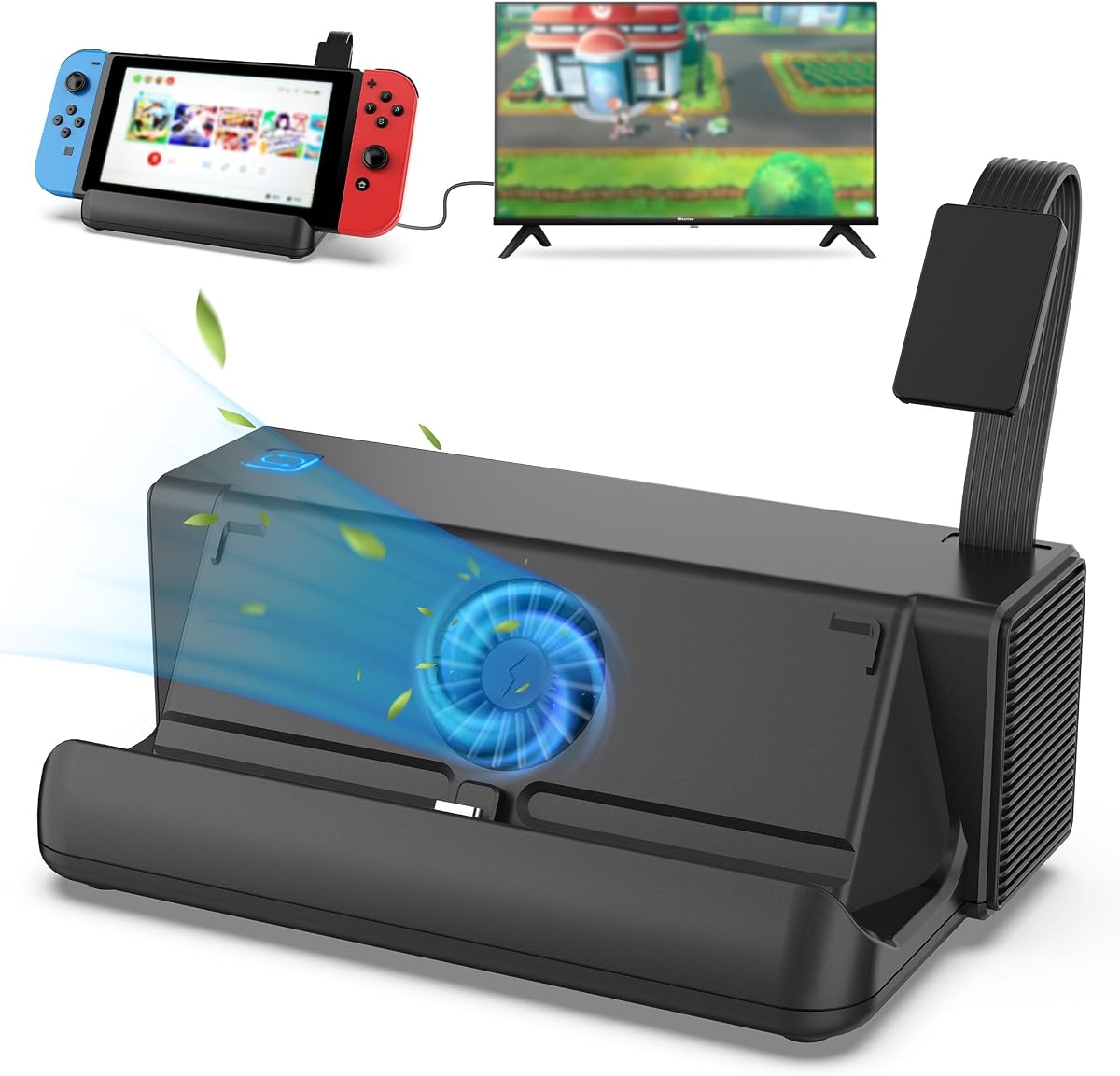
This cooling fan delivers excellent value with an LED display showing both fan speed and temperature in real time. It holds a strong 4.6 rating from users who appreciate its ability to prevent overheating during extended play sessions.
We may earn a commission when you buy through this link, at no additional cost to you.
The adjustable speed range from 510 to 6000 RPM allows you to match cooling power to your needs. Below 2400 RPM it runs nearly silently making it ideal for casual gaming where noise matters.
While the fan gets louder at max speed it effectively dissipates heat. The included fixed pad prevents scratches and ensures stability between the Switch and dock which is a thoughtful inclusion.
This model is best for budget conscious gamers wanting reliable thermal protection without spending too much. Its simplicity and effective cooling make it a top choice for original dock users.
The LED display shows exhaust temperature helping you verify cooling effectiveness instantly.
Lower RPM settings keep noise minimal while still providing adequate airflow for light use.
We may earn a commission when you buy through this link, at no additional cost to you.
The TNP cooler features three high-speed fans that deliver robust ventilation for original Switch docks. Despite a lower average rating it remains a solid option for users prioritizing airflow over noise levels.
We may earn a commission when you buy through this link, at no additional cost to you.
Its turbo and normal modes let you switch between intense cooling and quieter operation. The design plugs directly into the dock's USB port requiring no extra power adapters or complicated setup steps.
The compact build saves space on entertainment centers while still improving heat dissipation. Users report fewer overheating pauses during long gaming marathons thanks to the consistent airflow.
Choose this if you need maximum cooling power and don't mind slightly more noise. It is particularly useful for hardcore gamers who push their consoles to the limit regularly.
Three fans work together to push more air than single-fan alternatives for better heat removal.
Plugs straight into the dock's USB port simplifying setup and reducing cable clutter.
We may earn a commission when you buy through this link, at no additional cost to you.
This dedicated cooler is built for the newer Switch 2 console with dual fans ensuring optimal heat dissipation. It automatically starts when connected to the dock allowing seamless operation without manual intervention.
We may earn a commission when you buy through this link, at no additional cost to you.
The six game card slots let you store frequently used cartridges right on the stand. Three USB ports offer additional connectivity for controllers or peripherals enhancing the overall utility of the dock.
RGB lighting adds a visual flair with nine modes to match your gaming setup. While flashy it is optional and can be turned off if you prefer a cleaner look.
Switch 2 owners will find this ideal for consolidating accessories and cooling in one unit. It bridges functionality and aesthetics making it a standout choice for next-gen setups.
Six slots keep your favorite games organized and accessible without separate cases.
Cooling begins automatically when docked ensuring protection from the moment gaming starts.
We may earn a commission when you buy through this link, at no additional cost to you.
The Bewinner cooler uses three fans housed in a small footprint ideal for crowded desks. It focuses on straightforward performance with a side switch for toggling turbo or normal speeds quickly.
We may earn a commission when you buy through this link, at no additional cost to you.
Made from superior materials it resists wear during daily use. The design fits snugly against the dock providing stable support without obstructing ventilation channels or nearby devices.
While it lacks advanced displays or storage it delivers reliable cooling at a reasonable price. Users appreciate the no-fuss approach that just gets the job done without complications.
This is a good pick for those wanting essential cooling without extra features. Its simplicity makes it user-friendly and effective for standard gaming needs.
A physical side switch lets you toggle modes without navigating menus or apps.
The small size ensures it fits on any desk without taking up valuable space.
We may earn a commission when you buy through this link, at no additional cost to you.
This dock replaces the original unit with a superior design including a built-in cooling fan. The one-key game card switching allows seamless transitions between four active cards without physical swapping.
We may earn a commission when you buy through this link, at no additional cost to you.
Eight total storage slots mean you never need to swap cases during play. Independent power switches for the fan and card reader help reduce noise when certain features are not in use.
It supports both desktop and TV modes offering flexibility for portable and home setups. The HDMI output ensures 1080P resolution for crisp visuals on your television screen.
Ideal for avid gamers who want a complete upgrade to their docking setup. The convenience features justify the cost for those who play frequently and value organization.
Switch between active games instantly with a single button press saving time and effort.
Turn off unused features to save energy and reduce noise during downtime.
We may earn a commission when you buy through this link, at no additional cost to you.
Designed specifically for the 2021 OLED dock this fan replaces the base with an upgraded cooling version. The integrated blue light turns on with the fan adding a subtle tech-inspired look.
We may earn a commission when you buy through this link, at no additional cost to you.
Fourteen game card slots on top provide ample storage for collectors. The ABS material keeps the unit lightweight and durable while maintaining a sleek profile that matches your setup.
It connects via Type-C cable making installation quick and easy. The super turbo fans blow inward to circulate air directly over the base surface for efficient heat dissipation.
OLED users looking for a dock replacement with massive storage should consider this. The combination of cooling and storage makes it highly practical for heavy gamers.
Perfectly fits the HEG-007 OLED dock ensuring secure placement and optimal airflow.
Fourteen slots let you store your entire collection without needing external boxes.
We may earn a commission when you buy through this link, at no additional cost to you.
This fan is made for the OLED model and uses a high-speed fan to circulate air quietly. The blue LED inside matches the fan operation so it turns on and off simultaneously.
We may earn a commission when you buy through this link, at no additional cost to you.
Installation involves plugging the Type-C cable into the dock for power. It is straightforward and requires no additional tools or adapters for operation.
While it offers less airflow than multi-fan units it remains effective for moderate use. The white finish blends well with most entertainment setups keeping the look clean.
Opt for this if you prioritize silence and simplicity. It works well for users who need basic cooling without extra features or noise.
The blue LED activates with the fan creating a coordinated visual effect.
Designed to run quietly so it does not distract from game audio.
We may earn a commission when you buy through this link, at no additional cost to you.
This Switch 2 accessory features a smart auto on off function that matches console usage. The 45mm turbine fan delivers strong airflow while optimized blade structure keeps noise levels manageable.
We may earn a commission when you buy through this link, at no additional cost to you.
Three speeds allow you to match cooling intensity to your needs from 4000 to 6000 RPM. The vertical air duct aligns perfectly with the console inlet for efficient heat removal.
Installation is simple with a wide base and optional residue-free nano tape. For those who reposition often you can skip the tape and rely on the wide base for stability.
Ideal for Switch 2 users seeking hands-free cooling. The automation makes it easy to use without manual adjustments during play sessions.
The fan starts and stops with your console so you never forget to turn it off.
The duct aligns with the inlet for targeted cooling where it is needed most.
We may earn a commission when you buy through this link, at no additional cost to you.
This passive stand uses a hollowed-out design to improve airflow around the dock without fans. It produces zero noise and requires no power making it ideal for quiet environments.
We may earn a commission when you buy through this link, at no additional cost to you.
Made of sturdy black acrylic it keeps the dock secure with non-slip silicone pads. The stand fits snugly ensuring ventilation channels remain unobstructed during extended gaming.
Installation is effortless as you simply place the dock on the stand. No tools or assembly are needed to start benefiting from improved air circulation.
Choose this if you want silent cooling without electronics. It is great for setups where fan noise is unacceptable or where power outlets are limited.
Uses physical design to boost natural convection instead of powered fans.
Silicone pads prevent slipping and protect the dock from surface scratches.
We may earn a commission when you buy through this link, at no additional cost to you.
This cooler works with both Switch and Steam Deck offering versatile cooling options. It features an LED display for speed and temperature monitoring and supports adjustment from 510 to 6000 RPM.
We may earn a commission when you buy through this link, at no additional cost to you.
Running nearly silent below 2400 RPM it balances strong cooling with a low noise experience. The package includes a fixed stabilizer pad and joystick caps to enhance your setup.
While ratings are limited due to recent listing it promises lifetime warranty support. The vertical stand design ensures stability during use and helps prevent accidental slips.
Suitable for gamers who own multiple devices like the Steam Deck. Its versatility and included accessories make it a practical choice for multi-platform setups.
Designed to work with Switch original dock and Steam Deck for broader utility.
Includes stabilizer pads and joystick caps to protect your console and accessories.
We may earn a commission when you buy through this link, at no additional cost to you.
Selecting the right external cooling fan depends on your specific console model usage patterns and budget constraints. Understanding key factors ensures you invest in a cooler that truly extends your console's lifespan.
Always verify the product matches your dock model whether original OLED or Switch 2. Mismatched units may not fit or connect properly leaving you without adequate cooling protection.
Check product descriptions for specific mentions of your dock model to avoid compatibility issues before purchasing.
Adjustable speeds let you balance cooling power with noise levels. Look for units with a range from low silent settings to high RPM turbo modes for intensive sessions.
Higher speeds generate more noise but are necessary for long gaming marathons requiring maximum heat dissipation.
Most docks use USB or Type-C power connections. Ensure the cable provided matches your dock's available ports or that you have compatible adapters on hand.
Using the correct connection type ensures stable power delivery to the fan for consistent performance during use.
Fan noise varies significantly between models especially at higher speeds. Read reviews focusing on decibel levels to avoid units that distract from game audio during play.
Models with turbo modes that remain silent at low RPMs offer the best flexibility for different environments.
Some coolers include game card slots RGB lighting or USB hubs. Decide if these extras justify the higher cost based on your specific organizational needs.
Extra features can consolidate accessories but may add complexity or potential points of failure to your setup.
Durable plastics like ABS ensure the cooler withstands daily use without cracking. Check for reinforced joints and non-slip pads that protect your console from scratches.
Sturdy construction prevents damage to your console dock while providing reliable thermal protection over time.
Look for sellers offering warranties of at least one year. Reliable customer support ensures quick resolution if the fan stops working after a few months of use.
A good warranty reflects confidence in product quality and protects your investment against defects.
Evaluate whether the price matches the feature set. Basic fans may cost less but advanced models with displays and extra ports offer better long-term utility.
Choose a model that fits your budget while delivering the core cooling performance you need for safe gaming.
Install the cooler by aligning it with the back of your dock and plugging it into the USB port. Ensure it is securely attached so it does not shift during console insertion or removal.
Clean the fan blades and vents every month using compressed air to remove dust buildup. Accumulated dust reduces airflow efficiency and can cause the fan to work harder than necessary.
Avoid running the fan at maximum speed continuously to extend motor life. Use lower RPM settings when playing less demanding games to balance noise and cooling effectiveness.
Yes external cooling fans actively dissipate heat from the console helping maintain safe operating temperatures. They reduce thermal throttling and prevent unexpected shutdowns during intensive gaming sessions.
Using a cooling fan does not void your warranty as long as it does not damage the device. However you should keep original parts in case warranty claims are needed later.
Cooling fans designed for docked play generally do not work in handheld mode. Some portable coolers exist but they are rare and not part of standard dock accessory sets.
Yes all active cooling fans require power from a USB or Type-C connection. Passive stands exist but they rely on airflow design rather than electrical power for cooling.
Noise levels vary by model but most run silently below 2400 RPM. Higher speeds produce noticeable fan noise which may be distracting in quiet environments.
Some fans are specifically designed for Switch docks but universal USB coolers may fit other consoles. Check specifications for port sizes and dimensions before assuming compatibility.
We reviewed ten top cooling solutions offering options for every budget and console type. The TNP and Bewinner models provide great value while ZMBESUP offers premium docking features.
Prioritize compatibility and adjustability when selecting a cooler for your specific needs. Noise levels and build quality also impact daily satisfaction and long-term durability of your setup.
Prices and availability fluctuate frequently so always check current listings before purchasing. Regular maintenance ensures your cooler continues performing effectively for years of uninterrupted gaming.