
Auto Face Tracking Tripod 360 Rotation with Stand
4.5Editor score
No app required gesture control
70 inch adjustable height range
Built-in tracking camera system
Creating high quality video content requires stable shots and seamless movement tracking. A face tracking tripod for iPhone automates camera movement so you stay centered while vlogging streaming streaming or recording tutorials without assistance.
We evaluated ten leading models based on tracking accuracy build stability light quality and ease of use. Each product was analyzed for compatibility with iPhone and Android as well as portability and feature sets for creators.
Every pick highlights unique strengths like magnetic mounts gesture control or quad pod stability. Note that availability and pricing change frequently so verify details before purchasing to ensure you get the latest model with full support.
4.5Editor score

4.4Editor score

4.5Editor score
As an Amazon Associate we earn from qualifying purchases.
This side by side comparison highlights key specifications across all ten models including max height tracking range and special features like magnetic mounts or dual lights for informed decision making.

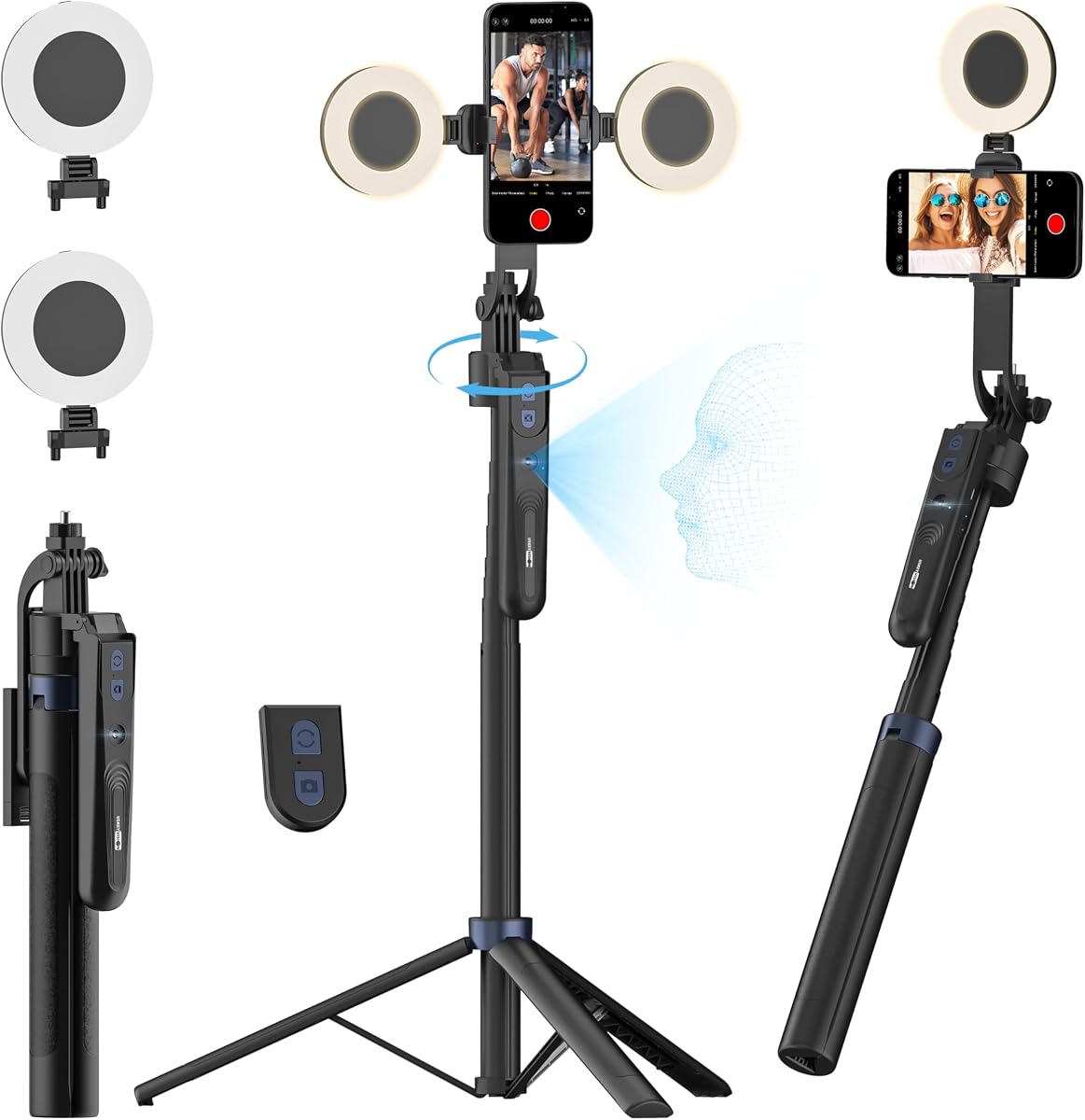


The Yeaki 71 Auto Face Tracking Tripod stands out with a 4.4 rating for creators needing reliable movement tracking. It combines 360 degree rotation with integrated lighting to keep subjects centered in any condition.
We may earn a commission when you buy through this link, at no additional cost to you.
Its advanced face tracking locks onto users using an OK gesture while a palm stops movement. The rechargeable remote lets you control TikTok or Instagram without touching your screen which streamlines recording sessions.
Trade-offs include a five meter optimal tracking distance and the need to keep the remote charged for full functionality. These limits remain minor given the smooth gimbal performance and stable aluminum alloy construction.
Creators focused on solo vlogging or tutorials benefit most from this all in-one tool. It balances portability with professional features to deliver steady shots that enhance video quality without extra gear.
Hand signals start or stop tracking which lets you move freely without pausing to adjust settings manually or worry about losing focus.
Warm white and natural light modes provide consistent illumination indoors and outdoors reducing shadows that can distract from your face in videos.
We may earn a commission when you buy through this link, at no additional cost to you.
This Acer Gadget model earns a 4.6 rating for users wanting versatile tracking that follows body movements beyond just facial recognition. It adapts well to dynamic scenes where subjects move frequently.
We may earn a commission when you buy through this link, at no additional cost to you.
The detachable ring light provides fill illumination that you can remove when not needed to save space. Its quad foot design ensures stability even when fully extended to nearly sixty five inches.
Shorter max height might limit overhead shots but the foldable design makes it ideal for travel. Gesture controls work reliably and the remote allows one click shooting for quick setup.
This tripod suits creators who prioritize portability and stability over extreme height options. It delivers smooth tracking and sturdy support for live streams or casual video content anywhere.
Unlike face only systems this model follows your whole body which helps during exercise videos or wide angle storytelling where framing changes often.
Folding down to just thirteen inches with a lightweight aluminum frame ensures you can pack it easily for trips without adding bulk to your bag.
We may earn a commission when you buy through this link, at no additional cost to you.
USKEYVISION offers a 70.9 inch reach with dual ring lights for versatile lighting options. The 4.4 rating reflects strong performance in both height flexibility and illumination control.
We may earn a commission when you buy through this link, at no additional cost to you.
Two detachable lights let you expand coverage or reduce weight. The 10 meter remote range allows control from a distance which is useful for group shots or staged scenes.
The flip up rotatable light design helps reduce shadows on subjects. While the non slip rubbers enhance stability the weight can be slightly higher during travel.
This is an ideal choice for creators needing adjustable lighting and height without multiple accessories. It balances professional features with ease of use for varied content types.
Attach one or both ring lights to match lighting needs and save battery when only soft illumination is required for natural looking videos.
Control recording from ten meters away which allows more freedom for movement without interrupting the tracking system or needing assistance.
We may earn a commission when you buy through this link, at no additional cost to you.
This Acer model introduces a strong magnetic mount for secure attachment without clamps. The 4.3 rating highlights fast setup and steady holding for iPhone users seeking simplicity.
We may earn a commission when you buy through this link, at no additional cost to you.
The auto open design lets you deploy the tripod with a single tap which saves time before recording. Magnetic attachment prevents slippage and keeps the phone aligned during tracking.
The detachable light provides basic illumination but is not as bright as dual light models. You will need a MagSafe adapter for Android compatibility which adds a small step.
It is best for quick social media shots where speed and stability matter most. The magnetic system reduces hassle and improves user experience for frequent content creators.
Strong magnets keep the phone locked in place so you avoid accidental drops or shifts while the tripod tracks your movements automatically.
Tap the base to ground and the legs open instantly so you start filming moments after arrival without manual assembly or adjustments.
We may earn a commission when you buy through this link, at no additional cost to you.
This budget friendly option delivers a 4.5 rating with no app required for gesture tracking. Its built-in camera ensures accurate positioning without extra software or permissions.
We may earn a commission when you buy through this link, at no additional cost to you.
The 70 inch height range provides flexibility for different shooting angles. You can control tracking with hand gestures which keeps your workflow simple and distraction free.
Lack of integrated lights means you may need external lighting for dim rooms. Tracking distance caps at five meters so it works best for controlled indoor environments.
It is an excellent choice for new creators on a tight budget. The reliable tracking and simple design make it accessible for vlogs and calls alike.
Use the built-in camera for tracking without downloading apps which preserves phone storage and prevents privacy permissions or compatibility issues.
Simple hand signals start or stop movement tracking so you can pause recording or adjust position without touching your device during use.
We may earn a commission when you buy through this link, at no additional cost to you.
This versatile model converts between a selfie stick floor tripod and stabilizer to cover multiple shooting scenarios. It rates 4.3 for flexibility and consistent tracking performance.
We may earn a commission when you buy through this link, at no additional cost to you.
The seven button remote allows advanced control beyond basic recording which helps during live streams or multi-angle shoots. Dual ring lights offer adjustable brightness for varying indoor conditions.
The aluminum frame adds weight but ensures rigidity. Folding to about twelve inches makes it travel ready though the lights require charging for consistent output.
Creators who need one device for handheld and tripod use will appreciate this all-in-one design. It provides professional features without needing separate stabilizers or stands.
Switch quickly between selfie stick and tripod modes to adapt to different scenes without carrying extra gear or reconfiguring setup constantly.
The seven button remote handles scrolling liking and recording which streamlines social media interaction while keeping hands free for natural movement.
We may earn a commission when you buy through this link, at no additional cost to you.
This 70.9 inch model earns a 4.6 rating for fast deployment and reliable gesture tracking. One click auto open means minimal setup before recording starts.
We may earn a commission when you buy through this link, at no additional cost to you.
No app requirement keeps the interface simple. Remote control reaches ten meters and standard 1/4 inch thread allows mic or light attachment for expanded functionality.
Limited lighting means it works best in well-lit rooms. The compact fold supports travel though you may want extra light for night shoots.
Ideal for quick tutorials or streaming setups where time matters. It delivers strong tracking and stability with a user friendly interface for all skill levels.
Push the base and the tripod opens instantly which reduces preparation time and keeps focus on content creation instead of gear setup.
Tracking works without installing apps which avoids privacy permissions and keeps your phone storage clean for essential tools and media.
We may earn a commission when you buy through this link, at no additional cost to you.
ULANZI TT23M offers a premium experience with MagSafe compatibility and quick auto deployment. It rates 4.5 for secure magnetic mounting and smooth tracking performance.
We may earn a commission when you buy through this link, at no additional cost to you.
The magnetic ring locks phones instantly which reduces setup time. One click auto deploy and a detachable remote ensure flexibility across multiple shooting scenarios.
Lighting is not included so you might add an external source. The four leg base and aluminum frame provide excellent stability even in windy conditions.
Best for iPhone users wanting top tier convenience and build quality. It suits professionals who need reliable tracking and quick setup for daily content production.
Built-in MagSafe magnetic ring allows iPhone users to snap their device on securely and Android users add a ring for similar convenience.
The base opens instantly with ground contact which saves setup time and lets you start recording almost immediately upon arrival.
We may earn a commission when you buy through this link, at no additional cost to you.
This ULANZI model features a 360 degree rotating gimbal for smooth motion tracking. A 4.5 rating reflects strong build quality and reliable facial recognition across devices.
We may earn a commission when you buy through this link, at no additional cost to you.
Adjustable phone holders fit iPhones and Androids. A removable phone holder doubles as a desktop stand for calls. The 1/4 inch thread supports camera or mic attachments.
No integrated light means you rely on ambient or external illumination. Remote range caps at five meters but works well for most indoor uses.
Ideal for creators needing multi-angle shots and easy device swaps. Its versatile gimbal and sturdy construction make it suitable for vlogs and multi device setups.
The 360 degree gimbal rotates smoothly to keep subjects centered even during dynamic movements or transitions without needing manual adjustments.
Remove the holder to use as a desktop stand which adds flexibility for video calls or media viewing without needing another accessory.
We may earn a commission when you buy through this link, at no additional cost to you.
K&F CONCEPT offers a seven-in-one tripod with dual ring lights and six axis gimbal for advanced control. It rates 4.4 for smooth motion and quick setup.
We may earn a commission when you buy through this link, at no additional cost to you.
The auto extend quick fold base protects fingers during deployment. Dual lights provide six hours battery life which reduces need for frequent recharges.
Heavier build means it is less ideal for hiking but excellent for studio or home use. The multiple modes support everything from overhead to live streaming angles.
Best for creators needing multi-angle versatility and stable tracking. It balances flexibility with portability for varied content types without extra accessories.
Six axis control provides smooth rotation and tilt for cinematic movement which enhances video quality by reducing shakiness and jitter.
Release the stick from a short height and the base unfolds instantly which speeds up setup and prevents pinched fingers.
We may earn a commission when you buy through this link, at no additional cost to you.
Selecting the ideal face tracking tripod involves evaluating tracking range lighting quality build stability and device compatibility. These factors determine how well the tripod performs during live streams vlogs or remote recording.
Look for AI cameras with a tracking distance of at least five to ten meters to ensure smooth movement in larger spaces. Models with gesture control like OK or Palm reduce need for manual adjustments and prevent interruptions during recording.
Choose tripods with high sensitivity to avoid jitter or sudden jumps in tracking. Accuracy ensures consistent framing even during dynamic movements which is vital for engaging content.
Check whether the tripod supports magnetic mounts or clamps. Magnetic mounts offer faster setup especially for iPhone users with MagSafe but clamps provide broader compatibility for Android devices without accessories.
Ensure the 1/4 inch screw thread is standard to attach ring lights or external microphones. Compatibility with GoPro or other cameras increases the tripod utility beyond smartphones.
Integrated ring lights with warm cool and natural modes help balance exposure indoors. Dual lights or adjustable brightness provide flexibility for low light environments without buying external fixtures.
Verify battery life for lights and tracking motors. Long runtime reduces interruptions during shoots and ensures consistent performance over extended sessions.
Aluminum alloy frames offer durability and resistance to wear. Quad leg designs enhance stability on uneven floors compared to traditional three leg tripods especially when fully extended.
Check for anti slip rubbers and weighted bases to prevent tipping. Sturdy construction is essential to avoid accidents and protect expensive devices during recording.
Folded height and weight matter for travel. Models under one hundred thirty inches folded and under one and a half pounds are easier to transport in backpacks or carry on bags.
Quick deploy mechanisms like auto open bases reduce setup time. Compact designs also save space at home or in studio environments.
Detachable Bluetooth remotes with one click shooting simplify capturing content. Look for remotes with multi function buttons for scrolling or liking during live streams.
Verify wireless range for remote controls. Ten meters is ideal for moving around the room without losing connection.
Avoid tripods requiring separate apps unless they offer extra features. Gesture control without apps streamlines workflow and reduces compatibility issues across iOS and Android devices.
Test gesture responsiveness to ensure tracking starts and stops reliably. Smooth hand signals help maintain focus and avoid accidental pauses during recording.
Determine your price range and prioritize features that match your needs. High end models offer more accessories but budget options can deliver reliable tracking for beginners.
Look for warranties of two years or more. After sales service ensures support if parts fail or tracking issues arise.
Place the tripod on a flat stable surface to avoid tipping. Extend the legs fully or adjust them for height ensuring anti slip rubbers contact the ground firmly.
Power on the device and activate tracking via gesture or remote. Keep your face or body within the optimal distance range for accurate detection and movement.
After use collapse the legs carefully and store in a dry place. Clean the surface with a soft cloth and avoid exposing to water or direct sunlight for prolonged periods.
Most models in this roundup do not require separate apps and work with gesture control. Built-in cameras handle tracking automatically which simplifies setup and preserves phone storage. Apps may add features but can introduce compatibility issues.
Most tripods support a five to ten meter range for reliable tracking. This distance allows flexibility in small rooms or studio settings. Exceeding this range may cause tracking to fail or lag.
Yes Android users can use magnetic tripods with a MagSafe compatible case or the included magnetic ring adapter. This accessory provides the same secure hold as MagSafe iPhones for fast setup.
Charge the tripod using the included USB cable by connecting it to a power adapter or computer. Check the battery indicator before recording to ensure enough power for your session.
Yes most tripods feature a standard 1/4 inch thread to attach external microphones or lights. This flexibility enhances audio and visual quality during live streams or tutorials.
Ensure lighting is adequate and avoid rapid movements. Keep within the optimal distance and restart the tracking function via gesture. Clean the tracking camera lens if needed for better performance.
Many models support GoPro via the 1/4 inch thread mount. Always check the maximum load capacity to ensure the tripod can safely hold the camera and accessories without wobbling.
Rechargeable remotes usually last several hours on a full charge depending on usage. Check the manual for battery life estimates and keep a USB cable handy for quick recharges.
The Yeaki 71 and ULANZI TT23M top our list for accuracy and magnetic convenience while budget models like the Auto Tracking Tripod offer accessible entry for beginners.
Prioritize tracking range build stability and lighting based on your typical recording environment to ensure reliable performance across different scenarios and shooting needs.
Always confirm current availability and verify specs before purchasing to avoid outdated models and secure the latest features tailored to your content creation workflow.