
RedThunder One Handed Gaming Keyboard RGB Backlit 35 Keys
4.4Editor score
35 Anti-Ghosting Keys
Macro Recording Support
RGB Backlit Modes
Ergonomic Wrist Rest
Discover the top 10 gaming keypads for 2026. We compare features, ergonomics, and performance to help you choose the perfect one-handed controller for your
Gaming keypads offer a specialized solution for players seeking enhanced control and ergonomics. These compact devices consolidate essential keys into a single hand, allowing for faster access to macros and abilities. Whether you play MMOs or FPS titles, a quality keypad can significantly improve your gameplay experience and comfort during long sessions.
To create this comprehensive guide, we analyzed ten top-rated models available on the market. We evaluated factors such as switch type, connectivity options, programmability, and build quality. Our goal is to provide an unbiased overview that helps you understand the unique strengths and limitations of each device before making a purchase decision.
Each product in this list showcases distinct features tailored to different gaming preferences and budgets. You will find detailed breakdowns of specifications, pros, cons, and ideal use cases for every model. Please note that availability and offers may change, so checking the latest details directly on the retailer site is always recommended.
4.4Editor score

4.3Editor score

4.3Editor score
This side-by-side comparison highlights the key specifications and capabilities of each gaming keypad featured in our guide. By examining switch technology, key counts, and connectivity, you can quickly identify which model aligns with your specific gaming needs and desk setup requirements.




The Razer Tartarus V2 stands out as a highly versatile one-handed gaming controller. It offers a rating of 4.3 and is designed to enhance both gaming and creative workflows. Its 32 programmable keys and unique thumbpad provide intuitive control that mimics console controllers while retaining keyboard flexibility.
We may earn a commission when you buy through this link, at no additional cost to you.
Its standout feature is the Mecha-Membrane switch technology, which combines the tactile feedback of mechanical switches with the comfort of rubber domes. This reduces fatigue during long sessions. Additionally, Razer Hypershift allows for complex macro mapping, and Chroma support ensures visual integration with your existing setup.
While highly capable, it relies on a wired connection, which may limit desk layout flexibility compared to wireless options. The price is also higher than entry-level alternatives. However, these trade-offs are acceptable given the build quality and extensive customization available for serious players.
This keypad is ideal for gamers who value customization and ecosystem integration. It suits MMO players needing rapid ability access and content creators requiring quick shortcut mapping. For those seeking a reliable, feature-rich device that balances performance and comfort, this remains a top recommendation.
The 8-way directional thumbpad offers natural controls for console-oriented players, allowing for ergonomic movement without reaching for a keyboard.
Chroma RGB support syncs lighting with games and hardware, creating a cohesive and immersive visual environment across your battlestation.
We may earn a commission when you buy through this link, at no additional cost to you.
The Redragon K585 Wired offers an excellent entry point into one-handed gaming peripherals. With a 4.4 rating, it delivers robust functionality at a budget-friendly price. Its 42-key layout ensures ample space for complex ability rotations in MMOs and MOBA titles.
We may earn a commission when you buy through this link, at no additional cost to you.
A key strength is its modularity. The socket accepts various switches, allowing users to customize feel without tools. The USB pass-through port helps keep cables organized by connecting a mouse directly to the keypad. Macros can be recorded via software or onboard keys for quick execution.
The main trade-off is its wired nature and larger size compared to compact models. However, the cost savings and customization options often outweigh these limitations. The detachable wrist rest also adds flexibility for different desk sizes.
This model is perfect for budget-conscious gamers who still want high customization. It suits players who enjoy tinkering with switches and need reliable macro performance. If you need a functional device without breaking the bank, this is a strong contender.
The upgraded socket accepts almost any 3-pin or 5-pin switch, allowing you to tune the feel of your keypad to match your main keyboard.
The USB pass-through port lets you plug your mouse or headset directly into the keypad for a cleaner and more organized desk setup.
We may earn a commission when you buy through this link, at no additional cost to you.
The AZERON Gaming Keypad represents a premium evolution in one-handed control. With a 4.3 rating, it stands out for its Hall Effect analog thumbstick and ergonomic adjustability. Designed for right-handed users, it allows mouse dominance while offloading keys to the left.
We may earn a commission when you buy through this link, at no additional cost to you.
Its thumbstick eliminates drift and supports 360-degree analog movement in compatible games. The keypad itself is 3D printed and customizable for hand sizes between 6.3 and 7.5 inches. Software allows deep customization of dead zones and sensitivity, effectively turning the thumbstick into a mouse if needed.
The primary drawbacks are the high price and potential fit variance for smaller hands. However, the modular design supports future updates and enhancements. This makes it a long-term investment for enthusiasts seeking unique control schemes that standard keyboards cannot offer.
This device is best suited for competitive gamers or tinkerers who demand precision. It works well for FPS and MOBA genres needing analog control. If you want a truly unique and adjustable setup that stands out, this premium option delivers unmatched flexibility.
The Hall Effect thumbstick supports 360-degree analog movement, eliminating stick drift and allowing for smoother in-game steering and aiming.
Adjustable parts ensure a perfect fit for right-handed gamers, making it comfortable for extended use across various hand sizes.
We may earn a commission when you buy through this link, at no additional cost to you.
The Redragon K585 PRO brings wireless freedom to the popular K585 layout. With a 4.2 rating, it offers the same 42-key tactical design but removes cables. This allows untethered placement on your desk for better positioning during intense gaming sessions.
We may earn a commission when you buy through this link, at no additional cost to you.
Its connectivity options include Bluetooth and 2.4GHz, with a battery lasting 15 to 20 hours on a single charge. Like its wired sibling, it supports switch swapping without soldering. The magnetic wrist rest can be removed to save space when needed.
The main trade-off is the need to monitor battery life and the added cost of wireless tech. However, the convenience often outweighs these concerns. The software support remains robust for macros and lighting effects.
This model is ideal for gamers who prefer a clean desk without wires. It suits those already familiar with Redragon's build quality. If you need reliable wireless performance and still want modularity, this is a solid upgrade from the wired version.
BT and 2.4GHz connectivity let you set the keypad anywhere on your desk, removing cable clutter from your gaming area.
The device offers 15 to 20 hours of continuous play on a single charge, ensuring you can game for days without recharging.
We may earn a commission when you buy through this link, at no additional cost to you.
The RedThunder One Handed Gaming Keyboard is built for portability and quick action. Rated 4.4, it features a compact 35-key layout with a built-in game chip for a 3ms response speed. This makes it suitable for gamers who travel or have limited desk space.
We may earn a commission when you buy through this link, at no additional cost to you.
It includes easy macro recording via FN keys, allowing you to bind complex commands without software. The RGB backlight supports static and breath modes with seven color choices. Its ergonomic design includes a large wrist rest to reduce fatigue during play.
Since it is driver-free, customization is limited to onboard keys. Some users might find the key spacing tight compared to full-sized boards. However, the plug-and-play nature means it works across many operating systems immediately.
This keypad is excellent for casual gamers or those with small desks. It serves well as a secondary controller for specific games. If you need a lightweight, responsive device that works straight out of the box, this RedThunder model is a good fit.
The built-in game chip provides a 3ms faster response speed, ensuring more fluent gameplay for enthusiasts enjoying games.
Press FN+ESC to start recording and FN+G keys to finish, allowing you to record complex sequences without external software.
We may earn a commission when you buy through this link, at no additional cost to you.
The Keychron C0 HE 8K is designed for competitive FPS players seeking low latency. It features Hall Effect magnetic switches with Rapid Trigger support, allowing for ultra-fast resets. Its 8K polling rate delivers precise timing for titles like Valorant and CS2.
We may earn a commission when you buy through this link, at no additional cost to you.
Users can adjust actuation points with 0.01 mm precision via a web-based configurator. This means no driver installation is needed for setup. It also serves creators well with shortcuts for OBS and video editing. RGB lighting is fully customizable per key.
While powerful, the lack of wireless might limit placement options for some. The web tool requires a browser session to configure. However, the performance benefits for competitive play often justify these trade-offs.
This keypad is perfect for pros and streamers needing precision. It supports both gaming and creative workflows efficiently. If you value raw speed and adjustable actuation over wireless convenience, this model is a standout choice.
Inputs are detected based on real-time key travel rather than fixed actuation points, enabling finer control and faster response.
Beyond gaming, trigger OBS scenes and manage streaming shortcuts with one hand for efficient content creation workflows.
We may earn a commission when you buy through this link, at no additional cost to you.
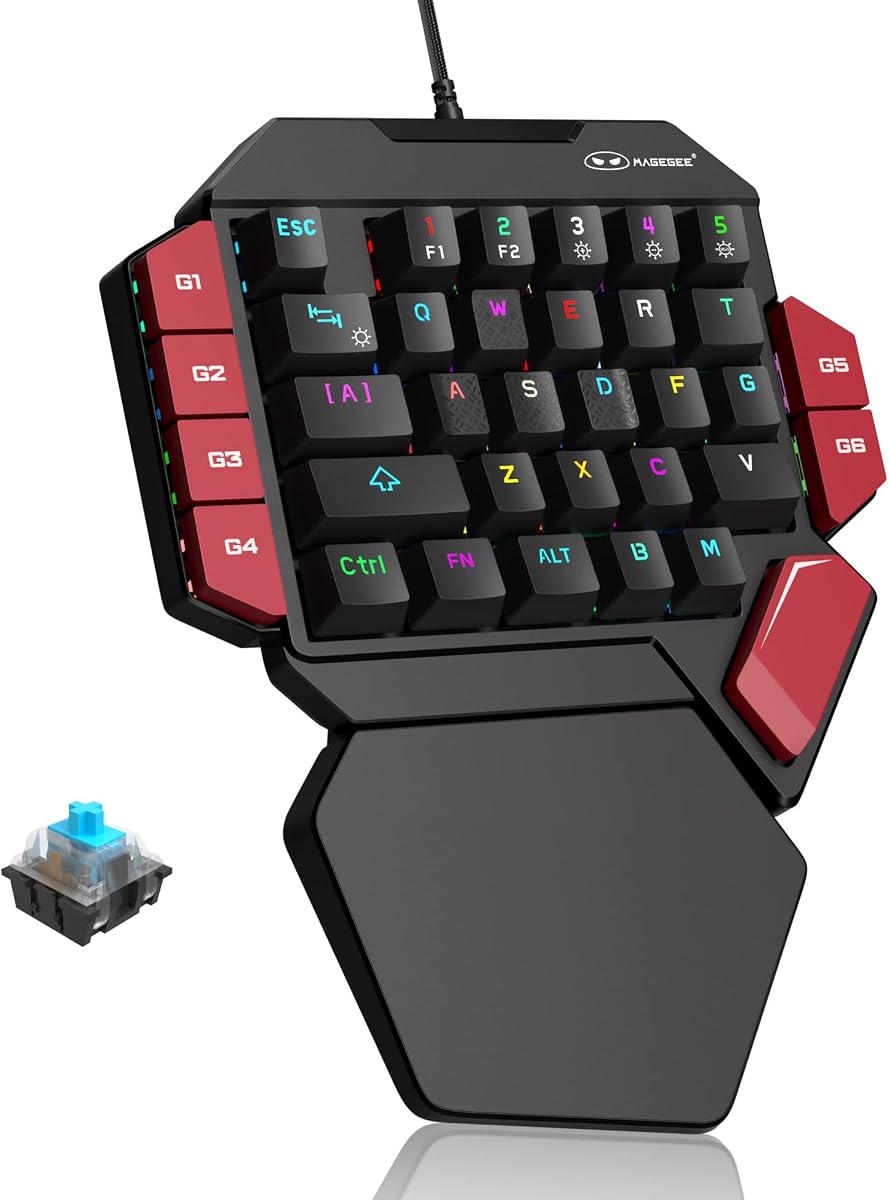
The MageGee One Handed offers a traditional mechanical feel for those who prefer tactile feedback. It uses Blue switches that produce a loud click sound, providing crisp paragraph feeling. This design is great for typing and gaming where you want to feel every keystroke.
We may earn a commission when you buy through this link, at no additional cost to you.
It includes 6 macro recording keys accessible via FN combinations. The RGB backlight offers dynamic and static modes for visual appeal. A large palm rest is included to reduce hand fatigue. It is compatible with many systems via direct USB connection.
The noise from the Blue switches might be distracting in quiet environments. The software capabilities are basic compared to more advanced brands. However, the plug-and-play simplicity is a strong selling point for casual users.
This model fits gamers who enjoy loud mechanical feedback and a robust build. It works well for players on a budget who still want physical switches. If you prioritize tactile sensation and simplicity, this MageGee keyboard is a solid option.
The Blue switches provide precise tactile feedback with a loud click sound, offering strong mechanical feeling and a long service life.
Press FN+G keys to record macros easily, allowing you to bind complex commands to single keystrokes for efficiency.
We may earn a commission when you buy through this link, at no additional cost to you.
The AJAZZ AK029 saves desk space with a 29-key layout that still offers pro-level performance. Rated 4.5, it uses Hall Effect switches with zero dead zones and no debounce delay. This ensures every tap registers instantly for consistent competitive performance.
We may earn a commission when you buy through this link, at no additional cost to you.
It features an 8KHz polling rate for fast response times. The web driver allows full customization without installing software on your PC. The rigid aluminum build provides stability, and the gasket mount adds slight cushioning. It includes 20 RGB modes for flair.
The compact size might require more precise keystrokes compared to larger boards. Some users may miss extra keys for macros. However, the portability and speed make it ideal for FPS setups where mouse space is crucial.
This keypad is perfect for gamers needing to free up mouse space. It suits LAN parties due to its portability and self-contained profiles. If you want tournament-grade speed in a small package, this model delivers impressive results.
The ultra-compact 29-key design saves 60% desk space, freeing your mouse for low-sensitivity FPS play and better movement.
Rapid Trigger enables instant reset on lift-off, while zero dead zones ensure every tap registers instantly for accurate input.
We may earn a commission when you buy through this link, at no additional cost to you.
The Razer Tartarus V2 is a well-regarded entry in one-handed gaming controllers. With a 4.2 rating, it emphasizes reliability and ecosystem integration. Its Mecha-Membrane switches offer a smooth experience suitable for both gaming and creative workflows.
We may earn a commission when you buy through this link, at no additional cost to you.
It supports full programmability via Razer Synapse software. Users can create complex macros and remap keys to execute commands efficiently. The Chroma feature syncs lighting across compatible hardware for a unified look. This model includes a thumbpad for intuitive navigation.
The primary limitation is the reliance on specific software for full configuration. It also lacks wireless options for some users. However, for those already invested in Razer hardware, it remains a solid choice for consistency.
This device is ideal for users who prioritize brand reliability and integration. It suits gamers who want to sync their lighting and macros seamlessly. If you value a trusted build that integrates well with existing gear, this is a dependable pick.
Razer Hypershift allows all keys and combinations to be remapped, executing complex commands with a single press for efficiency.
Fully syncs with games and other partners like Philips Hue, supporting 16.8 million colors for immersive backlighting.
We may earn a commission when you buy through this link, at no additional cost to you.
The Redragon RM104 offers a unique twist with a smart control knob for media and volume. With a 4.4 rating, it provides seamless wireless switching between Bluetooth, 2.4GHz, and USB-C. The battery capacity is high at 4000mAh for extended use.
We may earn a commission when you buy through this link, at no additional cost to you.
The knob allows quick adjustments like mute and RGB cycling without touching the screen. Software support enables macros and profile customization for games. Its design is distinct with pink and white coloring, adding a unique aesthetic to your setup.
As a keyboard rather than a dedicated keypad, it may not offer the same dedicated macro keys as others. The knob adds bulk that might not suit everyone. However, its versatility makes it a strong multi-purpose device.
This model is perfect for users needing audio control and wireless freedom. It suits those who appreciate unique design elements and long battery life. If you want a flexible device that handles media and gaming well, this is a great choice.
Rotate to adjust volume, press for instant mute, and hold to cycle RGB modes for smoother control than keyboard shortcuts.
Tri-Mode wireless lets you switch between Bluetooth and 2.4GHz easily, keeping your desk clean while maintaining reliable connection.
We may earn a commission when you buy through this link, at no additional cost to you.
Selecting the right gaming keypad involves assessing your specific needs, budget, and preferred playstyle. This guide outlines the essential factors to consider before making a decision.
Switches determine the tactile and auditory feedback you receive. Mechanical switches offer durability and distinct clicks, while membrane options provide a quieter and softer experience. Magnetic Hall Effect switches are ideal for competitive gamers needing precision and rapid reset.
Choose switches based on your preference for sound and tactile response.
Connectivity defines how the device interacts with your computer. Wired connections offer stability and zero latency, whereas wireless options provide flexibility and a cleaner desk. Bluetooth and 2.4GHz are common wireless standards for peripherals.
Select wired for competitive play or wireless for a clutter-free setup.
Comfort is crucial during long sessions. Look for ergonomic designs that include wrist rests or adjustable angles. The size and weight should fit your desk space and hand size comfortably to prevent fatigue.
Prioritize comfort features to maintain focus and health during extended gaming.
Software support enables macro recording and key remapping. Ensure the device allows deep customization to tailor it to your game. Onboard memory is a valuable feature for saving layouts without a PC.
Check if the software offers the depth of control you need.
Visual flair adds to immersion but also serves a functional role. Per-key RGB allows for better visibility in dark rooms. Custom modes help distinguish critical keys during fast-paced gameplay.
Ensure lighting is customizable if you value visual feedback or aesthetic integration.
Durability ensures the device lasts under pressure. Look for reinforced frames and high-quality keycaps. Materials like aluminum add stability while preventing excessive wobble during intense use.
Invest in a sturdy build to avoid frequent replacements due to wear.
The number of keys affects functionality. Larger layouts offer more macro slots but take up desk space. Compact models are portable but may limit your ability to bind complex sequences.
Select a key count that balances function with your available desk space.
Budget considerations range from affordable entry-level models to premium specialized gear. More expensive options often feature advanced switches and wireless capabilities. Decide how much you are willing to spend based on necessity.
Find a balance between features and cost to get the best value.
To ensure optimal performance, always connect the device securely to a USB port or pair it via Bluetooth before launching your game. Verify that your system recognizes the keypad correctly and any required software is installed.
Maintain your device by regularly cleaning the keys with compressed air to remove dust and debris. This prevents sticking and ensures that each press registers smoothly. Store it in a dry place when not in use.
If you notice inconsistent inputs, try recalibrating the device if supported or re-plugging the connection. Regular updates to firmware can also resolve connectivity issues and improve overall responsiveness during gameplay.
While designed primarily for PC, some models work with consoles that support keyboard input. Always check the product specifications for compatibility with your specific console system before purchasing.
Most devices use companion software where you can record key sequences and assign them to a key. Follow the software instructions to save the macro, then map it to your desired button for quick access.
Yes, they can be used for typing but may be less efficient than a full keyboard. They are optimized for gaming commands and shortcuts rather than standard text entry workflows.
A gaming keypad is designed for gaming macros and custom layouts. A numpad is typically a numeric grid used for data entry. Keypads offer more customizable and ergonomic options for players.
Many models support macOS. Ensure the product lists macOS compatibility. Some software may be Windows-only, but plug-and-play functionality often works regardless of the operating system.
A thumbpad allows for movement control without using the mouse. It is beneficial for players who want to keep their right hand on the mouse. Not all models include this feature.
We reviewed ten top models ranging from budget-friendly options to premium specialized controllers. Each device offers unique strengths tailored to different gaming styles and setups.
Prioritize features that align with your playstyle, such as wireless freedom or Hall Effect precision. Consider your ergonomic needs and budget before making a final choice to ensure satisfaction.
Always check current prices and availability online before purchasing. This ensures you get the best deal on the device that best suits your gaming requirements today.