
Anker Prime Charging Station
4.6Editor score
250W high capacity output
Smart control dial interface
Six port desktop design
Discover the top Gan Charger with Display models compared for power speed and smart monitoring features to optimize your device charging experience today.
Modern power needs demand smart solutions that combine high wattage with real-time visibility. A Gan Charger with Display offers precise control over charging speeds and device health monitoring in one compact unit.
We evaluated leading models based on power output efficiency safety features and display clarity. Our analysis covers multi-port options ranging from portable travel units to high-capacity desktop stations.
Each selection highlights unique strengths like AI battery care or rotatable screens. Please note that availability and pricing may vary so check current listings before purchasing your ideal charger.
4.6Editor score

4.7Editor score
4.5Editor score
This side-by-side comparison evaluates all ten selected chargers across key performance metrics including total wattage port count display type and safety certifications to help you find the perfect fit.




The UGREEN Nexode Pro stands out as the top pick with its impressive 160W output and intuitive touch display. It earns a strong 4.7 rating from users who appreciate its ability to charge multiple devices at once without bulk.
We may earn a commission when you buy through this link, at no additional cost to you.
Its standout quality is the rotatable digital screen that shows wattage and temperature in real time. The 140W single port capability ensures laptops charge rapidly while the five ports handle phones and tablets simultaneously.
While the price is higher than basic options the value comes from replacing several chargers. The touch controls are responsive though some may prefer physical buttons. Safety features like overheat protection add peace of mind.
This charger is ideal for power users who need high speed charging for laptops and phones together. Its compact build makes it perfect for travel and office desks alike.
The display provides instant feedback on total output and per-port power so you can optimize charging schedules.
With four USB-C ports and one USB-A port you can connect all your essentials to one block without adapters.
We may earn a commission when you buy through this link, at no additional cost to you.
The Anker Prime Charging Station offers unmatched power with 250W output and six ports for complex setups. It holds a 4.6 rating from users who need to power multiple high-end devices in a stationary workspace.
We may earn a commission when you buy through this link, at no additional cost to you.
Its premium feature is the smart control dial that allows immediate adjustments to energy output via the app. The 2.26 inch LCD display is clear enough to see status updates from across the room.
This unit is not for travel due to its size and weight. The desktop-only design ensures stability but limits portability. Safety monitoring occurs millions of times daily to protect connected gear.
Choose this if you run a home office or studio needing constant high-wattage power. It replaces multiple adapters and keeps your desk organized with clear visibility.
Register with the Anker application to unlock personalized charging modes and remote adjustments for optimal efficiency.
The 140W single port capability boosts productivity by charging large laptops in minutes instead of hours.
We may earn a commission when you buy through this link, at no additional cost to you.
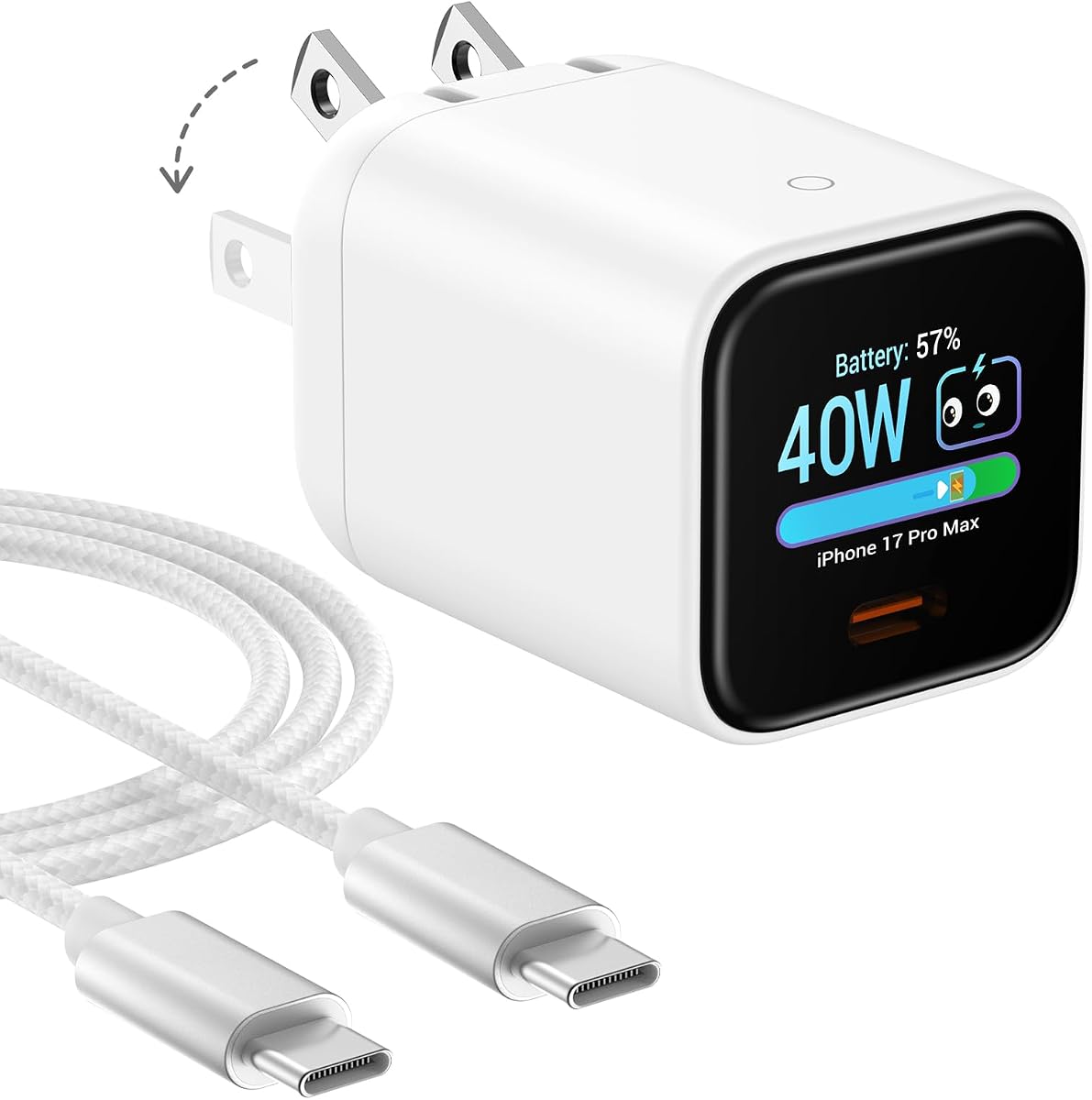
The Smart Charging Butler delivers exceptional value with AI-driven battery care and a clear display at a low price. It has a 4.5 rating from users seeking safe overnight charging without expensive features.
We may earn a commission when you buy through this link, at no additional cost to you.
Its key strength is TÜV-certified Care Mode that keeps battery temperatures up to 9°F cooler than standard chargers. The display shows device models and charging status with simple tap controls.
While 45W is not enough for high-end laptops it suits phones and tablets perfectly. The braided cable included adds durability. Single-tap switching avoids complex gestures for quick checks.
Buy this for budget-friendly safe charging of mobile devices. It extends battery lifespan and fits easily in any pocket or bag.
Intelligent monitoring adjusts speed based on battery health reducing stress during overnight charges.
The foldable prongs and lightweight build make it ideal for daily commutes or short trips.
We may earn a commission when you buy through this link, at no additional cost to you.
The Anker Prime 160W packs immense power into an AirPods-sized block with smart app connectivity. Users rate it 4.6 for its ability to handle laptops and phones simultaneously without speed loss.
We may earn a commission when you buy through this link, at no additional cost to you.
PowerIQ 5.0 ensures consistent 140W single port output even under load. The AnkerSense View app provides real-time monitoring via Bluetooth so you can track status remotely.
Unlike others this model lacks a physical display which may annoy some. The price is premium but justified for those needing portability and raw speed. It reduces desktop clutter significantly.
Perfect for travelers needing high power in minimal space. It balances performance and size better than most high-wattage competitors.
Smart distribution allows three devices to charge at full speed without manual configuration or cables.
Access custom charging modes and detailed data through the companion app on your smartphone.
We may earn a commission when you buy through this link, at no additional cost to you.
The Anker 140W 4-Port offers a crisp HD display and solid 140W power in a sleek block. It holds a 4.4 rating for users who prioritize visual clarity and multi-device flexibility.
We may earn a commission when you buy through this link, at no additional cost to you.
The high-definition color display shows temperature and status details clearly. ActiveShield 4.0 monitors temperature millions of times daily for enhanced protection. Two 140W USB-C ports support fast MacBook charging.
This unit is designed for balance between power and size. It is great for small home offices. The included cable adds value but may not meet all length needs.
Choose this for reliable home charging with excellent visibility. It is safe fast and fits easily on any desk.
ActiveShield 4.0 continuously checks temperatures to prevent overheating and protect connected gear.
Two ports support 140W output so laptops can charge at full speed independently.
We may earn a commission when you buy through this link, at no additional cost to you.
The Anker 100W 3-Port is a travel-friendly block with HD display and Low-Current Mode. It rates 4.7 for users who want a reliable compact charger for daily commute or trips.
We may earn a commission when you buy through this link, at no additional cost to you.
The display shows real-time charging status and temperature clearly. Low-Current Mode switches to 5W automatically for earbuds without damaging them. The foldable plug reduces bulk in bags.
While it lacks extra ports it focuses on stability. It sustains peak performance longer than average chargers. The design slips into pockets or coat pockets easily.
Perfect for daily users needing phone laptop and watch charging. It combines safety visibility and portability effectively.
Automatically detects low-power devices to charge safely without causing heat or damage.
Foldable plug and compact frame make it easy to carry without taking up space.
We may earn a commission when you buy through this link, at no additional cost to you.
The Anker Prime 250W is a desktop powerhouse designed for complex setups. It earns a 4.6 rating from users who need to power many high-energy devices simultaneously.
We may earn a commission when you buy through this link, at no additional cost to you.
Its smart dial allows instant adjustments to energy output. The LCD display gives clear updates on charging speed and status. It supports up to six devices at once.
This unit is strictly for home office use. Its size ensures stability but prevents travel. Wi-Fi connectivity enables advanced features through the Anker app.
Ideal for studio professionals or heavy home users. It maximizes productivity with stable high-speed charging for all your gear.
Adjust energy output immediately to ensure each device charges at its optimal speed.
Supports up to 250W total output to handle multiple laptops and accessories simultaneously.
We may earn a commission when you buy through this link, at no additional cost to you.
The MOKiN 70W is incredibly compact yet includes a touch display for monitoring. It holds a 4.4 rating from travelers seeking a balance between size and visual feedback.
We may earn a commission when you buy through this link, at no additional cost to you.
The HD display shows temperature and charging summary after disconnection. Tap to switch views or long press to rotate. Foldable prongs fit easily into backpacks.
It does not include a cable so you must buy one separately. This keeps weight low but adds cost. Power distribution is smart enough to handle laptops and phones together.
Great for backpackers needing a visual touch without bulk. It simplifies monitoring for quick power checks on the go.
After disconnecting the charger provides a summary of power used for better transparency.
Touch controls allow easy switching between status modes without physical buttons.
We may earn a commission when you buy through this link, at no additional cost to you.
The MOKiN 140W combines high power with an affordable price and includes a 140W cable. It has a 4.4 rating from users needing a complete kit without extra costs.
We may earn a commission when you buy through this link, at no additional cost to you.
Its display shows real-time status and temperature clearly. Active monitoring protects devices millions of times daily. Two high-speed ports support 140W output for fast laptop charging.
The build quality is standard but functional. It is ideal for home desks. The included cable ensures you can start using it immediately.
Select this for complete high power without buying extra cables. It offers great value for students or small offices.
Constant temperature checks protect connected devices from overheating during heavy use.
Delivers 140W to laptops to reach 50% battery in minutes rather than hours.
We may earn a commission when you buy through this link, at no additional cost to you.
The DJI Power 140W shines with its 7A digital display cable for real-time power readout. It holds a 4.9 rating for users valuing unique cable visibility and high current support.
We may earn a commission when you buy through this link, at no additional cost to you.
The digital cable shows charging status instantly while the block supports three devices at once. GaN tech ensures stable cool operation. It prioritizes power for DJI batteries but works broadly.
This charger includes a durable braided cable resistant to wear. It supports multiple protocols but excels with DJI gear. LED indicators confirm connection status clearly.
Choose this if you need high current visibility in the cable. It is great for creative pros working with drones or laptops.
The cable itself shows charging data so you see power flow without touching the block.
Automatically adjusts power to prioritize specific devices for fastest charging results.
We may earn a commission when you buy through this link, at no additional cost to you.
The Anker Nano 45W is a tiny block with smart display and TÜV-certified Care Mode. It earns a 4.7 rating for iPhone users seeking safe overnight charging.
We may earn a commission when you buy through this link, at no additional cost to you.
Care Mode lowers charging temperature by 9°F protecting long-term battery health. Display controls rotate after two seconds. Foldable prongs save space in drawers.
It lacks a touchscreen which simplifies use but limits customization. It works best with iPhone 17 and 16 series. The small size makes it easy to carry.
Ideal for iPhone owners prioritizing battery longevity. It combines safety with a compact form for any bag.
Automatically identifies supported models to adjust output for smarter safer power delivery.
TUV certification ensures lower heat during overnight charges to extend cell life.
We may earn a commission when you buy through this link, at no additional cost to you.
Selecting the right charger depends on power needs port count display type safety features size and device compatibility. This guide breaks down the most important factors.
Total output determines how much power you can deliver at once. Look for 100W or higher if you need to charge laptops. Higher counts support multiple devices without slowing down.
Choose at least 100W for laptops and lower for phones only.
More ports allow simultaneous charging of phones tablets and laptops. Check if you need USB-A for older accessories or all USB-C for speed. Distribution affects total performance.
Ensure enough ports for all daily devices without needing extra hubs.
Displays vary from basic LED to full color touch. Touch screens offer detailed data but cost more. LED indicators provide simple status without extra bulk.
Pick a display that matches how much data you need to monitor.
Look for protection against overheat overcurrent and short-circuit. ActiveShield and Care Mode reduce temperature. TÜV certification validates claims about cooling.
Safety features protect expensive devices from damage during long sessions.
Travel units must be small and light. Desktop models can be larger for stability. Foldable prongs help reduce bulk in bags.
Balance size with port count based on travel frequency.
Ensure the charger supports your laptop phone and tablet protocols. Apple and Android devices have different needs. Check for PD 3.1 for high-wattage laptops.
Match protocols to avoid slow charging or adapter requirements.
Some kits include high-speed cables while others do not. A 140W cable adds value but costs extra. Check if the block matches cable current limits.
Include a quality cable to realize full charging speed.
App connectivity or AI modes add control. Bluetooth apps allow custom settings. AI battery care extends cell life. These features increase cost but add convenience.
Use smart features if you manage many devices regularly.
Start by connecting the charger to a stable wall outlet and plugging in your devices to verify the display activates. If there is a touch interface swipe to view port details.
Keep the unit on a flat surface away from heat sources and soft materials like blankets to allow proper airflow. High-wattage loads produce more heat so ensure ventilation.
When storing fold any prongs and wrap the cable loosely to avoid internal wire damage. Clean the display with a dry cloth only to prevent scratches.
Yes because the display provides real-time data on temperature and wattage which helps optimize device health. It also reduces guesswork by showing exact power distribution across ports.
Most models have foldable prongs and compact sizes ideal for travel. Desktop units like the Anker Prime 250W are heavy and better suited for stationary office use only.
Most displays turn off automatically after inactivity to save energy. You can check the manual for auto-off settings to ensure minimal standby power usage.
Prioritize models with overheat and short-circuit protection along with temperature monitoring. TÜV certification indicates third-party testing for safety claims regarding heat management.
No because smart models include Care Mode or AI adjustments that reduce heat when batteries are full. This extends lifespan by preventing unnecessary heat stress during charging.
Yes smart units detect device needs and adjust power accordingly. Small devices like earbuds will only draw what they need without risk of overcharging.
The UGREEN Nexode Pro stands out as the top choice for high wattage and display clarity. Anker Prime leads in smart features and power density for desktop power.
Prioritize total output and port count based on your most demanding devices. Consider travel needs and display clarity for daily convenience in a home office.
Prices vary so check current listings before purchasing your ideal charger. Ensure the model fits your specific power and port requirements today.