
Acer 13-in-1 Laptop Docking Station
4.5Editor score
Triple display expansion
110W power adapter
Aluminum body design
This guide compares the top HDMI docking stations for multiscreen workstations to help you choose the best hub for productivity, charging, and display
Modern workstations demand robust connectivity to handle multiple displays and peripherals seamlessly. An HDMI docking station serves as the central hub for your laptop, enabling efficient multitasking and a clutter-free desk setup. Choosing the right model ensures stable performance and reliable power delivery for all your devices.
We evaluated ten leading HDMI docking stations based on port variety, display capabilities, charging power, and system compatibility. Our analysis focuses on real-world performance metrics and user feedback to identify the most reliable options for professionals. Each product offers unique strengths tailored to different workflow requirements and budget constraints.
Every selection in this list highlights key features like triple or quad display support and high wattage charging. You will find detailed breakdowns of specifications and practical use cases to inform your decision. Remember that product availability and pricing can change frequently so verify current details before purchasing.
4.5Editor score
4.3Editor score

4.7Editor score
The following table provides a side-by-side overview of the top HDMI docking stations evaluated in this guide. Compare key specifications like port counts, display support, and power delivery to find the best fit for your workstation needs.


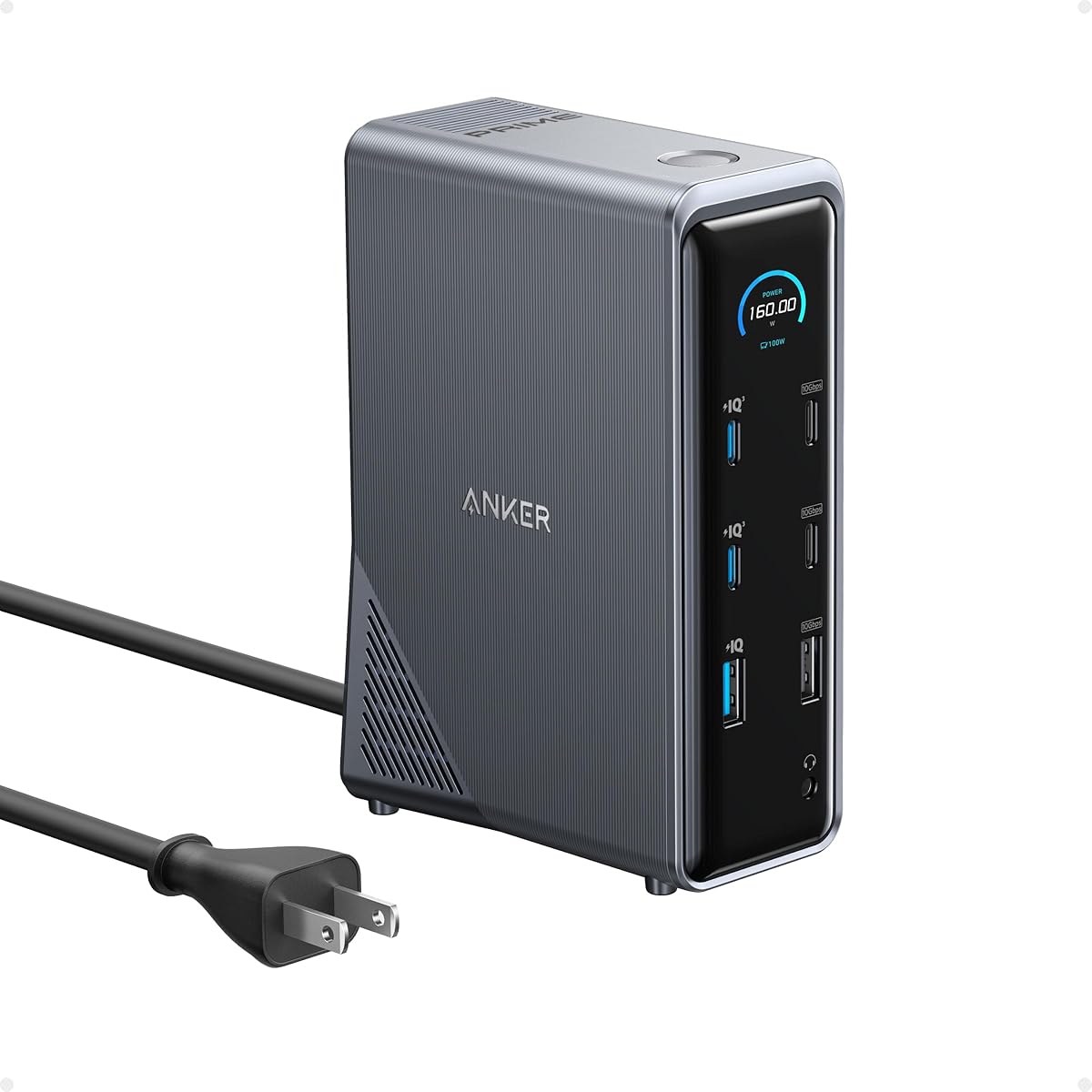
The Anker Prime Docking Station stands out as a top choice for professionals needing reliable dual display support. It boasts a robust 14-in-1 connectivity suite that handles charging and data transfer efficiently. With a total output of 160W it keeps multiple devices powered during intensive work sessions.
We may earn a commission when you buy through this link, at no additional cost to you.
This model features dual HDMI ports that support up to 2K@60Hz on compatible laptops. The 10Gbps data transfer speeds ensure quick file exchanges across connected peripherals. Its compact form factor fits neatly on desks while providing extensive connectivity options.
While the performance is impressive note that macOS users will see identical displays on both external monitors. Linux compatibility is also absent which may limit adoption in specific enterprise environments. These constraints are minor given the overall value and speed it offers.
If you need a powerful hub for a Windows or ChromeOS workstation this dock delivers exceptional results. The combination of high wattage charging and fast data speeds makes it ideal for multitaskers. It remains a solid investment for boosting productivity without cluttering your workspace.
Delivers up to 100W via USB-C ports ensuring laptops stay charged during heavy use.
Supports 10Gbps speeds for rapid file movement between devices and storage.
We may earn a commission when you buy through this link, at no additional cost to you.
This Anker model brings advanced DisplayLink technology to enable triple 4K displays simultaneously. It is designed for power users who need maximum screen real estate for multitasking. The smart display provides real-time updates on power and cooling status directly on the unit.
We may earn a commission when you buy through this link, at no additional cost to you.
With a 140W upstream port it powers the host laptop effectively while charging up to three external monitors. The included ActiveShield 3.0 protects connected devices from power surges ensuring long term reliability. A built-in fan helps maintain optimal operating temperatures under load.
Note that users must install the latest DisplayLink drivers for full functionality. Some DRM protected streaming services may show black screens due to hardware limitations. These are technical trade-offs for achieving triple extended display support on compatible systems.
For enterprise environments or heavy multitasking setups this docking station offers unmatched versatility. The combination of high wattage delivery and triple display output makes it a top premium choice. Ensure your system meets the driver requirements before purchase to avoid compatibility issues.
Supports three independent 4K screens for extreme productivity and data analysis.
Includes ActiveShield 3.0 to protect devices from voltage spikes and overheating.
We may earn a commission when you buy through this link, at no additional cost to you.
The Acer 13-in-1 docking station delivers excellent value for users needing triple display capabilities. It supports up to three external screens with a mix of HDMI and DisplayPort connections. The included 110W power adapter ensures stable charging for the host laptop under load.
We may earn a commission when you buy through this link, at no additional cost to you.
Constructed with a premium aluminum body this dock dissipates heat effectively for long use. It includes essential ports like Ethernet SD card readers and USB-A ports for connectivity. The design keeps your workspace organized by consolidating multiple cables into one connection.
Windows users can extend their display across three monitors while Mac users are limited to mirroring. The rear USB-C port supports data only without video or charging output. These limitations are balanced by the strong performance and competitive pricing.
If you are looking for a cost effective way to expand your workstation this option is ideal. The triple display support at this price point is hard to find. It serves well for budget conscious professionals who need robust connectivity without breaking the bank.
Supports three independent screens for Windows users to enhance multitasking efficiency.
Features an aluminum body that helps dissipate heat during prolonged use effectively.
We may earn a commission when you buy through this link, at no additional cost to you.
This Anker hub is designed for portability and dual display functionality. It fits easily into a laptop bag and connects two monitors for a versatile setup. The compact size does not compromise on essential features like SD card readers and Ethernet.
We may earn a commission when you buy through this link, at no additional cost to you.
It supports 4K@30Hz on dual displays which is sufficient for most office tasks. The 85W pass-through charging keeps your laptop powered while using peripherals. This model is compatible with Windows ChromeOS and Thunderbolt laptops.
The main limitation is the slightly lower power compared to larger stations. It might not charge high-end laptops at full speed under heavy loads. However for travel or lighter workloads it offers great flexibility and convenience.
Ideal for professionals who move between offices or home and need quick setup. The dual screen capability enhances productivity without adding bulk to your travel gear. It is a reliable choice for those who prioritize portability and essential connectivity.
Compact design allows for easy transport and setup in different locations daily.
Supports two 4K displays for effective multitasking in a small footprint.
We may earn a commission when you buy through this link, at no additional cost to you.
The Plugable docking station is built for enterprise environments requiring reliable connectivity. It supports triple HDMI displays making it perfect for hybrid teams and hot-desking. The device is engineered to work seamlessly across Windows macOS and ChromeOS systems.
We may earn a commission when you buy through this link, at no additional cost to you.
With a 100W Power Delivery port it ensures your host laptop stays charged during long shifts. The Gigabit Ethernet port provides stable wired network access which is crucial for secure work. This hub simplifies IT deployments with consistent performance across devices.
Users may need to install drivers for full display functionality on some systems. It is not optimized for high refresh rate gaming which limits its appeal to gamers. For professional use the reliability and support features make it a strong contender.
Choose this dock if you need enterprise grade reliability and extensive compatibility. The combination of triple display support and robust connectivity options suits large teams. It offers peace of mind with dedicated technical support for any deployment issues.
Designed for IT management with consistent performance across various corporate systems.
Enables three HDMI monitors for enhanced multitasking in professional workspaces.
We may earn a commission when you buy through this link, at no additional cost to you.
This TobenONE docking station supports four external monitors at 4K@60Hz simultaneously. It is one of the few hubs capable of driving such a massive display array. The 20-in-1 connectivity ensures you never run out of ports for peripherals.
We may earn a commission when you buy through this link, at no additional cost to you.
A 150W power adapter provides ample power for the host laptop and connected devices. The DisplayLink technology allows for seamless performance even on systems with limited native graphics. This makes it suitable for high resolution editing and complex workflows.
Installation of DisplayLink drivers is mandatory which adds a step to setup. The price point is higher reflecting the advanced capabilities and extensive port selection. It is a specialized tool for power users who need maximum visual real estate.
If you require four screens for trading or design work this dock is unmatched. The robust power delivery and wide compatibility make it a future proof investment. It transforms any laptop into a powerful desktop workstation with extensive visual capabilities.
Delivers four 4K@60Hz displays for ultimate multitasking and data visualization.
Offers 20 ports to connect every device you might need without adapters.
We may earn a commission when you buy through this link, at no additional cost to you.
The Acer 16-in-1 docking station supports three independent screens at 4K@60Hz. This capability is ideal for professionals who need high resolution extended displays. The unit includes a dedicated 130W power adapter for stable performance under load.
We may earn a commission when you buy through this link, at no additional cost to you.
It features dual HDMI and dual DP ports giving you flexibility in monitor connections. The USB-C port supports 10Gbps data transfer ensuring fast file synchronization. Built for Windows and macOS it covers a broad range of systems.
As with DisplayLink models driver installation is required for full functionality. macOS users may face some restrictions depending on their specific OS version. These factors are manageable considering the triple display performance at this price point.
Choose this model if you need high resolution triple displays without compromising on ports. The strong power delivery and variety of connections make it versatile for many setups. It is an excellent choice for expanding your workspace effectively.
Supports triple 4K@60Hz displays for crisp visuals and precise work.
Includes a 130W adapter to ensure reliable power for laptop and peripherals.
We may earn a commission when you buy through this link, at no additional cost to you.
This TobenONE hub supports four HDMI displays on Windows laptops for extensive multitasking. It is built to be compatible with a wide range of operating systems and devices. The 18-in-1 design ensures you have all the connectivity you need.
We may earn a commission when you buy through this link, at no additional cost to you.
A 120W adapter allows you to charge your laptop at up to 100W. You can also charge phones at up to 18W simultaneously via the front ports. This flexibility keeps your workspace tidy by reducing the need for separate chargers.
MacBook users should note that only three displays can be extended at once. The HDMI ports allow for versatile setup options across different monitors. Overall the performance is strong for a universal solution in mixed OS environments.
If you need a universal dock that handles multiple displays and devices this is a great option. The broad compatibility and high power delivery make it suitable for many users. It offers a balance of features and performance for various workloads.
Works with Windows macOS and ChromeOS for flexible use across devices.
Charges laptops up to 100W ensuring full speed operation during heavy tasks.
We may earn a commission when you buy through this link, at no additional cost to you.
The Dell Pro WD25 is designed for business environments requiring durable performance. It offers native support for up to four high-res displays for productivity. The unit includes a robust USB-C connector for enhanced durability in daily use.
We may earn a commission when you buy through this link, at no additional cost to you.
Power delivery reaches 100W which is sufficient for most modern laptops. The ambidextrous cable allows for flexible routing on either side of your desk. Built with recycled materials it aligns with corporate sustainability goals.
While it is optimized for Dell PCs it works well with non-Dell systems too. The focus on manageability means IT teams can deploy it easily across offices. This makes it a strategic choice for organizations with standardized hardware.
If you need a reliable business dock for a corporate setup this option is strong. The durability and sustainable design add value beyond basic connectivity. It ensures consistent performance for professionals who demand reliability in their tools.
Built for enterprise use with robust connectors for long term durability.
Uses recycled materials to reduce environmental impact during production.
We may earn a commission when you buy through this link, at no additional cost to you.
This Anker model transforms laptops into desktops with triple display support. It features a 135W power adapter to deliver 85W to the host laptop. The compact vertical design saves desk space which is useful for smaller workstations.
We may earn a commission when you buy through this link, at no additional cost to you.
It includes 10Gbps data transfer speeds and multiple USB-C and USB-A ports. You can charge your phone at 18W simultaneously with your laptop. This setup works well for extending Windows workstations efficiently.
Mac users will find that external monitors are limited to mirroring mode. The vertical orientation means it takes up some height space on your desk. These trade-offs are acceptable given the versatile features and included adapter.
Choose this hub if you want triple display support without a large footprint. The strong power delivery and variety of ports cover most daily tasks. It is a smart buy for users needing efficient workstation expansion at a value.
Vertical orientation minimizes desk footprint while supporting multiple displays.
Includes 135W adapter to power host and charge phone simultaneously.
We may earn a commission when you buy through this link, at no additional cost to you.
Selecting the right HDMI docking station depends on understanding your specific display and port needs. This guide outlines key factors to consider for making an informed decision.
Check if the dock supports dual triple or quad displays based on your workflow. Ensure it can output at least 4K resolution at 60Hz for crisp visuals. Confirm compatibility with your laptop's graphics capabilities for extended modes.
Prioritize models that offer DisplayLink technology if you need more than two screens on macOS.
Look for a docking station that provides at least 65W or 100W charging to power your laptop. Ensure the USB-C upstream port supports the required wattage for your specific device. Higher wattage ensures stable performance during heavy workloads.
Choose a model with a dedicated power adapter to guarantee consistent power to all devices.
Evaluate the number of USB-A and USB-C ports for your peripherals and storage. Ensure there are enough HDMI or DisplayPort outputs for your monitors. Check for Ethernet ports if you need wired network connectivity.
Opt for a dock that offers SD card readers if you work with media files regularly.
Verify that the dock works with your operating system whether Windows macOS or ChromeOS. Check for Thunderbolt or USB4 support to ensure maximum data transfer speeds. Avoid models that restrict functionality on specific systems.
Ensure the dock supports DP Alt Mode for seamless video output without extra drivers.
Choose docks with aluminum bodies for better heat dissipation and durability. Look for robust connectors that prevent loosening over time. Quality construction ensures long-term reliability in professional environments.
Consider compact designs if desk space is limited in your workspace.
Some models like DisplayLink hubs require driver installation for full functionality. Be prepared to install and maintain software for triple or quad display setups. Native hubs often offer plug-and-play convenience without extra software.
Check if your system meets the latest OS requirements for driver support.
Set a budget based on the features you need such as triple displays or high wattage. Higher priced models usually offer better build quality and performance. Weigh the cost against the productivity gains from a better dock.
Look for models that offer good value by balancing features and cost.
Connect the docking station to your laptop using the included USB-C cable. Ensure the power adapter is plugged in before connecting other peripherals for stability.
Install any required drivers for triple or quad display support if your model needs them. Restart your laptop after installation to ensure proper device recognition.
Keep your dock in a well ventilated area to prevent overheating during long sessions. Clean the ports gently with compressed air to avoid dust buildup over time.
Yes but macOS often limits external displays to mirroring unless you use DisplayLink technology. For extended screens on Mac check for docks specifically supporting DisplayLink drivers.
You should use the included high speed USB-C cable to ensure data transfer and charging work properly. Using generic cables may result in slower speeds or charging issues.
Check that your laptop supports DP Alt Mode and that the cable is securely connected. Install necessary drivers for DisplayLink docks to enable full functionality.
This depends on the model with some supporting two and others supporting three or four. Check the specs for specific limits on your laptop model.
DisplayLink uses compression to allow more than two screens on laptops without high-end graphics. It requires installing a driver but expands multi-monitor capabilities.
Yes it ensures your laptop charges while connected to the dock. Look for 65W or higher to keep your device powered during work.
Many docks do not support Linux. Check compatibility lists before purchasing to avoid issues.
Use compressed air gently to remove dust. Avoid using water or liquids to clean any part of the dock.
The Anker Prime and Acer models stand out for their balance of power and port options. They suit most users needing reliable dual or triple screen setups.
Prioritize high wattage charging and DisplayLink support if you require extended displays across all systems. These features ensure stability and productivity in daily work.
Verify current compatibility and pricing before purchase as updates may affect performance. Choosing the right dock significantly enhances your multitasking workflow.