
Redragon K617 HE
4.3Editor score
Hall Effect magnetic switches
8000Hz hyper polling
60% compact layout
Find the best keyboard for CS2 with this expert guide comparing top models featuring rapid trigger, hall effect switches, and adjustable actuation for
Choosing the right keyboard for CS2 is essential for competitive players seeking precision and speed. The right input device can significantly impact your reaction time and movement control during intense matches.
We have compared ten top models featuring advanced technologies like hall effect switches and rapid trigger capabilities. Our analysis focuses on performance, build quality, and features that matter most to FPS gamers.
Each pick highlights specific strengths tailored to different playstyles and budgets. Keep in mind that product availability and pricing may vary over time, so check current listings before making a final decision.
4.3Editor score
4.4Editor score
4.5Editor score
This side-by-side comparison details the key specifications and unique features of each selected keyboard to help you find the perfect match for your CS2 setup.



The Redragon K617 HE delivers impressive performance for players seeking an affordable entry into hall effect technology. Its rapid trigger capability ensures that key resets happen instantly, which is crucial for quick counter-strafing in CS2.
We may earn a commission when you buy through this link, at no additional cost to you.
With an 8000Hz polling rate and software-adjustable actuation points, this keyboard allows you to fine-tune sensitivity to your specific playstyle. The 60% layout maximizes desk space for wide mouse movements without sacrificing essential gaming keys.
While the build quality is basic compared to premium models, it holds up well under intense gameplay. The main trade-off is the lack of media keys, but the software control helps mitigate this limitation during long sessions.
This model is ideal for budget-conscious gamers who prioritize speed over luxury features. If you want rapid trigger functionality without breaking the bank, the K617 HE is a strong recommendation.
The hall effect switches detect keypresses without physical contact, allowing for consistent inputs that are essential for maintaining accuracy during fast-paced engagements.
You can save multiple profiles and adjust actuation points between 0.1mm and 3.4mm through the driver, ensuring your setup remains consistent across different games and maps.
We may earn a commission when you buy through this link, at no additional cost to you.
The Redragon K686 HE brings the benefits of hall effect technology to a tenkeyless format that balances size and functionality. Its next-gen UltraMag switches provide a distinct tactile experience that feels smooth and responsive during gameplay.
We may earn a commission when you buy through this link, at no additional cost to you.
The dual-module floating structure works with noise dampening layers to produce a soft, Hi-Fi bounce rather than a harsh clack. This makes it comfortable for long sessions while maintaining the speed needed for competitive play.
While it offers similar technical specs to other models, the inclusion of a dedicated control knob simplifies media management significantly. The slightly higher price reflects the added convenience and improved acoustics.
Gamers who prefer a TKL layout over a compact 60% will find this model appealing. It is a solid choice for those who want a reliable keyboard with excellent sound dampening.
The anti-wobble switch design combined with internal dampening ensures that keystrokes sound consistent and pleasant without being distracting to teammates on voice chat.
Adjusting volume or playback brightness is easier with a single knob, removing the need to memorize complex key combinations during intense matches.
We may earn a commission when you buy through this link, at no additional cost to you.
The Redragon K673 HE offers a full-sized layout for those who need numpad functionality alongside competitive gaming features. Despite the larger size, it maintains the hall effect technology that defines the series.
We may earn a commission when you buy through this link, at no additional cost to you.
Like its siblings, it features a dual-module floating structure that ensures a quiet and smooth typing experience. The software allows for precise tuning of actuation points to match your specific needs.
The main drawback is the physical size, which may limit mouse movement space on smaller desks. However, for players who need a full keyboard for work or gaming, it remains a practical option.
This model is best suited for users who prioritize desk space efficiency less than having access to a number pad. It brings reliable rapid trigger performance to a standard layout.
The full layout supports both work tasks and gaming sessions seamlessly, allowing you to switch roles without changing keyboards.
Calibrating magnetic switches via the driver ensures that your settings stay consistent, which is vital for muscle memory during ranked matches.
We may earn a commission when you buy through this link, at no additional cost to you.
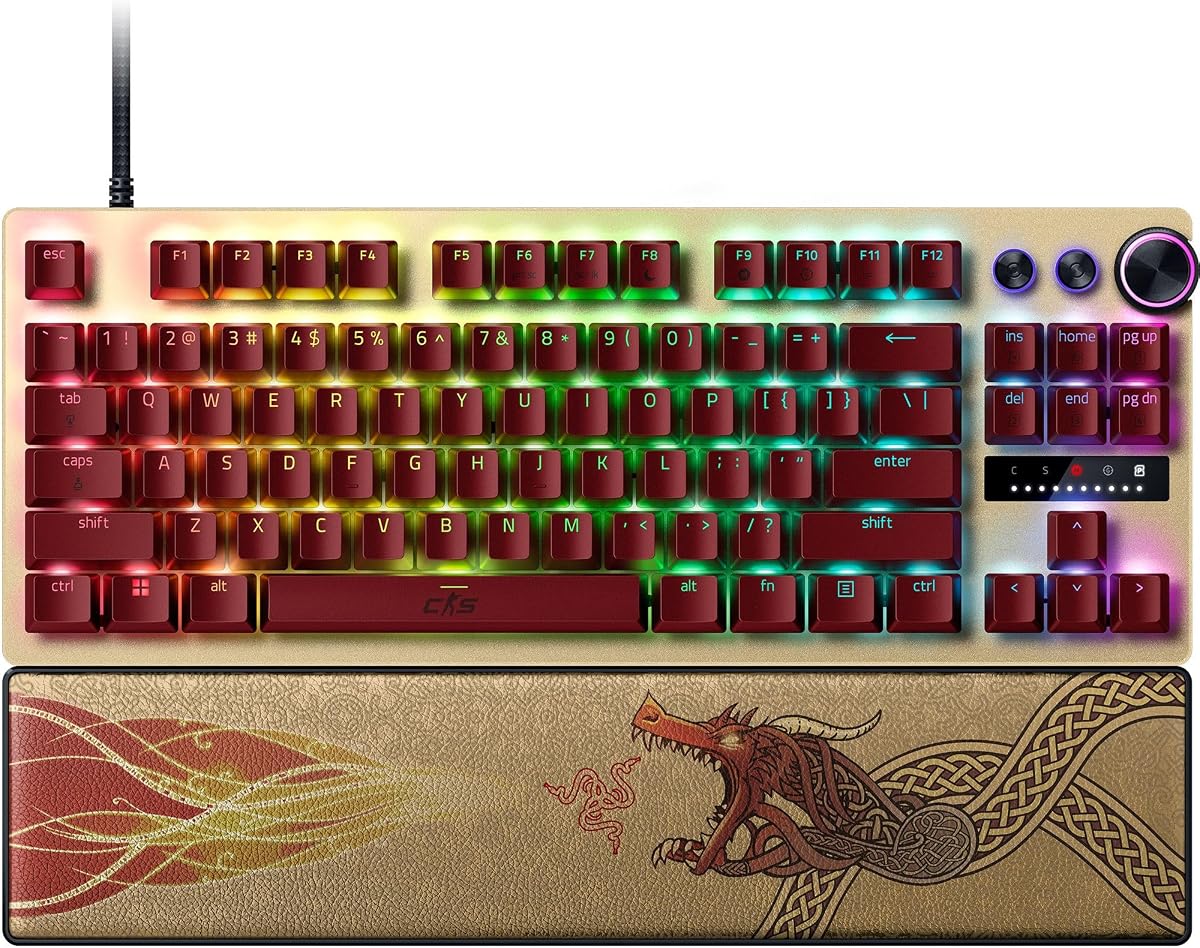
The Razer Huntsman V3 Pro TKL CS2 Edition is engineered specifically for elite competitive play. It features Snap Tap mode, which prioritizes the latest input between two keys without needing to release the previous one.
We may earn a commission when you buy through this link, at no additional cost to you.
This functionality provides near-instant directional changes in FPS games like CS2. Combined with analog optical switches and onboard LED adjustments, it offers a level of control that matches professional tournament standards.
The textured double-shot PBT keycaps resist wear and shine, ensuring durability over extended sessions. While the price is high, the specialized features justify the cost for serious players seeking every possible advantage.
This keyboard is the top choice for those who demand the highest level of performance. It is designed for players who want to push their movement and aiming to the limit.
Prioritizing the latest input allows for faster counter-strafing and movement transitions, giving you a tangible edge in fast-paced engagements.
You can make precise adjustments to actuation height without software, ensuring your settings are saved directly to the keyboard hardware.
We may earn a commission when you buy through this link, at no additional cost to you.
The Corsair Clipper PRO MINI is built for intense gameplay with IP57 durability that protects against spills and dust. Its MGX hyperdrive switches offer zero drift and reliable performance during critical moments.
We may earn a commission when you buy through this link, at no additional cost to you.
FlashTap SOCD technology enables cleaner directional inputs and sharper counter-strafing. The compact layout is specifically designed to maximize mouse space for low-sensitivity aiming setups.
While the lack of a numpad might be a drawback for some, the dedicated gaming features make up for it. The white design is stylish but requires more frequent cleaning to maintain appearance.
This model is best for players who value durability and compactness equally. It provides a clean and efficient setup for competitive FPS gaming.
Built to handle intense gameplay with water resistance, ensuring that accidental spills do not end your gaming session prematurely.
FlashTap SOCD ensures that your directional inputs are processed consistently, helping you maintain precision when moving quickly across the map.
We may earn a commission when you buy through this link, at no additional cost to you.
The Redragon K745 HE focuses on delivering a high-performance gaming experience with a strong emphasis on aesthetics and build comfort. Its 5-layer noise dampening creates a soft and silky switch feel.
We may earn a commission when you buy through this link, at no additional cost to you.
With an 8000Hz hyper-polling rate, inputs are transmitted faster than standard keyboards. This ensures that your movements and shots register exactly when needed during competitive matches.
While it features a web-based driver for tuning, some users prefer dedicated software. The lower rating suggests some users may have experienced inconsistency, but the core tech is solid.
This model is suitable for gamers who want a TKL keyboard with vibrant lighting. It offers a balance of performance and style for desktop setups.
Adjustable brightness and lighting modes bring your desk to life, allowing you to create an immersive environment day or night.
The independent switch-plate design paired with dampening gives a soft bounce instead of a harsh clack, reducing finger fatigue.
We may earn a commission when you buy through this link, at no additional cost to you.
The Keychron C0 HE is designed for players who want a specialized tool for high-level FPS gameplay. Its one-handed layout keeps essential commands within reach without cluttering your desk.
We may earn a commission when you buy through this link, at no additional cost to you.
With an 8K polling rate and rapid trigger switches, it ensures ultra-low latency and instant key reset. This is particularly useful for executing complex commands or macro workflows efficiently.
The web-based configurator supports both Windows and macOS, making it ideal for multi-system setups. While it lacks a standard layout, it excels as a secondary device for MMO or tactical shooters.
This keypad is best for creators or power users who need streamlined shortcuts. It serves as an excellent companion for dedicated gaming mice.
Trigger OBS scenes or manage push-to-talk directly from the keypad, freeing up your main keyboard for critical gaming inputs during streams.
Fully compatible with Windows and macOS, ensuring that your settings remain consistent regardless of the operating system you use.
We may earn a commission when you buy through this link, at no additional cost to you.
This renewed version of the Huntsman V3 Pro TKL offers high-end features at a more accessible price point. It retains the analog optical switches and Snap Tap mode that define the original model.
We may earn a commission when you buy through this link, at no additional cost to you.
The white finish adds a clean aesthetic, and the magnetic leatherette wrist rest provides ergonomic support. However, buying renewed means accepting some risk regarding cosmetic condition.
While performance remains strong, users should expect potential minor imperfections. It is a smart choice for budget-conscious gamers who still want top-tier performance technology.
Consider this option if you are comfortable with refurbished electronics. You get premium capabilities without the full retail investment.
Opting for renewed allows you to access professional-grade features while keeping your overall hardware expenditure manageable.
Despite being renewed, you still get the adjustable actuation and digital dial that make this keyboard stand out for competitive play.
We may earn a commission when you buy through this link, at no additional cost to you.
The Corsair K55 RGB PRO provides a reliable membrane option for casual players. It offers dynamic RGB backlighting and six dedicated macro keys for streamlined gameplay.
We may earn a commission when you buy through this link, at no additional cost to you.
With IP42 protection and a detachable palm rest, it is built for comfort and durability. Dedicated media keys allow you to control volume without interrupting your game.
While it lacks the rapid trigger tech of other models, it remains a solid choice for budget setups. The iCUE software adds customization depth not usually found at this price.
This keyboard is best for entry-level users or those who need a secondary device. It offers comfort and convenience without the cost of mechanical switches.
A soft rubber palm rest reduces stress on your hands, allowing you to play longer in comfort during extended gaming sessions.
Activate functions or shortcuts in just one stroke with six dedicated macro keys, easily set up through CORSAIR iCUE software.
We may earn a commission when you buy through this link, at no additional cost to you.
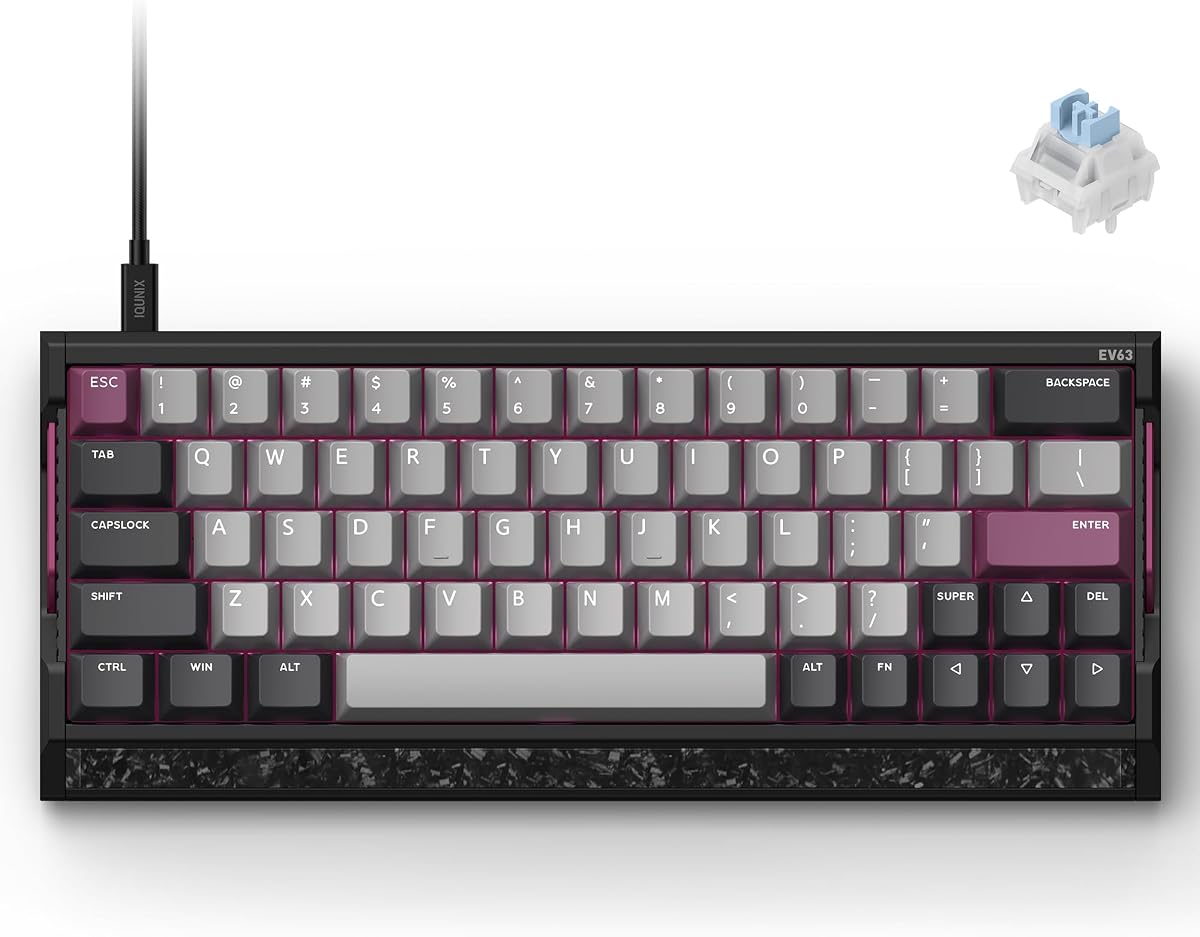
The IQUNIX EV63 combines premium materials with high-end gaming performance. Its aluminum chassis and forged carbon plate provide a solid and stable base that reduces vibration.
We may earn a commission when you buy through this link, at no additional cost to you.
Engineered for FPS play, the M.A.T. 2.0 algorithm reduces missed inputs and sticky key behavior. This ensures cleaner stops and counter-strafes which are vital in CS2.
The compact layout saves desk space but may require an adjustment period for full-size users. However, the driver offers pro-tuned presets to help you find the optimal setting quickly.
This is a top-tier choice for players who value build quality as much as speed. If you want a custom-like feel without the modding, this model delivers.
The aluminum chassis reduces unwanted desk movement and case vibration, giving gamers a solid, premium feel for intense gaming.
Real-time checks help maintain consistent magnetic sensing with fewer missed inputs, ensuring your movements are always recognized.
We may earn a commission when you buy through this link, at no additional cost to you.
Selecting the right keyboard involves evaluating several technical factors that directly impact your performance and comfort.
Hall effect and optical switches are preferred for CS2 due to their rapid trigger capabilities which allow keys to reset instantly. This technology eliminates the physical contact needed in mechanical switches, reducing wear and improving response times.
Look for switches that offer adjustable actuation points to customize sensitivity based on your playstyle.
A high polling rate ensures that your inputs are registered by the computer more frequently. For competitive gaming, an 8000Hz polling rate provides near-instant input registration which can shave milliseconds off your reaction time.
Choose a keyboard that supports high polling rates to ensure smoother and more responsive gameplay.
The layout of the keyboard determines how much desk space you have for your mouse. A 60% layout maximizes mouse space for low-sensitivity aiming, while a TKL layout offers a balance of size and key access.
Consider your mouse usage style when deciding between compact and full-sized options.
High-quality materials such as aluminum cases or PBT keycaps enhance the longevity of the keyboard. Durability is crucial for keyboards that will see daily use and intense gameplay.
Opt for models with IP ratings or reinforced casings to protect against spills and wear.
Software that allows for on-the-fly adjustments to actuation height or sensitivity is a valuable feature for serious gamers. Some models offer onboard storage which removes the need for constant driver reliance.
Check if the keyboard supports web-based configurators or dedicated desktop drivers for easy tuning.
Noise dampening layers inside the keyboard case reduce the harshness of keystrokes. A quieter keyboard is less distracting to teammates and provides a more comfortable experience over long sessions.
Look for features like double dampening or silicone gaskets to minimize acoustic noise.
An ergonomic design including wrist rests or adjustable feet can prevent strain during extended play. Comfort is just as important as speed when maintaining peak performance.
Prioritize keyboards that include wrist support or modular options for better posture.
A wired connection ensures the lowest latency and most stable input signal compared to wireless options. While wireless has improved, wired remains the standard for competitive FPS gaming.
Ensure your chosen keyboard has a reliable braided cable and standard USB connectivity.
Begin by installing the recommended driver or software to access advanced features like actuation tuning and rapid trigger settings. This ensures the keyboard performs at its highest potential immediately.
Keep the keyboard clean by using compressed air to remove dust from keycaps and switches. For spill-resistant models, wipe down the surface with a damp cloth and allow it to dry fully before use.
Regularly update your keyboard firmware to maintain compatibility with games and operating systems. Check the manufacturer website or use the onboard controls for updates to avoid input lag or bugs.
Rapid trigger allows keys to reset instantly when lifted rather than returning to a fixed base point. This enables faster counter-strafing and directional changes which are essential for movement in CS2.
Both offer speed and durability but hall effect switches use magnetic sensing for potentially smoother and longer-lasting performance. Optical switches are also fast and reliable depending on the specific brand quality.
Not necessarily as a 60% layout offers more mouse space while TKL provides more keys. Choose based on your available desk space and comfort preference.
Most modern hall effect keyboards allow adjustments through software or onboard controls. You can typically change the depth to which a key must be pressed to register an input.
Many models support both but check compatibility lists for specific features like software drivers. Some web-based configurators work across platforms without installation.
Membrane keyboards generally lack the speed and precision of hall effect switches. For competitive play, mechanical or hall effect options are recommended for better response times.
PBT keycaps are more durable and resist shine and wear better than ABS keycaps. They provide a textured feel that can improve grip during intense gaming sessions.
We have reviewed ten distinct models ranging from budget-friendly options to premium elite setups. Each keyboard offers unique strengths such as rapid trigger speed and durable build quality.
Prioritize hall effect technology and high polling rates if performance is your main goal. Also consider ergonomics and form factor to ensure you can maintain comfort during long matches.
Prices and availability fluctuate frequently so verify current listings before purchasing. Choosing the right tool can significantly elevate your competitive edge in CS2.