
YBING Keyboard Case for Samsung Galaxy Tab A11 Plus & Galaxy Tab A9 Plus
4.5Editor score
7-color rainbow backlight
360-degree rotation
Affordable price point
Discover the top 10 keyboards for Samsung A11 Tablet comparing features like battery life trackpads and compatibility to help you choose the perfect typing
Transforming your tablet into a productivity powerhouse starts with selecting the right keyboard accessory. A high quality keyboard case offers protection, portability, and a laptop like typing experience tailored for your device.
We compared ten top rated keyboard cases based on compatibility, build quality, battery life, and additional features like trackpads or wireless mice. Our analysis ensures you find the perfect match for your workflow needs.
Each pick highlights specific strengths such as detachable designs or backlight options. Keep in mind that product availability and pricing can fluctuate over time so verify details before purchasing your ideal accessory today.
4.5Editor score

4.3Editor score

4.6Editor score
This side-by-side comparison highlights key specifications across all ten selected keyboard cases to help you quickly identify which model aligns best with your specific usage preferences and budget requirements.


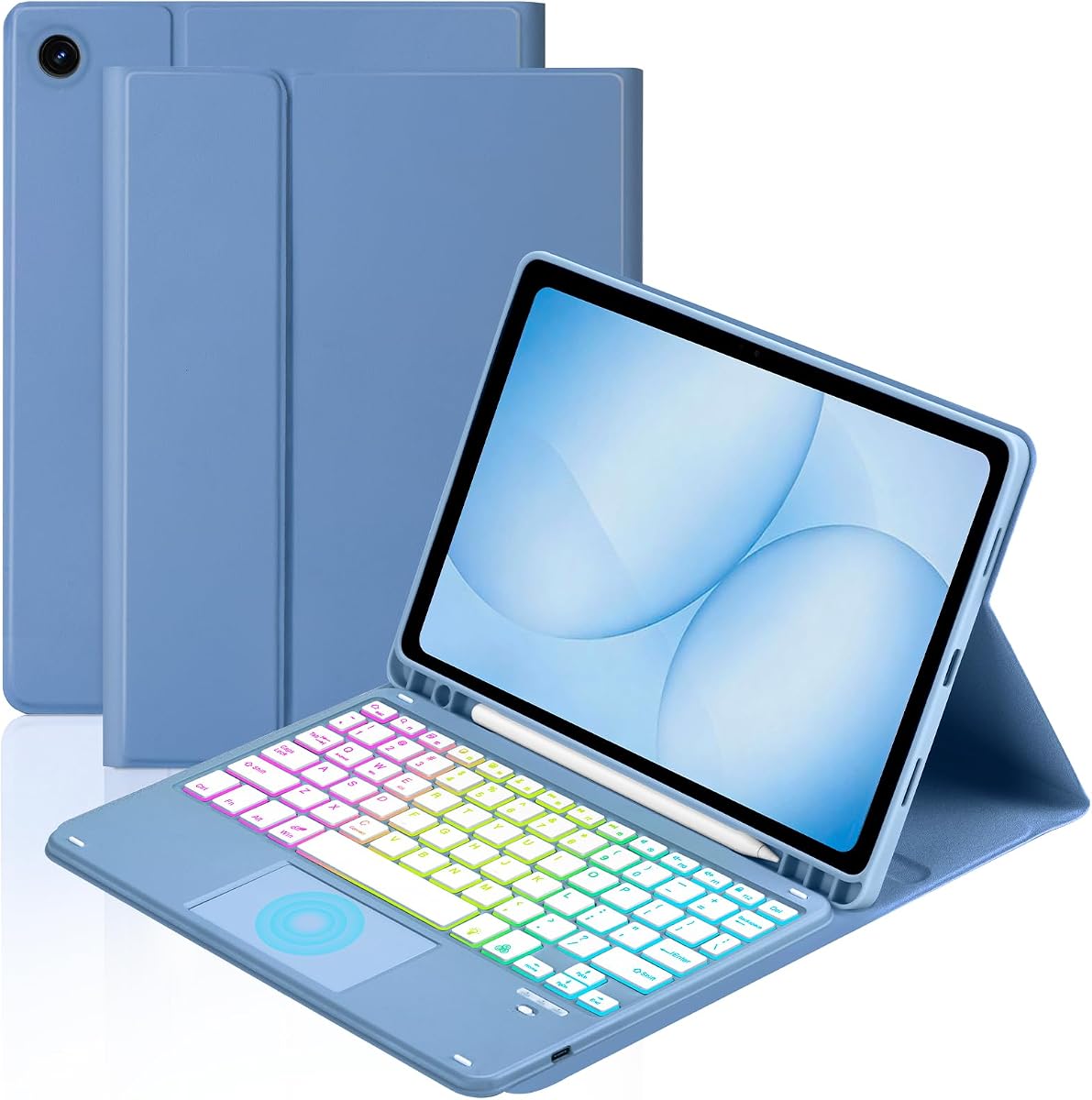

The Dexnor keyboard case stands out as the top choice for users seeking a complete laptop transformation without added bulk. With a 4.3 star rating and features like a multi-touch trackpad, it delivers a seamless typing experience.
We may earn a commission when you buy through this link, at no additional cost to you.
Its ultra-light design weighing just 1.36lbs makes it ideal for commuters who need to carry their device everywhere. The strong magnetic support ensures the tablet stays securely in place while you work or browse on any surface.
While it lacks a floating cantilever design which means the screen sits on the base, the ergonomic 120-degree angle still provides comfortable viewing. The trackpad supports gestures for efficient navigation without touching the screen directly.
This case is perfect for professionals and students who prioritize portability and productivity. If you need a reliable keyboard with trackpad capabilities for your Samsung A11 tablet, this model offers exceptional value and functionality.
The built-in multi-touch trackpad supports gestures for scrolling and multitasking, reducing the need to constantly reach for the screen.
With up to 720 hours of standby time, this keyboard ensures you remain productive even during extended trips without frequent recharging.
We may earn a commission when you buy through this link, at no additional cost to you.
The TUNKARMOR case offers a practical solution with its detachable magnetic keyboard design. Rated 4.3 stars, it allows you to separate the keyboard for easier handling and storage when not typing.
We may earn a commission when you buy through this link, at no additional cost to you.
Its adjustable viewing angles with anti-slip slots let you customize your setup for writing or reading. The honeycomb grid pattern in the inner layer provides cushioning that protects against overheating and physical impacts.
The auto sleep/wake function helps preserve tablet battery life by detecting when the lid is opened or closed. This energy-saving feature ensures your device is ready instantly without manual intervention.
Ideal for users who need versatility and protection, this case balances function and durability. If you value the freedom to detach the keyboard and need reliable protection, the TUNKARMOR is a solid choice.
The magnetic keyboard can be detached for a cleaner look or when you prefer using the tablet as a standalone screen.
Honeycomb cushioning adds extra durability and heat dissipation, extending the lifespan of your tablet during heavy use.
We may earn a commission when you buy through this link, at no additional cost to you.
This keyboard case distinguishes itself by including both a wireless mouse and a built-in trackpad. With a 4.4 rating, it offers a complete desktop replacement setup for your Samsung A11 tablet.
We may earn a commission when you buy through this link, at no additional cost to you.
The 7-color rainbow backlight adds a fun and functional touch for low-light environments. Multi-touch gestures on the trackpad allow for efficient navigation and editing tasks without touching the display.
You can switch between constant on, breathing, and off modes to suit your preference. The inclusion of a mouse makes it especially suitable for graphic work or detailed spreadsheet management.
If you require maximum control and precision, this all-in-one package delivers. Whether you are designing or organizing data, the added mouse enhances the productivity potential of your tablet setup.
With both a mouse and trackpad, this setup provides a full desktop experience for complex tasks like editing or multitasking.
Adjustable rainbow backlighting offers a stylish way to type in dim conditions while keeping the keyboard visible.
We may earn a commission when you buy through this link, at no additional cost to you.
The Soke Keyboard Case is a top contender with a 4.6 rating and solid features. It offers a lightweight solution with essential functions like auto sleep/wake and multi-system compatibility.
We may earn a commission when you buy through this link, at no additional cost to you.
Its 7-color backlight ensures visibility in dark settings and adds style. The magnetic stripe design allows the tablet to wake up instantly when opened and sleep when closed to save battery.
While it lacks a trackpad, the keyboard supports iOS, Android, and Windows systems for versatile use. The S Pen holder keeps your stylus secure and ready for quick notes or drawings.
This case is ideal for users who prioritize simplicity and ease of use. If you need a reliable keyboard without extra bulk, the Soke provides excellent value and performance.
Support for multiple operating systems ensures the keyboard works seamlessly across various devices you might use daily.
Quickly switch between 7 colors to match your mood or environment while typing comfortably in any lighting.
We may earn a commission when you buy through this link, at no additional cost to you.
The YBING Keyboard Case offers exceptional value with a 4.5 rating. It features a detachable keyboard and 360-degree rotation for maximum flexibility at a budget-friendly price point.
We may earn a commission when you buy through this link, at no additional cost to you.
Its rainbow backlight modes enhance the typing experience in low light. The strong magnetic adsorption prevents the keyboard from moving, ensuring stability during use on various surfaces.
The case includes 3 anti-slip grooves to adjust angles for comfortable reading or typing. A built-in pencil holder keeps your stylus secure and accessible when needed for creative tasks.
This option is perfect for students or casual users on a budget. If you need a reliable and affordable case with versatile viewing angles, the YBING delivers solid performance and protection.
Rotate the cover fully to switch between portrait and landscape modes effortlessly for any viewing preference.
Get essential typing features and protection without breaking the bank, ideal for users needing a basic setup.
We may earn a commission when you buy through this link, at no additional cost to you.
The Harvopu case provides desktop-grade accuracy with an included 3-level DPI wireless mouse. Rated 4.3 stars, it supports precision work like graphic editing and detailed navigation effortlessly.
We may earn a commission when you buy through this link, at no additional cost to you.
Its stain-resistant case repels spills and keeps the tablet clean during daily use. The high-endurance battery allows up to 180 hours of use on a single charge for months of productivity.
The detachable keyboard features vibrant color backlight modes for style and visibility. Full cutouts ensure complete access to all tablet functions while maintaining secure protection.
This model is best for professionals needing precise control. If you value accuracy and durability alongside a long-lasting power supply, the Harvopu offers a robust and reliable solution.
A single charge provides enough power for extended periods, ensuring you stay connected and productive without interruption.
Switch DPI levels instantly to match your task, whether for browsing fast or editing fine details on screen.
We may earn a commission when you buy through this link, at no additional cost to you.
The TiMOVO case is designed for security with an anti-slide feature that protects against accidental drops. With a 4.4 rating, it combines durable protection with functional features like a detachable keyboard.
We may earn a commission when you buy through this link, at no additional cost to you.
Its battery supports up to 90 hours of work and 90 days standby for long-term use. The 7-color backlight makes typing enjoyable even in dark environments by adding vibrant color choices.
The keyboard enters hibernation after inactivity to save power efficiently. Three adjustable angles allow you to find a comfortable position for typing or reading on different surfaces.
This case suits users prioritizing protection and battery efficiency. If you want a secure and reliable accessory that lasts, the TiMOVO is an excellent choice for daily reliability.
Withstand battery lasting up to 90 days, you won't need to recharge frequently even if usage is sporadic.
The anti-slide design ensures your tablet stays put and safe from accidental slips that could cause damage.
We may earn a commission when you buy through this link, at no additional cost to you.
The MePadKey Touchpad Keyboard features a smart touchpad supporting multi-touch gestures for efficient navigation. Rated 4.2 stars, it includes a detachable keyboard and rainbow backlight for style.
We may earn a commission when you buy through this link, at no additional cost to you.
Its touchpad supports up to 4-finger gestures for screenshots and app switching. This enhances workflow speed and efficiency for users who prefer touch-based control on a physical keyboard.
The keyboard supports rainbow and breathing light modes to suit different lighting needs. Magnetic adsorption keeps the keyboard secure while allowing easy removal for portability.
Ideal for users who rely on gestures for multitasking, this case offers a modern interface. If you value touchpad navigation over a mouse, the MePadKey provides the tools you need.
Use 4-finger gestures to take screenshots or switch apps quickly, streamlining your workflow without touching the screen.
Vibrant backlight modes make typing in low light easy and add a visually appealing element to your setup.
We may earn a commission when you buy through this link, at no additional cost to you.
The MePadKey Rotation case offers a 360-degree rotating cover for ultimate flexibility. Rated 4.3 stars, it includes a touchpad, pen holder, and multi-function shortcut keys for efficiency.
We may earn a commission when you buy through this link, at no additional cost to you.
Its touchpad supports gestures for easy navigation. The built-in pen holder ensures your stylus is always within reach for note-taking or drawing without searching around.
Shortcut keys allow system switching between iOS Windows and Android for versatile use. This makes the case adaptable across different devices or platforms seamlessly.
This case is ideal for flexible users needing diverse features. If you need a rotating case with gesture support and a pen holder, the MePadKey delivers comprehensive functionality.
The integrated pen holder keeps your stylus secure and accessible for quick sketches or notes whenever needed.
Rotate the cover to any angle to find the most comfortable position for your specific use case.
We may earn a commission when you buy through this link, at no additional cost to you.
The Supveco Keyboard Case sets the standard with premium honeycomb grid cushioning for enhanced protection. With a 4.6 rating, it delivers a secure and durable solution for your device.
We may earn a commission when you buy through this link, at no additional cost to you.
Its auto sleep/wake function preserves battery life by managing power states automatically. The backlit keys make typing easy in the dark with a variety of color options for style.
The detachable magnetic design allows easy repositioning or removal as needed. Compatibility with iOS, Windows, and Android ensures seamless performance across multiple operating systems effortlessly.
This case is ideal for premium users seeking top-tier features. If you value protection and advanced features, the Supveco offers a superior typing and safety experience.
Honeycomb cushioning reduces overheating and impact risks, extending the lifespan of your tablet significantly.
Automatic sleep/wake detects lid usage to keep the tablet awake when open and asleep when closed efficiently.
We may earn a commission when you buy through this link, at no additional cost to you.
Selecting the right keyboard requires understanding your unique needs. This guide covers essential factors to consider before making a purchase for your Samsung A11 tablet.
Ensure the keyboard case supports your exact model number like SM-X230 or SM-X210. Incorrect compatibility can lead to poor fit or missing cutouts for ports and buttons.
Always verify your tablet model in settings before purchasing to avoid returning mismatched accessories that fail to fit properly.
Look for responsive scissor-switch keys and ergonomic layouts that reduce finger fatigue during long typing sessions. A comfortable typing experience is crucial for productivity.
Prioritize models with full key travel and spacing that feel similar to a standard laptop for better accuracy and comfort.
Consider rechargeable options with at least 80 hours of life to ensure you can work for days without interruption. Long battery life reduces the hassle of frequent charging.
Check for auto sleep features that help extend power when the keyboard is not in use throughout the day.
Backlit keyboards enhance usability in low-light environments such as dark rooms or night flights. Features like adjustable brightness add significant value for varied lighting.
Choose models with color options or simple modes if you plan to type in dim conditions regularly.
Decide if you need a built-in trackpad or a separate wireless mouse. Trackpads save space while mice offer higher precision for detailed graphic work.
Select the option that aligns with your workflow needs whether you prefer touch gestures or traditional pointing devices.
Evaluate the case material and cushioning to ensure it protects against drops and scratches. A sturdy case extends the life of your expensive tablet significantly.
Look for features like shock-absorbing corners or honeycomb designs that provide extra durability.
Consider the weight and bulk of the case. A lighter design is essential for commuters who carry their device daily to work or school.
Detachable keyboards allow you to reduce weight when you do not need typing functionality at that moment.
Ensure the keyboard supports your operating system like Android iOS or Windows. Shortcut keys may vary so verify system switching capabilities.
Multi-system support offers flexibility if you use multiple devices and want a consistent typing experience across them.
Connect the keyboard to your tablet by ensuring Bluetooth is enabled on both devices. Follow the pairing instructions provided in the manual to establish a stable connection.
Clean the keyboard gently with a soft dry cloth to remove dust and debris. Avoid using harsh chemicals that could damage the keys or protective coating.
Charge the keyboard regularly to maintain optimal battery performance. Use the included cable and avoid leaving it plugged in for excessive periods to prevent battery wear.
Many models include auto sleep/wake features that detect when the case is opened or closed. This helps preserve your tablet's battery life by putting it to sleep automatically.
Several keyboards support Android iOS and Windows systems allowing you to switch layouts easily. Always check specific compatibility before purchasing for your primary device.
Most magnetic keyboards are detachable so you can use them separately from the protective case. This offers flexibility for different usage scenarios and easier storage.
Always check the product description for compatible model numbers like SM-X230. Verify your exact tablet settings before buying to ensure a perfect fit.
Most keyboard cases do not include a stylus but often provide a dedicated holder for one. You will need to purchase a separate pen if needed.
Battery life varies by model but many offer 80 hours or more of use per charge. Some even provide standby times exceeding 90 days for extended intervals.
Try turning Bluetooth off and on again on your tablet and re-pair the device. Ensure the keyboard is charged and not in deep sleep mode.
While cases may be resistant to light splashes most keyboards are not fully waterproof. Avoid exposing the keyboard to liquids directly to prevent damage.
We have reviewed the top 10 keyboard cases including premium options like Supveco and budget picks like YBING. Each offers unique benefits whether you need a trackpad mouse or simple typing.
Focus on your primary use case such as portability or durability to find the right match. Features like backlight and battery life greatly impact daily satisfaction with the accessory.
Always verify your model number before purchasing to ensure compatibility. Prices and availability may change so check current offers before finalizing your order today.