
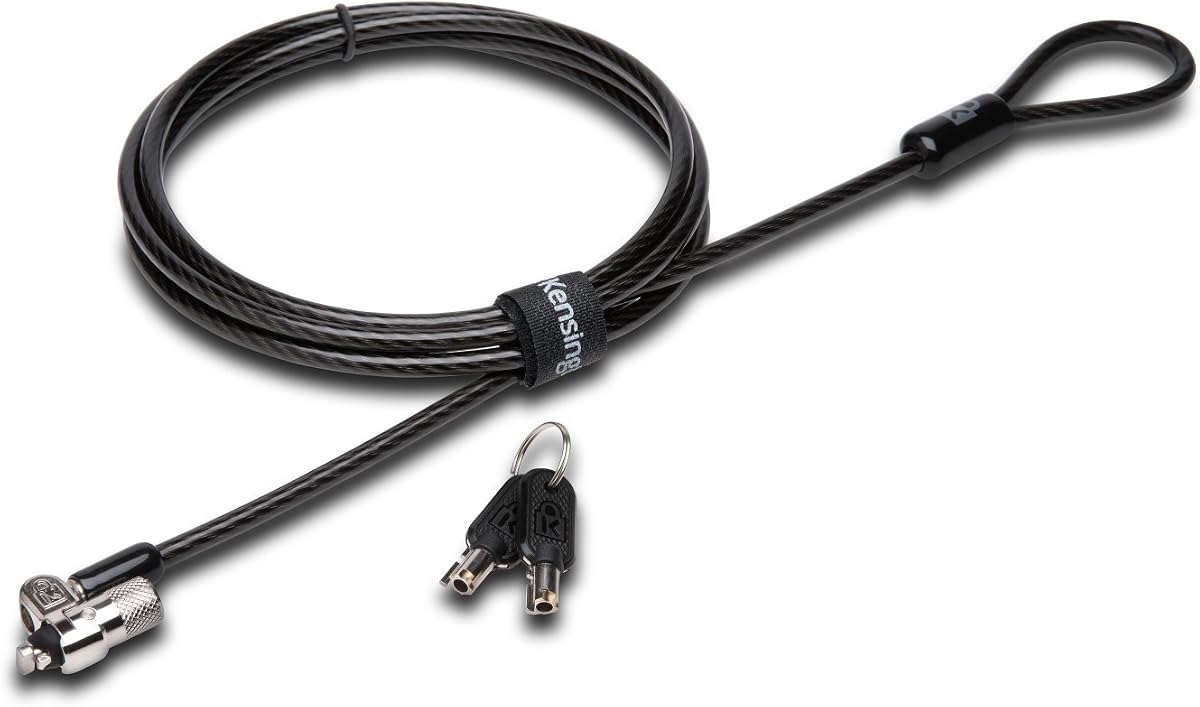
Kensington Nano Combination Lock
4.3Editor score
Slim lockhead for thin laptops
5-foot carbon steel cable
Affordable price point
This guide compares the top laptop lock cables for security, durability, and compatibility to help you choose the right anti-theft solution for your devices.
Protecting your valuable electronics from theft is essential in public spaces. A reliable laptop lock cable provides a physical barrier that deters opportunistic thieves and keeps your device secure at desks or tables.
We evaluated ten top-rated models based on build quality, cable strength, lock mechanisms, and compatibility with various security slots. Our analysis focuses on real-world performance and user feedback to ensure you get lasting protection.
Each pick highlights key features, pros, and cons to help you make an informed decision. Note that availability and pricing may change frequently so verify details before purchasing to ensure the best value for your needs.
4.3Editor score

4.4Editor score

4.3Editor score
The following table offers a side-by-side comparison of all ten reviewed laptop lock cables to help you quickly identify which model meets your specific security and compatibility requirements.



This Kensington Combination Cable T-Bar lock is widely recognized as a reliable choice for securing laptops in offices and public spaces. With a solid 4.4 rating from users, it stands out for its robust build and ease of use, making it a top contender in the category.
We may earn a commission when you buy through this link, at no additional cost to you.
Its standout quality is the push-button design that allows for one-handed engagement, which is incredibly convenient when you need to secure your device quickly without juggling keys. The 6-foot carbon steel cable is cut-resistant and anchors firmly to desks or tables ensuring your laptop stays put even if someone tries to move it.
While it offers excellent security for most devices it is important to note that it is not compatible with Dell or Alienware laptops that use wedge lock slots. This limitation means you must verify your device specifications before purchasing to avoid compatibility issues that could render the lock useless.
This lock is ideal for users with standard Kensington slots who value convenience and durability. If you work in a shared office or coffee shop setting this model provides the peace of mind you need to focus on your work without worrying about theft or unauthorized access.
The push-button design allows you to attach and detach the lock quickly using just one hand which is perfect for busy environments where speed matters.
Independently verified for torque and pull strength this cable ensures long-term reliability even under stress from attempted theft or environmental wear.
We may earn a commission when you buy through this link, at no additional cost to you.
For owners of Dell or Alienware laptops this N17 lock is a specialized solution that addresses the unique wedge lock slot found on these devices. It provides a tailored security experience that fits perfectly without compromising the aesthetic or structural integrity of your laptop chassis.
We may earn a commission when you buy through this link, at no additional cost to you.
The unique lock engagement creates the strongest connection between the lock head and slot ensuring that even if someone tries to pry it open it remains firmly in place. The 6-foot carbon steel cable is cut-resistant and provides enough length to anchor to a nearby fixed structure securely.
The main limitation is its compatibility since it only works with Dell and Alienware laptops with wedge lock slots. If you switch devices in the future you may need to purchase a different lock model to ensure your new hardware is adequately protected against theft risks.
This model is essential for IT departments or individuals who rely heavily on Dell hardware. It ensures that your investment is protected with a lock designed specifically for your device type offering peace of mind in educational or professional environments where theft is a concern.
Designed specifically for wedge type lock slots this lock ensures a seamless fit that does not interfere with ports or other features on your Dell or Alienware device.
The cut-resistant carbon steel cable anchors securely to desks or tables providing a physical barrier that deters casual theft attempts effectively.
We may earn a commission when you buy through this link, at no additional cost to you.
This Kensington model stands out for its keyed lock mechanism which offers a traditional approach to security with high durability and anti-pick protection. With a 4.5 rating it is highly trusted by users who prefer physical keys over combination dials for their security needs.
We may earn a commission when you buy through this link, at no additional cost to you.
The slim pivoting lock head is designed to offer uncompromised security while maintaining accessibility even for the thinnest laptops. The patented hidden pin technology supports the anti-pick tubular lock making it significantly harder for thieves to pick or bypass the locking mechanism.
One trade-off is that keyed locks require you to keep track of physical keys which can be lost or forgotten. Additionally it does not work with newer Dell laptops that use wedge lock slots so you must verify your device compatibility before making a purchase decision.
Ideal for users who want a more secure feel and do not mind managing keys this lock is a great choice for offices where security protocols favor keyed systems. It offers a strong level of protection that deters even determined thieves from accessing your device.
The patented hidden pin technology ensures that the lock resists picking attempts providing an extra layer of security for your valuable electronics.
The pivoting head allows for easy attachment to thin devices without blocking ports ensuring your laptop remains functional while secured.
We may earn a commission when you buy through this link, at no additional cost to you.
This locking kit is designed for environments where devices may not have standard security slots making it a versatile choice for IT departments. With a 4.3 rating it offers comprehensive protection for desktops monitors and other peripherals alongside laptops ensuring a uniform security approach.
We may earn a commission when you buy through this link, at no additional cost to you.
The inclusion of an anchor plate allows you to lock devices without a Kensington Security Slot securely by attaching it to a hard surface. Combined with adapters and a cable trap this kit provides a complete solution for securing multiple devices in shared workspaces or retail stores.
While it provides exceptional versatility the setup is slightly bulkier than a simple cable lock and may require more time to install properly. The higher price point reflects the added components and comprehensive protection it offers for complex security environments.
Best suited for offices or retail displays this kit ensures all your equipment remains secure regardless of slot availability. It is an ideal investment for businesses that need to protect a range of devices from theft and unauthorized access efficiently.
The anchor plate allows devices without slots to be locked securely making it perfect for desktops and peripherals that lack built-in security options.
Includes adapters and cable traps to secure additional accessories ensuring your entire workspace setup remains protected from theft.
We may earn a commission when you buy through this link, at no additional cost to you.
This versatile lock offers a budget-friendly solution for securing various devices including laptops tablets and smartphones. With a 4.3 rating it is praised for its flexibility and ability to work with both standard slots and devices that require an anchor plate.
We may earn a commission when you buy through this link, at no additional cost to you.
The inclusion of an adhesive anchor plate allows you to secure devices like iPads or Surface tablets that lack dedicated security slots. The stainless steel lock head rotates 360 degrees giving you flexibility to position the cable conveniently without restricting port access.
One consideration is that the adhesive anchor may wear over time and require replacement to maintain security. The cable construction is standard and while effective for general use it may not match the durability of more expensive carbon steel cables in high-risk environments.
This lock is a great option for students or casual users who need to secure multiple types of devices. Its ease of use and compatibility with a wide range of gadgets make it a practical choice for everyday security needs without breaking the bank.
With its anchor plate this lock works on tablets and smartphones as well as laptops ensuring all your electronics stay safe.
The 360-degree rotating head lets you loop the cable in any direction offering maximum flexibility during setup.
We may earn a commission when you buy through this link, at no additional cost to you.
Designed for laptops without dedicated lock slots this universal lock offers an alternative solution using the audio port. With a 4.1 rating it is particularly useful for MacBook users who want to add physical security without modifying their device.
We may earn a commission when you buy through this link, at no additional cost to you.
The adapter plugs directly into the headphone port creating a secure anchor point that allows you to tether your laptop to a fixed structure. This eliminates the need for a Kensington slot and makes it possible to secure devices that traditionally lack physical security options.
A limitation is that modern laptops increasingly remove audio ports which may limit the lock's future compatibility. Additionally using the audio port for security might block headphone use which could be inconvenient during daily tasks or travel.
If you own an older MacBook or need a quick way to secure a device without a slot this lock provides a practical solution. It is a cost-effective option for securing devices in cafes or shared spaces where traditional locks are not feasible.
By using the audio port this lock bypasses the need for a physical security slot making it ideal for MacBooks and thin laptops.
The 4-digit combination lock is resettable allowing you to set a personal code for easy access without carrying keys.
We may earn a commission when you buy through this link, at no additional cost to you.
This slim lock is specifically designed for thin laptops using nano-sized lock slots ensuring that your device lies flat without obstruction. With a 4.3 rating it balances affordability with effective security making it a top choice for users with modern ultrabooks.
We may earn a commission when you buy through this link, at no additional cost to you.
The slim lock head supports thin laptops effectively while allowing your device to lie flat and stable on a desk. The pivoting head rotates 360 degrees and the cable rotates up to 90 degrees providing convenient access to ports near the lock slot.
The shorter cable length may limit flexibility compared to 6-foot models and it is only compatible with nano slots which means you need to verify your device specs. However the anti-shearing plastic sleeve protects surfaces from scratches during use.
If you have a thin laptop with a nano slot this lock is an affordable and reliable option. It provides a secure anchor without adding bulk to your device ensuring you stay safe in public spaces without compromising on style or usability.
Designed to fit nano slots this lock allows thin laptops to remain flat and stable ensuring your device stays secure and functional.
The anti-shearing plastic sleeve prevents scratches on your desk or device surfaces maintaining the look of your hardware.
We may earn a commission when you buy through this link, at no additional cost to you.
This security kit is a value set that includes multiple adhesive anchors making it perfect for securing several devices in a home or office. With a 4.4 rating it is highly rated for its strong adhesive power and sturdy steel construction that resists theft attempts effectively.
We may earn a commission when you buy through this link, at no additional cost to you.
The industrial-grade 3M adhesive provides a strong bond to flat surfaces allowing you to attach a plate to tablets or phones without a security slot. The cut-resistant galvanized steel cable ensures that once anchored your device cannot be easily moved or stolen.
While effective the adhesive may need replacement after extended use or on rough surfaces. You must ensure the surface is clean and flat before applying the anchor to maximize adhesion and prevent accidental detachment during normal use.
This lock is ideal for parents or managers who need to secure multiple tablets and phones. It offers a practical solution for protecting various gadgets in public places or shared spaces ensuring peace of mind against theft or unauthorized access.
Industrial-grade adhesive ensures a secure attachment to flat surfaces keeping tablets and phones safe from theft in public spaces.
Includes two sets of adhesive anchors allowing you to secure multiple devices at once with one purchase.
We may earn a commission when you buy through this link, at no additional cost to you.
This lock is tailored for select ultra-thin laptops from HP Lenovo and Acer featuring nano-sized lock slots. With a 4.4 rating it offers a balance of slim design and robust security that appeals to users of popular business and consumer laptops.
We may earn a commission when you buy through this link, at no additional cost to you.
The slim lock head allows your laptop to lie flat and stable ensuring that valuable ports remain accessible while the device is secured. The free online code registration program provides an extra layer of convenience allowing you to recover your code if you forget it.
It is specifically designed for select HP Lenovo and Asus laptops meaning it may not fit all brands or models with nano slots. The two-year warranty adds value but you must ensure your device matches the specified compatibility list before purchasing.
If you own a compatible ultra-thin laptop this lock is a reliable choice that combines convenience with security. It is perfect for professionals who need to secure their devices in shared workspaces without obstructing ports or sacrificing device aesthetics.
Kensington's free online program helps you retrieve your code if lost ensuring you never get locked out of your security.
The pivot and rotate cable head allows for flexible and convenient connection making locking and unlocking effortless.
We may earn a commission when you buy through this link, at no additional cost to you.
With a high 4.9 rating this universal lock is praised for its compatibility with almost any security slot including Kensington Nano and Noble. It offers a versatile solution that accommodates a wide range of devices making it a popular choice among users.
We may earn a commission when you buy through this link, at no additional cost to you.
The 6-foot cut-resistant cable and resettable combination lock provide a straightforward and reliable way to secure your device. The high customer satisfaction suggests that users find it easy to install and effective at deterring theft in daily use.
While it works with most slots it may not fit every device perfectly and some users recommend checking specs before purchase. The basic cable construction is functional but may not offer the same durability as premium carbon steel models over extended periods.
For those seeking a broad compatibility solution at an affordable price this lock is an excellent option. It is perfect for users who have multiple devices with different slot types and want one lock that works across most of them.
This lock is designed to work with most security slots including Kensington and Nano offering broad compatibility across devices.
The resettable combination lock lets you set your own code for easy access and enhanced security against unauthorized use.
We may earn a commission when you buy through this link, at no additional cost to you.
Choosing the right laptop lock cable involves considering several factors to ensure your device is adequately protected in various environments.
The most critical factor is verifying your laptop's security slot type as locks are often designed for specific formats such as Kensington standard wedge or nano slots. Check your device manual or Kensington's selector tool to ensure compatibility before purchasing to avoid buying a lock that does not fit.
Always confirm the slot type first to ensure a secure and proper fit for your device.
Cable length ranges from 5 to 8 feet affecting how far you can anchor your laptop to fixed structures. Stronger carbon steel cables offer better cut resistance but may be heavier. Choose a length that provides enough flexibility for your workspace without tangling.
Select a cable length and material that suits your typical environment and portability needs.
Locks come with either combination dials or key mechanisms. Combination locks offer convenience but can be forgotten if not reset properly whereas keyed locks require physical keys that might get lost. Consider which method fits your habits and security preferences.
Choose between combination or keyed locks based on your convenience and security preferences.
For devices like tablets or MacBooks without security slots look for locks that include adhesive anchor plates. These allow you to attach a secure base to the device enabling you to use a standard lock effectively even without a built-in slot.
Use locks with anchor plates for devices lacking dedicated security slots to ensure full coverage.
Durability is key since locks often face rough conditions in public spaces. Look for cut-resistant materials like hardened steel and protective sheathing to prevent wear. Independent verification for torque and pull strength ensures the lock performs under stress.
Prioritize durable materials and independent testing to ensure long-term reliability.
Ease of use matters especially in busy environments. Push-button designs allow one-handed engagement making it quick to secure your device. Pivoting heads help align the lock with ports without blocking access. Consider how often you will install and remove the lock.
Choose designs that allow quick and easy installation for frequent use.
Prices vary based on features and brand reputation. Budget models offer basic protection while premium ones provide added versatility or stronger cables. Look for warranties and technical support which indicate manufacturer confidence and help in case of defects or issues.
Balance cost with features and warranty support to ensure value and reliability.
A good lock should not block essential ports on your laptop. Slim lock heads and rotating designs help ensure you can charge or plug in peripherals while the device is secured. Check product images and specs to confirm port clearance.
Ensure the lock design allows access to essential ports for daily use.
To use a laptop lock cable insert the lock head into your device's security slot or attach the anchor plate if needed. Ensure the lock is fully seated before looping the cable around a sturdy object like a desk leg or table base to secure it.
Regularly check the lock mechanism to ensure it is functioning smoothly and the cable is free of kinks or wear. If using adhesive anchors clean the surface thoroughly and allow it to dry before attaching to maximize adhesion strength and prevent slipping.
Store your lock in a cool dry place when not in use to prevent rust or corrosion. If you use a combination lock remember to reset your code if you change it and keep a backup note in a secure place to avoid being locked out.
A laptop lock cable is used to secure your device to a fixed object preventing theft or unauthorized removal. It creates a physical barrier that deters opportunistic thieves in public places like cafes or offices keeping your laptop safe.
Not all laptops have a standard security slot especially newer ultrabooks and tablets. Some use wedge slots or none at all. Check your device's manual to confirm if it has a slot and what type it is before purchasing a lock.
Use Kensington's lock selector tool or check your laptop's specs to determine the slot type. Most locks fit standard Kensington slots but some are made for wedge or nano slots. Confirming compatibility ensures the lock fits securely.
MacBooks often lack standard slots but some models have a Kensington slot or audio port. Use a universal lock with an audio adapter or check for a specific MacBook slot type. Newer models may require specialized solutions without physical slots.
Combination locks are more convenient but keys can get lost while codes can be forgotten. Both offer similar security levels. Choose based on your preference for carrying keys or remembering codes. Neither is inherently safer if used correctly.
Cable lengths typically range from 5 to 8 feet. A 6-foot cable is standard for most desks and tables. Longer cables offer more flexibility but may tangle easier. Choose a length that fits your workspace comfortably.
Most quality locks use cut-resistant steel cables that make cutting difficult but not impossible. Thieves with heavy tools may still break them but these locks deter casual theft. Use them as a visual deterrent and physical barrier against unauthorized access.
You can use adhesive anchor plates to attach a lock to devices without slots. These plates stick to the device surface allowing you to secure it like a standard lock. Ensure the adhesive is strong and the surface is clean for best results.
Choosing the right laptop lock cable ensures your device remains safe in public or shared spaces. The top picks offer a range of solutions from standard Kensington locks to universal options for devices without slots providing flexible protection.
Prioritize compatibility with your device's slot type and look for durable materials that resist cutting and wear. Balance convenience features like push-button engagement with security needs to find a lock that suits your daily routine.
Remember that prices and availability can change so always check current details before purchasing. Invest in a lock that provides reliable peace of mind and keeps your valuable electronics secure wherever you go.