
Vaydeer Vertical Laptop Stand Holder
4.6Editor score
Adjustable width design
Protective silicone mats
Compact three-in-one layout
Finding the right laptop rack for desk setups can transform your workspace into a more efficient and ergonomic environment. Whether you work from home or in a busy office, having your device elevated reduces strain and frees up valuable surface area.
We evaluated ten top-rated models based on stability, material quality, adjustability, and user feedback. Each product was assessed for its ability to support various laptop sizes while maintaining a sleek profile that complements modern office furniture.
This guide highlights the strengths and weaknesses of each option to help you make an informed decision. Please note that prices and availability can change frequently, so verify current details before purchasing to ensure the best value.
4.6Editor score

4.8Editor score

4.6Editor score
As an Amazon Associate we earn from qualifying purchases.
The following table provides a side-by-side comparison of the ten selected laptop rack for desk models. Review key specifications and design features to identify the best fit for your specific hardware needs.





The OMOTON Dual Vertical Stand stands out as a top choice for users managing multiple devices. With a high user rating of 4.8, it offers a reliable dual dock system that supports laptops ranging from 0.55 to 1.65 inches in thickness.
We may earn a commission when you buy through this link, at no additional cost to you.
Its anodized aluminum construction ensures durability and provides a sleek look that matches MacBook surfaces perfectly. The non-slip silicone mats on the slots and base keep devices secure and prevent any sliding during use.
While the stand is not height adjustable, its fixed design provides excellent stability. The main trade-off is that it occupies more desk depth than a single-unit stand, which might be a consideration for smaller workspaces.
This option is ideal for professionals who need quick access to two laptops simultaneously without cluttering the desk. It combines functionality with a refined design that elevates any office setup.
Supports two laptops simultaneously to streamline multitasking workflows.
Anodized aluminum alloy offers scratch resistance and a polished aesthetic.
We may earn a commission when you buy through this link, at no additional cost to you.
The NODOCA 2-Slot Storage Rack is designed to reclaim valuable desk space by mounting on the side. It features adjustable storage dimensions and includes a practical headphone hook for added organization convenience.
We may earn a commission when you buy through this link, at no additional cost to you.
Constructed from high-strength carbon steel, this stand ensures stability for various laptop models including MacBook and Surface. The silicone pad protects devices from scratches while the side placement keeps the desktop clean.
Users must ensure their desk has at least 5cm depth and less than 6cm thickness for proper installation. While this limits compatibility with some thick tables, the space-saving benefit is significant for crowded workstations.
This product is perfect for users who want to keep their laptop accessible without sacrificing screen real estate. It also offers flexibility to store tablets or keyboards when not in use.
Side mounting design preserves desktop area for monitors and peripherals.
Built-in hook provides a dedicated spot for headphones or bags.
We may earn a commission when you buy through this link, at no additional cost to you.
The BYMECOST Under Desk Mount offers a discreet storage solution that keeps your workspace tidy. Its no-drill design makes it easy to install and remove as needed without damaging the furniture.
We may earn a commission when you buy through this link, at no additional cost to you.
Made of high-quality powder-coated metal, this rack can support up to 44 pounds. The hollow structure promotes airflow and reduces dust accumulation, which is beneficial for devices that generate heat.
Cable management openings allow for organized charging setups. However, it is not suitable for tables with crossbars, so checking dimensions is crucial before purchase to avoid installation issues.
This mount is best for standing desks or offices where floor space is limited. It keeps laptops and accessories organized while maintaining a professional appearance.
Clips directly to the desktop frame without requiring any tools.
Sturdy metal construction supports heavier accessories and devices securely.
We may earn a commission when you buy through this link, at no additional cost to you.
The Vaydeer Vertical Laptop Stand is a budget-friendly choice that does not compromise on essential features. It combines laptop, phone, and iPad storage into one compact unit for better desk organization.
We may earn a commission when you buy through this link, at no additional cost to you.
The adjustable width allows it to accommodate thickness from 0.55 to 1.69 inches. Soft silicone mats prevent scratches while the polished surface adds a touch of style to the workspace.
While the ABS plastic is lightweight, it provides enough stability for standard laptops. It is not designed for extremely heavy gaming models, but it serves everyday needs well.
This stand is ideal for students or home office users looking for an economical organization solution. It helps keep devices tidy and ready for use without breaking the bank.
Delivers reliable storage functionality at a very competitive price.
Adjustable slots allow for secure fitting of various device sizes.
We may earn a commission when you buy through this link, at no additional cost to you.
The Elestoria 5-Slot Stand is built for power users who need to organize multiple laptops and tablets. Its solid aluminum construction provides stability for devices up to 17.3 inches in size.
We may earn a commission when you buy through this link, at no additional cost to you.
With three adjustable brackets, you can customize the slots to fit different thicknesses securely. The closed design protects against spills while maintaining 360-degree airflow to prevent overheating.
While it is more expensive than plastic options, the durability and capacity justify the cost for professional environments. It helps streamline the tech ecosystem by keeping everything within reach.
This stand is best for agencies or studios where multiple devices are in daily rotation. It transforms a cluttered desk into a clean and organized command center.
Supports up to 5 devices to manage complex workflows.
Solid aluminum alloy ensures stability and long-term durability.
We may earn a commission when you buy through this link, at no additional cost to you.
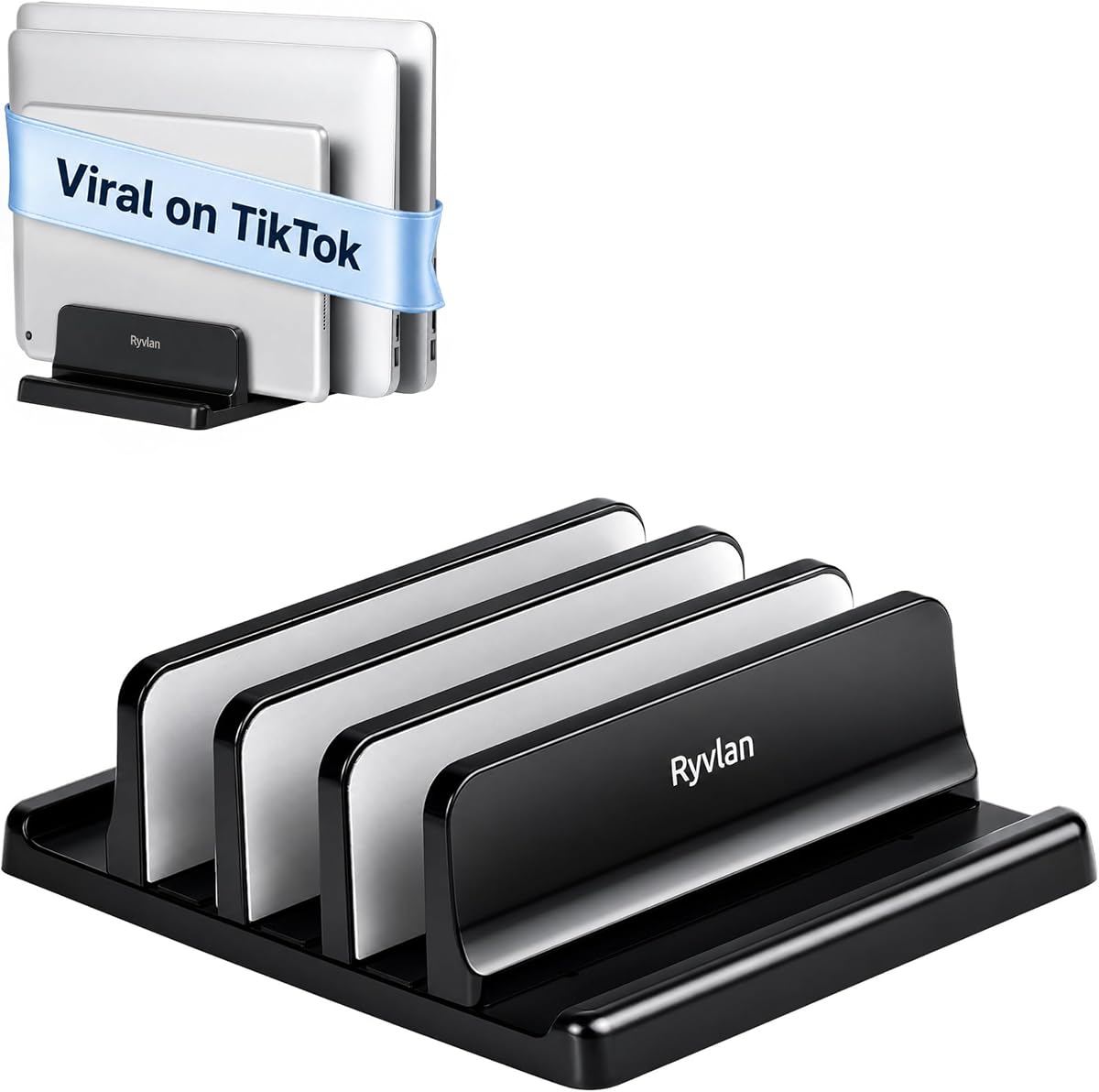
The Ryvlan Vertical Stand is an excellent combination for mixed device setups. It can hold up to three laptops and two tablets simultaneously, clearing significant desk space.
We may earn a commission when you buy through this link, at no additional cost to you.
The adjustable slots range from 0.47 to 1.2 inches, accommodating various device thicknesses securely. Silicone padding on all walls ensures protection from scratches and sliding.
Adjustment requires a wrench included in the box, which takes about a minute per slot. While the ABS plastic is durable, it is not as premium as metal options.
This stand is perfect for shared workstations where multiple users or device types are common. It maintains a minimalist aesthetic while providing substantial organizational value.
Designed to organize both laptops and tablets in one unit.
Grips devices firmly to prevent scratches and movement.
We may earn a commission when you buy through this link, at no additional cost to you.
The LOXP Laptop Stand introduces unique 360-degree rotation for flexible viewing angles. This feature is particularly useful for collaborative work or presentations in a desk environment.
We may earn a commission when you buy through this link, at no additional cost to you.
Constructed from one-piece fiber metal, it is more durable than standard aluminum stands. The height and angle adjustments help reduce neck strain and improve posture during long sessions.
The foldable design makes it portable for travelers, though it may not suit laptops larger than 16 inches. The silicone pads ensure the device stays secure even when rotated.
This stand is ideal for professionals who need to share their screen easily. It combines ergonomic benefits with a flexible design that adapts to various working styles.
Allows laptop to turn fully for easy collaboration.
Foldable design allows it to slip into a backpack easily.
We may earn a commission when you buy through this link, at no additional cost to you.
The Adjustable Metal Riser focuses on ergonomic comfort with customizable height and angle settings. This flexibility helps reduce neck fatigue by aligning the screen with eye level.
We may earn a commission when you buy through this link, at no additional cost to you.
It supports up to 17.6 lbs, making it suitable for larger gaming laptops or heavier models. The ventilation holes provide airflow to prevent overheating during intensive tasks.
While it is a simple riser and not a vertical storage unit, its adjustability makes it versatile. The smooth edges and rubber mats ensure a secure and safe placement for devices.
This stand is best for users prioritizing posture and screen positioning. It is a practical solution for home or office setups where comfort is the main priority.
Adjustable height helps maintain healthy posture and reduce strain.
Ventilation holes ensure optimal cooling for device performance.
We may earn a commission when you buy through this link, at no additional cost to you.
The BESIGN LS03 is a classic choice known for its reliable aluminum construction and clean aesthetic. It elevates the laptop by 6 inches to a comfortable viewing level.
We may earn a commission when you buy through this link, at no additional cost to you.
The detachable design allows for easy assembly in three steps and simple storage. Its open design ensures airflow which keeps devices cool during operation.
While the height is fixed at 6 inches, this works well for most monitors or keyboards. The rubber on the holder hands protects the laptop from scratches while keeping it secure.
This stand is perfect for users who want a simple and elegant solution. It fits well in home offices or corporate environments where minimalism is valued.
Sleek aluminum design matches modern office furniture.
Detachable parts make storage and transport quick.
We may earn a commission when you buy through this link, at no additional cost to you.
The WALI Monitor Stand is a versatile platform that elevates displays and laptops while offering under-stand storage. Its large shelf accommodates devices comfortably with a maximum weight capacity of 44 lbs.
We may earn a commission when you buy through this link, at no additional cost to you.
With height adjustments of 3.9, 4.7, or 5.5 inches, it provides ergonomic flexibility. The vented holes ensure devices stay cool, and rubber pads protect both the device and desk surface.
The open space beneath the stand is useful for storing keyboards and notebooks. However, the footprint is large and may not suit small desks requiring vertical storage.
This stand is ideal for home office setups needing a sturdy multi-purpose riser. It organizes accessories efficiently while improving the overall ergonomics of the workspace.
Supports heavy monitors and laptops with stable metal structure.
Space under the riser holds accessories to reduce clutter.
We may earn a commission when you buy through this link, at no additional cost to you.
Selecting the right laptop rack involves understanding your space, hardware needs, and workflow habits.
Ensure the rack fits your laptop size and weight. Check if it supports your device thickness range and any accessories you need to store alongside it.
Always verify compatibility with your specific device models before purchasing to avoid fit issues.
Materials like aluminum or carbon steel offer durability and stability. Plastic is lighter and often cheaper but may not feel as premium for heavy use.
Choose metal for long-term durability and plastic for lightweight portability.
Look for adjustable slots or angles to suit your screen height. Ergonomic design helps maintain a comfortable posture and reduce strain during work.
Prioritize stands that allow for height and angle customization.
Consider how many devices you need to store. Some racks support one laptop while others can hold multiple or include slots for tablets.
Select a capacity that matches your daily device usage.
Vertical racks save desk space by standing devices upright. Riser models free up area under the screen for keyboards and accessories.
Choose a format that best fits your desk layout.
Some models are clip-in while others require screws. Consider whether you want a permanent fixture or a movable option.
Check if the installation method fits your desk setup.
Verify the maximum weight limit to avoid damaging the stand. Heavy gaming laptops need robust construction to stay secure.
Ensure the rack supports the weight of your specific device.
Soft silicone mats prevent scratches on devices and desks. Look for smooth edges and non-slip bases to ensure safety.
Choose stands with protective padding for safe usage.
When placing your laptop on the rack, ensure it is fully seated in the slots. For vertical stands, slide the device in gently to avoid bending edges.
Clean the rack regularly with a soft cloth to remove dust and fingerprints. For metal models, a mild cleaner can restore shine without damaging the finish.
Check stability periodically especially if you move it often. Tighten any screws or clips to maintain safety and prevent accidental tipping.
Many racks are designed to support gaming laptops but you must check the weight limit. Aluminum or steel models generally handle heavier weights better than plastic ones.
Vertical stands are safe as long as the laptop is closed. They are designed to hold the device securely without putting pressure on the screen.
Most modern racks have open designs or cable management holes. Always check dimensions to ensure ports remain accessible when the device is docked.
Measure the thickness and width of your laptop and compare it to the rack specifications. Adjustable models offer more flexibility for different sizes.
Yes, some racks include multiple slots or adjustable dividers for both devices. Look for models described as hybrid or multi-device organizers.
A riser elevates the laptop on the desk surface while a vertical rack stores it standing up. Riser models save under-screen space but vertical racks save desktop area.
Some vertical racks are sized for tablets but you need to check the slot width. Dedicated tablet holders or adjustable models are usually safer for smaller devices.
Vertical stands often improve airflow around the device to prevent overheating. Ensure the rack has open slots or ventilation holes for optimal cooling.
Choosing the best laptop rack for desk requires balancing build quality, capacity, and ergonomics. Each option here offers unique strengths tailored to different workspace needs.
Focus on material durability and compatibility to ensure your device is supported properly. Consider how much space you want to save and whether vertical or riser styles suit your workflow.
Always check current prices and availability before buying as deals change frequently. Select the model that best aligns with your hardware and organization goals for a better experience.