
HUANUO Laptop Desk Mount
4.5Editor score
2-in-1 laptop and monitor use
Ventilated tray with 240 holes
Affordable ergonomic solution
Finding the right laptop tray desk mount can transform your workspace into a more ergonomic and efficient environment. These mounts elevate your device to eye level, reducing strain on your neck and shoulders while freeing up valuable desk space for other essentials.
We compared ten top-rated laptop tray desk mounts based on build quality, adjustability, cooling features, and ease of installation. Each product was evaluated for its ability to support various laptop sizes and its compatibility with different desk types.
Each pick in this list highlights specific strengths such as budget-friendly options, premium versatility, or specialized cooling designs. Please note that product availability and pricing may change over time, so verify details before purchasing.
4.5Editor score

4.5Editor score

4.6Editor score
As an Amazon Associate we earn from qualifying purchases.
The following table provides a side-by-side comparison of the ten best laptop tray desk mounts available this month. Reviewing these specifications helps you identify the model that fits your specific desk and device needs.
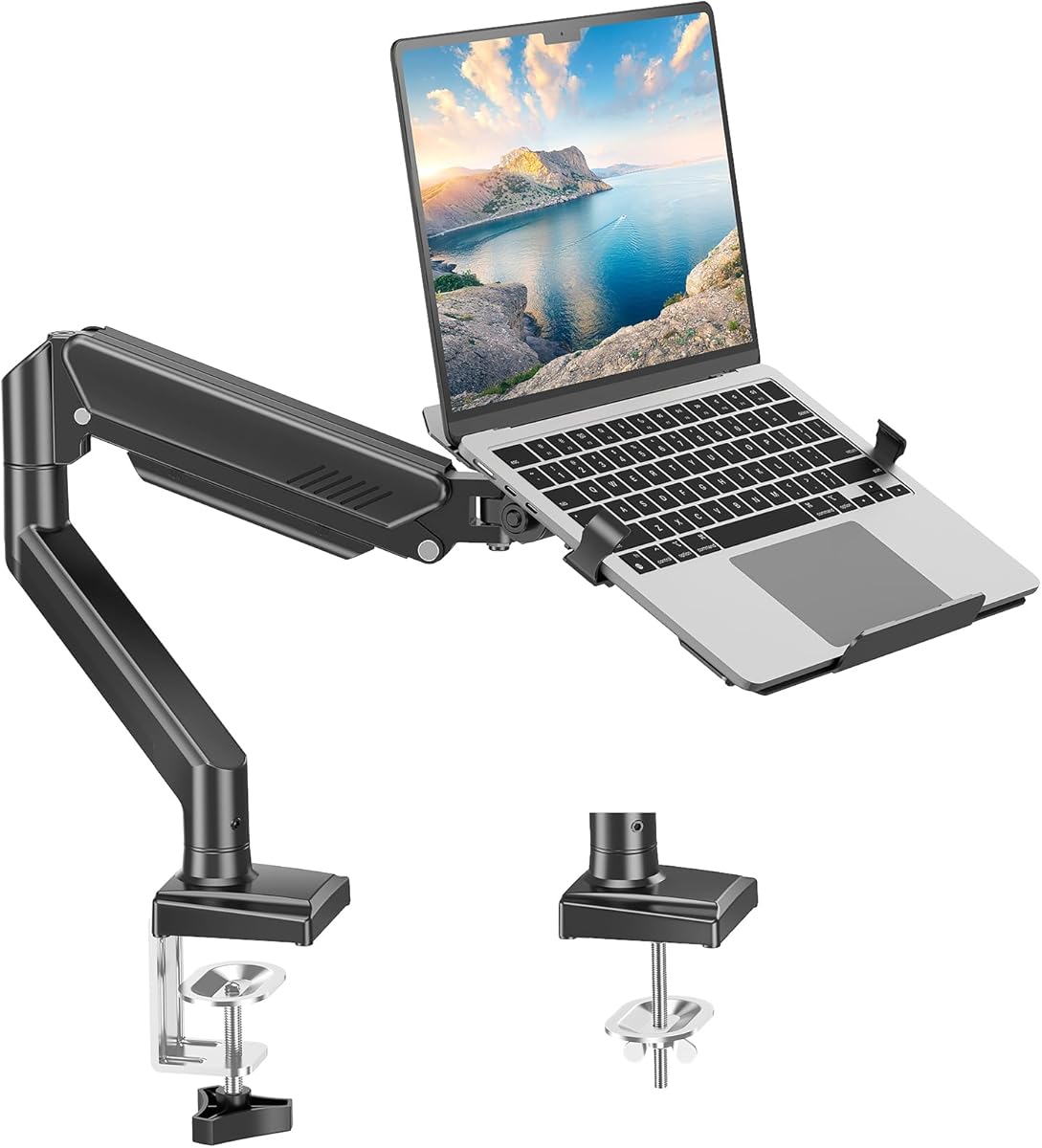


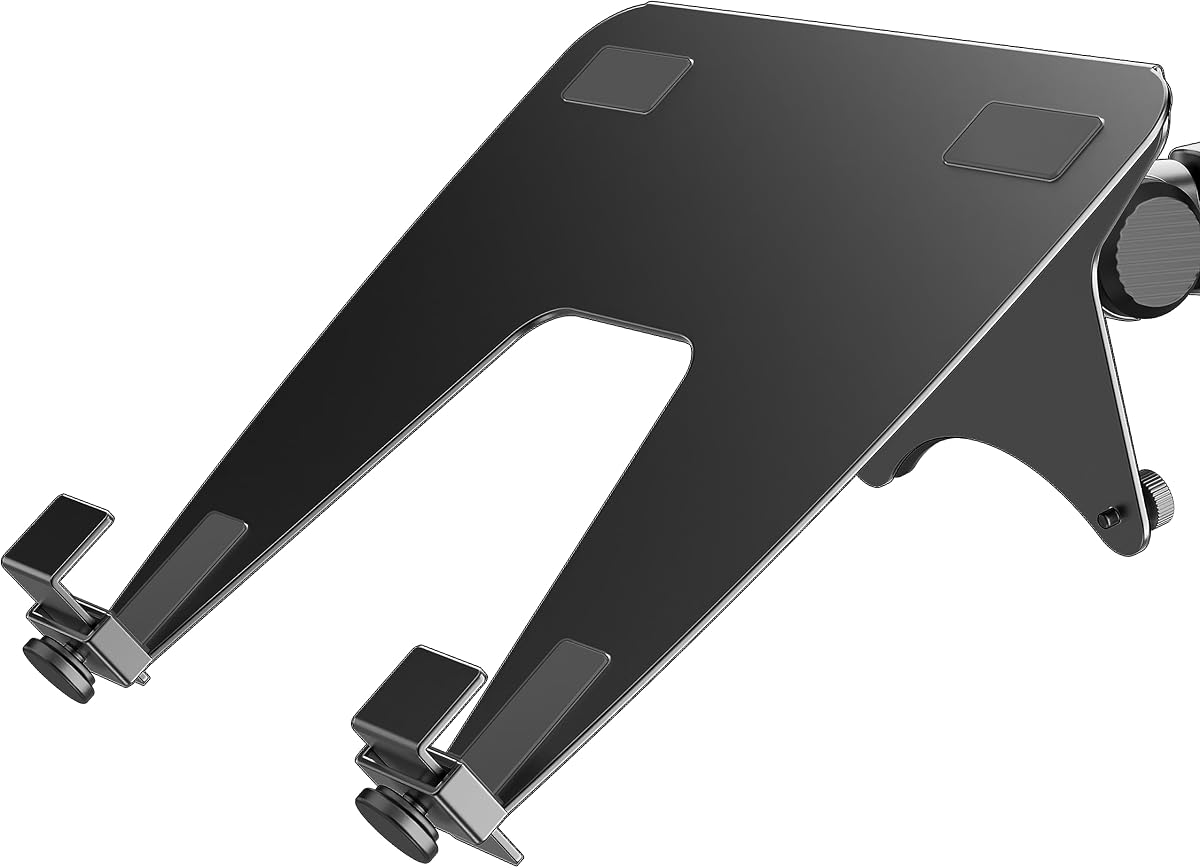
This WALI Adjustable Laptop Desk Mount is a top choice for users seeking a reliable and versatile solution. With a 4.5-star rating, it offers a balance of affordability and performance that appeals to many professionals.
We may earn a commission when you buy through this link, at no additional cost to you.
Its standout qualities include a ventilated tray design that keeps laptops cool during extended use. The dual mounting options ensure compatibility with various desk types, while the height adjustment provides significant ergonomic benefits.
Some users note that the plastic components may feel less robust compared to metal alternatives. However, the stable clamping mechanism and extensive adjustability make these trade-offs acceptable for most home office setups.
This model is ideal for anyone looking to improve their workspace ergonomics without breaking the bank. It effectively reduces neck strain and keeps your desk organized, making it a highly recommended choice.
The height adjustment and tilt features allow you to position your screen at eye level, reducing strain on your neck and back during long work sessions.
Ventilation holes on the tray promote airflow around your laptop, helping to prevent overheating and maintain optimal performance during heavy tasks.
We may earn a commission when you buy through this link, at no additional cost to you.
The MOUNT PRO Laptop Arm Mount is designed for users who want flexibility between laptop and monitor use. It features a robust aluminum arm that ensures stability while offering full motion adjustments for comfortable viewing.
We may earn a commission when you buy through this link, at no additional cost to you.
Key strengths include its ability to accommodate both laptops and monitors, making it a versatile addition to any desk. The built-in cable management keeps wires organized, and the anti-slip pads secure your device effectively.
One limitation is that the laptop tray cannot be rotated to a vertical position, which may limit certain use cases. Additionally, achieving the perfect setup requires careful attention during installation to ensure safety.
This mount is perfect for professionals who switch between devices frequently. Its durable construction and thoughtful design features make it a reliable choice for maintaining a tidy and ergonomic workspace.
Simply remove the tray to switch between laptop and monitor modes, allowing you to adapt your setup based on your current tasks without purchasing multiple mounts.
Integrated guides keep wires neatly routed along the arms, preventing clutter and ensuring a clean, professional look for your workstation.
We may earn a commission when you buy through this link, at no additional cost to you.
The VIVO Single Laptop Notebook Desk Mount stands out with its high customer rating and robust design. It supports laptops up to 17 inches and offers extensive adjustability for optimal viewing comfort.
We may earn a commission when you buy through this link, at no additional cost to you.
Strengths include drill-free mounting options that protect your desk surface and a full 360-degree rotation for maximum flexibility. The integrated cable management system helps keep your workspace organized and clutter-free.
Its heavier construction may be a downside for those seeking a lightweight solution, but it contributes to the stability and longevity of the mount. The limited color selection also restricts aesthetic customization for some users.
Ideal for users who prioritize stability and durability, this mount provides a strong foundation for your laptop. Its features make it easy to maintain an ergonomic and efficient workspace throughout the day.
The arm offers extensive tilt, swivel, and rotation adjustments, allowing you to find the perfect angle for any task or viewing preference.
Choose between C-clamp or grommet mounting to secure the stand without drilling holes, preserving the integrity of your desk surface.
We may earn a commission when you buy through this link, at no additional cost to you.
The HUANUO Adjustable Monitor Arm is a versatile solution that supports both laptops and monitors. It features a 14×12 inch ventilated tray that helps prevent overheating during extended use.
We may earn a commission when you buy through this link, at no additional cost to you.
Key strengths include its compatibility with monitors up to 32 inches and a flexible 2-in-1 design that adapts to various device needs. The integrated cable management keeps your desk neat and organized.
However, it is designed to fit wooden desks only, which limits its application for glass or metal surfaces. Users may also need to tighten screws carefully during adjustments to ensure stability.
This mount is perfect for users who need a flexible workspace setup. Its ability to switch between laptop and monitor modes makes it a practical choice for multitasking professionals.
The tray features a breathable design that promotes airflow around your laptop, reducing the risk of overheating and maintaining device performance.
Integrated cable management ensures wires stay neat and out of the way, contributing to a cleaner and more professional workspace environment.
We may earn a commission when you buy through this link, at no additional cost to you.
The HUANUO Laptop Desk Mount is an excellent budget-friendly option that doesn't compromise on essential features. With its 240-hole ventilated tray, it ensures your laptop stays cool during extended use.
We may earn a commission when you buy through this link, at no additional cost to you.
Its 2-in-1 design allows you to switch between laptop and monitor modes easily, providing great flexibility. The mount is straightforward to install and offers both C-clamp and grommet options for different desks.
The materials may feel lighter than premium alternatives, but the sturdy construction still supports devices up to 22 lbs effectively. Limited color options may not suit all aesthetic preferences, but the functionality is strong.
This mount is ideal for budget-conscious users who need a reliable ergonomic solution. It provides excellent value and helps create a comfortable and organized workspace without a high cost.
With 240 ventilation holes, the tray maximizes airflow to prevent overheating, ensuring your laptop operates efficiently during intensive tasks.
The tray can be removed to support monitors, making this mount a versatile investment for evolving workspace needs.
We may earn a commission when you buy through this link, at no additional cost to you.
The HUANUO 2 in 1 Function Laptop Mount is designed for users needing a robust solution that supports both laptops and larger monitors. It features a full range of motion for versatile viewing angles.
We may earn a commission when you buy through this link, at no additional cost to you.
Its strengths include wide monitor support and secure laptop grip with anti-slip pads and Velcro straps. The pre-assembled components simplify installation, making it quick to set up.
The mount is heavier than some competitors, which adds stability but may require more effort to position. The grommet base size limits mean you need to verify your desk thickness before purchasing.
This model is perfect for users who prioritize stability and broad compatibility. It provides a secure and ergonomic setup that enhances productivity without compromising on features.
Anti-slip pads and Velcro straps ensure your laptop stays firmly in place, preventing unwanted movement during use.
Pre-assembled components mean less time assembling parts, allowing you to start using your mount almost immediately.
We may earn a commission when you buy through this link, at no additional cost to you.
The VIVO Black Clamp-on Rotating Laptop Tray offers a unique approach by securing your laptop below the desk. This design saves desk space and provides ergonomic typing angles.
We may earn a commission when you buy through this link, at no additional cost to you.
Its standout feature is the 360-degree rotation, giving you ultimate flexibility for customized placement. The sturdy C-clamp ensures a tight hold on your desk without damaging the surface.
However, you need sufficient clearance for the rotation, and it is not compatible with lipped or beveled desk edges. These limitations require careful consideration of your desk type before buying.
Ideal for compact workspaces, this tray helps maximize desk real estate while maintaining comfort. It is a practical solution for those who need a discreet and efficient setup.
By mounting below the desk, this tray frees up valuable desk surface for other essentials, creating a more organized workspace.
The 360-degree rotation allows you to position your laptop exactly where you need it, enhancing your typing ergonomics.
We may earn a commission when you buy through this link, at no additional cost to you.
The monTEK 2-in-1 Laptop & Monitor Desk Mount is a premium option crafted from durable steel and aluminum. It supports a wide range of laptop sizes and even curved monitors, providing exceptional versatility.
We may earn a commission when you buy through this link, at no additional cost to you.
Its full motion adjustability allows you to find the most comfortable ergonomic posture, reducing strain. The scratch-free clamps protect your devices while ensuring a secure fit during use.
While it comes at a higher price point, the quality and features justify the cost for many professionals. Installation steps can be complex, so careful attention to instructions is necessary.
This mount is ideal for users who demand top-tier quality and flexibility. Its robust design ensures your devices are supported safely and efficiently in any workspace.
Scratch-free clamps and built-in cable management keep your devices safe and your workspace organized and clutter-free.
Crafted from high-quality materials, this mount offers long-lasting durability and a professional aesthetic for your desk.
We may earn a commission when you buy through this link, at no additional cost to you.
The Suptek Single Laptop Notebook Desk Mount is designed to relieve fatigue by positioning your screen at the optimal height. It features a fully adjustable arm that supports laptops up to 17 inches.
We may earn a commission when you buy through this link, at no additional cost to you.
Its multifunctional design allows use with a detachable tray or as a standalone monitor mount. The integrated cable management keeps wires organized, contributing to a tidy workspace.
It has a lower weight capacity compared to some competitors, which may limit options for heavier devices. The tray size is also smaller, so very large laptops might not fit as securely.
Ideal for users seeking an ergonomic and affordable solution, this mount provides practical features. It helps reduce strain and keeps your desk organized effectively for everyday tasks.
Position your screen at eye level to reduce neck and eye strain, enhancing comfort during long work sessions.
Integrated cable management and a clean design keep your workspace looking neat and professional.
We may earn a commission when you buy through this link, at no additional cost to you.
The ergounion Laptop Tray for Monitor Arm is a specialized add-on designed to transform a standard VESA mount into an ergonomic workstation. It supports laptops up to 17.3 inches with a strong weight capacity.
We may earn a commission when you buy through this link, at no additional cost to you.
Its key feature is a fixed 30-degree ergonomic slant that reduces wrist strain when used on a desk. The hollow design helps dissipate heat, preventing overheating during extended use.
As an add-on, it requires an existing VESA mount, which may not suit those starting from scratch. However, the zero port interference design ensures all your laptop ports remain accessible.
This tray is ideal for users with existing mounts who want to upgrade their setup. It provides a secure and scratch-free surface that enhances comfort and device performance.
Secure bottom-edge clips instead of side clamps ensure all your laptop ports remain accessible for a cleaner cable setup.
The fixed 30-degree slant provides a perfect typing angle to reduce wrist strain when placed directly on a desk.
We may earn a commission when you buy through this link, at no additional cost to you.
Selecting the right laptop tray desk mount depends on various factors including your desk type, laptop size, and specific ergonomic needs. Understanding these aspects ensures you choose a product that enhances your workspace effectively.
Ensure the mount supports your laptop's dimensions and weight capacity. Most models accommodate laptops up to 17 inches, but check specific measurements to guarantee a secure fit for your device.
Choose a model that matches your laptop's size and weight to avoid instability or damage.
Consider whether your desk has a flat edge or grommet hole. Most mounts offer both C-clamp and grommet options, but some may be limited to specific thicknesses or materials.
Verify your desk thickness and material to ensure the mounting option fits securely.
Look for features like tilt, swivel, and rotation to find your ideal viewing angle. More adjustable models allow you to tailor the mount to various tasks throughout the day.
Prioritize mounts with extensive adjustability to maintain comfort during long working hours.
Materials like aluminum or steel offer durability and stability compared to lighter plastics. A robust build ensures the mount stays stable even when adjusted frequently.
Choose sturdy materials for long-lasting performance and safety.
Ventilated trays help prevent laptop overheating by promoting airflow. This is crucial for devices that generate significant heat during intensive tasks.
Opt for a model with a ventilated tray to maintain your laptop's performance.
Some mounts come with pre-assembled parts and clear instructions, simplifying setup. Others may require more time and precision to install correctly.
Select a model that matches your comfort level with assembly to save time.
Integrated cable clips or channels keep wires organized and out of the way. A clean setup reduces clutter and makes it easier to manage your devices.
Look for built-in cable management to maintain a tidy workspace.
Prices vary widely depending on features and build quality. Determine how much you are willing to spend while ensuring the model meets your essential needs.
Balance cost with functionality to find the best value for your requirements.
Install your laptop tray desk mount according to the manufacturer's instructions, ensuring the clamps are tightly secured. Verify that the arm moves smoothly and locks into place after adjustments.
Regularly check all screws and joints to prevent loosening over time. Dust the tray and mount surface with a soft cloth to keep it free from debris that could affect stability.
Avoid overloading the tray beyond its weight limit to prevent damage. Adjust the position gradually to avoid sudden shifts that could harm your laptop or desk surface.
Most laptop tray desk mounts are designed to support laptops up to 17 inches in size. However, specific models may vary, so check the product specifications to ensure compatibility with your device.
Not all desks are compatible. Most mounts require a flat, solid edge with a thickness between 0.4 and 3 inches. Glass or uneven surfaces may require additional verification before purchase.
Many models offer a 2-in-1 design that allows you to remove the tray and use the mount for monitors. Check if the product supports VESA patterns if you plan to switch between devices.
Look for a mount with a ventilated tray design that promotes airflow. This feature helps dissipate heat and keeps your laptop cool during extended use.
Most come with all necessary hardware and step-by-step instructions. Installation typically takes less than 30 minutes, though some models may require more precision.
Quality mounts include padding and clamp mechanisms that protect your desk surface. However, always follow weight and thickness limits to avoid potential damage.
Yes, most models offer tilt, swivel, and rotation adjustments. These features allow you to customize the viewing angle for better ergonomics and comfort.
Weight capacity varies by model, typically ranging from 15 to 22 pounds. Ensure your laptop's weight is within the specified limit for safe and stable support.
Choosing the right laptop tray desk mount can significantly improve your workspace ergonomics and productivity. The models reviewed offer a range of options to suit different needs and budgets.
Consider factors like desk compatibility, build quality, and adjustability when making your decision. Prioritize features that will enhance comfort and functionality in your daily tasks.
Always verify product details and current availability before purchasing. Prices and specs may change, so double-checking ensures you get the best deal for your workspace setup.