
ASRock J4125M
3.4Editor score
Quad-core Celeron processor
Affordable price point
DDR4 memory support
Discover the top low power motherboard options for efficient NAS servers and compact PCs in this expert guide comparing performance and features.
Finding the right low power motherboard is essential for building efficient NAS servers or compact home systems. These boards balance performance with energy savings, making them ideal for always-on devices.
We compared ten top models based on their processor options, connectivity features, and thermal design. Each selection offers unique strengths for different use cases ranging from home labs to enterprise appliances.
Each pick highlights key specifications and real-world strengths to help you choose wisely. Prices and availability can change so always verify current details before making your final purchase decision.
3.4Editor score

4.5Editor score
This side-by-side comparison highlights key specifications across all ten models to help you quickly identify the best fit for your specific project needs.





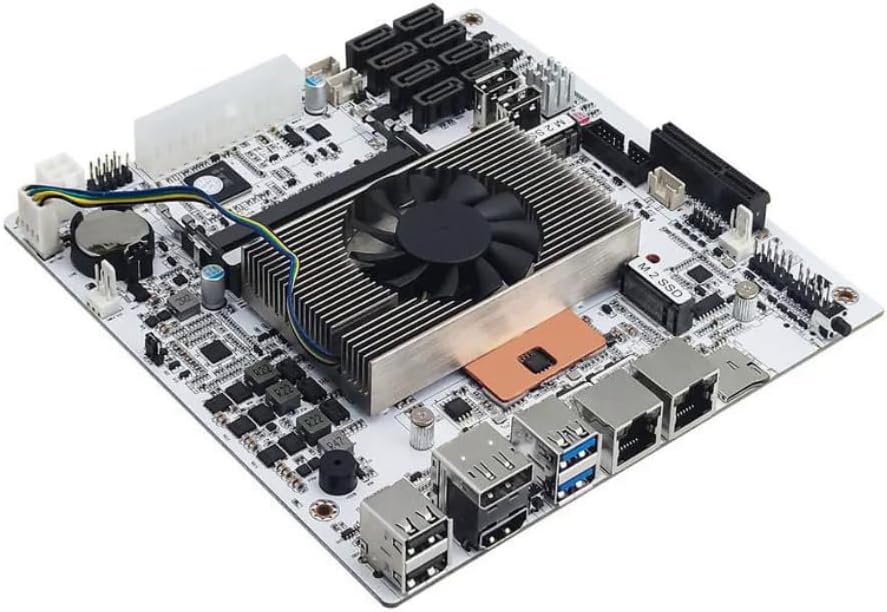
This industrial NAS motherboard features the Intel Celeron N5105 processor delivering four cores and threads for efficient multitasking. It earned a high rating for its reliability and specialized networking capabilities that suit server deployments perfectly.
We may earn a commission when you buy through this link, at no additional cost to you.
The standout feature is the inclusion of four 2.5GbE network ports which allow for advanced network configurations like aggregation or segregation. Combined with six SATA ports and dual M.2 slots this board supports extensive storage expansion for home labs or enterprise appliances.
While performance is strong the initial boot process may take a few minutes to read memory information which requires patience. Users must also ensure both 24PIN and 4PIN power connections are made which is standard but worth noting during installation.
This board is ideal for users building robust NAS systems or firewalls that need stable performance and fast networking. If you prioritize network throughput and storage flexibility over gaming this model offers exceptional value and reliability.
The high-density moisture-proof fiber circuit board ensures durability in varied environmental conditions suitable for industrial settings.
With dual display outputs and multiple USB ports this board supports versatile peripheral setups beyond just storage needs.
We may earn a commission when you buy through this link, at no additional cost to you.
The ASRock Micro ATX DDR3 motherboard offers a compact solution for budget-conscious builders needing basic low power functionality. It scored well for its simplicity and compatibility with older DDR3 memory modules which reduces build costs.
We may earn a commission when you buy through this link, at no additional cost to you.
This model includes the Intel J1800 dual-core processor suitable for lightweight tasks like media serving or basic file hosting. The micro ATX form factor fits easily into smaller cases making it a versatile choice for space-constrained environments.
While modern DDR4 and DDR5 are preferred DDR3 support remains useful for repurposing existing hardware. The board lacks advanced features like M.2 slots but provides essential connectivity including USB 3.0 and multiple display outputs.
Ideal for hobbyists or legacy system upgrades this board delivers solid basic performance. If you need a simple low power platform without breaking the bank this model is a practical and reliable choice.
Using DDR3 RAM allows builders to leverage existing inventory lowering overall system costs significantly.
Multiple video ports including HDMI DVI and VGA ensure compatibility with a wide range of monitors.
We may earn a commission when you buy through this link, at no additional cost to you.
This Gigabyte micro ATX motherboard supports a wide range of AMD Ryzen processors from the 3000 to 5000 series. It received high ratings for its balance of performance and affordability making it popular among budget builders.
We may earn a commission when you buy through this link, at no additional cost to you.
The inclusion of PCIe 4.0 support ensures compatibility with modern GPUs and NVMe drives for faster data throughput. Two M.2 slots provide flexibility for storage while the 3+3 power phase delivers stable power for mid-range Ryzen chips.
While the VRM is basic it suffices for non-overclocked use cases. The lack of extra USB ports or advanced networking might limit expansion for power users seeking maximum I/O flexibility.
Best for those building cost-effective desktops or small servers this board offers reliable performance. If you value AMD ecosystem compatibility and PCIe 4.0 features this is a strong contender in its price range.
Supporting Ryzen 3000 to 5000 series ensures longevity and upgrade paths without changing the motherboard.
Two M.2 slots allow for high-speed system drives and additional storage without occupying PCIe slots.
We may earn a commission when you buy through this link, at no additional cost to you.
The MSI PRO B550M-P is designed for stable performance with DDR4 memory support reaching high overclocked speeds. It achieved strong ratings for its cooling features and memory handling capabilities ideal for demanding tasks.
We may earn a commission when you buy through this link, at no additional cost to you.
Features like Core Boost and passive chipset heatsinks ensure steady power delivery and efficient thermal management. The board supports Ryzen 5000 processors and includes one M.2 Gen4 slot for ultra-fast storage drives.
However the rear I/O is somewhat basic with limited USB ports compared to higher-end boards. AI cooling helps manage temperatures but users may need to adjust fans manually for optimal noise performance.
Ideal for budget gaming or server builds this board offers reliable DDR4 performance. If you prioritize memory speed and thermal stability without paying for extra features this model is a great choice.
Memory overclocking up to 4400+ MT/s allows for improved system responsiveness and gaming performance.
Automatic fan adjustments based on temperatures help maintain efficiency without constant manual intervention.
We may earn a commission when you buy through this link, at no additional cost to you.
This ASRock motherboard featuring the Intel J4125 quad-core processor provides an affordable entry point for low power builds. While it has a lower rating it remains a popular choice for basic NAS or media server tasks.
We may earn a commission when you buy through this link, at no additional cost to you.
The J4125 processor delivers up to 2.7 GHz performance sufficient for running lightweight Linux distributions or TrueNAS. DDR4 memory support ensures modern compatibility while the micro ATX format keeps the system compact and inexpensive.
Connectivity is basic with limited PCIe 2.0 slots and fewer USB ports which might limit expansion for advanced users. The lower rating reflects minor quality control issues but overall performance remains consistent for intended workloads.
Perfect for tight budgets this board offers functional quad-core performance. If you need a simple low power system and prioritize cost over advanced features this is a practical and accessible solution.
This model provides one of the lowest price points for quad-core motherboards in the market.
Low power TDP keeps energy bills minimal for 24/7 operation environments like home offices.
We may earn a commission when you buy through this link, at no additional cost to you.
The ASRock B550M-HDV combines affordability with strong performance features including support for overclocked DDR4 memory speeds. It earned excellent ratings for its stability and comprehensive protection features suitable for daily use.
We may earn a commission when you buy through this link, at no additional cost to you.
Featuring a 6-power phase design with premium chokes this board delivers stable power for Ryzen processors. PCIe 4.0 support ensures modern GPU compatibility while legacy video outputs like D-Sub offer broad monitor compatibility for office tasks.
Although it lacks integrated WiFi the board includes essential Ethernet and USB ports. The Full Spike Protection guards hardware against electrical surges making it resilient in environments with unstable power supplies.
Best for budget-conscious builders needing reliable performance this board offers great value. If you prioritize stable power and memory speed over wireless features this model is an excellent choice for AM4 platforms.
Six power phases with premium chokes ensure stable power delivery for sustained CPU loads.
Full Spike Protection on USB audio and LAN ports shields connected hardware from electrical damage.
We may earn a commission when you buy through this link, at no additional cost to you.
This Gigabyte mini-ITX motherboard brings compact flexibility with built-in WiFi and Bluetooth connectivity. It received strong ratings for its small footprint and robust VRM design suitable for compact builds.
We may earn a commission when you buy through this link, at no additional cost to you.
The direct 6-phase digital PWM with DrMOS ensures stable power delivery for Ryzen processors even in small cases. Multiple display outputs including DP and HDMI allow flexible multi-monitor setups for office or media tasks.
While PCIe 3.0 is standard it remains sufficient for most applications. The premium price and lack of extra PCIe slots might deter those needing maximum expansion capabilities beyond a single GPU.
Ideal for small form factor PCs this board balances size and performance well. If you need a compact system with wireless connectivity and reliable power this model is highly recommended.
The compact size allows building powerful systems in tiny cases for desktop or embedded use.
Intel Dual Band WiFi and Bluetooth eliminate the need for separate expansion cards saving space.
We may earn a commission when you buy through this link, at no additional cost to you.
The ASRock B550M WiFi received perfect ratings for its comprehensive feature set including Wi-Fi 6E support. It stands out for providing premium connectivity options at a competitive price point in the mid-range market.
We may earn a commission when you buy through this link, at no additional cost to you.
Supporting DDR4 speeds up to 4733+ and PCIe 4.0 this board ensures modern performance standards are met. The inclusion of eight USB ports and 7.1 audio meets diverse peripheral needs without requiring expansion cards.
While it offers great features users should verify case compatibility as some micro ATX chassis vary in dimensions. The higher price is justified by the included WiFi and advanced connectivity options it offers.
Perfect for users needing wireless performance this board delivers top-tier features. If you value connectivity speed and modern standards this model is a standout choice for AM4 builds.
Wi-Fi 6E supports the 6GHz band for lower latency and faster wireless data transfers.
Realtek ALC1220 codec with Nahimic delivers immersive 7.1 surround sound for media and games.
We may earn a commission when you buy through this link, at no additional cost to you.
This mini-ITX motherboard features an 8th gen quad-core processor delivering eight threads for efficient virtualization and multitasking. It is highly rated for its extensive storage and networking capabilities ideal for home servers.
We may earn a commission when you buy through this link, at no additional cost to you.
The inclusion of eight SATA ports and dual 2.5G LAN connections allows building robust storage arrays and network appliances. Virtualization support ensures smooth operation for running multiple services on one compact system.
Users should note a known sleep mode bug and the need for specific power connections. While the initial boot may take time the overall performance for storage and firewall tasks remains solid.
Best for NAS and firewall builds this board offers exceptional connectivity. If you need maximum storage and network flexibility in a small form factor this model is a powerful solution.
Eight SATA ports allow connecting multiple hard drives for large capacity storage solutions.
Two 2.5G LAN ports enable link aggregation or secure network segregation effectively.
We may earn a commission when you buy through this link, at no additional cost to you.
This specialized NAS motherboard features a Core i5 8265U processor offering strong performance for virtualization and storage tasks. It is designed specifically for high-density storage systems requiring robust networking and reliability.
We may earn a commission when you buy through this link, at no additional cost to you.
Eight SATA ports combined with dual M.2 NVMe slots provide massive storage flexibility. The dual 2.5G LAN allows for high-throughput network transfers making it ideal for media servers or cloud storage.
The 15W TDP ensures energy efficiency while 24/7 operation. Although sleep mode is not supported the board is built for continuous uptime with features like passthrough for VMs.
Best for serious NAS builders this board offers high performance in a compact chassis. If you need enterprise-grade features for home use this premium option is worth the investment.
Core i5 performance ensures smooth handling of complex virtualization and data processing tasks.
Passthrough support for NIC and storage devices allows flexible VM configurations.
We may earn a commission when you buy through this link, at no additional cost to you.
Selecting the right low power motherboard involves balancing performance energy efficiency and connectivity. Here are key factors to consider for your specific needs.
Choose a CPU based on your workload. For basic NAS tasks quad-core processors like Celeron or J-series are sufficient. For virtualization look for cores with 8 threads to handle multiple services efficiently.
Prioritize CPUs with low TDP ratings under 25W for energy efficiency without sacrificing necessary power.
Modern low power motherboards often include multiple Gigabit or 2.5G ports. Check if your use case requires network aggregation or segregation which multi-port boards support.
Ensure the LAN controllers support the speeds you need for file transfers and streaming.
Verify the number of SATA ports and M.2 slots available. Large NAS builds need six or more SATA ports while others may only need one or two.
NVMe support provides faster boot and application loading speeds than SATA SSDs for your system drive.
Most current boards use DDR4 but older models may use DDR3. Check the supported speeds and max capacity to ensure compatibility with your needs.
Higher memory speeds can improve system responsiveness especially when running virtual machines.
Mini-ITX boards offer the smallest footprint but often lack expansion slots. Micro ATX provides more connectivity options while still fitting compact cases.
Verify your case dimensions and mounting points before purchasing to avoid physical fit issues.
Some specialized boards require specific power connectors like 24PIN plus 4PIN. Ensure your power supply has these connectors available.
Efficient power delivery reduces heat output and lowers electricity costs over time.
Check if the board has HDMI or DisplayPort for local monitoring. Multiple display support helps when using the system as a workstation.
Support for 4K resolution ensures compatibility with modern monitors for setup and management.
Look for boards with good community support for Linux or TrueNAS. Some models include features like Wake-on-LAN for remote management.
BIOS features like Q-Flash make updates easier without needing a working CPU.
Install the motherboard in a well-ventilated case with adequate airflow. Ensure all power connectors are seated firmly to prevent boot issues or system instability during operation.
Configure the BIOS for energy saving by enabling power saving modes and disabling unused hardware. Update the BIOS to the latest version to improve compatibility and stability for newer operating systems.
Regularly clean dust from the case and fans using compressed air to maintain cool temperatures. Monitor system logs to check for thermal throttling or errors that might indicate hardware issues over time.
Low power motherboards consume less electricity reducing your overall energy bill especially important for systems running 24/7. They also generate less heat allowing for silent fanless or passive cooling designs.
Most low power models are designed for server or office use with integrated graphics that suit light gaming. For serious gaming consider dedicated cards but ensure the motherboard has a compatible PCIe slot and power supply.
Yes many models support Intel VT-x or AMD-V features required for virtualization software like VMware or Proxmox. Check specific CPU support lists to confirm compatibility with virtual machine requirements.
DDR3 remains viable for budget builds where existing hardware can be reused. However DDR4 offers better speeds and efficiency which may be worth the extra cost for new systems built today.
It depends on your storage needs. Basic setups require one to four ports while NAS builds often need six or eight. Always check if SATA expansion cards are supported for future upgrades.
Standard ATX power supplies work for most micro ATX boards. Mini-ITX boards may use smaller SFX or proprietary units. Check the connector requirements like 24PIN or 4PIN before purchasing your power supply.
Some models include integrated WiFi and Bluetooth but most do not. Check the product specs carefully. If WiFi is needed and not included you may need an adapter or PCIe card.
Yes they are ideal for home servers due to reliability and low power consumption. Look for features like ECC RAM support or multiple Ethernet ports for robust network storage solutions.
We have reviewed ten top options ranging from budget quad-core boards to premium NAS solutions. Each offers unique strengths whether you need massive storage or minimal power usage.
Prioritize features that match your specific use case such as network ports or memory speed to ensure your system performs efficiently for years.
Always check current prices and availability before purchasing since specs and deals change frequently. Selecting the right model ensures your build remains efficient and reliable.