
VSD Mini Macro Pad
4.1Editor score
Six customizable LCD keys
Dual side RGB light bars
Compact portable design
Discover the top Macro Keypad Controller Deck for Streaming options compared side by side to help you streamline your workflow and enhance your broadcast setup
Choosing the right macro keypad controller deck for streaming can transform your workflow efficiency and reduce repetitive typing tasks during live broadcasts or content creation sessions.
We evaluated ten leading models based on key customization options software compatibility build quality and overall user feedback to ensure you find the ideal tool for your specific needs.
Each selection highlights unique strengths and potential trade-offs so you can make an informed decision while keeping in mind that retail pricing and stock availability may change over time.
4.1Editor score

4.4Editor score

4.9Editor score
This side-by-side comparison outlines the core specifications and unique capabilities of each ranked model so you can quickly identify the best fit for your desktop setup.


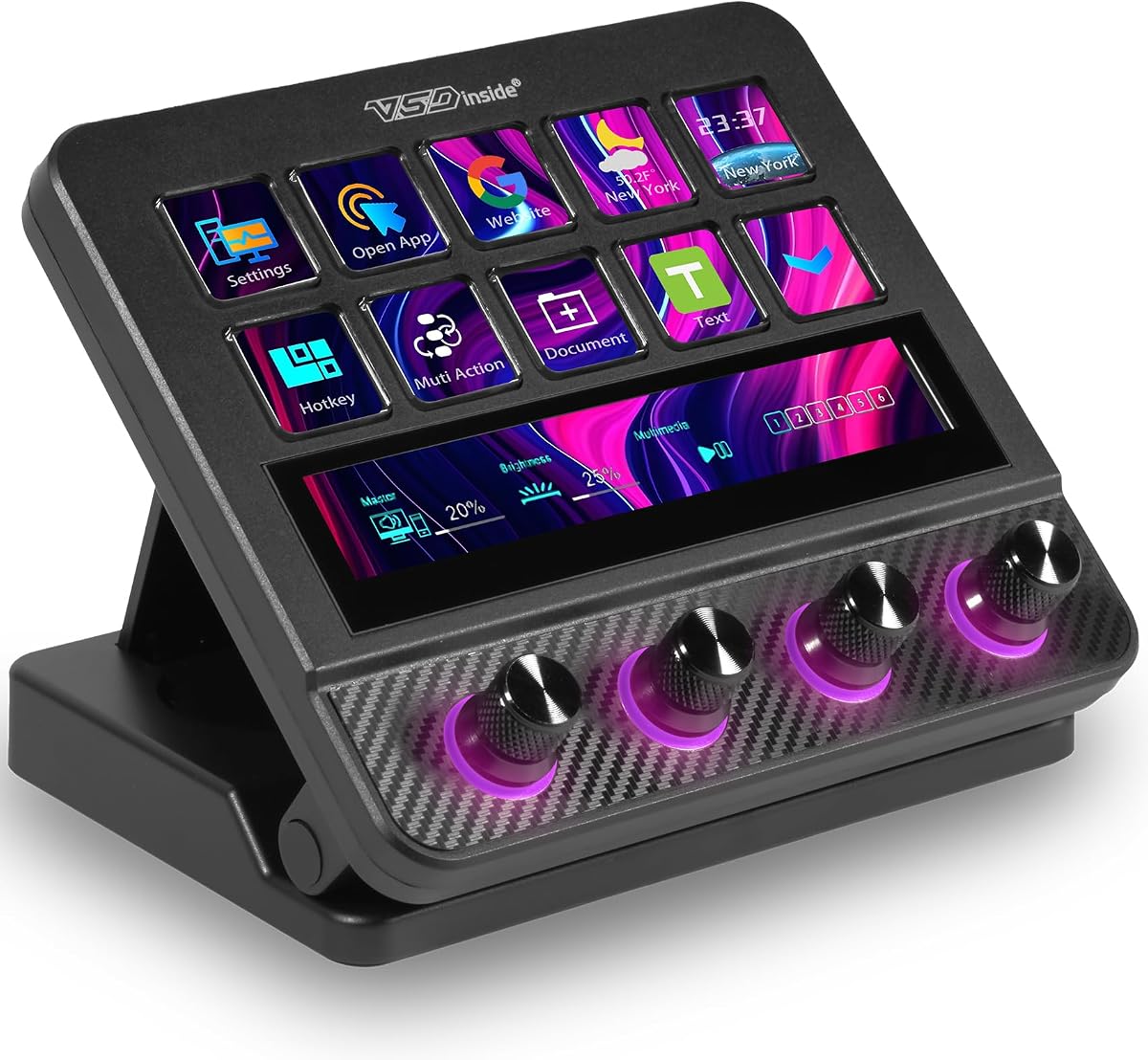


The VSD M18 Macro Pad stands out as a top tier option for streamers needing extensive control over their broadcasting environment with eighteen programmable keys.
We may earn a commission when you buy through this link, at no additional cost to you.
Its combination of fifteen visual LCD keys and three physical buttons allows for complex macro sequences while the RGB ring adds aesthetic appeal to any desk setup.
Although it lacks native Linux support and requires some initial software configuration the device integrates seamlessly with major platforms like OBS and Twitch for smooth operation.
If you need a reliable mid range controller that balances functionality with affordability this model offers excellent value for both beginners and experienced content creators.
Users can upload custom JPG PNG or GIF images to each key for instant visual recognition of assigned functions.
The outer light ring supports auto cycling and custom color tones to match your streaming theme or mood.
We may earn a commission when you buy through this link, at no additional cost to you.
This model offers nearly identical specs to its sibling but emphasizes ease of use for those who want quick access to common streaming commands without delays.
We may earn a commission when you buy through this link, at no additional cost to you.
The inclusion of a dedicated RGB ring and sturdy materials ensures it looks professional during broadcasts while maintaining reliability over long term usage.
While the software setup takes time to master the resulting workflow efficiency gains justify the initial investment for serious streamers.
It is a strong contender for anyone prioritizing stability and visual customization within a budget friendly price range.
Built in plugins like weather clocks and reminders help manage daily tasks alongside streaming operations.
Compatible with both Windows 11 and macOS 11 allowing users to switch operating systems without changing hardware.
We may earn a commission when you buy through this link, at no additional cost to you.
The Stream Dock N1 introduces a vertical design that saves desk space while offering three distinct modes including a numeric keypad and calculator function.
We may earn a commission when you buy through this link, at no additional cost to you.
Its fifteen LCD keys allow for detailed icon customization and it supports over one hundred plugins to extend functionality beyond basic macros.
The higher cost reflects its unique ergonomic benefits and additional utility functions that go beyond standard streaming control requirements.
Ideal for users with limited desk space who also need robust productivity tools alongside their streaming workflow management.
The vertical orientation reduces footprint on crowded desks while providing easy access with the non dominant hand.
Switch between streaming shortcuts calculator tools and numeric input with a simple knob adjustment.
We may earn a commission when you buy through this link, at no additional cost to you.
For those seeking an entry level solution this compact six key pad delivers essential macro functionality without breaking the bank or cluttering your workspace.
We may earn a commission when you buy through this link, at no additional cost to you.
The dual side RGB light bars provide visual flair that enhances any desk setup while the USB powered design ensures continuous operation during sessions.
While it lacks the extensive key count of larger models it excels as a supplementary tool for specific tasks like switching scenes or muting audio.
A perfect choice for beginners or streamers on a tight budget who still want some visual customization capabilities.
Designed to fit on small desks or alongside larger keyboards without obstructing normal typing or movement.
Six customizable keys are sufficient for common streaming actions without overwhelming users with too many options.
We may earn a commission when you buy through this link, at no additional cost to you.
This controller emphasizes usability with dedicated dials for volume and playback that make it easy to manage audio levels without stopping your stream.
We may earn a commission when you buy through this link, at no additional cost to you.
The drag and drop interface simplifies setting up complex macros while the plugin ecosystem offers hundreds of ready made integrations for popular apps.
Although it has fewer keys than some competitors the specialized dials offer unique value for content creators who frequently adjust audio settings.
It is a great option for those who prioritize audio control and ease of configuration over sheer number of programmable buttons.
Three physical knobs allow precise adjustment of volume and playback speed without needing keyboard shortcuts.
Execute multiple macro actions in a specific order with a single click to streamline complex tasks.
We may earn a commission when you buy through this link, at no additional cost to you.
Positioned as a studio grade controller the VSD N4 Pro combines macro keys with physical knobs and a sound deck for all in one production control.
We may earn a commission when you buy through this link, at no additional cost to you.
The ability to trigger sound effects and adjust audio atmosphere directly from the device makes it ideal for live production scenarios requiring quick changes.
While it does not have built in speakers for output the integration with computer audio systems is robust and reliable for professional use.
Streamers looking for a complete solution that bridges macro control and audio management will find significant value in this model.
Trigger audio cues and effects without interrupting your workflow using dedicated sound deck commands.
A foldable 60 degree stand provides comfortable viewing angles and easy storage when not in use.
We may earn a commission when you buy through this link, at no additional cost to you.
As one of the original leaders in this space the Elgato Stream Deck MK.2 remains a benchmark for reliability and software integration across platforms.
We may earn a commission when you buy through this link, at no additional cost to you.
Its fifteen keys support thousands of plugins including social media and smart home controls that extend its utility far beyond just OBS commands.
While some newer models offer dials or touch bars the Elgato's software stability and plugin ecosystem keep it at the top for many professionals.
If you prioritize long term software support and a vast library of community created integrations this is a solid choice.
Access thousands of plugins to integrate with Discord Spotify Philips Hue and other services easily.
Immediate visual confirmation on each key ensures you know your command was executed successfully.
We may earn a commission when you buy through this link, at no additional cost to you.
This XL model offers an impressive thirty two keys and dual scroll wheels providing unmatched capacity for complex workflows involving multiple apps and scenes.
We may earn a commission when you buy through this link, at no additional cost to you.
The dual wheels allow effortless navigation through pages or scenes without wasting key space while the large display supports dynamic animated icons.
While it commands a premium price the sheer volume of controls and robust plugin ecosystem justify the cost for power users with demanding needs.
It is the ultimate choice for those who want maximum control and visual customization in a single premium device.
Exclusive side wheels let you toggle between pages or scenes instantly without dedicating extra keys to navigation.
Support for animated icons and dynamic badges allows for rich visual feedback on every single button press.
We may earn a commission when you buy through this link, at no additional cost to you.
The S10 brings a unique touchscreen element combined with physical knobs and keys offering granular control over settings alongside quick macro execution.
We may earn a commission when you buy through this link, at no additional cost to you.
Its ability to handle complex workflows and audio adjustments makes it suitable for editors and streamers who need precise control during live sessions.
While the touchscreen adds learning curve it provides access to detailed settings without needing to switch windows to your main computer screen.
This model is recommended for professionals who value precision and advanced features over simplicity and cost efficiency.
Access deeper settings and profiles directly on the device without needing your main monitor for every adjustment.
Assign volume mic levels and timeline scrolling to the four knobs for smooth physical control.
We may earn a commission when you buy through this link, at no additional cost to you.
This model stands out with its support for dynamic animated icons bringing personality to your desktop interface while offering three modes for different usage scenarios.
We may earn a commission when you buy through this link, at no additional cost to you.
The marketplace provides thousands of free and premium options for extending functionality which ensures you can adapt the device to your growing needs.
While it shares some limitations with other VSD products regarding Linux support its icon capabilities make it a unique choice for branding focused streamers.
It is a well rounded option for those who want a mix of visual flair and functional versatility without paying for the XL version.
Unlike static images this deck supports animated GIFs on every key for richer visual feedback.
Switch between stream control calculator and numeric modes with a simple rotary knob adjustment.
We may earn a commission when you buy through this link, at no additional cost to you.
Selecting the right controller requires evaluating key features such as key count customization options software compatibility and build quality to match your specific workflow needs.
The number of programmable keys determines how many distinct actions you can trigger without needing a physical keyboard. Devices range from six compact keys to thirty two expansive layouts so consider whether you need quick access to a few common commands or a full suite of complex macros.
Choose a layout that fits your desk space and dominant hand preferences for ergonomic comfort.
LCD keys allow you to display custom icons animations or images that update based on context making it easier to identify functions at a glance. This visual feedback is critical for avoiding mistakes during live broadcasts.
Look for models that support GIFs and dynamic icons for the best visual experience.
A robust software platform is essential for programming macros and integrating with third party apps like OBS Discord or social media platforms. The availability of pre made plugins reduces the time needed to set up complex workflows.
Prioritize brands with active developer communities to ensure long term software support.
Some controllers include rotary knobs touch bars or scroll wheels that offer precise adjustments for volume or timeline scrubbing without taking hands off the device. These are especially useful for content creators who manage audio frequently.
Decide if you need tactile knobs for precision beyond simple button presses.
Ensure the device supports your primary operating system as some models are optimized for Windows or macOS only. Linux users should check for open source SDKs or limited functionality before purchasing.
Verify system requirements match your current setup to avoid installation issues.
Since these devices see frequent use during long sessions sturdy materials and reliable switches are essential for longevity. Some models include ergonomic stands or adjustable lighting that add to the overall desk experience.
Invest in a model with positive long term reviews to ensure it withstands daily wear.
Most units connect via USB C for plug and play functionality but check if external power or a built in battery is required for portable use. USB powered models are convenient but ensure your computer has enough power headroom.
Opt for USB C connectivity for modern compatibility and faster data transfer.
Prices vary significantly from budget options with fewer keys to premium models with advanced features. Consider which features you genuinely need versus optional extras that might inflate the cost unnecessarily.
Balance the feature set against your long term goals to find the best value.
Begin by connecting the device to a USB port and installing the manufacturer software application to map your desired shortcuts or macros to the available keys.
Customize each key by uploading images or icons that represent the function clearly so you can recognize actions instantly during high pressure streaming moments.
Regularly update the software to ensure compatibility with new streaming applications and wipe the LCD surfaces with a soft dry cloth to maintain clarity over time.
Most modern controllers are designed to work with both Mac and Windows operating systems provided you install the respective software version. Always check the product specifications to confirm compatibility with your specific OS version before purchasing to ensure full functionality.
Yes most macro keypads require dedicated software to configure the macros and assign specific actions to each key. While the hardware will plug in via USB the software enables the customization needed for them to function as streaming controllers.
Yes the keys can be programmed to trigger system level shortcuts which means they work across most applications including OBS Twitch Discord and even standard office tools like Excel or Word via general key combinations.
Linux support varies by manufacturer. While some provide open source SDKs for custom development others do not offer native support. Check the specific product documentation to confirm if Linux compatibility is available before making your purchase.
An RGB lighting ring enhances the aesthetic appeal of your setup allowing you to match colors with your brand or theme. It can also provide ambient lighting in low light environments which is helpful for late night streaming sessions.
Absolutely many users utilize macro keypads for gaming to execute complex combos or manage inventory quickly. The programmable nature allows you to map in game actions just as you would broadcast controls making them versatile tools.
To clean LCD keys gently wipe them with a soft dry microfiber cloth to remove dust and fingerprints. Avoid using harsh chemicals or wet cloths that could seep into the device and damage the electronics underneath.
Most basic plugins are free however some advanced or niche integrations might require a subscription or one time fee. Always review the marketplace terms to understand what costs are associated with premium features.
The VSD M18 Macro Pad stands out as an excellent balance of features and affordability making it a top choice for most streamers looking to upgrade their setup.
When prioritizing your purchase consider the number of keys you truly need and whether extra features like rotary knobs or dual scroll wheels justify a higher price point.
Remember to check current pricing and availability directly with the retailer as details may change slightly over time ensuring you get the best deal possible.