
Liene PixCut S1 Color Sticker Printer
4.2Editor score
Thermal dye-sublimation photo printer
Precise AI Auto-Cutting system
High-Resolution 300 DPI prints
This guide compares the top AI sticker printer maker devices for kids and creators, evaluating voice control, print quality, and ease of use.
The AI sticker printer maker has become a fascinating tool for children and creative enthusiasts alike. These devices transform spoken words into physical stickers using advanced artificial intelligence and thermal printing technology. They offer a unique blend of education and entertainment, allowing users to bring their imagination to life without needing traditional drawing skills. As the technology matures, more families are discovering how these printers can inspire creativity and storytelling in daily life.
To compile this comprehensive list, we analyzed ten real products available on the market today. We focused on features such as voice recognition accuracy, print quality, ease of use, and privacy safeguards for younger users. Each product was evaluated based on its ability to generate designs quickly, the variety of art styles offered, and the overall value provided to the buyer. Our goal was to identify devices that deliver consistent performance and satisfy diverse creative needs.
Each pick in this guide highlights specific strengths, such as portability, screen size, or specific AI capabilities. You will find options ranging from simple thermal boxes to advanced all-in-one cutting machines. Please note that prices and availability can change frequently on retailer platforms. We recommend checking the current listings before making a final decision to ensure you get the best value for your specific requirements and budget constraints.
4.2Editor score

4.8Editor score

5.0Editor score
The following table provides a side-by-side comparison of the top AI sticker printer maker devices available this month. It outlines key specifications to help you quickly identify which model fits your needs for creativity, portability, and ease of use.
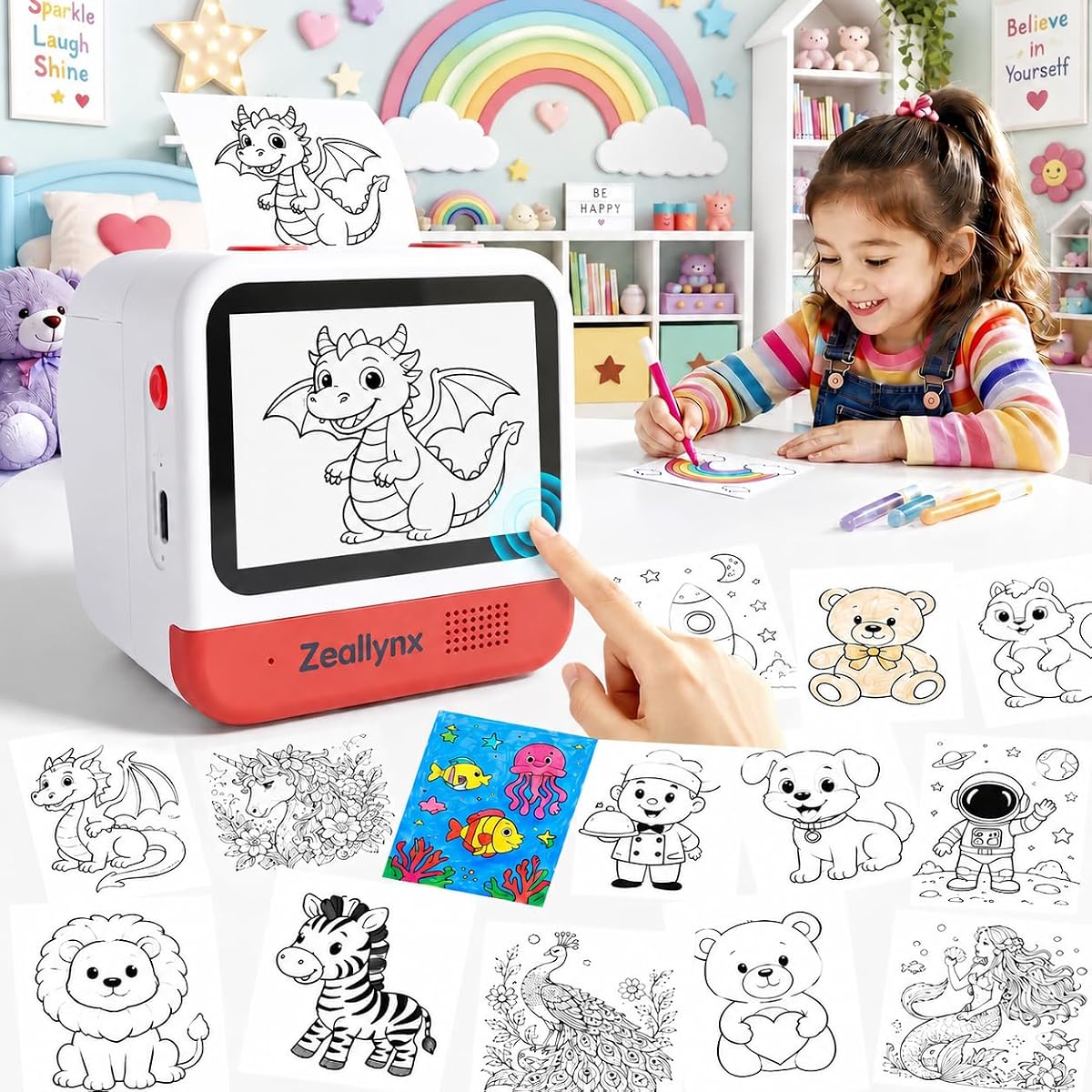

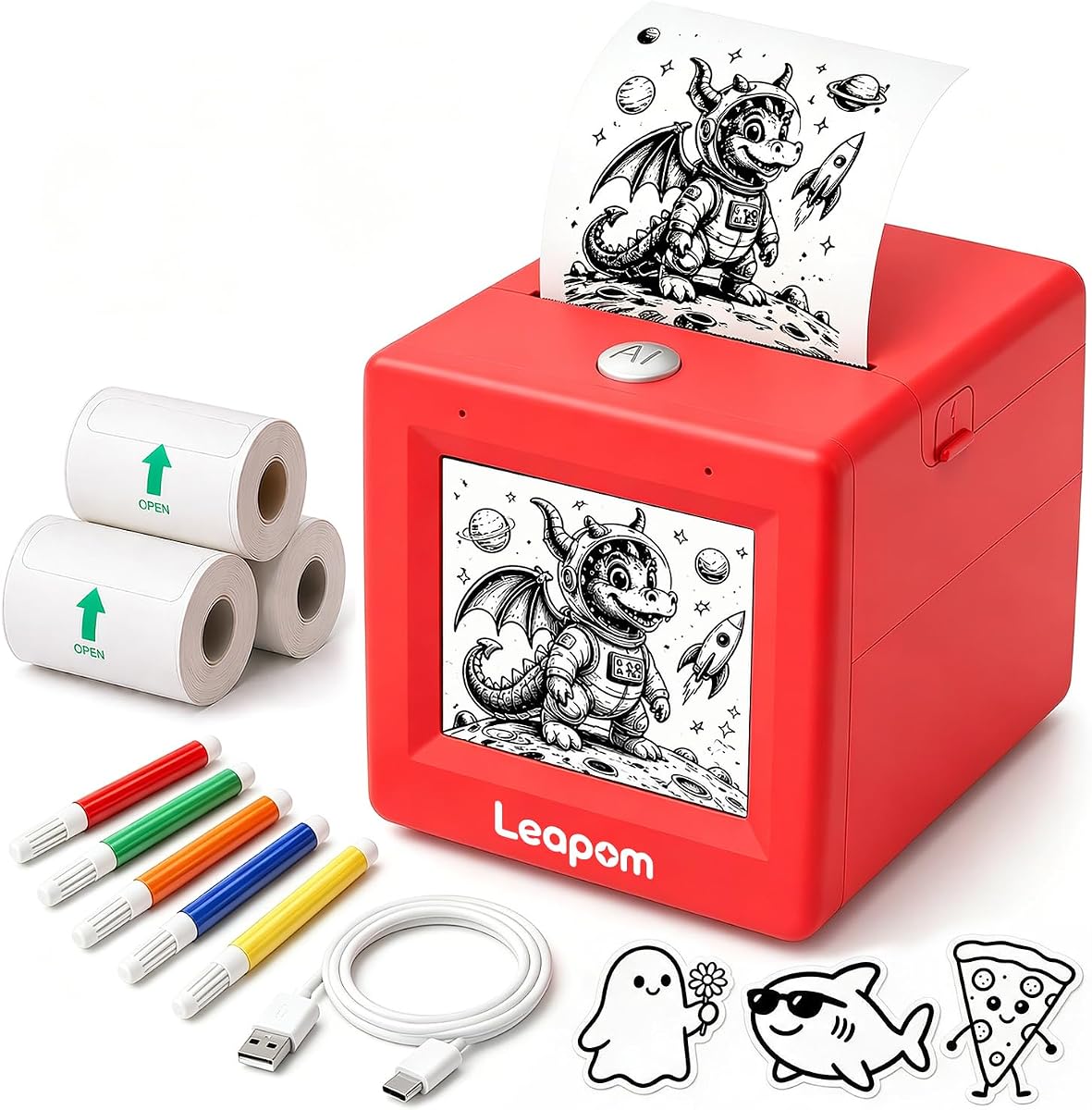


The AI Sticker Maker for Kids stands out as a top choice for families seeking an easy entry into AI art. This device combines voice recognition with a touchscreen interface to turn spoken ideas into printable stickers. With a high rating, it proves reliable for young users who want to create without complex steps. The inclusion of watercolor pens adds a tactile layer to the digital generation process.
We may earn a commission when you buy through this link, at no additional cost to you.
Its voice-to-image capability is robust, allowing children to describe scenes like a dragon or a car. The printer then generates the line art instantly using thermal technology. Because it connects via Wi-Fi without needing an app, parents avoid managing separate accounts or permissions. The device also features strict content filtering, ensuring that every generated image remains safe for children of all ages.
While the printer is efficient, it relies on thermal paper which can fade over time if exposed to heat. Additionally, the Wi-Fi requirement means it works best at home or near a router. These factors are acceptable trade-offs for the convenience of not needing Bluetooth pairing or manual downloads. The device remains a streamlined solution for spontaneous creative sessions.
This printer is ideal for birthdays, holidays, or daily play where creativity is encouraged. It helps kids develop communication skills by translating thoughts into visual outputs. We recommend it for parents who want a low-friction creative tool that feels like magic. The complete set includes everything needed to start making stickers right out of the box.
Children can express complex ideas through voice commands, bypassing the need for artistic ability. This empowers young minds to focus on storytelling and imagination rather than technique.
The device does not store data and filters content automatically, providing peace of mind for parents concerned about online safety. Privacy is built into the core design of the system.
We may earn a commission when you buy through this link, at no additional cost to you.
The Liene PixCut S1 represents a significant upgrade for those needing professional-quality stickers. It combines thermal dye-sublimation printing with precise auto-cutting in one device. This eliminates the need for separate machines, saving time and space. The high resolution ensures that every detail in photos or graphics is captured with sharp clarity.
We may earn a commission when you buy through this link, at no additional cost to you.
Its AI image extraction feature allows users to remove backgrounds and isolate subjects effortlessly. The cutter then follows the edges with pinpoint accuracy, creating flawless shapes every time. The printed stickers are waterproof and scratch-resistant due to the four-layer technology used during printing. This durability makes them suitable for long-lasting labels or gifts that survive wear and tear.
While the device is powerful, it comes with a higher price tag compared to basic thermal printers. It also requires a smartphone connection via Bluetooth to operate fully. These requirements might limit its accessibility for younger children who need simpler interfaces. However, for serious crafters, the quality and efficiency justify the investment.
We recommend this machine for DIY enthusiasts who want vibrant, custom stickers. It is perfect for creating phone skins, journal labels, or party favors. The app provides thousands of free templates, ensuring users never run out of ideas. If you need results that look professionally made, this is the tool to choose.
The 300 DPI resolution delivers vivid colors that rival commercial prints. Users can create gallery-worthy stickers or durable labels without visiting a print shop.
The precision cutting system ensures every sticker has clean edges. This reduces the need for manual cutting and makes the final product look polished.
We may earn a commission when you buy through this link, at no additional cost to you.
The AI Voice Sticker Printer offers exceptional value with a perfect rating and affordable price. It brings voice-to-sticker magic to any desk with a compact design. Users can speak an idea and get a black-and-white line art output instantly. The included color LED display lets you preview designs before printing to save paper.
We may earn a commission when you buy through this link, at no additional cost to you.
With seven unique art styles, this printer adds variety to creative projects. The ability to regenerate designs until satisfied reduces waste and frustration. The device is incredibly portable at 0.5 lbs, making it easy to carry in a backpack. This mobility supports creative activities at school or during travel without bulk.
Though it only prints in black and white, this limitation encourages coloring creativity with markers. The app offers free resources without subscriptions, keeping long-term costs low. Some users might prefer full color, but the line art is ideal for personalized coloring sheets. It is a practical choice for budget-conscious buyers.
This printer is a great gift for birthdays or holidays due to its versatility. It comes with four rolls of paper and a charging cable ready to use. We recommend it for kids and adults who enjoy DIY crafts on a budget. The smart preview feature ensures you only print what you truly love.
The color LED screen shows the design before printing. This allows users to make adjustments and save paper on unwanted outputs.
Light enough to fit in pockets, this device supports creativity anywhere. The rechargeable battery ensures it is ready for hours of use.
We may earn a commission when you buy through this link, at no additional cost to you.
The Sticker Printer AI Maker shines with its intuitive touchscreen and voice controls. It allows children to navigate modes easily without complex menus. With a perfect rating, it satisfies users looking for simplicity. The device offers ten creative modes, including story collection and comic strips, expanding beyond simple stickers.
We may earn a commission when you buy through this link, at no additional cost to you.
Its ability to save designs directly on a TF card is a standout feature. This means favorite creations are safe even without cloud connections. The fast 2.4GHz WiFi setup ensures minimal waiting before printing starts. Kids can focus on making content instead of troubleshooting technical settings.
The lack of an app requirement simplifies the experience for parents managing devices. However, it relies on thermal paper which may fade over time. Users should store printed stickers away from direct sunlight to preserve them. This is a minor trade-off for the convenience of immediate creation.
This printer is perfect for classrooms or home schooling environments. It supports journaling and notes as well as pure art. We recommend it for users who value ease of use over color options. The combination of touchscreen and voice makes it accessible for all skill levels.
The touchscreen allows all functions to be accessed directly on the device. This reduces dependency on external software and simplifies setup.
Ten creative modes mean the device is not limited to just stickers. Users can create stories and comics, enhancing its utility as an educational tool.
We may earn a commission when you buy through this link, at no additional cost to you.
Stickerbox AI Voice-Powered is unique because it encourages screen-free creativity. The design focuses purely on voice and printing to keep kids away from tablets. It is KidSAFE certified, which adds a layer of trust for parents. The device listens only when the button is pressed, ensuring privacy.
We may earn a commission when you buy through this link, at no additional cost to you.
Kids can tell a story and have the printer create stickers for that story. The included colored pencils allow them to customize the results further. This hands-on approach promotes storytelling and imagination without digital distractions. The thermal technology ensures there is no ink mess to clean up.
Because there is no screen, users cannot preview designs before printing. This might lead to some wasted paper if the idea does not match the output. However, this limitation reinforces the surprise element of the toy. It is a deliberate design choice to support independent play.
We recommend this for families wanting to balance tech and traditional play. It is an excellent gift for kids who enjoy offline hobbies. The certified safety features make it a reliable choice for younger children. The focus on creativity rather than screens sets it apart in the category.
By removing the screen, the device encourages children to use their voices and hands. This helps develop fine motor skills and creative thinking.
The push-to-talk feature ensures the device only listens when needed. This design protects privacy and reduces unnecessary data collection risks.
We may earn a commission when you buy through this link, at no additional cost to you.
This sticker maker combines interactive learning with creative fun for ages 3 and up. The app is free and secure, though users should ignore any third-party ads. It turns speech into designs instantly, making creativity accessible. The portable design allows kids to carry it around the house easily.
We may earn a commission when you buy through this link, at no additional cost to you.
The kit includes markers and paper rolls to start creating immediately. This makes it a complete gift that requires no extra purchases. The device supports photo and material printing through the app, adding versatility. It helps children develop communication skills while enjoying art.
The app experience is free but includes ads that parents should monitor. While the print quality is good for line art, it is not suitable for photos. For journaling and doodles, it is perfectly adequate. Users should take care with app navigation to avoid unexpected prompts.
We recommend this for parents looking for an affordable educational toy. It encourages kids to express ideas through sound and art. The included supplies make it ready to use out of the box. It is a solid choice for young creatives in the home.
The official app offers free resources without subscriptions. Users should be aware of third-party ads and close them to keep the experience smooth.
The lightweight design makes it easy for kids to use anywhere. It supports learning on the go without compromising on functionality.
We may earn a commission when you buy through this link, at no additional cost to you.
The AI Voice Activated Printer is a robust portable solution with an HD screen. It simplifies the design process by allowing input through voice or typing. The device comes with five rolls of paper, which is generous for a starter kit. This ensures users have enough supply for extended creative sessions.
We may earn a commission when you buy through this link, at no additional cost to you.
Its thermal technology produces clear black-and-white prints that are smudge-resistant. The screen helps visualize designs before committing to print. It is designed for family activities, making it suitable for parent-child bonding. The controls are simple enough for children to operate independently.
The device does not require ink or toner, keeping costs low per print. However, the adhesive paper limits the shapes users can cut manually. It is best used for standard labels and stickers. The portability allows for use at school or during travel.
We recommend this for families who want more supply upfront. It is a great gift for holidays due to the included paper. The HD screen adds a modern touch to traditional crafting. It balances tech and art well for kids and adults alike.
Five rolls of paper are included to start right away. This reduces the need for immediate refills and extends usability.
The HD display allows for better visualization of the output. This helps users adjust ideas before printing to save time.
We may earn a commission when you buy through this link, at no additional cost to you.
The T02 Mini Thermal Printer is a compact device that doubles as a study aid. It uses Bluetooth for quick one-click connections to phones. The app offers AI photo cutout to isolate subjects for stickers. This makes it useful for students needing flashcards or labels.
We may earn a commission when you buy through this link, at no additional cost to you.
Its scan function allows users to capture graphics and print them clearly. This helps with chemistry diagrams or math notes. The device is palm-sized, making it easy to carry in a backpack. It is ideal for on-the-go note-taking and organization.
The device does not support computer printing, limiting it to mobile use. Users must rely on the Phomemo app for control. This might restrict functionality for desktop-focused users. However, for mobile workflows, it is efficient and handy. The thermal technology keeps it quiet and clean.
We recommend this for students who need portable printing. It is a great addition to office or home supplies. The AI features add value beyond simple printing. For learners, it provides a quick way to document and organize materials.
The app allows users to remove backgrounds from images. This creates clean stickers or labels without manual editing.
Its small size fits anywhere. Students can use it in class or study groups to print notes or charts.
We may earn a commission when you buy through this link, at no additional cost to you.
The UtechSmart AI Voice Maker connects via WiFi or Bluetooth. This flexibility ensures it works in various network environments. It offers six art styles for diverse creative needs. The app allows for deeper customization of stickers and labels. This is a strong option for tech-savvy users.
We may earn a commission when you buy through this link, at no additional cost to you.
Its voice activation is simple, enabling kids to speak and print quickly. The BPA-free thermal paper ensures safe handling for children. It is a great gift for birthdays or school projects. The device is designed to be portable, making it a good travel companion.
Setting up the app is required initially which might take a few minutes. Once ready, the process is smooth. Users should note that it is limited to thermal output. This means it is best for black-and-white designs. The value lies in the flexibility of connection options.
We recommend this for families who value versatile connectivity. It is a reliable choice for regular creative use. The app adds features that pure hardware devices lack. For those who want control over their prints, this model is a good fit.
Supporting both WiFi and Bluetooth ensures it works in different settings. This flexibility reduces frustration with connectivity issues.
Using BPA-free materials ensures safety during handling. Parents can let kids use it without worrying about toxic substances.
We may earn a commission when you buy through this link, at no additional cost to you.
The AI Voice Sticker Maker Red features a 3.5-inch touchscreen for direct control. It requires no app installation, which simplifies the process. The push-to-talk voice input ensures privacy since it only listens when pressed. This makes it safe for kids without exposing personal data. It is a strong contender for families valuing privacy.
We may earn a commission when you buy through this link, at no additional cost to you.
The device connects via WiFi to generate designs quickly. It includes starter rolls so users can begin right away. The thermal printing is clean and efficient for daily use. The design is colorful and appealing to children. It encourages independent creation without parental intervention.
Privacy protection is built into the software to filter harmful content. The lack of an app reduces dependency on external services. However, users should ensure their WiFi is stable for best performance. The device is not intended for commercial use but rather personal fun. It offers a balanced approach to AI in toys.
We recommend this for parents who want a simple, private toy. It is ideal for kids who enjoy digital art. The screen provides a tactile interface that is easy to learn. For a gift that balances tech and safety, this model is a top choice.
The push-to-talk feature means the device never listens passively. This design protects children's voices from unauthorized access.
With a dedicated screen, users do not need a phone to operate the printer. This makes the experience self-contained and simple.
We may earn a commission when you buy through this link, at no additional cost to you.
Selecting the right AI sticker printer maker involves considering several key factors to match your needs. Whether you are buying for a child or a craft enthusiast, understanding the technical aspects helps avoid disappointments. This guide outlines the essential elements to evaluate before making a purchase.
Most devices use thermal printing which requires no ink or toner. This keeps costs low and operations clean. Some premium models use dye-sublimation for color. Consider if you need color or if black-and-white line art is sufficient for your projects.
Voice controls should respond accurately to simple commands. Look for models that understand common prompts like animals or cartoons. Test the sensitivity if possible to ensure it catches words easily. Good accuracy ensures the device feels responsive and fun to use.
Some devices need an app while others work via Wi-Fi directly. Decide if you prefer managing settings on your phone or on the device itself. Avoid devices that require complex Bluetooth pairing if you want simplicity. Stable connection ensures print tasks run without interruption.
Ensure the device has content filters to block inappropriate results. Check if it stores personal data or voice prompts. KidSAFE certification adds a layer of trust for families. Privacy-first models are better for younger children who need supervision.
A lightweight device is easier to carry for travel or school. Check dimensions to ensure it fits in your bag. A durable build withstands drops and daily handling. Look for rechargeable batteries to keep it running without constant power access.
Consider the cost and availability of replacement paper rolls. Some boxes include starter rolls while others require separate purchase. Thermal paper fades in heat so store prints properly. Ensure the device supports standard sizes for easy refilling and maintenance.
Look for models with multiple art styles like anime or sketch. These options keep creativity fresh. Apps with templates add value by providing structure. Features that save designs locally or on cards protect your work from loss.
An intuitive interface reduces the need for technical troubleshooting. Touchscreens or simple buttons are better than complex menus. Setup should be straightforward for children to use independently. The goal is to maximize fun while minimizing the learning curve.
Third, maintain the printer by keeping it in a cool place. Avoid exposing it to direct sunlight which can degrade thermal paper. Clean the exterior with a dry cloth to remove dust. Store unused paper rolls in a sealed bag to prevent them from fading prematurely.
No, most AI sticker printers use thermal technology which relies on heat rather than ink. This makes them mess-free and cheaper to operate over time. You only need to purchase thermal paper rolls to continue creating designs.
Most basic models print in black-and-white line art. However, premium options like the Liene PixCut S1 use dye-sublimation to produce color. Check the product details to see if color is a supported feature.
Connectivity varies by model. Some use direct Wi-Fi while others require a Bluetooth connection to a smartphone app. Follow the setup guide included in the box to pair your device securely.
Yes, most feature child-safe designs with content filters. They often avoid storing personal data to protect privacy. Always supervise younger users during setup and operation to ensure safe handling.
Thermal paper rolls are often available through the manufacturer's website. You can also find compatible rolls on major online retailers. Ensure you buy the correct size and type for your specific printer model.
Battery life varies but portable models usually last a few hours of continuous use. Many include USB-C charging for quick refills. For longer sessions, it is best to have a power source nearby.
Some printers work without an app using direct Wi-Fi or touch controls. Others rely on apps for advanced settings and templates. Check the product specifications to determine if an app is necessary.
Thermal stickers can fade over time if exposed to heat or sunlight. To maximize life, keep printed items out of direct light. Properly sealed stickers can last several years.
Prices and availability change frequently so check the current listings before ordering. We hope this guide helps you find the perfect tool to spark creativity. Happy printing and enjoy exploring the possibilities of AI in art.