
EMEET C960 4K
4.5Editor score
True 4K Resolution
PDAF Focus
Dual Omni Mics
This guide compares the top external webcams for Mac based on image quality, audio clarity, privacy features, and compatibility with macOS video conferencing
Choosing the right external webcam for your Mac is essential for clear video calls and professional presentations. Modern webcams offer improved sensors, better microphones, and seamless integration with macOS systems for enhanced productivity.
We evaluated ten top-rated models focusing on resolution, autofocus capabilities, low-light performance, and build quality. Each product was selected for its ability to deliver reliable performance across popular platforms like Zoom, Teams, and FaceTime.
Each review highlights key strengths, potential drawbacks, and ideal use cases to help you decide. Please note that pricing and availability may fluctuate over time so check current listings before purchasing your next camera.
4.5Editor score

4.6Editor score

4.6Editor score
This side-by-side comparison highlights the key specifications and features of each webcam to help you identify the best fit for your specific needs and workflow.





The Acer 4K Webcam stands out as the top choice for Mac users seeking high quality video performance. With a strong 4.6 rating this model delivers exceptional clarity and professional features that elevate virtual meetings and content creation.
We may earn a commission when you buy through this link, at no additional cost to you.
Its UHD 4K resolution paired with a large Sony 1/2 CMOS sensor ensures balanced true to life visuals even in challenging lighting conditions. The Phase Detection Autofocus technology keeps your image crisp and sharp while the all aluminum body provides fast heat dissipation for reliability.
While the price point is higher than standard options the build quality and advanced sensor justify the investment. The magnetic privacy cover adds a layer of security and the compact lightweight design makes it ideal for mobile workers.
This webcam is recommended for professionals streamers and creators who demand premium video quality. It offers a seamless plug and play experience with Mac systems ensuring you look your best on every call.
The combination of 4K resolution and a Sony sensor captures fine details and accurate colors for a lifelike presence on screen.
Aerospace grade aluminum construction ensures durability while the magnetic privacy cover keeps your lens secure when not in use.
We may earn a commission when you buy through this link, at no additional cost to you.
The EMEET C960 offers an impressive balance of performance and affordability for Mac users on a budget. Rated 4.5 this webcam delivers true 4K video quality that rivals more expensive models when configured correctly.
We may earn a commission when you buy through this link, at no additional cost to you.
Its PDAF technology ensures stable focusing during meetings while the auto light correction handles dim or over exposed settings effectively. The dual omnidirectional mics capture natural audio up to a reasonable distance without needing an external microphone.
You may need to switch settings via software to unlock the full 4K potential which adds a small step to setup. However the privacy cover and versatile mounting options including tripod threads add significant value for the price.
Ideal for students remote workers and casual streamers this webcam provides clear visuals without breaking the bank. It is a smart choice if you want 4K clarity at a competitive cost.
Delivering genuine 4K performance and solid build quality at a lower price makes this an excellent entry level choice.
Flexible horizontal and vertical adjustments along with a standard tripod thread allow for diverse setup configurations.
We may earn a commission when you buy through this link, at no additional cost to you.
The Logitech C922x is a well respected premium option known for its consistent performance and advanced software tools. With a 4.6 rating it remains a favorite among streamers and professionals who need reliable video and audio output.
We may earn a commission when you buy through this link, at no additional cost to you.
Its HD light correction technology fine tunes brightness and contrast automatically ensuring you look clear even in low light environments. The stereo audio with dual mics provides natural sound that enhances the quality of recorded videos and calls.
The included XSplit VCam license lets you replace or blur backgrounds without a green screen which is a unique perk for creators. Note that it lacks a physical privacy shutter which some users may prefer for security.
For those willing to invest in a proven tool the C922x offers features that go beyond standard video calls. It is perfect for anyone seeking a premium experience with extended software capabilities.
Advanced capture software and background removal tools make it a powerful option for content creation and streaming.
Stereo microphones capture rich sound that rivals dedicated external mics for everyday video conferencing needs.
We may earn a commission when you buy through this link, at no additional cost to you.
The Anker PowerConf C200 is designed to keep you visible in dim environments making it a top pick for home offices. Its 4.4 rating reflects strong performance in capturing clear video without needing extra lighting fixtures.
We may earn a commission when you buy through this link, at no additional cost to you.
Advanced AI noise cancellation ensures your voice comes through clearly even if there is background noise around you. You can adjust the viewing angle via software to frame your shot perfectly which adds flexibility to your setup.
While it offers 2K resolution rather than 4K the clarity is sufficient for most professional calls. The integrated cover provides quick privacy and the durable build ensures long term use.
If you often work in evenings or rooms with limited light this webcam delivers consistent results. It is a reliable choice for anyone prioritizing visibility and audio clarity over maximum resolution.
Built-in AI technology filters out distractions so your voice remains the focus during important virtual conversations.
Multiple viewing angles allow you to customize the shot to suit your workspace layout and personal preference.
We may earn a commission when you buy through this link, at no additional cost to you.
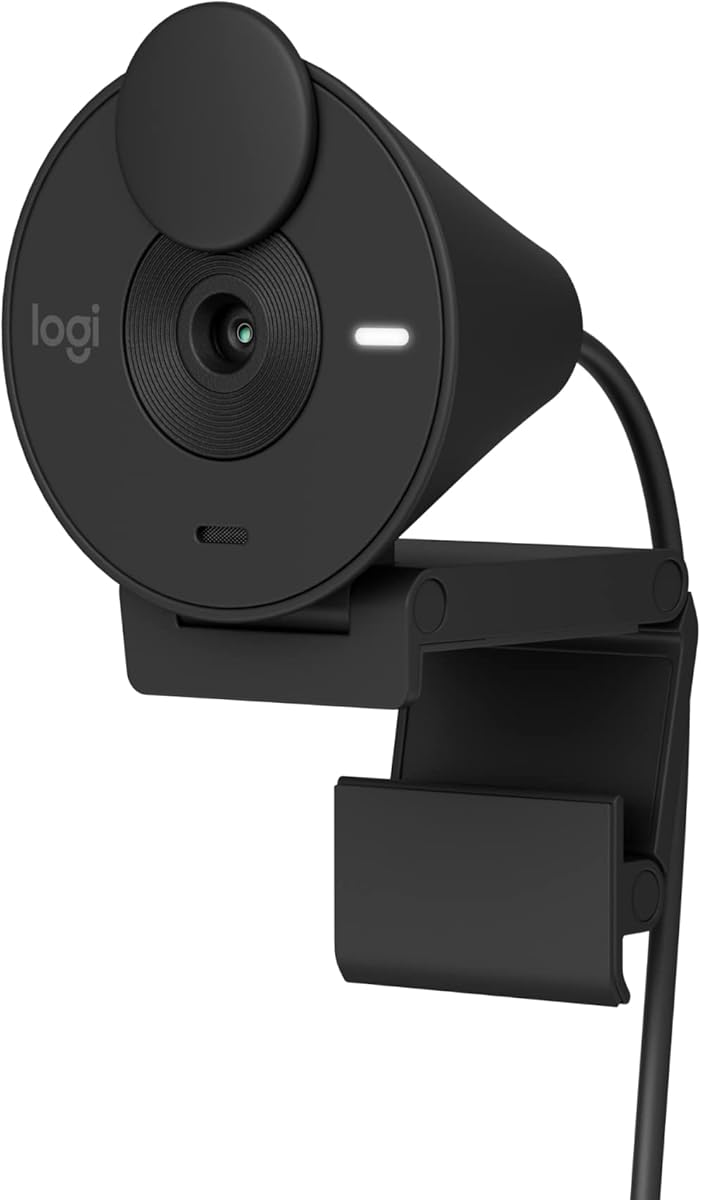
The Logitech Brio 100 offers a simple and stylish solution for Mac users who want reliable performance without unnecessary complexity. With a 4.4 rating it provides clear Full HD video and solid audio for everyday use.
We may earn a commission when you buy through this link, at no additional cost to you.
RightLight technology boosts brightness to reduce shadows so you appear well lit on camera. The integrated privacy cover slides easily for security and the built-in mic ensures you are heard without extra hardware.
While it lacks advanced features like 4K or software customization its simplicity is a strength for those who prefer plug and play. The use of recycled plastic also aligns with eco-friendly preferences.
This webcam is perfect for casual meetings and remote work where consistency and ease of use matter most. Its design complements modern setups while delivering essential video quality.
Made with post-consumer recycled plastic this model supports sustainability without compromising on core functionality.
Automated brightness adjustments ensure you look professional in varied lighting environments with minimal effort.
We may earn a commission when you buy through this link, at no additional cost to you.
The Logitech Brio 301 is engineered for business users needing certified compatibility with enterprise tools like Zoom and Teams. Its 4.4 rating highlights consistent performance and ease of integration into corporate environments.
We may earn a commission when you buy through this link, at no additional cost to you.
RightLight 2 technology compensates for poor lighting conditions ensuring you remain visible in any room. The spin shutter offers quick privacy access and the Logi Tune app allows for personalized adjustments.
While it uses a mono microphone the noise reduction works well to filter out distractions. The focus on certification ensures reliable behavior across different networks and systems.
For teams and professionals prioritizing compatibility and stability this model is a safe and efficient choice. It delivers essential features without the complexity of consumer-focused extras.
Certification for leading platforms ensures seamless operation in professional workflows without technical issues.
A simple spin shutter gives you immediate control over lens exposure for peace of mind between calls.
We may earn a commission when you buy through this link, at no additional cost to you.
The Logitech C920e is built for business settings with certifications and management tools that IT departments appreciate. Its 4.6 rating reflects high reliability and seamless integration into corporate workflows.
We may earn a commission when you buy through this link, at no additional cost to you.
Two omnidirectional microphones capture voice clearly from a distance ensuring everyone participates effectively. The attachable privacy screen and tripod mount options add utility for flexible workstation arrangements.
While it lacks modern 4K capabilities the 1080p video is crisp and adequate for daily meetings. Device management software helps keep the camera up to date across many users.
Ideal for organizations needing standardized hardware with strong compliance standards. This model ensures your team stays connected with consistent quality and security features.
TAA certification and device management make it a practical choice for large scale deployments.
Dual omnidirectional mics pick up speech naturally ensuring clear communication during collaborative sessions.
We may earn a commission when you buy through this link, at no additional cost to you.
The Logitech C920S continues to be a trusted workhorse for video calling with a solid 4.6 rating. It delivers Full HD video and reliable autofocus that keeps you sharp during important conversations.
We may earn a commission when you buy through this link, at no additional cost to you.
Stereo audio with dual mics provides rich sound quality that enhances the professional feel of your calls. The privacy shutter offers a simple way to cover the lens when not in use.
While it lacks the latest 4K advancements its performance is consistent and dependable. The build quality ensures longevity and setup is straightforward for any Mac user.
If you seek a proven camera that just works without fuss this is an excellent option. It balances price and performance perfectly for general remote work needs.
Proven technology ensures consistent video and audio quality that users can depend on daily.
Stereo microphones provide natural sound that avoids the hollow quality of mono alternatives.
We may earn a commission when you buy through this link, at no additional cost to you.
The NexiGo N60 is an affordable option that delivers decent Full HD video for basic needs. Rated 4.3 it offers solid value for users who want a no-fuss setup for video calls.
We may earn a commission when you buy through this link, at no additional cost to you.
A glass lens provides clear images within the recommended range and noise cancelling tech helps reduce background noise. The privacy cover is a handy inclusion that adds security to the package.
You may experience minor audio delays which can be resolved with firmware updates from support. However for casual use it provides the essential features at a very low cost.
This camera is suitable for students or anyone needing a reliable backup webcam. It is a practical choice when budget is the primary concern.
Delivers reliable performance at a fraction of the cost of premium models.
Glass optics ensure better light transmission and clarity compared to plastic alternatives.
We may earn a commission when you buy through this link, at no additional cost to you.
The Acer 4K Webcam is a second variant optimized for mobile workers and content creators needing portability and performance. With a 4.4 rating it offers a robust build and fast cooling for extended sessions.
We may earn a commission when you buy through this link, at no additional cost to you.
The Sony 1/2 sensor delivers rich visuals and the fast cooling design ensures reliability during long video streams or calls. Dual high sensitivity mics capture clear voice up to 2.5 meters away.
At just 57 grams it is ultra-portable for travel while still maintaining a premium feel. The magnetic privacy cover adds a secure touch for protecting your lens.
Ideal for users who travel often or require a durable camera for daily professional tasks. It combines high resolution with a compact form factor for modern workflows.
Lightweight design with 4K capability ensures you stay productive regardless of your location.
Fast cooling technology prevents overheating during prolonged use for consistent performance.
We may earn a commission when you buy through this link, at no additional cost to you.
Selecting the right webcam for your Mac involves evaluating resolution, audio quality, privacy, and compatibility with your workflow.
Resolution is a primary factor when choosing a webcam for Mac. Higher resolutions like 4K offer greater detail which is useful for presentations or close-up streaming. However 1080p is often sufficient for video calls and uses less bandwidth.
Look for cameras with larger sensors and better optics to ensure clarity even in varying lighting conditions.
Many home offices lack professional lighting so low-light correction technology is vital. Features like RightLight or AI noise adjustment help brighten your image without needing extra lamps.
Ensure the camera can handle dim rooms effectively to avoid grainy or dark video during evening calls.
Clear audio is just as important as video for effective communication. Dual microphones with noise cancellation reduce distractions like keyboard clicks or background chatter.
Check if the webcam uses omnidirectional mics that capture sound from a wider area for better natural audio.
Privacy is a growing concern for remote workers and businesses. Look for built-in privacy covers or shutters that physically block the lens when not in use.
Hardware privacy solutions offer more security than software toggles since they prevent remote access to the camera.
Ensure the webcam is compatible with macOS and the platforms you use like Zoom or Teams. USB plug and play is convenient but check if a specific cable like USB-C is needed.
Avoid cameras that require constant internet connections or cloud storage for basic functionality.
A durable webcam withstands daily use and travel better. Metal bodies offer better heat dissipation and premium feel compared to plastic ones.
Consider weight and size if you move your workspace often as lighter models are easier to transport.
Versatile mounting ensures the camera fits your monitor or desk setup. Tripod threads allow you to position the camera independently of your laptop.
Check if the clip is adjustable and sturdy enough to hold the camera securely on different screen thicknesses.
Some webcams come with proprietary software for adjusting settings or background effects. Ensure the software runs smoothly on your version of macOS.
Open plug and play models are often preferred by those who do not want extra installed applications.
To start using your webcam simply plug it into a USB port on your Mac. The system should recognize it automatically and you can select it in your video conferencing app's settings.
Clean the lens regularly with a microfiber cloth to avoid smudges that affect image clarity. Avoid harsh chemicals or rough materials that could scratch the glass.
Store the webcam in a protective case when traveling to prevent physical damage. Adjust privacy covers or shutters when not in use to maintain security.
The Acer 4K Webcam is our top choice due to its high resolution Sony sensor and premium build. For budget users the EMEET C960 4K offers excellent value with similar clarity at a lower cost.
Most modern webcams are plug and play and require no additional drivers on macOS. Some models offer optional software for advanced adjustments but basic functionality works out of the box.
Utilize webcams with auto light correction features to adjust brightness automatically. Positioning a light source in front of you rather than behind also helps your camera capture a clearer image.
For streaming and professional work 1080p or 4K is recommended. Higher resolutions provide better detail for viewers while 4K is ideal for content creators requiring high fidelity.
Yes hardware privacy covers provide more security than software toggles because they physically block the lens. This ensures no one can access your camera remotely when the cover is closed.
Yes webcams like the Acer 4K and Logitech C922x support gaming chat modes and streaming platforms. They offer clear video and audio for gameplay commentary or casual calls.
Choosing the right external webcam for Mac depends on balancing resolution audio quality and privacy. The Acer 4K Webcam leads with its sensor quality while the EMEET C960 offers a budget-friendly 4K alternative.
Prioritize features like low-light correction and noise-cancelling microphones to ensure professional communication. Consider your workspace lighting and privacy needs when making a decision.
Prices and availability may change over time so verify the latest listings before purchasing. With the right webcam you can enhance your remote presence and stay connected effortlessly.