
Ethernet Adapter for Fire TV Stick
4.7Editor score
Plug-and-play setup
Sleek aluminum design
Includes adhesive tapes
This guide compares the best Fire TV Stick Ethernet Adapter options to help you choose a reliable wired connection for smoother streaming and gaming.
Finding a stable connection for your streaming device is crucial for uninterrupted entertainment. A Fire TV Stick Ethernet Adapter transforms your wireless setup into a wired network, reducing buffering and improving speed significantly.
We evaluated ten top-rated adapters based on compatibility, build quality, and performance. Our analysis covers micro-USB and USB-C models to ensure you find the perfect match for your specific Fire TV hardware generation.
Each pick highlights key features and real-world performance metrics. Please note that product availability and pricing can change frequently, so always verify the latest details before finalizing your purchase decision.
4.7Editor score

4.5Editor score

4.1Editor score
The following table provides a side-by-side comparison of all ten adapters. We highlight key specifications and compatibility notes to help you quickly identify the right fit for your device.


This Micro-USB Ethernet Adapter stands out as a top choice for users seeking a direct wired network connection for their Fire TV devices. With a solid rating of 4.5 stars, it promises reliable internet speeds and helps free up WiFi bandwidth for other devices in your home.
We may earn a commission when you buy through this link, at no additional cost to you.
Its ease of setup is a major highlight. You simply connect the adapter into the USB port on your Fire TV and plug in an Ethernet cable directly from your router. This straightforward process ensures minimal fuss and maximum functionality for your streaming needs.
While it works with a wide range of Fire TV models including the Stick Lite and 4K versions, users should note it is incompatible with the Fire TV Stick HD (2nd Gen) which uses USB-C. Additionally, you may need to use the Fire TV's power adapter to ensure sufficient power for the Ethernet Adapter.
If you own a compatible Fire TV device and want to eliminate buffering caused by weak WiFi signals, this adapter is an excellent investment. It provides a stable connection that ensures smooth playback for your favorite content without interruptions.
By connecting directly to a wired network, this adapter ensures consistent internet speeds that are less prone to the interference often experienced with wireless connections.
The plug-and-play nature of this device means you do not need to install any drivers or software, making it accessible for users of all technical skill levels.
We may earn a commission when you buy through this link, at no additional cost to you.
The Right Angle USB-C Ethernet Adapter is specifically designed for the Fire TV Stick HD (2nd Gen) with USB-C connectivity. With a rating of 4.3 stars, it offers a practical solution for users needing a wired connection on this specific device model.
We may earn a commission when you buy through this link, at no additional cost to you.
Its right-angle design is particularly beneficial for saving space behind your TV. This thoughtful engineering helps prevent cable clutter and ensures a cleaner installation, which is often a concern in modern entertainment setups.
However, it is important to note that this adapter is incompatible with older micro-USB models. If you have a Fire TV Stick HD (1st Gen) or another device, you will need a different adapter. The speed is also limited to 480mbps when used with the Stick HD.
For owners of the Fire TV Stick HD (2nd Gen) looking to upgrade their network stability, this adapter is a solid choice. It provides a direct connection that can enhance your streaming experience by reducing latency and improving reliability.
The right-angle configuration allows the adapter to sit flush against the TV, reducing the risk of cables getting bent or disconnected by accident.
Ensuring compatibility with the newest USB-C model means users can upgrade their connection without worrying about adapter mismatches or return hassles.
We may earn a commission when you buy through this link, at no additional cost to you.
The ELECTOP 1000 Mbps Ethernet Adapter offers an extreme experience with gigabit speeds up to 1000Mbps. Rated 4.1 stars, it promises to stabilize your network and eliminate lag, making it ideal for 4K streaming and gaming on compatible devices.
We may earn a commission when you buy through this link, at no additional cost to you.
Its build quality is noteworthy, featuring a high-quality aluminum alloy casing. This material helps dissipate heat effectively, maintaining optimal performance even during long hours of operation. Additionally, the included LED indicator light provides clear visual feedback on connection status.
Users should be aware that this adapter is not compatible with USB-C models like the Chromecast with Google TV or Fire Stick 4K Max (2021+). It also requires a micro-USB port and a separate power cable for sufficient power supply via the Micro USB port.
If you are looking for a high-performance adapter that supports gigabit speeds and has robust heat management, this is a strong contender. The thoughtful design with adhesive tapes also helps keep the adapter securely in place behind your TV.
With support for 1000Mbps, this adapter ensures that your streaming device can handle high-bandwidth content without bottlenecks or buffering issues.
The aluminum alloy construction acts as a heat sink, preventing overheating and ensuring the adapter remains reliable over extended usage periods.
We may earn a commission when you buy through this link, at no additional cost to you.
This Ethernet Adapter for Fire TV Stick is a top budget-friendly option with an impressive 4.7-star rating. It offers a universal solution for TV sticks with Micro USB ports, ensuring reliable 10/100 Mbps speeds without breaking the bank.
We may earn a commission when you buy through this link, at no additional cost to you.
Setup is incredibly simple with a plug-and-play design that requires no drivers or complicated installations. The sleek and sturdy aluminum design not only looks good but also aids in heat dissipation, keeping the adapter cool during marathon viewing sessions.
While it supports only 10/100 Mbps speeds, this is sufficient for most streaming needs. However, note that it is not compatible with USB-C devices like the Chromecast with Google TV. Double-checking your device's port before purchasing is essential.
For users seeking a cost-effective and reliable way to switch to a wired connection, this adapter is highly recommended. Its high rating and straightforward functionality make it a safe choice for many households.
Priced affordably, this adapter delivers solid performance and reliability, making high-quality wired connectivity accessible to a broader range of users.
The inclusion of self-adhesive tapes ensures the adapter stays securely mounted, preventing loose connections and maintaining a tidy setup behind your TV.
We may earn a commission when you buy through this link, at no additional cost to you.
The ZEXMTE Ethernet Adapter is designed to work seamlessly with various Fire TV Sticks and Chromecast Ultra. With a rating of 4.5 stars, it promises rock-solid wired internet speeds to eliminate buffering and dropouts during streaming.
We may earn a commission when you buy through this link, at no additional cost to you.
Setup takes just one minute, making it an efficient solution for improving your network stability. The premium aluminum casing stays cool even during extended use, and the smart status lights provide instant visual confirmation that your connection is active.
While it covers many popular models, it is not compatible with USB-C devices. If you have a newer Chromecast with Google TV, this adapter will not work. Ensure your device has a Micro USB port before buying.
For those tired of WiFi interruptions, this adapter offers a straightforward fix. Its universal fit and reliable performance make it a strong choice for enhancing your streaming experience without technical complexity.
The smart status lights allow you to quickly check the connection status without navigating menus, providing peace of mind that your stream is optimized.
The aluminum casing effectively dissipates heat, ensuring the adapter remains cool and reliable even during binge-watching sessions.
We may earn a commission when you buy through this link, at no additional cost to you.
The UGREEN Ethernet Adapter stands out with its 3.3 ft long cable design, providing extra wiggle room behind your TV. Rated 4.4 stars, it offers a stable 10/100 Mbps connection to help you watch video smoothly without buffering.
We may earn a commission when you buy through this link, at no additional cost to you.
It includes a USB-A power cord that can power the network adapter and TV Stick simultaneously, though it must be connected to a USB wall charger over 5W. This feature adds flexibility if you lack a free port on your TV for power.
Note that this adapter is not compatible with any Roku devices or the Fire TV Stick 1st gen/4k Max. Always verify your device compatibility to avoid returns. Otherwise, it offers a straightforward driver-free setup.
If you need a reliable adapter with a generous cable length and power management options, UGREEN is a great choice. The extra cable length helps organize your setup better, which is a practical benefit for many users.
The 3.3 ft cable length provides ample slack to reach power sources and routers more easily, reducing cable strain and clutter.
With an included USB-A power cord, you can ensure the adapter gets sufficient power even if your TV USB ports are limited or insufficient.
We may earn a commission when you buy through this link, at no additional cost to you.
This ZEXMTE Ethernet Adapter is engineered to support speeds up to 1000Mbps for faster and more stable connections. Rated 3.7 stars, it aims to eliminate buffering and WiFi drops with its premium quality aluminum shell and visual indicators.
We may earn a commission when you buy through this link, at no additional cost to you.
Installation is super easy, switching your device from wireless to wired instantly without complex configurations. The green and yellow LED lights help you monitor the adapter's status at a glance, giving you confidence in your network connection.
However, note that it is not compatible with Fire TV Cube or Roku devices. Additionally, the rating suggests some users may have encountered issues with compatibility or performance. Ensure your device is a supported TV stick before purchase.
If you need gigabit speeds and a durable design, this adapter is worth considering. Its focus on visual status indicators and heat dissipation adds a layer of convenience and reliability for tech-savvy users.
Supporting up to 1000Mbps allows for smoother 4K streaming and gaming by utilizing the full potential of your broadband internet connection.
The green and yellow LED lights provide immediate feedback on connection success and operational readiness, reducing troubleshooting time.
We may earn a commission when you buy through this link, at no additional cost to you.
The Cable Matters Micro USB to Ethernet Adapter connects video streaming devices to your router for a stable wired connection. With a rating of 4.4 stars, it supports high-speed data transmission up to 300+Mbps, offering almost five times the speed of traditional Ethernet.
We may earn a commission when you buy through this link, at no additional cost to you.
Its convenient 3-foot USB power cable allows easy connection to a USB wall charger, ensuring both power and wired network access without extra clutter. This makes it ideal for setups where power ports are limited or inaccessible.
This adapter works with devices like the Fire TV Stick and Google Chromecast, providing an effective solution for eliminating video buffering caused by unreliable Wi-Fi signals. It requires no drivers, simplifying the setup process further.
For users seeking a versatile and high-speed connection solution, this adapter is a solid choice. Its focus on speed and power convenience makes it a reliable option for improving your streaming and browsing experience.
Supporting 300+Mbps allows for faster data transfer and smoother video playback, ensuring your content streams without interruptions.
The 3-foot power cable provides flexibility in placement and ensures the adapter gets consistent power from a wall source rather than a TV port.
We may earn a commission when you buy through this link, at no additional cost to you.
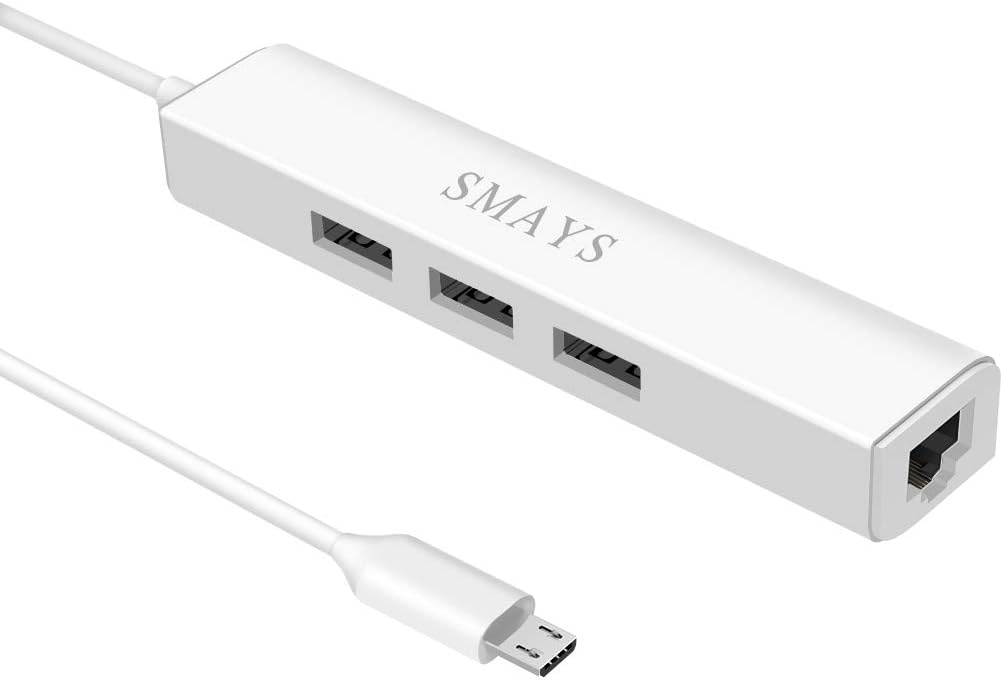
The Micro USB Hub with Ethernet Adapter is more than just a network adapter; it includes a 3-port OTG USB Hub for accessing external storage. Rated 4.3 stars, it offers stable wired internet speeds and lets you manage apps and files on a USB flash drive.
We may earn a commission when you buy through this link, at no additional cost to you.
This hub is compatible with various Fire TV models including the Lite and Cube. It supports mouse and keyboard connections, which is useful for gaming or easier navigation. The setup requires connecting the USB-DC cable to a wall charger for sufficient power.
Note that while it offers great versatility, you need to provide your own power adapter or use a 5V/2A wall charger. This adds an extra step to the setup but ensures the hub gets enough power for all connected devices.
For users who want to expand their TV stick's functionality beyond just streaming, this hub is a unique option. It combines network stability with storage and peripheral support, making it a versatile tool for smart TV users.
With three USB ports, you can connect peripherals like keyboards, mice, or storage devices, enhancing the capabilities of your streaming stick.
The integrated Ethernet port ensures a stable wired connection, eliminating buffering and lag that often occur with WiFi signals.
We may earn a commission when you buy through this link, at no additional cost to you.
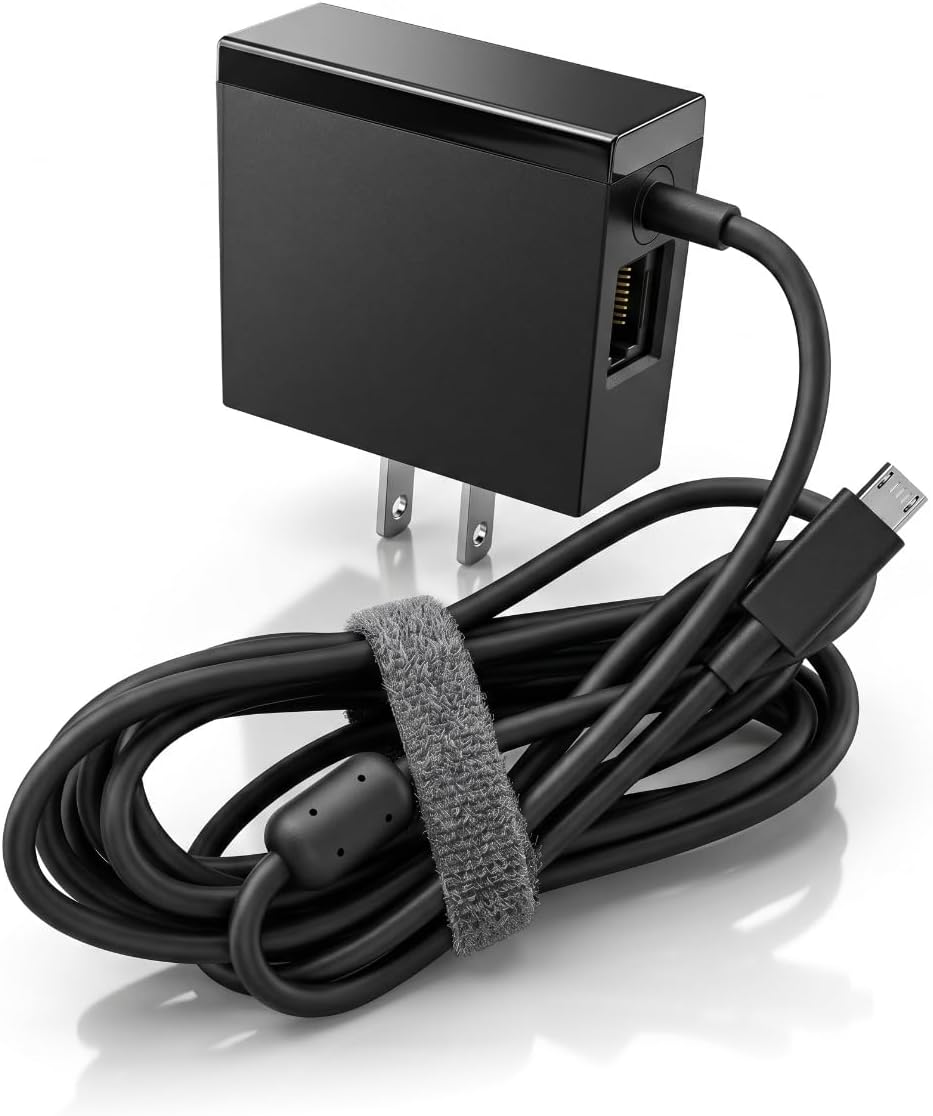
This Micro USB Port Fire Stick & Chromecast Ultra 4K Ethernet Power Adapter is a specialized solution combining power and connectivity. Rated 4.6 stars, it uses an original standard power adapter with a 100Mbps RJ45 ethernet port for stable 4K signal transmission.
We may earn a commission when you buy through this link, at no additional cost to you.
It is designed for specific models including the Fire Stick 2nd/3rd Gen and Fire TV Cube. The adapter ensures no worrying signal delay or loss by providing a dedicated power source and wired connection in one device.
Note that it does not support any USB-C Fire TV Stick or Chromecast with Google TV. If you have a compatible micro-USB device, this adapter simplifies your setup by reducing the number of cables needed behind your TV.
For those wanting an all-in-one power and Ethernet solution for their older devices, this adapter is a great fit. Its high rating indicates satisfaction with its ability to maintain stable 4K signals without interruption.
By combining the power adapter and Ethernet port, this device reduces cable clutter and ensures your device gets consistent power and internet simultaneously.
The 100Mbps RJ45 port is optimized to support stable 4K signal transmission, ensuring high-quality video playback without buffering or lag.
We may earn a commission when you buy through this link, at no additional cost to you.
Selecting the right adapter involves considering compatibility, speed, and design. This guide breaks down the key factors to help you make an informed decision.
Ensure the adapter matches your device's port type. Most Fire TV sticks use micro-USB, but newer models use USB-C. Using the wrong type will render the adapter useless.
Most adapters offer 10/100 Mbps, which is sufficient for 4K streaming. If you have gigabit internet, look for an adapter that explicitly supports 1000 Mbps speeds.
Some adapters draw power from the TV stick's USB port, while others require a separate power cable. Verify your setup can support the power needs of the adapter you choose.
Aluminum alloy casings provide better heat dissipation and durability than plastic. Look for adapters with sturdy builds to ensure long-term reliability.
Consider the physical size and design. Some adapters have right-angle connectors to save space behind your TV, while others may stick out and interfere with other cables.
The best adapters require no driver installation. If a product mentions complex setup, it may not be the best choice for non-technical users.
Look for features like LED indicators for connection status or adhesive tapes to secure the adapter. These small additions can significantly improve usability and cable management.
Compare prices relative to the features offered. Higher-priced adapters may offer better build quality or gigabit speeds. Ensure the product comes with a reasonable warranty for peace of mind.
To install your adapter, first plug the micro-USB or USB-C end into your TV stick. Then connect an Ethernet cable from your router to the adapter's RJ45 port.
If your adapter requires external power, plug the USB cable into a wall charger or a dedicated power port on your TV. Avoid using TV ports that share power with the stick.
For longevity, avoid bending the cables sharply and keep the adapter away from heat sources. Regularly dust the adapter to maintain optimal heat dissipation performance.
No, you can use standard Cat5e or Cat6 Ethernet cables. Ensure the cable is long enough to reach from your router to your TV location without straining.
They do not improve WiFi speed directly but eliminate WiFi dependency. By using a wired connection, you avoid WiFi interference and get consistent speeds.
No technical knowledge is required. Most adapters are plug-and-play. You simply connect the cables and the TV stick will recognize the wired connection automatically.
If your TV stick has USB-C, you must use a USB-C Ethernet adapter. Micro-USB adapters will not fit and cannot connect to USB-C devices.
It depends on the port type. If multiple devices share the same port (like micro-USB), you can use the same adapter. Check compatibility before switching devices.
Some adapters may not work well with VPNs. Check the product description carefully to ensure VPN compatibility before purchasing if this is a priority.
Look for LED indicators on the adapter. If lights are on, it typically indicates a successful connection. You can also check network settings on your TV.
If you have a fast internet plan and stream high-bitrate content, upgrading to a gigabit adapter can reduce bottlenecks. Otherwise, 10/100 Mbps is often sufficient.
We have explored ten top adapters suitable for Fire TV devices. The Micro-USB Ethernet Adapter remains a strong overall choice for its reliability and broad compatibility with most Fire TV models.
When choosing, prioritize compatibility and power needs. A reliable connection is key for uninterrupted streaming, so opt for a model that fits your device and power setup perfectly.
Prices and availability can change quickly, so verify current details before buying. With the right adapter, you can enjoy buffer-free streaming and gaming on your Fire TV.