
Alacrity Handheld POS PDA
5.0Editor score
Android 14 with 3GB RAM
6.5-inch HD touchscreen
80mm thermal printer support
Handheld pos systems have revolutionized how modern businesses manage transactions. These mobile devices allow merchants to accept payments anywhere, reducing lines and improving customer experience. A good system combines portability with robust processing capabilities and reliable connectivity.
We evaluated ten leading models based on their operating systems, battery life, and printing options. Each product was reviewed for its suitability across retail, food service, and service industries. Our analysis focuses on practical features that impact daily operations and long-term value.
Each pick highlights specific strengths and ideal use cases for different business types. While we provide detailed specifications, remember that pricing and availability can change over time. Always check the latest information before making your final purchasing decision for your business.
5.0Editor score

4.7Editor score

4.0Editor score
As an Amazon Associate we earn from qualifying purchases.
This side-by-side comparison outlines the core specifications of every top model. We focus on operating systems, connectivity options, and hardware features to help you identify which device matches your operational needs and budget constraints.




The Square Handheld is a top-rated portable point-of-sale solution designed for modern businesses. It holds a strong rating among users for its ease of use and reliable performance in various settings. Its standout qualities include a slim design that fits easily in pockets while maintaining full payment processing capabilities.
We may earn a commission when you buy through this link, at no additional cost to you.
This device allows you to accept payments anywhere, whether tableside or on a busy retail floor. The built-in barcode scanner streamlines inventory checks and sales. It supports offline payments ensuring sales continue even if internet access is lost temporarily during peak hours.
While the device is durable, an optional protective case is recommended for accidental drops. You should also note that offline payments have limits and regular connectivity is still required for full functionality. These trade-offs are acceptable given the convenience and portability it offers daily.
Business owners in restaurants or professional services should buy this device for its seamless integration and simplicity. It eliminates long-term contracts and offers a straightforward payment structure. We recommend this handheld system for businesses prioritizing mobility and customer experience over complex features.
Take orders anywhere with a device that fits in your palm or pocket.
Keep selling even when internet connection drops with offline payment support.
We may earn a commission when you buy through this link, at no additional cost to you.
The H10 Android Terminal delivers high-performance computing power for businesses needing robust mobile solutions. It features the latest Android 14 operating system for compatibility with modern business applications. Users appreciate its integrated thermal printer and NFC capabilities which support contactless payments efficiently.
We may earn a commission when you buy through this link, at no additional cost to you.
Its all-day battery life supports up to 14 hours of runtime making it ideal for extended shifts. The device includes dual-band Wi-Fi and 4G LTE networks for stable connectivity anywhere. Developers can also utilize the available SDK to integrate custom software for specific needs.
At 345 grams it is heavier than some competitors which might affect handheld comfort over time. The thermal printer produces monochrome prints so color receipts are not possible. These limitations are acceptable for businesses prioritizing performance and connectivity over weight and print color.
Retailers and logistics managers needing advanced connectivity should choose this terminal. It supports standard thermal paper rolls reducing ongoing costs. We suggest it for users who need a powerful Android environment with reliable printing features.
Run compatible business applications smoothly with Android 14 performance.
Get up to 14 hours of battery life with fast charging included.
We may earn a commission when you buy through this link, at no additional cost to you.
The Bisofice POS Receipt Printer offers a cost-effective mobile payment solution for small businesses. It runs on Android 8.1 which ensures stability for many standard apps. Users find it efficient for processing sales and inventory management in environments like cafes or boutiques.
We may earn a commission when you buy through this link, at no additional cost to you.
Its built-in thermal printer uses standard paper rolls eliminating the need for ink cartridges. The 5000mAh battery provides enduring working time for daily tasks. Connectivity options include 3G and Bluetooth allowing flexibility in network environments.
The Android version is older than newer models limiting access to some modern apps. The screen size is smaller which may affect visibility for some users. These factors are acceptable given the budget-friendly price and reliable core functionality it offers.
Small business owners needing a simple and affordable handheld terminal should buy this model. It is well-suited for warehouses and service shops. We recommend it for those who prioritize basic functionality and low operating costs.
Save on upfront costs while maintaining essential printing capabilities.
Reduce ongoing costs with no ink cartridges required for printing.
We may earn a commission when you buy through this link, at no additional cost to you.
The Bisofice 4G Handheld PDA provides a versatile solution for industries requiring robust network connections. It runs Android 13 ensuring compatibility with updated business software. Users appreciate the 2GB RAM and 16GB memory for smooth operation during busy shifts.
We may earn a commission when you buy through this link, at no additional cost to you.
The device supports 4G/3G/2G networks ensuring seamless connectivity anywhere. A built-in thermal printer and camera scanner handle both sales and inventory tasks efficiently. The included paper roll allows immediate use upon delivery for quick setup.
While the camera supports 1D and 2D barcodes it lacks advanced optical features. The battery is standard but sufficient for most daily needs. These are acceptable trade-offs for a device prioritizing connectivity and print capabilities at a moderate price point.
Logistics and warehouse managers needing reliable network options should choose this PDA. It simplifies workflows with its integrated printing and scanning tools. We suggest it for businesses operating in varied network environments requiring consistent performance.
Stay connected with full network compatibility in any location.
Streamline operations with built-in printing and barcode scanning.
We may earn a commission when you buy through this link, at no additional cost to you.
The Square Terminal serves as an all-in-one device for ringing up sales and printing receipts. It accepts all major credit and debit cards with simple rate structures. Users value its ability to process chip cards quickly and securely without extra hardware.
We may earn a commission when you buy through this link, at no additional cost to you.
This device works cordlessly thanks to its long-lasting battery designed for all-day use. It helps businesses accept payments anywhere in the store rather than just at a fixed counter. The simplicity of the system reduces friction during customer transactions.
While portable with battery, it is designed more as a countertop solution than a handheld one. You may need to position it carefully for optimal visibility. These constraints are minor for businesses prioritizing simplicity and reliability in a single unit.
Retailers wanting a simple and reliable countertop terminal should buy this device. It offers fast payouts and secure processing out of the box. We recommend it for businesses valuing ease of use and trusted payment processing.
Accept payments print receipts and ring sales all on one device.
Process chip cards in seconds with secure transaction technology.
We may earn a commission when you buy through this link, at no additional cost to you.
The Q2i Mobile POS Terminal offers a compact design ideal for retail environments. It runs Android 11 and supports major point-of-sale applications like Loyverse and Square. Users appreciate the built-in thermal printer and fast printing speed which keeps lines moving quickly.
We may earn a commission when you buy through this link, at no additional cost to you.
Its integrated 1D barcode scanner allows quick scanning on the retail floor or tableside. The device connects via dual-band Wi-Fi and Bluetooth ensuring stable performance during busy times. A complete kit with accessories makes setup straightforward for new users.
The scanner does not read QR codes which may limit inventory flexibility. The lower user rating suggests some variability in support experiences. These limitations are acceptable for businesses focused on standard 1D barcodes and reliable core printing.
Small retailers needing a lightweight solution with integrated printing should consider this model. It supports standard paper rolls and provides a straightforward checkout experience. We suggest it for shops prioritizing quick scanning and receipt printing on the floor.
Print receipts at speeds up to 80mm per second without ink.
Integrate with popular POS software using Android Play Store access.
We may earn a commission when you buy through this link, at no additional cost to you.
The P1 Touchscreen Credit Card Machine delivers high reliability for fixed checkout stations. It accepts all modern payment types including tap and mobile wallets securely. Users report a perfect rating for its stable performance and straightforward transaction processing.
We may earn a commission when you buy through this link, at no additional cost to you.
Equipped with hybrid connectivity options the device ensures uninterrupted workflow in busy environments. The vibrant HD touchscreen paired with a physical keypad offers an intuitive experience. A built-in thermal printer reduces counter clutter significantly.
It is designed primarily for fixed locations rather than handheld mobile use. The setup focuses on stable counter performance rather than portability. These constraints are acceptable for businesses needing a dedicated and reliable point-of-sale terminal.
Salons and small restaurants needing a trusted countertop solution should choose this machine. It offers fast payouts and reliable connectivity. We recommend it for businesses prioritizing stability and customer-facing interface quality.
Navigate transactions effortlessly with a vibrant HD touchscreen interface.
Never miss a sale with hybrid Ethernet and WiFi capabilities.
We may earn a commission when you buy through this link, at no additional cost to you.
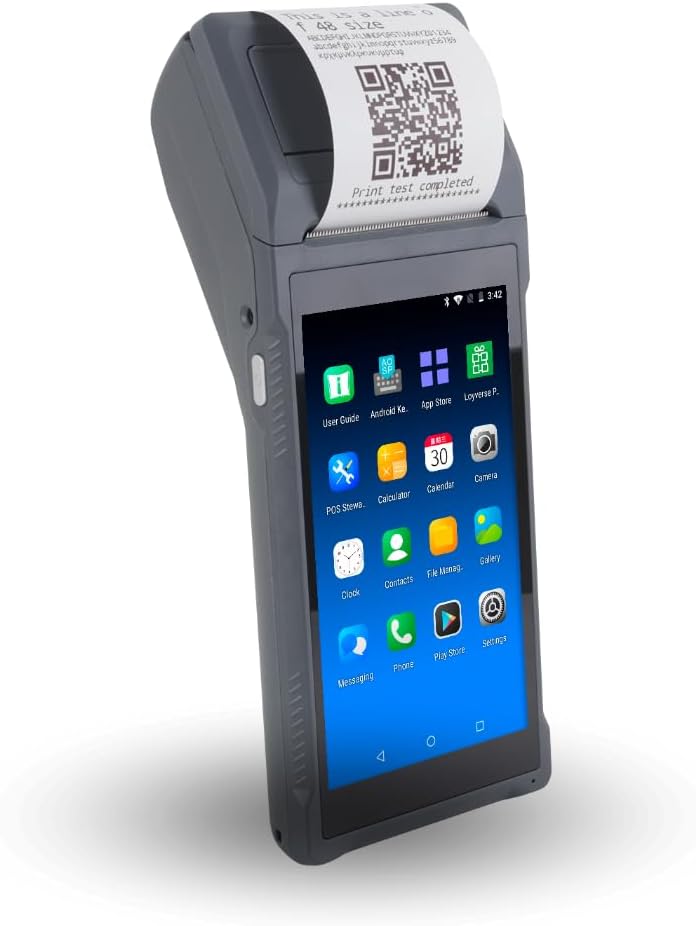
The Alacrity Handheld POS PDA is a top-tier device featuring advanced hardware and software. It runs Android 14 with an 8-core processor ensuring ultra-fast transaction processing. Users love the large 6.5-inch HD+ screen which provides clear visibility for operations.
We may earn a commission when you buy through this link, at no additional cost to you.
With an adjustable print width of 80mm it supports both receipts and labels. The 30W scanning module handles a wide range of 1D and 2D barcodes efficiently. Connectivity is robust with dual-band Wi-Fi and SIM support for reliable mobile internet.
It is heavier than basic handhelds due to its large screen and battery. The price point is higher reflecting its premium specifications and performance. These trade-offs are acceptable for businesses needing high-end hardware and flexible printing options.
Logistics and warehouse managers requiring robust scanning and labeling should choose this PDA. It supports extended working hours with its large battery capacity. We recommend it for operations needing professional-grade reliability and advanced scanning capabilities.
Enjoy clear visuals on a large 6.5-inch HD+ resolution screen.
Print receipts or labels with flexible adjustable print width options.
We may earn a commission when you buy through this link, at no additional cost to you.
The Alacrity Mobile POS Terminal delivers high performance with its upgraded 10-core CPU. It runs Android 12 allowing secure application installation for various business tasks. Users appreciate the large screen for error-free experiences during busy orders.
We may earn a commission when you buy through this link, at no additional cost to you.
Its 2D scan engine reads codes even with scratches or folds accurately. The built-in zigzag-edge paper cutter streamlines ticket printing tasks efficiently. Connectivity includes 4G and Bluetooth ensuring stable performance in varied environments.
It does not support encrypted card transactions so a third-party reader is needed for payments. This limits standalone payment processing but is fine for scanning and order management. These constraints are acceptable for teams managing queues and online orders.
Teams managing queues and mobile orders should buy this terminal for its speed. It provides high printing efficiency and clear data capture. We suggest it for businesses needing robust scanning and order tracking features.
Ensure seamless performance with an upgraded 10-core CPU.
Streamline tasks with a built-in paper cutter for easy separation.
We may earn a commission when you buy through this link, at no additional cost to you.
The Clover GO 3rd Gen offers secure mobile payment integration for smart devices. It connects wirelessly via Bluetooth to any smartphone. Users value its end-to-end security and features like custom tips and tax rates.
We may earn a commission when you buy through this link, at no additional cost to you.
It supports paperless receipts allowing you to text or email them to customers easily. The device lets you manage employee permissions to control access to business data. It is designed for US-based businesses using specific processing partners.
You must process through SwyftPAY before shipping which limits flexibility slightly. A dock is sold separately for countertop use requiring extra purchase. These constraints are acceptable for mobile businesses prioritizing flexibility and security features.
Small business owners seeking mobile flexibility with robust security should consider this system. It simplifies receipt delivery and employee management. We recommend it for merchants using SwyftPAY who need reliable mobile processing.
Protect data with end-to-end encryption throughout the process.
Email or text receipts to customers for a paperless experience.
We may earn a commission when you buy through this link, at no additional cost to you.
Selecting the right handheld pos system requires balancing connectivity, battery life, and payment features to meet your business needs.
Check the operating system version for app compatibility and updates. Newer versions like Android 14 offer better security and performance.
Prioritize devices with up-to-date OS versions for longevity.
Ensure the device supports necessary networks such as 4G or Wi-Fi. Reliable connectivity prevents transaction delays during busy periods.
Choose full network compatibility for operations on the go.
Look for batteries that last a full shift to avoid frequent charging. A minimum of 10 hours is ideal for most service environments.
Select models with high mAh ratings for extended daily use.
Decide if you need built-in thermal printing or external printers. Built-in printers reduce counter clutter and improve mobility.
Choose built-in printing for streamlined checkout experiences.
Verify the scanner supports both 1D and 2D barcodes for inventory. Advanced scanners handle damaged labels and QR codes efficiently.
Opt for advanced scanning modules for robust inventory control.
Check if the device is water-resistant or has protective options. Rugged builds prevent damage from drops or spills in busy settings.
Prioritize durable designs for environments with high physical risk.
Ensure the system supports encrypted card processing and secure wallets. Security standards protect both customer data and your business reputation.
Choose certified payment terminals for secure transactions.
Evaluate the screen size and touch responsiveness for ease of use. Larger screens improve visibility and reduce input errors for staff.
Select a clear interface to train staff quickly and efficiently.
Start by installing any required software and connecting the device to your payment network. Ensure the battery is fully charged before daily operations.
Regularly clean the screen and barcode scanner with a soft dry cloth. Avoid exposing the device to moisture unless it is water-resistant.
Update the operating system periodically to maintain security and performance. Store the device in a protective case when not in use.
Some models offer offline payment modes that store transactions until connectivity returns. Always verify offline limits and syncing features with your payment processor before relying on them.
Most handheld printers use standard 58mm or 80mm thermal paper rolls. No ink cartridges are needed making this solution cost-effective and simple.
Many handhelds connect via Bluetooth to smartphones but rely on Android apps for full terminal features. Check specific app compatibility with your iOS device before purchasing.
Battery life varies but many models offer between 10 to 14 hours of continuous use. Always carry a spare charger for extended shifts or travel.
Most modern units include NFC for tap-to-pay mobile wallets like Apple Pay. Ensure the device is certified for contactless transactions in your region.
Support depends on the manufacturer or payment processor. Check warranty terms and whether customer service is available before purchase.
The Square Handheld stands out for general mobility while Alacrity offers premium hardware. Bisofice provides budget-friendly options for smaller businesses.
Prioritize connectivity and battery life when evaluating models for your daily operations. Match features to your specific workflow needs.
Verify current availability and compatibility with your payment processor before buying. Prices and specs may change so check the latest details now.