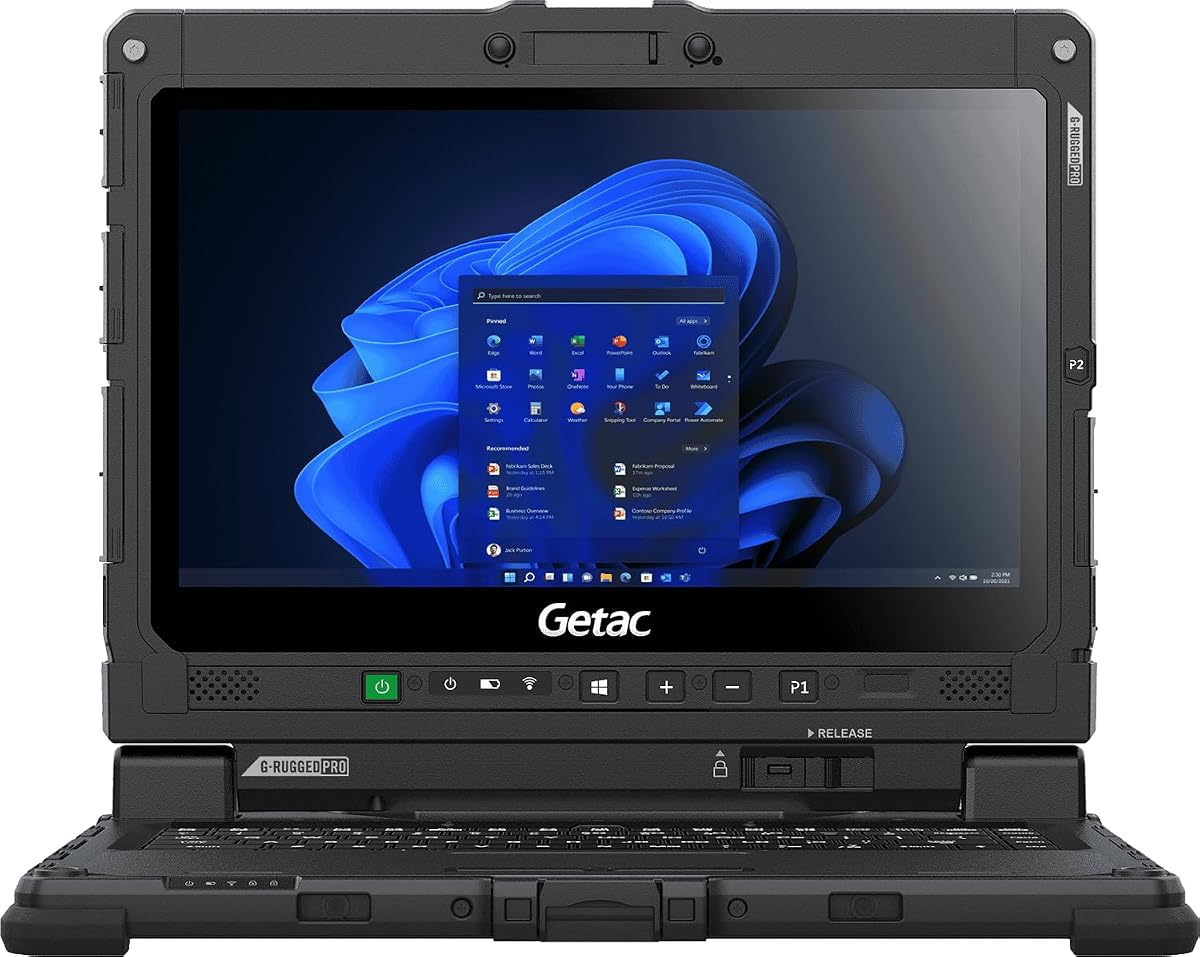
Getac Renewed K120
5.0Editor score
1200 nits brightness level
Mil-grade durability standards
Amazon renewed condition verified
Working outdoors under intense sunlight demands specialized hardware that standard consumer laptops simply cannot provide. Professionals in construction, logistics, and field research need devices that remain visible and reliable even when direct glare strikes the screen. Choosing the right device ensures productivity stays high regardless of environmental conditions.
We have carefully evaluated ten distinct models that excel in high-illumination environments based on technical specifications and user feedback. Our comparison focuses on display brightness, ruggedization standards, processing power, and battery life to help you make an informed decision. Each entry represents a unique solution tailored to different levels of outdoor demand.
Every selection below highlights specific strengths such as sunlight-readable screens, military-grade durability, or advanced connectivity options. We provide detailed breakdowns of features and practical considerations to guide your purchase effectively. Please note that availability and specific terms may vary over time as markets evolve.
5.0Editor score

4.1Editor score

4.3Editor score
As an Amazon Associate we earn from qualifying purchases.
This side-by-side overview compares ten distinct models selected for their ability to perform under intense outdoor lighting conditions. We examine key technical attributes including screen brightness, processor speed, memory capacity, and durability certifications to highlight differences. The data helps identify which device best matches your specific operational needs and environmental challenges.


The MUNBYN IRX17 stands out as a top contender for professionals requiring high visibility under intense sunlight. Rated at 4.1 stars, it delivers exceptional clarity with a 1000-nit display that remains readable even in harsh outdoor conditions. Its robust build ensures reliability across demanding industrial environments.
We may earn a commission when you buy through this link, at no additional cost to you.
This laptop excels in performance due to its Intel i7-1255U processor and 32GB DDR5 RAM, handling complex applications like AutoCAD and SolidWorks smoothly. The 512GB SSD provides fast storage access while supporting upgrades up to 4TB for growing data needs. Wi-Fi 6 ensures stable connectivity for remote monitoring tasks.
While the device offers significant power and durability, it comes with a higher price tag that may not suit budget-conscious buyers. The weight is also considerable compared to consumer laptops, making it less ideal for frequent hand-carry without a dedicated bag. These trade-offs are acceptable for field workers prioritizing function over portability.
Buyers seeking a reliable workstation for construction sites or oil rigs should strongly consider this model. Its combination of brightness, processing power, and rugged certification makes it a versatile tool for industrial tasks. Ensure you review warranty terms before purchase to maximize value.
The 1000-nit screen ensures that critical visual data remains clear even when direct sunlight hits the surface during field work.
With an i7 processor and 32GB RAM, this device handles heavy engineering software without lag, maintaining productivity in the field.
We may earn a commission when you buy through this link, at no additional cost to you.
The Getac K120 offers remarkable value for those needing outdoor reliability without the premium price of new rugged units. With a perfect 5.0 rating, it proves that renewed options can deliver consistent performance in field environments. Its 1200-nit brightness is a standout feature for glare resistance.
We may earn a commission when you buy through this link, at no additional cost to you.
This model features an Intel Core i5-8250U processor with 16GB of RAM, sufficient for most field data entry and analysis tasks. The 256GB PCIe NVMe SSD ensures quick boot times and efficient file access during busy shifts. Military-grade durability standards protect against drops and extreme temperatures from -29C to 63C.
Users may notice that the processor is older compared to current generations, which could limit performance in very intensive simulations. The 12.5-inch screen is compact, which aids portability but might feel small for detailed CAD work. These factors are manageable for general field tasks where budget is a priority.
This laptop is ideal for teams needing multiple units for outdoor inspection or logistics tracking. The renewed condition offers a cost-effective entry point into high-quality rugged computing. Always check the warranty coverage to ensure peace of mind during deployment.
Operates reliably in temperatures ranging from -29 degrees Celsius to 63 degrees Celsius, ensuring functionality in any climate.
Professionally inspected and tested to meet full working condition standards, offering new-like performance at a lower price.
We may earn a commission when you buy through this link, at no additional cost to you.
The Getac S510 combines modern AI capabilities with rugged reliability to suit high-end professional needs. Its 15.6-inch FHD touchscreen with 1000 nits ensures clarity under direct sunlight while allowing intuitive touch control. The device is designed for users who require advanced processing power alongside durability.
We may earn a commission when you buy through this link, at no additional cost to you.
Powered by the Intel Core Ultra 5 125U processor, this laptop delivers AI-enhanced performance for complex multitasking scenarios. It includes 32GB of DDR5 RAM and a 1TB PCIe NVMe SSD, providing ample resources for heavy data sets and rapid access. The physical keyboard includes a dedicated Copilot key for quick AI assistant access.
As a premium offering, the price point is higher than average, reflecting the advanced specifications and rugged certifications. The weight is noticeable for extended carrying, though it balances well for stationary field work. These aspects are reasonable trade-offs for professionals needing top-tier performance in tough environments.
This machine is perfect for engineers or data analysts working in harsh conditions who cannot compromise on speed or reliability. The integration of modern AI features sets it apart from traditional rugged models. Verify shipping weight details if frequent travel is required.
The Ultra 5 processor with AI capabilities supports intelligent workflows and faster data processing in demanding field scenarios.
A sunlight-readable touchscreen with protective film allows glove-friendly interaction even in dusty or wet conditions.
We may earn a commission when you buy through this link, at no additional cost to you.
The MUNBYN IRX16 delivers essential rugged features at a competitive price point for general field use. With a 4.0 rating, it offers solid performance for everyday industrial applications. The 1000-nit display ensures that information remains visible during sunny workdays without requiring extra shade.
We may earn a commission when you buy through this link, at no additional cost to you.
This laptop uses an Intel i5-1235U processor with 16GB DDR5 RAM to handle standard design and data tasks efficiently. The 512GB SSD is user-replaceable and supports expansion up to 4TB, giving flexibility for storage growth. IP65 certification provides significant resistance against dust and water jets in challenging environments.
While it lacks the raw power of higher-end models, it remains a practical choice for routine site inspections and documentation. The build is sturdy but may not withstand severe drops compared to fully ruggedized options. These trade-offs make sense for users balancing cost with environmental protection needs.
Select this model if your priority is visibility and basic durability without the premium cost of high-end units. It is well suited for contractors or field technicians needing a dependable tool for daily operations. Confirm SIM card installation steps as noted in the documentation.
The replaceable SSD design allows for easy upgrades, ensuring you can adapt storage capacity as project needs change over time.
Advanced WiFi 6 technology provides faster data transfer and lower latency for remote monitoring and real-time analysis tasks.
We may earn a commission when you buy through this link, at no additional cost to you.
The HP OmniBook 3 14 inch focuses on mobility and battery endurance for on-the-go professionals. Its Snapdragon processor and OLED screen deliver crisp visuals and efficient power management. With up to 41 hours of battery life, it supports long shifts without needing frequent recharging.
We may earn a commission when you buy through this link, at no additional cost to you.
This model features a 2K OLED display with 1920×1200 resolution, offering vibrant colors for creative or presentation work. The 16GB LPDDR5x RAM ensures smooth multitasking while the 256GB SSD provides fast storage access. Qualcomm Wi-Fi 6E ensures reliable wireless connectivity for cloud-based tools and video calls.
However, the screen brightness is not optimized for direct sunlight compared to rugged options, making it less ideal for outdoor field work. The Snapdragon processor is efficient but may not handle heavy engineering simulations like AutoCAD effectively. These limitations are acceptable for general administrative tasks in indoor or shaded settings.
Buyers needing a lightweight device for travel or indoor use will find this unit compelling. It offers excellent battery performance and modern AI features through the Copilot key. Verify display specifications if outdoor visibility is a primary requirement.
Enjoy up to 41 hours of battery life with fast charging, ensuring you stay productive throughout long workdays without interruption.
The 2K OLED display provides rich colors and sharp detail, enhancing visual clarity for design and presentation tasks.
We may earn a commission when you buy through this link, at no additional cost to you.
The HP OmniBook 3 16 inch offers a spacious viewing area that suits users needing more screen real estate. With a 4.5 rating, it provides solid value for everyday productivity and content consumption. The 2K IPS touchscreen delivers wide viewing angles and vibrant color reproduction for visual tasks.
We may earn a commission when you buy through this link, at no additional cost to you.
Powered by an AMD Ryzen 3 30 processor with 8GB RAM, it handles general office work and media streaming smoothly. The 256GB SSD ensures quick boot times while the 14-hour battery life supports a full workday. Advanced AI noise reduction filters background noise during calls for clearer communication.
The display brightness is typical for consumer models and may struggle in direct sunlight without shade. The 8GB RAM might be limiting for running complex software or multiple heavy applications simultaneously. These constraints are manageable for users focusing on standard productivity rather than specialized engineering.
Choose this unit if you need a large screen for presentations or document review indoors. The touchscreen adds versatility for navigating interface elements without a mouse. Confirm RAM requirements before running specific software applications.
The 2K resolution and wide viewing angles provide exceptional detail and color accuracy for visual design and multimedia work.
Advanced AI noise reduction isolates your voice during calls, ensuring clear communication even in noisy environments.
We may earn a commission when you buy through this link, at no additional cost to you.
The Dell 15.6 Laptop DC15250 offers a balance of performance and comfort for standard computing needs. It features an Intel Core i5 processor suitable for productivity suites and light creative work. The ComfortView software reduces blue light emissions to minimize eye strain during extended viewing.
We may earn a commission when you buy through this link, at no additional cost to you.
This device includes a roomy keypad with a separate numeric pad for efficient data entry tasks. The ergonomic design lifts the hinges to provide a comfortable typing angle that reduces wrist strain. Onsite service is available for one year, ensuring help when issues arise at your location.
Users should note that this model lacks specialized outdoor features like high brightness or rugged certification. It is best suited for indoor office settings rather than direct sunlight exposure. The standard battery life may require charging during long shifts without access to power.
Select this laptop if your primary environment is an indoor office with controlled lighting conditions. It provides reliable performance and ergonomic benefits for daily tasks. Check screen specifications if outdoor visibility is ever a requirement.
Dell ComfortView software helps reduce harmful blue light emissions, keeping eyes comfortable during long screen time sessions.
Lifted hinges provide an ergonomic typing angle that helps keep wrists comfortable during prolonged use of the keyboard.
We may earn a commission when you buy through this link, at no additional cost to you.
The HP 17.3 Laptop offers a large workspace that benefits users managing multiple complex windows. Its 17.3-inch FHD IPS LED display provides wide viewing angles and lifelike color for visual tasks. The anti-glare coating helps reduce reflections though brightness remains standard for indoor use.
We may earn a commission when you buy through this link, at no additional cost to you.
Powered by an AMD Ryzen 5 7430U 6-core processor with 16GB RAM, it handles multitasking and streaming efficiently. The 1TB storage capacity offers ample space for local files and media without needing external drives. The included laptop cooler helps maintain optimal temperatures during heavy use.
This device is not designed for high-glare outdoor environments as it lacks the brightness of rugged models. Its large size and weight make it less convenient for transport to field sites. These factors are acceptable for users working primarily in fixed office or studio locations.
Ideal for content creators or analysts needing a large screen for detailed work indoors. The Copilot key adds a layer of modern AI assistance for streamlined workflows. Check physical dimensions if storage space is limited.
The 17.3-inch screen delivers incredible detail and wide viewing angles for a lifelike visual experience during work.
The AMD Ryzen 5 7430U processor supports smooth multitasking and media editing with responsive performance for daily tasks.
We may earn a commission when you buy through this link, at no additional cost to you.
The Panasonic Toughbook FZ-55 MK1 represents reliability with its 1000 nit sunlight-readable display and robust certifications. Rated at 4.7 stars, it remains a favorite for professionals needing consistent performance in tough environments. The renewed status offers access to these features at a lower price point.
We may earn a commission when you buy through this link, at no additional cost to you.
Equipped with an Intel Core i7-8665U processor and 16GB RAM, it handles data processing and multitasking smoothly. The 512GB SSD provides fast access to files while the optional 4G LTE ensures connectivity where Wi-Fi is unavailable. A privacy cover on the camera adds security for confidential work.
While effective for field work, the processor is older than the newest consumer chips, limiting extreme performance potential. The weight is noticeable for those carrying the device for long periods without support. These trade-offs are justified by the rugged durability and display quality it provides.
Buyers valuing proven durability and outdoor visibility should consider this model. It serves well for field service and emergency response teams needing a reliable tool. Check warranty details to confirm renewal terms and coverage.
The 4G LTE multi-carrier option ensures you stay connected even in remote areas where Wi-Fi networks are unavailable.
MIL-STD-810H and IP53 certifications confirm this device can withstand drops, vibrations, and dust common in field work.
We may earn a commission when you buy through this link, at no additional cost to you.
The Dell 16 Laptop offers a modern business experience with a large immersive screen and efficient processing. Its 16-inch FHD+ display with a 16:10 aspect ratio provides more vertical space for productivity tasks. Adaptive thermals adjust power to optimize efficiency based on surface stability.
We may earn a commission when you buy through this link, at no additional cost to you.
This device features an Intel Core 7 150U processor with 16GB RAM to ensure smooth multitasking and quick response. The webcam includes temporal noise reduction for crisp images in varying lighting conditions. ComfortView Plus preserves true-to-life color while reducing blue light for eye comfort.
Users should note this model lacks outdoor durability features making it best for indoor office environments. The standard screen brightness may not suffice for direct sunlight exposure. These limitations are acceptable for business users working primarily in controlled indoor settings.
Select this unit for office work where screen real estate and thermal efficiency are priorities. It balances modern features with ergonomic design for daily productivity. Verify outdoor usability needs before purchase.
Built-in adaptive thermals adjust power and heat based on surface stability to run efficiently without unnecessary overhead.
ComfortView Plus helps reduce harmful blue light emissions while preserving true-to-life color for eye comfort over long use.
We may earn a commission when you buy through this link, at no additional cost to you.
Selecting the right laptop for bright sunlight involves evaluating display brightness, ruggedness, processing power, and battery life. These factors determine whether a device can withstand harsh outdoor conditions while remaining productive. This guide outlines the essential considerations to help you make an informed choice.
Brightness is measured in nits and indicates how well a screen remains visible under direct sunlight. Models with 1000 nits or higher ensure clarity in outdoor settings where standard screens often become washed out. Look for anti-glare coatings and sunlight-readable technologies that enhance contrast and color accuracy.
Prioritize displays with high nits ratings if you work outdoors frequently to ensure data remains legible and accurate.
Rugged laptops often carry MIL-STD-810H and IP ratings that certify resistance to drops, dust, and water. These certifications guarantee the device can survive harsh environments like construction sites or industrial plants without failure. Check for reinforced ports and protective covers on connectors that prevent debris entry.
Ensure the laptop meets at least IP53 or IP65 standards if it will face water or dust exposure regularly.
Industrial applications require sufficient processing power and RAM to run software smoothly without lag. An Intel Core i5 or higher with at least 16GB of DDR5 RAM handles multitasking and complex calculations efficiently. Advanced chips like Intel Ultra offer AI features that streamline specific field tasks.
Choose a processor and RAM combination that matches the computational demands of your specific software requirements.
Long battery life is crucial for remote work where power sources are unavailable during shifts. Look for models offering 10 hours or more of continuous use to avoid frequent recharging. Fast charging support allows you to restore power quickly during short breaks or between tasks.
Verify real-world battery tests rather than relying solely on manufacturer claims to ensure adequate runtime.
Stable wireless connectivity ensures you can access data and communicate with teams effectively in the field. Wi-Fi 6 or 6E provides faster speeds and lower latency for real-time applications and video conferencing. Cellular options like 4G LTE offer an alternative when local networks are unavailable or unstable.
Confirm the presence of necessary ports and wireless standards to support your specific connectivity needs.
Physical privacy switches for webcams prevent unauthorized access and protect sensitive information during operations. Windows Hello support and encryption options add extra layers of security for field data. These features are vital when working in public or shared spaces where device security is a concern.
Look for devices with physical camera covers and secure login methods to maintain privacy and data integrity.
Larger screens provide more workspace but add weight that impacts ease of transport. A 15-inch or 16-inch display balances usability with mobility for professionals moving between sites. Compact models may suit those needing maximum portability even if it means reduced screen real estate.
Consider the trade-off between screen size and weight based on how often you carry the device.
Reliable warranties and onsite service plans ensure rapid repair when devices face issues during critical work. Look for options that include replacement batteries or accidental damage coverage to extend device lifespan. Check response times for support as quick resolution is essential in field environments.
Verify warranty terms carefully to understand coverage details before committing to a purchase.
Start by calibrating your display to ensure colors remain accurate across various lighting conditions. Adjust brightness levels to match ambient light to prevent eye strain and maintain readability. Using a physical cover or shade when the screen is not in use can prolong its lifespan.
Protect ports and connectors from dust and moisture by keeping covers closed when not in use. Clean the screen regularly with a microfiber cloth to remove dust that can scratch the surface over time. Avoid exposing the device to extreme temperatures beyond its operating range to prevent internal damage.
Regularly update firmware and drivers to maintain performance and security in changing environments. Backup critical data to external storage or cloud services to prevent loss during unexpected device failure. Inspect the device for physical damage periodically to ensure all rugged features remain intact and functional.
Standard laptops often struggle to show content clearly under direct sunlight, making data entry errors likely. A sunlight-readable screen with high nits ensures you can read documents and software interfaces without strain. This visibility reduces mistakes and maintains productivity during outdoor operations.
Yes, rugged laptops typically weigh more due to protective materials and reinforced components designed to survive drops and impacts. This added weight ensures durability but may affect portability if you move sites frequently. Consider your transport needs when selecting between rugged and consumer models.
Many rugged models are rated to operate in extreme temperatures including cold environments typical of outdoor sites. Always check the specific temperature range in the product specifications to ensure compatibility with your climate. Proper battery management helps maintain performance in freezing conditions.
A physical camera switch allows you to disconnect the webcam completely when not in use for maximum privacy. This is especially important when handling confidential data in public or shared workspaces. It provides a hardware level of security that software toggles cannot guarantee.
Many rugged models offer user-replaceable SSDs that allow storage upgrades without opening sealed internal compartments. Check the product documentation for specific instructions on accessing the storage bay safely. Upgrading helps you adapt to growing data needs without purchasing a new unit.
Adjust screen brightness and disable unused wireless features to conserve power when working remotely for extended periods. Ensure the device is kept within its rated temperature range as extreme heat or cold reduces battery efficiency. Using external power sources when available can extend operational uptime significantly.
We reviewed ten distinct models ranging from rugged heavy-duty units to advanced consumer laptops suitable for varied environments. The MUNBYN IRX17 and Getac K120 stood out for their high brightness and durability making them ideal for harsh outdoor work. Each product offers unique strengths tailored to different operational requirements and budgets.
Prioritize display brightness and rugged certifications if you regularly work under direct sunlight or in challenging conditions. Consider processing power and battery life to ensure your device meets your daily software demands without interruption. Balancing these factors will help you select a reliable tool that enhances your field productivity.
Prices and availability fluctuate regularly so check current listings to confirm terms and specifications before purchasing. Ensure warranty coverage aligns with your operational risks to protect your investment over time. Selecting the right model will keep you productive regardless of environmental challenges.